
You are not logged in.
- Topics: Active | Unanswered
#201 Documentation » [SOLVED] Simple Netaid » 2022-04-28 19:52:04
- aitor
- Replies: 5
As I announced a few days ago in the mailing list, the new version of simple-netaid relies on the OpenWRT microbus architecture (Ubus):
https://openwrt.org/docs/techref/ubus
Over a period of testing time, I thing the most recent packaging of simple-netaid can be considered stable enough for daily use. Latest packages have been upload to packages.gnuinos.org yesterday night. In this section, I'm going to explain how to install and test them under devuan chimaera.
The following steps have been tested after a fresh install of devuan chimaera xfce. First of all, download and install the GnuPG key of gnuinos:
$ wget http://packages.gnuinos.org/gnuinos/pool/main/g/gnuinos-keyring/gnuinos-keyring_2020.05.03_all.deb
$ sudo dpkg -i gnuinos-keyring_2020.05.03_all.deb
Now you'll be able to add the gnuinos repo temporarily to your system:
$ sudo su
# echo "deb http://packages.gnuinos.org/merged chimaera main" > /etc/apt/sources.list.d/gnuinos.list
# apt-get update
After updating the repository, just install simple-netaid-vte3, and the following dependencies will be installed together with it:
# apt-get install simple-netaid-vte3
Leyendo lista de paquetes... Hecho
Creando árbol de dependencias... Hecho
Leyendo la información de estado... Hecho
Se instalarán los siguientes paquetes adicionales:
  libcdk5nc6 libiw30 libnetaid0 libpstat libubox0 libubus0 runit-helper simple-netaid-cdk snetaid ubus
Se instalarán los siguientes paquetes NUEVOS:
  libcdk5nc6 libiw30 libnetaid0 libpstat libubox0 libubus0 runit-helper simple-netaid-cdk simple-netaid-vte3 snetaid ubus
0 actualizados, 11 nuevos se instalarán, 0 para eliminar y 32 no actualizados.
Se necesita descargar 1.046 kB de archivos.
Se utilizarán 3.941 kB de espacio de disco adicional después de esta operación.
¿Desea continuar? [S/n]
Other runtime dependencies that were already installed after my fresh install of devuan chimaera are:
ifupdown , wpasupplicant , isc-dhcp-client , procps , coreutils
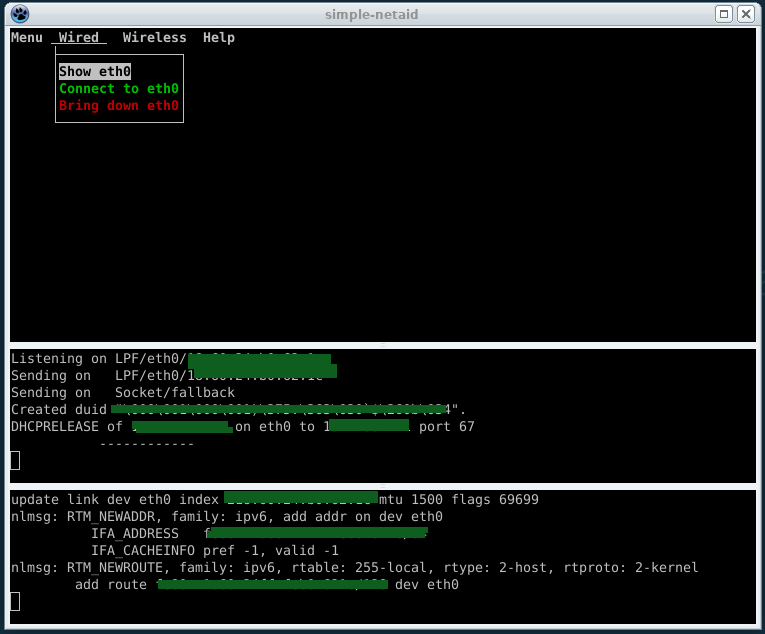
Simple-netaid-vte3 consists of a Gtk container for the ncurses interface of simple-netaid that provides, beyond the systray icon, a paned vte-terminal where both system calls of the ubus service and the info about the routing table netlink events are sent to, as you can see in the image below.
Once simple-netaid has been installed, it's highly recommended to remove network-manager:
# dpkg --purge network-manager-gnome network-managerNow configure the content of /etc/network/interfaces to suite your needs. One sample:
# This file describes the network interfaces available on your system
# and how to activate them. For more information, see interfaces(5).

source /etc/network/interfaces.d/*

# The loopback network interface
auto lo
iface lo inet loopback

auto eth0
allow-hotplug eth0
iface eth0 inet dhcp

allow-hotplug wlan0
iface wlan0 inet dhcp
Reboot the system. If everything goes right, ubus -v list will find out the complete list of procedures and their argument signatures the specific service ering.netaid provides:
$ sudo ubus -v list
[sudo] password for aitor:
'ering.netaid' @2b86f84a
	"interface_down":{"id":"Integer","ifname":"String"}
	"interface_up":{"id":"Integer","ifname":"String"}
	"ifdown":{"id":"Integer","ifname":"String","tty":"Integer"}
	"ifup":{"id":"Integer","ifname":"String","tty":"Integer"}
	"ipaddr_flush":{"id":"Integer","ifname":"String"}
	"wpa_passphrase":{"id":"Integer","essid":"String","passwd":"String","filename":"String"}
	"wpa_supplicant":{"id":"Integer","ifname":"String","filename":"String","tty":"Integer"}
	"uninstall":{"id":"Integer","filename":"String"}
	"scan_active_wifis":{"id":"Integer","ifname":"String"}
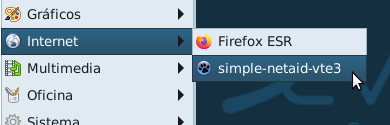
Run simple-netaid from the menu:
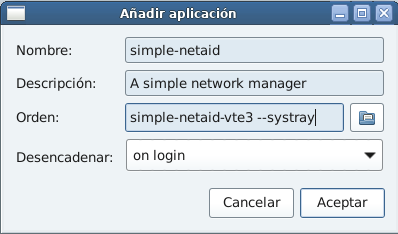
Alternatively, if you want to automatically start simple-netaid when the session is loaded, just specify simple-netaid-vte3 --systray in the dialog displayed via:
Settings Manager -> Session and Startup -> Application Autostart -> Add:
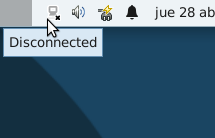
And the application will be iconified in your systray:
The first time you lanch simple-netaid a warning dialog will tell you that you need to be added to the netaid group:
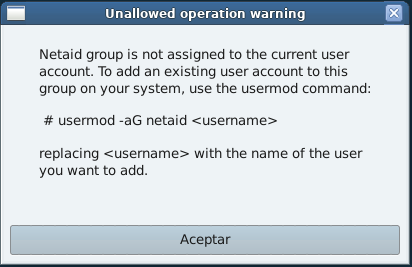
After adding yourself to the netaid group by typing:
# usermod -aG netaid <username>you should be able to call a given procedure within the ering.netaid namespace passing arguments to it as a regular user without granted permissions. For instance (ignore the first argument "id" so far):
$ ubus call ering.netaid ifdown '{ "ifname": "eth0" , "tty": 4 }'will invoke /sbin/ifdown eth0 in the server side, and the system call will be thrown afterwards to the client side as long as the user specifies the current tty passed throughout the last argument signature (i.e. tty). For the sake of the example, we assumed above that
$ tty
/dev/pts/4
In doing so, the root-owned program ifupdown will be executed within the non-privileged console session:
$ ubus call ering.netaid ifdown '{ "ifname": "eth0" , "tty": 4 }'
Killed old client process
Internet Systems Consortium DHCP Client 4.4.1
Copyright 2004-2018 Internet Systems Consortium.
All rights reserved.
For info, please visit https://www.isc.org/software/dhcp/

Listening on LPF/eth0/........ blah blah blah
The ACLs are located in /usr/share/acl.d. Concretly, simple-netaid involves netaid-server.json:
{

   "group": "netaid",

   "access": {

      "ering.netaid": {

          "methods": [
                       "interface_down" ,
                       "interface_up" ,
                       "ifup" ,
                       "ifdown" ,
                       "ipaddr_flush" ,
                       "wpa_passphrase" ,
                       "wpa_supplicant" ,
                       "uninstall" ,
                       "scan_active_wifis"
                     ]
      }

   }

}
This configuration is customizable. For example, it's possible to use something like "user": "devuanita" or even wildcards (*), as explained in the website of the OpenWRT project.
To end with, don't forget to revert the changes in your repository, removing packages.gnuinos.org
It's so risky... 
Therefore, as root:
# dpkg --purge gnuinos-keyring
# rm -f /etc/apt/sources.list.d/gnuinos.list
# apt-get update
Colophon: the automatically connect option of simple-netaid is still a work in progress.
#202 Re: Devuan Derivatives » GNUinOS - Libre » 2022-03-19 13:20:25
is there a guide to migrate from devuan to gnuinos and is it almost as stable as devuan?
I did it today from devuan chimaera to gnuinos chimaera and it succeded. Add the repository of gnuinos to your sources.list:
deb http://packages.gnuinos.org/merged chimaera main
deb-src http://packages.gnuinos.org/merged chimaera main

deb http://packages.gnuinos.org/merged chimaera-security main
deb-src http://packages.gnuinos.org/merged chimaera-security main

deb http://packages.gnuinos.org/merged chimaera-updates main
deb-src http://packages.gnuinos.org/merged chimaera-updates main
Download the package containing the gnupg key:
$ wget http://packages.gnuinos.org/gnuinos/pool/main/g/gnuinos-keyring/gnuinos-keyring_2020.05.03_all.deb
$ sudo dpkg -i gnuinos-keyring_2020.05.03_all.deb
Update the repository and upgrade the system:
# apt-get update && apt-get dist-upgradeInstall linux-libre and simple-netaid:
# apt-get install linux-image-5.10.0-11-amd64 simple-netaid-cdkOptionally you can reboot with this kernel and remove the rest of the kernels. In doing so, you'll be able to reinstall linux-image-amd64
If you decide to install vdev, it's highly recommended to install also runit as service supervisor:
# apt-get install vdev libudev1-compat runit runit-init getty-runTo end with, here you are my suggested ifupdown configuration in /etc/network/interfaces:
# This file describes the network interfaces available on your system
# and how to activate them. For more information, see interfaces(5).

source /etc/network/interfaces.d/*

# The loopback network interface
auto lo
iface lo inet loopback

auto eth0
allow-hotplug eth0
iface eth0 inet dhcp

allow-hotplug wlan0
iface wlan0 inet dhcp
I cross my fingers 
#203 Re: Devuan Derivatives » GNUinOS - Libre » 2022-03-19 10:59:15
I wondered if I could put Abrowser on Devuan/Gnuinos
I'll build abrowser for gnuinos daedalus. But, even being Rubén one the core developers of IceCat, I think that abrowser is just a rebranded firefox taken from ubuntu:
#204 Re: Desktop and Multimedia » Alternative browser for Devuan/Debian - Brave » 2022-03-07 00:25:22
I've built IceCat-91.6.0 for Daedalus:
https://packages.gnuinos.org/gnuinos/po … /i/icecat/
You can test it downloading a preview of gnuinos daedalus:
#205 Re: Other Issues » [SOLVED] Getting "Lock Version" in Synaptic to work » 2022-02-25 19:37:01
BTW, there was no "preferences" folder in /etc/apt, so I created one. Is that normal? There is a "preferences.d" folder.
I forgot the extension. So, you don't need to create any additional folder, because /etc/apt/preferences.d is the right place to edit the file.
#206 Re: Other Issues » [SOLVED] Getting "Lock Version" in Synaptic to work » 2022-02-24 22:54:21
I update via Synaptic, never from the terminal, so I don't see how this applies to me? I want Synaptic to not update sudoku, which is what I thought Lock Version was supposed to do.
Yes, it was. But this way failed, and therefore we are suggesting more reliable ways to prevent gnome-sudoku from being upgraded:
1) Via APT pinning. Edit a file /etc/apt/preferences/01nosudoku and write:
Package: gnome-sudoku
Pin: origin ""
Pin-Priority: -1
Run apt-get update to be effected.
2) As MLEvD pointed out:
# apt-mark hold gnome-sudoku#207 Re: Other Issues » [SOLVED] Getting "Lock Version" in Synaptic to work » 2022-02-24 06:54:04
Read here about APT pinning:
#208 Re: Off-topic » Music » 2022-02-13 17:07:42
#209 Re: News & Announcements » Daedalus desktop needs some love » 2022-01-31 00:25:10
@aitor . . . there have been a few nibbles. I am hopeful!
Well, let me know...
#210 Re: News & Announcements » Daedalus desktop needs some love » 2022-01-17 21:04:44
Oh aitor! Thank you!! But do you have the time to take on another piece of Devuan? The task is not trivial.
Well, let's say that this area isn't what suites me the best. It's not trivial, I know, and sooner or later gtk4 will be implemented in xfce as a replacement for gtk3, but I have some experience using css style sheets.
I'll post the request to DNG and -dev also. Let's see what happens . . .
Ok, let's see what happens
#211 Re: News & Announcements » Daedalus desktop needs some love » 2022-01-16 22:36:28
I am happy to mentor/collaborate as needed.
So who would like to make the Daedalus desktop beautiful?
golinux
golinux: if no-one volunteers, I would continue your work.
#212 Re: Off-topic » Happy Holidays & Merry Christmas » 2022-01-07 22:19:42
...and if ralph.ronnquist reads this from down-under....
¡ɹǝʞɐǝus ʎʞɐǝus noʎ˙˙˙˙noʎ ƃuᴉɥɔʇɐʍ ɯ,I
This deflection of your works may well be another evidence of the roundness of the Earth (Coriolis)
#213 Re: Devuan Derivatives » heads linux » 2022-01-02 14:41:47
is this abandoned? Can it still be used, updated?
It seems that parazyd's energies are more canalized towards another devuan derivative right now: Maemo Leste. But this is a guess
#214 Re: Installation » chimaera update firefox broken/ linux-image not updated » 2022-01-01 13:30:23
Yes indeed, sorry Ralph I was getting confused there.
If I navigate to https://pkgmaster.devuan.org/devuan/dis … ates/main/ I can't see any Contents-* files and the Packages.{gz,xz} files at https://pkgmaster.devuan.org/devuan/dis … ary-amd64/ are completely empty.
Is there a problem with Amprolla?
Short answer from my mobile:
#215 Re: Off-topic » Happy Holidays & Merry Christmas » 2021-12-30 20:27:06
Also...just as alphalpha has witnessed, every magnet that I own is flat and shaped like a disc. Now I'm starting to think that the earth is flat also based upon the magnetism that I can observe.
Earth's magnetic field protects the atmosphere from the solar wind resulting in the beautiful physical phenomenon known as Aurora Borealis. On the other hand, this magnetic field is generated by the movement of the metallic liquid in the core, in much the same way as the one generated by a solenoid, but as opposed to your magnets, which consists of some metals previously surrounded by a magnetic field so that all of its sub-atomic spins (microscopic fields that were cancelled each other out) point now in the same direction creating altogether a macroscopic one.
This said, in the flat model Earth's magnetic field couldn't exist (where is the volume of metallic liquid?). And even if it could, it wouldn't be able to protect the atmosphere in the various directions without certain degree of spherical symmetry. As a result, the atmosphere would be lost as happened in Mars.
#216 Re: Off-topic » Happy Holidays & Merry Christmas » 2021-12-29 20:47:25
i have some disc shaped magnets here

LOL! Then, i'm beginning to doubt...
#217 Re: Off-topic » Happy Holidays & Merry Christmas » 2021-12-28 20:50:15
By the way...I believe in Santa Claus. Sure...I can't prove that he's real, but you can't prove that he's not.

There is another phenomenon that, in spite of it really cannot demonstrate that the earth is necessarily a spherical globe, it does demonstrate, for reasons of simmetry, that it cannot be a flat surface: That is the magnetic field it generates.
#218 Re: Off-topic » Happy Holidays & Merry Christmas » 2021-12-28 20:24:11
That behaviour would only be observed in a rotating frame of reference, as the mathematics of the laws of motion clearly demonstrate.
That's truth, because an observer that is at rest with respect to the rotating frame of reference is being accelerated. Indeed, there is a centripetal acceleration associated to the undergoing rotation. So, in the context of the special relativity, such observer cannot be considered an inertial observer and, therefore, inertial forces arise produced by the rotation itself (e.g. Coriolis).
#219 Re: Devuan Derivatives » EDev1 » 2021-12-23 23:52:28
Thanks! Downloading it...
#220 Re: Desktop and Multimedia » Alternative browser for Devuan/Debian - Brave » 2021-12-19 00:03:47
Thanks, andyprough, i did hear about abrowser, but i thought they were the same.
#221 Re: Desktop and Multimedia » Alternative browser for Devuan/Debian - Brave » 2021-12-18 21:24:18
Couldn't you just use Ruben's/Trisquel's deb's for abrowser?
Ruben's packages were quite outdated -at least the last time i used Trisquel-, based on 52.3:
http://mirror.fsf.org/trisquel/pool/main/i/icecat/
- isn't that the same thing as running the makeicecat script on current firefox?
The script generates the sources of icecat together with the debian folder used by debbuild for the packaging, and the resulting sources are debianized afterwards in a secondary step. But it's not surprising that the content of the debian folder may differ from one distribution to another to suite the required dependencies in each particular case. All the more in view of the different distros (ubuntu/debian) they are based on.
Do you prefer to build it yourself, or to base it on Firefox-esr?
Yes, but the above reason isn't the only one. For example:
- I apply several patches taken from Debian's packaging of firefox-esr, leaving aside those related to android and other non-free stuff.
- The use of quilt patches leads to the use of the quilt source format, instead of the native format used in Trisquel. Look at the paragraph 5.22. source/format in the link below:
https://www.debian.org/doc/manuals/main … er.en.html
- My packages provide firefox-esr, otherwise in xfce the removal of firefox-esr would force the installation of the epiphany-browser and all its dependencies.
On the other hand, i like to make sure the application builds succesfully in my system, where the versions on gcc, libnss etc, are involved.
Otherwise i prefer not to use it, and much less to distribute it
#222 Re: Desktop and Multimedia » Alternative browser for Devuan/Debian - Brave » 2021-12-16 20:35:51
My step-by-step post on installing Guix and icecat on Trisquel (should be the same steps on Devuan) is here: https://trisquel.info/en/forum/installi … d-chromium
Thanks, i'm not familiar with guix, but i'll give it a try in Trisquel. I've been using the makeicecat script developed by Rubén, which generates the sources of icecat grown from firefox-esr. The rest is done using git-buildpackage and pbuilder.
#223 Re: Desktop and Multimedia » Alternative browser for Devuan/Debian - Brave » 2021-12-13 20:45:31
Another Firefox fork that I like is IceCat, which is created by and for freetards. Too bad there isn't an official repository to automatically receive updates through APT.
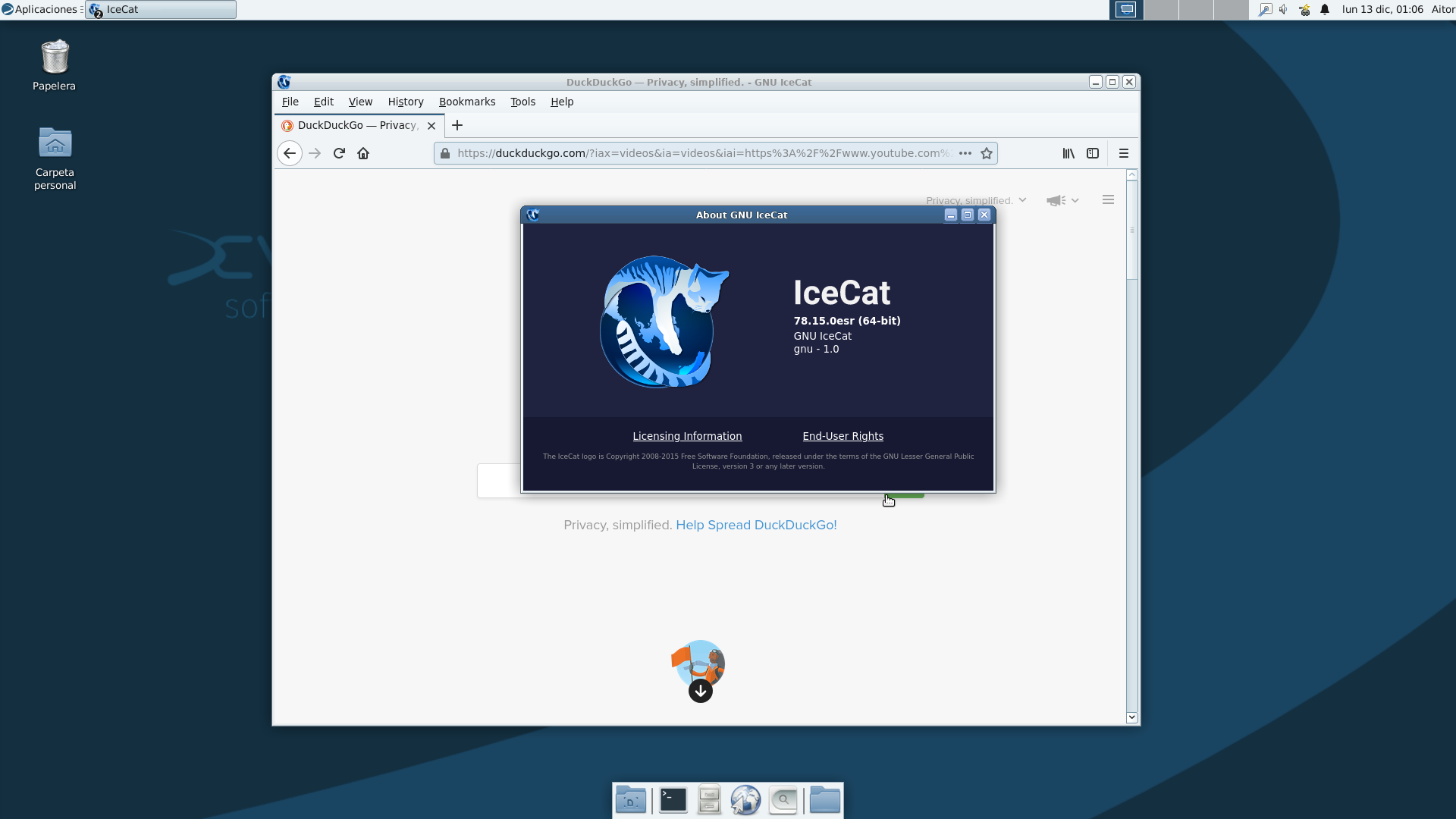
DEB packages of version 78.15.0 are available at:
http://packages.gnuinos.org/gnuinos/pool/main/i/icecat/
I announced them yesterday night in the irc channel. It looks good in chimaera:
#224 Re: Other Issues » [SOLVED] Need to reset root password » 2021-12-02 01:43:19
Good
#225 Re: Other Issues » [SOLVED] Need to reset root password » 2021-11-29 21:40:48
aitor wrote:Now bind the directories
You are right, but the mistake was below, at the end of the post:
To end with, exit the chrooted system and unmount all the partitions:
Fixed it. Thanks
Head_on_a_stick: i misunderstood you, you were quoting the phrase in reference to the arch-install-scripts package. Well..., fixed anyway. They are directories.
Board footer
