
You are not logged in.
- Topics: Active | Unanswered
#1401 Re: Devuan Derivatives » Vuu-do Linux! *New Openbox-64 iso's (1.0.7) up 2-02-18*!! » 2017-07-14 20:57:12
thanks
I installed it and currently am playing with conky.conf (and figthing with Lua syntax, but that's another matter). So far I've got only one problem, a font which make conky crash with a "floating point error" or the like, or maybe it's the font name (is a dash allowed in the name?)
As far as I know it's okay, have never had conky crash due to a font, so it's news to me. Seems like since it allows spaces that dashes should be fine?
#1402 Re: Devuan Derivatives » Vuu-do Linux! *New Openbox-64 iso's (1.0.7) up 2-02-18*!! » 2017-07-10 19:48:03
Uploading updated versions of Openbox and Mate maximal versions now, not a lot has changed but Devuan pushed a kernel update along with libc and some others, seemed important enough to run some new images, plus I added the conky code I posted above, and added more info to release notes, dotted some i's and crossed some t's here and there.
#1403 Re: Off-topic » When you can't tell the difference between Windows and systemd » 2017-07-10 19:04:18
Meanwhile...
In the real world.
If this were a first-person shooter game, this is what we would call a headshot:
"....And yes, a large part of this may be that I no longer feel like I can
trust "init" to do the sane thing. You all presumably know why."Linus
BOOM.
Rock on Devuan! 
#1404 Re: Desktop and Multimedia » Slim and build settings » 2017-07-10 18:45:13
So here is the state of slim as seen by me Mon July 20th 2017.
Time machine?

#1405 DIY » Nasty local hacks, the definitive and not-official Devuan list » 2017-07-08 22:24:46
- greenjeans
- Replies: 4
Okay, been thinking about making this thread for a while. Got any local hacks you do post-install? You know, the not-pretty-or-sustainable-but-does-the-trick type of thing, the "oh-no-you-don't-force-me-into-this-crap" kind of thing that isn't solved by the delete-hammer alone?
I'll post one here and more as I think of them.
1. Hate Samba? (and you should). Don't share files with intentionally buggy Windoze machines? Don't want any of that crap on your machine but use GVFS so are stuck with libsmbclient and 20+ mb's of samba-libs and other assorted samba related depends?
gvfs-backends is the only real issue here, mounting/reading samba shares is one of the things gvfs is capable of doing, not something it HAS to do, it's one of the features but somebody decided to make it a dependency during packaging.
Hack it: go to /var/lib/dpkg/status and open that file as root for editing. Find the gvfs-backends entry (search function in text-editor is very helpful here, this is a LARGE file). In the list of dependencies you will find libsmbclient, delete that entry only and change the "Version=" field of gvfs-backends to a higher number (currently on mine version is listed as 1.22.2-1, I changed only the last number to a 5). Save and close. Open Synaptic and refresh and if nothing else is using the samba libs they will be listed as "autoremoveable" by Synaptic. Now use the uninstall-hammer and enjoy linux without that buggy virus-port-of-entry samba crap.
#1406 Re: Off-topic » When you can't tell the difference between Windows and systemd » 2017-07-08 21:09:23
I'm beginning to get the feeling that he, (Lennart Poettering), is secretly working for Microsoft, seems all his software has bugs that he calls features.

More like pissy Microsoft wannabe, but never good enough to make the cut to make the big bucks in Redmond or Cupertino. Gnome devs=same thing.
They despise people having any choices, want to further close the source and commercialize linux and give it unremoveable "branding", these people are the very antithesis of everything open-source stands for, and a clear and present danger to free software going forward.
#1407 Re: Installation » Broken packages in Ascii, how to fix? (Beware of Debian Stretch) » 2017-07-08 20:43:57
I think you just like saying "Air-Gapped".
#1408 Re: Documentation » Live-build tips » 2017-07-08 20:41:22
Ozi wrote:.... given the live-sdk is the future?
Is it a given? Why/why not? What will become of live-build and its existing applications/users? Is there a migration path?
What are the alternatives? (Linux Live, Remastersys, ...)
Please discuss. Rationally, if you can, please, ladies and gentlemen. If this has been covered elsewhere (I did look) a pointer will suffice.
Suggested topics:
Pros and cons: stability, maintenance/maintainability, features/extensibility, ease of use/documentation/support, resources, licensing, user base, ...
Refracta-Snapshot is what I build with, it's perfect for my needs and how I do things, which is as an advanced user, not a developer. It's ultra-user friendly, a comfy GUI and just a few questions and you can roll your own.
It would be possible to do _most_ of what I do, with live-sdk if you were willing to invest the time to make an extremely lengthy and detailed build template....I told FSR I would give that a try at some point, but to be honest i'm a little daunted by it and not even sure I could get the level of detail that I get working the post-install system.
Once I have tweaked a system to the nth degree and am finally ready to run a snapshot, after that first run I have a template, so subsequent builds are super easy, load a template iso on a partition, update packages and make any changes desired, squash the results and boom, new iso.
It's not a "build" system like live-sdk is really, it's a tool for making copies, and requires a system already be in place to use it. But it's damned effective, and allows even novice users to experiment and create, I especially like that aspect, more people playing makes for a robust environment for innovation and development.
#1409 Re: Devuan Derivatives » Vuu-do Linux! *New Openbox-64 iso's (1.0.7) up 2-02-18*!! » 2017-07-08 19:42:09
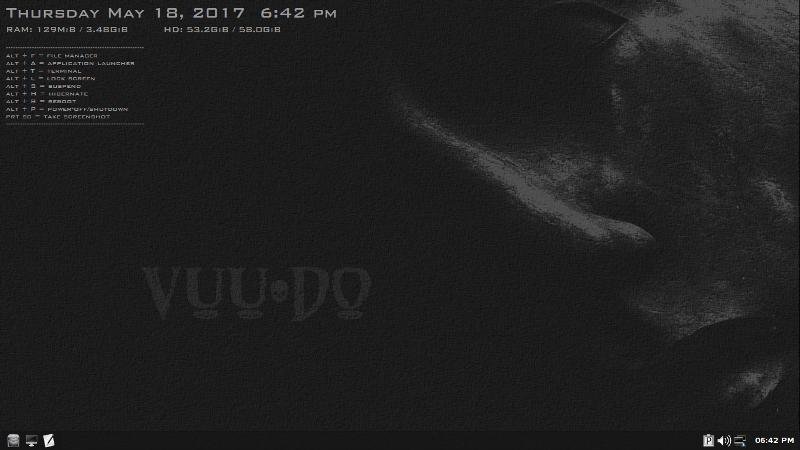
Hi greenjeans, just a question about your desktop: what's the program displaying date/time and keyboard shortcuts I see on the desktop?
Sorry, I was out of pocket for a few days, I see Pekman got it covered though.
I like conky, but on mine I like a minimal conky, date/time and some shortcuts and that's about it.
Am about to squash some new isos and have added the ability for conky to display whatever my music program (Exaile) is currently playing and the artist's name, for anyone who wants to add that to their conkyrc, here's the basic code:
${if_running exaile}${font BankGothic Md BT:pixelsize=16}now playing : ${execi 10 exaile --get-title} – ${execi 10 exaile --get-artist}$endifChange font and size to suit. I have only gotten this to work with Exaile so far.
#1410 Re: Desktop and Multimedia » Cinnamon on Devuan ascii » 2017-07-01 20:50:50
So is this only in Ascii?
#1411 Re: Hardware & System Configuration » Issues with Laptop Lid Suspend/Hibernate and Panel Plugins » 2017-06-30 22:31:08
I'm not sure what that "obscure" scripting attempts to do, but you really only need the following script as /etc/acpi/lid.sh:
#!/bin/bash

if [  "$3" = "close" ] ; then
     /usr/sbin/pm-suspend
fi
The program pm-suspend is from the pm-utils package.
Of course, if you want screen lock, the script needs some more, and it depends of which screen locking you are using.
Well that's a fix for laptop lid events, guess you would need some more code to be able choose hibernate or the screen locker you mentioned.
But unfortunately it doesn't address these power manager bugs. Are there any gui power managers available that don't have multiple broken features?
The mate one in particular is so bad it ought to be pulled until there's a version that actually does something.
#1412 Re: Desktop and Multimedia » caja automatically opens some thumbdrives but not others [SOLVED] » 2017-06-30 21:57:21
Alas, just creating a new partition table was not enough.
The only way to get caja to start automatically opening previously-ignored sticks was dd or wipefs, followed by creation of new partition table and new partition through whatever method.
That's so bizarre. What kind of partition table was on the bad sticks to start with, ms-dos?
#1413 Re: Hardware & System Configuration » Issues with Laptop Lid Suspend/Hibernate and Panel Plugins » 2017-06-30 21:38:13
I can confirm this is an issue using both XFCE power manager, and Mate power manager, also tried using XFCE pm in Openbox. No lid-triggered events to be had here.
The power icon is also static in Mate and won't update it's status during session, I suspect something in removed systemd components/actions in this case as it works in Debian, but I could be wrong about that.
Mate power manager does very little in fact these days as hibernate and suspend functions seem also to be broken and are grayed out in the gui, so it really doesn't do squat.
#1414 Re: Desktop and Multimedia » caja automatically opens some thumbdrives but not others [SOLVED] » 2017-06-30 21:25:27
Yay! Glad you guys fixed it, but before you go to all the below steps on any other drive that does this in the future, I was wondering if you had tried just creating a new partition table first before proceeding with formatting? Knowing gparted and thumbdrive weirdness i've experienced in the past, i'd say there was a good chance doing just that might have been what fixed it, not sure you needed to zero it out first.
lazlo: Yes, running the two wipefs commands and then going into GParted to create the partition table and fat32 partition also works (converts a non-auto-opening thumbdrive to an auto-opening one). The wipefs commands are very fast, much better than waiting 30+ minutes for the original dd command.
Since I've bumped into this issue many times, here is a script that puts it all together: wipefs steps, new msdos partition table, creation of single partition as big as the device, formatting the partition to fat32, adding a label to the partition:
sudo umount /dev/sdb1
sudo wipefs -a -f /dev/sdb1
sudo wipefs -a -f /dev/sdb
sudo parted /dev/sdb mklabel msdos &>/dev/null
sudo parted /dev/sdb mkpart primary 0% 100% &>/dev/null
while [ ! -e /dev/sdb1 ]; do sleep 1; done # because parted mkpart exits before it's done creating sdb1!
sleep 1
sudo mkfs.msdos -F 32 /dev/sdb1
sudo dosfslabel /dev/sdb1 "my_label"
EDIT: I'd try the targeted dd command as well, but at this point all of my "broken" thumbdrives have been fixed
WARNING: Before using the script above, make sure a) /dev/sdb is actually your thumbdrive (one way to check is with "sudo blkid"), and b) the thumbdrive contains no valuable data. If you have any doubt, don't run the script--it assumes these two things are true.
#1415 Re: Desktop and Multimedia » caja automatically opens some thumbdrives but not others [SOLVED] » 2017-06-29 22:15:25
wow, strange one GNUser......i'm at a loss......
#1416 Re: Desktop and Multimedia » caja automatically opens some thumbdrives but not others [SOLVED] » 2017-06-29 20:46:45
Okay I just found another way to reproduce this.
If you run gparted and format the usb stick to something, but don't add any content to the disk before trying it, it will automount the stick but not open Caja. If you put any piece of content whatsoever on the stick, then it will auto-open as well as auto-mount.
Gnuser are you trying the stick fresh from re-formatting but with no content?
#1417 Re: Desktop and Multimedia » caja automatically opens some thumbdrives but not others [SOLVED] » 2017-06-29 20:33:14
I'm sure that some subtle difference between a thumbdrive from factory vs. one formatted in GParted is to blame for this...
No sir. I literally have 8 different thumb drives with me right now, ALL have been formatted with gparted. Just for giggles I deleted everything on one and unformatted completely, after I did that it wouldn't even automount, much less open. I reformatted to ext3 with gparted, unplugged/plugged and it opened right up. I have probably done a couple hundred usb drives with gparted in the last ten years, trust me, it's not gparted.
#1418 Re: Desktop and Multimedia » caja automatically opens some thumbdrives but not others [SOLVED] » 2017-06-29 20:21:44
Just a shot in the dark here, but could it be an artifact of removing the systemd dependencies?
lazlo
Nope. I'm running the exact same system. And just tested another Devuan Mate install, everything working correctly.
#1419 Re: Desktop and Multimedia » caja automatically opens some thumbdrives but not others [SOLVED] » 2017-06-29 20:06:51
hmmm, I can't figure it out, the only way I can even reproduce your issue is unchecking that box in preferences.
Maybe check /home/(user)/.config/mimeapps.list, I have this entry in mine:
inode/directory=caja-folder-handler.desktop
Maybe that will help?
#1420 Re: Desktop and Multimedia » caja automatically opens some thumbdrives but not others [SOLVED] » 2017-06-29 19:42:44
Thanks, greenjeans. Caja's "Browse media when inserted" is already checked.
Maybe formatting in GParted causes the thumbdrive's x-content to change? How do I check its current x-content and, if applicable, change it to something that will continue to trigger Automount-open?
Can't be gparted, I use it all the time and have never had the issue. Your x-content in this case is simply the fat32 filesystem you put on the usb, if it mounts it you're fine, just need to auto-open.
Just for giggles, open caja as root, and make sure that box is checked for root user as well.
Mate is funny like that, i've had some glitches in the past where the system didn't want to honor the user's preferences because root preferences were different.
I'm using Mate right now and can confirm that unchecking that box stops auto-open on my machine, and re-checking it makes it work again.
Might be something you need to do in the mimeapps.list.
#1421 Re: Hardware & System Configuration » Retention of packages, i never installed a printer ... » 2017-06-29 19:28:51
Well, i wasn't sure about it, there are many packages relater to 'printer' ... i removed somes of them, till now the update is ok, i did my best ...
Did you ever figure this out? Synaptic is pretty handy when trying to figure out what you do and don't need.
The system-config-printer stuff can definitely go, that's just a helper gui for configging printers. Once you uninstall that there will likely be other packages that pop up as "autoremoveable", you can uninstall those too. A search on "cups" will list everything cups-related and you can get rid of most if not all of that, search "printer drivers" and uninstall those too.
#1422 Re: Desktop and Multimedia » caja automatically opens some thumbdrives but not others [SOLVED] » 2017-06-29 19:08:26
There are settings in dconf related to automount, and automount-open that are usually both active in the default install, that's why it automounts it and continues to automount after formatting.
Automount-open however, only works on media for which no known x-content is detected, if the media is recognized it will use the user-specified action instead.
Open caja, click Edit>>Preferences>>Media>> and be sure that the bottom box "Browse media when inserted" is checked. If that doesn't work you may need to add to the mimeapps.list
#1423 Re: Devuan Derivatives » Vuu-do Linux! *New Openbox-64 iso's (1.0.7) up 2-02-18*!! » 2017-06-28 20:19:15
These are nice! Full/max versions resemble my usual first test choices.
I recommend some sort of "dark" theme; Adwaita-Dark (for one) makes synaptic tolerable during dark-shift.
Not sure how to do that in OpenBox; I think synaptic takes gtk3.
Nice to see yad too - which repository is it in now?
Haven't tried PaleMoon on Linux for a while; nice to see it pick up (most) favorite add-ons, and OS theme.
(I have to add pavucontrol to get my speakers working right; maté's "sound" seems too dumb-down for me - minor.)
I see xfce-power-manager, is it better than the maté version?
Again, nice ISOs. Thanks!
:::
(No internet at your cabin? What do you do, sneaker-net from a library/café?)
Thanks!
Yep, I have to mess with Mate's sound preferences after an install almost every time, seems like pulseaudio is still a little finicky at times.
Glad you noticed the XFCE power manager, I substituted that because the mate power manager (like the default shutdown menu in mate now) doesn't seem to want to support suspend or hibernate. XFCE version just works better. I also added Obsession in Mate because it works so well in Openbox, easy way to add keyboard shortcuts to do everything shutdown-related. It's addicting after you use them for a while, file-manager and terminal too, just so handy compared to hunting through menus.
HA! yep, at the local coffeeshop in town now, doing my thing on my 50 dollah pawnshop lappy, i'm......thrifty......lol ;D
#1424 Re: Devuan » Defend Devuan against Antivirus and other thinks » 2017-06-27 23:19:07
The only one in the repo is the ubiquitous Clamav, it works okay, have used it a fair bit. There are also some rootkit programs like rkhunter.
#1425 Devuan Derivatives » Vuu-do Linux! *New Openbox-64 iso's (1.0.7) up 2-02-18*!! » 2017-06-27 23:07:30
- greenjeans
- Replies: 230
UPDATE: Discussion of latest Vuu-do development can be found at:
https://dev1galaxy.org/viewtopic.php?id=6944
=========================================
*Update* New Openbox 64 versions (1.0.7) uploaded, 2-02-2018* https://sourceforge.net/projects/vuu-do/files/Openbox/
Moved the project to Sourceforge now, Yahoo/Aabaco webhosting has no support and can't manage to accept an FTP upload faster than 16k. All images are fully updated as of a couple weeks ago, will run new ones if we get a large mass of updates.
https://sourceforge.net/projects/vuu-do/
Project only, not a distro as I have no real time for support or even an internet connection at my cabin.
This is for advanced users, and has been localized to English and UTF-8.
Vuu-do linux is a small, lightweight project based on Devuan and re-spun from Miyolinux. This is a minimal setup meant to be a base to build on with the programs/packages of your choice. There is an Openbox and also a Mate version.
It has all the infrastructure and utilities needed for a base system, but no browser or other programs installed. It is actually pretty cushy for Openbox, it's meant to make it easy for even a new linux user to use. The Mate version is similar but with the added functionality of the Mate DE.
There is also now a maximal version of both, with many added programs including:
Pale Moon web browser, Exaile, VLC, GIMP, Inkscape, Handbrake, XFburn (Brasero in the Mate version), Hexchat, Winff, a couple of Libreoffice programs (Calc for spreadsheets, Writer for .pdf's, .doc's, .rtf's etc.), some games, and some additional firmware and utilities.
VUU-DO stands for Veteran Unix User-do, because if I can do it, so can you. And all thanks to a lot of great VUA's who make VUU's possible. 
Vuu-do is powered by Devuan with the help of a whole lotta fsmithred/Refracta magic and Miyolinux soul.


Board footer
