
You are not logged in.
- Topics: Active | Unanswered
#101 Re: Installation » I don't find root and user with password initialilisation » 2021-09-19 08:57:03
Even if you make a sudo install you can afterwards enable root by "sudo passwd root" in a terminal to give root login.
Good point. I did it every time I had to use an stardard Ubuntu system.
But I prefer myself not to enable sudo to the standard user. More secure.
Ageed. My Devuan syetems don't have sudo installed.
#102 Re: Installation » How to partition my disk ? » 2021-09-19 08:54:01
I know that some people feel good about running an "Expert install" even though their need for that is nil
Just for the record, I feel at home using Expert install. I like to see all the options and answer all the cuestions. I did so in my first Debian instalation as a teaching tool for mysef and I do now (20+ years later) to see easily what is going on. Just my 0.02 currency units.
#103 Re: Installation » I don't find root and user with password initialilisation » 2021-09-18 11:37:53
You are so kind to tell the header of the configuration page where did you see "Allow root entry" "yes"
It is under "Set up users and passwords".
If you don't allow root entry, your system is ala Ubuntu or MacOS, you need sudo in front of any administrative command (I don't like it) and you can't login as root.
If you allow root entry, you can write just there your root password. Then, you can login as root or use the su command to became root.
I'm sorry if you already know all this. 
#104 Re: Installation » How to partition my disk ? » 2021-09-18 09:33:27
name is your choice (not required)
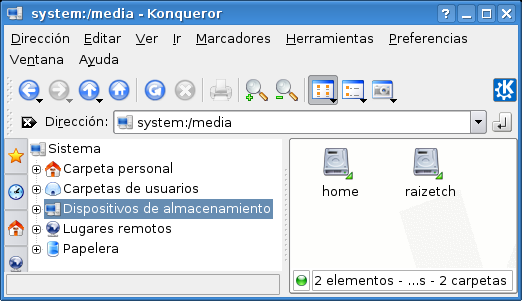
I name the partition as the function it has in the system: root, home, boot, etc. It comes handy when you see them with a file manager. Old example:
#105 Re: Installation » How to partition my disk ? » 2021-09-17 09:55:58
I will need non-free firmware for WiFi. I think there's a package called firmware-iwlwifi.
I'm starting with an ethernet cable so I presume I can add this later.
That is always my course of action. Once you have a system up and running, even minimal, you can use the apt family you install whatever you need. I find pciutils useful to see what is your exact WiFi card.
#106 Re: Installation » I don't find root and user with password initialilisation » 2021-09-17 09:49:38
I always use Expert install and I can tell you that this is very weird. Please check the MD5 of the downloaded files. Double check that you don't miss any screen. Select "Allow root entry" "yes" (I'm not sure about the spelling; anyway I think that your language is not English).
Good luck.
#107 Re: Other Issues » recommend a good email prgram » 2021-09-08 09:08:02
it had a nonsense error where it said a library that did exist did not exist.
It may not be as silly as it sounds; they are usually different versions, names o links of what seems the same library. Have you tried ldd yourbinary?
#108 Re: Installation » [SOLVED] SDDM not starting up after fresh Beowulf installation » 2021-09-07 09:14:25
Do you know about a good tutorial which go into what you taught?
My own script for that course is very dated (Debian 3) and in Spanish, but it is here: IntranetEducativa.pdf
I'm not aware of a similar slow paced tutorial, but may be because I no longer teach IT. Maybe projects as Linux from Scratch can be useful to you; I would give it a try, I learn a lot back in the day with it.
#109 Re: Installation » [SOLVED] SDDM not starting up after fresh Beowulf installation » 2021-09-05 08:47:36
So the problem was that SDDM did not start when necessary ATI/AMD firmware was not installed.
Long time ago I explained in a course about Debian how install X server and probing it working using the order X before installing any graphics login program. The course was very slow paced; nowadays we all can work much faster because everything works much better than 20 years ago, but knowing the basics is always useful.
#110 Re: Installation » [SOLVED] SDDM not starting up after fresh Beowulf installation » 2021-09-04 10:23:22
From a root console service sddm restart could sent some error messages.
#111 Re: Installation » Two NICs » 2021-05-10 11:11:35
Randomly after the install & configuration is completed one or the other NIC's becomes unavailable.
May be a problem of names of the interfaces. I would try net.ifnames=0 on the kernel parameters.
#112 Re: Hardware & System Configuration » Trouble writing to usb » 2021-04-25 12:27:06
I always do a sync before unmount, to more safety.
#113 Re: Off-topic » Gentoo, Slackware and more » 2021-04-20 16:46:44
What was the ZX81 worth back then where you come from?
I'm sorry, but I don't remember the price; I just remember that it was far out of my budget. Years later I could buy a Sinclair QL, my first computer.
#114 Re: Off-topic » Gentoo, Slackware and more » 2021-04-19 11:57:37
Yeah, that'll take a while.

Sure, one night; but I was sleeping.
My dad wrote a home accounting program in 1K on the ZX81.
I wrote software for ZX81, but never could run it because I had no money then to buy one computer, not even that humble ZX81.
#115 Re: Forum Feedback » New member SPOCK » 2021-04-06 10:47:04
I would hope that if Spock from Star Trek were to live today, he would use Devuan GNU+Linux because it is the logical choice.
We are far off topic, but I like it in this thread, because I'm a trekkie
Maybe OpenBSD were the logical choice...
#116 Re: Documentation » HOW TO Install lightdm webkit2 greeter » 2021-04-03 18:54:49
if I could figure out how to take a snapshot of it
May be this:
https://www.ubuntubuzz.com/2020/01/take … -2020.html
I've not tried it myself.
#117 Re: Off-topic » what music are you listening to RIGHT NOW? » 2021-04-03 09:22:24
RNE Clásica. TDT broadcast from national radio of Spain, classic channel.
#118 Re: Hardware & System Configuration » [SOLVED] Backup entire installed Beowulf w/software + configs + /home? » 2021-04-02 17:22:55
I miss them days, I REALLY do
OK, but I'm quite sure that you know way more now. Enjoy, too
#119 Re: Forum Feedback » New member SPOCK » 2021-04-02 17:19:50
Welcome to the forum. In every aspect of life we can find absolute experts: good for us
#120 Re: Off-topic » Music » 2021-03-15 11:17:58
Jethro Tull. broadsword
I have very good memories of this particular work. I won this vinyl on a radio quiz. And I could see the band live performing it. Long story short: it was amazing
#121 Re: Installation » devuan fresh installation on HP laptop fails to load graphical desktop » 2021-03-09 12:29:10
server ssh
Can you connect from another machine?
#122 Re: Off-topic » Digital minimalism. How many applications do you use daily » 2021-03-07 10:27:00
I wasn’t looking at the server side of things.
OK, but it is fun too
I find very convenient to have own server, it is much natural for web development.
#123 Re: Off-topic » Digital minimalism. How many applications do you use daily » 2021-03-06 10:47:51
I like this topic very much. I used to install systems for high school centers. So, always interested in what is really needed, but I dont want bloatware.
Now, I'm retired, but still active in the sense of working on personal projects.
I think that your question have very different answers depending on the different needs of everyone. Anyway, this is my personal list, incomplete for sure:
On a desktop:
Terminal: Konsole.
Shell: bash.
Graphical file management: Dolphin.
Text editor: nice editor and geany.
Office program: LibreOffice.
Web Browser: Firefox.
Email client: Thunderbird.
Document viewer: Okular.
Media viewer: VLC and mplayer.
Image viewer: Gwenview and qiv.
C compiler: gcc.
Python and Perl interpreters: the one on the distro.
LaTeX and Asymptote compilers.
PDF managing: PDFtk.
Audio managing: Audacity.
Graphics managing: The GIMP.
3D creation: OpenSCAD.
Database managing: sqlite3.
SSH CLI client and gFTP.
SSH server.
On a server:
Shell: bash.
Text editor: nice editor.
Web server: Apache.
Mail server: exim and Dovecot.
PHP and Perl interpreter: the one on the distro.
Database managing: sqlite3.
SSH CLI client.
SSH server.
#124 Re: Off-topic » Operating System Backups » 2021-03-06 10:30:15
I back up data with rsync, wrapped in a customized bash script.
I back up system partitions booting a different OS and using partclone from there.
#125 Re: Devuan » As Debian 11 moves closer to Devuan. Is there any reason to stay on De » 2021-02-25 10:04:59
It actually aims for KISS philosophy as much as possible without the pretentious "minimalism" crap.
Absolutly agreed. When I decided (long time ago) to pick Debian as my distro, I compared it with some others big players. Debian was, IMHO, the best hands down. Now, it is the time for Devuan to keep that spirit rolling.
Board footer
