
You are not logged in.
- Topics: Active | Unanswered
#101 Re: Freedom Hacks » The Biological Risk of High-Frequency EQ » 2026-01-20 21:12:25
Distortion is far more damaging than volume, clean sound makes ears and speakers last longer and run cooler, tuning down frequencies that are too loud and annoying via an EQ is a good way to preserve both.
#102 Re: News & Announcements » How you can help Devuan » 2026-01-20 21:07:43
^^^That sounds amazing, great to have another artist join the crew, I think @golinux is spot on in that the DIY section is the perfect place for such things, I look forward to seeing what you and your students come up with! 
#103 Re: Freedom Hacks » The Biological Risk of High-Frequency EQ » 2026-01-20 15:02:24
w t f
I know right?
#105 Re: Desktop and Multimedia » [SOLVED] Devuan Excalibur Alsa audio with multiple sound cards. » 2026-01-16 19:39:05
That's nonsense.
1. Nobody uses an EQ like that, it's an equalizer not a dedicated booster, it's just as easy to lower the annoyingly loud frequencies as it is to boost up the ones we can't hear so well.
2. Flat response sounds like shit to everyone's ears, especially on a laptop, it's just awful.
#106 Re: Desktop and Multimedia » noCSD for GTK4 » 2026-01-16 17:48:08
Update on the package I mentioned earlier in this thread, it's been a while now and it looks pretty well tested, Tromjaro is now shipping it on their isos. Works for GTK3, GTK4, and also anything libadwaita or libhandy.
https://codeberg.org/MorsMortium/gtk-nocsd
Just need a .deb package now, anybody up for it? I asked on the Devuan dev channel on IRC too.
#107 Re: Desktop and Multimedia » [SOLVED] Devuan Excalibur Alsa audio with multiple sound cards. » 2026-01-16 16:28:03
Bro you should try AlsaTune, it's basically made for what you're trying to do, and you can switch soundcards/devices right from the GUI. Plus you get a custom (if you want it) .asoundrc that provides basic mixing functions, and you also get a global 10-band EQ (provided by libasound-plugins-equal). All native alsa with no Pulse or Pipe.
#108 Re: Desktop and Multimedia » [SOLVED] Waterfox and AppArmor. » 2026-01-16 16:09:15
So what is the problem with just putting it in a bin directory in your home? That is what I do with all of these things then create the .desktop file pointing to it.
Now you just stop with that sensible talk, we're trying to do things the hard way here.
#109 Re: Desktop and Multimedia » [SOLVED] Devuan Excalibur Alsa audio with multiple sound cards. » 2026-01-16 01:41:21
If your chosen DE already has a mixer, then .asoundrc won't help you. What DE or window manager are you running?
#110 Re: DIY » New Project, a simple music player. And now a video player!! » 2026-01-14 16:56:52
Its of course fine to make a music player if that's what you want. I just wondered if you felt like it was worth your time given the options that exist lol.
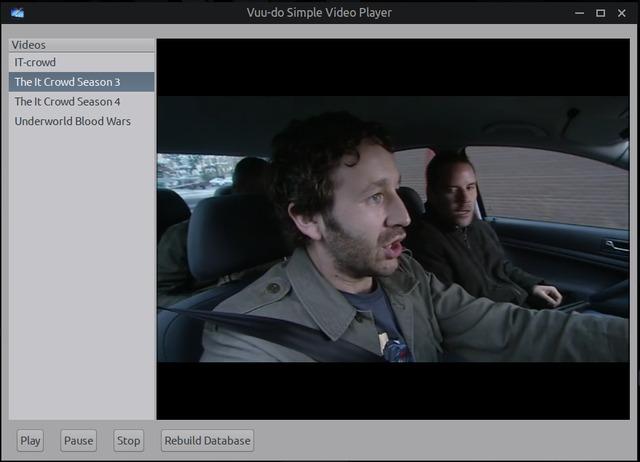
A fair question from months ago that I didn't have an answer for as I was just getting started, but now I can say it was all 100% worth it and then some! I have my beautiful simple player, and an amazing wealth of knowledge that I didn't have even 6 months ago that's helping me make even more and better things.
Today i'm going to pick back up on the video player project, last time I messed with it was in July and I do have a working prototype, but it's very crude and needs a lot of work I think, some new challenges for this project, but in some ways it's easier than the music player was.
Edit: well I made progress, the main pane had a transparency when you first opened it, fixed that. It was spamming the crap out of .xsession-errors and I fixed that. Added the ability to hide the treeview when maximized so it looks nicer.
Still got a lot to work through, it has issues maximizing/minimizing while on pause, some weird video artifacts. And the interface needs some work for sure.
#111 Re: Installation » [SOLVED]New partitions do not mount automatically without su password? » 2026-01-13 16:53:03
Okay, maybe i'm misunderstanding the OP and what he wants to accomplish. FWIW, the method I described above works like this:
I boot my machine, I open my file-manager and there in the treeview to the left it displays my other partitions, they are there but not mounted, I left-click one time on one and it mounts it and opens it for me. It's natural and intuitive and fast.
If that's the desired behavior then what I suggested should work for you.
#112 Re: Desktop and Multimedia » Linux Audio for the hard of hearing » 2026-01-13 16:47:31
You've probably already done this, but on my laptop when you open the alsamixer, there is a "main" volume control, and there is also a "speaker" volume control which is the laptop speaker volume specifically. If both are not at 100% then I won't get full volume on my machine.
#113 Re: Installation » [SOLVED]New partitions do not mount automatically without su password? » 2026-01-12 22:30:20
/usr/share/polkit-1/actions/org.freedesktop.UDisks2.policy
Edit as needed.
<!-- Mounting filesystems -->
<action id="org.freedesktop.udisks2.filesystem-mount">
  <description>Mount a filesystem</description>
  <message>Authentication is required to mount the filesystem</message>
  <defaults>
    <allow_any>auth_admin</allow_any>
    <allow_inactive>auth_admin</allow_inactive>
    <allow_active>yes</allow_active>   <<<--------change "auth_admin_keep" to a "yes" as shown here.
  </defaults>
</action#114 Re: DIY » New Project, a simple music player. And now a video player!! » 2026-01-12 15:30:09
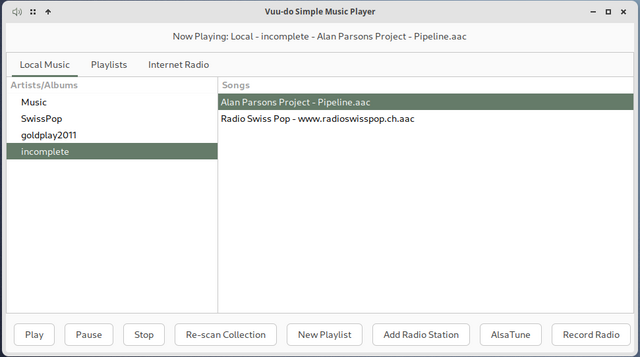
Sorry greenjeans it worked it was my stupidity. I was waiting for it to scan expecting the songs to appear and kept pressing re-scan. i didn't realise I just had to click Music below Artists/Albums. I didn't figure this out until I installed the new version. Also it found both .wav and .mp3
No stupidity about it my friend, vsmp is not that intuitive when held up to examples of modern apps, on a full-featured player you can double-click almost anything and a whole lot of stuff will happen automatically. In vsmp you have to click the artist/playlist/station, then click a song, then hit play, it's simple once you get used to it's kind of old-school vibe.
And your report caused me to remember something about the player that I had forgotten, the scraper script was actually a real bear to get right for some reason, it was the first feature of the whole project and I just threw 3 types of music files in there to build/test fully intending to expand that list...then 6 months went by, lol, and I forgot about it. So you really helped me out with your post and the scraper script is better than ever (fingers-crossed, still testing but no issues yet!).
Screenshots are not fullsize, I shrank them a bit to fit here better:
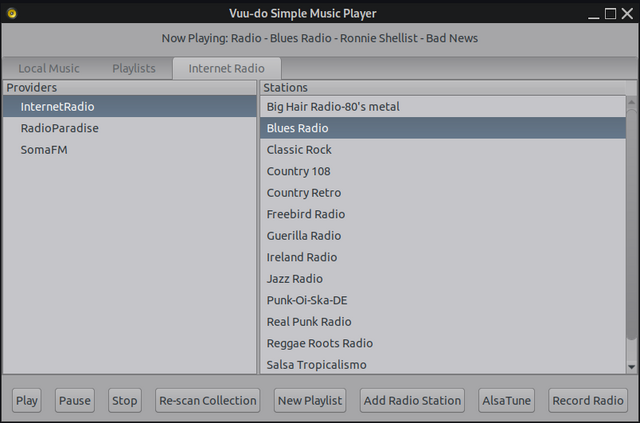
Screenshot below courtesy of Unklar on the BunsenLabs forum, big shout out to those guys, great distro and cool folks!
#115 Re: Desktop and Multimedia » ALSA+Jack system wide audio No pulseaudio or pipewire » 2026-01-11 22:48:39
@rations, bro you made my whole day and put a smile on my face that's still there, really motivated me to do some good work today, thank you!!!
I think together we are doing some great stuff on this forum in the area of sound, really looking forward to the future, once I have some stuff squared away I want to join you guys in working more with Jack, I have a lot of reading to do first though, lol, i'm still a noob pretending to be a programmer. 
#116 Re: DIY » New Project, a simple music player. And now a video player!! » 2026-01-11 22:23:38
Got it! The glib errors were just a timing issue, had to move a signal connect and that was it, sweet! Also expanded the scraper script to handle multiple more audio formats. Going to re-package here in a bit.
EDIT: New version 1.0-1 uploaded!
#117 Re: DIY » New Project, a simple music player. And now a video player!! » 2026-01-11 16:09:09
Bugs so far...
Issue #1 - I neglected to triple check, and so I have a bunch of output going to ~./xsession-errors, most normal operation messages from ffplay, I had rooted those out at one point...arrgh. Also a few of the typical glib-gio errors that seem to plague that file.
Issue #2 - I need to expand the list of mimetypes the music scraper looks for, right now it's just .mp3, flac, and ogg. Those were just the three I had on my machine when I was working on the scraper and never did add to 'em.
I think i'll pull the package for now, that error-spamming is too much.
Update: I did actually fix the normal operations messages, I was reading some messages from a different script I was playing with, so that part's good. Still getting like 11 glib-gobject warnings that pop up right when you start the app and that's it unless there's an actual error. Man if I had a dollar for every time those warnings pop up...working on it now.
The music scraper will be easy, just need to add a few more mimetypes to the script I think, .wav for one, just wondering what all formats I should add, the first 3 are just what I had available for original testing.
#118 Re: Desktop and Multimedia » Thunar flooding .xsession-errors after Excalibur upgrade » 2026-01-11 15:52:30
What it is useful for is to see just how much unfixed/crap code is routinely swept under the rug.
You know, all that [won't fix] stuff because [whatever].The thing is that the main issue for most any Linux user is that the bloody file runs wild.
And if not checked, can grow to ridiculous sizes and cause problems.
Bingo!!
Mostly it seems to choke on file-manager errors, but sometimes other programs, sometimes it's the CSS in a given theme. Tons of glib-gio stuff in some DE's. Last year Caja had a real nasty, when you hovered over the .xsession-errors file it would start to spontaneously grow to huge size, many mb in just a minute or less.
It's time-consuming and difficult to weed all the errors out but it can be done, at least in Openbox (daedalus). PcmanFM is still gtk2 in daedalus, that avoids a whole lotta issues.
*sigh* speaking of .xsession-errors...
#119 Re: DIY » New Project, a simple music player. And now a video player!! » 2026-01-11 15:34:09
@rations are all your music files in that folder .wav files? If so that's the reason, I set the scraper script to hunt for /mp3, flac. and .ogg a long time ago and never did add any more mime types, that's definitely going on the to-do list for the next version.
If it's a folder with mixed formats then I need to keep digging here.
#120 Re: Desktop and Multimedia » ALSA+Jack system wide audio No pulseaudio or pipewire » 2026-01-10 15:35:17
Well I think you're both heroes for putting in the work to make something better.
Re: Mate; It does want to pull in Pipewire when you uninstall Pulse, on mine I let it do so, then I uninstalled Pipewire and it didn't complain or try to make me install Pulse again. But the problem I had with Mate is that it still has it's own built-in mixer, which works fine with Alsa, but does take over sound, so my EQ was a no-go as was all my volume sliders but main. Really dug in there too, I was able to remove it with some effort but doing so took out some other important functionality.
Does XFCE have it's own built-in mixer?
1) Code that would reconnect an app to the same output it used before. Now whenever VLC changes track it switches back to the default output.
2) Adding devices automatically.
There may be some code in AlsaTune that might help, I included the source code in a separate tar.xz so folks can mess with it:
https://sourceforge.net/projects/vuu-do … /AlsaTune/
#121 Re: Desktop and Multimedia » Xscreensaver version in ports is still out of date » 2026-01-10 15:25:06
Yep, the Obsession logout app for openbox is well over 10 years old at this point, lol, but still works!
Lots of others in there that are actively maintained but for some reason debian won't update them, like Yad is especially old and buggy but for some reason they won't update to any one of the dozen newer versions available.
#122 Re: Desktop and Multimedia » ALSA+Jack system wide audio No pulseaudio or pipewire » 2026-01-10 14:41:17
Unreal mate, that's fantastic, great setup and that screenshot looks neat.
100% in agreement, really nice work Matlib!!
Loving it, i'm ever more convinced that pure Alsa+Jack is the way forward for complex sound set-ups, you guys are doing important work here. 
#123 Re: DIY » New Project, a simple music player. And now a video player!! » 2026-01-10 14:26:51
I should have mentioned from the get-go that this is built on daedalus libraries and probably won't work on excalibur. arrrgh.
#124 Re: DIY » New Project, a simple music player. And now a video player!! » 2026-01-10 14:08:05
Works with all my .wav files as well. I haven't tired the radio not really my thing but the playlist feature is great, works perfect. It didn't pick up the files in my music directory and trying re-scan didn't pick anything up either. This is using xfce. Thanks for this greenjeans "no replay-gain or re-sampling done by
the player, just pure unfiltered music" is a great feature.
Thanks! But dang, wondering why the scraper didn't work for you, it's set to search "~/Music" only, does your music directory have a different name or is it located somewhere else other than directly in user's home?
#125 Re: DIY » New Project, a simple music player. And now a video player!! » 2026-01-10 00:27:10
Packaged it up finally and ready for testing if anyone has a little time to do so!
https://sourceforge.net/projects/vuu-do … apps/VSMP/
Vuu-do Simple Music Player, no frills, no features, plain interface. Just music.
* Builds a local music database from ~/Music and a radio database automatically
on first run.
* Re-scan function for adding new local music.
* Simple dialog to add new radio stations to the database.
* Supports mp3, ogg, and flac for local playback.
* Supports mp3 and aac radio streams.
* Create and save playlists with a drag-and-drop interface.
* Record internet radio streams, with options to split and name tracks or
save as a single file.
* Integrates with AlsaTune for real-time audio tweaks (if installed).
VSMP is made to be brute simple, there is no replay-gain or re-sampling done by
the player, just pure unfiltered music. Controls are easy, this is a set-and-forget
type of app for those who just want to start the music, minimize the player and get
on with other tasks. There is no provision to right-click a music file in your file
manager and open it in this app, playing a single song is already an option in the
context menu in Vuu-do so no need. It also currently does not support playing music
directly from a CD in your optical drive, that would be less-simple, but may be a
future option, for now I recommend Asunder for ripping CD's to your HD/SSD and
adding to your collection.
To play music, first select station/album/playlist in the treeview, then select
the track to start with in the main pane and then hit "play". The "Pause" button
toggles pause on/off.
To add a new playlist just click that button and a drag-n-drop window opens on top
of other windows, so you can add songs from your file-manager or from the main pane
of the player itself, note that when adding from the player's main pane you can only
grab one song at a time, but in your file manager you can select multiple songs and
drag them all at once. Note that you can't grab a whole folder and drag/drop it,
only songs at this time. To delete playlists no longer wanted, open your file-manager
to ~/.local/share/vsmp/playlists and delete the ones you don't want.
Adding a radio station is easy, just click that button and fill in the form that pops
up. The first field "Provider" can be anything you choose, and is intended for things
like "SomaFM" and "Radio Paradise" that provide multiple stations, if in doubt just
throw up something like "Internet Radio". The station name is the next field, this also
can be anything you like, the name of the station or a descriptive title like "Blues Radio".
The last field must be precise, the URL of the stream itself. There are various ways
to find this, most stations have online players you can start that open a new window,
and frequently the URL of that window is the stream URL you need.
A nice website that hunts those pesky url's for you: https://streamurl.link/
To delete stations, open ~/.local/share/vsmp/vsmp_radio_db in your text-editor and
delete the ones you don't want. Be careful to maintain the format!
The Record Radio button does just that, you must have a station streaming to activate
this function, once started it forks off as a separate process with it's own window,
recording the station you selected until you tell it to stop. So you can listen to other
music in the player or turn it off entirely and the record function will continue to run.
It uses Streamripper for the backend and will store new tracks in your ~/Music directory.
After recording new tracks, just hit the "Re-scan Collection" button to add them to
the VSMP database.
Currently this is an alpha version, might be quirks, please let me know if you have any
issues!
~greenjeans
Board footer
