
You are not logged in.
- Topics: Active | Unanswered
#1 2026-01-08 20:02:34
- kapqa
- Member
- Registered: 2019-01-02
- Posts: 770
Linux Audio for the hard of hearing
Hello ,
have noticed since long that the Linux experience on Laptop is bit hard to swallow;
the problem is with office lapòtop of various kind
that use randomly;
now this Laptop has dual-boot Windows 10 - Devuan 7.0
and it functions reasonalby well;
however , the audio is still subpar;
whenever listen to various podcast, sometime cannot grasp the meaning of spoken word, since volume is too low.
Understand that the Windows 10 has dedicated drivers (Atmos enabled?) and sound very much better;
but does the Linux Audio really need to sound that thin?
It is a good experience to sharpen the listening curve,
but sometimes it is overwhelming;
now with program like
vlc > can boost to 200%
mpv > can boost to 130%
however, with normal audio being played throught browser or social media app, there is not much space left.
the linux is already alsa-only enabled, and volume is 100%.
Is there an easy way to "boost" the volume on Linux or what can be done to enhance the experience (badly needed on LInux desktop).
Thank you very much.
Offline
#2 2026-01-13 12:37:01
- rations
- Member
- Registered: 2025-11-06
- Posts: 85
Re: Linux Audio for the hard of hearing
Not sure about software but a cheap bluetooth speaker with volume controls helps.
You will own nothing and be depressed
SOURCEFORGE rations
Offline
#3 2026-01-13 16:47:31
- greenjeans
- Member

- Registered: 2017-04-07
- Posts: 1,765
- Website
Re: Linux Audio for the hard of hearing
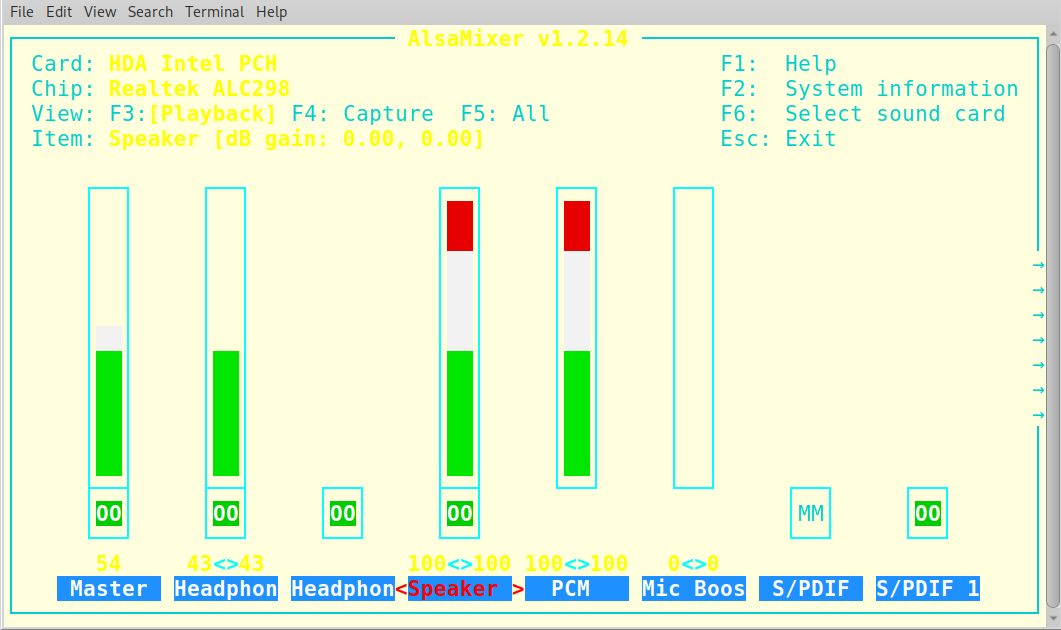
You've probably already done this, but on my laptop when you open the alsamixer, there is a "main" volume control, and there is also a "speaker" volume control which is the laptop speaker volume specifically. If both are not at 100% then I won't get full volume on my machine.
https://sourceforge.net/projects/vuu-do/ Vuu-do GNU/Linux, Devuan-based Openbox systems.
Devuan 6 mate-mini iso, pure Devuan, 100% no-vuu-do. Now with Xlibre as well.
Please donate to support Devuan and init freedom! https://devuan.org/os/donate
https://devuanusers.com/ Apps source : https://git.devuan.org/greenjeans
Offline
#4 2026-01-15 16:11:40
- igorzwx
- Member
- Registered: 2024-05-06
- Posts: 515
Re: Linux Audio for the hard of hearing
this Laptop has dual-boot Windows 10 - Devuan 7.0
...Understand that the Windows 10 has dedicated drivers (Atmos enabled?) and sound very much better;
but does the Linux Audio really need to sound that thin?
One might tentatively suggest that the operating system one uses could, in a rather modest sort of way, have a slight influence on how one thinks — nothing dramatic, mind you, just a small tendency to shape habits, decision-making, and the odd worldview. It’s not as if the thing actively reprograms you, of course. More like it gently nudges one’s approach to problems, file organisation, and the occasional existential crisis over software updates. Entirely unremarkable, really.
Of course. One might observe, with only mild amusement, that when a Windows user encounters a spot of bother with Linux, they often struggle to explain quite what they did — let alone articulate the nature of the problem in a way that makes the faintest bit of sense to anyone trying to help. It’s not their fault, really. They’re simply used to the machine telling them what’s wrong, in that passive-aggressive Windows fashion — “Something happened. We’ll fix it. Probably.” — rather than being expected to read a log file or, heaven forbid, recall what they actually did.
So they’ll say, “It’s broken,” with the same level of detail one might expect from a damp biscuit. No error message, no command entered, just… broken. As if the system itself has taken a turn for the worse and needs a lie down with a cool cloth.
Still, one must be charitable. It’s not their operating system’s fault if it’s never taught them to think.
Last edited by igorzwx (2026-01-15 16:14:06)
Offline
#5 2026-01-20 17:11:24
- kapqa
- Member
- Registered: 2019-01-02
- Posts: 770
Re: Linux Audio for the hard of hearing
mybe it is supposed to be that way, better safe than sorry, as it has been kindly warned here on other important post in the forum
(biological danger of eq and volume)
since am already damaged from bad listening habits in youth (in-ear headphone with too much volume)
consider it a fault on my side (mostly)
and play safe to get the hearing curve more training;
had already other linux laptop
(my second-last laptop from around 2012 came with linux-enabled (chinese)) and had the same problem back then (poor audio-quality from speaker)
(maybe because tend to use office-style laptop)
and at the time came out ubuntu 12.04 which the seller tucked along with the sale and ended up using "pavucontrol" before ridding the system completely of pulseaudio; but the audio was always bit low-volume, sometimes too low.
beffore, used powerbook g4 and although one speaker or microphone was bad, never had such volume issues;
(on mac os x tiger on previous iteration there was also handy feature to boost volume in quicktime playback inside finder)
even before, used windows 2000 professional, and also then never noticed such issues;
but maybe, just my hearing deteriorated, so it is bit unfair to "target" linux that hard;
-------------
Last edited by kapqa (2026-01-20 19:27:23)
Offline
#6 2026-01-20 17:34:50
- Camtaf
- Member
- Registered: 2019-11-19
- Posts: 569
Re: Linux Audio for the hard of hearing
Linux distros often only set speaker volume to 60~70%, as in days gone by, complaints were raised about the volume being set at 100% out of the box.
Two possible solutions, external speakers or headphones.
Also, as suggested, bluetooth speaker, the one that I bought for £14 off the internet is way too loud for me, if I don't adjust the volume down in Linux before pairing it to my computer.
Offline
#7 2026-01-21 18:09:09
- kapqa
- Member
- Registered: 2019-01-02
- Posts: 770
Re: Linux Audio for the hard of hearing
still having these issues with volume & understandability
now have tested this video with 3 different setting
https://davidicke.com/2026/01/21/im-her … el-farage/
1. | windows 10 | dolby audio "on"
2. | windows 10 | dolby audio "off"
3. | devuan linux 6/7 | alsa audio
the quality is from top down, not from boottom down to up;
with 1 hear best, 2 , 3 are very poor;
but even with with option 1, cannot understand the last passage;
maybe someone here can help me outù'?
the passage is at the very end "you know what - "unintelliglbe"?"
thank you very much.
(PS. with windows 7 there was a setting to really boost audio, but those setting have been disabled for windows 10 ; now it is "dolby audio" ; sometimes it sound great, sometime however not so much, and in this case, it is not sufficient to understand clearly.
Last edited by kapqa (2026-01-21 18:10:54)
Offline
#8 2026-01-31 21:24:44
- fanderal
- Member
- Registered: 2017-01-14
- Posts: 139
Re: Linux Audio for the hard of hearing
what can be done to enhance the experience
Can relate to the hearing issue you mentioned yet I rarely need to raise the volume's default from 50. I've found audio quality and clarity depends on equalizer settings.
For an alsa only setup, I'd suggest greenjean's mxeq pkg... the default .asoundrc file (see /usr/share/mxeq/README) is better than .asoundrc howto examples found online, and equalizer settings can be adjusted in real time, online or local, and saved for various audio/video such as news/talk shows, music, old movies, etc.
Offline
#9 2026-01-31 23:07:56
- igorzwx
- Member
- Registered: 2024-05-06
- Posts: 515
Re: Linux Audio for the hard of hearing
For an alsa only setup, I'd suggest greenjean's mxeq pkg... the default .asoundrc file (see /usr/share/mxeq/README) is better than .asoundrc howto examples found online
The Debian ALSA configuration is better by default than many custom ~/.asoundrc examples found online.
Debian (and Devuan) include comprehensive system-wide ALSA defaults via /usr/share/alsa/alsa.conf and card-specific configurations (e.g., HDA-Intel.conf). These enable:
dmix: Software mixing for multiple playback streams.
dsnoop: Simultaneous capture (microphone sharing).
asym: Full-duplex operation (independent playback and capture).
plug: Automatic format, rate, and channel conversion.
These are automatically applied based on detected hardware, meaning most users get a functional, flexible setup without any custom .asoundrc.
Many online .asoundrc examples:
Redundantly reimplement these features.
Use incorrect or suboptimal parameters.
Disable existing working defaults (e.g., bypassing plug causes format mismatches).
Thus, the default Debian ALSA setup is often more robust and correctly configured than typical hand-written user configurations.
The correct approach is to first inspect the system-wide ALSA configuration (in /usr/share/alsa/alsa.conf and card-specific files under /usr/share/alsa/cards/) before making any changes.
Offline
#10 2026-02-01 02:09:04
- fanderal
- Member
- Registered: 2017-01-14
- Posts: 139
Re: Linux Audio for the hard of hearing
The Debian ALSA configuration is better by default than many custom ~/.asoundrc examples found online.
I found that to be true for a long time. However, when hearing began to be an issue and volume wasn't enough, I installed libasound2-plugin-equal to see if an equalizer would get better results. It did, after finding a workable .asoundrc file online for the equalizer. With mxeq installed, the results were finer tuned and I configured/saved some equalizer settings.
These neither helped nor had acceptable results:
/usr/share/doc/libasound2-plugin-equal/README
/usr/share/alsa/alsa.conf.d/equal.conf
/usr/share/doc/libasound2-plugin-equal/examples/asound.conf_equal
Seems you know most every detail in configuring sound. I don't. With only basic knowledge, I found the right tool, improved on it, and now have the quality and clarity of sound I need. Isn't that what post #4 advocates?
Offline
#11 2026-02-01 11:06:32
- igorzwx
- Member
- Registered: 2024-05-06
- Posts: 515
Re: Linux Audio for the hard of hearing
Are you using an equaliser as a hearing aid, or do you believe it can improve sound quality?
Offline
#12 2026-02-01 14:40:16
- Devarch
- Member
- Registered: 2022-10-03
- Posts: 184
Re: Linux Audio for the hard of hearing
or what can be done to enhance the experience
Nothing real. But for laptop you can try https://wiki.archlinux.org/title/PipeWire#EasyEffects
pressets https://github.com/wwmm/easyeffects/wik … ty-presets
Offline
#13 2026-02-02 00:42:04
- fanderal
- Member
- Registered: 2017-01-14
- Posts: 139
Re: Linux Audio for the hard of hearing
Are you using an equaliser as a hearing aid
You're welcome to call it that if you want! Kinda awkward to use it as such.  I'm using an equalizer to adjust the audio frequency signals, so I can fine-tune the sound to what I'm able to hear and how I want to hear it... and you know it.
do you believe it can improve sound quality?
Lol, results matter, not what I believe! And I posted how I got the quality of those results, twice. Hope your hearing stays sharp, but if it ever starts to fade, perhaps you'll consider others in the same boat and give 'em a leg up... more useful than wordy, feigned urbanity to mock another's post and sidetracking the thread.
Offline
#14 2026-02-02 03:10:09
- igorzwx
- Member
- Registered: 2024-05-06
- Posts: 515
Re: Linux Audio for the hard of hearing
Is the equaliser the only appropriate tool being used to improve ALSA's sound quality? Have you tried something else?
Offline
#15 2026-02-13 16:41:23
- Mercury
- Member
- Registered: 2024-11-14
- Posts: 59
Re: Linux Audio for the hard of hearing
Of course. One might observe, with only mild amusement, that when a Windows user encounters a spot of bother with Linux, they often struggle to explain quite what they did — let alone articulate the nature of the problem in a way that makes the faintest bit of sense to anyone trying to help. It’s not their fault, really.
Stop your insulting, condescending, drivel.
The problem was described perfectly well: Audio on Windows can easily be made louder than normal, and there is no apparent way to do the same on Devuan. The poster was asking if there is a way, with the hope of receiving helpful instruction - of which your reply contained a negative amount.
If you did not understand the problem, then it is you who has comprehension difficulties.
The Debian ALSA configuration is better by default than many custom ~/.asoundrc examples found online.
Categorically false, in my case. ALSA insisted on outputting audio over the headphone jack when my primary use was over HDMI. Even switching card defaults was not enough because the card has several outputs and (bizarrely) ALSA recognizes the output I want as number 7. And even then, it needs a volume adjustment which ALSA doesn't do by default for what it thinks is a "SPDIF" output, necessitating a softvol control to be added. And on top of all of that I want to use the headphone jack sometimes.
I absolutely need an alsa.conf to get proper sound.
Have you tried something else?
Have you suggested something else? Your "contributions" so far seem to amount to criticising others.
Online
#16 2026-02-13 18:24:20
- greenjeans
- Member
- Registered: 2017-04-07
- Posts: 1,765
- Website
Re: Linux Audio for the hard of hearing
Categorically false, in my case. ALSA insisted on outputting audio over the headphone jack when my primary use was over HDMI. Even switching card defaults was not enough because the card has several outputs and (bizarrely) ALSA recognizes the output I want as number 7. And even then, it needs a volume adjustment which ALSA doesn't do by default for what it thinks is a "SPDIF" output, necessitating a softvol control to be added. And on top of all of that I want to use the headphone jack sometimes.
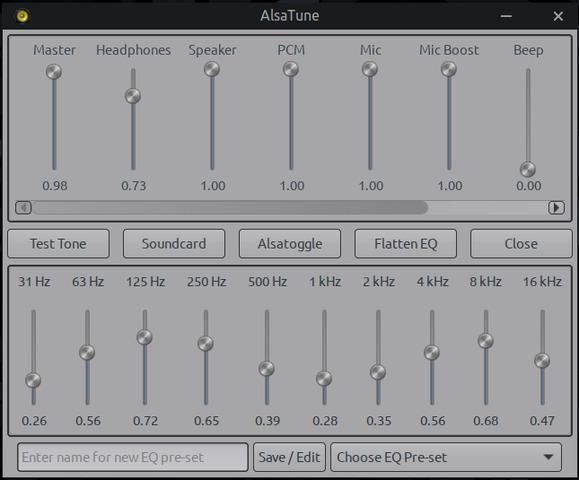
Stuff like this is why I made AlsaTune (formerly mxeq), all configurable instantly in one GUI.
Unfortunately doesn't work in DE's with built-in mixers, been pondering that issue for a while now, there may be a way around it.
https://sourceforge.net/projects/vuu-do/ Vuu-do GNU/Linux, Devuan-based Openbox systems.
Devuan 6 mate-mini iso, pure Devuan, 100% no-vuu-do. Now with Xlibre as well.
Please donate to support Devuan and init freedom! https://devuan.org/os/donate
https://devuanusers.com/ Apps source : https://git.devuan.org/greenjeans
Offline
#17 2026-03-20 18:47:14
- slonik
- Member
- Registered: 2026-03-20
- Posts: 13
Re: Linux Audio for the hard of hearing
For me, it was enough to increase the speaker volume. The alsamixer command
Offline
#18 2026-03-20 21:26:46
- greenjeans
- Member
- Registered: 2017-04-07
- Posts: 1,765
- Website
Re: Linux Audio for the hard of hearing
^^Good simple solution! The problem starts when a mixer gets involved, here's what alsamixer looks like in a system with pulseaudio:
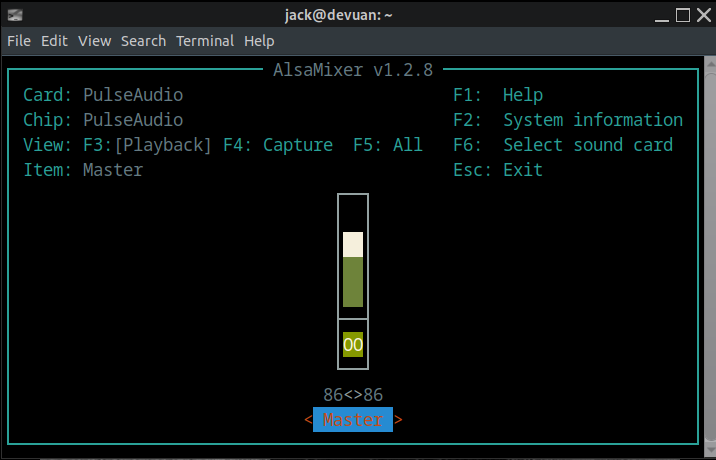
Yeah, ol' retard pottyring doesn't think you need access to such things.
Then there's AlsaTune, which has a completely different philosophy:
https://sourceforge.net/projects/vuu-do/ Vuu-do GNU/Linux, Devuan-based Openbox systems.
Devuan 6 mate-mini iso, pure Devuan, 100% no-vuu-do. Now with Xlibre as well.
Please donate to support Devuan and init freedom! https://devuan.org/os/donate
https://devuanusers.com/ Apps source : https://git.devuan.org/greenjeans
Offline
