
You are not logged in.
- Topics: Active | Unanswered
#1 2026-06-24 08:33:52

Trying to create a shared directory using only manpages as helpsystem.
-------------------------------------------------------------------------------------------------------
TLDR: For a shorter recap see my Devuan wikipage @
I present the wiki page as testing showcase of how i think a wiki could relate to various help systems used from Devuan Project.
-------------------------------------------------------------------------------------------------------
intention (goal) :
Trying to create a shared directory but with the constraint of not using the most accessible help in my system (internet search!!) . And if you have installed the most popular distros that is Firefox / google (by default). (so no web-search, no irc , no im , no forums, no emailists ... funny how most help systems need the net!) .. so that leaves us with 'good??' old manpages and possibly info.
User profiles:I approach the task from the perspective of either a sysadm that forgets always the details of a task or a naive user that is not afraid of tty.
Possible steps:
First: How do i search for related commands ? But that could be a wrong approach. Maybe our intention can be accomplished with a bunch of various commands.
So initially we could need help both in how we use the help inside our offline system and what commands could help me.
Possitble steps / search for commands / help
Know how to search for commands related to your intention. So if we dont remember how to ask our system for help we could go:
   $ help
   ....These shell commands are defined internally. ...
       cd [-L|[-P [-e]] [-@]] [dir]     // interestingly there is no #man cd
                                                // or #man alias but there is #man pwd
   $ help share files
bash: help: no help topics match `sharing'.  Try `help help' or `man -k sharing' or `info sharing'.
    //cool.help states that as far it knows  'man' and 'info' are the help systems to look at !
Possitble steps / search for commands / man
So my system dont seem it can help me unless i know $ man
But that still would help us! We need also $ man man
Indeed $ man man is a good start . (as @blackhole reminded me)
It explains that the system docs it can access and present to us are organized in sections and pages . And a page is structured in sections.
Also its opens the road to $ man -a intro and $ man -k and it refers also to apropos.
Possitble steps / search for commands / man -k (apropos)
But i think even that wont help us. For sharing a folder we must know about groups. That is a basic knowledge for even a forgetfull sysadm. (we already assume that the system has more than one users!!). Interestingly arpinux's debian begginer's handbook (see further in that forum's thread for more related details) refers to Linux's mutliuser nature in the Rights and permissions sections. So the naive but determined tty-fearless user could learn that permissions on a folder could be the answer to sharing.
Possitble steps / search for commands / searching for groups
1. Search for group related commands (# apropos group)
$ apropos group | wc
    122    1077    7284
$ apropos groups | wc
     23     214    1425
Lets narrow a list of commands that seem related: addgroup(8) , adduser(8) , getgroups(2)!! (how could a user know what '2' means?) , groups(1), setgroups(2)
Having already learned about man section we can narrow our list to sections 1 (Executable programs or shell commands),5(File formats and conventions),7(misc), 8 (System administration commands (usually only for root)).
$ apropos -s 1,5,7,8  groups | wc
   17     157    1037
Interstingly (for me!) root will give us the same :
# apropos -s 1,5,7,8  groups | wc
     17     157    1037
Still 17 commands are a lot. In worst case the forgetfull admin should read all the man pages ! (i wonder if i could pipe apropos results to man or another pager...)
But looking apropos's results shorts descriptions i guess we should start from groups(1) print the groups a user is in and addgroup (8) - add or manipulate users or groups.
(here we miss groupmod .. not because apropos wont find it but because
# apropos  -s 1,5,7,8 group | wc
     57     534    3614
. So we should search among more commands.
Our plan
So now a plan can be formulated:
create a folder # mkdir /home/sharedfolder
create a group (family)
change shared's folder group owner
add your users in that group
do some testing to see if the default permissions suits you.
Our plan / create the shared folder
Ok. Lets create the shared folder. If we choose /home as our parent dir then only root can create it. Also only root can call addgroup.
And only the root must change the folder's group.
Our plan / create the family group
$ man addgroup
   Add a group
       If  adduser is called with the --group option and without the --system option, or addgroup is called respectively, a
       user group will be added.
# addgroup family
bash: addgroup: command not foundAt that point i think our naive user will stop. (no internet)
A debian quirk makes even for root addgroup not accessible.
# sudo apt-file search addgroup
adduser: /usr/sbin/addgroup
So try again:
# /usr/sbin/addgroup family Our plan / validate new group creation
Now it'd be handy to validate that our group was created. But how ? The command we have found so far wont help us. So lets believe that if linux wont say anything is a good sing .(see unix philosophy @.) ( hint: again look at # apropos -s 1,5,7,8 group and have faith .. )
Our plan / change group owner of our sharedirecory
Now how do we change the group owner of our /home/sharedfolder ?
# apropos permissions
...
access (2)           - check user's permissions for a file
chmod (2)            - change permissions of a file
...
Here again the previous apropos command bites us. We need chown . So again we'r stuck. man pages are indifferent to our intentions or for what purpose we want to use a commands.
In worst case we must backtrack and look at # apropos -s 1,5,7,8 group having more faith at the short descriptions.
So we backtrack. (no internet ).
# man chown   // good description guides us here well.
# ls -al
...
drwxrwxr-x  2 root root  4096 Jun 24 10:33 sharedFolder
...
# chown root:family sharedFolder
# ls -al
...
drwxrwxr-x  2 root family  4096 Jun 24 10:33 sharedFolder
...
Our plan / add our user to the new family group
Dont loose faith. We are near the end!!... We must add our users to the family group we have created and sharing magic will start.
If at each user we do: $ groups we'll see the groups our users belong in. We want to add the 'family' group to that list.
Apropos to help.. look at # apropos -s 1,5,7,8 user
Check # man usermod
# /usr/sbin/usermod -a -G family alex
# /usr/sbin/usermod -a -G family olga

Alternatively :
/usr/sbin/groupmod -a -U alex,olga family
Our plan / do some testing
login as alex:
$ cd /home/sharedFolder/
alex@familypc:/home/sharedFolder$ ls
alex@familypc:/home/sharedFolder$ touch test
alex@familypc:/home/sharedFolder$ ls -al
σύνολο 8
drwxrwxr-x 2 root family 4096 Ιουν 24 21:48 .
drwxr-xr-x 6 root root   4096 Ιουν 24 10:33 ..
-rw-rw-r-- 1 alex alex      0 Ιουν 24 21:48 test
I think we're ok.
Last edited by chomwitt (Today 08:34:44)
Online
#2 2026-06-24 08:49:02
- blackhole
- Member
- Registered: 2020-03-16
- Posts: 223
Re: Trying to create a shared directory using only manpages as helpsystem.
The first step is:
% man manLast edited by blackhole (2026-06-24 08:49:18)
Offline
#3 2026-06-24 08:52:35
Re: Trying to create a shared directory using only manpages as helpsystem.
@blackhole thanks . noted . But what if my forgetfull - naive sysadm (or daring user)dont remeber that ?
So a forgetfull sysadm should first (as you propose) remember how to use the help system.
That seem correct. But how could (s)he remember that $ man man works ?
I think most propably s(he) would try $ help $ get-help ( :-) )
Last edited by chomwitt (2026-06-24 08:58:04)
Online
#4 2026-06-24 12:20:55
- rolfie
- Member
- Registered: 2017-11-25
- Posts: 1,461
Re: Trying to create a shared directory using only manpages as helpsystem.
What I miss in the man pages are examples for at least standard applications. manpages usually just list the options.
Offline
#5 2026-06-24 14:34:39
Re: Trying to create a shared directory using only manpages as helpsystem.
@rolfie At least in my stated goal man pages dont seems to help. Although the task could seem rather trivial (create a shared dir) . Debian has online a basic user guide @ (They now offer it also in a deb package (debian-beginners-handbook-en_13.3_all.deb) .But i dont think is in the repos yet. I think it'd be a good idea install images to have such a package.
Maybe the Devuan user installation guide @ could also be included in such a package.
Last edited by chomwitt (2026-06-24 14:52:09)
Online
#6 2026-06-24 15:34:57
- stargate-sg1-cheyenne-mtn
- Member
- Registered: 2023-11-27
- Posts: 495
Re: Trying to create a shared directory using only manpages as helpsystem.
mostly out of curiosity as to the quality and format of offline materials...
went to link @chomwitt provided:
https://debian-beginners-handbook.arpinux.org/index-en.html
and then further:
https://debian-beginners-handbook.arpinux.org/trixie-en/index.html
and downloaded the 17MB 267page pdf(warning: direct link to pdf download)
*ttps://debian-beginners-handbook.arpinux.org/trixie-en/download/the_beginners_handbook.pdf
fun read so far.
ymmv.
Be Excellent to each other and Party On!
https://www.youtube.com/watch?v=rph_1DODXDU
https://en.wikipedia.org/wiki/Bill_%26_Ted%27s_Excellent_Adventure
Do unto others as you would have them do instantaneously back to you!
Offline
#7 2026-06-24 17:06:11
Re: Trying to create a shared directory using only manpages as helpsystem.
As for the .deb packaged guide. I downloaded and installed it.
$ sudo dpkg -i debian-beginners-handbook-en_13.3_all.deb

$ dpkg -L debian-beginners-handbook-en
/.
/usr
/usr/bin
/usr/bin/debian-beginners-handbook-en
/usr/share
/usr/share/applications
/usr/share/applications/debian-beginners-handbook-en.desktop
/usr/share/debian-beginners-handbook-en
/usr/share/debian-beginners-handbook-en/the_beginners_handbook.pdf
/usr/share/doc
/usr/share/doc/debian-beginners-handbook-en
/usr/share/doc/debian-beginners-handbook-en/README.Debian
/usr/share/doc/debian-beginners-handbook-en/changelog.gz
/usr/share/doc/debian-beginners-handbook-en/copyright
/usr/share/man
/usr/share/man/man1
/usr/share/man/man1/debian-beginners-handbook-en.1.gz
/usr/share/pixmaps
/usr/share/pixmaps/debian-beginners-handbook-en.png
It basically a pdf. It has a nice touch though. It installs a script command that open the pdf:
#!/bin/sh
xdg-open /usr/share/debian-beginners-handbook-en/the_beginners_handbook.pdf &
exit 0
Also as for the guide's history i found here the older versions @ and a 2017 version on the internet archives @
As for the authors he has the nick arpinux .(website: @) and the guide is released under the WTFPL @
Last edited by chomwitt (2026-06-24 17:25:49)
Online
#8 2026-06-25 00:07:08
- fanderal
- Member
- Registered: 2017-01-14
- Posts: 137
Re: Trying to create a shared directory using only manpages as helpsystem.
Don't know if it's of use but included in the x11-apps pkg is xman, which may be of help to 'point and click' users. Inputting xman gets a tiny window that must be enlarged to use. Inputting xman -notopbox in a terminal (or script in menu), opens the Help page with Options and Sections menus at the top left, and a list of default key bindings. Colors can be set: xman -notopbox -bg black -fg green, and Ctrl+q quits.
Last edited by fanderal (2026-06-25 00:14:13)
Offline
#9 2026-06-25 01:54:12
- EDX-0
- Member

- From: Guatemala
- Registered: 2020-12-12
- Posts: 246
Re: Trying to create a shared directory using only manpages as helpsystem.
something that definitely helps for streamlining the usage of manpages is the capability to fuzzy search manpages with in search previews of the manpage, that way you can read some of what information it has before opening it with man proper
and as it turns out i happpen to have a script for that leveraging fzf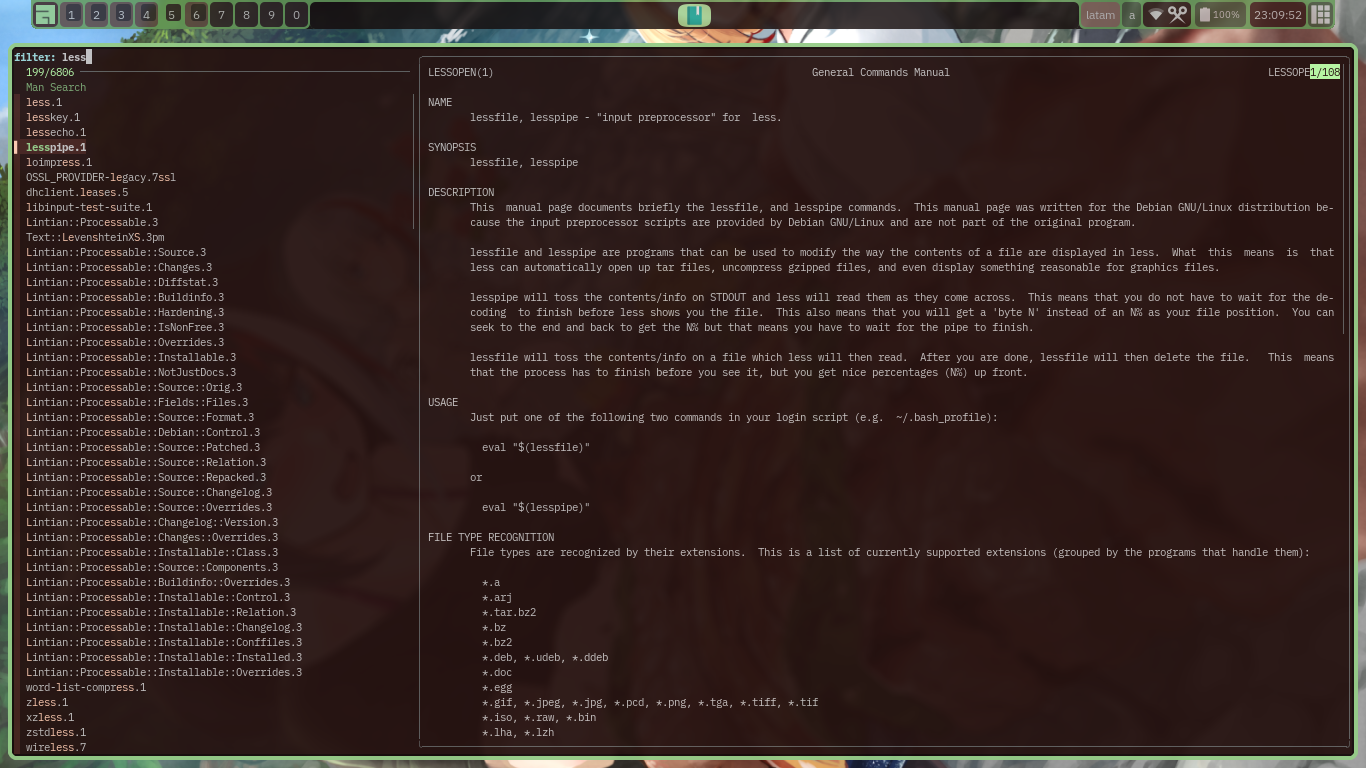
https://github.com/eylles/mansearch
could probably write a manpage for it, put out a release tag and maybe look to package it for debian if there's any interest
Offline
#10 2026-06-25 14:33:47
Re: Trying to create a shared directory using only manpages as helpsystem.
Thanks @EDX-0 and @fanderal . xman surely could help in my no-internet scenario to make man look more accessible . Also fuzzy search is surely a boost but it'd be help to put it and a begginers manual in installer images.
Also speaking of user guides let me remind the FreeBSD Handbook @. But i dont think is contained in a FreeBSD installation.
Last edited by chomwitt (2026-06-25 14:46:28)
Online
#11 2026-06-25 16:12:38
- chris2be8
- Member
- Registered: 2018-08-11
- Posts: 375
Re: Trying to create a shared directory using only manpages as helpsystem.
The most likely scenario is that a new install can't connect to the internet. So a note in the Readme that came with the distro saying which man pages to read (eg networkmanager if the distro uses that) would point the user the right way.
Of course there are a lot of reasons a network connection could fail, but at least they would have some chance of fixing it.
Offline
#12 2026-06-25 18:47:18
- EDX-0
- Member
- From: Guatemala
- Registered: 2020-12-12
- Posts: 246
Re: Trying to create a shared directory using only manpages as helpsystem.
rather than a begginers manual i'd push the idea of a "welcome app", which is to be a sort of "hub" app that autostarts and is available to run as is, the hub app would show options to launch things like the helpsystem, manual page search, software installation (name your favourite "software store" type program from synaptic to aptitude or apt-ui), set alternatives, etc...
Offline
#13 2026-06-27 09:28:13
Re: Trying to create a shared directory using only manpages as helpsystem.
+1 for @EDX-0's proposition / linux or devuan new users / fresh install (or liveISO) / 'welcome' app.
Some additional propositions :
@chomwitt's proposition / welcome app / add a chatbot backend tied to an irc local client . It doesnt have to be LLM level. Even adventures of the 80s had interesting text parsers!. I remember LarryLaffer 's designer explaining in a video how he collected hundreds of possible questions from beta testers and aligned his game text parser to these questions!
@chomwitt's proposition / welcome app / offer offline copy of Devuan site , Devuan install guide and currently a variation of Debian begginers handbooks (also see if it's @exercises can be downloaded)
@chomwitt's proposition / create 'man devuan' page.
@chris2be8 proposition / offer help to establish connection to internet offering specific and general advices .
(that could be tied to the @EDX-0's welcome app.)
@chomwitt's proposition / welcome app / offer connection to a irc devuan channel for new users
@chomwitt's proposition / installer / linux newcomers / history&basic usage in loading screens : Installer by default (or in less powerfull mode) could present unix-linux-debian-devuan history snippets intermixed with basic user knowledge. (unix mantras etc) .
Last edited by chomwitt (2026-06-27 11:19:14)
Online
#14 2026-06-27 15:59:39
- EDX-0
- Member
- From: Guatemala
- Registered: 2020-12-12
- Posts: 246
Re: Trying to create a shared directory using only manpages as helpsystem.
well the welcome app could take notes from bunsenlab's bunsen-welcome and antix's antix-control-center
Offline
#15 Today 08:29:06
Re: Trying to create a shared directory using only manpages as helpsystem.
I have created Devuan wiki page titled Help to new users : @
I present the wiki page as testing showcase of how i think a wiki could relate to various help systems used from Devuan Project.
I have transfered some ideas presented here there. Tell me if you dont like ideas trasnfered there.
In a few words a wiki (remote text-collaboration website) could be a slow-paced user-admin workflow integrator incubator. That would position it (as a help system) in the opposite direction from a fast-paced-critical im or irc helpsystem-channel. In my test page at the top there a category tag. There a wiki user could see all user related efforts to formulate related workflows and express opinion on a user usefullness gradient and collaborate on a consensus building common wikipage.
So if you find the idea promising you could
ask wiki admin onefang in the irc #devuan-wiki to create an account for you .
create a personal wiki space @
post on a wikipage your worklow and
link it to the same category [[!SharingFiles]]. @
All these are personal views-ideas. I am a user of the Devuan wiki.
For my general views : HelpSystemSemantics @
Last edited by chomwitt (Today 08:30:36)
Online
#16 Today 10:56:51
- EDX-0
- Member
- From: Guatemala
- Registered: 2020-12-12
- Posts: 246
Re: Trying to create a shared directory using only manpages as helpsystem.
one thing
there's a lack of really good and clear documentation to write man pages, i know there are videos out there, forum posts and articles about writing documents with roff and some even delve on the differences between roff dialects and implementations like groff, nroff, troff, etc... but they all have the same problem, they are written as narrations/articles which isn't the ideal form to ingest information dense topics, i find the best way to ingest and digest any topic with high information density is through the structured sections of wiki pages and ironically man pages as those are also structured by sections...
so, knowing that there are man pages that need to be written for this project it would be nice to have a wiki page and a manpage about writing manpages, and i know there will be some that will say "just write in asciidoc and convert to a manpage" and i'm not invalidating that but a manpage is not a mystical lost language, it is just roff, which is admittedly not great to write by hand but not impossible, so covering how to write a manpage by hand shouldn't really be a "no one will ever do that", that said for the task of writing the wiki page and the manpage that are to have the refference on how to write manpages both by hand and asciidoc it would make sense to write the source in asciidoc so it can be "easily" converted to both formats
for some repos i write manpages directly in roff and they come out okay cuz i cheat copying the manpages of other projects as template/base (usually the sxiv/nsxiv manpage) and editing it, but doing that has limits like when i want to add some usage or even code examples onto the manpage which i've had to format in less than ideal manners...
Offline
#17 Today 12:09:18
- ralph.ronnquist
- Administrator
- From: Battery Point, Tasmania, AUS
- Registered: 2016-11-30
- Posts: 1,691
Re: Trying to create a shared directory using only manpages as helpsystem.
It appears the section 7 man page for "man" has been moved into the "groff" package, and changed name to "groff_man". So, with "manpages" and "groff" packages installed, and of course the "man-db" package, you should have the command man 7 man providing a good reference manual for writing man pages.
As noted by @chomwitt there is a proliferation in documentation systems. In actual practice, the situation that historically started with :man pages", has been successively aggravated in time by a chain of successive concerted attempts to make "a better help system", through 1, 2 or a few year spurts into new-system setups and tooling, and then simply dropping the ball upon the humongous task of modifying all existing documentation for the new-system approach.
Nowadays there also seems to be effort to break up (or down) "man pages" by collating them split off from their subjects into side packages, and many sorts of destructive actions, that when questioned get motivated by statements like that the man pages are too ugly, too hard to understand or to out-of-date etc.
In any case, in my view it remains essential that software gets documented in respect of how to use it (as well as ideally in terms of design principles, actual implementation choices and even sub system architecture).
Offline
#18 Today 13:46:06
- greenjeans
- Member

- Registered: 2017-04-07
- Posts: 1,664
- Website
Re: Trying to create a shared directory using only manpages as helpsystem.
Don't know if it's of use but included in the x11-apps pkg is xman, which may be of help to 'point and click' users. Inputting xman gets a tiny window that must be enlarged to use. Inputting xman -notopbox in a terminal (or script in menu), opens the Help page with Options and Sections menus at the top left, and a list of default key bindings. Colors can be set: xman -notopbox -bg black -fg green, and Ctrl+q quits.
Very cool, thanks for posting that, learned something new today. 
https://sourceforge.net/projects/vuu-do/ Vuu-do GNU/Linux, Devuan-based Openbox systems.
Devuan 6 mate-mini iso, pure Devuan, 100% no-vuu-do, mostly 
Please donate to support Devuan and init freedom! https://devuan.org/os/donate
https://devuanusers.com/
Offline
