
You are not logged in.
- Topics: Active | Unanswered
#1 2025-01-17 14:32:38
- SpongeBOB
- Member

- From: Brussels
- Registered: 2022-02-07
- Posts: 169
Is it possible to install a package permanently on Live ?
Hi,
Is it possible to install a package / program permanently on a Live version ?
or it's only possible by creating an .iso file ( refractasnapshot and refractainstaller for example )
and if only possible trough .iso can refractasnapshot work directly on a Live session ?
Thanks.
Linux noob, plz be kind 
Offline
#2 2025-01-17 15:04:04
- Camtaf
- Member
- Registered: 2019-11-19
- Posts: 569
Re: Is it possible to install a package permanently on Live ?
Add your program whilst running 'live', take a snapshot, put that snapshot onto your disk - that's how I've done it.
Offline
#3 2025-01-17 15:17:19
- SpongeBOB
- Member
- From: Brussels
- Registered: 2022-02-07
- Posts: 169
Re: Is it possible to install a package permanently on Live ?
Thank you Camtaf 👍
Linux noob, plz be kind
Offline
#4 2025-01-17 19:18:08
- fsmithred
- Administrator

- Registered: 2016-11-25
- Posts: 2,993
Re: Is it possible to install a package permanently on Live ?
If you run refractasnapshot in a live session, be sure to edit the config file to use some real storage space for the work directory and the snapshot directory.
If you make a live-usb with an extra partition for full persistence, you can install packages and they will still be there on the next reboot. If you run apt-upgrade and apt-update on such a system, it will install the updated packages into the persistent volume. You could keep updating such a system until you fill up your usb stick. Better to update the iso and re-image the read-only part of the stick.
Offline
#5 2025-01-18 14:12:34
- SpongeBOB
- Member
- From: Brussels
- Registered: 2022-02-07
- Posts: 169
Re: Is it possible to install a package permanently on Live ?
Thank you fsmithred,
I've installed the version 10.4.1 of refractasnapshot
I've edited the /etc/refractasnapshot.conf to use the hard-drive for the workinf folder and .iso output.
run it, generated the .iso make a usb dongle with it.
boot the laptop the boot process completed ( passed the grub etc.. ) for 3 min the screen was black then the xfce desktop appeared, mouse cursor too but everything seem to be frozen... Any ideas ?
Last edited by SpongeBOB (2025-01-18 14:13:49)
Linux noob, plz be kind
Offline
#6 2025-01-18 16:07:32
- fsmithred
- Administrator
- Registered: 2016-11-25
- Posts: 2,993
Re: Is it possible to install a package permanently on Live ?
The refractasnapshot log file would be a good place for hints, but I didn't think to tell you to save it. It can be found at /var/log/refractasnapshot.log but since you were in a live session, that file is gone. (Unless that same live system is still running and hasn't been rebooted.)
How did you make the live-usb? If you used dd or cat to image the isohybrid, I don't think you'll be able to make a second partition. That doesn't seem to work in all situations. I use refracta2usb to make a live usb and it will set up the persistent partition for either full persistence (that's what you want) or else just a persistent /home. It's not in the repo. You can get it here: https://sourceforge.net/projects/refrac … -2.4.3.deb
Other live-usb software might work, but I don't know which. First partition should be fat32 with boot flag and second should be ext2/3/4 with a persistence.conf in the root of the persistent volume. See 'man live-boot' for more details.
Offline
#7 2025-01-19 01:10:00
- dzz
- Member
- From: Exmouth, South West England
- Registered: 2016-12-01
- Posts: 123
Re: Is it possible to install a package permanently on Live ?
Is it possible to install a package / program permanently on a Live version ?
If the package is not so large or complex and doesn't call update-intramfs, you can use live-config's "live-hook" mechanism.
You can write a simple live-hook script (which could call e.g. dpkg -i /path/to/package or even another set of subscripts) and place it on any present media/disk, inside or outside the iso. It's automatically activated via the cmdline.
man live-configis a learning curve but very well documented.
The package would of course need all it's deps sorted first. Script those in order and it should work.
Note the need to use wget-style absolute paths (file:///whatever), that's the awkward one.
Works here..
EDIT: If you use full persistence also, maybe you can then disable your hook script, since it will be already merged into the live system.. ?
Last edited by dzz (2025-01-19 02:11:03)
Offline
#8 2025-01-19 04:09:06
- greenjeans
- Member

- Registered: 2017-04-07
- Posts: 1,765
- Website
Re: Is it possible to install a package permanently on Live ?
As fsmithred said, it greatly depends on what you used to create the liveUSB.
I would use Refracta2usb or Mintstick to get best results. Mintstick won't get you persistence, Refracta2usb will.
There is also iso-master, but i've never tried it so have no idea if that would work for your scenario.
https://sourceforge.net/projects/vuu-do/ Vuu-do GNU/Linux, Devuan-based Openbox systems.
Devuan 6 mate-mini iso, pure Devuan, 100% no-vuu-do. Now with Xlibre as well.
Please donate to support Devuan and init freedom! https://devuan.org/os/donate
https://devuanusers.com/ Apps source : https://git.devuan.org/greenjeans
Offline
#9 2025-01-19 10:24:30
- SpongeBOB
- Member
- From: Brussels
- Registered: 2022-02-07
- Posts: 169
Re: Is it possible to install a package permanently on Live ?
Thank you very much to all of you !
So yes indeed, I tried to copy the .iso generated by refractasnapshot with dd and also rufus...
I've downloaded Refracta2usb , read the /usr/lib/refracta2usb/help_r2u.txt
Now I'm trying to copy/install the .iso file trough refracta2usb
So far I've done the
dd if=/dev/zero of=/dev/sdX bs=512 count=4096
Formatting the stick, but which size should have the first (vfat) partition ? and what will be inside ? the OS (devuan ? ) and if I make a second partition it will be for the persistent storage, right (I don't plan to use it right now)
I plan to boot this live stick in ( load in ram )
Then which ISO mode should I choose ? ISO_1 or ISO_2 ?
Last edited by SpongeBOB (2025-01-19 10:26:26)
Linux noob, plz be kind
Offline
#10 2025-01-19 10:33:20
- SpongeBOB
- Member
- From: Brussels
- Registered: 2022-02-07
- Posts: 169
Re: Is it possible to install a package permanently on Live ?
Something else,
After dd if=/dev/zero of=/dev/sdX bs=512 count=4096 I run gparted
created a partition table type gpt
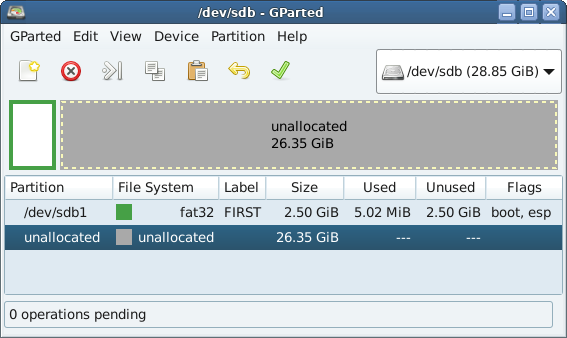
then when I choose ISO_2 (to try) in the GUI I got
The boot flag is not set on /dev/sdb1
Thanks.
Linux noob, plz be kind
Offline
#11 2025-01-19 14:16:16
- fsmithred
- Administrator
- Registered: 2016-11-25
- Posts: 2,993
Re: Is it possible to install a package permanently on Live ?
You need to make the first partition big enough to hold the iso (packed or unpacked) plus kernel and initramfs. If you plan on adding more than one iso to the stick, then make it big enough to hold all the isos. ISO_1 or ISO_2 will work. One unpacks the iso file and the other one keeps it intact and uses the 'fromiso=' boot option. That option is useful if you think you want to have a copy of the intact iso to use it somewhere else or share it.
If you think you might want to use the stick to share files with windows computers, make the first partition big enough to hold those files, too.
Yes, you need to give the fat32 partition the boot flag. You can do that in gparted.
To boot to ram, you need to add the boot option: toram=/path-to/live/filesystem.squashfs (where path-to is the name you give the directory that holds the OS.) I'm not sure how or if that will work with persistence. You would only boot the read-only live system without any of your persistent changes. There might be a way to do it using overlays. Let me know if you figure it out.
You could boot to ram and manually mount a data partition to hold selected files, but that's not the same thing as persistence.
Look in the refracta2usb help to see what the disk layout looks like on the usb stick. Diagrams are near the bottom.
Offline
#12 2025-01-19 18:13:26
- dzz
- Member
- From: Exmouth, South West England
- Registered: 2016-12-01
- Posts: 123
Re: Is it possible to install a package permanently on Live ?
@SpongeBOB: Why not try msdos partition table?
R2u uses syslinux/isolinux, it's more complex to get that working for gpt (and you don't need gpt)..
Last edited by dzz (2025-01-19 18:22:36)
Offline
#13 2025-01-19 20:37:03
- greenjeans
- Member
- Registered: 2017-04-07
- Posts: 1,765
- Website
Re: Is it possible to install a package permanently on Live ?
^^^What dzz said.
Kinda confused here SpongeBOB, are you trying to make a liveUSB or are you trying to do a conventional install on a stick?
What live version?
Gparted: create new ms-dos partition table. Create fat32 main partition big enough to hold iso with some room to spare. Create 2nd partition in ext2 and name it "persistence. Then add boot flag to the first partition. done.
R2USB: use 01 or 02 first, I use 02 with the "findiso" option, finish that operation. It will want to install syslinux, let it do so. When done it will take you back to menu, then choose the option to create the persistence partition, run that, when it's done you are done, exit program.
You will be able to edit the boot entries and persistence.conf during the install or you can simply do it afterwards.
https://sourceforge.net/projects/vuu-do/ Vuu-do GNU/Linux, Devuan-based Openbox systems.
Devuan 6 mate-mini iso, pure Devuan, 100% no-vuu-do. Now with Xlibre as well.
Please donate to support Devuan and init freedom! https://devuan.org/os/donate
https://devuanusers.com/ Apps source : https://git.devuan.org/greenjeans
Offline
#14 2026-02-24 09:29:57
- tyder
- Member
- From: Oslo, Norway
- Registered: 2016-12-19
- Posts: 53
Re: Is it possible to install a package permanently on Live ?
I haven't tried with Devuan yet, but I have handled Debian 13.3.0 with complete success. Both on USB sticks and external SSD disks.
I have found legacy grub to be the most reliable companion, and I haven't needed any special tools.
I use three partitions (minimally)
1. An ext2 partition for booting
2. An ext4 partition for compressed live images
3. An ext4 partition for persistent storage
All these partitions can hold several OS versions, and one version (I have used Debian 11.2.0 as the basis for the last 4 years) may go through several iterations (typically 3-6) of compressed live images during a lifetime of 2-5 years.
This can be done on a 32+ GB USB 3.X stick with 30+ MB/s writing times. Using a slower stick is hardly worthwhile. A SATA disk or an m2-disk in an external case is simpler in daily use, but hardly necessary. 64GB is a practical mimimum, 256 GB kind of sweet spot. If you think you need more, you haven't really tried to be space efficient. If you are sure you need less, you have probably not lived through the full OS version upgrade blues.
Using live versions with persistent storage are, traditionally, called Poor Man's Installs (PMI). There is a tradition going back (at least) to Klaus Knopper and KNOPPIX. He made a 32-bit version-hybrid Debian derivative, therefore very hard to upgrade, but very, very useful for a couple of years.
In the Debian context, a Poor Man's Install is based on 4 files:
1. vmlinuz - the kernel. Which does not have to be changed during the lifetime of an OS version, but of course, YMMV.
2. initrd.gz - often Busybox-based init code. Hackable, I once made a pure 64-bits Knoppix version starting with a modified initrd.
3. filesystem.squashfs - the compressed live image. Which you may recreate as needed. I just expanded the original Debian 3.2 GB Lxqt image to 8.8 GB, including ca 250 R-cran packages plus GIMP, VLC, WXMaxima etc. If you think you have to grow the image way above 10 GB, consider Docker for some of the large components.
4. persistence. A loop-mounted overlay file system, typically 2-20 GB. No, you don't have to restrict yourself to small programs when you work based on a live system. Oracle XE, Postgresql and even Axiom (math theorem proving etc) work just fine.
In the booting partition, booting files are organized in directories by OS releases. For example. I have deb910 (LXDE) , deb1120 (LXDE), deb1330Qt (LXQt) to mention a few. Upgrading kernel/initrd is of course possible here, and may be best practice. But I have never experienced an urgent need for that, and I think it is safer to start a new OS version install than upgrading the kernel. This partition is mostly read-only.
The live image partition is read-only in everyday use. But it may be updated several times.
The persistence partition holds 1-2 persistence files for each OS version, union mounted with the compressed image: The one in current use and eventually the previous. When it starts to get full, it is time for 'remastering', simply copying the whole union file system into a directory, squashfs-compressing it into a new live image and setting up a new persistence file.
Surprisingly, old legacy grub is just fine for booting in this context, and it even works on a USB stick set up with three (or more) Linux partitions. Here is the booting stanza for Lxqt Debian 13.3.0 with one 'remastering'. This is on an internal disk, using a stick would be similar.
title Debian 13.30 64 bits lxqt live sda3 v1 persistence sda6
      root(hd0,0)
      kernel  (hd0,1)/boot/deb1330Qt/vmlinuz boot=live config quiet splash initrd=(hd0,1)/boot/deb1330Qt/initrd.img  bootfrom=/dev/sda3 live-media-path=deb1330/live1 persistence persistence-path=deb1330Qts/pers1  keyboard-layouts=no
      initrd (hd0,1)/boot/deb1330Qt/initrd.img
Offline
