
You are not logged in.
- Topics: Active | Unanswered
#76 Re: Other Issues » [SOLVED] Reloading wifi interface and kernel module without reboot » 2022-01-09 17:29:57
after a suspend, the driver crashes as evident in dmesg
Could be relevant to see the message you get?
#77 Re: Installation » Devuan takes a long time to start up » 2022-01-09 17:27:07
I have done the same with the other systems and nothing wrong ever happened
Sometimes we do something slightly different and we are not aware of doing it. I'm quite sure that there are good technical explanaitions on what you are talking about.
For more that 25 years I've been learning a lot from what was apparently a malfunction of my UNIX-like system: from Coherent all the way to Devuan. Almost always I was wrong, not the system.
In this very forum I read every day a lot of expert advice.
The explanaition of HoaS about the delay of your system at boot is excelent. I spent a rewarding amount of time reading it. Thanks, HoaS.
#78 Re: Installation » xorg start only as super user! why? » 2022-01-08 09:59:32
an totally UNfriendly system did Linux become along the years...
There are a lot of Linux distros to choose from. Here Devuan users want to know how manage our systems. Other distros take a different way. Nobody is forced to use an specific distro.
#79 Re: Other Issues » Escaping the Kiosk » 2022-01-07 10:17:49
How do people here ... store their personal data?
My main desktop has a 2TB spinning disk that holds /home; I backup it on a weekly basis, rotating four external disks plugged through SATA. All partitions are ext*. No trouble in more that 20 years; exceptions: disks eventually fail, you HAD to backup all your data beforehand.
I've two servers at home: same policy as desktop, also no problems. 20 years and counting.
Defrag? Nope.
#80 Re: Hardware & System Configuration » Interesting article - Ventoy » 2021-12-13 11:38:33
But the Devuan ISO image has a rescue mode...
I understand your point. But I was thinking on fully graphical systems, like System Rescue CD, for instance. Sometimes I want to check a new computer, wipe out a hard drive, and prepare some unusual partition scheme. And using System Rescue CD (or Knoppix, or similar) for these tasks is very comfortable. And I don't want to talk of others OS we usually are not very fond of here  ...
...
#81 Re: Hardware & System Configuration » Interesting article - Ventoy » 2021-12-12 09:44:23
Why do people need so many live images?
I have a bunch of USB devices with instalers of a few versions of Devuan, both 32 bits and 64 bits, and live rescue systems, just in case.
A solution like Ventoy could save me a few sticks. Using it is in my "to do" list.
#82 Re: Other Issues » [SOLVED] Need to reset root password » 2021-11-29 19:50:55
How about having your instalation media still around and using it in rescue mode?
#83 Re: Hardware & System Configuration » boomaga is not printing » 2021-11-10 10:21:23
From https://github.com/Boomaga/boomaga:
Please, look through the error messages in CUPS logsAny message there?
#84 Re: Installation » Status of lilo » 2021-10-25 09:04:28
They run one single operating system ... Lilo presents a simple way of handling specifications for the boot process
Installing Devuan 4 I tackled the same issue as you. I managed to use GRUB in a very simple way, trying to mimic the LILO behaviour. The HoaS aproach is appreciate; mine was using this /etc/default/grub:
GRUB_DEFAULT=0
GRUB_HIDDEN_TIMEOUT=0
GRUB_TIMEOUT=0
GRUB_DISTRIBUTOR="Devuan"
GRUB_CMDLINE_LINUX_DEFAULT=""
GRUB_CMDLINE_LINUX=""
GRUB_BACKGROUND=""
GRUB_DISABLE_RECOVERY="true"
So far, so good.
#85 Re: Installation » How to have updated firefox-esr in Chimaera? » 2021-10-25 08:57:40
Have Firefox 92.0 running in Chimaera
With or without pulseaudio in your system?
#86 Re: Installation » How to have updated firefox-esr in Chimaera? » 2021-10-23 09:24:34
If it is only for Firefox, one can simply download and run the desired version directly from upstream source
I used to do so, but now I cannot deal with Firefox compiled only with pulseaudio and not pure alsa. I dont install pulseaudio in my Devuan systems.
(May be I should try apulse again).
#87 Re: Off-topic » Hello new neighbour » 2021-10-01 09:31:25
Welcome to the forum
I did start with the intent of moving away from kde.
I don't argue about personal tastes, if you want to move away form KDE, it is up to you, of course.
I just would like to say that I'm a KDE user for 15+ years and I could customize KDE in Beowulf to my taste. I've instaled it on several relatives' boxes, with no complaints so far. It feels like and old desktop, but is modern enough in the backend.
So, may be you can play a bit with the almost infinite posibilities of KDE customizations.
Note: I dont use metapackages.
#88 Re: Installation » When did Legacy BIOS cease to exist? » 2021-09-30 17:09:18
Here's a start:
Thanks for the links. I see it is a one by one machine trial and error (unless vendor implements itself). It remembers me 20 years ago, every potencial free software user checking the hardware compatibility before buying. Put the money where your mouth is.
#89 Re: Desktop and Multimedia » incorrect screen size and keyboard not working after lid closure » 2021-09-29 09:15:09
Any ideas?
Please check the size of your swap partition. It should be as big as your RAM o bigger.
#90 Re: Installation » When did Legacy BIOS cease to exist? » 2021-09-29 09:11:28
If a computer or motherboard isn't compatible with either of those, I simply won't buy it.
Agreed. But, how could us know if a motherboard is compatible or not? I dig in the technical specifications of some of them I cannot find if I can disable Secure Boot.
#91 Re: Installation » [SOLVED] USB image - Access Denied error » 2021-09-22 09:14:17
@Élisabeth . . . your tenacity is quite extraordinary! Congratulations!
+1
Still, I would like to know what the hell is going on the Élisabeth laptop. I've been intrigued since her first messages (but unable to help) and I feel that still nobody of us really knows what is happening. May be a bug in BIOS firmware? I said that just like a curiosity beause life is short and Devuan is already running in Élisabeth computer.
#92 Re: Installation » minimal installations: what is the minimal way to install sound » 2021-09-20 09:05:23
May be helpful: Do not use pulseaudio
#93 Re: Installation » How to partition my disk ? » 2021-09-20 08:59:06
I ported a relational database to a UNIX system for the Catastro.
Good to know. Congratulations
#94 Re: Installation » urxvt » 2021-09-20 08:56:24
May be that: configuring-urxvt
#95 Re: Installation » I don't find root and user with password initialilisation » 2021-09-19 08:57:03
Even if you make a sudo install you can afterwards enable root by "sudo passwd root" in a terminal to give root login.
Good point. I did it every time I had to use an stardard Ubuntu system.
But I prefer myself not to enable sudo to the standard user. More secure.
Ageed. My Devuan syetems don't have sudo installed.
#96 Re: Installation » How to partition my disk ? » 2021-09-19 08:54:01
I know that some people feel good about running an "Expert install" even though their need for that is nil
Just for the record, I feel at home using Expert install. I like to see all the options and answer all the cuestions. I did so in my first Debian instalation as a teaching tool for mysef and I do now (20+ years later) to see easily what is going on. Just my 0.02 currency units.
#97 Re: Installation » I don't find root and user with password initialilisation » 2021-09-18 11:37:53
You are so kind to tell the header of the configuration page where did you see "Allow root entry" "yes"
It is under "Set up users and passwords".
If you don't allow root entry, your system is ala Ubuntu or MacOS, you need sudo in front of any administrative command (I don't like it) and you can't login as root.
If you allow root entry, you can write just there your root password. Then, you can login as root or use the su command to became root.
I'm sorry if you already know all this.
#98 Re: Installation » How to partition my disk ? » 2021-09-18 09:33:27
name is your choice (not required)
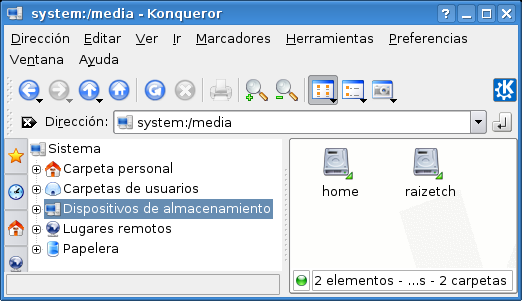
I name the partition as the function it has in the system: root, home, boot, etc. It comes handy when you see them with a file manager. Old example:
#99 Re: Installation » How to partition my disk ? » 2021-09-17 09:55:58
I will need non-free firmware for WiFi. I think there's a package called firmware-iwlwifi.
I'm starting with an ethernet cable so I presume I can add this later.
That is always my course of action. Once you have a system up and running, even minimal, you can use the apt family you install whatever you need. I find pciutils useful to see what is your exact WiFi card.
#100 Re: Installation » I don't find root and user with password initialilisation » 2021-09-17 09:49:38
I always use Expert install and I can tell you that this is very weird. Please check the MD5 of the downloaded files. Double check that you don't miss any screen. Select "Allow root entry" "yes" (I'm not sure about the spelling; anyway I think that your language is not English).
Good luck.
Board footer
