
You are not logged in.
- Topics: Active | Unanswered
#326 Re: Devuan Derivatives » Refracta OS issues and questions :) » 2025-03-07 17:45:21
The installer will recognize more than one existing efi partition and let you choose the one you want, so yes, you have to make it first.
In gparted, make a fat32 partition and give it the esp flag (it'll get the boot flag automatically).
Your motherboard might not let you be the one to decide which efi partition is the real one. And I don't know if having two and switching them by changing the drive order will work or is safe. The usual procedure is just to let linux use the same efi partition as windows and put itself in first place for booting. If you've looked at what's in the efi partition, you can see that there are several bootloaders. You can change the order or manage them otherwise with efibootmgr - depending on how much the motherboard manufacturer felt like following standards. see rodbooks.com for more info on uefi.
#327 Re: Devuan Derivatives » Refracta OS issues and questions :) » 2025-03-07 15:15:27
Nice to see you again and good luck with it. Post again if you run into problems.
BTW, I don't think you can call yourself a noob anymore. I checked my old forum logs. 2014!
Edit: fixed type (the year)
#328 Re: ARM Builds » refractasnapshot-base syslinux arm64 » 2025-03-07 10:37:57
Of course, having someone who knows where to look is even better. Thanks, dzz.
I'm not sure what's up with ssh. In the excalibur isos I've made recently, live-config keeps turning off password authentication. I resorted to making a live-config script to look for 'SSH-ON' in the boot command.
#329 Re: Devuan Derivatives » Refracta OS issues and questions :) » 2025-03-07 10:28:52
1. I find myself fighting with grub a lot more in the last few year. It might not be you. If you have another linux installed, the easy solution would be to install Refracta without a bootloader, then let the other linux find it and add it to the existing boot menu.
You should be able to install to any partition when there are several on the disk and or several disks. The graphical installer will show you lists of partitions with checkboxes. The text installer requires you to enter the correct device name. That's probably something you're doing wrong or misinterpreting. No way to tell from here without more information.
2. Daedalus is the current stable version of Devuan. It's the same as Debian Bookworm (only better). Excalibur is the testing suite, same as Debian Trixie, and Ceres is Sid, always unstable.
3. Command names and file locations differ greatly between the rpm and deb worlds. Getting the scripts to work with both would be a major undertaking.
Newer kernel:
Here's an iso with a minimal graphical system, daedalus (stable) with backports kernel, and I think it has some firmware installed. You could install this and then add whatever you want.
https://get.refracta.org/files/experime … 4_1806.iso
Excalibur isos will be coming soon, but it's still in Testing so there will be frequent changes and possible breakage until it's stable. (maybe by end of year)
#330 Re: ARM Builds » refractasnapshot-base syslinux arm64 » 2025-03-05 21:44:19
Sorry I missed this thread when it was new. Running refractasnapshot without syslinux would result in the script failing because it looks for syslinux/isolinux files to put into the iso. It might be possible to run it and then chroot into the filesystem copy to make changes and then run the xorriso command manually to pack it into an iso file.
I don't have any arm hardware to play with this. If anyone figures out how to do it, please let me know. If someone feels competent enough to try, I can help with pointing where to look in the script so they don't have to follow every strand of spaghetti.
#331 Re: Installation » Radeon 5770 GPU in Daedalus? » 2025-03-04 18:14:50
Do you need to install firmware-amd-graphics? If so, you need to remove the stuff from amd. The script probably has its own removal option.
In daedalus you have to add 'non-free-firmware' to the sections in sources.list to get firmware that used to be in the non-free section. (example: firmware-amd-graphics)
You might need both of those sections, depending on what other hardware you have. (e.g. nvidia, some broadcom)
#332 Re: Devuan Derivatives » Refracta "Good-bye i386" iso » 2025-03-04 18:01:22
hello again, i386.
I replaced/updated the final debian kernel with linux-libre from FSFLA.
https://get.refracta.org/files/testing/ … 4_1613.iso
No kernel source or headers with this one. I selected the kernel that gets all the updates and changes (short term support) and that's probably fine while excalibur is in testing. If I continue with these builds, I'll probably change to the long term support kernel. Or you could do that yourself with 'apt install linux-libre-lts'.
edit: almost forgot this. it's also in the same dir as the iso along with a gpg sig file. sha256sum
d03a863bfdf91425b6b6d640450b7bd2b67c7c9c94c68898b57f918b7ea63fe7 refracta_13_nox_libre_i386-20250304_1613.iso#333 Re: Devuan Derivatives » [SOLVED] Announcing Movuan » 2025-03-03 11:33:26
lxb, I'd like to try your amd64 build. I don't have time to build my own right now. I'll send you an email.
#334 Re: Installation » [SOLVED] Unable to install Daedalus » 2025-03-03 10:42:33
Yes, a new thread for the post-installation issues would be good. That makes it easier to find the useful information in the discussion later.
#335 Re: Devuan Derivatives » [SOLVED] Announcing Movuan » 2025-03-02 22:59:23
There's no problem with fdisk reading the image file. The problem occurs if I dd the image to a usb stick and try to boot that on amd64 hardware. The kernel sees the usb stick when it's plugged in, but it doesn't recognize a block device.
Uh-oh. I just plugged it in again and it did get a device name. But the system is complaining about GPT header and said to fix it with parted. I did that, and now fdisk can read the partitions on the usb. It doesn't boot on my hardware.
#336 Re: Devuan Derivatives » [SOLVED] Announcing Movuan » 2025-03-02 14:33:52
Is there a way to boot the image in qemu or virtualbox? I tried but failed - what is the correct cpu type to use? pine64.org mentions Cortex A53, Allwinner A64/R18 but I don't see those in the qemu list of supported devices.
So instead, I mounted the image file and chrooted into it, installed xserver-xephyr and jwm, and I can get a graphical session. I also tried installing xfce4, but I couldn't get that to run. I also couldn't get gnome to run, but I don't know the command to start it.
I wish I had a pine phone to try it for real (and for other reasons). The mobian site talks about dd'ing the image to usb and booting it on x86 hardware. Is this possible with the movuan image? I did put it on a usb stick, but when I plug it into the laptop, fdisk doesn't see it. Syslog shows usb device, but it doesn't get a block device name. Is there some package I can install that will recognize the partitions on the usb?
git.devuan.org is free. You could put the code there. I don't know if there are any space constraints that would prevent storing images there, and I don't think you can build there.
#337 Re: Installation » [SOLVED] dpkg error while update » 2025-03-01 14:18:49
In addition to backing up your data, you probably should think about moving it to a system that has continued support for the kernel and maybe a system that isn't changing as rapidly as ceres.
Which kernel are you using? Did you manage to get the last one before they removed the 32-bit kernels from ceres? I believe that was 6.10.9. Do you have an alternate strategy for dealing with kernel patches? If so, those of us with old machines would like to know more.
#338 Re: DIY » α-utilz -- a funky version of refractasnapshot/installer » 2025-02-20 20:09:03
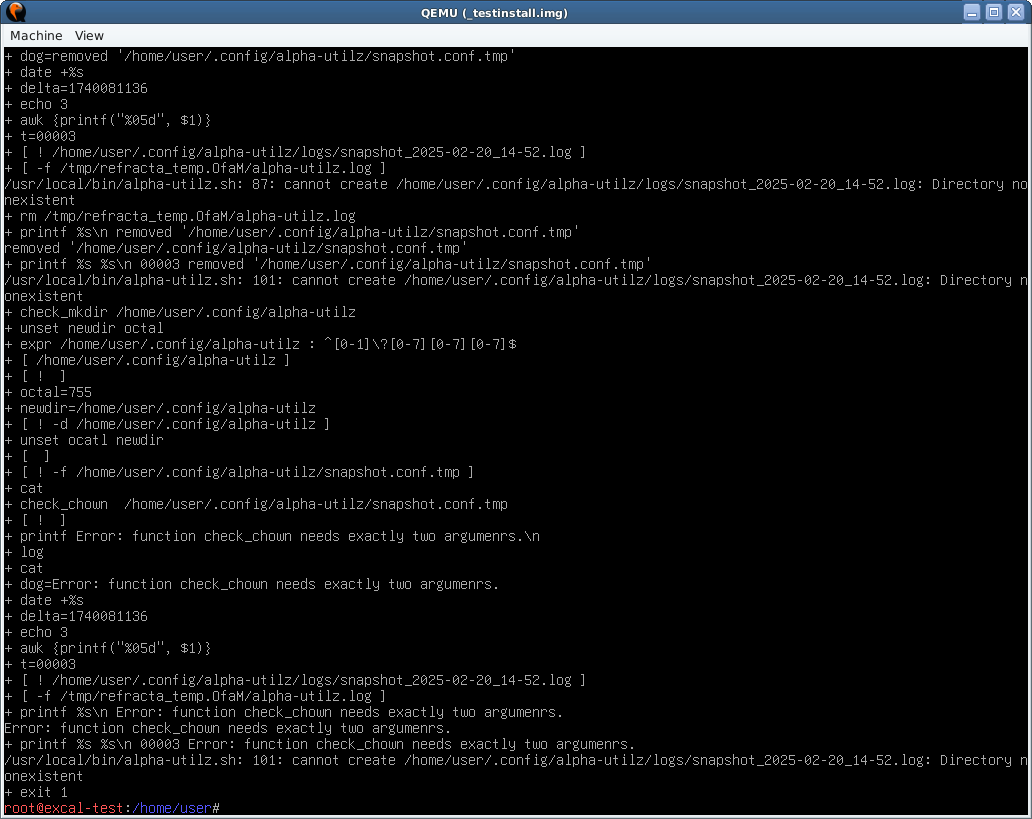
I get the same error as nixer re: function check_chown. It seems like it's confused about where the logfile goes. I added set -x and tee'd the output. That didn't get the last of it, so I also made a screenshot. On re-read, I see that nixer was in ceres and I'm doing this in excalibur, but I don't think that should matter.
text output and screenshot
https://get.refracta.org/files/misc/alphautilz.out
https://get.refracta.org/files/misc/alp … output.png
#339 Re: Hardware & System Configuration » [SOLVED] sudoers.d file for ifup / ifdown » 2025-02-20 16:40:02
couple guesses -
You need to log out and log in for the changes to take effect. (or restart sudo)
I use commas between things in the list, but I also use command aliases.
Cmnd_Alias      HALT = /sbin/shutdown, /sbin/halt, /sbin/poweroff, /usr/sbin/pm-suspend, /usr/sbin/pm-hibernate
Cmnd_Alias      REBOOT = /sbin/reboot, /usr/local/bin/update-machineid
Cmnd_Alias      NET = /sbin/ifconfig, /sbin/ifup, /sbin/ifdown

fsmithred ALL=NOPASSWD: HALT, REBOOT, NET#340 Re: Devuan » [SOLVED] Bring back Clearlooks-Phenix-Cinnabar theme » 2025-02-13 09:49:29
It didn't go anywhere.
http://deb.devuan.org/devuan/pool/main/ … -5_all.deb
Download the package and install with dpkg -i clearlooks-phenix-cinnabar*.deb
Go up one directory level and you'll see the other devuan themes. The only one that won't work on current releases is the purpy theme from 2019.
Cinnabar icons: http://deb.devuan.org/devuan/pool/main/ … .0_all.deb
#341 Re: Other Issues » [SOLVED] linux-image not updated » 2025-02-03 11:58:20
I normally do just apt upgrade and I get the newer kernels. I tried it now and I aborted the upgrade because I got a warning of grave bugs in rsync.
Then I tried
apt install linux-image-amd64which was already installed, and that gets me the newer kernel and headers without the rest of the upgrades.
#342 Re: Off-topic » Statement regarding X community » 2025-01-31 18:57:40
Hey, thanks for clearing up my confusion. I actually thought the post was about computer-related stuff and they were talking about dropping xorg because of security reasons. Unplug your ethernet cable if you want to feel safe.
#343 Re: Off-topic » Statement regarding X community » 2025-01-30 22:55:38
We can assure you that we will provide the xorg packages as long as debian keeps making them. Beyond that, someone would need to fork the packages and maintain them. If you have someone in mind to do that, please get us connected. We only have a handful of maintainers and debian keeps giving us more work.
That twitter post gives me cognitive dissonance. I guess I need to read the new debian social contract. It's obviously much different from the old one.
#344 Re: Installation » [SOLVED] Black screen afte boot » 2025-01-24 19:05:22
Synopsis: You create a keyfile and put it in the root partition. Edit /etc/crypttab so that the keyfile gets used to open your home partition. When you boot, you will enter the luks passphrase to open root, and home will be opened automatically by the keyfile.
https://www.howtoforge.com/automaticall … -a-keyfile
Note: Add a keyslot for the keyfile and keep the passphrase active, in case the keyfile gets lost or corrupted, then you can still use the passphrase.
This one is more detailed:
https://wiki.archlinux.org/title/Dm-cry … n#Keyfiles
A couple notes about encrypted disks.
- The encryption is only effective when the computer is turned off. Turning it on or mounting the drive to another system to access it will not expose your data without entering the passphrase. Once it's open and running, it's no longer hidden in a locked box.
- The unencrypted swap partition is not protected. It might contain sensitive data that could be accessed by booting the system or attaching to another system. Not a good idea if this is a laptop that could be lost or stolen. If you need more that 256mb of swap space, you can make a bigger swapfile.
#345 Re: Installation » Efivarfs, Efibootmgr, hold the grub » 2025-01-23 01:34:04
I think you need to boot the rescue cd, open a shell in the installed system and run grub-install and update-grub. But I've never done an install like yours, so there might be something else to do.
#346 Re: Installation » [SOLVED] Black screen afte boot » 2025-01-22 01:18:02
The live installer won't make a swap partition for you, but it will let you use an existing swap partition. If you still want to use a swap partition, you can run mkswap on it and edit /etc/fstab to use that partition instead of the swapfile. Note that it will be outside your encrypted partitions and insecure.
It also won't set up lvm for you, but it's possible to do it manually using the cli installer instead of the graphical. (run 'refractainstaller' in a terminal for that one.) https://dev1galaxy.org/viewtopic.php?id=2323
That other partitioner you used was cfdisk (for mbr) or gdisk (for gpt).
I didn't expect to see intel graphics. I'm not sure why you got a black screen with the first install.
#347 Re: Installation » [SOLVED] Black screen afte boot » 2025-01-21 10:21:01
To avoid entering a password for both home and root partitions, you could make a keyfile that automatically opens the home partition during boot. This post has a couple of useful links for that: https://dev1galaxy.org/viewtopic.php?pid=38078#p38078
The desktop-live has firmware-amd-graphics installed. If you have amd video, that might explain why it works.
#348 Re: Installation » [SOLVED] Black screen afte boot » 2025-01-20 22:55:07
Press 'e' at the boot menu and add the word nomodeset to the linux line then press ctrl-x to boot. If it's an nvidia problem, this might work. Then you can see what you're doing to install the drivers you need.
If that doesn't work, boot a live system as suggested and at least run lspci so you can see what hardware you have.
#349 Re: Other Issues » Is it possible to install a package permanently on Live ? » 2025-01-19 14:16:16
You need to make the first partition big enough to hold the iso (packed or unpacked) plus kernel and initramfs. If you plan on adding more than one iso to the stick, then make it big enough to hold all the isos. ISO_1 or ISO_2 will work. One unpacks the iso file and the other one keeps it intact and uses the 'fromiso=' boot option. That option is useful if you think you want to have a copy of the intact iso to use it somewhere else or share it.
If you think you might want to use the stick to share files with windows computers, make the first partition big enough to hold those files, too.
Yes, you need to give the fat32 partition the boot flag. You can do that in gparted.
To boot to ram, you need to add the boot option: toram=/path-to/live/filesystem.squashfs (where path-to is the name you give the directory that holds the OS.) I'm not sure how or if that will work with persistence. You would only boot the read-only live system without any of your persistent changes. There might be a way to do it using overlays. Let me know if you figure it out.
You could boot to ram and manually mount a data partition to hold selected files, but that's not the same thing as persistence.
Look in the refracta2usb help to see what the disk layout looks like on the usb stick. Diagrams are near the bottom.
#350 Re: Other Issues » Is it possible to install a package permanently on Live ? » 2025-01-18 16:07:32
The refractasnapshot log file would be a good place for hints, but I didn't think to tell you to save it. It can be found at /var/log/refractasnapshot.log but since you were in a live session, that file is gone. (Unless that same live system is still running and hasn't been rebooted.)
How did you make the live-usb? If you used dd or cat to image the isohybrid, I don't think you'll be able to make a second partition. That doesn't seem to work in all situations. I use refracta2usb to make a live usb and it will set up the persistent partition for either full persistence (that's what you want) or else just a persistent /home. It's not in the repo. You can get it here: https://sourceforge.net/projects/refrac … -2.4.3.deb
Other live-usb software might work, but I don't know which. First partition should be fat32 with boot flag and second should be ext2/3/4 with a persistence.conf in the root of the persistent volume. See 'man live-boot' for more details.
Board footer
