
You are not logged in.
- Topics: Active | Unanswered
#26 2025-09-29 13:37:08
- RedGreen925
- Member
- Registered: 2024-12-07
- Posts: 308
Re: Darkness - ISO Devuan Testing + TDE for AMD64
Passwords are the same as in the first post:
As I explained in the post anything that requires the TDE su password as is asked for with many, perhaps all, of the system tools does not work with the default passwords. Setting a password for the root account allows these tools to work by using it.
Offline
#27 2025-09-29 15:36:48
- greenjeans
- Member

- Registered: 2017-04-07
- Posts: 1,764
- Website
Re: Darkness - ISO Devuan Testing + TDE for AMD64
This looks really nice, i'm not into TDE or KDE but that desktop looks sharp, the wallpapers are gorgeous. Not a fan of having the panel on the side but I bet it would look great at the bottom. 
And in 3 different languages? That's one helluva LOT of work, kudos my friend and also big props for giving Xlibre a shot! I'll have to download this later and take it for a spin. 
https://sourceforge.net/projects/vuu-do/ Vuu-do GNU/Linux, Devuan-based Openbox systems.
Devuan 6 mate-mini iso, pure Devuan, 100% no-vuu-do. Now with Xlibre as well.
Please donate to support Devuan and init freedom! https://devuan.org/os/donate
https://devuanusers.com/ Apps source : https://git.devuan.org/greenjeans
Offline
#28 2025-10-05 08:57:44
- Codalunga
- Member

- Registered: 2025-08-05
- Posts: 12
Re: Darkness - ISO Devuan Testing + TDE for AMD64
Thank you for taking the time to come up with such an interesting spin! I use Devuan + TDE stable as my daily driver, its the combo that made me stop distro-hopping and I can't praise enough how both projects represent a beacon of hope in the modern Linux ecosystem!
With Darkness being on the dev/testing branch of both TDE and Devuan I can't commit to installing it on my production machine, but I wish you all the best with this project!
And the addition of XLibre...? Chef's kiss 🤌
Offline
#29 2025-10-08 14:57:59
- callmetango
- Member
- Registered: 2025-08-23
- Posts: 5
Re: Darkness - ISO Devuan Testing + TDE for AMD64
samhain wrote:
Autumn 2025 Version is out!
I just finished uploading the latest version of "darkness". Biggest changes:
- TDE 14.2-DEVELOPMENT
- Xlibre instead of Xorg - thanks to @callmetango
- new background images
- kernel 6.16.8
- own repository for darkness-specific packages (ATM a package for the repo and the wallpapers)
…
@samhain: Thank you very much for your efforts and for choosing XLibre! We spread the word a little bit:
https://x.com/XLibreDev/status/1975929979922776353
https://bsky.app/profile/xlibredev.bsky … otwn5pmk2h
https://mastodon.social/@XLibreDev/115339036844446679
Offline
#30 2026-02-24 16:08:52
- devuan_dk_fan
- Member
- Registered: 2018-01-10
- Posts: 162
Re: Darkness - ISO Devuan Testing + TDE for AMD64
I really love the TDE idea. Better to reuse code and improve on it then reinvent the wheel. Unfortunately not loving that it is testing. I would use it as a daily driver if it followed stable.
Last edited by devuan_dk_fan (2026-02-24 16:10:31)
Military justice is to justice what military music is to music. - Groucho Marx
I’ve had a perfectly wonderful evening, but this wasn’t it. - Groucho Marx
Offline
#31 2026-02-24 19:51:47
- samhain
- Member
- Registered: 2017-04-03
- Posts: 92
Re: Darkness - ISO Devuan Testing + TDE for AMD64
Well, you can just use regular stable devuan and follow the installation guide for TDE:
https://wiki.trinitydesktop.org/Devuan_ … structions
You find my customisations in /etc/skel - just copy them over to your installation, it'll work.
BTW, I run testing as my daily gear and I'm happy with it - but YMMV
Offline
#32 2026-02-25 05:50:20
- devuan_dk_fan
- Member
- Registered: 2018-01-10
- Posts: 162
Re: Darkness - ISO Devuan Testing + TDE for AMD64
Cool. Thanks for the reply. If using a Devuan install without a desktop already installed, will the TDE login manager be pulled in? Is it better to start with a minimal install such as LXDE and then remove it after TDE gets installed?
Military justice is to justice what military music is to music. - Groucho Marx
I’ve had a perfectly wonderful evening, but this wasn’t it. - Groucho Marx
Offline
#33 2026-02-25 11:53:24
- samhain
- Member
- Registered: 2017-04-03
- Posts: 92
Re: Darkness - ISO Devuan Testing + TDE for AMD64
I prefer to start with a full installation and then work my way back. Just mark all packages installed by tde-trinity as "manual". "tdm-trinity" should be pulled in automatically.
Offline
#34 2026-02-25 12:01:46
- RedGreen925
- Member
- Registered: 2024-12-07
- Posts: 308
Re: Darkness - ISO Devuan Testing + TDE for AMD64
If using a Devuan install without a desktop already installed, will the TDE login manager be pulled in? Is it better to start with a minimal install such as LXDE and then remove it after TDE gets installed?
The TDM (TDE Display Manager) will be installed no matter the current one on the machine. If already installed different manager then you get the debconf choice to choose the one to login with. Should be no need for anything other than the basic install then installing the software wanted for the TDE and Xlibre if wanted instead of Xorg. With the TDE you get the choice of the tdebase-trinity to install or the tdedesktop-trinity the whole thing I think it is called.
https://wiki.trinitydesktop.org/Devuan_ … structions
https://github.com/xlibre-debian/devuan/
The .sources files from my testing machine I use for both of them.
root@9600k:~# cat /etc/apt/sources.list.d/trinity.sources
# This file trinity.sources adds the settings needed to install the TDE
# desktop on Devuan Excalibur.

# Trinity R14.1.x Stable Release (not for testing/unstable)

Types: deb
URIs: http://mirror.ppa.trinitydesktop.org/trinity/deb/trinity-r14.1.x
Suites: excalibur
Components: main deps
Architectures: amd64
Signed-By: /etc/apt/trusted.gpg.d/trinity-archive-keyring.gpg
Enabled: yes

# Testing builds if wanted need to enable then disable the stable above

Types: deb
URIs: http://mirror.ppa.trinitydesktop.org/trinity-testing
Suites: excalibur
Components: main deps extra
Architectures: amd64
Signed-By: /etc/apt/trusted.gpg.d/trinity-archive-keyring.gpg
Enabled: no
root@9600k:~# cat /etc/apt/sources.list.d/xlibre-debian.sources
# Xlibre built for Devuan
# https://github.com/xlibre-debian/devuan/

Types: deb
URIs: https://xlibre-debian.github.io/devuan/
Suites: main
Components: stable
Enabled: yes
Architectures: amd64
Signed-By: /usr/share/keyrings/NexusSfan.pgp
Offline
#35 2026-02-25 15:30:04
- devuan_dk_fan
- Member
- Registered: 2018-01-10
- Posts: 162
Re: Darkness - ISO Devuan Testing + TDE for AMD64
OK, thanks for that. Here is why I prefer a stable install medium - I don't have much of a routine with this kind of thing:
@ samhain How does one
mark all packages installed by tde-trinity as "manual"
and why?
@ RedGreen925 Thanks for the info and a look at your /etc/apt/sources.list.d/trinity.sources file.
Military justice is to justice what military music is to music. - Groucho Marx
I’ve had a perfectly wonderful evening, but this wasn’t it. - Groucho Marx
Offline
#36 2026-02-25 17:20:48
- samhain
- Member
- Registered: 2017-04-03
- Posts: 92
Re: Darkness - ISO Devuan Testing + TDE for AMD64
tde-trinity is TDEs top meta-package. When installing it pulls in the next layer of meta-packages. When you uninstall any package that is referenced somewhere down the dependency tree you'll end up with all depending packages removed. e.g. "tde-trinity" depends on "tdeedu-trinity" depends on "klatin-trinity". klatin-trinity" will remove all the meta-packages that depend on it, including "tde-trinity". As all other TDE packages like "tde-core-trinity" are marked as "automatically installed" they will be removed when the last package depending on them is removed ... so removing "klatin-trinity" will remove the whole of TDE.
To prevent this from happening you can mark all packages that "tde-trinity" depends on as "manually installed", e.g.:
apt-mark manual $(LANG=C aptitude show tde-trinity |grep Depends|sed -e 's#Depends:##' -e 's#([^)]*),##g')Now removing "klatin-trinity" will remove the meta-package "tde-trinity" and the meta-package "tdeedu-trinity" plus all other things mentioned in "tdeedu-trinity", but the rest of TDE will still be installed. As the meta-packages are there for your convinience it works as intended
Last edited by samhain (2026-02-25 17:22:21)
Offline
#37 2026-02-25 17:23:59
- devuan_dk_fan
- Member
- Registered: 2018-01-10
- Posts: 162
Re: Darkness - ISO Devuan Testing + TDE for AMD64
Ah. OK, thank you very much.
Military justice is to justice what military music is to music. - Groucho Marx
I’ve had a perfectly wonderful evening, but this wasn’t it. - Groucho Marx
Offline
#38 2026-02-25 18:10:14
- dzz
- Member
- From: Exmouth, South West England
- Registered: 2016-12-01
- Posts: 121
Re: Darkness - ISO Devuan Testing + TDE for AMD64
Used TDE here since the beginning, ~2010. Main OS then was Debian Unstable (sidux) with KDE 3.5. The end for me with KDE and consequentially running testing/unstable on a production machine, was a routine dist-upgrade leaving a semi-functional DE with no way back, i.e. the premature release of KDE4.
Maintaining testing/unstable is nothing compared to such (yes, by design) nasty surprises.
@samhain, thanks for your contributions, I appreciate what you do and always give your latest ISO a spin.
I prefer to start with a full installation and then work my way back. Just mark all packages installed by tde-trinity as "manual". "tdm-trinity" should be pulled in automatically.
My approach is the minimalist opposite: Disable 'recommends', install tdebase-trinity and add what you want if/when needed. Wallpapers, games. stuff you will never use or prefer alternatives.. Why install in the first place?
Also, IMO, if unwanted stuff is apt-marked manual it gets difficult to track down and thin down.
Here is my basic, minimal TDE install list to feed apt with (adapt to suit). Other TDE essentials and deps (not all the cruft) are pulled automatically. I use this for the ExeGNU live images and (done usually from bootstrap) 'real' installations. Note, tdm is in the list, nothing else pulls it in.
tdebase-trinity
amarok-trinity
ark-trinity
gwenview-i18n-trinity
gwenview-trinity
k3b-i18n-trinity
k3b-trinity
kaffeine-trinity
kamera-trinity
karm-trinity
kate-plugins-trinity
kcalc-trinity
kcoloredit-trinity
kcron-trinity
kdf-trinity
kdiff3-trinity
kdirstat-trinity
kexi-trinity
kgamma-trinity
kget-trinity
kghostview-trinity
kicker-applets-trinity
kipi-plugins-trinity
kmix-trinity
knemo-trinity
knotes-trinity
konq-plugins-trinity
konversation-trinity
kpdf-trinity
kregexpeditor-trinity
ksnapshot-trinity
ksplash-engine-moodin-trinity
kspread-trinity
ksvg-trinity
ksysguardd-trinity
ktorrent-trinity
kuser-trinity
kword-data-trinity
kword-trinity
network-manager-tde
soundkonverter-trinity
tde-i18n-engb-trinity
tde-i18n-es-trinity
tde-style-qtcurve-trinity
tdeaddons-tdefile-plugins-trinity
tdeartwork-misc-trinity
tdeartwork-style-trinity
tdeartwork-theme-icon-trinity
tdeartwork-theme-window-trinity
tdebase-runtime-data-common-trinity
tdegraphics-tdefile-plugins-trinity
tdeio-locate-trinity
tdemultimedia-tdeio-plugins-trinity
tdepowersave-trinity
tdescreensaver-trinity
tdm-trinity
twin-style-crystal-trinity
Offline
#39 2026-05-01 12:45:31
- samhain
- Member
- Registered: 2017-04-03
- Posts: 92
Re: Darkness - ISO Devuan Testing + TDE for AMD64
May 2026 Version is out!
Biggest changes:
- TDE 14.2.0-DEVELOPMENT
- Xlibre 25.0.0
- new background images
- kernel 7.0.3
- own repository for darkness-specific packages (ATM a package for the repo and the wallpapers)
Notes:
- Persistent partition at 3GB when booting the ISO from a USB stick: As long as any future ISO written to the stick is smaller than 3GB the data on the partition is unaffected.
- Virtualbox/VMware guest graphics: mesa has deprecated gallium-xa. When you run inside an affected guest then xserver-xlibre-video-vmware is automatically downgraded to 13.4.0.1-2
- Laguage: TDE language packs of unused languages are removed when booting from iso, so that translations of missing texts come from english and not from any other language pack
- deactivate 3D acceleration on Lenovo X61 / Intel GM965/GL960
Download:
- https://www.klepp.cn/darkness/iso/darkness-20260501.iso
- https://www.klepp.cn/darkness/iso/darkn … iso.sha256
Some Images:


Thumbnails of all new wallpapers:
Please feel free to download and try .. and post your experience 
Last edited by samhain (2026-05-01 12:53:16)
Offline
#40 2026-05-01 13:06:22
- greenjeans
- Member
- Registered: 2017-04-07
- Posts: 1,764
- Website
Re: Darkness - ISO Devuan Testing + TDE for AMD64
That looks gorgeous! Wallpapers are really nice. But please tell me it's possible to move the panel to the bottom?
https://sourceforge.net/projects/vuu-do/ Vuu-do GNU/Linux, Devuan-based Openbox systems.
Devuan 6 mate-mini iso, pure Devuan, 100% no-vuu-do. Now with Xlibre as well.
Please donate to support Devuan and init freedom! https://devuan.org/os/donate
https://devuanusers.com/ Apps source : https://git.devuan.org/greenjeans
Offline
#41 2026-05-01 13:26:57
- samhain
- Member
- Registered: 2017-04-03
- Posts: 92
Re: Darkness - ISO Devuan Testing + TDE for AMD64
Sure it is:
- right click on a free space of the panel (just above the CD icon)
- select "Configure Panel ..."
You'll most likely want to reconfigure the clock, too
Last edited by samhain (2026-05-01 13:29:18)
Offline
#42 2026-05-17 09:12:39
- samhain
- Member
- Registered: 2017-04-03
- Posts: 92
Re: Darkness - ISO Devuan Testing + TDE for AMD64
Maintenance Release
Due to "some" severe security vulerabilities in older kernels I have created and uploaded a maintenance release.
Biggest changes:
- kernel 7.0.7
- linux-vulnerability-mitigation installed and activated
- minor fixes in locales now uses translated manpages etc. by default
- raspberrypi installer /root/rpi-installer included - in case you want ceres + TDE + darkness on your PI.
Download:
- https://darkness.klepp.cn/iso/darkness-20260517.iso
- https://darkness.klepp.cn/iso/darkness- … iso.sha256
uid/pwd:
- root / toor
- user / user
Please use this ISO or install "linux-vulnerability-mitigation" on the older ones.
Last edited by samhain (2026-05-17 09:17:18)
Offline
#43 2026-05-21 18:06:45
- samhain
- Member
- Registered: 2017-04-03
- Posts: 92
Re: Darkness - ISO Devuan Testing + TDE for AMD64
For those who happen to have a raspberry 4/400/5: I have uploaded an image based on https://arm-files.devuan.org/RaspberryP … 2-0554.zip upgraded to ceres.
The image is essentially the same as you get when running /root/rpi-installer from the ISO above, but with these changes:
- default language is english
- you can change the localisation and language to german and russian using /root/change-language
Download:
- https://darkness.klepp.cn/iso/darkness- … -21.img.xz
- https://darkness.klepp.cn/iso/darkness- … .xz.sha256
Please feel free to download and try .. and post your experience
Last edited by samhain (2026-05-21 20:54:43)
Offline
#44 2026-05-23 17:00:17
- soumya65536
- Member
- Registered: 2026-05-05
- Posts: 16
Re: Darkness - ISO Devuan Testing + TDE for AMD64
Anyone interested in building a calamares installer for Devuans? The OS looks goood!
Last edited by soumya65536 (2026-05-23 17:01:22)
Offline
#45 2026-05-24 13:33:24
- samhain
- Member
- Registered: 2017-04-03
- Posts: 92
Re: Darkness - ISO Devuan Testing + TDE for AMD64
Just a heads-up for all devs: TDE 14.2.0 running on a "HP Mini" ATOM 32bit machine.
- Kernel 7.0.9 i686
- TDE 14.2.0-DEVELOPMENT
- Devuan Ceres
Download:
- https://darkness.klepp.cn/iso/darkness- … 386.img.xz
- https://darkness.klepp.cn/iso/darkness- … .xz.sha256
Please note: for the old DXXX ATOM CPUS you must use the "modesetting" driver, otherwise the GPU will crash:
cat > $MNT/etc/X11/xorg.conf.d/20-intel.conf << XXX
Section "Device"
Identifier "Intel Graphics"
# Driver "intel"
Driver "modesetting"
Option "NoAccel" "True"
Option "DRI" "False"
EndSection
XXX
So dust off those old machines on your shelfs and basements, you can run a decent OS on them
Last edited by samhain (2026-05-24 13:33:47)
Offline
#46 2026-06-27 20:01:11
- deepforest
- Member

- Registered: 2020-03-24
- Posts: 497
Re: Darkness - ISO Devuan Testing + TDE for AMD64
why always this when i try mount my disks?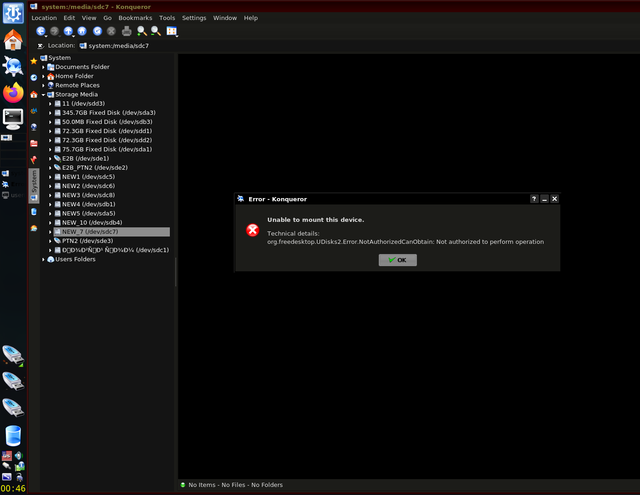
linux/bsd at desktop its sado-mazo game/toy for geeks/nerds with absolutely no warranty and antifool protection ©
linux have unprofessional bazar type of development by amators and to amators
pyzNi 3.14zDa!
Offline
#47 2026-06-27 20:21:45
- samhain
- Member
- Registered: 2017-04-03
- Posts: 92
Re: Darkness - ISO Devuan Testing + TDE for AMD64
Can you post an image just of the error message? I can't read the text
And please post which version of darkness you use.
Last edited by samhain (2026-06-27 20:50:32)
Offline
#48 2026-06-27 20:24:13
- greenjeans
- Member
- Registered: 2017-04-07
- Posts: 1,764
- Website
Re: Darkness - ISO Devuan Testing + TDE for AMD64
why always this when i try mount my disks?
Likely need to change a setting in /usr/share/polkit-1/actions/org.freedesktop.UDisks2.policy
<allow_active>yes</allow_active>
https://sourceforge.net/projects/vuu-do/ Vuu-do GNU/Linux, Devuan-based Openbox systems.
Devuan 6 mate-mini iso, pure Devuan, 100% no-vuu-do. Now with Xlibre as well.
Please donate to support Devuan and init freedom! https://devuan.org/os/donate
https://devuanusers.com/ Apps source : https://git.devuan.org/greenjeans
Offline
#49 2026-06-27 20:30:53
- greenjeans
- Member
- Registered: 2017-04-07
- Posts: 1,764
- Website
Re: Darkness - ISO Devuan Testing + TDE for AMD64
Can you post an image just of the error message? I can't read the text
You can click the image and it takes you to the page it's hosted on, then when there click it again for a larger version.
https://sourceforge.net/projects/vuu-do/ Vuu-do GNU/Linux, Devuan-based Openbox systems.
Devuan 6 mate-mini iso, pure Devuan, 100% no-vuu-do. Now with Xlibre as well.
Please donate to support Devuan and init freedom! https://devuan.org/os/donate
https://devuanusers.com/ Apps source : https://git.devuan.org/greenjeans
Offline
#50 2026-06-28 11:05:46
- jirkas
- Member
- Registered: 2026-06-28
- Posts: 2
Re: Darkness - ISO Devuan Testing + TDE for AMD64
Hi
I am really interested in your Darkness project, as the combination of Devuan and the Trinity Desktop Environment sounds fantastic.
However, I noticed that the official download links point to a Chinese domain (klepp.cn). To be honest, this makes me a bit hesitant and worried about downloading and running the image, given the general security concerns associated with third-party or unexpected regional domains.
Could you please explain why the project uses a .cn domain for hosting the ISO/IMG files? Are there any alternative official mirrors available in Europe?
Thank you for your time and for your work on this distribution!
Best regards
Jirkas
Offline
