
You are not logged in.
- Topics: Active | Unanswered
#1176 Re: Other Issues » Login Password Devuan 4 requires US key for # » 2021-12-20 15:26:56
Now run setupcon to have the your default keyboard settings applied to the console.
The console-setup package is supposed to ensure that the desktop & console keyboard settings are the same.
Reference: https://salsa.debian.org/installer-team … tinst#L133
#1177 Re: Hardware & System Configuration » [SOLVED] jED, line numbers and user » 2021-12-20 14:15:15
/etc/jed.d/*.sl
The system wide configuration files (this is a special Debian feature).
#1178 Re: Other Issues » Login Password Devuan 4 requires US key for # » 2021-12-20 05:52:56
changed 20 to 40
I have no idea what this means.
Please share the exact, full contents of the configuration file along with it's precise location and also share the full X.Org & display manager (LightDM?) logs. Remember to use code tags when posting terminal output and perhaps consider using a pastebin and sharing a link here if the logs are large. Thanks.
#1179 Re: DIY » execute a script on log-in » 2021-12-20 05:50:41
#1180 Re: Devuan » Does Devuan automatically sync date & time with NTP server by default? » 2021-12-19 20:57:15
Yes.
apt install ntpIf it isn't enabled automatically use
apt install sysv-rc-conf
sysv-rc-conf#1181 Re: Other Issues » Login Password Devuan 4 requires US key for # » 2021-12-19 20:55:44
Perhaps try https://bbs.archlinux.org/viewtopic.php?id=245451
I think localectl(1) is meant to handle this in Debian but it's part of systemd. For Devuan you may have to create the X.Org configuration file manually (as per the linked thread).
#1182 Re: Other Issues » Login Password Devuan 4 requires US key for # » 2021-12-19 15:42:03
The setxkbmap command does not persist between reboots.
I can use the # key as normal as i have it in Root password in GUI (Synaptic Package Manager authorizaton box) and when using su - just user login.
Sorry but I do not understand this sentence.
Please try to explain the exact situation in which you experience the problem more fully. Include as much detail as possible. Thanks.
#1183 Re: Devuan Derivatives » Grub's custom.cfg » 2021-12-19 14:25:18
So there is no "Paid for Support"
Ah, my apologies. I thought you were referring to https://www.smoothwall.com/
A shame you didn't provide a link in the OP. That would have prevented us wasting our time, eh? 
And as you appear to be reluctant to engage beyond cryptic utterances I'll bow out of this thread now. Good luck!
#1184 Re: Devuan Derivatives » Grub's custom.cfg » 2021-12-19 11:27:50
it uses rc.d and /dev/harddrive.
Post exact configuration and commands though, vague descriptions will just lead to confusion and bad advice.
But it really sounds like you should be taking advantage of the support for which you have paid SmoothWall money.
#1185 Re: Installation » New Chimaera install /home Problem » 2021-12-19 08:44:49
Dirty hack (run as root, replace X & Y with the letter & partition number for the new disk):
mount /dev/sdXY /home
tee -a /etc/fstab <<!
$(grep home /proc/self/mounts)
!
sed -i s!/dev/sdXY!$(lsblk -o mountpoint,uuid|awk '/home/{print $2}')! /etc/fstab
Alternative, slightly less hacky method (again, as root; this method over-writes /etc/fstab):
apt install arch-install-scripts
mount /dev/sdXY /home
tee /etc/fstab <<!
$(genfstab -U /)
!
If you want try either of those backup /etc/fstab first so it can be restored if necessary:
cp /etc/fstab{,.orig}To do it properly read man fstab and make a new entry for /home yourself.
#1186 Re: Other Issues » Login Password Devuan 4 requires US key for # » 2021-12-18 22:24:06
pc105 should be fine, that's what I have in /etc/default/keyboard.
Are you experiencing this problem in both the console (TTY) and graphical desktops?
EDIT: does this fix things in the graphical environment:
setxkbmap gb#1187 Re: Other Issues » Login Password Devuan 4 requires US key for # » 2021-12-18 20:38:07
root@devuanfour:/home/swarfendor437# dpkg-reconfigure keyboard-configuration
bash: dpkg-reconfigure: command not found
So you haven't read the release notes then?
Use either sudo -i or su - to obtain a root shell. For the second command the - is important 
#1188 Re: Other Issues » Login Password Devuan 4 requires US key for # » 2021-12-18 19:43:27
Can we see the content of /etc/default/keyboard?
Try
# apt install console-setup
# dpkg-reconfigure keyboard-configuration
And make sure the desired options are selected.
#1189 Re: Installation » [SOLVED] laptop fan running too much: cyber currency miner? Clam inop? » 2021-12-18 19:36:38
advertised it as refurbished, whatever that means
It's a meaningless marketing term with no legal basis. s/refurbished/cleaned/g.
#1190 Re: Installation » How to have updated firefox-esr in Chimaera? » 2021-12-18 15:12:48
Good news indeed, thanks geki.
#1191 Re: Devuan Derivatives » Grub's custom.cfg » 2021-12-18 15:09:41
Try something like this:
menuentry 'SmoothWall' {
   search --fs-uuid --set=root 955e45ca-5142-4cc4-89d1-bbae49bf512c
   linux /boot/vmlinuz-5.10.0-9-amd64 root=UUID=955e45ca-5142-4cc4-89d1-bbae49bf512c ro quiet
   initrd /boot/smoothwall.initramfs.gz
}
That presumes the SmoothWall system is installed on a partition with the stated UUID, that /boot is on the root partition (ie, it does not have a separate /boot partition) and that the kernel image is at /boot/vmlinuz-5.10.0-9-amd64 with the initramfs at /boot/smoothwall.initramfs.gz.
If SmoothWall is Debian-based then you may find symlinks from the kernel image & initramfs to /vmlinuz & /initrd.img, which can be quoted in the menuentry to avoid having to update the configuration file whenever the kernel version changes.
EDIT: be sure to place the file at /boot/grub/custom.cfg on the system from which GRUB reads it's configuration. Use the set command (with no options or arguments) from the GRUB command line to see the $configfile parameter which dictates this.
#1192 Re: Devuan Derivatives » Grub's custom.cfg » 2021-12-18 14:33:41
Is this possible ?
Yes.
Haven't had much luck yet ..
Share your efforts then. Post exact configuration and commands though, vague descriptions will just lead to confusion and bad advice.
But having said that you should get better support here. Your money should buy you that, at least, right?
#1193 Re: Installation » [SOLVED] laptop fan running too much: cyber currency miner? Clam inop? » 2021-12-18 09:45:10
Try taking a vacuum cleaner attachment to the vents to try and clear out any dust.
a relatively new laptop
the CD-DVD drive
Those two statements appear to be contradictory 
I'm still pondering drilling a few holes in the case
Mentalist
That's been my experience with clam. Not sure if it's even useful on a desktop installation - isn't it just checking windows virus definitions? It seems like it's mainly for things like email servers.
^ This.
There is plenty of malware floating about that will infect a Linux system directly but ClamAV won't catch any of it.
#1194 Re: Hardware & System Configuration » [SOLVED] WiCD and Chimaera » 2021-12-18 09:36:20
@Altoid . . . You might look in chimaera-proposed-updates.
That's just a transitional package that depends on NetworkManager or connman to ensure the user isn't left without a network management solution. It does not provide a wicd client of any sort.
Is it secure?
The current version of wicd uses Python 2, which is EOL and unsupported[0] so I would say no. Don't use it, it's obsolete.
The developer is currently working on a Python 3 version but it "will take some time":
https://launchpad.net/wicd/+announcement/30535
And for SLiM the situation is even more extreme because maintenance stopped back in 2014 and as a result it doesn't support user login sessions correctly. The code will continue to rot over time. Anyway it runs X under the root user and so should be avoided like Omicron for that reason alone IMO.
But hey, it's your machine and if you want to use antediluvian unsupported software that is your prerogative.
#1195 Re: Desktop and Multimedia » X.Org Security Advisory » 2021-12-14 16:12:42
Thanks for the heads-up Altoid.
Just for the record:
on systems where the X server is running privileged
^ This does not apply to any Devuan beowulf (or later) systems that use startx to launch the desktop (or GDM but I don't think that's very popular here).
EDIT: posted from Wayland
#1196 Re: Hardware & System Configuration » Interesting article - Ventoy » 2021-12-12 10:10:44
live rescue systems, just in case
But the Devuan ISO image has a rescue mode which lets you open a shell in the installed system with a working internet connection without having to manually chroot in with the API filesystems (bind) mounted. It's *much* easier and more convenient than random live ISO images.
#1197 Re: Off-topic » Ode to HoaS (and Sid) » 2021-12-12 08:48:10
Nice chickens Andy! Give them some corn from me x
#1198 Re: Hardware & System Configuration » Interesting article - Ventoy » 2021-12-12 08:47:10
Why do people need so many live images? I find that a bit strange tbh.
#1199 Re: Off-topic » Extremely Critical Log4J Vulnerability.... » 2021-12-12 08:43:58
Relevant:
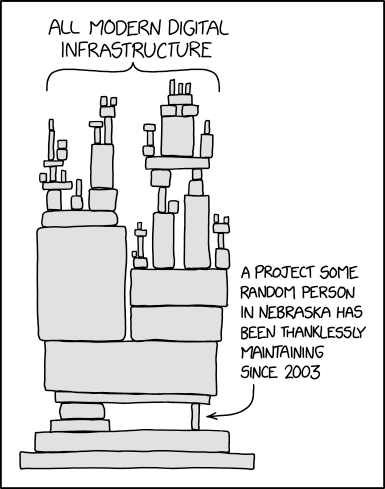
The Log4j library is maintained by Ralph Goers who, up until this vulnerability, had a grand total of three donors for their project. Shameful.
See also https://ariadne.space/2021/12/11/to-sec … y-fund-it/
#1200 Re: DIY » dwm & i3wm on Devuan by way of Miyo-rolling » 2021-12-10 23:53:32
I realize you're probably not using openbox in addition to dwm and i3, but f you ever want to fix that broken obmenu-generator menu...
1 - Open the terminal and enter the following command as root (su or sudo)...
cpanm Linux::DesktopFiles
Or use my obmenu-generator Debian repository (which is linked directly from trizen's github site) to install the Perl modules via APT.
Installing Perl modules with cpanm will leave system files that are not tracked by the package manager. This is not desirable.
Here is a direct link to the DesktopFiles Perl module .deb packages:
https://software.opensuse.org//download … sktopfiles
I have mentioned this several times before...
Board footer
