
You are not logged in.
- Topics: Active | Unanswered
#26 Re: Freedom Hacks » The Absurdist Comedy » 2026-10-01 16:40:58
it is just loosely connected,
but am using devuan 7 and have noticed in latest "updates" the pipewire crept back in.
now it functions like on raspi os it seems , when you uninstalling pipewire, it automatically installs pulseaudio for you , and viceversa.
can someone please offer a highway out of this dilemma? thanks.
sudo apt remove pipewire
The following packages were automatically installed and are no longer required:
  libconfig++15  liblua5.5-0  libpipewire-0.3-modules  libwireplumber-0.5-0
  libffado2      libopenfec1  libroc0.4                pipewire-bin
Use 'sudo apt autoremove' to remove them.

Installing dependencies:
  pulseaudio

Suggested packages:
  pavumeter  pavucontrol  paprefs

Recommended packages:
  dbus-user-session

REMOVING:
  pipewire  pipewire-pulse  wireplumber

Summary:
  Upgrading: 0, Installing: 1, Removing: 3, Not Upgrading: 8
  Download size: 1,195 kB
  Space needed: 5,734 kB / 22.6 GB available

Continue? [Y/n]
Get:1 http://deb.devuan.org/merged freia/main amd64 pulseaudio amd64 17.0+dfsg1-3 [1,195 kB]
Fetched 1,195 kB in 5s (231 kB/s)
(Reading database… 567154 files and directories currently installed.)
Removing wireplumber (0.5.17-1)…
Selecting previously unselected package pulseaudio.
(Reading database… 566991 files and directories currently installed.)
Preparing to unpack …/pulseaudio_17.0+dfsg1-3_amd64.deb…
Unpacking pulseaudio (17.0+dfsg1-3)…
dpkg: pipewire-pulse: dependency problems, but removing anyway as requested:
 plasma-pa depends on pipewire-pulse | pulseaudio; however:
  Package pipewire-pulse is to be removed.
  Package pulseaudio is not configured yet.
 libcanberra-pulse:amd64 depends on pipewire-pulse | pulseaudio; however:
  Package pipewire-pulse is to be removed.
  Package pulseaudio is not configured yet.

(Reading database… 567234 files and directories currently installed.)
Removing pipewire-pulse (1.6.9-2)…
Removing pipewire:amd64 (1.6.9-2)…
Setting up pulseaudio (17.0+dfsg1-3)…
Processing triggers for libglib2.0-0t64:i386 (2.90.0-1)…
Processing triggers for dbus (1.16.2-5devuan1+b1)…
Processing triggers for man-db (2.13.1-1)…
Processing triggers for libglib2.0-0t64:amd64 (2.90.0-1)…
sudo apt remove pulseaudio
Installing dependencies:
pipewire pipewire-pulse wireplumber
Suggested packages:
libspa-0.2-libcamera wireplumber-doc
REMOVING:
pulseaudio
Summary:
Upgrading: 0, Installing: 3, Removing: 1, Not Upgrading: 8
Download size: 277 kB
Freed space: 5,734 kB
Continue? [Y/n]
Get:1 http://deb.devuan.org/merged freia/main amd64 pipewire amd64 1.6.9-2 [117 kB]
Get:2 http://deb.devuan.org/merged freia/main amd64 pipewire-pulse amd64 1.6.9-2 [15.4 kB]
Get:3 http://deb.devuan.org/merged freia/main amd64 wireplumber amd64 0.5.17-1 [144 kB]
Fetched 277 kB in 4s (64.7 kB/s)
Selecting previously unselected package pipewire:amd64.
(Reading database… 567213 files and directories currently installed.)
Preparing to unpack …/pipewire_1.6.9-2_amd64.deb…
Unpacking pipewire:amd64 (1.6.9-2)…
Selecting previously unselected package pipewire-pulse.
Preparing to unpack …/pipewire-pulse_1.6.9-2_amd64.deb…
Unpacking pipewire-pulse (1.6.9-2)…
dpkg: pulseaudio: dependency problems, but removing anyway as requested:
plasma-pa depends on pipewire-pulse | pulseaudio; however:
Package pipewire-pulse is not configured yet.
Package pulseaudio is to be removed.
libcanberra-pulse:amd64 depends on pipewire-pulse | pulseaudio; however:
Package pipewire-pulse is not configured yet.
Package pulseaudio is to be removed.
(Reading database… 567234 files and directories currently installed.)
Removing pulseaudio (17.0+dfsg1-3)…
Selecting previously unselected package wireplumber.
(Reading database… 566997 files and directories currently installed.)
Preparing to unpack …/wireplumber_0.5.17-1_amd64.deb…
Unpacking wireplumber (0.5.17-1)…
Setting up pipewire:amd64 (1.6.9-2)…
Setting up wireplumber (0.5.17-1)…
Setting up pipewire-pulse (1.6.9-2)…
Processing triggers for libglib2.0-0t64:amd64 (2.90.0-1)…
Processing triggers for libglib2.0-0t64:i386 (2.90.0-1)…
Processing triggers for dbus (1.16.2-5devuan1+b1)…
Processing triggers for man-db (2.13.1-1)…even
sudo apt remove pipewire --no-install-recommends
The following packages were automatically installed and are no longer required:
  libconfig++15  liblua5.5-0  libpipewire-0.3-modules  libwireplumber-0.5-0
  libffado2      libopenfec1  libroc0.4                pipewire-bin
Use 'sudo apt autoremove' to remove them.

Installing dependencies:
  pulseaudio

Suggested packages:
  pavumeter  pavucontrol  paprefs

Recommended packages:
  dbus-user-session

REMOVING:
  pipewire  pipewire-pulse  wireplumber

Summary:
  Upgrading: 0, Installing: 1, Removing: 3, Not Upgrading: 8
  Download size: 1,195 kB
  Space needed: 5,734 kB / 22.6 GB available

Continue? [Y/n]
thanks
#27 Re: Hardware & System Configuration » [SOLVED] Devuan Won't Load Firmware AMD Radeon 7700S » 2026-09-30 02:19:52
@forsoothplays,
fair enough, have noticed the AI "responsd" anyways,or is trying as such, depending on configuration of course.
here is how it looks on my laptop.
lspci -nnk | grep -iA3 vga
ERROR: ld.so: object '/usr/lib/x86_64-linux-gnu/libgtk3-nocsd.so.0' from LD_PRELOAD cannot be preloaded (cannot open shared object file): ignored.
ERROR: ld.so: object '/usr/lib/x86_64-linux-gnu/libgtk3-nocsd.so.0' from LD_PRELOAD cannot be preloaded (cannot open shared object file): ignored.
00:01.0 VGA compatible controller [0300]: Advanced Micro Devices, Inc. [AMD/ATI] Wani [Radeon R5/R6/R7 Graphics] [1002:9874] (rev c9)
        Subsystem: Lenovo Device [17aa:5120]
        Kernel driver in use: amdgpu
        Kernel modules: amdgpu
glad however if you solved it for you, also Ubuntu can make a laòptop user happy.
(noticed that the forum overhaul is not fully inclusive, but that may just be a observation tad out of place)
#28 Re: Hardware & System Configuration » [SOLVED] Devuan Won't Load Firmware AMD Radeon 7700S » 2026-09-28 18:54:25
hello ,
would not like to look like a fool around here, but what "error" message made you conclude that the firmware is not correctly "deployed"?
that you could not login properly or not get a working GUI with the 7700s attached, or how else did you come to that conclusion?
having a hard time believing that hte 7700s would not funciton on Devuan 6 or 7, but am open to amazement.
if you however tried to install those drivers here
https://www.amd.com/en/support/download … ivers.html
that however could explain having issues since those drivers normally odnt function onn devuan linux , and are only since lately supported on debian (at least last time i tried it functioned).
i am surprised at the turn of the events. where you being offered a new mainboard or what prompted the replacement?
this is what AI overview offered
Die AMD Radeon RX 7700S ist direkt im Linux-Kernel und im freien Mesa-Grafikstack integriert; es müssen keine proprietären Treiber manuell installiert werden
Das Paket firmware-amd-graphics muss auf Ihrem System installiert sein (bei den meisten Distributionen standardmäßig vorhanden
lspci -nnk | grep -iA3 vga
there should be mention of "amdgpu" in the result. also recommended by friend AI what the "vulkaninfo --summary".
so much for a fools errand.
#29 Re: Off-topic » (PostIt) Devuan Benchmark Results » 2026-09-26 10:49:49
@ fwiw
Devuan 6 Excalibur Benchmark
https://www.passmark.com/baselines/V11/ … 2639353735
Hardinfo2 results - 9700X Generic System
Devuan 6 Excalibur - KDE on X11 -
https://sudden-bronze-ugdw17r5.edgeone.dev/
sorry for the interruption.
#30 Re: Off-topic » (PostIt) Devuan Benchmark Results » 2026-09-23 11:35:22
@chomwitt
the shortcut proposed should suffice for the task at hand;
here are some hardinfo2 result for comparision
------
hardinfo2
------
(result not so relevant for Devuan)
CPU Blowfish (Single-thread) 16x 5582.00 MHz 58.44|
CPU Blowfish (Multi-thread) 16x 5582.00 MHz 556.95 |
CPU Blowfish (Multi-core) 16x 5582.00 MHz 441.33
SysBench CPU (Single-thread) 16x 5582.00 MHz 6342.99
SysBench CPU (Multi-thread) 16x 5582.00 MHz 50505.06
(these probably more influenced by OpenSource Drivers)
funnily GPU drawing got values for RX 7600 in the realms of NV 4070TI
GPU Drawing
(AMD Radeon RX 7600 2454.93) < (NVIDIA GeForce RTX 4070 Ti SUPER/PCIe/SSE2 2513.84)
and for GPU OpenGL Drawing came out one top?
(AMD Radeon RX 7600 4595.50) > (Radeon RX 7900 XTX 3512.29)
GPU Vulkan drawing not so fast
(AMD Radeon RX 7600 26607.16 ) < (AMD Radeon 8060S 43247.77)
Cache Memory
AMD Ryzen 7 9700X 163008.08|16x 5582.00 MHz
-------
#31 Re: Off-topic » (PostIt) Devuan Benchmark Results » 2026-09-23 07:49:15
@GlennW , thanks , yours got to be the new benchmark!
Found out i am still bit afraid of heights
https://www.cpubenchmark.net/common_cpus.html
@chomwitt you can use this shortcut
sudo ln -s /usr/lib/x86_64-linux-gnu/libncurses.so.6 /usr/lib/x86_64-linux-gnu/libncurses.so.5#32 Re: Hardware & System Configuration » excalibur does not wake up from sleep after suspend » 2026-09-22 08:04:56
have you tried installing the latest system drivers?
i reember found it difficult to find the proper driver packages for one NUC i bought 11th gen one time ] there should be one file that has them all, maybe you need a BIOS update;
uneducated guess, sorry.
ah, you got a ASUS NUC, that made it possibly more asiy to find the system driver. if anything, thats my guess.
#33 Off-topic » (PostIt) Devuan Benchmark Results » 2026-09-21 16:41:41
- kapqa
- Replies: 11
one recent for
Devuan GNU/Linux 7 (freia/ceres)
https://www.passmark.com/baselines/V11/ … 2609603226
Search Baselines Matching:
OS: NA
#34 Re: Installation » [SOLVED] NetInstall with XFCE and Cinnamon options » 2026-09-19 21:46:01
you could do "sudo tasksel" and install from within xfce4 the cinnamon; maybe it got mixed up, and is missing some items; so you could clear it for you. with dual or more GUI things tend to becom messy, sometimes, unfortunately.
#35 Re: Desktop and Multimedia » Recurring captcha from Google. » 2026-09-18 18:28:23
it may be irrelevant with the task at hand , but with captcha i normally click once twice forwared to get to the section where it asks me to pick from the 9 quadrants all several those that match the [requested] until finished.
i may be stupid but those other quesits where it asks me to select the quadrants where is a say a bike from a whole picture of 9 quadrants, i quite always dont succeed, it must be just too technical for me. (or i dont get the whole picture on those)
#36 Re: Desktop and Multimedia » Recurring captcha from Google. » 2026-09-17 21:42:45
forgot to add, if you use dual-boot, need to check the tiem is "correct" this someit prevents things from happening in browserland.
and yes, different browser behave differently. am using satellite internet since few years and it has helped me solved quite some problems that otherwise would have taken me down the "vpn" route which is just cumbersome, not to speak of TOR, where does the captcha thing much more easily happen.
(it used to be difficult to achieve, now its just one click only solution, so probably not the big problem solver it is portrayed, but not in the know):
#37 Re: Desktop and Multimedia » Recurring captcha from Google. » 2026-09-17 12:45:59
it just seems everyzone wants to read out our open tabs list ~ maybe famous player in the market I A I getting more gritty ~ but then , he should already be in the know.
i have tried to change DNS for some time, to no avail. My solution will be to no longer consult the pages that are "too agressive" on this.
#38 Re: Desktop and Multimedia » Chromium-based browsers killed HW accel for some old video cards » 2026-09-17 03:22:46
spci-fically ytb can use pipe-viewer
it functions well and lets you adapt to your favorite player.
#39 Re: Documentation » Changes in sudo (upstream) » 2026-09-14 20:08:30
sorry fo the crosspost, but just got this in "news" , again, and not really known what should make of it.
maybe it is of no relevance, after all.
adduser (3.155) unstable; urgency=medium
The GROUPHOMES, LETTERHOMES, SGID_HOME and QUOTAUSER options were
deprecated for a while and got removed in this release.-- Marc Haber <mh+debian-packages@zugschlus.de> Mon, 19 Jan 2026 09:23:49 +0100
thanks.
coming back to the original quesit:
when i use ssh , feel more comfortable to login via user, and proceed from there with "sudo" when needed; rather than as root; is this warranted behaviour or is it better to login as root user?
whenever i use root, have feeling things could break more easily, maybe from experience.
thanks.thanks.
#40 Re: Hardware & System Configuration » Is there a way to find/open usb device without terminal commands? » 2026-09-14 17:11:40
hello ,
one command that can function is
sudo lsusbit would likst you connected usb devices; if your cd drive is listed there, depends on wether it is an usb-connected-dvd/cd/bluray-drive in the first place, of course; sometimes, one usb port may have gone bit loose and wont power the usb-drive enough, that could be an issue;
if it is sata drive, the command is another one, which dont have present; but sometimes, depending on distro, had also issues with DVD drive not showing up properly; but it could be also that the drive itself is bit faulty, which happens; i have a newer bluray drive now which i cherish quite; to me, it is still an essential part of computer.
for making camera visisble, think it depdens a bit on the firmware of the camera; but in principle, linux is a lot more flexible than say macos with cameras, and you should have no problem whatsoever pulling the pictures off it.
EDIT: now that you mention it, found that my bluray-drive is also not listed under "devices" which is a bit odd; however, when i put a media into it, the device suddenfly shows-up.
i use Mate Desktop atm; and the Caja File manager seems rather limited, or not so much updated since a while (may be wrong about it; credits syy 1999-2009, 2011-2021) version 1.26.4)
#41 Documentation » Changes in sudo (upstream) » 2026-09-13 10:01:33
- kapqa
- Replies: 17
This was today in the "news"
sudo (1.9.17p2-7) unstable; urgency=medium
Starting with sudo 1.9.17p2-6, the default /etc/sudoers was aligned with
the example file that upstream ships. This was done to reduce the
differences between Debian and other distributions.This has removed /usr/local/sbin and /usr/local/bin from the
"Defaults secure_path" setting. This may break some local scripts, but
also increases security, since on some systems, /usr/local might be
writable for non-root users and thus executing programs from there might
introduce privilege escalation.If you want to use executables from /usr/local with sudo without giving
the explicit path, consider changing the setting in an /etc/sudoers.d
snippet.-- Marc Haber <mh+debian-packages@zugschlus.de> Sat, 04 Jul 2026 12:57:42 +0200
have not fully understood the implicatoins of change, but suppose it is a benevolent, sensible change.
#42 Re: Hardware & System Configuration » [SOLVED] Devuan Won't Load Firmware AMD Radeon 7700S » 2026-09-10 08:04:09
hello ,
you should not have issues with internal and external gpu loaded, they can both be used;
my computer has 9700x (with raphael igpu) and rx 7600, and both can be used on devuan excalibur;
you need to make sure to install devuan properly, best in uefi mode.
https://www.techpowerup.com/gpu-specs/r … 700s.c4015
https://www.techpowerup.com/gpu-specs/r … 7600.c4153
EDIT:
also the radeom 860m should be supported by excalibur, but maybe since gorgone point newer release, you could have more luck with devuan 7.
https://www.techpowerup.com/gpu-specs/radeon-860m.c4289
you could test this by using devuan only without the rx 7700s, and see i you still have the same issue; if so , would try to use devuan 7 (provided you have devuan properly in the first place). or install devuan 6 again, but from another boot-medium (like dvd-r) or via boot-stick; there are some settings in BIOS that effectively shut-out the iGPU, but don§t remember what actually determines if the iGPU gets properly recognized or not (had also Linux install where only the dGPU got recognized properly after install of amdgpu drivers for example, but in principle both should be able to function)
this is how it look like on "geekbench" info-table for devuan 6 excalibur
Vulkan
+-------------+-----------+----------------------------------------------+
| Platform ID | Device ID | Description |
+-------------+-----------+----------------------------------------------+
| 0 | 0 | AMD Radeon RX 7600 (RADV NAVI33) |
+-------------+-----------+----------------------------------------------+
| 0 | 1 | AMD Radeon Graphics (RADV RAPHAEL_MENDOCINO) |
+-------------+-----------+----------------------------------------------+
| 0 | 2 | llvmpipe (LLVM 19.1.7, 256 bits) |
+-------------+-----------+----------------------------------------------+
#43 Re: Desktop and Multimedia » Pluma bug and proposed fix: Where do I report, and what happens next? » 2026-09-07 09:48:37
am using "reportbug" just of now
it is stalling
Connecting to mx.devuan.org via SMTP...
SMTP send failure: [Errno 101] Network is unreachable. You can retry, or save
the report and exit. Do you want to retry [Y|n|q|?]? #44 Re: Installation » [SOLVED] Freia Unable to Detect Network Hardware » 2026-09-04 11:03:45
@RecklessEpoch if forced you need to use a WiFi there is things called "Travel Router" that lets you bridge and use an Ethernet cable on device instead, but myself never used one, cannot vouche for it.
on first years of University, remember the scarce laptop positions used to have shared spaces, with 3 ethernet cables, so you got to sit around a table(t), and actually chit-chat if you wanted, that was rather nice!
nowadays is focered wiFi and no Fun at all.
#45 Re: Installation » [SOLVED] Freia Unable to Detect Network Hardware » 2026-09-03 15:03:09
since when is T series lacking Ethernet port?would rather return the laptop, and get one with an Ethernet port.
pleasee mark solved.
#46 Other Issues » /usr/lib/x86_64-linux-gnu/libgtk3-nocsd.so.0' cannot be preloaded » 2026-09-02 18:31:57
- kapqa
- Replies: 0
hello ,
on this laptop using devuan freia or maybe unstable
with kde plasma x11.
normally receive fairly daily upgrades , however tody chose to upgrade via "discover" which alwasys remind up impending update/upgrades but then does not finish seem to finish them mostly due to errors. there were lots of packages propeosed , maybe 600+.
since then have now this error here like
source ~/.bashrc
ERROR: ld.so: object '/usr/lib/x86_64-linux-gnu/libgtk3-nocsd.so.0' from LD_PRELOAD cannot be preloaded (cannot open shared object file): ignored.
locate libgtk3-nocsd.so.0
/usr/lib/i386-linux-gnu/libgtk3-nocsd.so.0
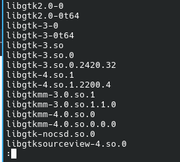
/usr/lib/x86_64-linux-gnu/libgtk3-nocsd.so.0but when i look inside this folder "/usr/lib/x86_64-linux-gnu" it seems the file object
/usr/lib/x86_64-linux-gnu/libgtk3-nocsd.so.0
is not present?
sorry if i made anerror.
#47 Re: Desktop and Multimedia » Xscreensaver kicking in when a video is playing with mpv or mplayer » 2026-08-18 07:35:45
not sure if this is the right repo,
but used something like this in the past to achieve the effect of disabling suspend during playback of video via mpv
https://git.sr.ht/~anteater/mpv-inhibit-suspend
it is not for disabling screensaver, but could have the same effect. now on kde there it can be effected easily in tray, just activate @presentation mode<
similarly, on mate, i use sometimes @caffeine to inhibit sleep bevaviour.
[color]---[/color]
OH sorry i did not read your question properly, please disregard my post.
#48 Re: Installation » Some stupid questions to prepare for Devuan installation » 2026-08-17 17:33:08
@clueless, if you using ZFS, might readily be more advanced in the computing then me here;
however, the GT 730 according to Techpowerup conly hdmii 1.3a, so you might not fare well with 4k;
even the GT 710 has hdmi 1.4; and might be luckier for higher resolution, but that might also be wrong info on the side of techpowerup (/which happens sometimes)
have checked again, and found that the devuan box mentioned has the proper driver installed; but don't asked how it is done; it is elaborated probably only thanks to this post from user in southern france, that shared the respective kernel patch or something.
happy landing on devuan.
#49 Re: Devuan Derivatives » Genuen » 2026-08-17 12:41:56
Upgrade snetaid again
would not be able to achieve it ~ tried the expoert mode twice , once with 3 options clicked; second time with not additional options;
the install would seem to go through flawlessly, but apparently somehting went wrong, since could net effectuate basic operations like "sudo ifup" "sudo ifdown" "dhclient" etc. so second time i checked and there was maybe just 50 mb for the whole disc occupied;
~ tried to install packages then from with sources #usb-stick - but that would fail miserably;
since have again used the normal text-installer to install distro anew and with the psmouse trick it would now function;
have noticed that the laptop could also have trouble with wake from "lock screen" - maybe the system is as whole a bit too advanced for the older laptop and might have more stable system with plain devuan ~ but i'd be glad to test some more since i really like the system, it is very responsive, thanks.
#50 Re: Other Issues » Xsane bad scan image quality » 2026-08-14 16:26:03
used this software when i had problems installing scanner on linux; getting to function.
it is good for testing purpoese, but leaves a watermark.
(trial full-version)
Board footer
