
You are not logged in.
- Topics: Active | Unanswered
#26 Re: Freedom Hacks » About installers » 2026-02-16 18:38:51
Gparted is bloat, like any other GUI. I use parted, fdisk, or sfdisk if I want to pipe in a saved layout.
Chuck Norris edits the partition table in binary, with ed, which is also a valid approach. IMO.
I don't like bloat either, I would argue that most of my experiments are anti-bloat in nature from the get-go.
But we are talking about normies here when you think about distributing your software, and as @rations already said, normies have some issues with things and are not prone to be CLI-savvy, GUI's is what they want. Gparted works fine in limited use and folks can understand it.
I like a 10 minute install. I like knowing exactly what i'm getting.
In the end it sounds like you're making an argument that Refracta-Installer needs a better GUI? While at the same time eschewing GUI's in general and speaking of your preference for CLI apps, it's confusing me.
I need to make a video showing the basics of a simple install using Refracta-Installer, my gawd it's so simple I just don't see how it could be confusing unless folks are just asking it to do all the things, which admittedly I have not tested them all, I just know my way works.
What would make RI better? A more conventional UI rather than yad dialogs? What is it that people have a hard time with?
Fsmithred's a pretty laid back guy, he might take some suggestions well when he has time, keep in mind he's busy as hell like all the devs.
I'd be willing to at least try and mock up an updated GUI for it, maybe we need a fork of it for the less tech-savvy that explains things more and simplifies some things.
#27 Re: Freedom Hacks » About installers » 2026-02-16 01:01:22
D-I is fine, it's always been fine. Preferrably the TUI "expert" mode.
The XP installer is also fine, provided period-appropriate hardware. 99% of problems installing XP, "back in the day" or otherwise, are really driver issues.
Yeah, provided you wanted to waste a couple of hours doing an install. Refracta-Installer is a brilliant piece of work that takes around 10 minutes to do, and so simple a caveman could do it. Truth is it could be even simpler as no installer (IMO) should have to do partitioning, running gparted before doing an install should be mandatory. And it's getting better with every iteration.
There is an elegance to brevity of code, that people forget in this day and age. " Oh dang, I have 5000 gb of ram and 1000 terabyte HD, so I should grow all programs and apps to be gigantic and consume 500 gb of ram minimum." Because ya know, rounded corners and all.
#28 Re: Hardware & System Configuration » [SOLVED] ext4 write slow on small 120gb sata SSD » 2026-02-16 00:50:52
If you think "I still boot from a single bargain-basement mechanical drive from 2009" is some kind of brag (outside the vintage scene, and half of that is using flash these days anyway), you do you.
2012 actually, don't hate, how many SSD's last 14 years?
#29 Re: Freedom Hacks » UDisks2: Security Considerations » 2026-02-15 19:56:56
If you write the software, you get to decide what options and dependencies it has.
If you package the software, you get to decide which of those are enabled.
If you just use the software, you get to complain ineffectually, and I get to give you shit for it.
ROTFL! That is some sig-line material right there. 
So true too....
@Igor if you were in reality a robot and you didn't know but the rest of us did, would you want us to tell you?
#30 Re: Freedom Hacks » UDisks2: Security Considerations » 2026-02-14 02:01:30
Not a matter of intelligence zappy, just common sense.
Lol and even if someone got my banking info, wouldn't do much good, I don't have squat in the bank and I dumped credit 17 years ago, so my credit rating is like negative -0
#31 Re: Hardware & System Configuration » [SOLVED] ext4 write slow on small 120gb sata SSD » 2026-02-14 01:58:25
Wait, you guys are getting 120 mbps write speed? dayum....almost makes me want to try an SSD.
#32 Re: Freedom Hacks » UDisks2: Security Considerations » 2026-02-14 01:39:35
Tempest in a teapot. As with most "security" risks i've seen lately, only applies to a multi-user system, and it assumes that if you go to the bathroom in a coffeeshop whilst online, that that coffeeshop is full of hackers who are just waiting for you to leave your machine unattended (and not locked) so they can rush over there and start looking through your files. Having to type a password to view your own files in another partition on your own machine of which you have sole access to, is retarded. Editing polkit fixes that nonsense.
If I had a dollar for every stupid thing that was done in the name of "security" i'd be rich. A lot of it is FUD, and frequently used these days as excuses for lack of quality code by second-rate coders (It's not a bug, it's a feature that we removed functionality, it's for your own good).
If someone were to somehow break in to my machine, you would not find:
1. Porn
2. Personal homemade porn (I have a sneaking suspicion that this is why some people are paranoid about security).
3. Passwords
4. My name, SSN, DOB, or any other personal info such as banking info
You could wipe the entire drive and I wouldn't lose squat. Everything I have that's important is permanently air-gapped. I don't use mail-clients, if I did I would have literally woke up this morning to a virus e-mail on my damned machine, instead it's on my mail providers server, and got promptly deleted and reported.
#33 Re: Desktop and Multimedia » Linux Audio for the hard of hearing » 2026-02-13 18:24:20
Categorically false, in my case. ALSA insisted on outputting audio over the headphone jack when my primary use was over HDMI. Even switching card defaults was not enough because the card has several outputs and (bizarrely) ALSA recognizes the output I want as number 7. And even then, it needs a volume adjustment which ALSA doesn't do by default for what it thinks is a "SPDIF" output, necessitating a softvol control to be added. And on top of all of that I want to use the headphone jack sometimes.
Stuff like this is why I made AlsaTune (formerly mxeq), all configurable instantly in one GUI.
Unfortunately doesn't work in DE's with built-in mixers, been pondering that issue for a while now, there may be a way around it.
#34 Re: DIY » New Project, a simple music player. And now a video player!! » 2026-02-13 16:35:57
According to what i'm looking at right now, it was actually you that made comment #69.
Anyhoo, about to go through these two and a couple more apps, and compile new versions for Excalibur using the newer libraries.
#35 Re: Hardware & System Configuration » Using apt to find the package I want... » 2026-02-11 23:49:47
Been using Synaptic for many years now, it's my preferred way of doing things, easy to search, reasonably descriptive.
#36 Re: Freedom Hacks » About installers » 2026-02-11 20:17:18
Calamares and I had disagreements about my partitioning scheme.
Last time I tried it, it needed around 125mb of software to work. That was a few years ago.
Yeah I just checked, 147 mb on my machine, basically the QT kitchen sink and all the dishes. Yikes.
#37 Re: Devuan » Kde and Systemd - In the News » 2026-02-11 20:12:03
I can see both sides here, and at the risk of getting snarked at by Ralph and/or chewed out by Steve, lol, i'm gonna post this.
I don't consider Devuan a "distro", I consider it an online provider of Linux packages for me to use to build a distro. That's it. Possibly it might help some folks to look at it that way.
I consider it my job to update outdated packages when needed, add third-party software and some of my own apps, to fix little bugs and behavior, to dot the i's and cross the t's, to design the system to be user-friendly and stable.
Devuan's basically Home Depot, and i'm a carpenter. Systemd is warped lumber and Debian is fine with forcing it on you, while Devuan chooses to pitch out as much of it as they can.
#38 Re: Devuan Derivatives » Devuan 6 (excalibur) mate testing iso uploaded » 2026-02-11 18:10:50
For those who are trying it, please let me know of any issues or suggestions, i've still got it loaded up in the build partition and will be testing over the next few days, so it's simple right now for me to fix and roll up a new iso.
Known issues:
1. Takes longer to boot than comparable daedalus systems, right after "Waiting for /dev to be fully populated" it hangs for a bit, it's doing some thing back there, I think my ancient machine is part of the problem, seems to stick thinking about some radeon firmware.
2. As per the usual for Mate for years now, it does spam ~/.xsession-errors a fair bit, tons of reports about it, i'll probably be making another one. It never becomes an issue unless you never shutdown/reboot/logout your machine as that file is replaced with a new one on login.
#39 Re: Freedom Hacks » About installers » 2026-02-11 18:00:37
I'm always shocked when I hear people that have issues with the Refracta-Installer, for me it's literally the best install experience in 18 years of Linux, so simple and straightforward....10 minutes or less and i'm done, never had it fail on me. I honestly don't see how it could be made more user-friendly. The installer script itself is only 67 kb, I know it like the back of my hand and if I thought it could be made better I wouldn't hesitate to try things and report my findings to fsmithred for possible inclusion.
What about it is be-fuddling folks?
#40 Re: DIY » New Project, a simple music player. And now a video player!! » 2026-02-11 17:02:49
Okay,
1. It does not use as much resources as mpv, mpv has a clickable progress/seek bar, and that means constant progress checks going on in the background. But there's really no comparing the two, they're very different in philosophy, and mpv is some 60 times larger than vsvp and has a lot more depends.
2. I promise you I could install it on your machine if you have the right libraries, it's not debian-specific, it's just yad, bash, ffmpeg and gtk.
3. I'm not opposed to making an appimage of it, just busy with other things, I have a lot of apps to maintain now in addition to multiple Vuu-do and Devuan isos, and to be honest I don't see it getting enough traction to warrant a lot of extra work on it, only a few people will like it, most want the extended functionality of larger players whether they use those features or not.
Myself I think it's a beautiful script, elegant in it's size and brevity of code, leveraging ffplay to do the heavy lifting, the simple workarounds for various issues are actually quite groovy, I think a lot of people when faced with those challenges would have simply said screw it i'll just use mpv for the backend, and then what you would have is just another set of window dressings for mpv of which there are plenty enough already.
I made it for me.
I made it for the challenge.
I made it for the learning experience.
It works and I love it, mission accomplished, level-up complete. I just share things I make on the odd chance someone might like 'em.
#41 Re: Freedom Hacks » About installers » 2026-02-11 16:03:28
FYI I didn't start this thread, I made a post that got moved. But I do appreciate the replies and insight.
#42 Freedom Hacks » About installers » 2026-02-11 01:32:04
- greenjeans
- Replies: 44
My life is too short and my time too valuable to spend on the debian installer, i'd rather beat my junk with a ball-peen hammer, it's like trying to install win xp back in the day. Has anybody tried the Calamares installer? Is it any better?
Thank the gawds and fsmithred for Refracta-installer, without it I just wouldn't bother.
#43 Re: Off-topic » XFCE is building a new WM and compositor for Wayland » 2026-02-10 21:40:37
Thunar also takes centuries to load up thumbnails in a directory (such as Downloads). Older versions did not have this issue, and it didn't matter if you only had five files or five hundred -- everything loaded blinking fast.
Interesting, must not be caching thumbnails I guess? I have a script for that..... 
#44 Re: DIY » New Project, a simple music player. And now a video player!! » 2026-02-10 21:05:02
@greenjeans I actually wonder how much cpu usage your video player uses compared to like mplayer or mpv.
Oh I can pretty much guarantee it uses less, just playing a video itself is likely the same, but those players (even mpv which is very basic) have a lot of features that require constant system calls and checks, the progress bar is one.
#45 Re: Installation » [SOLVED] Devuan 6.1.0 desktop installer has no options for modern filesystems » 2026-02-10 17:57:09
@Mercury, because Devuan is extremely short-handed and the devs are over-worked and underpaid, sometimes you have to focus on bigger stuff....
Perhaps you could write out a note about it since you seem familiar with the issue, then submit it for inclusion? I believe Xenguy is who you'd need to contact to add documentation to the website.
#46 Re: Devuan Derivatives » Vuu-do Linux! *New Openbox-64 iso's (1.0.7) up 2-02-18*!! » 2026-02-10 17:18:32
Hey I got a "Community Choice" badge on Sourceforge for hitting 10k downloads! A big heartfelt thank you to all who have taken the time to try out one or more of my little experiments! 
#47 Re: Devuan Derivatives » Devuan 6 (excalibur) mate testing iso uploaded » 2026-02-10 02:24:19
So for those unfamiliar, this is NOT an official Devuan iso, nor is it an official Vuu-do iso. It's just a snapshot of vanilla Devuan with the Mate DE, rolled up from the same daedalus iso. Just a simple way to get up and running with Devuan Mate. FYI I forgot to revert sources.list to the default Devuan list, so gnlug is the current default and I don't feel like running another iso just to deal with that! You can change 'em in Synaptic.
https://sourceforge.net/projects/vuu-do … te-mini-6/
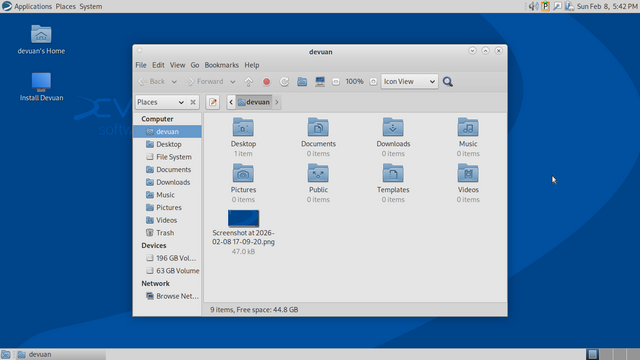
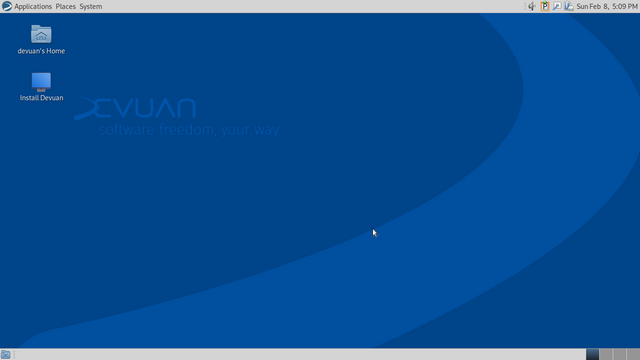
From the readme:
This is not an official Devuan release, nor a Vuu-do release. This is a user re-spin
of Devuan 6 (excalibur), updated completely as of 2/09/2026 with the Mate desktop environment.
It's purpose is to provide a quick small iso for those interested in testing the
Mate version of Devuan.
2-09-2026 Updated fully, some 155 packages including a new kernel. Also added a lot of
firmware packages, mostly for wi-fi and ethernet but also bluetooth and some
graphics stuff including the nvidia graphics package (for nouveau). All this
is to try and insure a user can get full functionality right out of the box.
It does bloat up initrd some, a smart user can get rid of what they don't need
post-install easily enough. I also added addititonal support for viewing and
thumbnailing newer image formats like heif and avif and jxl.
Fixed the alsa-restore issue using fsmithred's fix.
Fixed the dbus spamming issue from rotating the machine-ID using the init script
I posted in this thread: https://dev1galaxy.org/viewtopic.php?id=7414
Fixed the NM-lease spamming by adding to the post-install Refracta script.
Added updated excludes files for Refracta-tools, added some and commented one
which was the one deleting the gtk icon caches, and rebuilt all the icon caches.
Put a halt to the watchdog spam during boot.
Fixed a couple of useless systemd warnings.
Pulled picom out, it was spamming logs when not in use. Mate has a compositor
built-in which it uses by default. If you really want picom it's in the repo
but you'll need mate-tweak to apply it.
Pulled the gnome policy kit auth package, Mate has it's own, also got rid of
gnome keyring and it's depends.
Fixed and expanded sources.list, the default Devuan repo urls are there, and
also (commented out) are the gnlug listings for an alternate repo if you have
issues with DNS.
Changed the theme, the green-blue was just too clash, switched to BlueMenta
for a nice simple interface, and switched to the deepsea icons which are a
nice blue that compliments the Devuan wallpaper. Only issue with those was
the default menu icon was the gnome foot, so that had to go. I found a large
Devuan logo in pixmaps, so I made new icons from it in gimp, looks really
nice I think!
This is a liveCD and includes the Refracta-installer for fast simple install.
This is not uefi-enabled. The os-prober has been enabled when you install grub, if you
need to disable it before install, while still in live-session, just edit
/etc/default/grub and /usr/share/grub/default/grub to disable the prober.
---------------------------------------------------------------------------
In all respects it is identical to current Devuan, I have not "vuu-do-fied" it,
it contains all original files, docs, translations, help files, original configs,
artwork etc. with the following exceptions:
This is a "mini", it contains no browser, office or multimedia programs whatsoever,
just the infrastructure for you to build on and configure as you see fit. There are no
release notes or manual as this is stock Devuan and ample documentation is available
on the site and forum.
Had to add firmware for AMD before lightdm would work properly for me, this may be
just my machine, or you may need it for Nvidia and Intel too, just don't know yet,
again this is all from the testing section, and hasn't been declared stable yet.
Some packages have been added for convenience, these are:
Mozo - simple mate menu editor
Mate-tweak - handy utility, gets rid of pesky desktop icons if you so desire
Parcellite - clipboard manager
NTPsec - keeps time correct
Caja file manger extensions - resize-rotate images, open terminal here, edit/open as root etc.
Bleachbit - but it has been configured to NOT delete any translations/localizations.
Slight mods to config:
File-manager configged to open files with single-click and include delete command that
bypasses trash - this made my work go much faster. Altered sources.list as main repo has
been having some issues, changed to what's been working for me and what I used to build this iso.
Set lightdm.conf to autologin the user on the liveDVD for convenience.
Username/passwords for LiveDVD:
devuan = devuan
root = root
#48 Re: Desktop and Multimedia » [SOLVED] Devuan Excalibur install and Pipewire. » 2026-02-08 19:40:48
If you're a musician you might want to check out user @rations jack-bridge, it's a JACK+ALSA solution that doesn't require Pipe or Pulse to work. I don't know much about Jack or Midi myself, I just deal with low-level alsa stuff, but perhaps his app might help.
#49 Re: Other Issues » Refracta Snapshot (Excalibur) is Broken » 2026-02-08 19:32:55
Again, have used Snapshot many times on excalibur over the last 6 months, worked fine every time and still does, I have excalibur-based isos on my sourceforge right now that were made with Snapshot.
This seems like a case of user-error.
#50 Re: Off-topic » A blast from the past... » 2026-02-08 16:15:51
Cool story ComputerBob! I love tales from back in the day. The picture above is especially meaningful to me, as my father worked for NASA back in the 60's, and would have likely worked at some point on the very machine that memory stick was used in.
Board footer
