
You are not logged in.
- Topics: Active | Unanswered
#301 Re: DIY » ALSA-only purists: Question, new GUI app for the mixer and EQ? » 2025-11-24 00:31:49
It's a great little plugin, real-time global EQ, on my own machine I disable all of the mediaplayers' equalizers and set the master EQ with my own pre-sets.
#302 Re: DIY » ALSA-only purists: Question, new GUI app for the mixer and EQ? » 2025-11-23 20:48:22
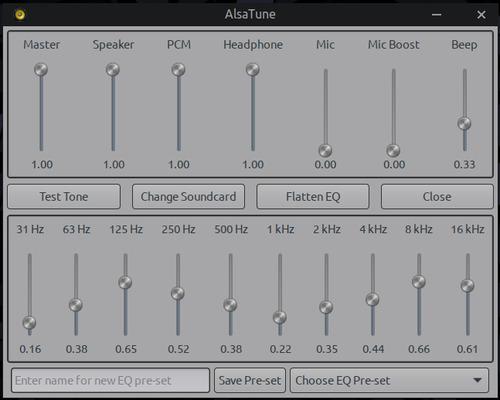
Hi tux, EQ is all done by the libasound plugin for the EQ: libasound2-plugin-equal, so it's all native alsa doing the work, AlsaTune is just a gui frontend for the alsamixer and eq that you can access in terminal, plus some other features added like saving EQ pre-sets and such.
#303 Re: Desktop and Multimedia » ALSA+Jack system wide audio No pulseaudio or pipewire » 2025-11-23 20:41:20
Played super tux kart today with my sons bluetooth controller connected using the alsatune gui. I also got the misses bluetooth headphones to connect but no sound.
Have you got the libasound2-plugin-bluez and the bluez-alsa-utils packages installed?
#304 Re: DIY » ALSA-only purists: Question, new GUI app for the mixer and EQ? » 2025-11-23 20:32:43
Working on 2.0
#305 Re: Off-topic » Hard Rust requirements for APT from may next year » 2025-11-21 23:03:20
So in just going over the general reaction it seems that rust proponents are saying that it was a lack of skills in rust programming on the part of Cloudflare folks that caused the issue.
So basically they are saying "Any code can be bad if it's not written carefully and correctly".
Really good to hear you say that boys, doses of reality often bite but there are long-term rewards to understanding life how it really is. 
#306 Re: DIY » Simple card-switcher for ALSA » 2025-11-21 22:50:19
Yeah...so it seems there's no scroll function or auto-sizing for the yad list dialog, at least not in the old versions being used in the repo. For the moment I added a little height. arrgh.
I added an error check to look for ~/.asoundrc right at the start and exit if there isn't one. But now i'm thinking in the error message to also add the ability to copy a simple .asoundrc (to be shipped with the mxeq/AT package) to the users home if there isn't one, and then continuing (or hit cancel to back out of course).
I'll be modding AT a fair bit to add a button for the card-switcher and some other functions including a button to test sound, using aplay to play a .wav file I made, just 3 seconds of a 500hz note, the idea being you can test whatever changes you made with the card-switcher right there in the gui after doing it, without having to cycle audio/video apps on and off.
#307 Re: Devuan Derivatives » Vuu-do Linux! *New Openbox-64 iso's (1.0.7) up 2-02-18*!! » 2025-11-21 15:58:56
Hey Ron, oh yeah, no Pulse or Pipewire in Vuu-do.
It can be removed from Mate pretty easily, and Mate has it's own built-in mixer that works with Alsa.
#308 Re: DIY » Simple card-switcher for ALSA » 2025-11-20 18:02:43
Hah, I love it...yep...Vuu-do Linux, handcrafted using stepwise refinement and multi-solutional iterations (hit-or-miss). 
Thanks for the help, I really appreciate it and at some point i'll take you up on the offer to test the next version.
724 lines in asound.conf? Holy crap, that's epic! Yeah I can see where my little script probably wouldn't be good for that system, but it's a dang fine one for testing the limits of it for sure.
#309 Re: Hardware & System Configuration » (excalibur) strange messages during startup » 2025-11-20 17:55:34
RE: the alsa errors, have a look here: https://dev1galaxy.org/viewtopic.php?pid=59886#p59886
#310 Re: Other Issues » Alsa errors during boot of Excalibur » 2025-11-20 17:52:24
Thank you @fsmithred!!
I'm so sorry y'all are having to deal with stuff like this right now. Seems like there's quite a few of these upstream shenanigans going on with this release of debian.
#311 Re: Freedom Hacks » ALSA software mixer enabled by default in Debian/Devuan » 2025-11-20 17:12:55
Good info and very true, it just takes some work figuring out all the particulars, alsa has a language all it's own.
In general my priorities for sound are based on delivering the simplest most basic config to ship with my distro project, leaving it up to the user to customize as they see fit, rather than saddling them with additional mixers and sound servers that they may dislike.
I also never saw a lot of sense in playing simultaneous streams until a gamer friend pointed out that he liked to listen to music while he played, that I can understand, so i'm testing a new .asoundrc that allows the functions Igor spelled out above, it's still very short and simple and needs some more testing (specifically with the mic) as so far i've just tested simultaneous streaming and it's working great on both single and dual card systems that i've tested.
This config assumes a user also has the EQ plugin package, but no additional plugins like fftrate, just posting it here for general info purposes, @Igor feel free to critique as I wouldn't mind hearing thoughts/suggestions but please don't call me demented, lol.
# Default: route through dmix > plug > equalizer > hardware
pcm.!default {
    type plug
    slave.pcm "dmixed_equal"
}

ctl.!default {
    type hw
    card 0
}

# Equalizer control (for mxeq GUI)
ctl.equal {
    type equal
}

# Final EQ stage: applies to mixed output
pcm.dmixed_equal {
    type equal
    slave.pcm "dmixed_plug"
}

# Plug wrapper for format/rate conversion after dmix
pcm.dmixed_plug {
    type plug
    slave.pcm "dmixed"
}

# dmix: allows multiple playback streams > direct to hardware
pcm.dmixed {
    type dmix
    ipc_key 1024
    ipc_key_add_uid false   # safer than 0
    slave {
        pcm "hw:0,0"
        period_time 0
        period_size 1024
        buffer_size 4096
        rate 44100          # optional: lock rate if needed
    }
    bindings {
        0 0
        1 1
    }
}

# Optional: dsnoop for multiple capture (mic) apps
pcm.dsnooped {
    type dsnoop
    ipc_key 1025
    slave.pcm "hw:0,0"
}

# Optional: full duplex (for simultaneous play+capture)
pcm.duplex {
    type asym
    playback.pcm "dmixed_plug"
    capture.pcm "dsnooped"
}

# Legacy: old names for compatibility/scripts
pcm.plugequal {
    type equal
    slave.pcm "plughw:0,0"
}
pcm.equal {
    type plug
    slave.pcm "plugequal"
}#312 Re: Documentation » Desktop memory use in Excalibur » 2025-11-20 14:29:16
Ahh I see, so yeah it's pretty close to the old school way of measuring ram, what's actually being used, nice.
If you run conky it's easy to check without ever opening anything at boot-up, you can use the "mem" command to get ram usage, and that's the newer way with all buffers and cache and such added in. But you can get the old behavior still at least in Daedalus by using "legacymem" in place of the mem command.
I use the new method generally to get a fuller picture of usage, but I tried legacymem last night for giggles on Vuu-do, and the mini runs 230-240 mb at idle, and the max runs about 260-270.
Openbox FTW.
#313 Re: Documentation » Desktop memory use in Excalibur » 2025-11-19 23:45:25
I'm not familiar with that script, is it just calculating mem use minus buffers & cache?
#314 Re: Off-topic » Microsoft admits it's own AI is malware. » 2025-11-19 17:30:42
Lol, more hilarity as the world flails about, the reason Cloudflare went down wasn't a DDOS or other attack, it was shit coding in the cloudflare challenge that everybody hates to start with that took down 20% of the internet.
Cloudflare said in a post-mortem statement on Tuesday that a “feature file” used by its Bot Management System to fight off cyberattacks grew beyond its normal limit, leading to a failure in Cloudflare’s software.
#315 Off-topic » Microsoft admits it's own AI is malware. » 2025-11-19 16:50:17
- greenjeans
- Replies: 5
https://www.windowscentral.com/microsof … ia-malware
Microsoft has issued an urgent warning to Windows 11 users: The new agentic OS features that allow AI agents to operate also open the door to malware
The real question is, did anybody at all ever expect it to NOT be yet more windoze spyware/malware?
#316 Re: DIY » Simple card-switcher for ALSA » 2025-11-18 22:20:08
Ahh I gotcha, and that's the kind of thing I need to know to proceed, problem is I don't have a machine around here to test, I get one line on my single-card lappy, two on the library machine...without having a complex machine with multiple outputs around to test on it's gonna make it really hard for me to extend this script. I kinda need to see what things are doing, my methods involve a lot of trial-and-error.
Basic philosophy/use-case is for Vuu-do as it already has a working alsa system, and is meant for simple everyday garden-variety use, just a quick switch for those machines that have an analog and an HDMI output as most of the time the dual-setups default to HDMI as card 0.
At least at this stage...baby steps...but i'd like to pursue it and figure out all the edge-cases and sub-devices and such so I can package it with AT for general use at some point.
#317 Re: Devuan Derivatives » Installation failure (Excalibur) » 2025-11-18 21:49:10
Dunno, that's a weird one, something's trying to use that systemd command, don't know why. Maybe something in Excalibur is different from Daedalus, I haven't dug into it enough to know. Something in Calamares maybe?
Just FYI on Devuan there is no /etc/machine-id, Devuan changes the machine-id on every boot. Don't know if that has any bearing on your issue.
#318 Re: DIY » Simple card-switcher for ALSA » 2025-11-18 01:04:54
Ummm, GPU? Ya lost me there somewhere...
#319 Re: DIY » Simple card-switcher for ALSA » 2025-11-17 22:30:46
^^Much appreciated!
No .asoundrc is a case, at the start of this endeavour I am writing this to be included in AlsaTune/Vuu-do which will already have an .asoundrc in the system, but like other things I want to also make a generic/portable version that can be used anywhere so that's the next target for functionality.
Window-size: How many cards are in your list? I had envisioned entries for just a couple, can you elaborate? Do I need a scroll function?
#320 Re: Documentation » How to: Devuan 5 Daedalus an pipewire » 2025-11-17 22:20:03
it really warms my heart to see the joke fly over everyone's head thanks to my posts being ignored unless i join the whining...
Sorry, I have a tad bit of the 'tism so sometimes I don't recognize sarcasm.
But I don't think everyone is whining, lots of folks contributing new info about sound and potential solutions.
But I should stay out of Pipe-how-to threads in general as I am a founding member of TDAM (The Devuan Alsa Mafia).
#321 DIY » Simple card-switcher for ALSA » 2025-11-17 19:50:38
- greenjeans
- Replies: 16
So this is another tiny utility to be added to the toolbox for AlsaTune or other interface, for use in a pure alsa system. This is just the rough prototype, I need to do more testing, and more thinking about possible errors and edge-cases and dealing with them.
It would be great if someone with multiple cards could test, I only have one machine that has two cards and I have tested on it and all the single-card machines and this works fine so far. Curious about systems with more cards and those with sub-devices, and also other possible areas to edit that aren't in my config (you can see in the script it changes for hw, plughw, and card).
This works by merely editing ~/.asoundrc, it uses aplay to get the card list, then seds your choice into the config file. It doesn't require re-booting or even re-loading alsa, you just need to close and re-open any running sound instances like your music player after editing is complete. It also creates a backup of your old config, but for testing purposes you should definitely backup whatever you have now for an .asoundrc.
#!/bin/bash
# soundswitch - simple card switcher for AlsaTune that mods ~/.asoundrc
# TO-DO: deal with subdevices? Any other prefixes common in larger asound files
# (like card, hw, or plughw below) that need added?

CARDS=$(aplay -l | grep "^card [0-9]")

CHOICE=$(echo "$CARDS" | yad --list --title="Select Sound Card" \
  --column="Card" --width=550 --height=200 --window-icon=info --button="Apply:0" --button="Cancel:1")

[ $? -ne 0 ] && exit 1

CARD_NUM=$(echo "$CHOICE" | cut -d'|' -f1 | grep -o -E '[0-9]' | head -n 1)

if [ -z "$CARD_NUM" ]; then
  yad --title="Error" --width=300 --center --text-align=center --window-icon=error \
--text="\nNo card was selected. Exiting..." --no-buttons --timeout=4
  exit 1
fi

# Backup
cp ~/.asoundrc ~/.asoundrc.bak

# Replace all card #'s with new card #'s
sed -i "s/hw:[0-9],/hw:$CARD_NUM,/g; s/plughw:[0-9],/plughw:$CARD_NUM,/g; s/card [0-9]/card $CARD_NUM/g" ~/.asoundrc

yad --window-icon=info --text-align=center --width=300 --center --title="Sound" \
--text="\nSound card switched to Card $CARD_NUM\n\nConfig backed up to ~/.asoundrc.bak" --button=gtk-ok:0#322 Re: Documentation » How to: Devuan 5 Daedalus an pipewire » 2025-11-17 17:05:38
just cancel pipewire and use alsa only + jack every so often, this is literally bloating the desktop with the bloatware of pipewire as if the poettering bloatware of pulseaudio wasn't bad enough,
I'm afraid I agree. But there's a lot of work to be done to make pure alsa more accessible to an average non-technical user. Working on that myself, and forum member @rations just posted some nice work on alsa+jack systems. Even Igor's doing some good, lol, so hopefully there's some resurgence in interest for a nice low latency system without a lot of software on top of it, just needs some simple gui methods to control configs really.
#323 Re: Desktop and Multimedia » ALSA+Jack system wide audio No pulseaudio or pipewire » 2025-11-17 03:00:12
Brilliant, I love this stuff. Been working today on a simple script to switch cards, just a little convenience thing to add to AT and make the alsa system a little more user-friendly. Needs more testing and likely more work, but I have a working proto.
#324 Re: Devuan Derivatives » Vuu-do Linux! *New Openbox-64 iso's (1.0.7) up 2-02-18*!! » 2025-11-16 18:13:42
I never removed anything but gnome-keyring in mine, the pkcs11 package had to stay because Exaile wouldn't play internet radio without it (more gnome crap, this is why i'm making my own music player).
Yeah it might take a re-boot, but you can try logging out and back in on a live session after removing just the gnome-keyring package.
Or you can try just editing the exec line for chromium, that will definitely work.
There's been a LOT of updates to Excalibur since I made those iso's, might be better to just go for the new Devuan netinstall iso and choose Mate for the DE during that portion of the install, some things have been fixed in the newer versions.
Believe me, there was a lot that I wanted to do on those iso's, but I was committed to putting out something that was pure Devuan as-delivered without any of my hackiness, lol.
#325 Re: Desktop and Multimedia » ALSA+Jack system wide audio No pulseaudio or pipewire » 2025-11-16 17:56:19
That's awesome, I wasn't sure AlsaTune would work as-is because in my testing if there's any other soundserver installed it won't work properly, but I never tried it with JACK, just Pulse and Pipewire, and for those you would just lose everything except for a main volume control, and the EQ wouldn't work.
I just thought maybe there was some code you could re-use, but this is cool!
So with jack-bridge running you are able to adjust EQ settings in real-time? That's so groovy, I need to read more about Jack.
I made an experimental standalone EQ that i've never deployed at one point, and on it I added a button like you're describing to zero out everything on the EQ, but I never did one for the AT interface, that's not hard to implement and I agree it's a good idea.
Record feature/button? oooooh yeah, that would be slick and now it's got my creative side going, when I finish my other projects today i'll dig in and see. But of course feel free to hack on it in any way you see fit if you already have plans to implement it.
For your particular use-case with jack-bridge and working with music, are there any other features you can think of that would be helpful?
Board footer
