
You are not logged in.
- Topics: Active | Unanswered
#1 2026-05-07 20:03:01
- fsmithred
- Administrator

- Registered: 2016-11-25
- Posts: 2,994
Test ISO: refracta freia xlibre turnstile pipewire
In the spirit of "Let's change three or four variables at once and see what happens" this one started out as a Refracta 13 (Excalibur) no-X iso, upgraded to Freia, and then had some lxqt and xfce thrown at it along with getting xorg replaced with xlibre. It also has turnstile installed for user services (see man suss) and pipewire set up as a user service. It also has a few wireless firmware packages installed from the firmware-nonfree repo.
https://get.refracta.org/files/experime … 7_1411.iso
There's a short README in the user's home. Read it.
If you need to log in:
Login: user Password: user
Login: root Password: root
The default desktop is lxqt. To get to xfce in the live iso is tricky.
Drop to console, stop lightdm, comment out the autologin lines in lightdm.conf, start lightdm, click on the white dot in the login panel to select the session. Choices are lxqt, xfce or openbox. They all work from here.
If you drop to console, stop lightdm and then run startxfce4, you end up with no inputs. If you use startlxqt or startx /usr/bin/openbox-session in console, you do get inputs. I don't know why it's like that.
Offline
#2 2026-05-11 14:53:20
- fsmithred
- Administrator
- Registered: 2016-11-25
- Posts: 2,994
Re: Test ISO: refracta freia xlibre turnstile pipewire
Easier way to get to xfce. Don't know why I didn't think of this the first time.
At the isolinux boot menu (for legacy boot) press TAB, or at the grub menu (for uefi boot) press e to edit the boot command.
Add either 'noautologin' or 'nox11autologin' to the boot command. For legacy boot, it goes at the end of the command that appears at the bottom of the screen. For uefi boot it goes at the end of the linux line.
You'll boot to a lightdm login screen. Login as user with password user.
Has anyone tried this iso yet? Please see if you can break it. Thanks.
Offline
#3 2026-06-02 22:30:30

Re: Test ISO: refracta freia xlibre turnstile pipewire
Easier way to get to xfce. Don't know why I didn't think of this the first time
I managed booting genuen + vdev + seatd + xlibre without any display manager https://www.genuen.org/mirror/excalibur and the result is that coldplug input devices at server start do work (devices present before xlibre starts, or after restarting xlibre with the device already plugged in), but disconnect/reconnect or a newly plugged input/event* node won't respond until xlibre is restarted, unless a workaround is used -for example, adding myself to the input group, which isn't very convincing-; the best workaround I've found is to add startxfce4 to ~/.xinitrc and use exec startx instead. I have:
#!/bin/sh
exec /etc/X11/Xsession startxfce4
Btw, I'm curious to try chimera's turnstile, so I downloaded your iso. Thanks!
If you work systematically, things will come by itself (Lev D. Landau)
Offline
#4 2026-06-07 21:10:40
- fsmithred
- Administrator
- Registered: 2016-11-25
- Posts: 2,994
Re: Test ISO: refracta freia xlibre turnstile pipewire
I'm not seeing that problem in my seatd test iso:
https://get.refracta.org/files/experime … 4_1517.iso
I can add a mouse after boot and it works, and I can boot with the mouse plugged in, unplug and replug it and it works again. I'm running the iso from a live-usb for this test.
That one has seatd without elogind or consolekit and without a display manager. (also no turnstile in that one)
Offline
#5 2026-06-07 22:50:45
- ralph.ronnquist
- Administrator
- From: Battery Point, Tasmania, AUS
- Registered: 2016-11-30
- Posts: 1,754
Re: Test ISO: refracta freia xlibre turnstile pipewire
@aitor: turnstile is ported to debian, with a "simple user session startup backend". It's in ceres.
re hotplugging: does the device plug-in get logged in X11 log? in syslog? I think X11 needs the libinput module for hotpluggable devices, and that this interacts with udev.
Offline
#6 2026-06-20 17:27:39
- menuhin
- Member
- Registered: 2018-10-01
- Posts: 9
Re: Test ISO: refracta freia xlibre turnstile pipewire
I have been contemplating if someone has already tried to run Devuan with seatd and turnstiled etc. and xlibre, instead of elogind and Xorg...
Offline
#7 2026-06-20 19:43:09
- fsmithred
- Administrator
- Registered: 2016-11-25
- Posts: 2,994
Re: Test ISO: refracta freia xlibre turnstile pipewire
You can add turnstile to the no-elogind build. I just tried it, and it doesn't pull anything else in.
https://get.refracta.org/files/experime … 4_1517.iso
Offline
#8 2026-06-24 23:12:04
Re: Test ISO: refracta freia xlibre turnstile pipewire
does the device plug-in get logged in X11 log? in syslog? I think X11 needs the libinput module for hotpluggable devices, and that this interacts with udev
I've solved the issue: it seems that a prior input-only OS_SUBSYSTEM filter applied to zzz-udev-compat.act in the vdevd.1 profile left DRM without G:seat / E:ID_SEAT entries. Thanks 
Last edited by aitor (2026-06-24 23:12:57)
If you work systematically, things will come by itself (Lev D. Landau)
Offline
#9 2026-06-28 15:36:34
- Xaver
- Member

- Registered: 2025-12-28
- Posts: 12
Re: Test ISO: refracta freia xlibre turnstile pipewire
Based on 'refracta_13.3_nox_amd64-20260501_1521.iso' I have created a similar system in qemu.
Already two years ago I had build such a system based on antiX-23 (bookworm). It is running stable on my desktop pc as my work horse.
These have been my steps:
(1) install refracta_13.3_nox with runit and seatd
(2) exclude unwanted packages via pins in /etc/apt/preferences.d:
00dbus-bin 00java-common 00libelogind0 00libsystemd0 00mono-runtime-common 00nodejs 00polkitd
(3) add antiX-26 repos to refracta
Give Devuan a higher priority than antiX in /etc/apt/preferences.d
To stay as close as possible to original Devuan I have turned on the antiX repos only when needed.
(i.e.: Arandr from Devuan cannot be installed – the antiX version is fine. Plank needs gconf-gsettings-backend from antiX to function properly.)
Once the base system has been completed, I shall keep the antiX repos turned on for upgrades.
(4) install from antiX-26:
# apt install turnstile runit-service-turnstiled libturnstile0
# apt install runit-service-seatd
(5) install my proven Openbox desktop
no display manager – just xinitrc | no pipewire – pure alsa
This setup should work with all window managers.
Desktops do not work. They all need active dbus daemons, whereas this setup uses libdbus-1-3 only.
(6) Power Management
For power management I use acpid, xset and the script suspend_if_idle (combined with i3lock and kdocker).
[https://gitlab.com/antiX-Linux/antix-go … type=heads]
(7) use lxterminal as pseudo gui
i.e.; obsession is crippled, lxsession needs polkit
As workaround in the openbox menu I use commands like the following:
<execute>lxterminal --geometry=39x4 --title=PowerOff -e bash -c "echo -- ???_PowerOff_??? __ [ENTER] = yes --; read line; (openbox --exit && sudo poweroff); echo read line"
<execute>lxterminal --geometry=90x32 --title=clamscan_Downloads -e "clamscan -v -r ~/Downloads; echo '<Enter> to Close Terminal'; read line"
So far I have found a solution for all my software needs within this setup.
The system is light, fast and stable and maybe a little more secure than standard.
I had to create one single dummy for pkexec, because gparted as dependency of refractainstaller-gui demands it. Of course pkexec is not really needed. Gparted starts as well with 'lxsu' or 'su-to-root -X -c'.
An extra benefit: The limitations have inspired me to find better alternatives to standard apps.
Example: I use SQLiteStudio instead of the bloated LibreOffice-Base.
Linux-libre works well, but I prefer the Devuan kernel for the option of non-free-firmware.
So far xorg has not caused any problems. Therefore I have not yet tested xlibre. It is in the antiX-26 repo. '#apt install -s xlibre' does not show any problems, but all the xserver-xorg-input-* packages will be removed.
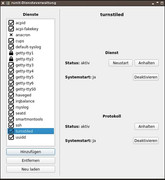
screenshot runit-service-manager https://postimg.cc/RqQnGVvg
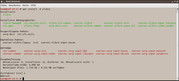
screenshot #apt install xlibre https://postimg.cc/kDFtwX7f
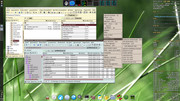
screenshot openbox desktop https://postimg.cc/mhNFV2TS
Last edited by Xaver (2026-06-29 15:08:30)
Offline
#10 2026-08-30 13:31:07
- Xaver
- Member
- Registered: 2025-12-28
- Posts: 12
Re: Test ISO: refracta freia xlibre turnstile pipewire
To my delight building my system was very uncomplicated. But then I realized, that Refracta 13.3 has libsystemd0 onboard.
I have replaced libsystemd0 by libelogind-compat and libelogind0. Then I tried to remove libelogind0 or replace it by a dummy, but that did brake the system.
This would be possible by using packages from the antiX nosystemd repo. To do so I would have to rise the priority of the antiX nosystemd repo, but then I shall get conflicts with the runit-services package. Maybe it is possible with sysv-init, but not with runit.
This motivated me to check your 'refracta_14_test_xlibre_turnstile-20260507_1411.iso'
Maybe you have found a better solution.
You have installed elogind/libelogind0 installed and seatd, libseat1 and turnstile as well. Both fulfill the same purpose. So which one is active? To figure that out I have run two tests:
(1) # apt purge seatd turnstile
After reboot the system did not show any differences.
seatd and turnstile seem to have no effect.
(2) # apt purge elogind (and keep seatd + turnstile)
This removed lxqt-panel. So Lxqt became unusable, but openbox was still working fine. Then I removed turnstile as well. Again this did not make any difference.
So in both cases turnstile seems to be irrelevant.
Last edited by Xaver (2026-08-30 13:48:46)
Offline
#11 2026-08-30 15:23:08
- fsmithred
- Administrator
- Registered: 2016-11-25
- Posts: 2,994
Re: Test ISO: refracta freia xlibre turnstile pipewire
This one does not have elogind or consolekit or turnstile. Just seatd and some elogind libraries. No display manager. I think you could remove some of those libraries if you removed the lxqt packages.
https://get.refracta.org/files/experime … 4_1517.iso
The turnstile iso has turnstile for user services. It's only used for pipewire in the iso you used. Turnstile uses the script in ~/.user_session.d
Did you revert to using only alsa for audio after removing turnstile?
Offline
#12 2026-08-30 18:50:26
- Xaver
- Member
- Registered: 2025-12-28
- Posts: 12
Re: Test ISO: refracta freia xlibre turnstile pipewire
I had not checked sound. Indeed, removing turnstile deactivates sound, even if I set audacious to alsa output.
'refracta_14_test_xlibre_turnstile-20260507_1411.iso' has the same login packages installed as my system.
But I have turnstile as well. If I would purge it, audacious, mousepad, xfburn and gcr would be removed too.
I could not detect why. Reverse depends of turnstile only show turnstile-dbgsym.
Offline
#13 2026-08-30 20:31:51
- fsmithred
- Administrator
- Registered: 2016-11-25
- Posts: 2,994
Re: Test ISO: refracta freia xlibre turnstile pipewire
That's weird. I'm not seeing that in my turnstile iso. If I remove turnstile, it does not want to remove anything else. If I try to remove dbus, it wants to remove audacious along with another 85 packages.
Make sure you get rid of all the pipewire, wireplumber and pulseaudio packages, and then alsa should work. (libpulse0 can stay and won't interfere.) Make sure you're using the right sound card. 'aplay -l' will show you which one is card 0 and if there's more than one, such as hdmi from your cpu, it'll show which one is card 1. There are a few ways to set the system to use the right card. Ask if you need help with that.
Offline
#14 2026-08-30 22:37:27
- Xaver
- Member
- Registered: 2025-12-28
- Posts: 12
Re: Test ISO: refracta freia xlibre turnstile pipewire
Yes, it is very weird. Sound works well and is pure alsa, nothing else installed.
Dbus daemons are excluded – only libdbus is installed.
Fortunately I see is no need to remove turnstile.
My guess: The cause is solver 3.
Offline
#15 2026-08-31 15:33:28
- Xaver
- Member
- Registered: 2025-12-28
- Posts: 12
Re: Test ISO: refracta freia xlibre turnstile pipewire
It seems that I have discovered the source of the mystery.
My system is based on excalibur and the dbus daemons are excludes by a dbus-bin pin. In excalibur there is no turnstile. So installed it from antiX and the related packages and runit service too. Among these there is the optional package 'dbus-turnstile-user-session'. It contains a script '/etc/user_session.d/01_dbus':
#!/bin/sh
DBUS_SESSION_BUS_ADDRESS="unix:path=$XDG_RUNTIME_DIR/bus"
dbus-daemon --session --nofork --address=$DBUS_SESSION_BUS_ADDRESS &if [ "$XDG_RUNTIME_DIR" = "/run/user/$(id -u)" ]; then
echo export DBUS_SESSION_BUS_ADDRESS="$DBUS_SESSION_BUS_ADDRESS" >> "$XDG_RUNTIME_DIR/profile"
fi
Somehow this script catches the dependencies to dbus-bin.
If I remove 'dbus-turnstile-user-session' (which depends on turnstile), all programs that need dbus-bin will be removed.
So now I understand, why I had got no dependency complains, when I installed audacious.
Offline
#16 2026-09-01 12:23:27
- Valera
- Member
- Registered: 2026-01-25
- Posts: 39
Re: Test ISO: refracta freia xlibre turnstile pipewire
dbus-turnstile-user-session is needed to run the suss backend and user services on runit, openrc. You can remove it if you don't need custom services.
Last edited by Valera (2026-09-01 12:42:00)
Offline
#17 2026-09-01 18:12:04
- Xaver
- Member
- Registered: 2025-12-28
- Posts: 12
Re: Test ISO: refracta freia xlibre turnstile pipewire
Thanks for the hint.
Yes, especially since there are no active dbus daemons on my system, dbus-turnstile-user-session probably is of no effect.
But if I remove it, audacious will go with it, unless I install some dbus dummy.
So I rather keep dbus-turnstile-user-session installed.
Offline
#18 2026-09-01 19:01:15
- Valera
- Member
- Registered: 2026-01-25
- Posts: 39
Re: Test ISO: refracta freia xlibre turnstile pipewire
You need to install dbus-x11 instead
Offline
#19 2026-09-01 20:29:13
- Xaver
- Member
- Registered: 2025-12-28
- Posts: 12
Re: Test ISO: refracta freia xlibre turnstile pipewire
You need to install dbus-x11 instead
For me that is the worst option.
I want as little of dbus on my system as possible.
Why? See here
https://wiki.hyperbola.info/doku.php?id … us_failure
and my post on dbus in the antiX forum
https://www.antixforum.com/forums/topic … ost-118320
Offline
#20 2026-09-02 05:54:25
- Valera
- Member
- Registered: 2026-01-25
- Posts: 39
Re: Test ISO: refracta freia xlibre turnstile pipewire
Interesting. Good luck with your research.
Offline
