
You are not logged in.
- Topics: Active | Unanswered
#1 2026-02-20 09:59:28
- Valera
- Member
- Registered: 2026-01-25
- Posts: 34
[SOLVED] MX_Devuan_KDE_dinit
This is my MX_Devuan with Plasma 6.5 and Dinit. For experiments.
I did not check the work on other configurations.
https://mega.nz/file/37I1FK7C#rnMFbuAe5 … zHHWzMJJUE
Last edited by Valera (2026-02-21 13:29:00)
Offline
#2 2026-04-04 06:32:27
- Valera
- Member
- Registered: 2026-01-25
- Posts: 34
Re: [SOLVED] MX_Devuan_KDE_dinit
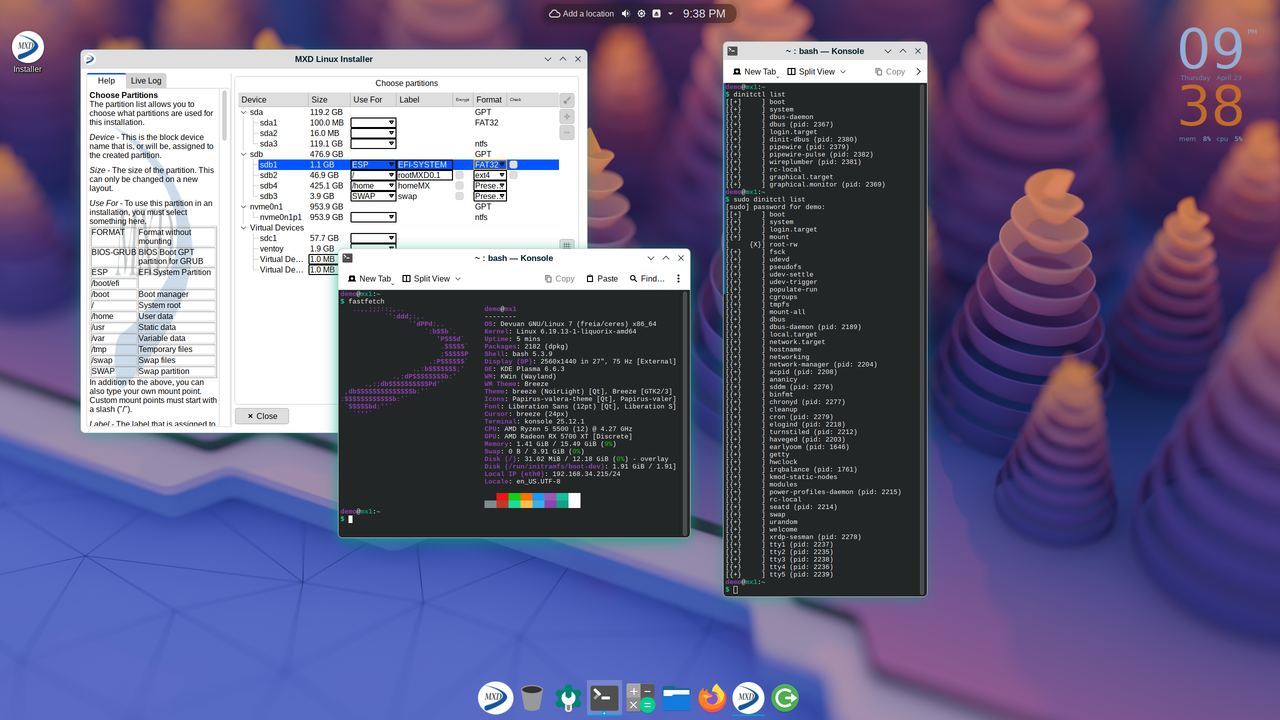
New minimal version.1.9 gb
Rolling Devuan Unstable + Plasma 6.6 + Dinit + MX Tools
Soft: Synaptic, BleachBit, Grub Customizer, Gparted, Timeshift, Gwenview, PortProton, qBittorrent,Tribler, Firefox, FileZilla, JamesDSP, Strawberry, SMPlayer, AbiWord, Gnumeric, Okular and more.
https://mega.nz/file/b2ZTFIII#PVQ3l1h7v … ZoxLANhk6c
Last edited by Valera (2026-04-23 19:12:34)
Offline
#3 2026-04-08 09:32:26
- sarcastillo
- Member
- Registered: 2026-04-08
- Posts: 2
Re: [SOLVED] MX_Devuan_KDE_dinit
Thanks for sharing. I've tried bot but couldn't figure out how to get any sort of network connection going. I was hoping using an Ethernet would autoconfigure itself, like it does on Devuan Excalibr and even my Freia test installs.
Any tips on how to get access to a network once these are installed?
Offline
#4 2026-04-08 11:05:27
- Valera
- Member
- Registered: 2026-01-25
- Posts: 34
Re: [SOLVED] MX_Devuan_KDE_dinit
Sorry. I don"t use a Network-manager. Using Dhcpcd. You can do:
ip link
ip link set eth0 up
Now I"ll do it with Network-manager....
Added Network-manager to ISO.
Last edited by Valera (2026-04-09 09:35:49)
Offline
#5 2026-04-08 13:04:46
- fsmithred
- Administrator

- Registered: 2016-11-25
- Posts: 2,908
Re: [SOLVED] MX_Devuan_KDE_dinit
If the computer will stay in one location, you could add a couple lines to /etc/network/interfaces.
https://www.devuan.org/os/documentation … figuration
See the section on using ifupdown and standard dhcp cable. If you need to have a static address on the local network, scroll down to Standard static address cable setup.
Offline
#6 2026-04-08 16:28:38
- sarcastillo
- Member
- Registered: 2026-04-08
- Posts: 2
Re: [SOLVED] MX_Devuan_KDE_dinit
Thank you for the quick responses! Do you build this using live-build and debootstrap?
Offline
#7 2026-04-08 17:39:32
- Valera
- Member
- Registered: 2026-01-25
- Posts: 34
Re: [SOLVED] MX_Devuan_KDE_dinit
To create the ISO I used MX-Snapshot (it is in the system). I removed debootstrap from the ISO, but you can install it in the live boot and then install the system with debootstrap.
The system has the best GUI installer - Gazelle-installer for installing the system.
Offline
#8 2026-04-09 09:30:50
- Valera
- Member
- Registered: 2026-01-25
- Posts: 34
Re: [SOLVED] MX_Devuan_KDE_dinit
Updated ISO with Plasma 6.6
Offline
#9 2026-04-11 07:18:40
- Valera
- Member
- Registered: 2026-01-25
- Posts: 34
Re: [SOLVED] MX_Devuan_KDE_dinit
Fixed the work of Dinit user services
Last edited by Valera (2026-04-11 07:28:18)
Offline
#10 2026-04-14 04:59:17
- Valera
- Member
- Registered: 2026-01-25
- Posts: 34
Re: [SOLVED] MX_Devuan_KDE_dinit
Fixed Dinit working with Cgroups, Turnstile work, Pipewire now runs through Dinit user services. There are still small problems, but they run into the lack of Dinit support in Devuan.
Offline
#11 2026-04-14 16:03:15
- l4nc
- Member
- Registered: 2026-03-24
- Posts: 2
Re: [SOLVED] MX_Devuan_KDE_dinit
I’m not a huge fan of KDE, but I’m glad someone’s adapting a Dinit to Devuan – great work, Valera!
Offline
#12 2026-04-15 09:24:02
- Valera
- Member
- Registered: 2026-01-25
- Posts: 34
Re: [SOLVED] MX_Devuan_KDE_dinit
l4nc, thank you!
Fixed Polkit, PackageKit
Last edited by Valera (2026-04-15 09:28:21)
Offline
#13 2026-04-18 17:33:52
- Valera
- Member
- Registered: 2026-01-25
- Posts: 34
Re: [SOLVED] MX_Devuan_KDE_dinit
Finished Dinit.Fixed running grafical.target with turnstile
Fixed starting a session with turnstile -now turnstile works completely like on Chimera Linux
Also fixed other bugs. Minimal, optimized for games with fresh software. Dinit is beautiful 
Offline
#14 2026-04-19 14:06:06
- Valera
- Member
- Registered: 2026-01-25
- Posts: 34
Re: [SOLVED] MX_Devuan_KDE_dinit
Sorry,I didn"t notice There were also problems with the cyclical launch of Turnstile services. I corrected it.
Turnstile - still in development...It's difficult with it.
Last edited by Valera (2026-04-19 14:14:13)
Offline
#15 2026-04-19 16:06:21
- l4nc
- Member
- Registered: 2026-03-24
- Posts: 2
Re: [SOLVED] MX_Devuan_KDE_dinit
I've heard that the integration in Chimaera Linux is perfect and a lot better than in ARTix. Are you sure it is the same level of implementation?
Offline
#16 2026-04-19 16:52:50
- Valera
- Member
- Registered: 2026-01-25
- Posts: 34
Re: [SOLVED] MX_Devuan_KDE_dinit
Sorry, I'm using Google Translate
My opinion is that Artix and Arch are not suitable for experimenting with init systems - they break very easily. Sid and Apt are better for this. The work of Dinit in Chimera Linux is the standard to be strived for. There the system is built to bypass Logind. I can't do the same on Devuan - there are permission problems. But I did my best to make Turnstile work. It controls the session and user services.
Offline
#17 2026-04-19 23:25:14
- ralph.ronnquist
- Administrator
- From: Battery Point, Tasmania, AUS
- Registered: 2016-11-30
- Posts: 1,672
Re: [SOLVED] MX_Devuan_KDE_dinit
Are you developing turnstile?
Or "simply" fixing its dinit backend?
I guess I don't understand why you would need to experiment with init systems while fixing the dinit backend for turnstile.
And turnstile in itself should be agnostic about init system. It merely is a service that implements that concept of "User Services" where a user may set up "services" (programs) to start and restart when and while the user is logged in, and terminate when they log out.
Of course the ABI in detail has that start/restart as a 2-step matter with a "started" notification from the service control scripting separate from progress monitoring, and that's what the backend provides. The backend flavours, to me, only concerns which support utilities for process management would be expected.
But I may well have misunderstood it all. Why is turnstile related to which init system is in use?
Offline
#18 2026-04-20 03:54:38
- Valera
- Member
- Registered: 2026-01-25
- Posts: 34
Re: [SOLVED] MX_Devuan_KDE_dinit
>> Are you developing turnstile?
No. I"m a regular user. I watched how Turnstile worked in Chimera Linux and tried to do the same in Devuan. To do this, I had to make my own Dinit-dbus file and modify the dinit backend script in Turnstile. This is an experiment. Through elogind, everything works perfectly. I also had to fix the work of dinit in cgroups. I hope my settings will interest someone and the developers will take care of the support of dinit in Devuan.
>>Why is turnstile related to which init system is in use?
Turnstile works with other init systems, but I fixed it work with dinit in this particular system. It will not work fully with the standard settings for the dinit backend - they are for Chimera Linux.
Last edited by Valera (2026-04-20 04:39:02)
Offline
#19 2026-04-20 04:28:33
- Valera
- Member
- Registered: 2026-01-25
- Posts: 34
Re: [SOLVED] MX_Devuan_KDE_dinit
From the Internet:
" What's the point of running the graphical stack and session via Turnstile in Chimera Linux?
In the context of Chimera Linux, using Turnstile is a deliberate architectural choice. It provides all the power of systemd for managing user and graphical services while remaining completely independent from systemd itself and its philosophy.
Simply put, Turnstile solves three key problems that are critical for modern graphical environments:
Automatic user service management: It automatically starts your personal instance of Dinit (or runit) right after you log in, and crucially, shuts it down properly when you log out.
Proper application runtime environment: It creates and manages the XDG_RUNTIME_DIR (typically /run/user/1000), which is required for PipeWire, Wayland, and many other modern applications to function.
Graphical session management: It provides targets like graphical.target, allowing you to start all your desktop environment services with a single command and manage them as a unified whole.
🖥️ How does this work in practice with the graphical stack?
The process is seamless but logical and elegant:
Login: You enter your password in a display manager (e.g., SDDM). The PAM module pam_turnstile notifies the turnstiled daemon that a session is starting.
Environment setup: Turnstile creates the /run/user/$(id -u) directory, sets environment variables (XDG_RUNTIME_DIR, DBUS_SESSION_BUS_ADDRESS), and launches your user instance of Dinit.
Service startup: Your dinit --user receives a command to start the graphical.target. This target includes launching pipewire, wireplumber, dbus-daemon, and finally your Wayland compositor (e.g., labwc, sway).
Work and logout: You use your system. When you log out, Turnstile signals your user Dinit to stop, which gracefully terminates all child processes and cleans up the /run/user directory.
🤔 Why use this instead of just elogind?
That's a fair question. Unlike elogind (which is essentially a stripped-out piece of systemd), Turnstile was designed from the ground up to be service manager agnostic.
elogind only knows about systemd. It doesn't know how to directly manage Dinit or OpenRC.
Turnstile is specifically built not to care what init system you're using. It simply executes a backend — a small script — which in turn launches your dinit --user or runsvdir.
Thanks to this architectural decision, Chimera Linux can have:
System-wide Dinit for global services.
User Dinit for your personal services, launched via Turnstile.
seatd or elogind for device access.
All these different systems work together without interfering with each other, making Chimera Linux one of the most cohesive and thoughtfully designed distributions outside the systemd ecosystem."
Last edited by Valera (2026-04-20 05:22:11)
Offline
#20 2026-04-20 05:06:08
- ralph.ronnquist
- Administrator
- From: Battery Point, Tasmania, AUS
- Registered: 2016-11-30
- Posts: 1,672
Re: [SOLVED] MX_Devuan_KDE_dinit
@Valera, there are too many nonsense statements in that.
Why that kind of sales blurb?
There is no special power in any of these programs. Nothing complicated.
Offline
#21 2026-04-20 05:18:27
- Valera
- Member
- Registered: 2026-01-25
- Posts: 34
Re: [SOLVED] MX_Devuan_KDE_dinit
>> Why that kind of sales blurb?
Sorry, it"s just a piece from the Internet, but it explains why I messed with Turnstile, and I just like dinit. I did it for myself as best I could, and I share it with others. This is relevant for those who use KDE and Wayland.
Last edited by Valera (2026-04-20 05:25:36)
Offline
#22 2026-04-20 15:19:36
- curranjm
- Member
- Registered: 2026-04-20
- Posts: 2
Re: [SOLVED] MX_Devuan_KDE_dinit
It's so weird to see administrators watching the second or third person (outside of ProwlerGR with the Devuan/Antix InitDiversity spins, which are incredible work) try to loosen systemD's stranglehold via Dinit and say, "Nothing complicated."
No, system inits and service files aren't generally complicated. But Devuan has stuck with SysV and OpenRC for as long as y'all have because the legwork was also being done on other distros, so you could share the workload. Antix doesn't move to Runit without Void, etc. etc.
Working from Chimaera to Devuan is a genuinely interesting path. Why you feel the need to belittle it is probably why Devuan is the community that it is.
Offline
#23 2026-04-20 20:46:51
- greenjeans
- Member

- Registered: 2017-04-07
- Posts: 1,651
- Website
Re: [SOLVED] MX_Devuan_KDE_dinit
Sorry, it"s just a piece from the Internet, but it explains why I messed with Turnstile, and I just like dinit. I did it for myself as best I could, and I share it with others. This is relevant for those who use KDE and Wayland.
While I don't use KDE or Wayland (and have no desire to do so!), still I very much appreciate your efforts and experimentation, it's interesting and sheds some light on parts of the system I use or might use, so thank you!
https://sourceforge.net/projects/vuu-do/ Vuu-do GNU/Linux, Devuan-based Openbox systems.
Devuan 6 mate-mini iso, pure Devuan, 100% no-vuu-do, mostly 
Please donate to support Devuan and init freedom! https://devuan.org/os/donate
https://devuanusers.com/
Offline
#24 2026-04-21 00:16:28
- ralph.ronnquist
- Administrator
- From: Battery Point, Tasmania, AUS
- Registered: 2016-11-30
- Posts: 1,672
Re: [SOLVED] MX_Devuan_KDE_dinit
@curranjm, yes, the init programs themselves are not, and should not be, very complicated.
All complexity around "init" comes with the designed/intended framework of the particular init system idea. This is a matter of documenting that framework clearly and openly so that service devlopers can shoe-horn their service control into that framework. The framework itself would be concerned with the ordering of service control activity, and how to detect and handle failure situations. Complex stuff.
I don't think anything much is gained by conflating the complexity of an init framework abstraction with (ideally) the simplicity of the technical operation of an init program.
Offline
#25 2026-04-22 02:35:46
- curranjm
- Member
- Registered: 2026-04-20
- Posts: 2
Re: [SOLVED] MX_Devuan_KDE_dinit
And nothing much is gained by watching someone post a working system with user services ported from a BSD userland while navigating Devuan's, um, knotty relationship with elogind and asking if they're "working on fixing a backend to another project's service." People post umpteen Openbox clones that are just darker and darker Crunchbang clones with zero negative comments and one dude who doesn't speak English natively gets grilled on his understanding of init, service and session management by someone who wanted to give OP enough rope rhetorically to hang himself.
It's like you wanted a deeper conversation, couldn't get it because the other person was on a different stage of their journey into learning about OS fundamentals, and then decided to end by telling everyone why you were right instead of taking the decent step like FSmith does in almost every thread of just trying to point in one useful or elucidating direction.
Offline
