
You are not logged in.
- Topics: Active | Unanswered
#1 Re: Installation » confusion about repository content » Yesterday 01:09:24
Hello:
Thanks ...
You're welcome.
... tried snap and snapd ...
At least you sorted out the repository confusion.
Best,
A.
#2 Re: Installation » confusion about repository content » 2026-11-10 23:14:34
Hello:
Seems you are looking for a package present in the Debian repositories but not in the Devuan repositories.
ie: [snapd] and not [snap]. <- the DNA sequence with hidden markov mode application.
All official Devuan packages are sourced from the Debian repositories as long as they can be used directly and without intervention from the Devuan devs.
Otherwise, they are sanitised of their reliance on [systemd] and only then made available for installation.
If that is not possible, they are banned from the Devuan repositories.
See the list here.
You will find [snapd] there as it depends on [systemd].
That said, if a specific package is not in the Debian repositories, you will not find it in the Devuan repositories.
Best,
A.
#3 Re: Off-topic » Can I trust freenginx? » 2026-11-07 16:40:31
Hello:
... (debian) don't have it in their packages ...
Right.
So, there you have it: not in [Debian]*? ---> not in [Devuan] either.
... available on Hyperbola ...
Being available in the [Hyperbola] repositories makes it explicitly suitable for [Hyperbola GNU/Linux-libre].
Not necessarily for [Debian] or [Devuan] for that matter.
* there is surely a reason for that being so, you could ask them.
Best,
A.
.
#4 Re: Off-topic » Can I trust freenginx? » 2026-11-07 14:00:05
Hello:
... searched the Devuan's package manager (apt) to see ...
Have you checked if that package is in the Debian repositories?
If it is not to be found there, then you will not find it in the Devuan repositories.
... reason that I don't find it in apt and extrepo is because ...
Maybe its being a fork of [nginx] keeps it out of the Debian repositories?
No idea.
No matter:
All Devuan packages are sourced from the Debian repositories as long as they can be used directly without intervention from the Devuan devs.
Otherwise, they are sanitised of their reliance on [systemd] and only then made available for installation.
But if that is not possible, they are banned from the Devuan repositories.
Best,
A.
#5 Re: Installation » Security vulnerability in APT allows execution of malicious code » 2026-11-06 10:09:04
Hello:
... daedalus affected or patched?
Easiest is using [synaptic] and some command line:
1. open up [synaptic]
2. hit the [reload] button
3. go to [settings] -> [repositories]
4. look for the check-box for [http:/deb/devuan.org/merged daedalus-proposed-updates]
5. check the box and hit reload again
6. exit [synaptic]
Now you have enabled [http:/deb/devuan.org/merged daedalus-proposed-updates].
7. open a terminal
8. become [root] and do:
# apt install aptOnce done, exit [root] and check the installed version:
$ apt -v
apt 2.6.2devuan1 (amd64)   ### this is the upgraded version for [daedalus].
~$
Next, disable [http:/deb/devuan.org/merged daedalus-proposed-updates] which is not usually needed/desired.
Redo steps 1-6, this time unchecking the box for [http:/deb/devuan.org/merged daedalus-proposed-updates], hitting the reload button and exiting [synaptic].
Best,
A.
#6 Re: Devuan » Why not use runit? Do you guys use runit? » 2026-11-05 21:16:51
Hello:
If "service supervision" is necessary because some service tends to die unexpectedly ...
... the service/daemon is buggy and should either be fixed or replaced ...
... not kept alive with service supervision.
+1
Of course, there is the argument that as the daemon is mission critical, supervision is needed and blah, blah, blah ...
To which the answer is: if it is mission critical, it should not be buggy.
Best,
A.
#7 Re: Devuan » Why not use runit? Do you guys use runit? » 2026-11-05 18:04:53
Hello:
What do I gain by using runit instead of sysvinit?
In other words, why should I use it?
Indeed ...
Unless your distribution of choice uses [runit] by default, in which case it would be:
What do I gain by sysvinit using instead of runit?
In other words, why should I use it?
Any one of the aforementioned situations (necessarily) imply a justification for doing so, the second implication being that the user is sufficiently versed in the options being considered to be able to make an informed choice.
Like I have said a few times now: [systemd] was never about anything but an orchestrated putsch, not against Debian per se, but against the Linux ecosystem as a whole.
Debian is just the viral vector to deliver [systemd] to the Linux ecosystem.
As such, it will end up being nothing but collateral damage.
Best,
A.
#8 Re: Installation » freia desktop-live test iso » 2026-11-03 01:52:19
Hello:
... instead of re-cycling it just appends the current session ...
... nothing ever gets deleted. This could make for a very large file ...
Indeed ...
I have seen huge GB sized [.xsession-errors] files.
But recycling the file means that you will not have access to the error log from the last session.
I see log files as the bread and butter of a Linux installation.
To me, the best solution is the one posted here. ### not that I'd have a clue as to what the file says, but someone else might ...
TL;DR: add a task to your crontab to periodically check the size of [.xsession-errors file].
If it grows past an arbitrary size, you truncate it to an also arbitrary amount of lines.
You set the size and the amount of lines.
eg: size=5GB lines=10000
*/15 * * * * [ $(du -k .xsession-errors | awk '{ print $1 }') -gt 5000000 ] && tail -10000 /home/$(whoami)/.xsession-errors > /home/$(whoami)/.xsession-errorsBest,
A.
#10 Off-topic » Pegasus Mail and WINE question » 2026-10-12 11:25:08
- Altoid
- Replies: 2
Hello:
I have searched the forum and it would seem that I am the only member using [Pegasus Mail] under [WINE].
Q1: anyone else?
But I have seen that there are quite a few members using [WINE], mostly for games (?)
Q2: which WINE?
ie: the respective 'repack' from the Devuan repository or some version from WineHQ?
Thanks in advance.
Best,
A.
#11 Re: Hardware & System Configuration » [SOLVED] /etc/resolv.conf resets on reboot ever since I switched routers » 2026-10-11 20:40:25
Hello:
See* this thread: https://dev1galaxy.org/viewtopic.php?id=6845
Best,
A.
* the search function in this forum is a very useful tool.
#12 Re: Hardware & System Configuration » [SOLVED] SD Card problem » 2026-10-07 17:08:33
Hello:
One or more of these should work.
Thanks for the heads-up.
Had never heard of [sfdisk] before.
Best,
A.
#13 Re: Hardware & System Configuration » [SOLVED] SD Card problem » 2026-10-07 12:24:44
Hello:
@KindlyDoRight
... useful to reset the correct partition size, after I have botched a partition when resizing it.
Yes, I have used the [testdisk] [PhotoRec] utility to recover files from an accidental [dd] stopped at 1.5MB.
The problem is that losing the directory structure results is an endless stream of [recup_dir.X] directories with a few files in each of them, many times repeated in other directories. ie: a nightmare.
Better than nothing, I guess.
I have yet to find a properly documented (understandable) set of instructions to reset partiton sizes and such operations.
That said, most important step is to make an image of the damaged drive before doing anything with [testdisk].
@dzz
"64GB" Sandisk Ultra here ...
# fdisk -l /dev/sdc
Disk /dev/sdc: 57.3 GiB, 61530439680 bytes, 120176640 sectors
Disk model:  SanDisk 3.2Gen1
Units: sectors of 1 * 512 = 512 bytes
Sector size (logical/physical): 512 bytes / 512 bytes
I/O size (minimum/optimal): 512 bytes / 512 bytes
Disklabel type: dos
Disk identifier: 0x8776131b

Device     Boot Start       End   Sectors  Size Id Type
/dev/sdc1  *     2048 120176639 120174592 57.3G  c W95 FAT32 (LBA)
Gparted also reports 57.3G. Never mind, it works.
Right.
Thank you both for your input.
Best,
A.
#14 Re: Hardware & System Configuration » [SOLVED] SD Card problem » 2026-10-07 12:08:18
Hello:
... an image of the entire device then the image should be the same size as the device capacity. All bootloader and partitioning info (if any) will be part of the image ...
I see.
Why are you flashing to a partition here?
See my previous reply to @rbit.
Thanks for your input.
Best,
A.
#15 Re: Hardware & System Configuration » [SOLVED] SD Card problem » 2026-10-07 12:01:23
Hello:
Sorry for the delayed reply.
... the "img" file is of the device, but you're trying to write it to a partition.
I see.
I did it so:
1. formatted the sd card (clear and then as FAT32 or ext4)
2. remount it and check the device name (with dmesg, Gparted, Disks and lsblk) <- imagine why...*
All these printed [/dev/sdX1], so I used that for [dd].
Made sense to me as the SD Card was not partitioned.
ie: just one single partition
OT ->
When new to Linux, I read about [dd] being called "disk destroyer") so I have always been weary of using it.
But I have used it in a few occasions, inevitably resulting in lack of practise / experience.
Something you may have noticed. 8^°
But I will insist, I think it is a very powerful and versatile tool, just have to learn to master it.
Eventually. * even with all these precautions, I have lost more than one partition table to [dd].
<- OT
... fdisk -l /media/storage/isos/chimaera/rpi_chimaera.img
# fdisk -l rpi_chimaera.img
Disk rpi_chimaera.img: 7.22 GiB, 7757398016 bytes, 15151168 sectors
Units: sectors of 1 * 512 = 512 bytes
Sector size (logical/physical): 512 bytes / 512 bytes
I/O size (minimum/optimal): 512 bytes / 512 bytes
Disklabel type: dos
Disk identifier: 0xd9d859d0

Device            Boot  Start      End  Sectors  Size Id Type
rpi_chimaera.img1 *      2048   524287   522240  255M  b W95 FAT32
rpi_chimaera.img2      524288 15151103 14626816    7G 83 Linux
#
I have managed to properly write an image to the sd card using [disks]; boots/works as expected.
[rpi-3-devuan-chimaera-5.10.74-v8-ext4-2021-10-19.img] from the Devuan repository.
# fdisk -l rpi-3-devuan-chimaera-5.10.74-v8-ext4-2021-10-19.img
Disk rpi-3-devuan-chimaera-5.10.74-v8-ext4-2021-10-19.img: 1.82 GiB, 1958482432 bytes, 3825161 sectors
Units: sectors of 1 * 512 = 512 bytes
Sector size (logical/physical): 512 bytes / 512 bytes
I/O size (minimum/optimal): 512 bytes / 512 bytes
Disklabel type: dos
Disk identifier: 0xd9d859d0

Device                                                Boot  Start     End Sectors  Size Id Type
rpi-3-devuan-chimaera-5.10.74-v8-ext4-2021-10-19.img1 *      2048  524287  522240  255M  b W95 FAT32
rpi-3-devuan-chimaera-5.10.74-v8-ext4-2021-10-19.img2      524288 3825160 3300873  1.6G 83 Linux
#
I now have to pull configuration and files I need from the last working image which can be mounted with [disks].
Only remaining problem (if I stay with Chimaera) is the repository not working yet.
Again, eventually.
Thanks for your input.
Best,
A.
#16 Re: Hardware & System Configuration » [SOLVED] SD Card problem » 2026-10-07 11:04:09
Hello:
... the old GB vs GiB problem.
Look close Altoid ...
Yes ...
And see how easy it is to embarass oneself. 8^°
Thank you both.
Best,
A.
#17 Re: Hardware & System Configuration » [SOLVED] SD Card problem » 2026-10-06 18:56:57
Hello:
Will post with results.
Unfortunately, I am getting the same results I posted previously.
This is the [dd] process:
# dd if=/media/storage/isos/chimaera/rpi_chimaera.img of=/dev/sdg1 bs=4M status=progress
7755268096 bytes (7.8 GB, 7.2 GiB) copied, 668 s, 11.6 MB/s^[[B
1849+1 records in
1849+1 records out
7757398016 bytes (7.8 GB, 7.2 GiB) copied, 787.312 s, 9.9 MB/s
#
ie: all records written but only 7.2 GB of 7.8 GB copied. <-- what did not get copied?
# mount /dev/sdg1 /mnt/SD
mount: /mnt/SD: wrong fs type, bad option, bad superblock on /dev/sdg1, missing codepage or helper program, or other error.
       dmesg(1) may have more information after failed mount system call.
#
As I was able to install an old Devuan Beowulf and boot without issues it would seem that the SD Card is working properly,
I will try to burn and [*iso] file to see what happens.
Will post with results.
Best,
A.
#18 Re: Hardware & System Configuration » [SOLVED] SD Card problem » 2026-10-06 18:11:44
Hello:
... took a dd image of this device.
... trying to write that image using dd back to the same device ...
... getting the error that there is insufficient space. Correct?
Yes to all.
There's still more:
While [dd] prints that all records have been written [1849+1 records in / 1849+1 records out], at the same time it prints that of the 7.8 GB that had to be copied, only 7.2 GB had been written [(7.8 GB, 7.2 GiB) copied].
# dd if=/media/storage/isos/chimaera/rpi_chimaera.img of=/dev/sdh1 bs=4M status=progress
7757398016 bytes (7.8 GB, 7.2 GiB) copied, 577 s, 13.4 MB/s
1849+1 records in
1849+1 records out
7757398016 bytes (7.8 GB, 7.2 GiB) copied, 703.66 s, 11.0 MB/s
#
Also, if I try to mount the card, I get this:
# mount /dev/sdh1 /mnt/SD
mount: /mnt/SD: wrong fs type, bad option, bad superblock on /dev/sdh1, missing codepage or helper program, or other error.
       dmesg(1) may have more information after failed mount system call.
#
[dmesg] prints the same data.
Curiously enough I was able to install an old [Beowulf] netinstall but stopped short of installing [LiLO] because GRUB was not offered as an option.
So what's up with my not being to install [*.img] files?
I insisted with the Beowulf installation this time in automatic mode and (lo and behold) I was able to install it, booting just fine.
Here is what [fdisk -l] and [df -h] print:
Disk /dev/sdg: 29.72 GiB, 31914983424 bytes, 62333952 sectors
Disk model: Storage Device
Units: sectors of 1 * 512 = 512 bytes
Sector size (logical/physical): 512 bytes / 512 bytes
I/O size (minimum/optimal): 512 bytes / 512 bytes
Disklabel type: dos
Disk identifier: 0xb403ed78

Device     Boot Start      End  Sectors  Size Id Type
/dev/sdg1  *     2048 62332927 62330880 29.7G 83 Linux
# df -h
Filesystem Size Used Avail Use% Mounted on
/dev/sdg1 30G 607M 27G 3% /mnt/SD
# I can also mount it manually with no issues:
# mount /dev/sdg1 /mnt/SD
# cd /mnt/SD
# ls
bin   dev  home        initrd.img.old  lib64	   media  opt	root  sbin  sys  usr  vmlinuz
boot  etc  initrd.img  lib	       lost+found  mnt	  proc	run   srv   tmp  var  vmlinuz.old
#
So the next test would be to see if installing [GRUB] to the card has cleared out whatever was causing the problem.
ie: any one (or more) of these: wrong fs type, bad option, bad superblock on /dev/sdh1, missing codepage or helper program, or other error.
Will post with results.
Best,
A.
#19 Re: Hardware & System Configuration » [SOLVED] SD Card problem » 2026-10-06 13:46:59
Hello:
@Camtaf
Thanks for the link, but [uBlock] gives me a warning, probably false.
That said, the card is an original/store purchased Sandisk Ultra which worked perfectly well until I screwed it up.
If there was some issue with respect to its real capacity or provenance it would have shown up once I used it for the first time.
Methinks there is something else afoot here ...
Best,
A.
#20 Hardware & System Configuration » [SOLVED] SD Card problem » 2026-10-06 12:09:28
- Altoid
- Replies: 17
Hello:
I think I sort-of-ish screwed up the 32Gb SD Card I use in my RPi3B+ by attempting to resize the first 128Mb partition.
The result was that while [df -h] reported a size of 128Mb, [fdisk -l] reported a size of 256Mb.
The RPi booted/worked properly but thinking the discrepancy (ie: filesystem smaller than the partition it occupied) would eventually become a problem, I messed it up.
Have to rewind a bit and see if I can remember exactly what I did last night.
No problem (said I feeling smug ...) I had previously made an image albeit with the discrepancy included.
But as it was an image of a working system, I was confident I could recover it and just live with it.
Not so.
An attempt to write the image with the [Disks) utility gave me an error: the image was 1.6Mb larger than the available space.
No problem, (said I, still feeling smug) I'll just [dd if=/dev/zero] the saylights out of it and problen solved.
Not so.
Here is the printout of the process:
# dd if=/dev/zero of=/dev/sdg bs=4M status=progress
31910264832 bytes (32 GB, 30 GiB) copied, 2818 s, 11.3 MB/s
dd: error writing '/dev/sdg': No space left on device
7610+0 records in
7609+0 records out
31914983424 bytes (32 GB, 30 GiB) copied, 2928.4 s, 10.9 MB/s
#
Unless I am mistaken, it would seem that the size discrepancy has been baked into some part of the sd card I have not been able to access with [dd] and as a result it reads the card and computes that it can write 32Gb worth of zeroes to it but something in the card says that its size is 30Gb and throws an error. ie: No space left on device
Edit:
Attempting to [dd] the [2026-09-15-raspios-trixie-arm64-lite.img] downloaded fron the Raspberry website gets me this:
# dd if=/media/storage/isos/RPi/2026-09-15-raspios-trixie-arm64-lite.img of=/dev/sdg1 bs=4M status=progress
3057647616 bytes (3.1 GB, 2.8 GiB) copied, 261 s, 11.7 MB/s
730+0 records in
730+0 records out
3061841920 bytes (3.1 GB, 2.9 GiB) copied, 386.086 s, 7.9 MB/s
#
In this case, [dd] does not copy all the data but 2.0Gb less, just like before.
ie: 30Gb of 32Gb copied.
Maybe it is not being able to write to the partition table space?
Any idea as to how to solve this?
Best,
A.
#21 Re: Intergalactic Communities » Spaced Linux » 2026-10-05 18:02:37
Hello:
... suggest that the derivative creators do what they do for very different reasons ...
I'd tend to agree, but with one caveat: by no means that can be a blanket to be cast over all of them.
There are a lot of very capable/valuable people out there doing excellent/useful work.
And even then, I will support their absolute right of anyone to do as they please, vanity or not.
That is not the point.
What gets me is the time and (mostly capable) manpower invested by thousands individually instead of harnessing it all towards a common goal. ie: a brick/set of bricks, part of a huge building within the metropolis that is the Linux ecosystem.
Instead of a small / temporary tent for two or three set up in a shanty town.
But with your name on the door, of course. 8^°
Right.
I think we have unwittingly veered way off-topic.
So I will end my participation now.
Thanks for the input.
Best,
A.
#22 Re: Packaging for Devuan » chimaera is going to archive? » 2026-10-05 11:12:48
Hello:
... bullseye-security is in archive now...
Thanks for the heads up.
Best,
A.
#23 Re: ARM Builds » [SOLVED] Upgrading kernel via apt » 2026-10-04 19:30:09
Hello:
... a hardware bootloader that boots the kernel binary directly. The package manager doesn't know anything about it and that's why you couldn't upgrade the kernel. I don't know if there's a way to manually upgrade it.
I have managed to update/upgrade my RPi 3b+ to [chimaera] via apt but, just like [steve_graham], the thingy is still using the kernel it was using before.
rpi3b:~$ cat /etc/os-release
PRETTY_NAME="Devuan GNU/Linux 4 (chimaera)"
NAME="Devuan GNU/Linux"
VERSION_ID="4"
VERSION="4 (chimaera)"
VERSION_CODENAME="chimaera"
--- snip ---
rpi3b:~$
rpi3b:~$ uname -asrm
Linux rpi3b 4.16.14-v8+ #1 SMP PREEMPT Tue Jun 5 18:50:10 CEST 2018 aarch64 GNU/Linux
rpi3b:~$ The [/boot] directory has three kernel images ...
rpi3b:/boot# ls | grep ker
kernel.img        <--- to be removed?
kernel7.img       <--- to be removed?
kernel8.img
pi3b:/boot#
... and [/boot/config.txt] uses the [kernel=8] option:
rpi3b:~$ cat /boot/config.txt | grep kernel=
kernel=kernel8.img
rpi3b:~$
@fsmithred
Looking around I found a recent paper [*.pdf] published by the people at [raspberrypi.com]: Updating Raspberry Pi firmware.
The interesting (?) part is in p. 7:
Updating only the firmware
--- snip ---
In these circumstances, and possibly others not mentioned here, you will need to update the firmware files in the distribution manually.
--- snip ---
The basic principle is to copy the required start and fixup files from this zip file and replace those of the same name in the destination OS image. The exact process will depend on how the OS has been set up, but the following gives an example of how it should be done for a Raspberry Pi OS image:• Extract or open the zip file so that you can access the required files
• Open the boot folder in the destination OS image (this can be on an SD card or a disk-based copy)
• Determine which start.elf and fixup.dat files are present in the destination OS image
• Copy those files from the zip file to the destination OS imageThe image should now be ready to use on the latest Raspberry Pi Ltd hardware
Is this the information you would need to manually upgrade the RPi kernel manually or maybe this would not work in Devuan?
Best,
A.
#24 Re: Intergalactic Communities » Spaced Linux » 2026-10-04 14:25:43
Hello:
"Vanity derivatives" also tend to generate technical support requests on the "parent" distributions ...
Yes, I have observed that happens quite a bit.
@golinux: interesting name/definition 8^)
Matches perfectly with the "Look Ma!, I rolled my own [whatever]" I have posted about a few times about the same thing.
... same thing with many of the derivatives these days: Essentially, name it, stick a badge on it and a wallpaper ...
Exactly my thoughts but by no means depreciative of the efforts made by those engaged in them.
Have a look* at the map of all the Debian based distributions that, for whatever reason, ended up by the wayside.
More than one deserved a much better fate eg: the original [CrunchBang]** and [DamnSmallLinux].
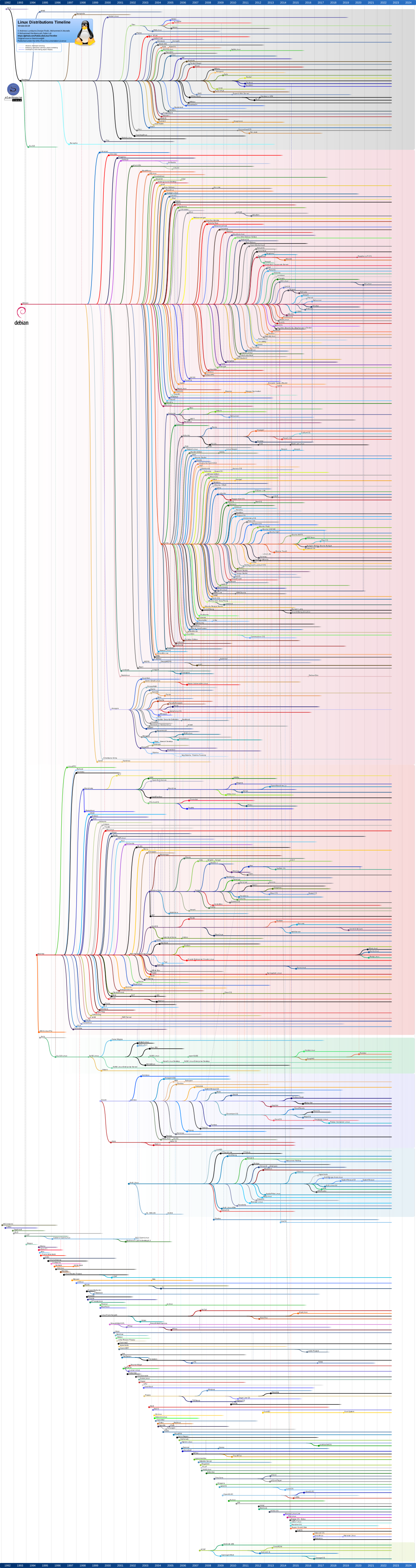
Makes you wonder about the time and manpower lost instead of being harnessed towards a common goal.***
Would MS-Windows exist today in its present form today?
* within the larger map of generic Linux distributions timeline.
** all time favourite till it went under.
*** for a distribution or applications/packages in need of maintenance.
TL;DR:
Do we really need another grain of sand on the beach?
Best,
A.
#25 Re: Freedom Hacks » The Absurdist Comedy » 2026-10-01 14:03:51
Hello:
... missing the point.
Could be.
My command of the english language is rather lacking, so I won't argue that point.
But ...
Consider the possibility of what you see as predetermined was, at some stage in *IT time*, previously decided* by those who were interested in a specific outcome. eg: interested parties that wrote/timed and executed the rule of the game for their own advantage, something I see as evident.
* planned
Thus it began and as a result we now have MS-registry's half brother, [systemd], among us.
Best,
A.
Board footer
