
You are not logged in.
- Topics: Active | Unanswered
#176 Re: Freedom Hacks » Debian not providing new 686 kernels in Trixie » 2025-05-25 22:07:12
Uh-oh. I upgraded my excalibur minimal-X system and made a new live-iso. It doesn't boot. Drops to initramfs prompt and says it couldn't mount the squashfs. This is with linux-image-6.12.30-gnu. I made another live-iso that includes the 6.12.24-gnu kernel and that boots normally. (Note: both kernels boot normally in the VM I'm using to make the isos.)
mount /run/live/medium/live/filesystem.squashfs: fsconfig() failed: unable to read squashfs_super_block.Here's a screenshot that shows the error message in /boot.log
https://get.refracta.org/files/misc/mou … -00-38.png
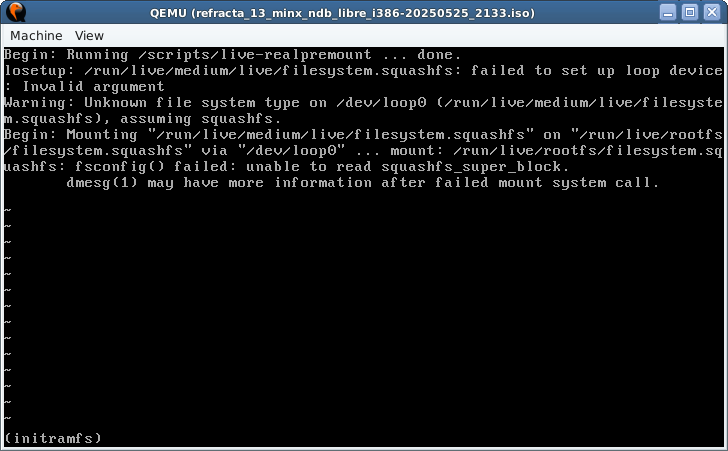
Edit: Found an iso I made on May 12 with 6.12.28-gnu that works.
#177 Re: Freedom Hacks » Debian not providing new 686 kernels in Trixie » 2025-05-25 16:34:51
Oops! My EEE has a 128G ssd, so I didn't think a lot about disk space. I recently added a 32G sd card so I could run excalibur without losing my daedalus install (or my win XP install which I keep only for nostalgia). The EEE sees it as a usb storage device, so it's bootable.
#178 Re: Freedom Hacks » Debian not providing new 686 kernels in Trixie » 2025-05-24 22:15:46
This works:
https://www.fsfla.org/ikiwiki/selibre/l … sh.en.html
Example:
https://get.refracta.org/files/testing/ … 5_1010.iso
sha256sum:
5ba7eab51ee52a50a7eb5203c01a7ea836551e177ca3b4a96a4f70cb58b000ed refracta_13_nox_libre_i386-20250425_1010.isoIf you need nonfree firmware, you'll need to find a different solution.
#179 Re: Installation » Daedalus desktop live: Cannot load memtest » 2025-05-23 20:46:33
In the live isos, the memtest images are in the /live directory with the kernel and initrd. That's where you'll find it if you mount the iso on a running system. If you boot the iso, look in /run/live/medium/live (I think that's right.) Poke around and you'll find the boot menus - isolinux/isolinux.cfg and boot/grub/grub.cfg.
#180 Re: Hardware & System Configuration » [SOLVED] Stale keyring files? » 2025-05-23 20:40:39
Tint2 or lxpanel or lxqt-panel or polybar in autostart.
spacefm or ~/.fehbg or nitrogen in autostart.
I like to include a terminal there too, so it's always open and ready on first desktop. That way, if my monitor dies while booting up, I can still type commands and shut down gracefully. (old boy scout)
'kits in excalibur desktop-live iso. This is in xfce despite what your eyes may tell you:
$ dpkg -l |grep -Ei "polkit|policykit|login|seat"
ii  cups-pk-helper                        0.2.6-2.1                                    amd64        PolicyKit helper to configure cups with fine-grained privileges
ii  elogind                               255.17-2                                     amd64        user, seat and session management daemon
ii  gir1.2-polkit-1.0                     126-2devuan1                                 amd64        GObject introspection data for polkit
ii  libelogind-compat:amd64               255.17-2                                     amd64        user, seat and session management library compatibility
ii  libelogind0:amd64                     255.17-2                                     amd64        user, seat and session management library
ii  libpam-elogind:amd64                  255.17-2                                     amd64        elogind PAM module
ii  libpam-gnome-keyring:amd64            48.0-1                                       amd64        PAM module to unlock the GNOME keyring upon login
ii  libpolkit-agent-1-0:amd64             126-2devuan1                                 amd64        polkit Authentication Agent API
ii  libpolkit-gobject-1-0                 126-2devuan1                                 all          polkit Authorization API
ii  libpolkit-gobject-elogind-1-0:amd64   126-2devuan1                                 amd64        polkit Authorization API
ii  libseat1:amd64                        0.9.1-1                                      amd64        flexible user, seat and session management library
ii  login                                 1:4.16.0-2+really2.41-4devuan1               amd64        system login tools
ii  login.defs                            1:4.17.4-2                                   all          system user management configuration
ii  lxpolkit                              0.5.6-2                                      amd64        LXDE PolicyKit authentication agent
ii  pkexec                                126-2devuan1                                 amd64        run commands as another user with polkit authorization
ii polkitd 126-2devuan1 amd64 framework for managing administrative policies and privileges#181 Re: Hardware & System Configuration » [SOLVED] Stale keyring files? » 2025-05-23 14:29:55
I think the background color in openbox is built into the binary. I couldn't find a way to change it. Two ways I know to have a bg image in openbox are with spacefm or feh. I seem to recall some gaseous element name for bg images with a window manager - I think it's nitrogen but it might be oxygen.
#182 Re: Hardware & System Configuration » [SOLVED] Stale keyring files? » 2025-05-23 00:28:38
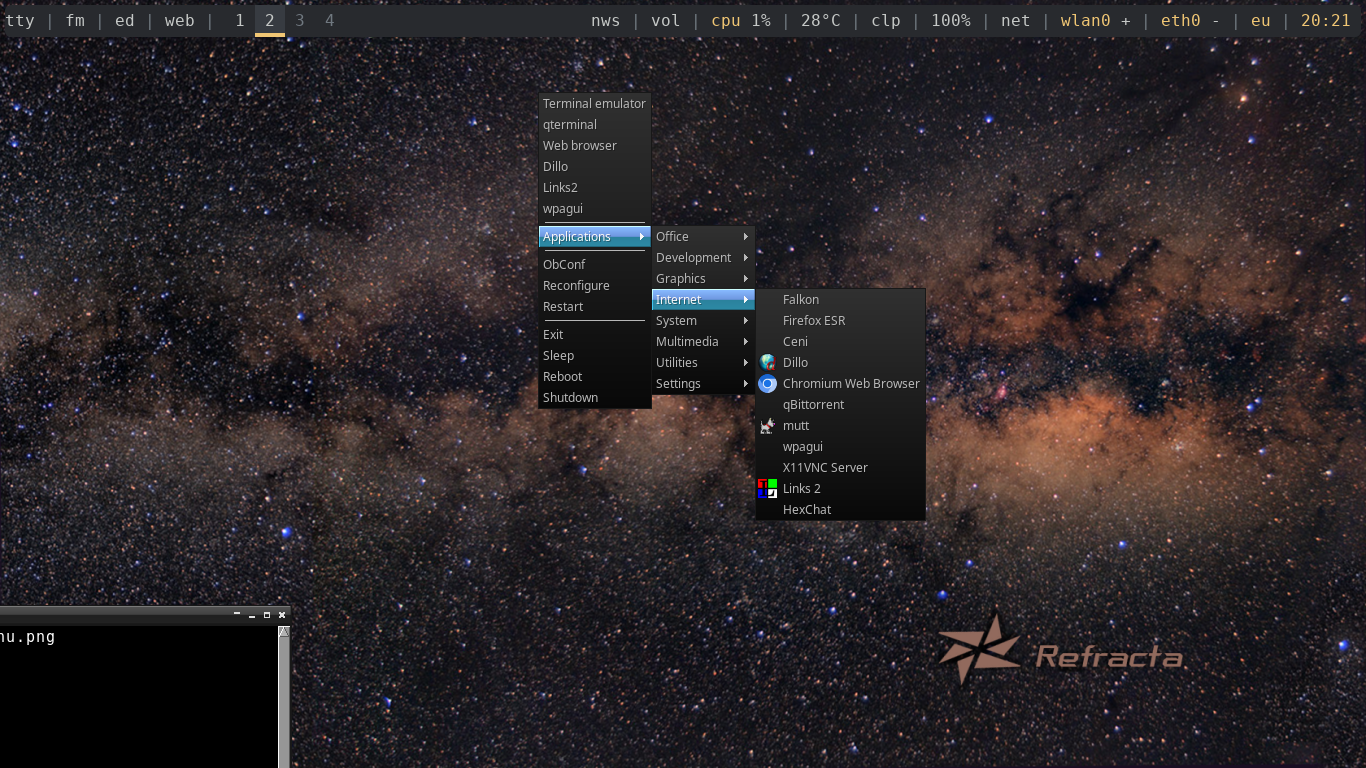
Openbox now includes an applications menu that uses the .desktop files in /usr/share/applications. I added a few items to the main menu, but everything expanded from "Applications" was automatically added.
https://get.refracta.org/files/misc/ope … s-menu.png
#183 Re: Installation » Daedalus desktop live: Cannot load memtest » 2025-05-22 21:58:12
Good find. I'll have to remember to play with that on a multi-boot live-usb that uses syslinux to see what it does.
I don't know if the .bin file is needed. I'll leave it for now and see if someone finds a case where that's the only one that works for them.
#184 Re: Installation » Daedalus desktop live: Cannot load memtest » 2025-05-22 20:03:58
Thanks again. That works. I changed "kernel" to "linux" on the memtest boot entries and it works. Both *.efi and *.bin work on a T450s Thinkpad in legacy or uefi boot. I didn't try the ia32 images. I probably won't include those in the boot menu, but they'll be there in case anyone needs them.
#185 Re: Other Issues » [SOLVED] ifupdown removes insecure files after chmod » 2025-05-22 16:49:10
I'm pretty sure that everything in /run will be regenerated on reboot. If you changed permissions on the executables in /sbin, those won't revert. You should do that manually.
Instead of changing permissions, you could give your user sudo privs without password for just the required commands. Then you can use those commands in destkop launchers without having to enter a password.
I have something like this in /etc/sudoers.d/usercommands. (Hint: visudo /etc/sudoers.d/usercommands)
Cmnd_Alias	HALT = /sbin/shutdown, /sbin/halt, /sbin/poweroff, /sbin/reboot
Cmnd_Alias	NET = /sbin/ifconfig, /sbin/ifup, /sbin/ifdown

fred    ALL=NOPASSWD: HALT, NET
For brightness, your user can run xrandr.
# $monitor1 is the name of the connected monitor from xrandr without any options.
# $bright1 is a number between 0.0 and 1.0.
xrandr --output $monitor1 --brightness "$bright1"#186 Re: Installation » Daedalus desktop live: Cannot load memtest » 2025-05-22 13:37:07
Thanks for the thorough testing and excellent report! I can confirm your results and add one more. The *ia32.efi works on a 32-bit machine. (Asus EEE).
I did get some weirdness on one uefi laptop - if I stroke the touchpad while memtest is running I either get a popup menu to select the address range to test, and it hangs on that menu, or else it reboots. I'm guessing that's a hardware problem with this laptop that was dropped too many times.
The beeps are intentional for those who can't see the screen. Once it boots, it's ready for braille display. Grub won't do the ASCII beep, but it should play two tones when the boot menu comes up.
Another way to see the difference between the boot screens is that the font and layout are different between legacy (isolinux) and uefi (grub). Isolinux says to use TAB to edit, Grub says press e to edit.
I added "86" to the grub menu for the next build. Not sure what to do about menu entries at this point. Maybe someone will figure out what the .bin files are for.
#187 Re: Installation » Daedalus desktop live: Cannot load memtest » 2025-05-20 00:47:36
...sooner than I thought.
There are two memtest entries in the boot menus. One for memtest86+x64.efi and one for memtest86+x64.bin. Both appear in the legacy boot menu (isolinux) and the uefi boot menu (grub). I'm interested to hear which one works in which situations.
For me, just the .efi version works in both legacy and uefi boots. The .bin gives me some nice dot patterns that scroll off the screen to be replaced with black.
Excalibur desktop-live:
https://files.devuan.org/devuan_excalib … p-live.iso
Excalibur minimal-live:
https://files.devuan.org/devuan_excalib … l-live.iso
sha256sums:
d301d0e4eb31e7b4e8dee9cee5fdc9a74763d61ff95a1a18a456991905500206  devuan_excalibur_6.0-preview-2025-05-19_1437_amd64_desktop-live.iso

149e3538d01c76d8f6393fcc871167f221e2582e0dca3221ed8750b8bf01e27e devuan_excalibur_6.0-preview-2025-05-19_1919_amd64_minimal-live.iso#188 Re: Installation » Daedalus desktop live: Cannot load memtest » 2025-05-19 18:08:44
greenjeans, the boot device menu lets me choose "USB" or "USB UEFI". F11 on this box.
#189 Re: Hardware & System Configuration » xfe i386 file manager » 2025-05-19 14:21:11
I'm sure it's available because I've made a few excalibur i386 live-isos and included xfe.
2.0.1-1 is installed on my EEE and 2.0.1-2 is available in excalibur and ceres.
If you want it on chimaera, there's a chance that the excal deb will install. If not, you'd need to download the source from salsa.debian and backport it to chimaera. But if you want 2.1, you'll probably have to get the upstream non-debianized source and either package it or compile it behind your package manager's back.
#190 Re: Installation » Daedalus desktop live: Cannot load memtest » 2025-05-19 14:00:48
Thanks for the reminder. I just tried it with an excalibur desktop-live iso and memtest86+x64.efi works here on two computers in legacy boot mode and two computers in uefi mode. (That's a total of three computers - one of them can be switched easily between uefi and legacy at boot).
The .bin file doesn't boot for me on any of them.
I think I'll make two boot menu entries - one for .efi and one for .bin. Excalibur preview live-isos will be posted soon.
#191 Re: Installation » [SOLVED] Problem with Failed to execute login command - Daedalus » 2025-05-14 11:48:49
Start with df -h which will show your mounted partitions with their size and amount used. Pay particular attention to the percentage used on your root filesystem. If it goes beyond 95% you're likely to have problems. If anything is too full, find some big files to delete.
You might run apt-cache autoclean to get rid of old deb packages in /var/cache/apt/archives or even apt-cache clean to get rid of all the deb packages in that directory. Note that this will not uninstall any programs. It just remove the .deb packages, so if you needed to reinstall something, you'd need to pull it from the repository. (i.e. the way most people install packages most of the time.)
#192 Re: Desktop and Multimedia » Daedalus Thunar unmount disks notifications issue » 2025-05-14 11:34:12
It's probably thunar-volman that does this (or doesn't). We don't fork that package, so any bug reports should go to bugs.debian.org. It's also a good idea to find out if the same behavior exists in debian before filing a bug report. Before you do that, consider that the two most recent bug reports on thunar-volman are from 2021 and 2013 and neither one got a response. I also didn't see any bugs on thunar that were relevant and recent.
#193 Re: Hardware & System Configuration » [SOLVED] USB with *.iso image not detected in BIOS boot netbook » 2025-05-13 01:00:33
Altoid,
dd to the whole device, /dev/sdg, not to the partition.
#194 Re: Hardware & System Configuration » [SOLVED] USB with *.iso image not detected in BIOS boot netbook » 2025-05-12 15:31:00
USB 2.0.
It also booted with a refracta excalibur iso (with libre kernel).
#195 Re: Hardware & System Configuration » [SOLVED] USB with *.iso image not detected in BIOS boot netbook » 2025-05-12 12:41:52
Works ok on 1101HA, bios version 0317
I'm using a cheap, no-name giveaway usb stick dd'd with devuan_chimaera_4.0.2_i386_desktop-live.iso.
#196 Re: Desktop and Multimedia » [SOLVED] Wallpaper Location » 2025-05-01 22:01:53
Is desktop-base installed? Check in synaptic package manager or run dpkg -l desktop-base. If it's not there, then install it.
apt install desktop-base
dpkg -L desktop-base # This will show you all the files in that package.#197 Re: News & Announcements » Initramfs changes in Excalibur + refracta2usb » 2025-04-29 23:36:01
patch-initrd works
patch-initrd with encrypted loopback file on first partition works.
loopback file on second partition works with and without encryption
reinstall syslinux works. It hung for a long time running mmove using 100% cpu, and I ended up killing that process, but it worked anyway. I suspect the problem was my usb stick that was already having booting problems. Seems to be fixed now.
There were a couple of times I tried to make a loopback file on the second partition, but it never asked which partition to use, and it wanted to put it on the first. I closed refracta2usb and restarted it, and it did what I wanted after that.
All testing done on excalibur host with a devuan excalibur desktop-live iso. (i.e. with microcode)
#198 Re: News & Announcements » Initramfs changes in Excalibur + refracta2usb » 2025-04-29 13:59:16
Looks good in meld. I haven't tried it yet.
Don't know if this helps, but refractasnapshot now uses unmkinitramfs to extract initrd. It's simpler code. Here's the relevant commit.
https://git.devuan.org/devuan/refractas … 7d53f7d9d8
#199 Re: News & Announcements » Initramfs changes in Excalibur + refracta2usb » 2025-04-28 22:07:47
Thank you! I've been dreading touching that script to make any changes. I can test it. I'm using it frequently now that I'm making excalibur isos. Maybe we should both put what we have on git.devuan.org for merging the changes.
#200 Re: Off-topic » Lightweight system without (too) bloated software » 2025-04-27 17:26:52
xfe - lightweight file manager that also includes xfw text editor. They each use about 9 MB RAM.
qlipper - simple clipboard similar to parcellite. Uses about 20 MB and works without dbus-bin or dbus-daemon installed.
links2 or dillo for graphical web browsers. Any of the big ones are too painful when you only have 2 GB RAM and 1.33 GHz Atom CPU. Sometimes lynx or w3m will suffice.
claws-mail - 49 MB compared to thunderbird's 307 MB.
Board footer
