
You are not logged in.
- Topics: Active | Unanswered
#151 Re: Installation » No live devuan or refracta will boot on a new AMD Ryzen AI 9 HX370 » 2025-06-18 19:23:05
What about this Debian bug https://github.com/mattermost/desktop/issues/2853?
Will Devuan follow Debian's package policy?
I don't understand your question. That looks like a mattermost or electron bug, not a debian bug, and it looks like they already fixed it by removing unnecessary dependencies.
#152 Re: Installation » No live devuan or refracta will boot on a new AMD Ryzen AI 9 HX370 » 2025-06-16 19:51:47
I got the screenshot I wanted by installing on a laptop that has eth0 that does not work and wlan0 that does work.
https://get.refracta.org/files/misc/pro … mware.jpeg
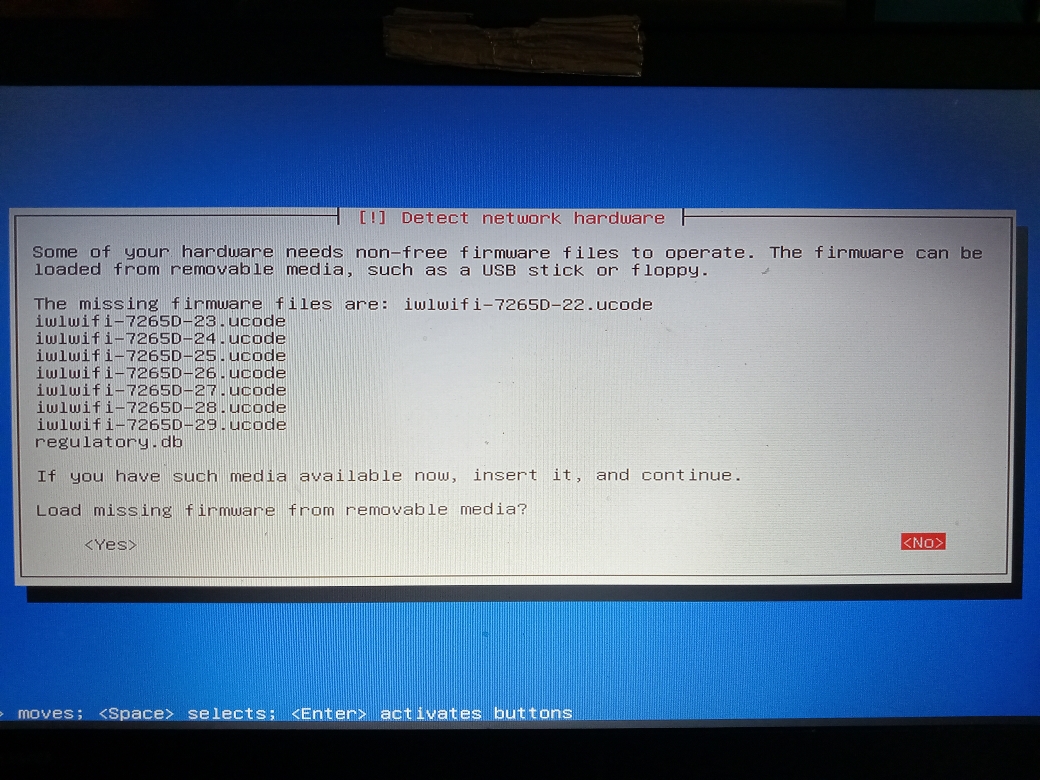
This was an expert install of devuan_excalibur_6.0-20250605_amd64_netinstall.iso. I'm not sure if expert is necessary to get this firmware question.
I answered "no" to providing the firmware on external media and proceeded.
When it got to network detection and configuration, it only saw eth0. Since eth0 is broken, dhcp failed. I set it up manually and gave it a good local address.
When it came to setting up the package manager, I had to proceed without a mirror. While it was installing the base system, I switched to vt2 and saw that it was installing firmware-iwlwifi.
After the sofware install but before it installed grub bootloader, I opened a shell and tried to set up the wireless.
wlan0 did not show up with 'ip a'. I chrooted the installed system (in /target) and tried configuring wlan0 in /etc/network/interfaces. That didn't work. wpasupplicant was not installed. rfkill was not installed, so I couldn't see if the wireless card got switched off. That's when I gave up.
In past releases, the network setup saw the wireless hardware and let me choose whether to set up eth0 or wlan0. That didn't happen here. I'll pass this info on to the iso builder.
Reported here:
https://bugs.devuan.org/cgi/bugreport.cgi?bug=894
#153 Re: Installation » No live devuan or refracta will boot on a new AMD Ryzen AI 9 HX370 » 2025-06-16 13:51:27
It is possible to install a base system using the netinstall iso without a network connection. You get a very minimal system, and you'd have to set up the network manually after rebooting into the system. Get the firmware package from the installer usb or the iso file mounted on the system.
Is there any chance you could run the installer again and get a screenshot or camera shot of the screen that asks you to supply the wireless driver on usb stick? I'd like to have that for reference, but I can't reproduce it easily. Thanks.
#154 Re: Installation » No live devuan or refracta will boot on a new AMD Ryzen AI 9 HX370 » 2025-06-16 13:02:12
The installer looks at your hardware and when it sees which intel wireless chip you have, it will install the firmware-iwlwifi package that it pulls from the /firmware directory inside the iso.
I want to know if you stopped the installation at the point where it asks for the driver or if you continued without it and it failed at some later point.
Normally you can ignore that request for the driver and you will be able to set up the network during the install.
#155 Re: Installation » No live devuan or refracta will boot on a new AMD Ryzen AI 9 HX370 » 2025-06-16 12:25:07
I have the same issue with AMD Ryzen 9 HX 3700 and AMD Radeon 890M. Additionally, neither Excalibur nor Daedalus netinstall .iso images have WiFi support; they all require iwlwifi-ty* on an external USB drive. However, even when I provide it, Devuan is unable to find and use the driver.
Did you try proceeding without providing the driver on external usb? Daedalus and Excalibur netinstall isos do have wifi support. The firmware packages are all in the iso and will be installed if your hardware requires them. The live isos have wireless firmware already installed.
#156 Re: DIY » Need advice, building a small server for city-library-Devuan mirror » 2025-06-11 11:33:47
You can install to RAID with the cli refractainstaller, but it won't take 10 minutes. It would probably be more like 15 minutes. RAID1 will prevent downtime, and you can make a cron job to check the drives and send you email and/or text message if one fails.
Update on these instructions - it says that partitions must end in a non-zero digit and that's no longer true. I fixed it long ago. You can use md0 and if you do lvm you don't have to end the lv name with a digit. (e.g. /dev/mapper/nodigitshere would work.)
https://dev1galaxy.org/viewtopic.php?id=2323
#157 Re: Installation » Installed Excalibur on Geekom A5 » 2025-06-09 14:42:55
In most cases the install will be easier if you ignore that question about loading firmware from removable media. Most of the firmware packages are on the disk. (e.g. firmware-realtek). That question is a leftover inherited from debian when they did not include non-free firmware in the isos. It's only useful for a few drivers that require you to agree not to share them before they let you have them. (e.g. some broadcom chips) and only if you're installing without a network connection.
#158 Re: Installation » [SOLVED] accidentally deleted (EFI) partition - how recover? » 2025-06-08 10:45:43
Thanks. I got confused because I always use dd on whole devices or partitions. Sending it to a file won't clobber other files.
#159 Re: Installation » [SOLVED] accidentally deleted (EFI) partition - how recover? » 2025-06-07 10:11:04
MLEvD, did you copy/paste the wrong commands? That dd command will replace whatever is on the partition with a file containing zeroes. That would reproduce the OP's problem instead of fixing it.
#160 Re: Other Issues » Daedalus kernel upgrade from 6.1.0-35 to 6.1.0.37 breaks hibernate » 2025-06-06 21:08:26
I just tested pm-hibernate in excalibur and it works. Kernel is 6.12.27.
Check /etc/initramfs/conf.d/resume to make sure it didn't change and also that the uuid on the swap didn't change. (assuming resume uses the uuid)
Check /var/log/syslog for errors. I got something like "couldn't find swap" before I did a few things to make my new swap partition work. (I had to make a resume file, edit fstab, run update-initramfs -u, and reboot.)
#161 Re: Freedom Hacks » Debian not providing new 686 kernels in Trixie » 2025-05-30 20:11:54
linux-libre 6.15.0 with the current version of mount (2.41-5devuan1) is working correctly. Here's an iso in case anyone wants to play with it.
https://get.refracta.org/files/experime … 0_1739.iso
sha256sum
4d19d4a9f1f28eb5548fc3b141f83fece1a9df0640cdb6bbc63a528944b41306 refracta_13_minx_ndb_libre_i386-20250530_1739.iso#162 Re: Off-topic » Hospitals and the irc#devuan » 2025-05-30 12:07:24
Devuan infrastructure would be the servers we control - pkgmaster.devuan.org, git.d.o, files.d.o and this forum. There are also some backup servers and other stuff that keeps it all running.
#163 Re: DIY » Does anyone here use Mintstick for making livUSB's? Need testers. » 2025-05-29 18:11:11
Install openbox and do a diff on the files you're curious about against the ones in /etc/xdg/openbox. (probably menu.xml and rc.xml)
FWIW, not related to the installer isos, but refractasnapshot has a config option for enabling uefi boot or not. (you always get legacy boot) It's just a matter of turning on or off one (I think it's just one) function. Oh yeah, the devuan-live isos have the same option because the same function is used in live-sdk.
To test those other config files, drop them in ~/.config/openbox/ and fire up an openbox session.
#164 Re: Devuan » Devuan Excalibur on i386 - We need an official kernel! » 2025-05-29 00:12:34
seems we'll be denied the option to build a vanilla kernel that can take advantage of >4GB.
Confirmed. I have some i386 excalibur isos with libre kernel. If I boot in qemu and give it 6GB of memory, the iso with 6.12 kernel shows 6GB but the one with the 6.15 kernel only shows 3GB.
#165 Re: Installation » Minimalist/selective installation? » 2025-05-28 17:31:41
I'll try to expain for you folks who aren't getting it. If you install a desktop environment from the installer iso, it uses a metapackage such as task-xfce-desktop or other desktop, which pulls in all parts of the chosen DE plus all other desktop applications. Trying to remove some parts of that will often result in the whole desktop being removed.
If you start with a minimal system, you can add the parts of the desktop that you want along with the specific applications that you want and have a leaner system than you would get with the task-* package.
Example: How do you install kde without getting libreoffice or gimp? Partial answer: You don't install task-kde-desktop.
$ apt depends task-kde-desktop
task-kde-desktop
  Depends: tasksel (= 3.73devuan1)
  Depends: task-desktop
  Depends: kde-standard
 |Depends: lightdm
 |Depends: slim
  Depends: sddm
  Recommends: kdeaccessibility
  Recommends: orca
  Recommends: gimp
  Recommends: libreoffice-writer
  Recommends: libreoffice-calc
  Recommends: libreoffice-impress
  Recommends: libreoffice-plasma
  Recommends: libreoffice-kf5
  Recommends: libreoffice-help-en-us
  Recommends: mythes-en-us
  Recommends: hunspell-en-us
  Recommends: hyphen-en-us
  Recommends: print-manager
 |Recommends: <time-daemon>
    chrony
    ntpsec
    openntpd
Recommends: ntpsec-ntpdate#166 Re: DIY » Does anyone here use Mintstick for making livUSB's? Need testers. » 2025-05-28 17:20:24
Altoid wrote:
devuan_chimaera_4.0.3_i386_desktop-live.iso
This *.iso file did not generate a #$%& UEFI partition when I wrote it to the SD Card.
That's right. the i386 doesn't do uefi. I'm not aware of any 32-bit uefi systems.
#167 Re: Freedom Hacks » Debian not providing new 686 kernels in Trixie » 2025-05-28 00:10:44
About that size issue...
I poked around a bit. Most of the difference is in /lib/modules and most of that is drivers. libre has more directories and files there than debian and all the .ko files in the debian kernel are xz-compressed. That accounts for around 200mb difference.
#168 Re: Installation » Minimalist/selective installation? » 2025-05-27 21:56:34
Here's a daedalus (stable) mini.iso, a.k.a. business card iso. Network install only, no wireless for the install. This one should boot for you.
https://pkgmaster.devuan.org/devuan/dis … t/mini.iso
It's also possible to use the live isos to do a debootstrap install.
#169 Re: Freedom Hacks » Debian not providing new 686 kernels in Trixie » 2025-05-27 20:17:55
Update. If I downgrade to the previous version of mount, the isos boot. (i.e. they can loop-mount filesystem.squashfs)
mount, fdisk libfdisk1 and uuid-runtime were all downgraded from 2.41-5devuan1 to 2.38.1-5+deb12u3devuan1
I filed a bug report against mount - https://bugs.devuan.org/cgi/bugreport.cgi?bug=892
#170 Re: Desktop and Multimedia » [SOLVED] .xsession-errors file » 2025-05-27 10:08:54
...until you ARE interested in the error log.
You could change the log daily and keep yesterday's log in case you need it. Make a user cron job that runs 'mv .xsession-errors .xsession-errors.old' once a day. (use the full path to the file)
#171 Re: Installation » [SOLVED] Should the live desktop auto start RAID arrays? » 2025-05-27 09:56:43
I think you make a good case for turning mdadm off in the live isos. Easy enough to do.
In /etc/default/mdadm
# START_DAEMON:
#   should mdadm start the MD monitoring daemon during boot?
START_DAEMON=false
If you need mdadm in the live session, turn it on with /etc/init.d/mdadm start
Now all I gotta do is remember to put it in the release notes.
Might be better to make a hook script so it could be turned on or off at the boot command. (talking to myself now)
#172 Re: Installation » Installing Devuan with only free firmware » 2025-05-27 09:40:55
Choose Expert install (in one of the installer isos) and you will be asked if you want non-free or not. I think you'll also be asked if you want -security and -updates. You should take those.
#173 Re: DIY » Does anyone here use Mintstick for making livUSB's? Need testers. » 2025-05-26 13:21:05
"su" vs. "su -" problem? Those usually give you a "command not found" error. More likely the environment issue (root vs. user)
If you want to be able to run root programs on the user's desktop like you used to do before su got moved into util-linux, do this:
echo "Always_set_path yes" >> /etc/default/suThen log out and log in using "su" and compare your PATH to what it was before. (or try to run a graphical app as root)
#174 Re: Freedom Hacks » Debian not providing new 686 kernels in Trixie » 2025-05-26 13:12:07
Update: I'm trying more kernels and I asked a question in #gnu-linux-libre (libera.chat)
6.12.30-gnu has the problem.
6.12.28-gnu and 6.12.24-gnu both work.
6.12.30-gnu.nonpae works.
6.14.8-gnu (non-lts) works.
#175 Re: DIY » Does anyone here use Mintstick for making livUSB's? Need testers. » 2025-05-25 23:40:53
Feel free to use this. No gui stuff. (I actually dissected it out of a gui app. You'll recognize some of it.) And yes, this uses dd.
#!/usr/bin/env bash
#
# iso2usb.sh
#set -x
#
# Run this script from the directory that contains your .iso files.
#

blocksize="1M"

[[ $(id -u) -eq 0 ]] || { echo -e "\n\t You need to be root!\n" ; exit 1 ; }

usbdevlist=$(/usr/sbin/hwinfo --usb --short | awk '/dev\/sd/ {print $1}')
usbdevfulllist=$(/usr/sbin/hwinfo --usb --short | awk '/dev\/sd/ {print $0}')

	echo -e "\n\tLIST OF REMOVABLE DRIVES\n${usbdevfulllist}\n${sdfulllist}\n${cdromfulllist}\n\nSelect a device:"
	select opt in $usbdevlist ; do
		device=$(echo "$opt" | awk '{ print $1 }')
		break
	done

if [[ -z "$device" ]] ; then
	echo "No device was found."
	exit 0
fi

echo -e "\n\tSelect the image file.\n"
select file in *.iso *.img ; do
	echo -e "\n$file"
	break
done

size=$(ls -lh $file | awk '{ print $5 }' | sed -e 's/M//')

if echo "$size" | grep -q G ; then
	size="$(echo "$size" | sed -e 's/\.//' -e 's/G//')00"
fi

echo "Size is ${size}M"

if echo "$size" | grep -q K ; then
	echo "Out of range units"
	exit 1
fi

echo -e "\n\tCopy $file to $device?\n\n\tThe command will be:\n\tdd if=$file | pv -s ${size}M | dd of=$device bs=${blocksize}\n\n"
echo -e " Press ENTER to continue or ctrl-c to abort."
read -p " "

dd if="$file" | pv -s ${size}M | dd of="$device" bs="$blocksize"
sync

exit 0Board footer
