
You are not logged in.
- Topics: Active | Unanswered
#1201 Re: Installation » UUID and drive letter assignments » 2021-06-10 00:35:54
Hello:
... for me it's monitoring disk space.
I monitor disk space like this:
 DISKS
 ${hr 2}
 / $alignc ${fs_used /} / ${fs_size /} $alignr ${fs_used_perc /}%
 ${fs_bar /}
 /home $alignc ${fs_used /home} / ${fs_size /home} $alignr ${fs_used_perc /home}%
 ${fs_bar /home}
 /media/backups $alignc ${fs_used /media/backups} / ${fs_size /media/backups} $alignr ${fs_used_perc /media/backups}%
 ${fs_bar /media/backups}
 /var/log $alignc ${fs_used /var/log} / ${fs_size /var/log} $alignr ${fs_used_perc /var/log}%
 ${fs_bar /var/log}
Not my doing but cannot recall the source.
Thanks for your input.
Best,
A.
#1202 Re: Installation » UUID and drive letter assignments » 2021-06-10 00:32:23
Hello:
... should be able to assign letters to specific UUID's using (e)udev rules.
I think it may be easier to just assign labels instead of saying /dev/sdx.
eg:
SATA1: +${execi 60 hddtemp /dev/disk/by-uuid/d6841f29-e39b-4c87-9c52-3a9c3bafe2d3 | cut -c 81-86} Thanks for your input.
Best,
A.
#1203 Installation » UUID and drive letter assignments » 2021-06-09 19:39:34
- Altoid
- Replies: 5
Hello:
My Devuan box has four SAS drive slots, an on-board USB socket and room to comfortably install an additional two or three 2.5" drives.
I use UUID to keep the installation behaving properly (so to speak) but although this works, drive letters move around between UUIDs if I add a drive.
This affects my conky output by mean of which I monitor drive temperatures.
/dev/sda: +${execi 60 hddtemp /dev/disk/by-uuid/d6841f29-e39b-4c87-9c52-3a9c3bafe2d3 | cut -c 81-84}
/dev/sdb: +${execi 60 hddtemp /dev/disk/by-uuid/49d1369c-ed70-4543-b0ee-ef65327e101b | cut -c 83-86}
/dev/sdc: +${execi 60 hddtemp /dev/disk/by-uuid/bdf33361-5929-433e-ac7f-1a626aa6e844 | cut -c 78-81}
/dev/sdd: +${execi 60 hddtemp /dev/disk/by-uuid/7a33fda5-abda-451b-b6ef-c17553c78810 | cut -c 83-86}
/dev/sde: +${execi 60 hddtemp /dev/disk/by-uuid/ca8dbded-819d-4e2b-b017-0981a75ea718 | cut -c 101-104}
When I added an old SATA drive for testing purposes, drive letters got shuffled down, the new drive became /dev/sda and the one that was /dev/sda became /dev/sdb.
So, while I am still monitoring a specific drive's temperature, I sort of lost as to which drive it is.
It's just a labelling but it is what I use to ID the drives and their temperatures via conky.
Maybe I should skip the /dev/sdx system and just go with something like Drive N?
Comments welcome.
Thanks in advance,
A.
#1204 Re: Off-topic » What will happen to Windows? » 2021-06-06 13:06:34
Hello:
Censorship is a slippery slope.
Quite so ...
Very.
Not my intent.
... post may be stupid and irrelevant ...
Not stupid.
In another context/forum it would actually be a fitting subject.
In my opinion, I'd say it is (if anything) irrelevant.
Devuan is better ...
That was my idea.
Thanks.
Best,
A.
#1205 Re: Installation » Nvidia persistence? » 2021-06-06 00:44:09
Hello:
... installed the proprietary nvidia driver ...
... keep getting this message when I install a new package ...
Did you check out the thread I suggested? -> https://dev1galaxy.org/viewtopic.php?id=3820
See post #23, it has a step by step rendition of how I followed Hevy Devy's instructions and solved my problem.
Don't skip any steps.
Best,
A.
#1206 Re: Off-topic » What will happen to Windows? » 2021-06-05 21:54:47
Freedom is a double edged sword so actions should be chosen with care.
Indeed ...
I really fail to grasp how/why What will happen to Windows can actually be a topic, even here at the Off-topic forum.
Ah, yes ...
Forgot my pill. 8^/
A.
#1207 Re: Devuan Derivatives » Support for DevuanDog! » 2021-06-02 17:05:47
Hello:
BusterDog is still available and active?
Hmm ...
No idea.
Not my dog.
Sadly, I haven't had a dog since I was 16.
What is your link to download your Live iso?
I don't have a Live iso, hence I have no link to anything you can download.
Since July 2020 there is no activity on your forum.
Makes sense ...
I don't have a forum.
Never had one.
I don't understand how a nice system like DevuanDog has been discontinued.
Hmm ...
Ask the author?
Or carefully read what he posted here --> https://oldforum.puppylinux.com/viewtop … c#p1040932
ie:
Reason is that I've found a self-supporting way, which I prefer, to avoid systemd, BusterDog is based on Debian Buster with a few alterations to make possible running without systemd.
Sorry ...
It's quite all right.
Every one has a bad day at some time or another.
I have one every week.
Usually on tuesdays, occasionally fridays.
... in what flavor of Devuan do you have software updated to date with firefox which is about version 89?
Sorry to dissapoint you.
I don't have any flavours of Devuan.
Just the plain Devuan Beowulf I got here.
But my all time favourite ice cream flavour is bitter chocolate with dark chocolate chips mixed in.
Yes, redundancy is a real thing for me.
Cheers, 8^P
A.
#1208 Re: Devuan Derivatives » Support for DevuanDog! » 2021-06-02 12:36:12
Hello:
Why did devuandog stay in 2019? ...
It was discontinued/terminated.
See: https://oldforum.puppylinux.com/viewtop … 2#p1040932
Reason is that I've found a self-supporting way, which I prefer, to avoid systemd, BusterDog is based on Debian Buster with a few alterations to make possible running without systemd.
A.
#1209 Re: Other Issues » Tape drives » 2021-05-23 21:11:33
Hello:
that might be it
sadly ftape and zftape are not in the kernel anymore
Indeed ...
The problem was that this hardware (my opinion) was not really something solid like all the SCSI tape drives out there at the time.
The advantage was that it was much less expensive to get a QIC/Travan etc. and run it from a parallel port or IDE adaptor card.
But for most, not the real thing.
In my day, I had a QIC and a Travan under Windows but found them to be slow and unreliable.
Here's a link to old Ubuntu releases:
http://old-releases.ubuntu.com/releases/
Try Ubuntu 5.10 (Breezy Badger) or Ubuntu 6.06.2 LTS (Dapper Drake), both have 64bit DVD Live editions:
http://old-releases.ubuntu.com/releases … -amd64.iso
http://old-releases.ubuntu.com/releases … -amd64.iso
... any practical usecase for that tape drive ...
Quite so.
With relatively inexpensive fast HDDs to make a multiple Tb NAS with very little investment, tape ends up being cumbersome.
And no, I will not store anything in any cloud.
A cloud is just water vapour: one moment it's there, the next it's gone.
I had my last DAT DD2 drive sitting atop my box for the longest while and finally decided to move it out of the way last week.
A beautiful Sun Microsystems external box hosting a Seagate Scorpion 8000 which saw very little use.
Maybe the box, PS and SCSI board will be of use for something.
... still curious what might be sitting on that tape
Ahh ...
So that's it. 8^D !
... put it back into that old 486 where i ripped it out ...
You'll still need the application used to make the tape or download it raw and pick out the bits.
Once you find out what you can do by booting the Ubuntu DVD, you may want to make a VM see if you can access it from there.
Much better than trying anything with the 486.
Cheers,
A.
#1210 Re: Other Issues » Tape drives » 2021-05-22 17:16:32
Hello:
It seems that what is needed is to load the proper driver modules.
ie: modprobe zftape -> depends ftape
This will load zftape and ftape, creating all needed devices under /dev, so there's no MAKEDEV to run.
But this was when you could actually find ftape and zftape for your kernel.
zftape and ftape went awol quite a few years ago, so they were taken out of the kernel from 2.x something on.
I have read in one post that maybe some old Ubuntu may have it, so booting that from a CD may be a solution.
https://retrocomputing.stackexchange.co … with-ftape
Check out these posts:
http://thewunders.org/SxS/storage/ftape.html
https://tldp.org/HOWTO/Ftape-HOWTO-6.html#ss6.1
https://github.com/Godzil/ftape
https://dmitrybrant.com/2020/11/01/how- … -qic-tapes
Good luck ... 8^)
Best,
A.
#1211 Re: Installation » Kernel upgrade: apparmor and tomoyo » 2021-05-17 18:30:18
Hello:
Everything not needed to run a system should remain optional ...
... don't foist these things onto ordinary desktop users ...
Evidently that's not the vision of those who are in a position to run the Debian show and decide the hows, why's and whens.
... a good working distro to do my daily tasks ..
I'm glad to see we're more than one.
But I'm afraid the dice have already been rolled.
And the result was not in our favour.
Hence the very existence of Devuan.
Best,
A.
#1212 Re: Installation » Kernel upgrade: apparmor and tomoyo » 2021-05-17 15:51:26
Hello:
... this sort of config should be opt in even at the kernel level.
Exactly my point.
If and when I want/need to install a Mandatory Access Control scheme for my rig's security, I'll just apt install the required modules and configure.
Makes no sense to call it a security feature ...
I could not care less about what it is called.
It is being made part of the kernel just because some DH decided it should be.
Why? On the basis of what?
Next thing you know you'll have to set it up/configure if you want the kernel to work.
eg: no apparmor/tomoyo/SELinux? No WAN/LAN.
This has all the colourings of one of Poettering's diktats.
Like this other one:
https://dev1galaxy.org/viewtopic.php?id=4136
Bad, bad, bad ...
A.
#1213 Re: Installation » Kernel upgrade: apparmor and tomoyo » 2021-05-16 22:46:29
Hello:
I think not:
https://wiki.archlinux.org/title/TOMOYO_Linux#
You were quite right, I stand corrected.
In spite of what wiki.archlinux says, adding security=none disables tomoyo as there are no entries for it in dmesg, kern.log or syslog.
Edit: security=none not only disables tomoyo, it also makes apparmor=0 unneccesary. 8^D
Thanks for the heads up. 8^)
Best,
A.
#1214 Re: Installation » Kernel upgrade: apparmor and tomoyo » 2021-05-16 22:30:18
Hello:
... Way Too Many.
Indeed ...
tomoyo-tools ...
... why that is enabled in debian's standard linux-image is unkown to me ...
Hmm ...
Maybe it's yet another one of Poettering's brillant ideas?
Apparently adding security=none to the boot command should disable this one.
I was wondering about that.
A bit for disabling apparmor but none for disabling tomoyo?
I think not:
https://wiki.archlinux.org/title/TOMOYO_Linux#
TOMOYO Linux 2.x is the Linux mainline kernel branch of development. In June 2009, TOMOYO was merged into the Linux kernel version 2.6.30 and it uses standard Linux Security Module (LSM) hooks. However, the LSM hooks must be extended further in order to port the full MAC functionality of TOMOYO Linux into the Linux kernel. Thus, it does not yet provide equal functionality with the 1.x branch of development. This chart compares the differences between each branch.
Disabling
For kernels 5.1 and above remove tomoyo from the lsm= kernel parameter or remove lsm= entirely. <- | x |
For kernels 3.2 to 5.0 change the kernel parameter security=tomoyo to security=none.
I'll try it out and report.
-------> I_don't_like_this. 8^|
If and when I want/need to install a Mandatory Access Control scheme for my rig's security, I'll just apt install the required modules and configure.
Why do I have to have the kernel looking to run something that is not there?
Thanks for your input.
Best,
A.
#1215 Installation » Kernel upgrade: apparmor and tomoyo » 2021-05-16 19:29:46
- Altoid
- Replies: 8
Hello:
My 4.19 Devuan Beowulf, unlike ascii which had it disabled by default, set up apparmor as if I had actually asked for it.
I let it stay on and after reading around a bit, decided that it was not worth keeping around.
So I uninstalled it and added apparmor=0 to my kernel command line so it would not be asking for it.
Fast forward to my upgrading the installation to the 5.10 kernel:
groucho@devuan:~$ uname -a
Linux devuan 5.10.0-0.bpo.3-amd64 #1 SMP Debian 5.10.13-1~bpo10+1 (2021-02-11) x86_64 GNU/Linux
groucho@devuan:~$
The 5.10 kernel also recommends apparmor:
groucho@devuan:~$ aptitude why apparmor
i   linux-image-5.10.0-0.bpo.3-amd64 Recommends apparmor
groucho@devuan:~$
So it does as the upgrade from ascii to Beowulf did and installs apparmor.
Now ...
Seeing that my kernel command line had the apparmor=0 bit, you'd think that it would leave it alone and skip installing apparmor.
After all, it left the rest of the command line stanzas as they were.
But no ...
Not only did it install apparmor but it also removed the apparmor=0 bit from the kernel command line.
No big deal: I just uninstalled it and returned the kernel command line to what I had set it.
Then while looking for clues as to what goes on in my system when I get a bad shutdown, I found this in dmesg:
In dmesg ie: at boot
[ 21.906451] Not activating Mandatory Access Control as /sbin/tomoyo-init does not exist.Also at shutdown:
In kern.log and syslog:
May 16 13:57:16 devuan kernel: [14429.313238] Not activating Mandatory Access Control as /sbin/tomoyo-init does not exist.I had to look it up as I had no idea as to what tomoyo was, let alone of its existence.
What is all this about?
Is it just me or am I seeing far too many (unrequired) Mandatory Access Control instances in the Linux kernel?
Cheers,
A.
#1216 Re: Other Issues » Tape drives » 2021-05-15 15:49:31
Hello.
... iomega tape 250 drive along with this 3gb ditto tape ...
Nice find. 8^)
... how do i get it to work?
The key to this may be here:
Technical aspects
Ditto internal drives were connected through the floppy drive channel and used MFM encoding to store data (the same method as on older floppy drives). An ISA accelerator card called the Ditto Dash, providing higher speed than a stock floppy controller, was also available.
--- snip ---
Check that the USB Floppy adapter is correctly inserted.
It should (?) have a key (like the IDE cables did) or some indication in the adapter's manual/instruction sheet.
See:
https://en.wikipedia.org/wiki/Ditto_(drive)
https://www.manualslib.com/products/Iom … 35190.html <---- | x |
https://johnvidler.co.uk/linux-journal/LJ/022/1215.html
http://pong.tamu.edu/~baum/linux/LDP/HO … TO-28.html
Edit:
https://tldp.org/HOWTO/pdf/ZIP-Drive.pdf
Best,
A.
#1217 Re: Installation » Linux e1000e module removal and e1000e EEE timer - Part II » 2021-05-13 19:56:13
Hello:
... and report back.
Done.
groucho@devuan:~$ uname -a
Linux devuan 5.10.0-0.bpo.3-amd64 #1 SMP Debian 5.10.13-1~bpo10+1 (2021-02-11) x86_64 GNU/Linux
groucho@devuan:~$
groucho@devuan:~$ apt policy nvidia-legacy-340xx-kernel-dkms
nvidia-legacy-340xx-kernel-dkms:
Installed: 340.108-10~bpo10+1
Candidate: 340.108-10~bpo10+1
Version table:
*** 340.108-10~bpo10+1 100
100 http://deb.devuan.org/merged beowulf-backports/non-free amd64 Packages
100 /var/lib/dpkg/status
340.108-3~deb10u1 500
500 http://deb.devuan.org/merged beowulf/non-free amd64 Packages
groucho@devuan:~$ Q: what does *** after Version table: mean?
With respect to e1000e-3.8.7, I guess now it's time to wait and see if there's another bad_shutdown or bad_boot and if they leave any trace
Maybe the additons to /etc/default/acpi-support have some effect?
---
Edit:
Last night I realised that the e1000e driver module now put in use by the 5.10 kernel upgrade was most probably the current one ie: e1000e-3.8.7.
But I had not applied the five patches, so that's done now.
---
Thanks for your input.
Best,
A.
#1218 Re: Installation » Linux e1000e module removal and e1000e EEE timer - Part II » 2021-05-13 17:17:36
Hello:
Did you try nvidia drivers from backports / non-free?
Yes.
I do have that in my /etc/apt/sources.list.
Must be a question of package priorities.
Will have to specifically install that: apt install nvidia-legacy-340xx-kernel-dkms/stable-backports
I'll get it done and report back.
Thanks for your input.
Best,
A.
#1219 Re: Installation » Linux e1000e module removal and e1000e EEE timer - Part II » 2021-05-13 00:03:58
Hello:
I'll apply patch 1005 and report back with whatever results I get.
Right, here we go.
groucho@devuan:/usr/src/e1000e-3.8.7$ sudo patch -p0 -i /usr/src/e1000e-patch/1005-e1000e_387_pm_freeze_sane_detach.patch
patching file src/netdev.c
groucho@devuan:/usr/src/e1000e-3.8.7$
groucho@devuan:/usr/src/e1000e-3.8.7/src$ sudo make
make[1]: Entering directory '/usr/src/linux-headers-4.19.0-16-common'
make[2]: Entering directory '/usr/src/linux-headers-4.19.0-16-amd64'
CC [M] /usr/src/e1000e-3.8.7/src/netdev.o
/usr/src/e1000e-3.8.7/src/netdev.c: In function 'e1000e_pm_freeze':
/usr/src/e1000e-3.8.7/src/netdev.c:7401:3: warning: ISO C90 forbids mixed declarations and code [-Wdeclaration-after-statement]
int count = E1000_CHECK_RESET_COUNT;
^~~
LD [M] /usr/src/e1000e-3.8.7/src/e1000e.o
Building modules, stage 2.
MODPOST 1 modules
CC /usr/src/e1000e-3.8.7/src/e1000e.mod.o
LD [M] /usr/src/e1000e-3.8.7/src/e1000e.ko
make[2]: Leaving directory '/usr/src/linux-headers-4.19.0-16-amd64'
make[1]: Leaving directory '/usr/src/linux-headers-4.19.0-16-common'
groucho@devuan:/usr/src/e1000e-3.8.7/src$groucho@devuan:/usr/src/e1000e-3.8.7/src$ sudo modinfo /usr/src/e1000e-3.8.7/src/e1000e.ko
filename: /usr/src/e1000e-3.8.7/src/e1000e.ko
version: 3.8.7-NAPI
license: GPL
description: Intel(R) PRO/1000 Network Driver
author: Intel Corporation, <linux.nics@intel.com>
srcversion: 7C3F06437067F7EF077432C
alias: pci:v00008086d00001A1Dsv*sd*bc*sc*i*
--- snip ---
alias: pci:v00008086d0000105Esv*sd*bc*sc*i*
depends:
retpoline: Y
name: e1000e
vermagic: 4.19.0-16-amd64 SMP mod_unload modversions
parm: copybreak:Maximum size of packet that is copied to a new buffer on receive (uint)
parm: TxIntDelay:Transmit Interrupt Delay (array of int)
parm: TxAbsIntDelay:Transmit Absolute Interrupt Delay (array of int)
parm: RxIntDelay:Receive Interrupt Delay (array of int)
parm: RxAbsIntDelay:Receive Absolute Interrupt Delay (array of int)
parm: InterruptThrottleRate:Interrupt Throttling Rate (array of int)
parm: IntMode:Interrupt Mode (array of int)
parm: SmartPowerDownEnable:Enable PHY smart power down (array of int)
parm: KumeranLockLoss:Enable Kumeran lock loss workaround (array of int)
parm: CrcStripping:Enable CRC Stripping, disable if your BMC needs the CRC (array of int)
parm: EEE:Enable/disable on parts that support the feature (array of int)
parm: Node:[ROUTING] Node to allocate memory on, default -1 (array of int)
parm: debug:Debug level (0=none,...,16=all) (int)
groucho@devuan:/usr/src/e1000e-3.8.7/src$dmesg at boot
groucho@devuan:~$ sudo dmesg | grep -i "e1000e\|00:19"
[    1.079755] pci 0000:00:19.0: [8086:10bd] type 00 class 0x020000
[    1.079770] pci 0000:00:19.0: reg 0x10: [mem 0xf5fc0000-0xf5fdffff]
[    1.079776] pci 0000:00:19.0: reg 0x14: [mem 0xf5ffe000-0xf5ffefff]
[    1.079783] pci 0000:00:19.0: reg 0x18: [io  0xac00-0xac1f]
[    1.079830] pci 0000:00:19.0: PME# supported from D0 D3hot D3cold
[    2.147352] e1000e: loading out-of-tree module taints kernel.
[    2.215009] e1000e: module verification failed: signature and/or required key missing - tainting kernel
[    2.316026] e1000e: Intel(R) PRO/1000 Network Driver - 3.8.7-NAPI
[    2.333730] e1000e: Copyright(c) 1999 - 2020 Intel Corporation.
[    2.357402] e1000e 0000:00:19.0: Interrupt Throttling Rate (ints/sec) set to dynamic conservative mode
[    2.368687] e1000e 0000:00:19.0: PHY Smart Power Down Disabled
[    2.390290] e1000e 0000:00:19.0: EEE Support was initialized to be enabled
[    2.412085] e1000e 0000:00:19.0: EEE Support has been reset to be disabled
[    2.897162] e1000e 0000:00:19.0 eth0: (PCI Express:2.5GT/s:Width x1) 00:14:4f:4a:a2:81
[    2.897164] e1000e 0000:00:19.0 eth0: Intel(R) PRO/1000 Network Connection
[    2.897182] e1000e 0000:00:19.0 eth0: MAC: 7, PHY: 6, PBA No: FFFFFF-0FF
[   27.302085] e1000e 0000:00:19.0 eth0: NIC Link is Up 100 Mbps Full Duplex, Flow Control: None
[   27.314226] e1000e 0000:00:19.0 eth0: 10/100 speed: disabling TSO
groucho@devuan:~$
dmesg for rmmod -v e1000e
groucho@devuan:~$ sudo dmesg
--- snip ---
[10140.513586] e1000e: PCI REMOVE PTP
[10140.513590] e1000e: PCI REMOVE TIMER
[10140.513593] e1000e: PCI REMOVE CANCEL WORK SYNC
[10140.513595] e1000e: PCI REMOVE HW TIMESTAMP
[10140.513617] e1000e: NETDEV CLOSE ENTERED
[10140.513619] e1000e: NETDEV CLOSE WAIT DONE
[10140.513620] e1000e: NETDEV CLOSE DEV IS PRESENT
[10140.741067] e1000e: NETDEV CLOSE DEV IS DOWN
[10140.741081] e1000e: NETDEV CLOSE FREE IRQ
[10140.741086] e1000e 0000:00:19.0 eth0: NIC Link is Down
[10140.741087] e1000e: NETDEV CLOSE LINK DOWN MSG
[10140.741089] e1000e: NETDEV CLOSE NAPI DISABLED
[10140.741099] e1000e: NETDEV CLOSE FREE TX RES
[10140.741121] e1000e: NETDEV CLOSE FREE RX RES
[10140.741123] e1000e: NETDEV CLOSE VLAN DONE
[10140.741125] e1000e: NETDEV CLOSE HW CTRL RELEASED
[10140.741128] e1000e: NETDEV CLOSE DONE
[10140.756902] e1000e: PCI REMOVE UNREGISTER NETDEV
[10140.756908] e1000e: PCI REMOVE WAKE NO RESUME
[10140.756911] e1000e: PCI REMOVE RELEASE HW CONTROL
[10140.756951] e1000e: PCI REMOVE INT AND TX RX RING
[10140.756968] e1000e: PCI REMOVE SELECTED REGIONS
[10140.772962] e1000e: PCI REMOVE FREE NETDEV
[10140.772965] e1000e: PCI REMOVE DISABLE ERR REPORTING
[10140.773065] e1000e: PCI REMOVE DISABLE DEVICE
--- snip ---
groucho@devuan:~$
dmesg for modprobe -v e1000e
groucho@devuan:~$ sudo dmesg
--- snip ---
[10200.634814] e1000e: Intel(R) PRO/1000 Network Driver - 3.8.7-NAPI
[10200.634819] e1000e: Copyright(c) 1999 - 2020 Intel Corporation.
[10200.635004] e1000e 0000:00:19.0: Interrupt Throttling Rate (ints/sec) set to dynamic conservative mode
[10200.635007] e1000e 0000:00:19.0: PHY Smart Power Down Disabled
[10200.635008] e1000e 0000:00:19.0: EEE Support was initialized to be enabled
[10200.635010] e1000e 0000:00:19.0: EEE Support has been reset to be disabled
[10200.949099] e1000e 0000:00:19.0 eth0: (PCI Express:2.5GT/s:Width x1) 00:14:4f:4a:a2:81
[10200.949104] e1000e 0000:00:19.0 eth0: Intel(R) PRO/1000 Network Connection
[10200.949129] e1000e 0000:00:19.0 eth0: MAC: 7, PHY: 6, PBA No: FFFFFF-0FF
[10202.829745] e1000e 0000:00:19.0 eth0: NIC Link is Up 100 Mbps Full Duplex, Flow Control: None
[10202.829854] e1000e 0000:00:19.0 eth0: 10/100 speed: disabling TSO
groucho@devuan:~$
Seems everything is where/how it should be?
Thanks in advance,
A.
#1220 Re: Installation » Linux e1000e module removal and e1000e EEE timer - Part II » 2021-05-12 21:42:17
Hello:
... here it shuts down properly...
Any idea why it would not shut down properly in my box?
How can I troubleshoot that?
Right.
Thanks. 8^)
... if your system entered sleep and e1000e called the pm_freeze function things could be corrupted, indeed.
Which ones?
... next shutdown and start may go boom?!
Nah ! 8^D
... WoL, too tricky ...
... disable WoL command early in boot process ...
That's what I am already doing, remember?
First at /etc/rc.local ...
groucho@devuan:~$ cat /etc/rc.local
#!/bin/sh -e
#
# rc.local
#
# This script is executed at the end of each multiuser runlevel.
# Make sure that the script will "exit 0" on success or any other
# value on error.
#
# In order to enable or disable this script just change the execution
# bits.
#
# By default this script does nothing.

# to set all /proc/acpi/wakeup entries to 'disabled'
# no wakeup from S4 for anything
# does not survire reboot that's why it is here
# see https://dev1galaxy.org/viewtopic.php?pid=29113#p29113
/usr/local/bin/acpi_wakeups.sh

# to disable wol via ethtool at boot
# does not survire reboot that's why it is here
/sbin/ethtool -s eth0 wol d
groucho@devuan:~$
... and just in case some #%&?¡ whatever decides differently, with my shutdown script:
groucho@devuan:~$ cat /usr/bin/shutdown.sh
#!/bin/sh
# added to shutdown directly - no shutdown helper
# options added to troubleshoot nic related bad shutdown
PATH=/sbin:/bin:/usr/sbin:/usr/bin:

# 2
# sync
# disable onboard eth wol
# shutdown system directly
sync && sudo ethtool -s eth0 wol d && sudo shutdown -h now
I've come across a couple of pages related to PM and /etc/default/acpi-support.
As acpi-support seesm to have been deprecated long ago, I had to look around for oldish pages or get systemd only hits.
I added the links to the file so as to remember where it all came from:
groucho@devuan:~$ cat /etc/default/acpi-support
# comment the next line to disable ACPI suspend to RAM
# ACPI_SLEEP=true
ACPI_SLEEP=false

# comment the next line to disable suspend to disk
# ACPI_HIBERNATE=true
ACPI_HIBERNATE=true

# added 20210511
# see https://forums.linuxmint.com/viewtopic.php?t=43068
# https://askubuntu.com/questions/47311/how-do-i-disable-my-system-from-going-to-sleep
SUSPEND_METHODS="none"
groucho@devuan:~$
With respect to the >5.5 kernel upgrade:
I installed 5.10 but there are no drivers for my Nvidia cards.
It seems that the nvidia-340xx-legacy driver used by my perfectly working Nvidia Quadro FX 580 cards has fallen out of favour with the powers that be.
And from what I have read, caused a lot of noise.
I think Manjaro and Ubuntu have put out patches, I expect Debian/Devuan will follow suit. (?)
So I'll have to wait.
I'm not going to give up my 580's or use nouveau, unless it improves.
They still have a few years left in them.
I'll apply patch 1005 and report back with whatever results I get.
Thank you very much for your help.
Best,
A.
#1221 Re: Installation » Linux e1000e module removal and e1000e EEE timer - Part II » 2021-05-11 11:21:10
Hello:
You got that PCI REMOVE prints once out of dmesg?
Yes.
I posted them at your request.
But I got them only after a rmmod e1000e and modprobe -v e1000e cycle:
groucho@devuan:~$ sudo dmesg
--- snip ---
[    1.805846] e1000e: loading out-of-tree module taints kernel.
[    1.808975] ACPI: Power Button [PWRB]
[    1.851745] e1000e: module verification failed: signature and/or required key missing - tainting kernel
[    1.851839] input: Power Button as /devices/LNXSYSTM:00/LNXPWRBN:00/input/input3
[    1.873915] ACPI: Power Button [PWRF]
[    1.894607] SCSI subsystem initialized
[    1.906926] ACPI: bus type USB registered
[    1.917645] usbcore: registered new interface driver usbfs
[    1.934103] Fusion MPT base driver 3.04.20
[    1.944731] Copyright (c) 1999-2008 LSI Corporation
[    1.945571] usbcore: registered new interface driver hub
[    1.966487] usbcore: registered new device driver usb
[    1.979636] e1000e: Intel(R) PRO/1000 Network Driver - 3.8.7-NAPI
[    1.990206] e1000e: Copyright(c) 1999 - 2020 Intel Corporation.
[    2.002032] e1000e 0000:00:19.0: Interrupt Throttling Rate (ints/sec) set to dynamic conservative mode
[    2.013157] i801_smbus 0000:00:1f.3: SMBus using PCI interrupt
[    2.021243] e1000e 0000:00:19.0: PHY Smart Power Down Disabled
[    2.039474] e1000e 0000:00:19.0: EEE Support was initialized to be enabled
[    2.050107] e1000e 0000:00:19.0: EEE Support has been reset to be disabled
--- snip ----
[  431.874537] e1000e: PCI REMOVE PTP     <-- here is rmmod e1000e
[  431.874542] e1000e: PCI REMOVE TIMER
[  431.874546] e1000e: PCI REMOVE CANCEL WORK SYNC
[  431.874547] e1000e: PCI REMOVE HW TIMESTAMP
[  431.874572] e1000e: NETDEV CLOSE ENTERED
[  431.874573] e1000e: NETDEV CLOSE WAIT DONE
[  431.874575] e1000e: NETDEV CLOSE DEV IS PRESENT
[  432.104194] e1000e: NETDEV CLOSE DEV IS DOWN
[  432.104210] e1000e: NETDEV CLOSE FREE IRQ
[  432.104215] e1000e 0000:00:19.0 eth0: NIC Link is Down
[  432.104217] e1000e: NETDEV CLOSE LINK DOWN MSG
[  432.104218] e1000e: NETDEV CLOSE NAPI DISABLED
[  432.104228] e1000e: NETDEV CLOSE FREE TX RES
[  432.104251] e1000e: NETDEV CLOSE FREE RX RES
[  432.104252] e1000e: NETDEV CLOSE VLAN DONE
[  432.104254] e1000e: NETDEV CLOSE HW CTRL RELEASED
[  432.104257] e1000e: NETDEV CLOSE DONE
[  432.120067] e1000e: PCI REMOVE UNREGISTER NETDEV
[  432.120072] e1000e: PCI REMOVE WAKE NO RESUME
[  432.120075] e1000e: PCI REMOVE RELEASE HW CONTROL
[  432.120110] e1000e: PCI REMOVE INT AND TX RX RING
[  432.120123] e1000e: PCI REMOVE SELECTED REGIONS
[  432.140044] e1000e: PCI REMOVE FREE NETDEV
[  432.140048] e1000e: PCI REMOVE DISABLE ERR REPORTING
[  432.140164] e1000e: PCI REMOVE DISABLE DEVICE
-----------------------------------------------------------------------------------------------------------------------------------
[  443.741628] e1000e: Intel(R) PRO/1000 Network Driver - 3.8.7-NAPI      <--- here is modprobe -v e1000e
[  443.741632] e1000e: Copyright(c) 1999 - 2020 Intel Corporation.
[  443.741822] e1000e 0000:00:19.0: Interrupt Throttling Rate (ints/sec) set to dynamic conservative mode
[  443.741824] e1000e 0000:00:19.0: PHY Smart Power Down Disabled
[  443.741826] e1000e 0000:00:19.0: EEE Support was initialized to be enabled
[  443.741827] e1000e 0000:00:19.0: EEE Support has been reset to be disabled
[  444.060221] e1000e 0000:00:19.0 eth0: (PCI Express:2.5GT/s:Width x1) 00:14:4f:4a:a2:81
[  444.060227] e1000e 0000:00:19.0 eth0: Intel(R) PRO/1000 Network Connection
[  444.060251] e1000e 0000:00:19.0 eth0: MAC: 7, PHY: 6, PBA No: FFFFFF-0FF
[  446.780888] e1000e 0000:00:19.0 eth0: NIC Link is Up 100 Mbps Full Duplex, Flow Control: None
[  446.780997] e1000e 0000:00:19.0 eth0: 10/100 speed: disabling TSO
[  447.562186] e1000e: NETDEV CLOSE ENTERED
[  447.562190] e1000e: NETDEV CLOSE WAIT DONE
[  447.562192] e1000e: NETDEV CLOSE DEV IS PRESENT
[  447.792198] e1000e: NETDEV CLOSE DEV IS DOWN
[  447.792211] e1000e: NETDEV CLOSE FREE IRQ
[  447.792216] e1000e 0000:00:19.0 eth0: NIC Link is Down
[  447.792218] e1000e: NETDEV CLOSE LINK DOWN MSG
[  447.792219] e1000e: NETDEV CLOSE NAPI DISABLED
[  447.792227] e1000e: NETDEV CLOSE FREE TX RES
[  447.792251] e1000e: NETDEV CLOSE FREE RX RES
[  447.792252] e1000e: NETDEV CLOSE VLAN DONE
[  447.792254] e1000e: NETDEV CLOSE HW CTRL RELEASED
[  447.792257] e1000e: NETDEV CLOSE DONE
[  448.311058] e1000e: NETDEV CLOSE ENTERED
[  448.311062] e1000e: NETDEV CLOSE WAIT DONE
[  448.311064] e1000e: NETDEV CLOSE DEV IS PRESENT
[  448.532200] e1000e: NETDEV CLOSE DEV IS DOWN
[  448.532213] e1000e: NETDEV CLOSE FREE IRQ
[  448.532218] e1000e 0000:00:19.0 eth0: NIC Link is Down
[  448.532220] e1000e: NETDEV CLOSE LINK DOWN MSG
[  448.532221] e1000e: NETDEV CLOSE NAPI DISABLED
[  448.532230] e1000e: NETDEV CLOSE FREE TX RES
[  448.532254] e1000e: NETDEV CLOSE FREE RX RES
[  448.532255] e1000e: NETDEV CLOSE VLAN DONE
[  448.532257] e1000e: NETDEV CLOSE HW CTRL RELEASED
[  448.532260] e1000e: NETDEV CLOSE DONE
[  450.408891] e1000e 0000:00:19.0 eth0: NIC Link is Up 100 Mbps Full Duplex, Flow Control: None
[  450.409000] e1000e 0000:00:19.0 eth0: 10/100 speed: disabling TSO
groucho@devuan:~$
I have found no other record of e1000e activity on a bad_sutdown.
A normal shutdown would not enter S3?
Though, I am out with that.
I don't know.
There's the issue of not being able to disable sleep state in the BIOS.
And that being set to S3.
The thing would be to avoid the system from picking it up and overriding what the BIOS says.
ie: the proper way to do things
I patch WOL and PM FREEZE detach thingie and that's it from me.
Sorry to hear that, but I understand.
You've done more than enough already. 8^)
And no one else has made any suggestions.
Maybe not patch WoL as that seems to be taken care of vie ethtool and boot and shutdown.
BTW: you have this in your system?
     # Make it possible to not shut down network interfaces,
        # needed to use wake-on-lan
        netdown="-i"
        if [ "$NETDOWN" = "no" ]; then
                netdown=""
        fi

        log_action_msg "Will now halt"
        read -p "Press enter to halt ($netdown $poweroff $hddown)" reply     <--- this line added
        halt -d -f $netdown $poweroff $hddown
}
Does it shut down properly?
Thanks for your input.
Best,
A.
#1222 Re: Installation » Linux e1000e module removal and e1000e EEE timer - Part II » 2021-05-10 21:54:42
Hello:
... and the dmesg output shows what for the freeze?
Screen was frozen, needed a hard shudown.
dmesg0 does not show anything strange.
I could reproduce the whole thing but how to get what dmesg recorded, if anything at all?
Thanks in advance,
A.
#1223 Re: Installation » Linux e1000e module removal and e1000e EEE timer - Part II » 2021-05-10 21:45:03
Hello:
... you got no pm tooling, I wonder who enters S3.
That's what I think is the question here.
I think the answer is in the U24's BIOS.
Remember that I have not been able to disable ME "Firmware Power Control" and "Host Sleep States" in BIOS.
It is set to S3, I can set it back to S0 but I cannot disable it.
Only one visible for now is /sbin/halt with its unsetted NETDOWN.
If not that, it must be the kernel on its own, then?!
Hmm ...
Why would that be?
Anyone here knows about sleep state handling?
No one else has pitched in ...
But you have gathered quite a following.
Thanks for your input.
A.
#1224 Re: Installation » Linux e1000e module removal and e1000e EEE timer - Part II » 2021-05-10 21:36:05
Hello:
There's some alteration in the posting order ...
... you want to put NETDOWN=no into /etc/default/halt to disable WoL handling of /sbin/halt.
Right.
groucho@devuan:~$ cat /etc/default/halt
# Default behaviour of shutdown -h / halt. Set to "halt" or "poweroff".
HALT=poweroff
NETDOWN=no
groucho@devuan:~$ Quite strange parameter to what it is doing in the end.
I'll take your word for it.
Don't have a clue as to what is strange here ...
Though, you still want to disable WoL via ethtool. The more disabling, the better.
That is supposed to be the tool to use.
When the HW or the driver does not undo it behind your back.
We can get a patch to forcefully disable WoL by module parameter. I already spotted the flag in code, which activates WoL.
We can, hypothetically for now, reset that in src/param.c ...
Thanks for sharing.
But it's you doing the patching. 8^)
... even with that hypothetical patch, We want to disable WoL from /sbin/halt.
Right.
Would be like disabling it in the BIOS, which for whatever reason cannot be done without screwing up everything.
I discovered an old Sun Microsystems thread.
Had to find a catched copy.
Seems that this was a hard cookie from the very start of the Sun Ultra 24's market debut:
https://webcache.googleusercontent.com/ … clnk&gl=us
Best,
A.
#1225 Re: Installation » Linux e1000e module removal and e1000e EEE timer - Part II » 2021-05-10 21:23:33
Hello:
I'll edit that into /etc/init.d/halt and see how it behaves.
If I understand correctly, it will shut down on Enter.
Never got that far ...
Here's the part that I edited:
        # Make it possible to not shut down network interfaces,
        # needed to use wake-on-lan
        netdown="-i"
        if [ "$NETDOWN" = "no" ]; then
                netdown=""
        fi

        log_action_msg "Will now halt"
        read -p "Press enter to halt ($netdown $poweroff $hddown)" reply     <--- just this line
        halt -d -f $netdown $poweroff $hddown
}
On shutdown, the box froze at this point:
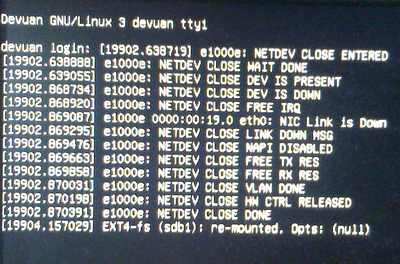
Good sign is that there were no fans blowing.
Only way out was a hard shutdown.
REISUB did not work or maybe it was that I could not type and hold Alt+SysRq at the same time?
This happens whether I shut down with my script or with sudo shutdown -h now from a terminal.
Thanks in advance.
A.
Board footer
