
You are not logged in.
- Topics: Active | Unanswered
#976 Re: Installation » [SOLVED] How install nftables ? » 2022-02-07 15:42:43
IMO ufw is just useless bloat because the nftables syntax is so much simpler than iptables and no more complex than ufw.
How can I install nftables ? Fully, I mean with the back end, front end (nft) start the service automatically ?
# apt install nftables orphan-sysvinit-scripts
# cp /usr/share/orphan-sysvinit-scripts/nftables /etc/init.d
# update-rc.d nftables defaults
The nftables package provides several sample configuration files under /usr/share/doc/nftables/examples/ which can be copied to /etc/nftables.conf — that file will be read when the nftables service starts.
#977 Re: Other Issues » "ly" Display Manager » 2022-02-06 20:52:37
case "$(tty)" in
   /dev/tty1) exec startx /usr/bin/dwm ;;
   /dev/tty2) exec startx /usr/bin/i3 ;;
   /dev/tty3) exec startx /usr/bin/startxfce4
esac
^ That starts dwm if you log in at TTY1, i3 from TTY2 and Xfce from TTY3. You can even have all three running at the same time if you want :-)
EDIT: oops, no it didn't. Corrected.
#978 Freedom Hacks » Missing init scripts and how to provide them » 2022-02-06 20:19:17
- Head_on_a_Stick
- Replies: 4
With the advancing encroachment of systemd across the Linux ecosystem it is now not unusual for applications to only supply systemd unit files and omit traditional init scripts. This prevents users of alternative init systems from automatically starting system daemons and other services at boot.
For the bullseye release Debian has provided a small selection of "orphaned" init scripts that can be installed in Devuan chimaera (or later) with
# apt install orphan-sysvinit-scriptsA list of the scripts and their locations can be found here:
https://packages.debian.org/bullseye/al … s/filelist
To use the scripts copy them from /usr/share/orphan-sysvinit-scripts/ to /etc/init.d/ and run this command to make them start automatically from the next boot:
# update-rc.d script defaultsTo start the script immediately use
# service script startIn both cases replace script with the actual name of the file that was copied to /etc/init.d/.
For the applications not covered by the above package there is a sysv2d.sh script that can be downloaded from here by using this command:
$ wget https://git.savannah.nongnu.org/cgit/sysvinit.git/plain/contrib/sysd2v.shTo use it make the script executable and move it to a directory in your user's PATH:
$ chmod +x sysd2v.sh
# mv sysd2v.sh /usr/local/bin/sysd2v
Once that is done the command can be used on any systemd unit files[1] like this:
$ sysv2d example.service > example
# mv example /etc/init.d/
In both commands replace example with the actual name of the unit file.
Once the script is moved to /etc/init.d/ it can be enabled with update-rc.d and started with service as outlined earlier.
(In this thread commands prefixed with $ should be run as the normal user and commands prefixed with # should be run as root; in both cases the prefix should be omitted when running the actual command.)
[1] The systemd .service unit files for installed packages can be found under /lib/systemd/system/.
#979 Re: Other Issues » "ly" Display Manager » 2022-02-06 19:36:00
I used https://git.savannah.nongnu.org/cgit/sy … /sysd2v.sh on the systemd unit file to generate this:
#!/bin/sh
# Generated by sysd2v v0.3  --  http://www.trek.eu.org/devel/sysd2v
# kFreeBSD do not accept scripts as interpreters, using #!/bin/sh and sourcing.
if [ true != "$INIT_D_SCRIPT_SOURCED" ] ; then
    set "$0" "$@"; INIT_D_SCRIPT_SOURCED=true . /lib/init/init-d-script
fi
### BEGIN INIT INFO
# Provides:       ly display-manager
# Required-Start: $remote_fs
# Required-Stop:  $remote_fs
# Should-Start:   plymouth-quit-wait getty@tty2
# Should-Stop:    plymouth-quit-wait getty@tty2
# Default-Start:  2 3 4 5
# Default-Stop:   0 1 6
# Description:    TUI display manager
### END INIT INFO
DAEMON=/usr/bin/ly
PIDFILE=/var/run/ly-sysd2v.pid
START_ARGS="--background --make-pidfile"
^ Copy that into a file at /etc/init.d/ly and run
# update-rc.d ly defaultsThen either reboot or attempt to start it manually with
# service ly startDisclaimer: untested.
Off-topic: display managers are bloat so why not just add this line to ~/.profile instead:
[ "$(tty)" = /dev/tty1 ] && exec startx^ That runs startx automatically if you log in to TTY1.
#980 Re: Other Issues » [SOLVED-BAD RAM] Browser crashes on Devuan 3 and 4,... » 2022-02-06 14:58:29
Try the three vertically-placed dots at the top-right, just underneath the window close button.
#981 Re: DIY » [SOLVED] message from the grub underworld » 2022-02-06 12:04:59
Head_on_a_Stick wrote:So the other distributions all have root=/dev/whatever instead of the UUID, which is why the boot breaks — the block device identifier has changed so the correct root can't be found.
You mean changed from uuid to dev-name?
No, I mean that what was /dev/sda when grub.cfg was created has been assigned to /dev/sdb (or another device node) for the failed boot.
The kernel & initramfs images for Artix are unversioned so they can also be called directly with no need to edit after updates.
No idea about SUSE though, sorry.Suse does it much the same, actually I used to wish that all distros would use exactly identical vmlinuz and initrd exactly in the same path i.e. /boot to make it easier for people having to boot manually
But then it wouldn't be possible to keep old kernel versions installed in case of a problem with the new one. Arch attempts to solve that problem by offering both a mainline and LTS kernel package but it's not perfect and there has been some discussion on their mailing lists about moving to versioned kernel images.
The default Suse version uses #GRUB_DISABLE_LINUX_UUID=true so I'm not sure what that would do in real life
Actually their setting must be false by default because the native entries use UUIDs to identify the root partition in the kernel command line. I think the problem must be with os-prober, there are a few old bug reports describing that and I seem to remember a recent post over at forums.debian.net with the same issue. I don't bother with os-prober myself though so I have no experience with it.
#982 Re: Other Issues » [SOLVED-BAD RAM] Browser crashes on Devuan 3 and 4,... » 2022-02-06 11:55:29
Pale Moon[...]Vivaldi
So are those Steve Pusser's and Vivaldi's own .deb packages, respectively?
They both bundle their own libraries in flagrant violation of Debian policy[1] so I would advise trying a browser from the Devuan repositories instead. The firefox-esr package tends to stay up to date better than chromium so I would (and do) use that. Report back if that also crashes.
If an "official" browser remains stable then perhaps take your chances on the Pale Moon forums. If you do that then please share a link, I have some popcorn ready...
[1] Yes, I have read https://forum.palemoon.org/viewtopic.php?f=5&t=23706 but it is my opinion that "Moonchild" and that fat **** Tobin don't have a ****ing clue what they're doing, especially in respect of Linux.
#983 Re: Off-topic » Show your desktop (rebooted) » 2022-02-05 15:49:50
Spammy double-post time! 
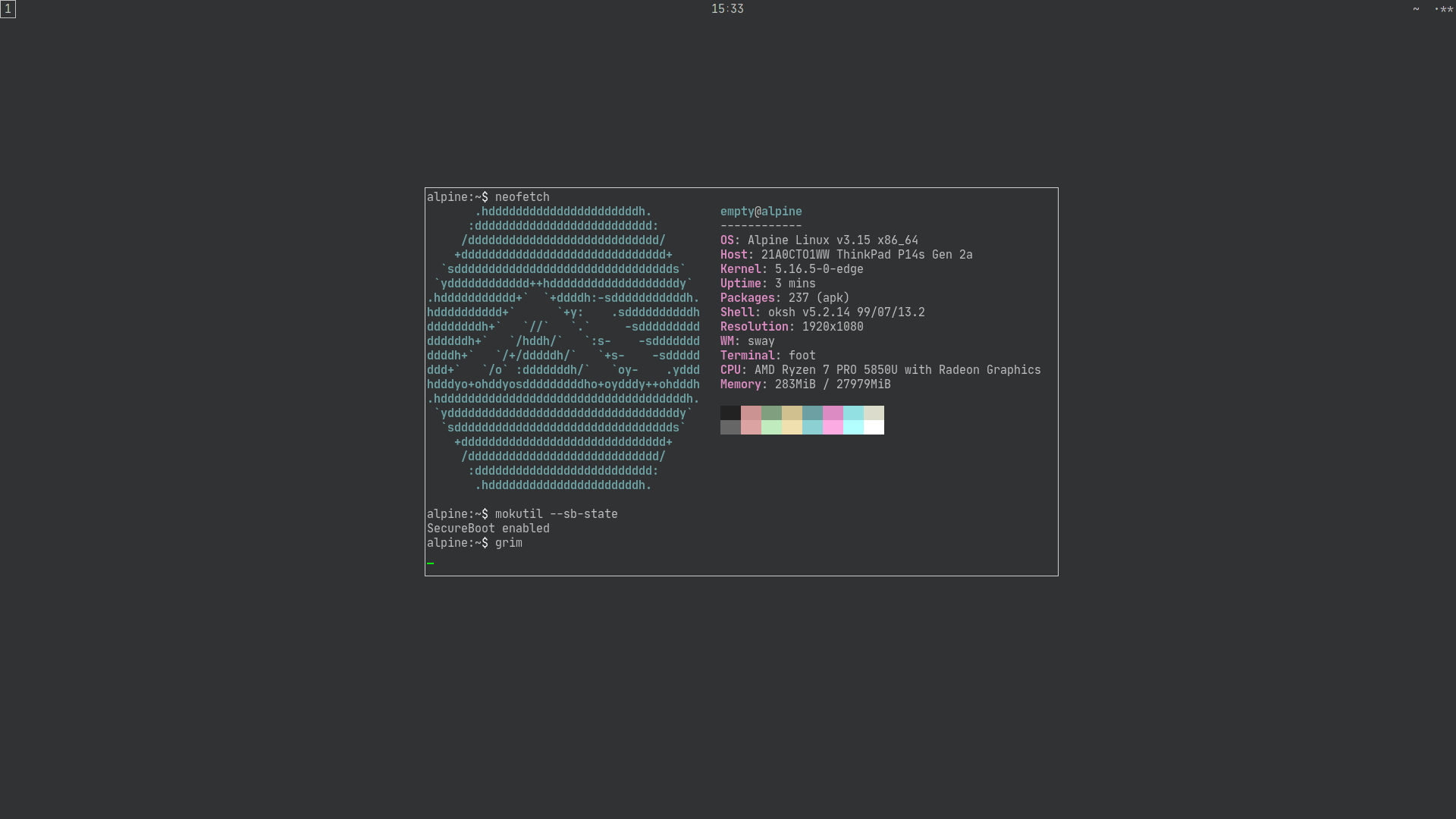
Copied the VM to bare metal and got it configured. The setup is beautiful — sway in Alpine used to have the setuid bit applied but now it relies on seatd instead (which is *much* better than the elogind bloat-monster). The memory usage looks high but that's because the machine has 32GiB of RAM, the same desktop on Arch is over 400MiB at a bare desktop just after boot.
They've even ported over systemd-boot (under it's old name of gummiboot) so I can use a unified kernel image signed with my SecureBoot keys & EFI_STUB booting. Very nice.
Now all I need is for the rtw89 driver to be added to their linux-edge kernel so my wireless card works. EDIT: it's been added for v5.16.7.
I love Alpine, it really is Linux done right (IMO).
#984 Re: News & Announcements » PeppermintOS now Debian base & soon Devuan based » 2022-02-05 15:37:57
Interesting news, thanks for the information.
they have a number of repos stages (stable, test, unstable) with pinning involved
#985 Re: DIY » [SOLVED] message from the grub underworld » 2022-02-05 10:59:48
So the other distributions all have root=/dev/whatever instead of the UUID, which is why the boot breaks — the block device identifier has changed so the correct root can't be found.
I think the best approach here would be to ditch os-prober completely and build your own multi-boot menu using /etc/grub.d/40_custom to call configfile (ie grub.cfg) in each of the distributions.
Here's an example for Devuan:
menuentry 'Devuan' {
   search.fs_uuid f203d9ec-a53c-4f33-ad2a-222cf8f8dbcd
   configfile /boot/grub/grub.cfg
}
Alternatively just build a complete menuentry, like this:
menuentry 'Devuan' {
   search.fs_uuid f203d9ec-a53c-4f33-ad2a-222cf8f8dbcd
   linux /vmlinuz ro quiet root=UUID=f203d9ec-a53c-4f33-ad2a-222cf8f8dbcd
   initrd /initrd.img
}
^ That uses the /vmlinuz & /initrd.img symlinks that always point to the current kernel version so it doesn't need to be updated after kernel upgrades.
Slackware has similar symlinks in /boot/vmlinuz, /boot/vmlinuz-generic & /boot/vmlinuz-huge with /boot/initrd.gz remaining unchanged regardless of kernel version.
The kernel & initramfs images for Artix are unversioned so they can also be called directly with no need to edit after updates.
No idea about SUSE though, sorry.
And to be clear: this is not a problem with Devuan and there is nothing the Devuan developers can do about it.
EDIT: looking again at the documentation you should check /etc/default/grub in the controlling system and make sure this is set:
GRUB_DISABLE_LINUX_UUID=false^ That should make GRUB use root=UUID= in the linux line. It should be set by default but perhaps you have changed it to true for some reason. Remember to update the configuration afterwards:
# grub-mkconfig -o /boot/grub/grub.cfg#986 Re: Off-topic » Show your desktop (rebooted) » 2022-02-05 10:48:05
Storage is cheap
Not for anybody using one of the current generation of budget laptops which all come with 30GiB eMMC storage devices with no upgrade options for it. A "recommended" Slackware system would fill that up quicker than Windows FFS.
A more useful comparison would be your Alpine system with and without wayland.
Tricky to get a fair comparison but here's df -h from a fresh installation with only the amdgpu & rtw89 firmware packages installed:
Filesystem                Size      Used Available Use% Mounted on
devtmpfs                 10.0M         0     10.0M   0% /dev
shm                       3.9G         0      3.9G   0% /dev/shm
/dev/vda3                 7.2G    157.6M      6.7G   2% /
tmpfs                     1.6G     92.0K      1.6G   0% /run
/dev/vda1                88.2M     25.5M     55.7M  31% /boot
Here's the output with a fully-working sway desktop (including the foot terminal emulator, mesa, libinput, eudev and seatd):
Filesystem                Size      Used Available Use% Mounted on
devtmpfs                 10.0M         0     10.0M   0% /dev
shm                       3.9G         0      3.9G   0% /dev/shm
/dev/vda3                 7.2G    257.4M      6.6G   4% /
tmpfs                     1.6G    252.0K      1.6G   0% /run
/dev/vda1                88.2M     25.5M     55.7M  31% /boot
So that's about 100MiB, which isn't bad for a full graphical desktop.
Note that an openbox/tint2 desktop takes up more space thanks to the xorg-server & xinit packages:
Filesystem                Size      Used Available Use% Mounted on
devtmpfs                 10.0M         0     10.0M   0% /dev
shm                       3.9G         0      3.9G   0% /dev/shm
/dev/vda3                 7.2G    288.4M      6.5G   4% /
tmpfs                     1.6G    232.0K      1.6G   0% /run
/dev/vda1                88.2M     25.5M     55.7M  31% /boot
And it also uses more memory:
              total        used        free      shared  buff/cache   available
Mem:           7.8G      150.8M        7.5G        4.1M      138.8M        7.4G
Swap:          2.5G           0        2.5G
Compared to sway:
              total        used        free      shared  buff/cache   available
Mem:           7.8G      145.2M        7.5G        9.7M      167.6M        7.4G
Swap:          2.5G           0        2.5G
Wayland ftw!
is your Alpine system running "Bonkers Gnome"
No, that would be silly
EDIT: screenshot to stay on topic:

#987 Re: Desktop and Multimedia » Rhythmbox throwing error after update/upgrade » 2022-02-04 22:53:46
I've run sid and ceres for decades
My apologies. I didn't mean to offend.
#988 Re: Off-topic » syntax highlighting » 2022-02-04 22:49:39
Thanks Ralph, that is a beautiful suggestion, but unfortunately the sway-bar status_command doesn't know the value of "$COLUMNS" for the bar so that code just results in no space at all between the clock and the battery indicator.
I've settled on
printf "%s%98s%s\n" "$(date +'%H∶%M')" "$state" "$symbols"Which does at least look less silly, even if it isn't.
And now back to the thread topic...
#989 Re: Off-topic » syntax highlighting » 2022-02-04 21:53:24
Might I suggest using printf
Thanks for the suggestion. I need spaces to line up the clock exactly on the centreline, tabs don't quite match. But I suppose it would be slightly cleaner to use mostly tabs with a few spaces:
printf "$(date +'%H∶%M')\t\t\t\t\t\t\t\t\t\t\t\t %s%s\n" "$state" "$symbols"Thanks again and apologies to the OP for the diversion.
#990 Re: DIY » [SOLVED] message from the grub underworld » 2022-02-04 21:32:07
We need to see /boot/grub/grub.cfg from whichever system is controlling the bootloader. You claim this to be "Suse" (openSUSE?) in the OP but if you're not sure run the set command from the GRUB command line to see the configfile variable and it's location.
If that variable isn't listed and you're not sure which system is controlling the bootloader then install the boot-info-script package in Devuan and share the output of
/usr/sbin/bootinfoscriptThe output will be lengthy so be sure to use code tags.
#991 Re: Other Issues » [SOLVED] Desktop locked up .. how to solve?? » 2022-02-04 21:25:23
I would have just
pkill XThen logged in again.
#992 Re: Desktop and Multimedia » Rhythmbox throwing error after update/upgrade » 2022-02-04 21:06:17
Have you tried full-upgrade? It might be needed for a "clean" upgrade. But it might also break things more.
Random things breaking is to be expected when running ceres. That's why it's also called "unstable" 
#993 Re: DIY » [SOLVED] message from the grub underworld » 2022-02-04 18:28:12
If you're dropped to an initramfs shell then I don't think /etc/fstab has been read. The problem must be with the GRUB configuration. Please share that here along with the output of lsblk -f. Thanks.
#994 Re: DIY » execute a script on log-in » 2022-02-04 18:24:44
Remove the PATH line from ~/.xsessionrc if it's being set in ~/.profile and also remove the bash line from ~/.profile then you can call the script from .xsessionrc, like this:
0-BitTwisters-siggen.bsh^ That's all you need if the script is executable, is in a PATH directory and has a #!/bin/bash shebang. No need to call the full path or prepend bash.
Alternatively remove any PATH additions and just call the full path to the script.
#995 Re: Other Issues » [SOLVED] USB Device (keyboard) problem » 2022-02-04 18:15:23
Do you actually have any problems with the keyboard apart from the dmesg spam?
Could be a dodgy cable and/or connector.
#996 Re: Installation » Problems with desktop-live iso. » 2022-02-04 18:13:47
I think the modesetting DDX driver is a better option than nouveau at this stage. Not buying NVIDIA's crap is the best option ofc.
#997 Re: Other Issues » [SOLVED] Desktop locked up .. how to solve?? » 2022-02-04 18:11:39
Feb 3 13:06:54 user kernel: [1443046.597471] chrome invoked oom-killer: gfp_mask=0x100cca(GFP_HIGHUSER_MOVABLE), order=0, oom_score_adj=300
Yup, looks like Chrome ate all the RAM. Next time drop to a TTY and use
pkill chromeOr install earlyoom to kill it from user space before the kernel jumps in and messes things up. Linux really is shit at handling OOM events 
EDIT: you do have swap, right? You need swap.
#998 Re: Off-topic » syntax highlighting » 2022-02-04 18:07:13
I'm a complete tart so I can't live without syntax highlighting. I find it useful for shell scripts because it indicates when I mess up the syntax, which happens often.
I use the default vim highlighting, here's an example featuring my lame status "script" for sway:
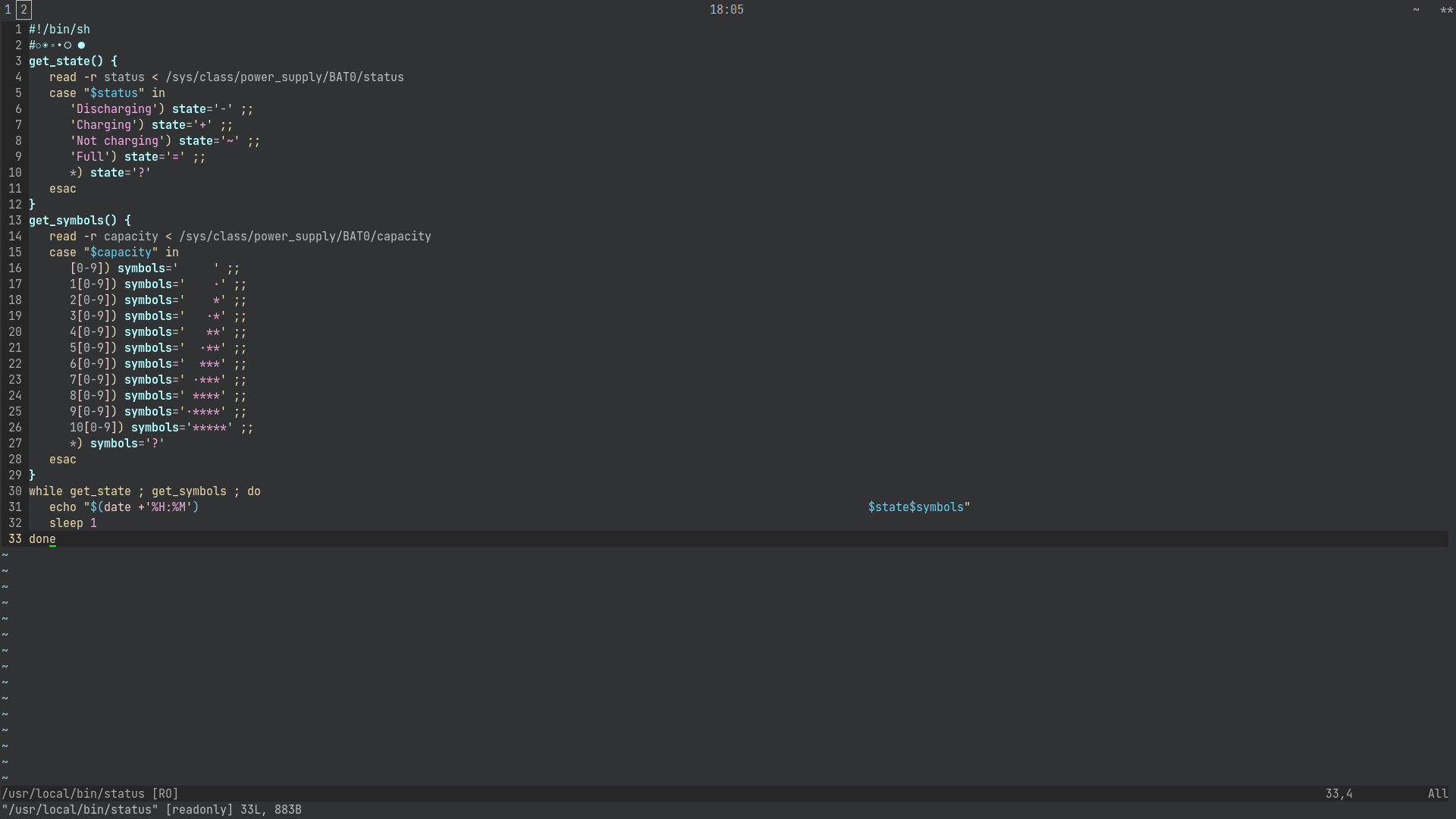
EDIT: yes, I am using whitespace to centre the clock; I don't know how to use JSON...
EDIT2: btw did you know OpenBSD's ksh can use GNU-style PS1 backslash-escaped special characters?
PS1='\e[36m\w \e[32m>\e[0m '^ That replicates your PS1 without having to run pwd & sed every time you press <return>.
#999 Re: Off-topic » Show your desktop (rebooted) » 2022-02-04 17:57:30
Got Slack:
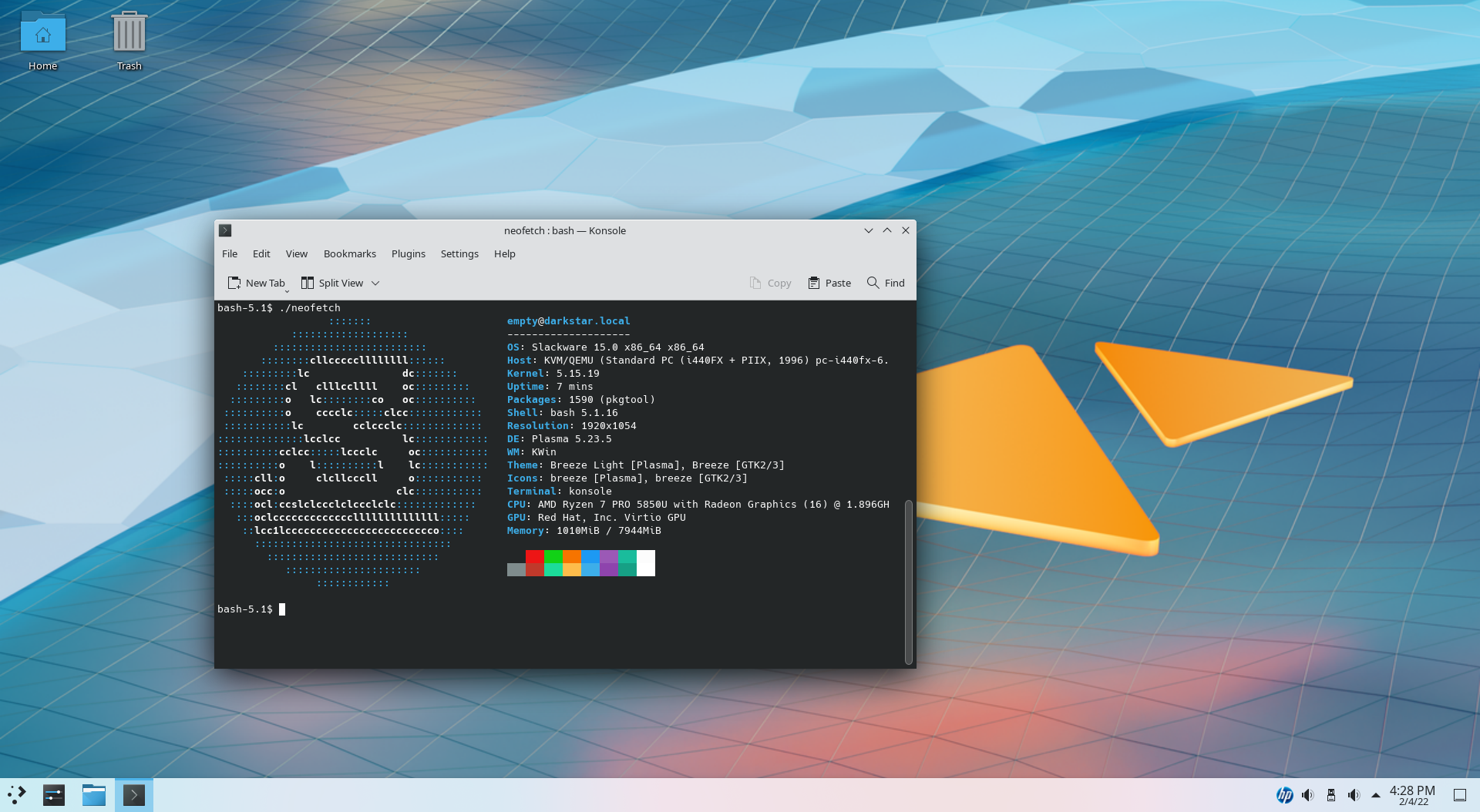
Interesting release but the default Lilo configuration failed so I had to install GRUB from a chroot and the recommended install takes up ~16GiB, which is frankly ridiculous.
EDIT: for comparison I have an Alpine Linux VM using sway that I'm about to transfer to my hard drive that takes up 882MiB.
#1000 Re: Devuan » A Possible Future For Devuan and Linux » 2022-02-04 17:54:02
Do we have anything like pledge in Linux-land?
It can almost be mimicked by using capabilities(7) but the implementation wouldn't be as straightforward. The init-system-that-shall-not-be-named (or spelled correctly) offers capability-based restrictions for unit files: https://manpages.debian.org/bullseye/sy … PABILITIES
Board footer
