
You are not logged in.
- Topics: Active | Unanswered
#751 Re: Installation » Howto install dual-boot Windows Linux best method » 2023-07-30 13:15:01
Hello:
One operating system per physical drive is a clear approach.
+1
Fully agree with that.
Provided it is not a netbook/laptop with a single HDD but then that also has the possibility of a fast SD card.
Not sure that can be done for a windows system.
Best,
A.
#752 Re: Desktop and Multimedia » Browser for netbook running Devuan » 2023-07-30 13:04:37
Hello:
... links2 for lightweight graphical browsing. It makes the internet look like 1995, which I find very soothing.
I'll have a look.
To test, I fired up the devuan_chimaera_4.0.3_i386_desktop-live.iso using a 4GB SD card and although Firefox behaved a bit better but still unusable.
Maybe I should try an older version and pin it or resize the swapfile.
Thanks for your input.
Best,
A.
#753 Re: Installation » Strange netinstall.iso behaviour » 2023-07-30 12:11:54
Hello:
... comes out Like this,
--- snip ---
... did the partitioning before the installation ...
Yes, I used to do it like that.
Every time I moved from one distribution to the next one in line.
I then settled on Devuan ~6 years ago.
I was very much used to /dev/sdx notation but eventually started using UUIDs.
... every time you format a partition it get a new UUID.
Indeed ...
And your fstab gets ... fstabbed.
Resulting in a warning about the system not finding a UUID, usually happens when you resize the /swap partition.
... used to have more separate system partitions ...
The benefit of separate partitions for /home, /var and /swap are important.
I also use primary partitions, easier/faster to work with than primary+extended if you don't need more than four partitions.
My box has 8.0GB RAM and the 4.0GB swap partition (in my case) practically gets no use as I have priority set to -2 (it is a small SSD).
Should I need more disk space I will see about a tmpfs for swap, have been puting it off for the longest time.
With respect to the reason for this thread, I think the installer is not working properly.
ie:
Once a specific drive is selected for the installation, the default behaviour should be that no partition on any other drive be used for anything.
More yet, the installer should warn that a partition outside the selected installation drive will be used before continuing with the process.
Thanks for your input.
Best,
A.
#754 Desktop and Multimedia » Browser for netbook running Devuan » 2023-07-29 19:14:39
- Altoid
- Replies: 14
Hello:
I have run Devuan Linux on an Asus 1000HE (1.66GHz Intel Atom N280 CPU + 2GB RAM) for a few years now.
These days, 5.10.0 with a backported kernel.
I run my coffee roasting software and serves as a access websites when I'm doing maintenance on my box and need to read up on something specific.
I also take with me when I am out of town. Limited but quite useful for a 14 year old netbook.
Now, the thing is that with the last two or three upgrades to firefox-esr, the browser has become incredibly slow/sluggish: practically unusable.
Is there another, lighter on resources (ie:'netbook friendly') that can be used with Devuan instead of Firefox-esr?
Thanks in advance.
Best,
A.
#755 Re: Installation » Strange netinstall.iso behaviour » 2023-07-29 14:00:41
Hello:
Apparently the partitioner picks up all swap partitions ...
Apparently so, would have to delve further into that.
But ...
Remember my first post: the installer wanted to format a partiton that did not exist.
Now, having 1) chosen to do an expert install, 2) selected specific drive to use and 3) having opted to partition it manually, I think that this should not be happening.
I did what you suggested and made sure that "don't use this partition" was used on every partition I could find that did not belong to the drive I selected for the installation and that worked.
As the other ie: /, /var and /home partitions were already established, the installer only formatted the /swap partition.
That said, why isn't every partition set up as "don't use this partition" by default?
Why does the installer pick up a /swap partition from a previously unselected drive?
I don't understand what is going on, maybe a glitch or a bug? Quite worrisome, at least to me.
In any case, I stopped the installation at 32% as it had been there for well over 15'.
I guess that installing on a 64GB USB2.0 will do that and as the damn things no longer come with the luxury of an activity LED, you really don't know if it is being written to or the install process went awry for whatever reason.
I'll try again this weekend.
Thanks for your input.
Best,
A.
#756 Re: Installation » Strange netinstall.iso behaviour » 2023-07-28 15:39:39
Hello fsr:
... seen the disk order change when booting with usb ...
Yes, I think that happens always.
But it does not matter here as the installation drive is easy to identify.
Unless I am not paying attention, the right drive will be formatted and receive the installation.
The problem (as I see it) is that the installer wants to muck around with other drives and in ways that don't make sense.
eg: formatting an inexistent partition. (?)
Thanks for your input.
Best,
A.
#757 Re: Installation » Strange netinstall.iso behaviour » 2023-07-28 15:34:52
Hello:
How does the dialog before that one look?
Here it is:

The installation drive (USB stick) is correctly identified (VendorCo ProductCode), is the correct size (62.9GB) and is where it should be (SCSI9 /dev/sdd).
Thanks for your input.
Best,
A.
#758 Re: Installation » Strange netinstall.iso behaviour » 2023-07-28 14:10:41
Hello:
Partition your disk manually ...
That is exactly what I am doing.
Thanks for your input.
Best,
A.
#759 Re: Installation » Strange netinstall.iso behaviour » 2023-07-28 11:52:06
Hello:
Having come to my senses, I went ahead and did it right way. 8^°
I burned the netinstall.iso to a 2.0Gb MicroSD card to install to the previously used 64Gb USB2.0 stick.
During the installation I chose to delete everything on the stick so it would start anew.
But I got the same behaviour from the installer:
eg: the installer informing me that ...
- it would format partitions in drives that don't belong to the drive previously selected for the installation.
ie: drive selected is /dev/sdc but it informs that it will format partition #3 in /dev/sdb- it would format an inexistent partition.
ie: drive /dev/sdf does not have a partition #3
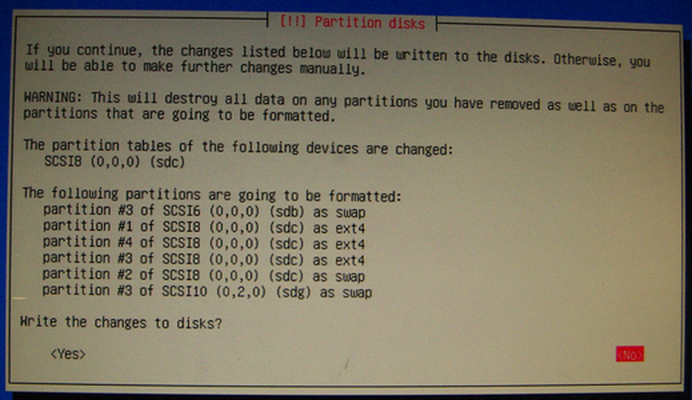
Any idea as to what is happening?
Why would the installer want to muck around with a drive not selcted for installation?
Thanks in advance.
Best,
A.
#760 Re: Installation » Strange netinstall.iso behaviour » 2023-07-28 11:29:23
Hello fsr:
Live isos can boot the entire iso into RAM.
Yes.
Add "toram" or maybe "toram=filesystem.squashfs" to the boot command for a live-usb ...
... that way might allow you to install over the imaged usb, but then you have to get it right the first time ...
That's a good idea.
Have to get it right the first time around.
Thanks for your input.
Best,
A.
#761 Re: Installation » Strange netinstall.iso behaviour » 2023-07-28 10:03:31
Hello:
... you are trying to install it to the same pendrive ...
Exactly.
See previous posts.
Thanks for your input.
Best,
A.
#762 Re: Installation » Strange netinstall.iso behaviour » 2023-07-28 03:03:50
Hello:
Looks funny yes ...
So I thought.
... hard to know what is happening when you start partitioning the installer disk ...
... installing over itself is probably stretching it too far.
Indeed.
For some reason I had it in my head/was convinced that is was loading to RAM ... 8^°
I wonder where I got that from?
... really need the installed system to replace the installer on that USB ...
No, not that at all.
More ignorance (of how the install process works) than anything else.
... misunderstood your use case?
You are too kind.
Thanks (many) for your input.
Best,
A.
#763 Re: Installation » Strange netinstall.iso behaviour » 2023-07-28 01:59:42
Hello:
Have you done like that before?
Install Linux directly on a USB drive?
Most probably, long ago.
Really can't recall.
What did you expect to see?
More like what I did not expect to see.
eg: the installer informing me that ...
- it would format partitions in drives that don't belong to the drive previously selected for the installation.
ie: drive selected is /dev/sdc but it informs that it will format partition #3 in /dev/sdb
- it would format an inexistent partition.
ie: drive /dev/sdf does not have a partition #3
Obviously, this problem has an easy enough solution: take all drives in my box off-line.
But questions remain:
Why does the installer want to work on drives not selected for the installation?
Why does the installer see an inexistent partition in one of those drives?
I think that that type of thing should not happen.
Surely it can't be because the selected drive is a USB stick?
Thanks in advance.
Best,
A.
#764 Installation » Strange netinstall.iso behaviour » 2023-07-27 22:46:00
- Altoid
- Replies: 22
Hello:
I downloaded the devuan_chimaera_4.0.0_amd64_netinstall.iso, checked it aginst its SHA256SUM and burned it to a 64Gb USB2.0 stick.
The purpose was to install it to that same USB stick.
When I got to writing the partitions I came across something strange, see for yourselves:
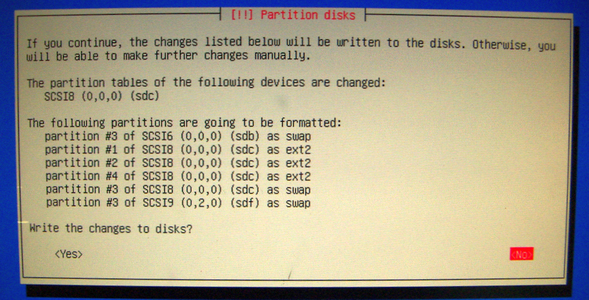
The USB stick I am using for the installation is SCSI8 (sdc).
SCSI6 (sdb) is my system drive and /dev/sdb3 is the swap file.
SCSI9 (sdf) is *not* partitioned and it contains a few important backup files.
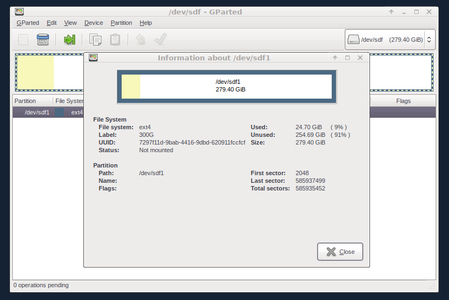
Anyone knows what is going on?
Thanks in advance.
Best,
A.
PD: sorry for the lousy image system but the one I had is no longer free.
#765 Re: Off-topic » Why still they don't solve that infamous systemd shutdown problem » 2023-07-19 02:22:37
Hello:
If systemd is "so good" why does it still exist?
Is that a question to ask here, at Dev1?
Seeing that there is no systemd in Devuan, you may want to consider asking that question here.
... the sole reason I choose devuan when I can.
If that is your sole reason for your choosing Devuan, I think you have a lot of reading up to do.
Best,
A.
#766 Re: Off-topic » PHP joke » 2023-07-14 01:48:33
Hello:
... purchasing stuff off Jack Ma's Aliexpress ...
... unable to login because the PHP is not working right ...
I also purchase things from Aliexpress, no problems logging in.
I use Firefox 102+uBlock Origin for most if not all my web activity.
Everything goes through Pi-Hole set up as a recursive DNS server in a VM inside my Devuan box.
Am I missing something?
Best,
A.
#767 Re: Desktop and Multimedia » [SOLVED] Random Xorg crashes after upgrading to Daedalus » 2023-07-05 00:06:09
Hello:
... you may have to change Device1 to Device0):
Section "Device"
	Identifier "Device1"
	Driver "intel"
EndSection
--- snip ---
... had to change Device0 to Device1 for the config file to have any effect. Crashes went away with this.
Reading your post I vaguely recalled a similar issue (many) years ago when I was attempting to go from a single screen layout to a two (and then three) screen layout.
I was trying to get a manually configured xorg.conf file to work but had started the screen numbering at 1 instead of at 0.
Once I got it to work I never had to look at it again: I have used the same *.conf file with the same hardware through at least four different distributions and now with Devuan since Jesse.
See Device Section here: https://www.x.org/releases/current/doc/ … #heading10
Screen number
This option is mandatory for cards where a single PCI entity can drive more than one display (i.e., multiple CRTCs sharing a single graphics accelerator and video memory). One Device section is required for each head, and this parameter determines which head each of the Device sections applies to. The legal values of number range from 0 to one less than the total number of heads per entity. Most drivers require that the primary screen (0) be present.
In short: screen numbers start at 0.
Best,
A.
#768 News & Announcements » X.Org Security Advisory: Sub-object overflows in libX11 » 2023-06-16 01:45:26
- Altoid
- Replies: 0
Hello:
Got this today in my inbox:
-------------------------------------------------------------------------------------------
X.Org Security Advisory: June 15, 2023
Buffer overflows in InitExt.c in libX11 prior to 1.8.6 [CVE-2023-3138]
====================================================
The functions in src/InitExt.c in libX11 prior to 1.8.6 do not check
that the values provided for the Request, Event, or Error IDs are
within the bounds of the arrays that those functions write to, using
those IDs as array indexes. Instead they trusted that they were called
with values provided by an Xserver that was adhering to the bounds
specified in the X11 protocol, as all X servers provided by X.Org do.
As the protocol only specifies a single byte for these values, an
out-of-bounds value provided by a malicious server (or a malicious
proxy-in-the-middle) can only overwrite other portions of the Display
structure and not write outside the bounds of the Display structure
itself. Testing has found it is possible to at least cause the client
to crash with this memory corruption.
This is fixed in:
https://gitlab.freedesktop.org/xorg/lib … 0332cfa36c
which is included in the libX11 1.8.6 release issued today.
X.Org thanks Gregory James Duck for reporting this issue to our security team.
--
Alan Coopersmith - alan.coopersmith@oracle.com
X.Org Security Response Team - xorg-security@lists.x.org
-------------------------------------------------------------------------------------------
Best,
A.
#769 Re: Other Issues » usb pendrive always mounted as read-only » 2023-05-30 00:00:09
Hello:
... idea of a hardware failure as a personal insult, especially if it is something I paid my own actual money for.
Indeed ...
But it happens and there can be quite a few reasons.
From crappy memory chips in cheap USB sticks to counterfit Kingston USB drives to faulty/dirty USB sockets.
... accept the loss and beg/buy/borrow/steal another drive?
I would first try the (apparently) offending drive on a different host. ie: another PC, laptop, RPi, whatever you have available.
Boot to a terminal and do a command line nuke of the thing, a thorough clean-up via dd.
Once that is done, attempt the same operation you had problems with and check the result.
If the problem subsists, the drive is bad.
If the operation was successful, repeat the whole process to rule out a fluke.
The first thing is to rule out a hardware fault.
In my experience, the usual suspects are the USB stick and then, if using a portable, the USB socket.
A few years ago I chased USB stick issues for over two days till I discovered an intermittently failing USB socket in my Asus 1000HE.
Best,
A.
#770 Re: Other Issues » Update nginx > 1.19.4 » 2023-05-29 12:50:30
Hello:
... running Chimaera and I would like to update my nginx to >= 1.19.4
... how can I update my Chimaera to a version above 1.19.4 ?
Consider waiting till the new version becomes available in the Chimaera repository?
Or maybe gets backported?
---
... followed those instructions ...
Installing a Prebuilt Debian Package ...
Debian package ≠ Devuan package.
Installing a package from a Debian repository to a Devuan installation is, more often than not, a source of grief and/or problems.
There is a reason for the existence of Devuan repositories.
... from the Official NGINX Repository ...
The NGINX Repository, official or not, is not a Debian or Devuan repository.
Noob or not, one thing you should know by now is that installing from foreign repositories is not advisable. ;^°
That said ...
Just what is it about the next version of nginx that is taking you down this path?
Is there a severe security problem involved?
If that's the case, be sure that a patched version will be available very soon.
Is there some essential functionality you need?
Do bear in mind that latest versions are not necessarily better.
Or as tested by its users as previous ones have been since the last release.
And as such, not necessarily bugless.
Best,
A.
#771 Re: Desktop and Multimedia » EXT4 BUG? Data loss when I have launched sigil :s » 2023-05-26 18:03:42
Hello:
... no proposed mechanism or reliable reproduction ...
... should be punted upstream to the kernel mailing list.
Investigating esoteric kernel bugs is not Devuan's responsibility.
+1
I was about to post the same thing/idea.
Best,
A.
#772 Re: Other Issues » usb pendrive always mounted as read-only » 2023-05-18 20:32:28
Hello:
I show you mkfs and kernel ...
Please post terminal output/printout as code.
In the bar above you will see, among other options, 'code' (between brackets).
Click on it and you will get 'code' and '/code' both beween brackets.
Post all the terminal output between 'code' and '/code' (each is between brackets).
Use the 'Preview' button below to check.
Thanks.
Best,
A.
#773 Re: Intergalactic Communities » Interest probing: Devuan Conference » 2023-05-15 20:16:34
Hello:
Welcome.
... come in peace from Dyne.org ...
As expected. 8^D
... before we go ahead ...
Indeed ...
I'd say that the organisers would have to first have a go at defining conference in terms of how many atendees/speakers actually configure one and would be feasible to get running as such, given the number obtained.
It could well be that you get 200/300 Dev1-ers able | willing | in-condition to attend, mingle and listen/exchange views with two to five speakers.
That is a level of activity that can probably be covered in a morning and an afternoon with maybe another morning for extras.
Just an idea.
Best,
A.
* BTW: I'd love to attend but for me, Stockholm is ~12.537 km away, can't possibly afford it.
#774 Re: Hardware & System Configuration » how to completely disable laptop lid detection? [SOLVED] » 2023-05-10 16:15:39
Hello:
... missing lid in the section he used to disable it:
cat /proc/acpi/wakeup
Device	S-state	  Status   Sysfs node
HDAS	  S3	*disabled  pci:0000:00:0e.0
XHC	  S3	*enabled   pci:0000:00:15.0
XDCI	  S4	*disabled
RP01	  S4	*enabled   pci:0000:00:14.0
PXSX	  S4	*disabled  pci:0000:02:00.0
CNVW	  S4	*disabled
Maybe one of the enabled ones is causing problems.
ie: some conflict.
Any suggestion?
As I understand it, you have only two options with an actual address and enabled :
XHC	  S3	*enabled   pci:0000:00:15.0
RP01	  S4	*enabled   pci:0000:00:14.0
I think XHC is related to something USB and that RP01 is related to something PCIE.
Your mouse is probably on the USB bus (?).
Try disabling one at a time or both at the same time, reboot and see what happens.
ie: if the lid works properly and the mouse does not freeze any more.
BTW: in my WS, I have all entries in /proc/acpi/wakeup set to disabled, even the ones with no address. 8^°
HTH.
Best,
A.
#775 Re: News & Announcements » Devuan websites need a makeover for Daedalus » 2023-05-10 02:08:16
Hello:
Then you haven't been paying attention.
Well ...
You know me, always so distracted. 8^D
Best,
A.
Board footer
