
You are not logged in.
- Topics: Active | Unanswered
#26 Re: Off-topic » Show your desktop (rebooted) » 2026-04-04 22:20:04
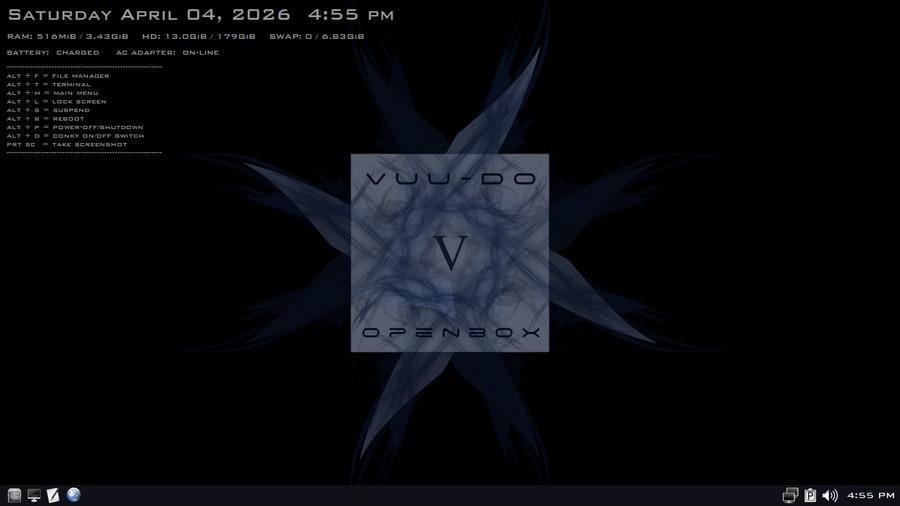
#27 Re: DIY » I'm making a note-taking app » 2026-04-03 20:27:54
EDIT: Done and uploaded and ready for testing.
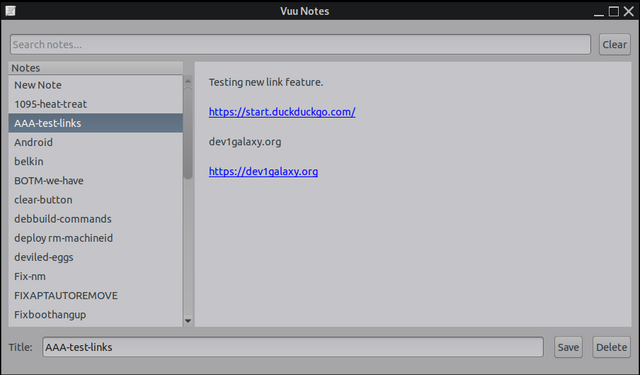
Added a function for clickable hyperlinks to open in default browser, and a first run dialog that now offers to install the save folder in the default location or let the user select one via the file-chooser dialog. Thanks to ceeslans and Zathras for the suggestions! Note: Have not packaged or uploaded this new version yet, this will be v. 1.0-2

#28 Re: DIY » I'm making a note-taking app » 2026-04-01 21:47:22
Did some work on it today, fixed a small behavior issue, added a delete function +button and some tidying, and finally packaged it.
https://sourceforge.net/projects/vuu-do … /VuuNotes/
#29 Re: Devuan Derivatives » Devuan Excalibur mate-mini + Xlibre! » 2026-04-01 01:18:51
^^ Nice, thank you! Going over that data now, will have some questions later if that's okay?
#30 Re: Devuan Derivatives » Devuan Excalibur mate-mini + Xlibre! » 2026-03-31 15:24:41
3-31-2026 New Xlibre version available.
Got the new one uploaded, there were a fair number of updates including imagemagick and others.
For Xlibre, all Xorg packages that have a replacement available were swapped, while any that didn't
remain. I couldn't install the amdgpu package for the latest AMD cards dues to the backports libgallium
issue, and some very old amd packages for 15+ year old cards like mach64 are not available in the
current version of Xlibre, there are some packages for that available from an earlier version, but I
was advised that it's possibly a bad idea to mix-n-match, i'll test that later when I get access to an older
machine and report back.
This version has Mate's on-board compositor (Xpresent) turned off, and I had already previously removed
picom. And with that all the artifacts disappeared, everything seems to be working good and feels nice and
snappy again. Still have yet to test video, browser, or other major programs, just wanted a good working
base to start testing, so that's what this is for. All feedback very welcome, even if it's just to say it's
working/not working and what hardware you tested on, it helps a LOT.
#31 Re: Devuan Derivatives » Devuan Excalibur mate-mini + Xlibre! » 2026-03-30 17:37:11
Good question, I don't have an answer though as the mate-mini doesn't have any packages that require QT libraries, it's all GTK, I would think it wouldn't matter what toolkit is used, but I could be wrong. I'm going to snapshot a new Xlibre version with the compositor turned off later today to make it easy for folks to test, maybe load some QT apps in a live-session and see how they work, I haven't even tried video yet, just wanted to make a base model to start with and go from there.
#32 Re: Off-topic » Something X11ish for you all to look at. » 2026-03-30 17:32:25
It is interesting though, it's worth reading the readme, developer has some good points and interesting ideas, and i'm always grateful for people like that who are looking for new solutions to the wayland plague.
#33 Re: Devuan Derivatives » Devuan Excalibur mate-mini + Xlibre! » 2026-03-29 21:21:33
Okay finally got some time to re-visit this earlier, so I went in and turned off Mate's built-in compositor (Xpresent) and all the artifacts went bye-bye and seems to be working smoothly. Seems like it doesn't play too well with compositors, though in fairness they didn't work too well on X11 either, some bugs in that compositor that need to be fixed. Didn't try it with picom.
Still have the issue with the amdgpu package and libgallium, but the rest seems stable, so I may try and run another iso with xpresent turned off.
#34 Re: Off-topic » Something X11ish for you all to look at. » 2026-03-29 19:57:02
Nah, I'll stick with XLibre.
Ditto.I have some issues using it on my machine, but i'm going continue testing and working with it, I think it's a good solution going forward.
#35 Re: DIY » Ballistics calculator app » 2026-03-26 18:45:01
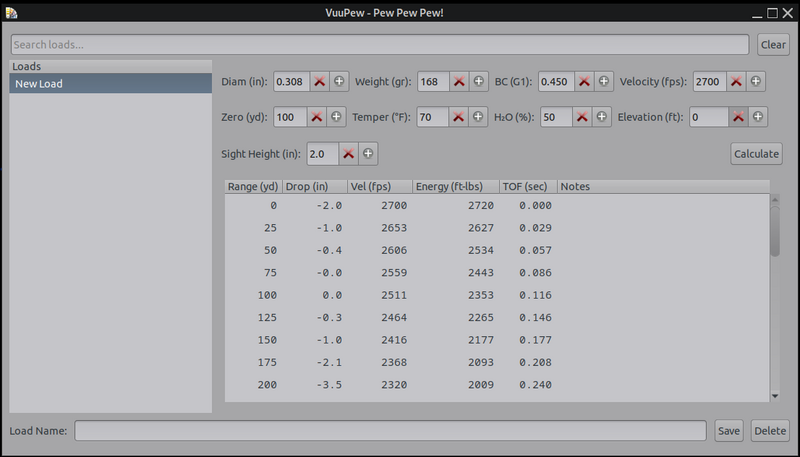
Got the logic done (at least preliminary) for adding temp, humidity, and pressure done, you won't need to try and figure out what the barometric pressure is at your location to use it, you just need the elevation which is easy to remember and a constant (unless you travel) and the app calculates it for you and adds the data to the calculations. Also added a toggle for the main pane to switch from chart-view to an editable notes pane and back. Still have to hook that into the notes column and mod the save function to include the chart and notes, and then it's a LOT of testing and refining from there, possibly a couple more features too.
EDIT: I don't know why the pics are blurry but the app is nice and sharp actually, lol.
EDIT2: VuuPew is an acronym, it stands for "Veteran Unix User's Projectile Estimation Widget", my wife came up with that name, I think it's brilliant. 
EDIT3 3-29-2026 : Added wind drift but my math is still off a bit, got everything else done and the save function puts out a great simple printable chart + notes and details, updating the screenie below.

#36 Re: Freedom Hacks » How will life be without gvfs? » 2026-03-24 18:49:02
I'm not a fan of its key bindings and only know the basic ones so ranger is not for me
.
I can do most everything I need to do in it with a mouse, it even displays pics.
Back on-topic: I'm sorry Altoid, but gvfs works really well with PcmanFM for me, and it's not even running until I open the file-manager for the first time in a session (i'm not using the file-manager to run the Desktop, so it's not on all the time either).
For me it's crucial to my workflow to be able to quickly access other partitions. If I could figure out a good solution to dropping it I would likely do so.
#37 Re: Freedom Hacks » How will life be without gvfs? » 2026-03-24 15:09:38
For a terminal based file manager, I think ranger is a lot better than mc.
#38 Re: DIY » Ballistics calculator app » 2026-03-24 15:04:37
greenjeans is preparing for hobbies, and has never fired a shot in anger in his life....I mean the metal gongs and paper targets I used to shoot at in competition probably don't like me but ya know....
#39 Re: DIY » Ballistics calculator app » 2026-03-24 01:01:42
Grudging progress, I dislike math and it dislikes me, lol.
#40 DIY » Ballistics calculator app » 2026-03-21 17:40:36
- greenjeans
- Replies: 5
Just started work on this earlier, gonna take a while for sure, but I think it will be a cool useful app for re-loaders and precision shooters, plenty of online calculators but not much in the way of local apps for Linux. Very very basic to start with, I start simple and then do one tiny feature at a time, got a basic cli math engine working based on just a flat trajectory (muzzle perfectly level and parallel to the ground).
Example: .308 168gr BC=0.450 MV=2700 fps
Range(yd) | Drop(in) | Velocity(fps) | Time(sec)
0 | 0.0 | 2700 | 0.000
50 | -0.6 | 2606 | 0.057
100 | -2.5 | 2511 | 0.116
150 | -5.8 | 2416 | 0.177
200 | -10.6 | 2320 | 0.240
250 | -17.0 | 2224 | 0.306
300 | -25.1 | 2127 | 0.375
350 | -35.2 | 2028 | 0.447
400 | -47.4 | 1927 | 0.523
450 | -61.9 | 1824 | 0.603
500 | -79.0 | 1717 | 0.687
550 | -99.2 | 1605 | 0.778
600 | -122.6 | 1488 | 0.875
#41 Re: Other Issues » Trying to install Refracta Snapshot, says it will delete Mate » 2026-03-21 17:34:02
This may be one of the few times I would use the terminal instead of Synaptic. You can download the Snapshot package itself, then use apt-get install in terminal, and it will usually give you some details as to why something like this would happen, i.e. if there's conflicts between packages it will list them and then ask if you want proceed (obviously NO in this case, lol).
#42 Re: Devuan Derivatives » Devuan Excalibur mate-mini + Xlibre! » 2026-03-20 22:18:39
Well crap, booted up the xlibre iso in a live-session and while it seemed to have no artifacts when it was installed, it has them again in live-session, so I pulled the iso for now.
Back to the drawing board.
This way you could try apt-mark hold xorg then install mate-desktop or mate-desktop-environment.
It wanted to pull everything basically, Mate, all it's other apps like Atril, also wanted to pull all the xorg and xlibre packages out, i'd have to try and pin 100 packages or so.
The amdgpu package isn't going to help the artifacts i'm experiencing even if I get it installed, it was installed in the iso I just took down and the one back in September too. My system is using the radeon driver, so must be some issue there.
#43 Re: Installation » [SOLVED] Brother MFC-L2690DW » 2026-03-20 21:38:24
You may have to check in the repo, Devuan doesn't by default install all printer packages. I'm no printer expert as I never use one, so I use the system-config-printer app to help out, it's been very useful.
#44 Re: Desktop and Multimedia » Linux Audio for the hard of hearing » 2026-03-20 21:26:46
^^Good simple solution! The problem starts when a mixer gets involved, here's what alsamixer looks like in a system with pulseaudio:
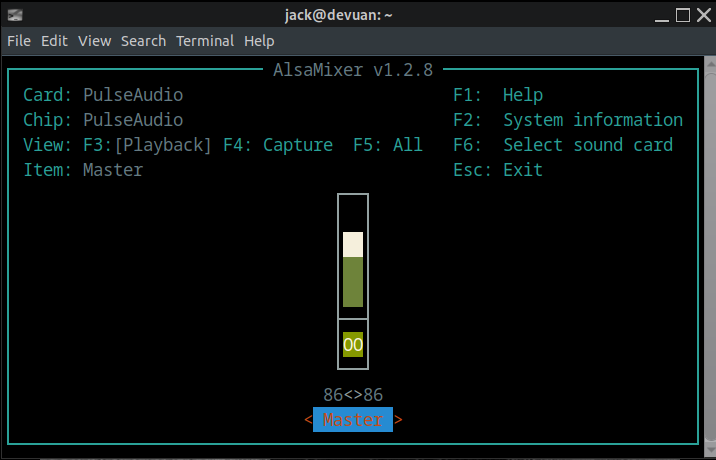
Yeah, ol' retard pottyring doesn't think you need access to such things.
Then there's AlsaTune, which has a completely different philosophy:
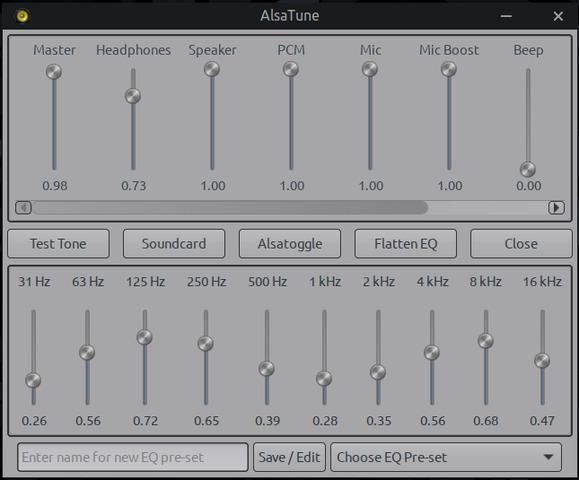
#45 Re: Other Issues » [SOLVED] Hardisk space full , but no files . » 2026-03-20 20:50:58
Apologies if that offends you.
What a strange comment, why in the world would that offend me, or anyone for that matter? Did I offend you in some way with my comment? It wasn't targeted at you at all, it simply comes from a lifetime as an electrical and mechanical technician, and has to do with the importance of maintenance and not ignoring warning signs. Maintenance is always easier than repairs.
#46 Re: Other Issues » [SOLVED] Hardisk space full , but no files . » 2026-03-20 18:16:41
^^ That's basically like putting a piece of tape over the check engine light in your car so you don't have to see that it needs maintenance.
#47 Re: Other Issues » [SOLVED] Hardisk space full , but no files . » 2026-03-20 17:37:20
Turning into a tempest in a teacup here. OP have you checked your xset settings? xset q will tell you if DPMS is disabled. xset +dpms to enable it.
For all it's PITA times, .xsession-errors is still a good way to learn what's mis-behaving in your system, that's why I don't disable it, instead I fix the things it complains about.
#48 Re: Devuan Derivatives » Devuan Excalibur mate-mini + Xlibre! » 2026-03-20 15:25:03
without the kernel option and .conf, screen artifacts appear when using browsers, compositors such as compiz, picom, etc.
Ahhh, mate has a built-in compositor that's enabled by default usually. That could explain the artifacts.
My machine is very old and doesn't use the amdgpu driver package I think as that is for newer and more complex cards and obviously is not installed in the latest experiments I have done, so i'm really wondering why now that the iso I have up now using the old repo got rid of those compositor artifacts, while the new one has made them re-appear? I'll do some more testing today, I need a larger sample size to make any kind of informed conclusion.
#49 Re: Other Issues » [SOLVED] Hardisk space full , but no files . » 2026-03-20 15:11:53
You can just delete the .xsession-errors file after you login, it will spawn a new one on re-boot, but not during a session. This is how golinux does it.
FYI mate has become somewhat infamous to those of us who tinker with it, for spamming xsession-errors, almost anything can cause it, sometimes it just doesn't like a theme or a particular app. A few months back a version of caja was so bad that if you just hovered over the xsession-errors file it would start rapidly filling up with even more garbage at the rate of a mb every couple seconds. I filed on that bug and to the debian-mate team's credit they fixed it in 24 hours, but it was bad.
#50 Re: Freedom Hacks » How will life be without gvfs? » 2026-03-20 14:55:07
Also, I may be the outlier here, and everybody knows I hate what gnome has become, i'm even to the point where i'm writing my own software specifically to take the place of gnome crap, that being said, gvfs and udisks are 2 that have never given me any trouble, and make for a lot of convenience in my system.
When I boot up my system, I want every partition and connected device to show up in that treeview, and I want to open them with a single click without any hoopla, I just don't have time in my day to work any other way, I work fast and the system either needs to keep up or get the **** out of the way and let me work. So far gvfs and udisks comply just fine with those requirements.
Board footer
