
You are not logged in.
- Topics: Active | Unanswered
#1 2025-12-19 23:33:17
- Ron
- Member
- Registered: 2018-04-22
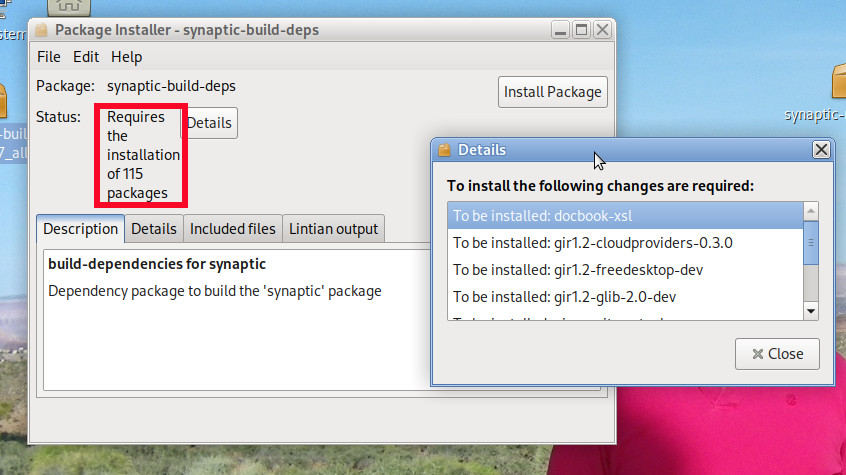
- Posts: 624
[SOLVED] Synaptic problem, or what?
So I've noticed since installing Devuan 6 that for every app I highlight in Synaptic, then click "Get Screenshot," I always get an empty window. I know not everything has a screenshot, and I'd bet it's over 75% that don't. But I must have tried over 50 things, and not a one gives a screenshot. Is something wrong here? Have all the screenshots been removed? I know I've tried some that I have gotten a screenshot for in the past (for one, Aisleriot). Anybody else notice this? It's also making me wonder if anything else is wrong. The last update I got was on December 7. Has anybody gotten anything after that date?
Offline
#2 2025-12-20 01:08:08
- yohno
- Member
- Registered: 2019-09-25
- Posts: 24
Re: [SOLVED] Synaptic problem, or what?
Seems the same problem is encountered in Ubuntu as well. Confirmed as well by seeing op's comment.
Synaptic screenshots of applications not working: https://discourse.ubuntu.com/t/synaptic … king/69398
Offline
#3 2025-12-20 01:44:10
- Ron
- Member
- Registered: 2018-04-22
- Posts: 624
Re: [SOLVED] Synaptic problem, or what?
That post in your link is already over 2 months old, and still isn't fixed. I get the feeling this might never be fixed. Can it be manually fixed, seeing that the issue is apparently that Synaptic can't handle the screenshots coming over https vs. http?
Last edited by Ron (2025-12-20 01:49:01)
Offline
#4 2025-12-20 02:22:22
- Ron
- Member
- Registered: 2018-04-22
- Posts: 624
Re: [SOLVED] Synaptic problem, or what?
So following a link within the link given above, I found that someone has (supposedly) fixed it, here:
https://github.com/mvo5/synaptic/issues … 3616629445
Following the link in the link I just gave I found the deb installer. If I were to install it, how do I go about it? Should I purge the Synaptic now on my system, then install the fixed one?
Offline
#5 2025-12-20 03:22:55
- RedGreen925
- Member
- Registered: 2024-12-07
- Posts: 311
Re: [SOLVED] Synaptic problem, or what?
Should I purge the Synaptic now on my system, then install the fixed one?
Should just be a simple sudo dpkg -i synaptic_downloaded.deb which will overwrite the version installed. With its higher version number as it has the +nmu1 added to the version number telling the system that it is newer higher versioned packaged than the plain 0.97.1 installed now.
Offline
#6 2025-12-20 16:04:58
- Ron
- Member
- Registered: 2018-04-22
- Posts: 624
Re: [SOLVED] Synaptic problem, or what?
So when I double click the deb file I get a message saying it requires the installation of 115 additional packages. That's turning me off of installing it. Is there a way to install it without those 115 extra things? I mean, I already have a version installed . . . why would a simple update need an additional 115 packages when the current version doesn't?
Offline
#7 2025-12-20 20:27:25
- RedGreen925
- Member
- Registered: 2024-12-07
- Posts: 311
Re: [SOLVED] Synaptic problem, or what?
it requires the installation of 115 additional packages. Is there a way to install it without those 115 extra things?
Yes follow the instructions on that page to build it on your system with the already existing packages you have. This is the problem with using random .deb files built by other people on their system not an exact copy of the system you are using having built it.
Offline
#8 2025-12-20 20:49:47
- greenjeans
- Member

- Registered: 2017-04-07
- Posts: 1,773
- Website
Re: [SOLVED] Synaptic problem, or what?
So when I double click the deb file I get a message saying it requires the installation of 115 additional packages.
Are you sure you got the right version? For Debian 13?
https://sourceforge.net/projects/vuu-do/ Vuu-do GNU/Linux, Devuan-based Openbox systems.
Devuan 6 mate-mini iso, pure Devuan, 100% no-vuu-do. Now with Xlibre as well.
Please donate to support Devuan and init freedom! https://devuan.org/os/donate
https://devuanusers.com/ Apps source : https://git.devuan.org/greenjeans
Offline
#9 2025-12-20 20:51:07
- Ron
- Member
- Registered: 2018-04-22
- Posts: 624
Re: [SOLVED] Synaptic problem, or what?
Yes follow the instructions on that page to build it on your system
I tried building something from source once, and the resultant app caused an unstable system requiring a reinstall, so I'm hesitant to try building from source again. If I do, just run these 3 commands in terminal?
git clone https://github.com/mvo5/synaptic.git
cd synaptic
debuildAre you sure you got the right version? For Debian 13?
Yes.
Last edited by Ron (2025-12-20 20:54:30)
Offline
#10 2025-12-21 00:49:14
- RedGreen925
- Member
- Registered: 2024-12-07
- Posts: 311
Re: [SOLVED] Synaptic problem, or what?
If I do, just run these 3 commands in terminal?
Yes if you have the build-essential and build-depends for synaptic installed that should probably do it. I doubt the package you got is built for Debian 13/Devuan 6 a simulated install here shows very few packages needed for a fresh install.
root@9600k:~# agis synaptic

Installing:
  synaptic

Installing dependencies:
  libcairo-gobject-perl  libextutils-depends-perl           libglib-perl
  libcairo-perl          libglib-object-introspection-perl  libgtk3-perl

Suggested packages:
  libfont-freetype-perl  dwww       apt-xapian-index
  libxml-libxml-perl     deborphan  software-properties-gtk

Summary:
  Upgrading: 0, Installing: 7, Removing: 0, Not Upgrading: 1
Inst libcairo-perl (1.109-5+b1 Devuan:6.0/stable [amd64])
Inst libextutils-depends-perl (0.8002-1 Devuan:6.0/stable [all])
Inst libglib-perl (3:1.329.3-3+b3 Devuan:6.0/stable [amd64])
Inst libcairo-gobject-perl (1.005-4+b4 Devuan:6.0/stable [amd64])
Inst libglib-object-introspection-perl (0.051-2+b1 Devuan:6.0/stable [amd64])
Inst libgtk3-perl (0.038-3 Devuan:6.0/stable [all])
Inst synaptic (0.91.7 Devuan:6.0/stable [amd64])
Conf libcairo-perl (1.109-5+b1 Devuan:6.0/stable [amd64])
Conf libextutils-depends-perl (0.8002-1 Devuan:6.0/stable [all])
Conf libglib-perl (3:1.329.3-3+b3 Devuan:6.0/stable [amd64])
Conf libcairo-gobject-perl (1.005-4+b4 Devuan:6.0/stable [amd64])
Conf libglib-object-introspection-perl (0.051-2+b1 Devuan:6.0/stable [amd64])
Conf libgtk3-perl (0.038-3 Devuan:6.0/stable [all])
Conf synaptic (0.91.7 Devuan:6.0/stable [amd64])
root@9600k:~# alias agis
alias agis='apt -s install'
Offline
#11 2025-12-21 01:13:51
- Ron
- Member
- Registered: 2018-04-22
- Posts: 624
Re: [SOLVED] Synaptic problem, or what?
I doubt the package you got is built for Debian 13/Devuan 6
Well, this is where I got it from (note the ending of the address):
https://download.opensuse.org/repositor … Debian_13/
So if it's wrong, then it's PeterBBB's mistake, not mine. But anyway, now trying it from the terminal, right off the bat, first command, I get this:
$ git clone https://github.com/mvo5/synaptic.git
bash: git: command not found
Last edited by Ron (2025-12-21 01:18:22)
Offline
#12 2025-12-21 05:05:10
- RedGreen925
- Member
- Registered: 2024-12-07
- Posts: 311
Re: [SOLVED] Synaptic problem, or what?
This is from the control file I extracted from the downloaded .deb file from that location.
Package: synaptic
Version: 0.91.7+nmu1
Architecture: amd64
Maintainer: Michael Vogt <mvo@debian.org>
Installed-Size: 7805
Depends: libapt-pkg7.0 (>= 1.9.0), libc6 (>= 2.38), libgcc-s1 (>= 3.0), libgdk-pixbuf-2.0-0 (>= 2.22.0), libglib2.0-0t64 (>= 2.14.0), libgtk-3-0t64 (>= 3.21.5), libpango-1.0-0 (>= 1.14.0), libstdc++6 (>= 14), libvte-2.91-0 (>= 0.49.92), libxapian30 (>= 1.4.28~), hicolor-icon-theme, polkitd | policykit-1, pkexec | policykit-1
Recommends: libgtk3-perl, xdg-utils
Suggests: dwww, deborphan, apt-xapian-index, tasksel, software-properties-gtk
Very few packages needed and looking at the same package it appears before it gets cut off by my Terminal width it is going to list exactly the same packages.
zeus@9600k:~$ apt show synaptic
Package: synaptic
Version: 0.91.7
Priority: optional
Section: admin
Maintainer: Michael Vogt <mvo@debian.org>
Installed-Size: 7,975 kB
Depends: libapt-pkg7.0 (>= 1.9.0), libc6 (>= 2.38), libgcc-s1 (>= 3.0), libgdk-p>
Recommends: libgtk3-perl, xdg-utils
Suggests: dwww, deborphan, apt-xapian-index, tasksel, software-properties-gtk
So all of them dependencies shown should already be installed on your machine, I am failing to see how it wants to install all those extra packages you say it does. The git failure in your previous posting is due to it not being installed. Show us the output of the sudo dpkg -i /path/to/downloaded/synaptic_0.91.7+nmu1_amd64.deb.
Last edited by RedGreen925 (2025-12-21 05:08:34)
Offline
#13 2025-12-21 13:46:54
- Ron
- Member
- Registered: 2018-04-22
- Posts: 624
Re: [SOLVED] Synaptic problem, or what?
You're right, it wasn't installed. Anyway, here is a screenshot showing that it is saying it will install 115 more packages (trying to upgrade from the .deb file).
And here's the output of sudo dpkg -i /home/ ... /synaptic-build-deps_0.91.7_all.deb
Selecting previously unselected package synaptic-build-deps.
(Reading database ... 200410 files and directories currently installed.)
Preparing to unpack .../synaptic-build-deps_0.91.7_all.deb ...
Unpacking synaptic-build-deps (0.91.7) ...
dpkg: dependency problems prevent configuration of synaptic-build-deps:
 synaptic-build-deps depends on libapt-pkg-dev; however:
  Package libapt-pkg-dev is not installed.
 synaptic-build-deps depends on libgtk-3-dev; however:
  Package libgtk-3-dev is not installed.
 synaptic-build-deps depends on libvte-2.91-dev; however:
  Package libvte-2.91-dev is not installed.
 synaptic-build-deps depends on intltool; however:
  Package intltool is not installed.
 synaptic-build-deps depends on xmlto; however:
  Package xmlto is not installed.
 synaptic-build-deps depends on libsm-dev; however:
  Package libsm-dev is not installed.
 synaptic-build-deps depends on sharutils; however:
  Package sharutils is not installed.
 synaptic-build-deps depends on libxapian-dev; however:
  Package libxapian-dev is not installed.

dpkg: error processing package synaptic-build-deps (--install):
 dependency problems - leaving unconfigured
Errors were encountered while processing:
 synaptic-build-deps
Last edited by Ron (2025-12-21 14:01:58)
Offline
#14 2025-12-21 13:59:14
- RedGreen925
- Member
- Registered: 2024-12-07
- Posts: 311
Re: [SOLVED] Synaptic problem, or what?
That is not the synaptic package those are the development files you try to install. Download this package here and use the command I showed you in the last posting to install it from a Terminal.
https://download.opensuse.org/repositor … _amd64.deb
That will result in the package being installed with only seven others if memory serves me perhaps no others if you already have the Debian/Devuan package installed as it will only update the synaptic with the newer version in that case.
Offline
#15 2025-12-21 14:03:24
- Ron
- Member
- Registered: 2018-04-22
- Posts: 624
Re: [SOLVED] Synaptic problem, or what?
We cross-posted. I edited it in in my post above yours.
Offline
#16 2025-12-21 14:07:10
- Ron
- Member
- Registered: 2018-04-22
- Posts: 624
Re: [SOLVED] Synaptic problem, or what?
Okay, I see. Here's the correct info:
(Reading database ... 200414 files and directories currently installed.)
Preparing to unpack .../synaptic_0.91.7+nmu1_amd64.deb ...
Unpacking synaptic (0.91.7+nmu1) over (0.91.7) ...
dpkg: dependency problems prevent configuration of synaptic:
 synaptic depends on libxapian30 (>= 1.4.28~); however:
  Package libxapian30 is not installed.

dpkg: error processing package synaptic (--install):
 dependency problems - leaving unconfigured
Processing triggers for mailcap (3.74) ...
Processing triggers for desktop-file-utils (0.28-1) ...
Processing triggers for mate-menus (1.26.1-1) ...
Processing triggers for hicolor-icon-theme (0.18-2) ...
Processing triggers for man-db (2.13.1-1) ...
Errors were encountered while processing:
 synaptic
Offline
#17 2025-12-21 14:10:09
- Ron
- Member
- Registered: 2018-04-22
- Posts: 624
Re: [SOLVED] Synaptic problem, or what?
Now Synaptic won't start at all. I didn't do anything but run the commands. What do I do now?
Offline
#18 2025-12-21 14:31:42
- Ron
- Member
- Registered: 2018-04-22
- Posts: 624
Re: [SOLVED] Synaptic problem, or what?
I guess I'm seeing a reinstall in my immediate future.
Offline
#19 2025-12-21 14:39:25
- rolfie
- Member
- Registered: 2017-11-25
- Posts: 1,517
Re: [SOLVED] Synaptic problem, or what?
Just try an
apt install -fOnline
#20 2025-12-21 14:45:51
- Ron
- Member
- Registered: 2018-04-22
- Posts: 624
Re: [SOLVED] Synaptic problem, or what?
When I do that it wants to install 115 packages . . . I'm guessing that's the same 115 packages from earlier. How did it get screwed up like this?
Offline
#21 2025-12-21 15:20:31
- rolfie
- Member
- Registered: 2017-11-25
- Posts: 1,517
Re: [SOLVED] Synaptic problem, or what?
Well, that means there is another unfinished installation around. Well you said you tried double-clicking on a deb. I guess that's what triggers this request. No idea how to get around this.
BTW: the same problem already exists on Daedalus. Same as Excalibur. When I ask for a screenshot of a package, I get a square window with a small terminal-like icon. Thats it.
Online
#22 2025-12-21 15:23:06
- Ron
- Member
- Registered: 2018-04-22
- Posts: 624
Re: [SOLVED] Synaptic problem, or what?
What I don't understand is Debian broke it by deciding to serve images from their website over https . . . why didn't they at the same time fix synaptic to receive them over https?
Last edited by Ron (2025-12-21 15:23:32)
Offline
#23 2025-12-21 15:35:33
- rolfie
- Member
- Registered: 2017-11-25
- Posts: 1,517
Re: [SOLVED] Synaptic problem, or what?
Exotic non-essential function that nobody really uses and tests?
Online
#24 2025-12-21 15:42:53
- Ron
- Member
- Registered: 2018-04-22
- Posts: 624
Re: [SOLVED] Synaptic problem, or what?
I use it and so does everybody else who posted about it elsewhere. I don't consider it exotic.
Offline
#25 2025-12-21 16:20:58
- stargate-sg1-cheyenne-mtn
- Member
- Registered: 2023-11-27
- Posts: 507
Re: [SOLVED] Synaptic problem, or what?
the synaptic package manager screenshot functionality has always been hit/miss for me over 20yrs(ubuntu/debian/devuan)
i just have the website bookmarked for easy access:
https://screenshots.debian.net/
i seem to recall breaking synaptic a few years ago(wouldn't start/display/etc), and i just did a fresh install to make sure all was back to normal(as normal as it gets...ha!)
Be Excellent to each other and Party On!
https://www.youtube.com/watch?v=rph_1DODXDU
https://en.wikipedia.org/wiki/Bill_%26_Ted%27s_Excellent_Adventure
Do unto others as you would have them do instantaneously back to you!
Offline
