
You are not logged in.
- Topics: Active | Unanswered
#1 Re: Freedom Hacks » The Absurdist Comedy » 2026-06-12 08:33:46
Patch to fix Firefox ALSA backend
Any chance to be accepted upstream?
#2 Re: Installation » [SOLVED] Help! Install failing repeatedly/failing to mount file system ext4 » 2026-06-06 09:17:58
Maybe the takeaway of this thread could be "check carefully all the options in your BIOS". I' ve always done it, although I don't understand every single item 
#3 Re: Off-topic » New on the distro » 2026-05-23 07:03:17
Welcome! I'm not very into games, but I'm glad to know that Devuan can also fit this niche, to some extent.
#4 Re: Off-topic » Breaking the AI hype.(AI or Die..?) » 2026-05-22 10:08:41
I find very difficult to break the hype, as you ask, considering the current state of pubilc opinion. I was terrified when I read in a recent survey that the three most admired brands in the world are Google, Apple and Microsoft.
#5 Re: Hardware & System Configuration » [SOLVED] MAC change and eudev » 2026-05-21 06:54:19
Another way to change that udev rules file is by removing it and reboot.
This has been my course of action every time I've been in this situation (a lot of them).
#6 Re: Installation » Setting up automatic updates (or something close to it). » 2026-05-09 08:05:58
Got no experience with cron scripts, unfortunately
You will not find a better occasion for learning than scratching your own itch. Don't be daunted, cron scripts on Debian and Devuan are easy to set up. Pick your tutorial, start with something easy... and take off. Friendly advice
#7 Re: Installation » No audio in fresh install of Excalibur » 2026-05-08 07:19:21
I thought that pipewire was the new requirement for Plasma?
Just my 2 cents here: I run happily Devuan 5 with KDE Plasma with pure ALSA. I had to tailor /etc/modprobe/alsa.conf to convince Plasma to use my prefered sound output. YMMV.
VLC can be handy to troubleshoot, because in it you can change sound output on the fly.
#8 Re: Intergalactic Communities » My Blog Post About Devuan » 2026-05-06 07:55:03
I'm a newbie.
You're not! But good try. Welcome to the forum, mate.
#9 Re: Installation » Weird usb partitioning issues » 2026-05-02 09:07:37
I just want to wipe everything, and start fresh.
Then, you can use dd, but you will have to be extremely cautious to not wipe out the wrong unit.
To use dd you have to write as root
dd if=/dev/zero of=/dev/YOUR-RAW-DEVICEFor instance:
dd if=/dev/zero of=/dev/sdePlease note that there are not a number in the name of the unit. This is important.
Double check your typing before ENTER!!
Wait to completion and then use sync before unplugging the stick.
#10 Re: DIY » ALSA-only purists: Question, new GUI app for the mixer and EQ? » 2026-04-09 08:35:04
Humor aside (I liked the joke), I'm always in favor of ISO recomendation. So, in my desktop today's date is 2026-04-09.
https://www.iso.org/iso-8601-date-and-time-format.html
#11 Re: Other Issues » Getting 403 forbidden from wiki.debian.org? » 2026-04-09 08:30:53
It is working for me. Madrid (Spain), fixed IP address, Firefox 51 32 bits, Debian 7.
#12 Re: Off-topic » Devuan Users Audio Sound Setups » 2025-11-17 08:23:38
Main desktop is attached to an Arcam ALPHA amplifier with Q-Acoustic 2020 speakers.
Less used desktop is attached to an NAD C 325BEE amplifier with ProAc Studio 1 speakers.
Casual desktop in a small nook just uses Bose Companion 2 Series III speakers:
http://pedroreina.net/pedro/ei/nipogi.jpeg
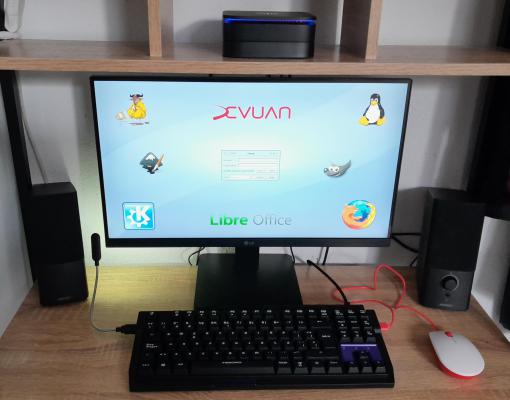
I keep an eye on the Edifier R1280T active speakers for future upgrades.
#13 Re: Hardware & System Configuration » Concurrent filecopy over USB / onto NAS » 2025-11-05 10:44:30
Much as I rate rsync, most of the time I actually use midnight commander
Agreed.
In my use cases:
Small files around same partition: cp or dolphin.
Remote backup: rsync
Large files or multiple files, different partitions: midnight commander
#14 Re: Forum Feedback » FluxBB » 2025-10-19 08:31:40
I'm glad to see that the new version of this forum still works in my daily driver browser, Firefox 51 (on Debian 7). Not many websites work in that old browser
#15 Re: Off-topic » When installing a system, do you manually partition first? » 2025-10-07 08:44:03
For me, it depends on the previous status of the target drive. If it is empty, like in a brand new one, I start the installer in expert mode and do a manual partitioning. But if the drive already have same content (for instance, an undesired operating system), I start a live system and use gparted to wipe out previous partitioning and maybe I do the desired one. In either case, sometimes a manual tweak could be necessary.
#16 Re: Hardware & System Configuration » [SOLVED] Encrypt USB? » 2025-09-30 07:11:34
Another possibility: compress all the content in a zip file protected with password and copy that file to the USB. I did not test it myself.
#17 Re: DIY » ScrotShot, simple GUI frontend for scrot » 2025-07-13 07:59:46
Actually option #3 does that too
Excellent!
#18 Re: DIY » ScrotShot, simple GUI frontend for scrot » 2025-07-12 10:17:49
I would miss a forth option that I use very often (with the default KDE app): 4. Select window using the mouse.
#19 Re: Other Issues » [SOLVED] Could not write to external drives after update » 2025-06-22 17:30:05
computer science isn't an exact science. :lol
I see your smile, but can't stop myself:
It is, but we rely on damn hardware :lol
#20 Re: Other Issues » [SOLVED] Could not write to external drives after update » 2025-06-22 08:14:18
Check the logs looking for something unusual. I came across a similar puzzling problem years ago to find that a damaged file system was put read only automatically when an error in it was detected. So, the culprit was the USB drive, not the system.
#21 Re: Desktop and Multimedia » Error in an effort to run an X client in a remote X Display. » 2025-06-10 09:51:18
How will i restart the X server in xdm or another display manager?
Restarting the display manager restarts the X server. With SysV, service YOUR_DM restart. As I said, just logging out and in does not read the new configuration values. So, the procedure shoud be: log out, restart DM, log in again.
For the moment i try using network transparency without using ssh.
Understood. It will be very educational. I hope the best to you . By the way, I felt in love with the old X system when I succeded doing what you are trying now. Back then (circa 1998) I didn't know the very existence of ssh.
#22 Re: Desktop and Multimedia » Error in an effort to run an X client in a remote X Display. » 2025-06-09 15:00:41
Logging out from XDM and llogginh again in didnt work.
It makes sense: the X server is not restarted.
Changing -nolisten to -listen it'll be effective after restarting the whole system.
No need to: just restart the X server.
Did you try to ssh -X into your remote box?
#23 Re: Desktop and Multimedia » What is the procedure for sound out of alsa without pulseaudio? » 2025-06-03 12:00:24
Preliminary strace suggests it needs a "mixer" PCM
I had this problem trying to use HDMI sound output, but when I selected analogic output (the one asked for by OP), it worked.
#24 Re: Desktop and Multimedia » What is the procedure for sound out of alsa without pulseaudio? » 2025-06-03 09:15:28
I use mocp in my only-ALSA Daedalus box; it should work regardless of DE. Have you instaled alsa-utils?
@ralph.ronnquist: mocp belongs to the moc package.
#25 Re: Other Issues » [SOLVED] certbot renewal cron script » 2025-04-22 06:58:16
Your cron entry misses the user field. I made the same error in my cron entry tailor-made for acme.sh
May be you'd need the full path of certbot, you just check it out, because I'm not sure.
Board footer
