
You are not logged in.
- Topics: Active | Unanswered
#1 Re: Devuan Derivatives » [MiyoLinux] New Releases Uploaded » 2026-03-14 15:25:49
Miyo is the most brilliant and prolific re-spinner i've ever seen in my own 17 year history of re-spinning
Yeah, I have to agree (with you being a close second). I really miss using his spins. If I wasn't already on version 6 I'd try his newest one out.
#2 Re: Devuan Derivatives » [MiyoLinux] New Releases Uploaded » 2026-03-14 12:08:27
I just happened to be on Miyo's Sourceforge page and there was some activity today. He uploaded a version for a friend, he said. (It's bios only, no UEFI; there's also some other qualifiers.) It's good to see some activity from him.
Anyway, the reason I was poking around there was because due to a huge mistake I made yesterday, I lost the miyo startup sound I had saved and was looking to see if he had it as a separate file. I couldn't find one and really don't want to download a whole .iso file for it. Can anyone help?
EDIT
Nevermind about the startup sound. Dan was good to post a link to it in this thread way back in post #481.
#3 Re: Installation » Post installation annoyances » 2026-03-06 11:24:14
KDE is a much better choice. No mutter, no GTK. No glitches with kwin compositor (chose x11, not wyaland!).
Isn't KDE going Wayland only?
#4 Re: Other Issues » Does Mate 1.28 use X11 or Wayland by default? » 2026-02-20 13:59:32
I'm not using Mate 1.28 on Freia. I'm on Mate 1.26 Excalibur. That's the reason I'm asking. I'd like to know before installing Freia with Mate 1.28. (Also I use Slim, not lightdm.)
#5 Re: Other Issues » Does Mate 1.28 use X11 or Wayland by default? » 2026-02-20 13:25:12
Thanks for pointing out my ignorance on this issue. So does Mate 1.28 use Wayland or x11? A quick search seems to point to x11.
[Edited subject line to make sense.]
#6 Other Issues » Does Mate 1.28 use X11 or Wayland by default? » 2026-02-20 13:12:21
- Ron
- Replies: 6
It is my understanding that Debian testing uses Wayland. Is Devuan testing (Freia) also using Wayland, or is it sticking with x11?
#7 Re: Documentation » [HowTo] Excalibur + MATE/Xfce: Remove the suspend/hibernate buttons » 2026-02-14 11:45:02
I finally got around to trying this out (Mate). Works perfectly! Thanks.
#8 Re: Documentation » [HowTo] Excalibur + MATE/Xfce: Remove the suspend/hibernate buttons » 2026-02-02 09:40:40
Thanks for this. I'm going to try it out this weekend (I'm swamped at work this week).
#9 Re: Off-topic » I saw some opinions in a locked thread » 2026-02-02 09:35:07
and we have droves of right wing nuts,
And left-wing nuts. Or don't they count?
This thread needs locked before it gets any worse.
#10 Re: Desktop and Multimedia » [SOLVED] having issues installing vivaldi browser in excalibur » 2026-01-03 21:26:30
I don't have a horse in this race, I use Chromium from the repos, and Pale Moon. As far as Brave goes, I've read some bad stuff about it as well.
#11 Re: Desktop and Multimedia » [SOLVED] having issues installing vivaldi browser in excalibur » 2026-01-03 20:13:01
As for Vivaldi, their website claims that after installing the the .deb package "our Linux update repositories will be configured automatically for you to receive updates".
Personally I doubt this "Users are stupid so we don't give technical details, just click button and we'll handle everything" corpo-speak bullshit, but I'm not about to install the thing to find out.
I can vouch for this when I used Vivaldi a while ago. After installing it, it was showing in Synaptic and updates came through it (Synaptic / apt). It has been a while since I've used it, I'm not quite sure of all the negative feelings being said about it here. What's wrong with it? It's no worse than Chrome, is it? Of course that's not saying much anyway. 
#12 Re: Desktop and Multimedia » [SOLVED] having issues installing vivaldi browser in excalibur » 2025-12-29 12:00:32
I have run Vilvaldi on Devuan, but it's been a while now, so I don't know if anything has changed. You are trying it from the .deb file, right?
For Basilisk, you don't need to "install" it. Just download the correct one, extract the folder somewhere, and run the file "basilisk" from inside the "basilisk" folder. I use Pale Moon and do it the same way. I extract the folder to the Templates folder and created a shortcut on the panel for it /home/ron/Templates/palemoon/palemoon. Just replace palemoon with basilisk.
#13 Off-topic » Is AI going to become a Frankenstein monster? » 2025-12-25 18:40:31
- Ron
- Replies: 30
An article about AI refusing commands to shut down:
#14 Re: Other Issues » [SOLVED] Synaptic problem, or what? » 2025-12-21 22:42:46
I can confirm that installing synaptic_0.91.7+nmu1_amd64.deb fixes the screenshot issue.
#15 Re: Other Issues » [SOLVED] Synaptic problem, or what? » 2025-12-21 15:42:53
I use it and so does everybody else who posted about it elsewhere. I don't consider it exotic.
#16 Re: Other Issues » [SOLVED] Synaptic problem, or what? » 2025-12-21 15:23:06
What I don't understand is Debian broke it by deciding to serve images from their website over https . . . why didn't they at the same time fix synaptic to receive them over https?
#17 Re: Other Issues » [SOLVED] Synaptic problem, or what? » 2025-12-21 14:45:51
When I do that it wants to install 115 packages . . . I'm guessing that's the same 115 packages from earlier. How did it get screwed up like this?
#18 Re: Other Issues » [SOLVED] Synaptic problem, or what? » 2025-12-21 14:31:42
I guess I'm seeing a reinstall in my immediate future.
#19 Re: Other Issues » [SOLVED] Synaptic problem, or what? » 2025-12-21 14:10:09
Now Synaptic won't start at all. I didn't do anything but run the commands. What do I do now?
#20 Re: Other Issues » [SOLVED] Synaptic problem, or what? » 2025-12-21 14:07:10
Okay, I see. Here's the correct info:
(Reading database ... 200414 files and directories currently installed.)
Preparing to unpack .../synaptic_0.91.7+nmu1_amd64.deb ...
Unpacking synaptic (0.91.7+nmu1) over (0.91.7) ...
dpkg: dependency problems prevent configuration of synaptic:
 synaptic depends on libxapian30 (>= 1.4.28~); however:
  Package libxapian30 is not installed.

dpkg: error processing package synaptic (--install):
 dependency problems - leaving unconfigured
Processing triggers for mailcap (3.74) ...
Processing triggers for desktop-file-utils (0.28-1) ...
Processing triggers for mate-menus (1.26.1-1) ...
Processing triggers for hicolor-icon-theme (0.18-2) ...
Processing triggers for man-db (2.13.1-1) ...
Errors were encountered while processing:
synaptic#21 Re: Other Issues » [SOLVED] Synaptic problem, or what? » 2025-12-21 14:03:24
We cross-posted. I edited it in in my post above yours.
#22 Re: Other Issues » [SOLVED] Synaptic problem, or what? » 2025-12-21 13:46:54
You're right, it wasn't installed. Anyway, here is a screenshot showing that it is saying it will install 115 more packages (trying to upgrade from the .deb file).
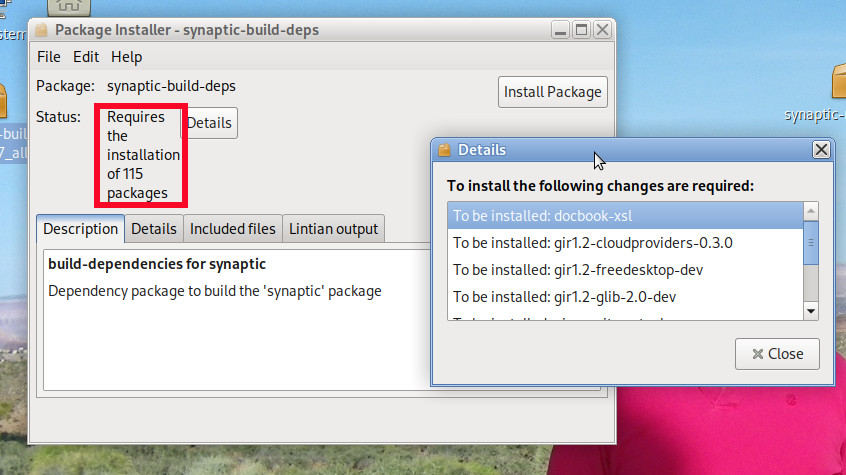
And here's the output of sudo dpkg -i /home/ ... /synaptic-build-deps_0.91.7_all.deb
Selecting previously unselected package synaptic-build-deps.
(Reading database ... 200410 files and directories currently installed.)
Preparing to unpack .../synaptic-build-deps_0.91.7_all.deb ...
Unpacking synaptic-build-deps (0.91.7) ...
dpkg: dependency problems prevent configuration of synaptic-build-deps:
 synaptic-build-deps depends on libapt-pkg-dev; however:
  Package libapt-pkg-dev is not installed.
 synaptic-build-deps depends on libgtk-3-dev; however:
  Package libgtk-3-dev is not installed.
 synaptic-build-deps depends on libvte-2.91-dev; however:
  Package libvte-2.91-dev is not installed.
 synaptic-build-deps depends on intltool; however:
  Package intltool is not installed.
 synaptic-build-deps depends on xmlto; however:
  Package xmlto is not installed.
 synaptic-build-deps depends on libsm-dev; however:
  Package libsm-dev is not installed.
 synaptic-build-deps depends on sharutils; however:
  Package sharutils is not installed.
 synaptic-build-deps depends on libxapian-dev; however:
  Package libxapian-dev is not installed.

dpkg: error processing package synaptic-build-deps (--install):
 dependency problems - leaving unconfigured
Errors were encountered while processing:
synaptic-build-deps#23 Re: Other Issues » [SOLVED] Synaptic problem, or what? » 2025-12-21 01:13:51
I doubt the package you got is built for Debian 13/Devuan 6
Well, this is where I got it from (note the ending of the address):
https://download.opensuse.org/repositor … Debian_13/
So if it's wrong, then it's PeterBBB's mistake, not mine. But anyway, now trying it from the terminal, right off the bat, first command, I get this:
$ git clone https://github.com/mvo5/synaptic.git
bash: git: command not found#24 Re: Other Issues » [SOLVED] Synaptic problem, or what? » 2025-12-20 20:51:07
Yes follow the instructions on that page to build it on your system
I tried building something from source once, and the resultant app caused an unstable system requiring a reinstall, so I'm hesitant to try building from source again. If I do, just run these 3 commands in terminal?
git clone https://github.com/mvo5/synaptic.git
cd synaptic
debuildAre you sure you got the right version? For Debian 13?
Yes.
#25 Re: Other Issues » [SOLVED] Synaptic problem, or what? » 2025-12-20 16:04:58
So when I double click the deb file I get a message saying it requires the installation of 115 additional packages. That's turning me off of installing it. Is there a way to install it without those 115 extra things? I mean, I already have a version installed . . . why would a simple update need an additional 115 packages when the current version doesn't?
Board footer
