
You are not logged in.
- Topics: Active | Unanswered
#2101 Re: Installation » I can not install the new Devuan(2) » 2018-06-27 12:30:47
Start the installer and select Help or else read /usr/share/doc/refractainstaller-base/readme.refractainstaller.txt (same thing).
#2102 Re: Hardware & System Configuration » Enable Backports - Newbie Question » 2018-06-21 11:47:33
cynwulf wrote:To my knowledge backports ... does/did not, by default, allow automatic upgrades anyway.
Exactly. This is how it was and how it is right now. I just remember a brief timespan where adding backports actually resulted in apt wanting to upgrade my whole system to backports versions if available and i had to use pinning to keep it in check. Not sure if it was something i broke though. At some point it just worked again like we are all used to.
No, it wasn't something you broke. Early on, auto.mirror had the wrong priority on backports, and it got fixed. Then pkgmaster had the wrong priority on backports, and that got fixed. I keep it pinned, just in case.
/etc/apt/preferences.d/releases
Package: *
Pin: release a=ascii-backports
Pin-Priority: 100#2103 Re: Devuan » Devuan ASCII reviewed on DistroWatch Weekly » 2018-06-20 11:17:39
A few comments on this:
On the desktop are icons for opening the file manager, reading the distribution's release notes, launching the installer and changing the desktop font sizes. [...] Unfortunately, the text labels under the desktop icons do not handle being resized well. When we first start using Devuan, the text under the icons reads "Small", "Large" and "_Release Notes". Increasing the size one notch makes the text read "SM", "LA" and "_RE".
Can this be confirmed by anyone?
Yes, if you click on the desktop icon to increase the font size, the font size is increased and no longer fits in the allotted space for the unhighlighted desktop icons. Same as if the icons name is too long to fit in that space. When you click on the icon to hightlight it, that one icon is given more space so that the full name shows. This is true with large font the same as with a long file name.
Devuan supports working with just the ext2/3/4 file systems.
Refractainstaller will automatically format the selected partitions to your choice of ext2/3/4 unless you tell it not to. Other filesystem formats are possible by pre-formatting your partitions and telling the installer not to format. This information is in the Help available from within the installer.
We are asked which language locales should be set up, with options being pulled from a cryptic list with entries like "en_US.UTF-8". We then select our keyboard layout from a similar set of lists.
The live installer provides the exact same debconf dialogues for locales, time zone and keyboard as the debian-installer. (same as if you run dpkg-reconfigure locales|tzdata|keyboard-configuration)
#2104 Re: Devuan Derivatives » Refracta no-dbus experiment » 2018-06-17 21:51:09
Forgot to mention that I excluded Recommends.
msi, you can add firefox-esr to the list. And maybe audacity under its own category - audio editing
FWIW: Some previous versions of Refracta (the regular one, with xfce) had deadbeef. At some point, we switched to audacious because it was in the repo.
#2105 Re: Forum Feedback » Much ado about nothing » 2018-06-17 21:24:20
Perhaps public requests in Forum Feedback would be a better option to suggest a need for administrative action.
There's already a Report button at the bottom of each post, but it looks like it hardly ever gets used. 90% of the reports are for spam, and we don't even get those anymore. (Thanks, Ralph!) Maybe we just need to point out that button's existence in the top post. Or maybe we don't - this is a pretty calm board, even when it heats up.
#2106 Re: Installation » Installation attempt does not seem to see partitions » 2018-06-17 20:59:09
Glad you got it working. For future reference -
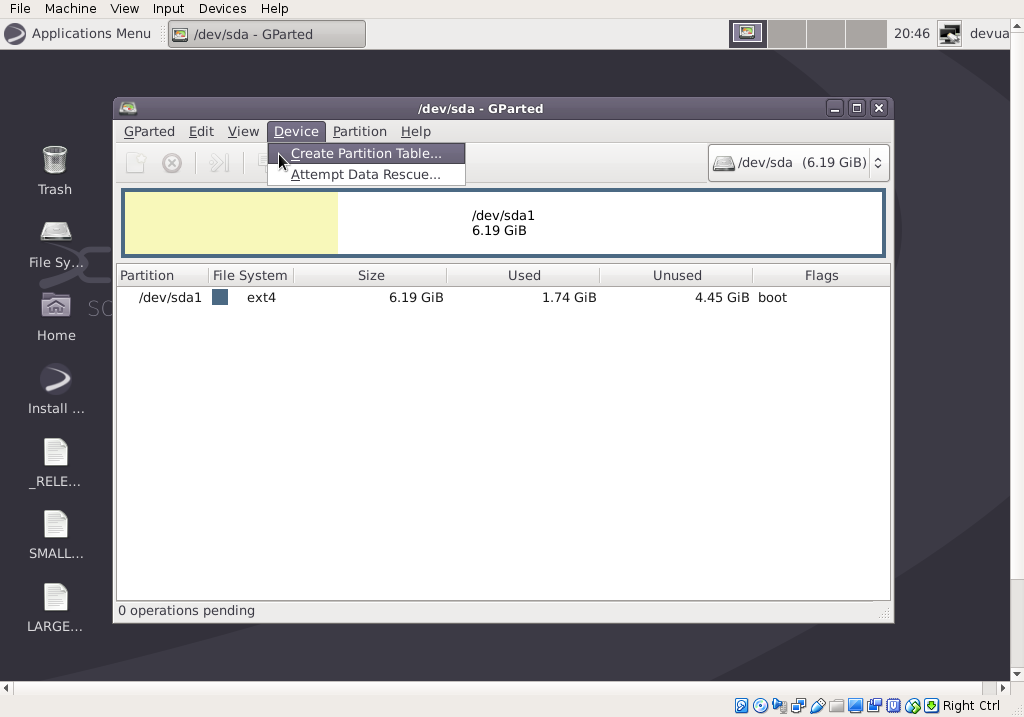
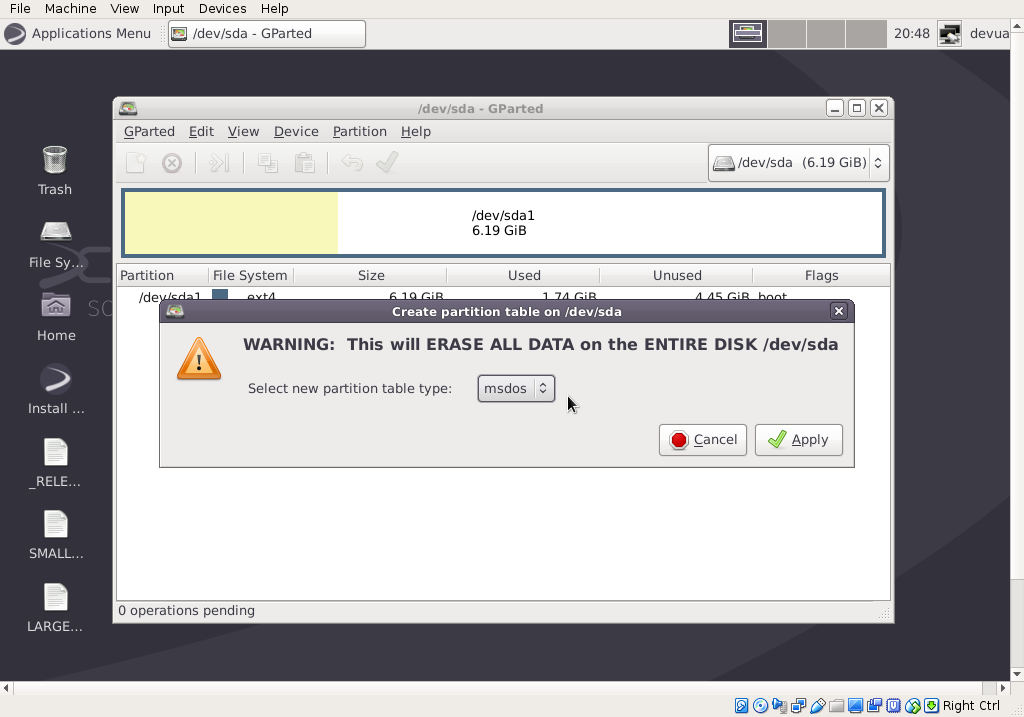
In gparted, go to Device --> Create partition table
and then where it says 'mdos' is a drop-down menu with partition table types.
#2107 Re: Installation » Installation attempt does not seem to see partitions » 2018-06-17 18:26:28
The installer in the live isos does not do any automatic partitioning. After you close gparted, you should get questions about where to put the OS, and if you made separate partitions for /home or /boot, you get to select those, too.
Some lenovos won't let you use legacy boot. I don't know the details on that.
If you're booting in uefi mode, you will need to re-partition your drive.
In gparted, first go to the Device menu and write a new gpt partition table. You must have left it set for msdos.
At minimum, you will need a partition for the OS and an efi partition (with esp and boot flags). The swap partition is optional - the installer will create a swapfile if there's no swap partition.
If you want to use a gpt-partitioned disk with legacy boot, you need to create a special partition for that. It must be >1MB and unformatted. (It's at the bottom of the list of filesystem types in gparted). And it must have the bios_grub flag.
#2108 Re: Forum Feedback » Much ado about nothing » 2018-06-17 00:06:42
Correct me if I'm wrong, but this is just an ignore filter with a public record of who is being ignored (but not a public record of who is doing the ignoring.)
Did I get it right? Or does the ignored get to find out who is doing the ignoring? I know if I got ignored, I'd like to know who is ignoring me, so that I could decide whether I care or not.
#2109 Re: Devuan Derivatives » Refracta no-dbus experiment » 2018-06-16 12:18:30
No systemd-shim. The only package with systemd in its name is libsystemd0, and that was needed for xorg.
There's a full package list in the root of the iso.
#2110 Re: Desktop and Multimedia » How to install KDE using apt-get ? » 2018-06-16 12:13:38
There are several metapackages for installing kde. Some pull in more packages than others. To see what you would get with each, run apt-cache depends kde-full and do the same for
kde-plasma-desktop
plasma-desktop
kde-standard
task-kde-desktop
kde-baseapps
#2111 Devuan Derivatives » Refracta no-dbus experiment » 2018-06-15 20:51:34
- fsmithred
- Replies: 37
Refracta no-dbus build (experiment)
The subject of running without dbus comes up from time to time in various places. I decided to try it and see how far I could get. I started with a debootstrap install of devuan ascii, pinned dbus to a priority of -1, and proceeded to make the same changes as I do to make Refracta live isos. Normally, the Refracta isos use xfce, but that's not possible without dbus.
I was surprised to see how much did install without dbus. So I thought I'd share it. This build uses openbox, lxpanel, lxterminal and spacefm.
Maybe someone will want to use it. Maybe it will inspire someone else to do something better. Feeback is welcome.
http://distro.ibiblio.org/refracta/file … 2_0156.iso
sha256sum:
633634c3ac2beb06252b29bc78b3135f5f5ded473a72f42e5dc6c17d326d1f17
Login/Password:
user/user
root/root
No display manager. Run 'startx' to get a desktop.
Edit: I excluded Recommends. That might make a big difference if you're trying to install packages without pulling in dbus.
echo "APT::Install-Recommends \"no\";" > /etc/apt/apt.conf.d/norecommends
# These can be installed without dbus and without libsystemd0
rsync bash-completion busybox kbd locales firmware-linux-free deborphan unzip lvm2 cryptsetup sshfs \
hwinfo alsa-utils moc pppoeconf pppconfig pppoe ntfs-3g dosfstools curl \
live-boot live-config live-boot-initramfs-tools live-config-sysvinit squashfs-tools xorriso pmount pv \
syslinux syslinux-common syslinux-utils isolinux xz-utils gdisk parted hexedit iftop smartmontools lm-sensors \
hdparm testdisk fdupes irssi iptraf ethtool scrot wipe mlocate wireless-tools wpasupplicant \ # get libdbus-1-3 here
gddrescue screen feh hddtemp p7zip-full partimage pm-utils sysv-rc-conf tree wodim htop bzip2 whois \
lsb-release file setnet net-tools cifs-utils mdadm arp-scan \
dialog live-boot-doc live-config-doc refractainstaller-base refractasnapshot-base \
btrfs-tools btrfs-progs pciutils psmisc rename tcpd usbutils uuid-runtime dnsutils \
eject telnet usbutils util-linux-locales vrms mutt sudo
# These were installed after allowing libsystemd0
xorg openbox spacefm lxterminal lxpanel obconf lxappearance lxappearance-obconf lxrandr \
linux-headers-4.9.0-6-amd64 build-essential xserver-xorg-legacy xserver-xephyr xterm aptitude \
icewm xarchiver leafpad links2 xpdf mpv yad ***grub-of-your-choice***
x11vnc xtightvncviewer grsync bleachbit meld asunder winff \
mplayer ffmpeg volumeicon-alsa tilda geeqie dkms transmission-gtk gftp \
xserver-xorg-video-intel xscreensaver xinput libnotify-bin hexchat \
abiword hardinfo gdmap gimp geany firejail firefox-esr
deadbeef http://sourceforge.net/projects/deadbee … b/download
firemenu https://sourceforge.net/projects/refrac … nu-1.2.deb
refracta2usb https://sourceforge.net/projects/refrac … -2.3.6.deb
These will NOT install. (and probably a lot more that I didn't try.)
audacious xfburn wicd connman libpam-elogind synaptic gdebi
#2112 Re: Installation » extlinux install from Devuan ASCII installer shell. » 2018-06-15 15:07:52
Sorry I don't have anything useful to add. When I get a chance, I'll try extlinux with a multi-boot system and let you know what I find.
#2113 Re: Installation » fsmithred - observation on Refracta - EFI frame buffer » 2018-06-15 15:01:37
I'm surprised the live installer didn't display the nvme disk/partitions. That's been in there since 9.2.1. Support for uefi in the cli installer was added in 9.3-something. Currently, 9.4.2 is in ascii. If you use that version (graphical) and it doesn't show the nvme, please let me see the error log. (if you start it from terminal instead of from the apps menu, please add the -d option for a debug log.)
The efi partition selection window should work correctly in the latest versions. There's still the problem of knowing which disk is first. If the bios/uefi provides a boot device menu (F12 or other key may do it) you can see which disk the motherboard wants to use, and you probably have to use that one.
For uefi, you must use gpt partitioning.
Refracta Installer will let you have separate partitions for other directories. In the graphical installer, it's in the Options menu, and for the cli installer, there's an option in the config file. It's a bit of a hack - the system gets installed first, and then those directories get copied to the additional partitions, and the originals get deleted. If you're installing an encrypted system, don't use this feature. The additional partitions won't be encrypted.
3.16 kernel is in jessie. Ascii has 4.9. Which iso are you using?
Here's an updated iso with ascii-backports 4.16 kernel and new refractainstaller -
http://distro.ibiblio.org/refracta/file … 5_1409.iso
#2114 Re: Installation » extlinux install from Devuan ASCII installer shell. » 2018-06-13 23:23:12
If it's already dual boot and you're adding another OS, couldn't you just make a new entry in the existing boot menu?
You could let it install grub and then switch to extlinux. When I did that, it was easy. I didn't set it up for multiple systems, but I do use syslinux on multiboot live-usb frequently, but those are all on the same partition. I'm not sure what happens when you want to boot from different partitions.
At the slim login screen, press F1 to toggle different window managers.
#2115 Re: Installation » extlinux install from Devuan ASCII installer shell. » 2018-06-13 12:30:14
Here are my notes on installing extlinux (after installation of the system)
To do it from within the installer, alt-F2 to get to a console.
chroot /targetThen you should be able to install extlinux.
Note: you must choose one of the expert installs to prevent grub from being installed.
#2116 Re: Installation » fsmithred - observation on Refracta - EFI frame buffer » 2018-06-11 22:53:15
Re-reading this thread...
But my BIOS/UEFI only seems to recognize it as a legacy device, not as a UEFI device.
If the motherboard is set to uefi, it will look for bootloaders on the efi partition, which must be fat32 with esp and boot flags. If you use the version of refractainstaller currently in ascii, it will complain if there's no proper efi partition, and if there's more than one, it will give you a choice of which one to use. (Which may or may not be the one your motherboard chooses to use.)
Are you using one of the isos I made with the ascii-backports kernel? (I think it was 4.12 or 4.13.) Ryzen needs newer kernels than the stock ascii kernel.
If it turns out that your hardware won't let you boot from the nvme disk, you could probably just move the /boot dir to its own partition on a sata drive. Or maybe it only wants the efi partition on a different drive. (Just making guesses here.)
And if you're using gpt partitioning with legacy boot, you need to make a special partition, >1MB unformatted, with bios_grub flag (in gparted) or ef02 (in gdisk), otherwise grub-install will fail.
#2117 Re: Installation » fsmithred - observation on Refracta - EFI frame buffer » 2018-06-11 11:33:06
How much analyzing does the UEFI do, to determine what boot devices are present?
Ha! This question presumes some consistency from one uefi implementation to the next. On mine, F12 brings up a boot device menu with HDD, USB, Optical and Network. The USB line shows the thumb drives that are uefi-ready, but is empty when I try one that only boots with bios. This is a laptop, so there's only one internal drive.
Running efibootmgr shows all the bootloaders on the efi partition. There's one for each installed system (except for where I didn't let the installer add a bootloader) and those don't get deleted if I remove an installed system (by wiping a partition, for instance.) Whichever was installed last is first in the boot order.
Can you change the order of the hard drives if you go into the computer setup?
Have you previously booted any linux from this nvme drive on this computer?
#2118 Re: Installation » fsmithred - observation on Refracta - EFI frame buffer » 2018-06-10 20:23:08
init 1 then ctrl-d might take the place of a reboot.
If you have too many deer, you should invite some to dinner. (Assuming you have a big freezer.)
#2119 Re: Other Issues » /usr/bin/x11 symlink to /usr/bin/X11? » 2018-06-10 11:03:43
I don't know the answer, but I've seen similar recursive symlinks in various locations and various distributions over the years.
#2120 Re: Installation » fsmithred - observation on Refracta - EFI frame buffer » 2018-06-10 10:54:16
At the grub boot menu, press e to edit. Add a line before the linux line with the desired resolution. On my laptop, I have to use:
set gfxpayload=1366x768Then ctrl-x to boot.
If you want it to be permanent, plug the live-usb into a running system and edit boot/grub/grub.cfg to add the resolution. You could use the above line in selected menuentries, or you could set it for all of them as I do in the example below. All the individual menuentries (not shown) have "set gfxpayload=keep".
if loadfont $prefix/font.pf2 ; then
  set gfxmode=1366x768
  insmod efi_gop
  insmod efi_uga
  insmod video_bochs
  insmod video_cirrus
  insmod gfxterm
  insmod jpeg
  insmod png
  terminal_output gfxterm
fi

background_image /boot/grub/splash.png
set menu_color_normal=light-gray/black
set menu_color_highlight=white/black
set timeout=15
<snip>
If you boot with the right resolution, and the graphical refractainstaller still has buttons off-screen, it may be a gtk2/gtk3 problem. Let me know if that's the case. (I've only seen that with refractasnapshot.) One way around that is to use the cli refractainstaller. The other way is to use yad compiled for gtk2 - http://distro.ibiblio.org/refracta/file … _packages/
#2121 Re: Hardware & System Configuration » Problems going into another operative system. [solved] » 2018-06-08 13:46:35
just for clarification: i did't nothing at MXLinux that line was added in Devuan.
Good. Just so you know what that line does...
/dev/sda3 / auto defaults,noatime 1 1
That says to mount sda3 (your MXLinux partition) at the root of the filesystem. Which means you would be running mx, not devuan.
Whereas, this line:
/dev/sda3 /mnt auto defaults,noatime 1 1
mounts the mx partition at /mnt, where it is available, but is not the system that's running at that time.
Changing '/dev/whatever' to 'UUID=' or 'LABEL=' is just a different way of identifying the partition. Sometimes it's necessary to do that. (e.g. multiple disks in the computer)
#2122 Re: Hardware & System Configuration » Problems going into another operative system. [solved] » 2018-06-05 19:01:09
DO NOT CHANGE ANYTHING IN MXLINUX!
We gave you several easy ways to be able to access mxlinux file from devuan. If you want it to work in devuan the same as it works in mxlinux, we need more information. (And it will probably be more complicated.)
What desktop environment, display manager and file manager does mxlinux use?
What desktop environment, display manager and file manager is installed in devuan?
#2123 Re: Hardware & System Configuration » Problems going into another operative system. [solved] » 2018-06-05 16:08:58
It is displayed on this line of your output:
/dev/sda3 95G 7.6G 83G 9% /mntThe partition that holds MXLinux is mounted at /mnt. The files in your MX home are under /mnt/home/ and are available to you in Devuan. Is this not what you want?
#2124 Re: Hardware & System Configuration » Problems going into another operative system. [solved] » 2018-06-05 14:26:38
O'k, step by step, you need to know first what is there after:
root@kaos:/home/keos# ls /mnt
bin   build  etc   lib	  lost+found  mnt  proc  run   sys  usr
boot  dev    home  lib64  media       opt  root  sbin  tmp  var
root@kaos:/home/keos#
That looks correct. You can confirm that it's mxlinux by looking in /mnt/home/keos and recognizing files in your mx home. Or look at other files under /mnt that you can identify as mx files, or run 'mount' or 'df -h' to show that the right partitions are mounted in the right place.
Any way i tried this, but without any result:
UUID=6e55911a-2620-4ab6-b2b5-1458602e6252       /       ext4    defaults,noatime        0       1
UUID=0b4a75ba-8b74-47b1-8aaa-2d971f92732f       swap    swap    defaults        0       0
LABEL=MXLinux    /mnt    auto defaults,noatime     0     0
What does "without any result" mean? Again, what's the output of df -h?
#2125 Re: Hardware & System Configuration » Problems going into another operative system. [solved] » 2018-06-05 13:07:26
But now mxlinux do not even appear at the graphic ...
It won't show up on the desktop when it is mounted. Try 'ls /mnt' to see that it's there.
I”m not sure about what you said after run blkid:
root@kaos:/home/keos#  blkid
/dev/sda1: UUID="6e55911a-2620-4ab6-b2b5-1458602e6252" TYPE="ext4" PARTUUID="000f1103-01"
/dev/sda2: UUID="0b4a75ba-8b74-47b1-8aaa-2d971f92732f" TYPE="swap" PARTUUID="000f1103-02"
/dev/sda3: LABEL="MXLinux" UUID="66f3f330-78b2-4767-bc3e-8a9e7750e476" TYPE="ext4" PARTUUID="000f1103-03"
root@kaos:/home/keos#
Do you means that i have to go into mxlinux and change what i have over there:
No. I mean you can edit devuan's fstab to use the uuid instead of /dev/sda3. If you only have one hard drive in the computer, you probably don't need to do this. (The order of hard drives can't change if there is only one.) You don't need to change anything in MX.
devuan's fstab: (be sure to remove the quotes around the uuid number)
UUID=6e55911a-2620-4ab6-b2b5-1458602e6252       /       ext4    defaults,noatime        0       1
UUID=0b4a75ba-8b74-47b1-8aaa-2d971f92732f       swap    swap    defaults        0       0
UUID=66f3f330-78b2-4767-bc3e-8a9e7750e476    /mnt    auto defaults,noatime     0     0
Since you have a label on the MX partition, you could do this instead:
UUID=6e55911a-2620-4ab6-b2b5-1458602e6252       /       ext4    defaults,noatime        0       1
UUID=0b4a75ba-8b74-47b1-8aaa-2d971f92732f       swap    swap    defaults        0       0
LABEL=MXLinux /mnt auto defaults,noatime 0 0Board footer
