
You are not logged in.
- Topics: Active | Unanswered
#176 Re: Hardware & System Configuration » CONMANN instead of WICD, any users experience? » 2020-09-14 18:54:11
Thank you guys, these were amazing ultra detailed info... WOW!
#177 Hardware & System Configuration » CONMANN instead of WICD, any users experience? » 2020-09-14 17:12:58
- Danielsan
- Replies: 8
I have never used conmann, and I learned about it recently while I was testing Artix Linux, but I never liked also WICD, I always found it quite unreliable that usually I uninstall it. I would like to try conmann and I would like to know if any of you have some experience to share with all of us!
Thanks,
Danielsan
#178 Hardware & System Configuration » [SOLVED] Bluetooth not working » 2020-09-14 17:07:22
- Danielsan
- Replies: 4
Hi folks,
I just noticed that wireless connections, wifi and bluetooth, don't work. The wifi was fixed just reinstalling the iwlwifi-firmware package but the bluetooth is still not working and I don't understand why... Bluetooth works always fine with this laptop with Debian Testing and POP!_os as well, hence I am quite surprised.
Here some logs:
dmesg | grep iwl
[   13.601382] iwlwifi 0000:04:00.0: enabling device (0000 -> 0002)
[   13.630348] iwlwifi 0000:04:00.0: firmware: direct-loading firmware iwlwifi-8000C-36.ucode
[   13.630358] iwlwifi 0000:04:00.0: Found debug destination: EXTERNAL_DRAM
[   13.630359] iwlwifi 0000:04:00.0: Found debug configuration: 0
[   13.630665] iwlwifi 0000:04:00.0: loaded firmware version 36.79ff3ccf.0 8000C-36.ucode op_mode iwlmvm
[   13.630676] iwlwifi 0000:04:00.0: firmware: failed to load iwl-debug-yoyo.bin (-2)
[   13.630738] iwlwifi 0000:04:00.0: Direct firmware load for iwl-debug-yoyo.bin failed with error -2
[   13.764989] iwlwifi 0000:04:00.0: Detected Intel(R) Dual Band Wireless AC 8260, REV=0x208
[   13.772259] iwlwifi 0000:04:00.0: Applying debug destination EXTERNAL_DRAM
[   13.772378] iwlwifi 0000:04:00.0: Allocated 0x00400000 bytes for firmware monitor.
[   13.848856] iwlwifi 0000:04:00.0: base HW address: a4:34:d9:64:f8:ca
[   13.922880] ieee80211 phy0: Selected rate control algorithm 'iwl-mvm-rs'
[   19.537161] iwlwifi 0000:04:00.0: Applying debug destination EXTERNAL_DRAM
[   19.773408] iwlwifi 0000:04:00.0: Applying debug destination EXTERNAL_DRAM
[   19.861057] iwlwifi 0000:04:00.0: FW already configured (0) - re-configuring
sudo dmesg | grep hci0
[ 23.633828] Bluetooth: hci0: Bootloader revision 0.0 build 2 week 52 2014
[ 23.638840] Bluetooth: hci0: Device revision is 5
[ 23.638841] Bluetooth: hci0: Secure boot is enabled
[ 23.638841] Bluetooth: hci0: OTP lock is enabled
[ 23.638842] Bluetooth: hci0: API lock is enabled
[ 23.638842] Bluetooth: hci0: Debug lock is disabled
[ 23.638843] Bluetooth: hci0: Minimum firmware build 1 week 10 2014
[ 23.640553] bluetooth hci0: firmware: direct-loading firmware intel/ibt-11-5.sfi
[ 23.640555] Bluetooth: hci0: Found device firmware: intel/ibt-11-5.sfi
[ 23.671732] Bluetooth: hci0: Failed to send firmware data (-38)
[ 23.671799] Bluetooth: hci0: Intel reset sent to retry FW download
[ 88.771269] Bluetooth: hci0: command 0xfc05 tx timeout
[ 88.771271] Bluetooth: hci0: Reading Intel version information failed (-110)
[ 88.771273] Bluetooth: hci0: Intel Read version failed (-110)
[ 88.771345] Bluetooth: hci0: Intel reset sent to retry FW downloadRFKILL sees the the hardware:
sudo rfkill
ID TYPE      DEVICE      SOFT      HARD
 0 bluetooth hci0   unblocked unblocked
 1 wlan      phy0   unblocked unblocked
But HCITOOL does not:
hcitool dev
Devices:

hcitool scan
Device is not available: No such device
The Gentoo wiki suggests this but it didn't work:
sudo hciconfig hci0 up
Can't init device hci0: Connection timed out (110)
I have not clues.... 
#179 Devuan » Devuan and bug reporting » 2020-09-09 16:58:06
- Danielsan
- Replies: 1
Hi Folks,
my debugging abilities are very limited but I am, at least, able to move across terminal outputs and logs and catch some bug/warning/issue.
For instance I think I found some issue related with OpenRc and BTRFS in that case where should I report that bug to Devuan or to Debian? How can I understand/know when a bug is specific for Devuan and when it is not?
Thanks,
D.
#180 Re: Desktop and Multimedia » Choosing an email client » 2020-09-08 13:37:34
I have been using Thunderbird on every platforms since ever, and in my experience it is the only one able to handle responsively a huge database; the other fails (including Outlook every version) no matter what. Evolution, Geary, Claws get stuck at a certain point. Evolution also requires a lot Gnome's components running in background I would recommend it only for Gnome users.
The extensions are a plus, I need just six for my setup. I think Thunderbird is a reliable and professional tools, he can be used also in a enterprise environment and surely I suggest it for small and medium business.
#181 Re: Hardware & System Configuration » [SOLVED] Learning to use Devuan logs (Nvidia-persistenced) » 2020-09-05 03:43:30
These might be on some help:
https://dev1galaxy.org/viewtopic.php?pid=20903#p20903
- my fixed version of /etc/init.d/nvidia-persistenced.
and
https://dev1galaxy.org/viewtopic.php?pid=20917#p20917
- which explains that you can probably also get away with simply removing or disabling nvidia-persistenced as for most use cases it's not needed unless you want to use CUDA.
Oh thanks!
Actually I want use CUDA for Blender...
EDIT
Oh boy you are a genius... I would really like being able to open a code, understand it, and eventually fix it!!!
#182 Hardware & System Configuration » [SOLVED] Learning to use Devuan logs (Nvidia-persistenced) » 2020-09-04 20:43:38
- Danielsan
- Replies: 2
Hi Folks,
I am fully Devuanized but we are few and systemd is all over the world hence trying to find a solution these days has been complicated, I have an issue with an Nvidia package (nvidia-persistenced) not fully installed, the workarounds I found involved looking at journalctl and fixing the way systemd initializes the GPU.
Should learn how check to the logs again, then beside SYSLOG, DMESG, X.org.log and propably KERN.log where have I to check for potential issues related with this package not completely installed?
Honestly I had a tons of issues more that were resolved moving from stable to testing as I have to the habit to use Debian.
Thanks,
Danielsan
#183 Re: Installation » [SOLVED] BTRFS on RAID and SUBVOLS but double entry on GRUB, why? » 2020-09-03 16:11:59
By the way I think I solved the issue leaving the second disk in a partionless state, other thing is creating /boot outside of the btrfs filesystem; I did the same on my real hardware (WOW!!!  ) and it worked.
Soon my recommendations or at least what I did... :-P
#184 Re: Devuan » As an extensive user, GIMP 2.10.x is unusable. 2.8.x is great though! » 2020-09-03 12:04:49
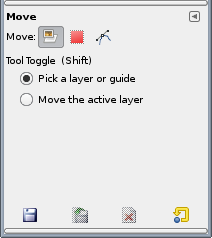
There are fundamental differences in the way GIMP 2.10 handles several important functions that I used all the time, such as moving layers or selections that are behind other layers - in 2.8 it's possible to grab/move layers/elections that are behind other layers, while in 2.10 it's not. I literally can't do my work without that functionality. There are other things that also don't work properly anymore, where "properly" is the precedent set by over a decade of they worked in GIMP.
Good for you if you like GIMP 2.10, but there's absolutely no purpose for you to say so in this thread. It's like coming to this forum to post, "Debian works for me". It adds nothing to the conversation.

This is not true...
You can decide if working on the active layer or to have the autoselect mode activated and move any layer is clicked by the mouse, this is the default behavior since 2.6
#185 Re: Installation » [SOLVED] BTRFS on RAID and SUBVOLS but double entry on GRUB, why? » 2020-08-29 06:49:55
I re-did the installation and this time the issue doesn't happen, perhaps because I did all my steps clearly and in the right sequence, and now I have Devuan on a Btrfs RAID using subvolumes as partitions:
gnuser@devuan:~$ lsb_release -a
No LSB modules are available.
Distributor ID:	Debian
Description:	Devuan GNU/Linux 3 (beowulf)
Release:	3
Codename:	beowulf

gnuser@devuan:~$ mount | grep btrfs
/dev/sdb1 on / type btrfs (rw,noatime,discard,space_cache,autodefrag,subvolid=268,subvol=/@)
/dev/sdb1 on /home type btrfs (rw,noatime,discard,space_cache,autodefrag,subvolid=270,subvol=/@home)
/dev/sda3 on /media/snapshots type btrfs (rw,relatime,space_cache,subvolid=5,subvol=/)

gnuser@devuan:~$ sudo btrfs fi df /
Data, RAID0: total=4.00GiB, used=3.64GiB
System, RAID1: total=32.00MiB, used=16.00KiB
Metadata, RAID1: total=256.00MiB, used=125.92MiB
GlobalReserve, single: total=16.00MiB, used=0.00B
gnuser@devuan:~$ sudo btrfs fi show
Label: 'btraid'  uuid: cf6cf3c5-f308-46b8-b4e8-dea7ad870436
	Total devices 2 FS bytes used 3.76GiB
	devid    1 size 16.00GiB used 2.28GiB path /dev/sdb1
	devid    2 size 16.00GiB used 2.28GiB path /dev/sdc

Label: 'snapshots'  uuid: bcbe0d7f-14c9-4ad4-86c4-27362d64ef93
	Total devices 1 FS bytes used 3.66GiB
	devid    1 size 5.59GiB used 4.51GiB path /dev/sda3

gnuser@devuan:~$ lsblk
NAME             MAJ:MIN RM  SIZE RO TYPE  MOUNTPOINT
sda                8:0    0   16G  0 disk
├─sda1             8:1    0  524M  0 part  /boot/efi
├─sda2             8:2    0  525M  0 part  /boot
├─sda3             8:3    0  5.6G  0 part  /media/snapshots
└─sda4             8:4    0  9.4G  0 part
  └─sda4_crypt   254:0    0  9.4G  0 crypt
    ├─vgcr0-swap 254:1    0  3.7G  0 lvm   [SWAP]
    └─vgcr0-enc  254:2    0  5.7G  0 lvm   /mnt/private
sdb                8:16   0   16G  0 disk
└─sdb1             8:17   0   16G  0 part  /home
sdc                8:32   0   16G  0 disk
sr0               11:0    1 1024M  0 rom
I am almost ready to install Devuan on a real hardware!!!
#186 Re: Installation » [SOLVED] BTRFS on RAID and SUBVOLS but double entry on GRUB, why? » 2020-08-28 03:51:06
It is not a challenge... But I'd like to have every steps working fine before to post something...
#187 Installation » [SOLVED] BTRFS on RAID and SUBVOLS but double entry on GRUB, why? » 2020-08-27 16:25:00
- Danielsan
- Replies: 4
Hi guys,
I am here again, I have been trying Artix and Obarun, but I think that I feel more comfortable with Debian based distro.
I won't get in the details now but after installation I was able to create BTRFS raid, create my subvolumes, and run Devuan from them. But when I update GRUB it finds a second installation of Devuan when it is actually one. You can boot from SDA1 or SDB1 and you get same environment, but it is unwanted and probably a manifestation of a wrong step somewhere.
How can I get grub recognize properly the only Devuan the lies on the RAID striped mode over two disks?
May it depend by an that version of GRUB itself?
Anyway I found another method that create BTRFS RAID and SUBs during the installation time:
https://www.paritybit.ca/blog/debian-with-btrfs
Thanks!
#188 Re: Installation » Devuan Chimaer as guest on Virtualbox: any known issues? » 2020-07-27 13:25:19
Danielsan wrote:Are there any known issues of which I am unaware?
VirtualBox is a buggy pile of shite which is slower than QEMU/KVM and the developers have a tendency of covering up and ignoring security issues.
See also https://bugs.debian.org/cgi-bin/bugrepo … bug=794466
And it relies on blobs.
I see, but the other alternative I have on Windows is hyper-v of M$ which is even worst.
#189 Re: Installation » Devuan Chimaer as guest on Virtualbox: any known issues? » 2020-07-24 20:42:49
Yes of course, I also installed the Guest Addition but no traces of vboxdrv, and vboxsf and vboxvideo exist as modules but won't load even if I put in /etc/modules/modules.conf.
On the same HOST I have also Debian testing which works perfectly with all these features available...
#190 Installation » Devuan Chimaer as guest on Virtualbox: any known issues? » 2020-07-24 18:04:19
- Danielsan
- Replies: 9
Hi guys,
I am trying to figure out if Devuan Chimaera plays nice with Virtualbox, so far I encountered some issues that Debian testing doesn't have. For example I cannot share folders from W10 host to Devuan guest while I can with Debian Testing. There are some modules missing in Devuan, I have not idea if this depends by the fact that Virtualbox is so tied to systemd right now.
That is a real shame a Virtual Linux Machine is a fundamental part of my daily workflow and it would be fantastic working again with Devuan. Actually I used to work with Devuan Ascii for one year on a MacOS host with Virtualbox and stuff like shared folders worked fine.
Are there any known issues of which I am unaware?
#191 Re: Installation » [IDEAS] Rollback system in Devuan » 2020-07-22 20:35:14
Danielsan wrote:I would like to use Devuan as rolling distro
If you want to use a rolling release distribution then install a rolling release distribution. Devuan is not a rolling release distribution — chimera & ceres are development branches, the only release is the stable branch.
But if you want to use the development branches then I would recommend btrfs (or zfs if you don't mind the dirty licence and fiddly installation) combined with full system backups to a different filesystem (I use xfs for that) just in case btrfs breaks.
FWIW I've been using btrfs on the family laptop for several years with no problems at all. It has a completely drained battery and has suffered literally hundreds of hard resets with absolutely no filesystem corruption whatsoever.
Thanks for all these information, but I have been using Debian testing as a rolling distro so far, and I feel comfortable with it, you probably said me the same on the Debian forum... :-p
#192 Re: Installation » [IDEAS] Rollback system in Devuan » 2020-07-22 19:14:08
Hi
Use btrfs. As long you do what the debian wiki suggest you should be very safe https://wiki.debian.org/Btrfs . Snapshots takes very little space (and time). I hav been using btrfs for a long time. I have used compression but today I am using it without. It makes it a lot faster and avoids trouble.
Have a nice day
Lars H
Thanks for feedback... However the more I read about BTRFS the more I feel I had better to stay away from it... I don't think is a wise choice on rolling distro. Tumbleweed is rolling but it is stuck to a specific kernel that receives backport patches from the newer...
#193 Re: Installation » [IDEAS] Rollback system in Devuan » 2020-07-22 15:35:38
Epic fail...
I must dig into it... But I found the Refract Installer quite convoluted I hope this will be more user friendly.
#194 Installation » [IDEAS] Rollback system in Devuan » 2020-07-22 15:08:09
- Danielsan
- Replies: 8
Hi Folks,
I am doing my test for my perfect setup, one thing I would like to do, due the nature of Devuan, is implementing a rollback system since I would like to use Devuan as rolling distro...
I have a bunch of ideas, and I would like to know your comments since Devuan community has a very high level tech skills, here my ideas:
LVM snapshots:
Pros: easy to use.
Cons: snapshots tend to be larger during the time.
BTRFS snapshots + snapper
Pros: filesystem designed for this scope.
Cons: even if BTRFS is around for a very long some issues aren't solved completely.
BTRFS snapshots
Pros: filesystem designed for this scope.
Cons: even if BTRFS is around for a very long some issues aren't solved completely.
Rsync, Rsnapshot & Timeshift
Pros: easy to use.
Cons: if you are unable to boot you can't restore your system.
Timeshift/Rsnapshot + server installation
Pros: easy to do.
Cons: You have to designate at least 4GB of disk space.
Timeshift/Rsnapshot + persistent ISO
Pros: funny to do.
Cons: will take time to make it working properly.
I would like to explain the latter option, that is something I took inspiration from POP!_Os that it had probably taken inspiration from MacOS, but you may reserved a FAT32 partition where put an ISO image to run in case you need to revert the main system to a previous state; 2GB should be fine and you don't need to do a normal installation but you need to modify grub to make your computer able to run from a that ISO.
What do you think might be the best option in your opinion?
Thanks in advance,
Daniel
#195 Re: Devuan » Stupid question about Devuan Testing and Debian Testing » 2020-07-21 23:23:23
When I say testing, I mean whichever suite is in testing at the moment. I absolutely DO NOT mean that 'testing' should appear in your sources.
USE CODENAMES!
Whether or not you use chimaera or ceres or both is not my decision. If you're ok with unexpected breakage, then go for it.
I am ok with unexpected breakage, the amount of issues with Debian testing are really few compared with Debian Sid, I am also thinking to use BTRFS to handle issues with the updating and eventually revert to the previous status.
I am still figuring out the best option, but one thing is sure I don't like systemd as much as I don't like stable release distro.
#196 Re: Devuan » Stupid question about Devuan Testing and Debian Testing » 2020-07-21 16:17:01
I see...
Can I go forward Testing/Ceres or it is better Chimaera/Ceres anyway?
#197 Re: Devuan » Stupid question about Devuan Testing and Debian Testing » 2020-07-21 15:34:26
This exactly what I am trying to do... Testing/Ceres... Just Unstable is too extreme for me, I had a lot of headaches with Debian Sid unless Devuan, since is delayed respect Debian, doesn't have the same issues and get all packages already fixed from upstream.
It is "safer" using Ceres compared "theoretically" with Sid?
#198 Re: Devuan » Stupid question about Devuan Testing and Debian Testing » 2020-07-20 21:38:22
This question is not stupid at all...
I am doing tests using "testing" as repo, are you suggesting to avoid it, like I would have done with Debian, and use the name of the next release instead?
#199 Re: Off-topic » New here - presentation! » 2020-07-19 04:08:23
It's possible to create encrypted partitions without lvm using debian installer. It goes like this - http://distro.ibiblio.org/refracta/misc … rypt-4.ogv
I'm only a little bit surprised you don't know about this. It's not obvious or intuitive. The 4 in the filename is the number of times it took me to do it right, and I've done it many times before.
If you want more than one partition encrypted this way, you'll end up with a password (or keyfile) for each.
Thanks for video screencast I missed that option, I have been always creating the encryption through the menu on top. Honestly I am pretty new to encryption I started using on POP and I used this method:
https://write.snopyta.org/gnuserland/tu … encryption
Now I am doing some test with the refracta installer but it I find it a little bit convoluted for my tastes...
Gentoo on the desktop, Devuan on the server. I did run Arch once, long ago, it's a pain in the ass and so are many of it's users.
I used to do my partitions manually once, when I had plenty of time available, then I decided that a smart installer is wise and smart thing and I like very much using it, more is complete the better. And the Debian installer is really good, beside the fact that works on several platform can perform LVM and encryption; others derivatives like Ubuntu Desktop, Mint, POP!_OS, Elementary or Linux MX cannot handle installation on multiple disks. The only exception is the Ubuntu server installer.
Other distros like gentoo, also arch, are better designed to be handled manually. Recently I discovered KISS which follow the same approach, I'd like to play with it but I don't think will ever have time...
#200 Re: Off-topic » New here - presentation! » 2020-07-18 06:18:44
LAs for encryption, I have exactly 2 encrypted stores, one dataset using zfs native encryption on my home fileserver, and the /home partition on my laptop, using dm-crypt. Unsurprisingly, one is mostly used to back up the other.
The most important thing to remember about encryption, where it applies to any threat more serious than "some random stole my laptop", is this.
You sure don't use Arch? -___-
ZFS is not available on the Debian/Devuan installer and always from the Debian/Devuan installer when you create an encrypted partition you have to use LVM to write on it...
Nice strip but I am more concerning about my failing memory...
Board footer
