
You are not logged in.
- Topics: Active | Unanswered
#151 Re: Other Issues » No Sound ALSA » 2022-10-16 18:00:43
aitor wrote:One question arises: why do we need to rename the *.ko?
Better workarounds...?I'm referring to this:
using modprobe with hyphens the later use of lsmod didn't list anything
I mean, using hyphens in the module name, it's not listed by lsmod
I answer myself:
# echo "alias snd-hda-codec-cs8409 snd_hda_codec_cs8409" >> /lib/modules/${kernel_version}/modules.aliasI see lots of aliases replacing hyphens by underscores in the modules.alias. Therefore, the workaround in the install target of the Makefile is superfluous if we add an alias for the driver.
c'est fini...?
#152 Re: Other Issues » No Sound ALSA » 2022-10-16 17:41:26
One question arises: why do we need to rename the *.ko?
Better workarounds...?
I'm referring to this:
using modprobe with hyphens the later use of lsmod didn't list anything
I mean, using hyphens in the module name, it's not listed by lsmod
#153 Re: Other Issues » No Sound ALSA » 2022-10-16 17:09:38
aitor wrote:... but I'm not sure whether or not hyphens are allowed for kernel module names.
Yes, they are! I've found some of them. So, I'll write the definitive howto in a few minutes...
Indeed, there are a lot. But this morning something got me confused, because using modprobe with hyphens the later use of lsmod didn't list anything. This is the reason why I changed all the hyphens by underscores in the module name. In doing so, It doesn't build. Hense, the howto needs a workaround in the install target of the Makefile.
First of all, remove the previous work:
# dkms remove -m snd_hda_codec_cs8409 -v 1.0
# rm -rf /usr/src/snd_hda_codec_cs8409 -v 1.0
Leave the content of dkms.conf as follows (using hyphens):
PACKAGE_NAME=snd-hda-codec-cs8409
BUILT_MODULE_NAME=snd-hda-codec-cs8409
PACKAGE_VERSION=1.0
BUILT_MODULE_LOCATION=./
DEST_MODULE_LOCATION=/kernel/driver/updates
AUTOINSTALL=yes
Now we are going to modify the install target in the Makefile, renaming the module before it's installation:
install:
	mkdir -p $(KDIR)/updates/
	mv snd-hda-codec-cs8409.ko snd_hda_codec_cs8409.ko
	cp snd_hda_codec_cs8409.ko $(KDIR)/updates/
	depmod -a
Here you are the rest of the steps:
# mkdir /usr/src/snd-hda-codec-cs8409-1.0
# cp -Rv . /usr/src/snd-hda-codec-cs8409-1.0
# dkms add -m snd-hda-codec-cs8409 -v 1.0
# dkms build -m snd-hda-codec-cs8409 -v 1.0
# dkms install -m snd-hda-codec-cs8409 -v 1.0
# modprobe snd_hda_codec_cs8409
$ lsmod | grep snd_hda_codec_cs8409
In my computer:
$ lsmod | grep snd_hda_codec_cs8409
snd_hda_codec_cs8409 163840 0
snd_hda_codec_generic 98304 2 snd_hda_codec_cs8409,snd_hda_codec_realtek
snd_hda_codec 184320 5 snd_hda_codec_generic,snd_hda_codec_hdmi,snd_hda_codec_cs8409,snd_hda_intel,snd_hda_codec_realtek
snd_hda_core 118784 6 snd_hda_codec_generic,snd_hda_codec_hdmi,snd_hda_codec_cs8409,snd_hda_intel,snd_hda_codec,snd_hda_codec_realtek
One question arises: why do we need to rename the *.ko?
Better workarounds...?
#154 Re: Other Issues » No Sound ALSA » 2022-10-16 16:23:18
... but I'm not sure whether or not hyphens are allowed for kernel module names.
Yes, they are! I've found some of them. So, I'll write the definitive howto in a few minutes...
#155 Re: Other Issues » No Sound ALSA » 2022-10-16 16:14:27
By the way...
aitor wrote:tux wrote:parent dir '/usr/src/snd_hda_codec_cs8409-1.0'
Contaning the configuration file for dkms, I suppose.
Try deleting it (but don't remove the content of the folder):
# dkms delete -m snd_hda_codec_cs8409and then add, build and install it again. Via dkms add/build/install
man dkms does not have delete action, only remove or uninstall
name of folder snd_hda_codec_cs8409 and name of the .config file is call dkms.conf
might below command fix?
sudo dkm remove -m dkms.conf
The command is:
# dkms remove -m snd_hda_codec_cs8409 -v 1.0instead of delete.
#156 Re: Other Issues » No Sound ALSA » 2022-10-16 16:09:54
cd '/usr/src/snd_hda_codec_cs8409-1.0'
sudo dkms add -m snd_hda_codec_cs8409 -v 1.0

ouput - Creating symlink /var/lib/dkms/snd_hda_codec_cs8409/1.0/source ->
                 /usr/src/snd_hda_codec_cs8409-1.0
DKMS: add completed.
dkms install -m snd_hda_codec_cs8409 -v 1.0 Kernel preparation unnecessary for this kernel. Skipping... Building module: cleaning build area... make -j4 KERNELRELEASE=5.18.0-0.deb11.4-amd64 -C /lib/modules/5.18.0-0.deb11.4-amd64/build M=/var/lib/dkms/snd_hda_codec_cs8409/1.0/build.... Error! Build of snd_hda_codec_cs8409.ko failed for: 5.18.0-0.deb11.4-amd64 (x86_64) Make sure the name of the generated module is correct and at the root of the build directoryand in stable
Kernel preparation unnecessary for this kernel.  Skipping...

Building module:
cleaning build area...
make -j4 KERNELRELEASE=5.10.0-18-amd64 -C /lib/modules/5.10.0-18-amd64/build M=/var/lib/dkms/snd_hda_codec_cs8409/1.0/build...
Error!  Build of snd_hda_codec_cs8409.ko failed for: 5.10.0-18-amd64 (x86_64)
Make sure the name of the generated module is correct and at the root of the
build directory
there are dmks headers for apt-get install dkms linux-headers-5.10.0-18-amd64 but none for backport 5.18.0.0-amd64
This morning I've built it successfully, but now I'm getting the same error than you. The problem is that, testing one of my installers, I formatted the disk where the installation succeded. However, I'm pretty sure that this mess comes from the use of underscores instead of hyphens in the module name. Though I see all the drivers using underscores in /lib/modules, this one is generated as snd-hda-codec-cs8409.ko. You can see this fact in the Makefile, but I'm not sure whether or not hyphens are allowed for kernel module names.
Give me some time, and I'll update my how-to.
#157 Re: Other Issues » No Sound ALSA » 2022-10-16 13:05:10
sudo dkms add -m snd_hda_codec_cs8409 and sudo dkms add -m snd_hda_codec_cs8409-master
give error
Sorry, the version of the module was missing in my howto:
# dkms add -m snd_hda_codec_cs8409 -v 1.0I put it when using dkms build and dkms install , but I forgot it when adding the module.
Now it should work...
Sorry again 
#158 Re: Other Issues » No Sound ALSA » 2022-10-16 12:22:59
is the parent the subdirectory inside /usr/src/snd_hda_codec_cs8409-1.0'
Yes.
if it is then there is no subdirectory inside /usr/src/snd... dir and only an copy of /home/user/snd-hda-codec-cs8409-master at /usr/src/snd_hda_codec_cs8409-1.0'
As a result:
BUILT_MODULE_LOCATION=./ ==> absolute_dir = /usr/src/snd_hda_codec_cs8409-1.0/ + relative_dir (= ./)
where the Makefile is found, that is:
path_to_the_makefile ==> absolute_dir/Makefile = /usr/src/snd_hda_codec_cs8409-1.0/Makefile
All this is right, and the origin of the issue is another one.
#159 Re: Other Issues » No Sound ALSA » 2022-10-16 11:54:39
parent dir '/usr/src/snd_hda_codec_cs8409-1.0'
Contaning the configuration file for dkms, I suppose.
Try deleting it (but don't remove the content of the folder):
# dkms delete -m snd_hda_codec_cs8409and then add, build and install it again. Via dkms add/build/install
#160 Re: Other Issues » No Sound ALSA » 2022-10-16 11:41:24
cannot find ./ dir
Huh? It's the parent directory
should i nano edit /usr/snd... dir and add
BUILT_MODULE_LOCATION=./usr/src
delete /usr/src/snd... dir and restart whole process again?
Nope. The location is right. This variable is not an absolute path (note that it hasn't a forward slash at the beginning), but a relative path (relative to /usr/src/snd_hda_codec_cs8409-1.0/ where the tarball has been uncompressed). And it's the path to the Makefile, which is located in the parent directory.
In some cases, for example, you can find the Makefile in
/usr/src/<name>-<version>/src/Makefile
Hence, the variable would be BUILT_MODULE_LOCATION=./src
If I'm not mistaken 
#161 Re: Other Issues » No Sound ALSA » 2022-10-16 11:31:07
dkms.conf tar matches original tar.
...
there is no subdirectory inside /usr/src/snd_hda_codec_cs8409-1.0 which has source code and tar...
The icon confuses you. It's not a compressed tarball. It's just a plain text file. The icon looking like a package is due to the content of the first line beginning with PACKAGE_NAME=blah_blah_blah.
Move the line:
BUILT_MODULE_NAME=snd_hda_codec_cs8409
to the top file, and the icon changes.
#162 Re: Other Issues » No Sound ALSA » 2022-10-16 11:16:32
when creating dkms.conf in 8409-master dir it turn into a brown folder package
...
on save it turn into a dkms.conf package not file
Yes, if you are referring to the icon.
#163 Re: Other Issues » No Sound ALSA » 2022-10-16 11:10:30
there is no subdirectory inside /usr/src/snd_hda_codec_cs8409-1.0 which has source code and tar, nor inside original.
Therefore BUILT_MODULE_LOCATION=./
#164 Re: Other Issues » No Sound ALSA » 2022-10-16 10:15:30
The name of the folder must be: <PACKAGE_NAME> - <PACKAGE_VERSION>
Disclaimer: don't use hyphens ( - ) in the name, use underscores ( _ ) instead.
#165 Re: Other Issues » No Sound ALSA » 2022-10-16 10:09:30
when creating dkms.conf in 8409-master dir it turn into a brown folder package
cd into 8409 dir
Pay attention to what I said:
The name of the folder must be: <PACKAGE_NAME> - <PACKAGE_VERSION>
Althogh there isn't any debian package here. So, the uncompressed tarball must be copied to /usr/src/snd_hda_codec_cs8409-1.0 or whatever name and version you wish. But they should match those given in the dkms.conf file:
PACKAGE_NAME=snd_hda_codec_cs8409
BUILT_MODULE_NAME=snd_hda_codec_cs8409
PACKAGE_VERSION=1.0
BUILT_MODULE_LOCATION=./
...
BUILT_MODULE_LOCATION is the subdirectory containing the source and the Makefile. It might be src/ in some common cases.
All the steps worked for me.
#166 Re: Other Issues » No Sound ALSA » 2022-10-16 00:04:52
reinstalled pulse and alsa
no longer says cirris-logic-genaric
cat /proc/asound/card*/codec* | grep Codec
Codec: Cirrus Logic CS8409
how to compile and install driver from github? cd, mkdir, make build not installing
https://github.com/egorenar/snd-hda-codec-cs8409
It's not so trivial. I recommend you to install the driver using the Dynamic Kernel Module Support (DKMS).
You need to install dkms together with the linux-headers (replace the version of the headers to match your kernel version):
# apt-get install dkms linux-headers-5.16.0-1-amd64Download the tarball:
$ wget https://github.com/egorenar/snd-hda-codec-cs8409/archive/refs/heads/master.zipand extract the content (you'll need to install unzip first):
$ unzip master.zipEnter the directory:
$ cd snd-hda-codec-cs8409-masterCreate the dkms.conf file inside of the extracted source code directory. For example:
PACKAGE_NAME=snd_hda_codec_cs8409
BUILT_MODULE_NAME=snd_hda_codec_cs8409
PACKAGE_VERSION=1.0
BUILT_MODULE_LOCATION=./
DEST_MODULE_LOCATION=/kernel/driver/updates
AUTOINSTALL=yes
This example identifies a kernel module named snd_hda_codec_cs8409 with version 1.0.
As root, copy the kernel module source code into the /usr/src/ directory:
# mkdir /usr/src/snd_hda_codec_cs8409-1.0
# cp -Rv . /usr/src/snd_hda_codec_cs8409-1.0
In the above commands, the name of the folder must be: <PACKAGE_NAME> - <PACKAGE_VERSION>
Add the kernel module to the dkms tree so that it is tracked by if:
# dkms add -m snd_hda_codec_cs8409Build the kernel module using dkms:
# dkms build -m snd_hda_codec_cs8409 -v 1.0Install the kernel module using dkms:
# dkms install -m snd_hda_codec_cs8409 -v 1.0The modprobe command can be used to load it:
# modprobe snd_hda_codec_cs8409Validate the kernel module is loaded:
$ lsmod | grep snd_hda_codec_cs8409Good luck!
#167 Re: Devuan » Devuan kFreeBSD » 2022-10-14 05:58:09
Danielsan wrote:It was closed for lack of volunteers but I think it was a great idea.
It would be fantastic if Devuan could inherit and revive this project!
So I take it you're volunteering then? Thanks!

I started working on that:
https://www.gnuinos.org/kfreebsd-13.1/
But I can't make any promises. It's not an easy task.
#168 Re: Off-topic » Music » 2022-10-09 14:25:52
Spirit in the Dark by Arethra Franklin.
And now True Genius by Ray Charles.
In a Soul mood today.
Don't forget Janis Joplin
#169 Re: Other Issues » package-update-indicator » 2022-09-25 12:08:01
/usr/bin/xfce4-terminal -x sudo apt upgrade
#170 Re: Desktop and Multimedia » amixer-gtk » 2022-09-22 17:48:02
Nice mixer I should say altor.
Thanks
#171 Re: Desktop and Multimedia » amixer-gtk » 2022-09-12 19:27:57
This app obviously lacks some features like sound device selection.
I am aware of this. Thanks for giving it a try!
#172 Re: Desktop and Multimedia » [SOLVED] upgrade produces initramfs-tools errors » 2022-09-10 05:43:26
Hello everybody!
during system upgrade got this mesage
update-initramfs: Generating /boot/initrd.img-5.10.0-16-686-pae
W: No zstd in /usr/bin:/sbin:/bin, using gzip
trying to install 'zstd' got this one
update-initramfs: deferring update (trigger activated)
Processing triggers for initramfs-tools (0.142) ...
update-initramfs: Generating /boot/initrd.img-5.10.0-16-686-pae
live-boot: core filesystems dm-verityE: /usr/share/initramfs-tools/hooks/live failed with return 1.
update-initramfs: failed for /boot/initrd.img-5.10.0-16-686-pae with 1.
dpkg: error processing package initramfs-tools (--configure):
 installed initramfs-tools package post-installation script subprocess returned error exit status 1
Errors were encountered while processing:
 initramfs-tools
E: Sub-process /usr/bin/dpkg returned an error code (1)
any help is appreciated!
thank you in advance!
The part concerning to dm-verity in /usr/share/initramfs-tools/hooks/live should be as follows:
# dm-verity support
if [ "${DISABLE_DM_VERITY:-}" != "true" ] && [ "${DISABLE_DM_VERITY:-}" != "yes" ]
then
	[ "${QUIET}" ] || echo -n " dm-verity"
	manual_add_modules dm-verity
	# The BusyBox mount does not support dm-verity so we use the util-linux version.
	copy_exec /bin/mount
fi
The problem arises trying to copy the mount binary, which is located at /bin instead of /usr/bin. So, the line:
copy_exec /usr/bin/mount /binmust be replaced with:
copy_exec /bin/mountin live-boot-initramfs-tools
#173 Re: Desktop and Multimedia » amixer-gtk » 2022-09-09 20:34:21
It looks great. Thank you for your work.
Thanks, Pedro!
#174 Re: Other Issues » [SOLVED] Invalid Signatures » 2022-09-08 23:39:59
ISO images have to be fixed, though
Quoting Ralph Ronnquist, there is an initial collection of trial installer ISOs that need to be tested in a range of settings at:
#175 Desktop and Multimedia » amixer-gtk » 2022-09-08 23:27:22
- aitor
- Replies: 15
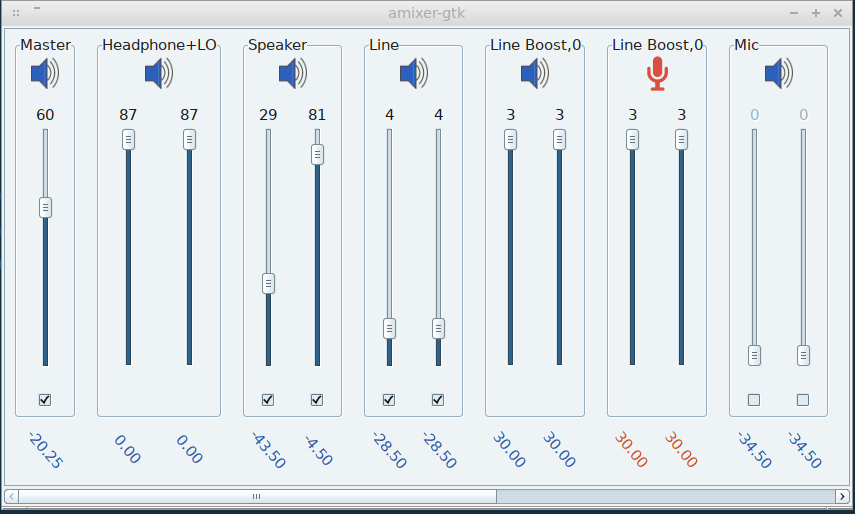
I've developed a new alsa mixer interface:
The packages are built for chimaera.
Just run amixer-gtk or add it to your autostart applications, and the icon will appear in your systray. The sound card suitable for playback/capture streaming will be automatically detected by the program. It looks like this:
Board footer
