
You are not logged in.
- Topics: Active | Unanswered
#1226 Re: Installation » Linux e1000e module removal and e1000e EEE timer - Part II » 2021-04-30 11:34:41
Hello:
Yes, issue of either incremental or absolute.
I don't have a clear idea of absolute, but incremental I get.
1. Use the commands I used being in root of your source tree.
Not in /?
See my example work-flow. That is how everyone expects it to be used.
Evidently I'm not in that intersection of the venn diagramme. 8^D!
2. Do not confuse yourself with making different copies of the source tree.
Keep just vanilla being patched and apply/unapply there.
It's the unapply thing that complicates my train of thought.
An architect by trade, 30+ years at it has sunk in deeply
It's the way I keep track of previous versions so I can go back to them.
Freehand drafting table stuff, before this CAD thing.
eg:
1. sketch A, with a min of corrections/erasing. (erasing = unpatch)
2. but sketch A needs to be modified and see changes clearly/check the result.
3. put a translucid piece of paper over sketch A and draw on that
4. result is sketch B, a modified sketch A (sketch B = incremental patch)
But in this case, as the second patch did not work/was modified, I deleted it to avoid confusion.
The equivalent of throwing away the piece of paper used in 3.
3. If you need to do it that way: p -> q obviously needs only netdev shutown v2 patch (incremental)
Hmm ...
I get that it is not the 'usual way' but it is the way I got an easier grasp of it.
But ...
Isn't that what I did yesterday?
ie:
I had an original working 3.8.7 params.c patched to 3.8.7p params.c which worked and showed us the 'fun' you were looking for.
I then applied the v2 patch to it to get 3.8.7q which would hopefully debug the e1000e mess.
ie: 3.8.7p + v2.patch = 3.8.7q
groucho@devuan:/$ sudo patch -p0 --dry-run --fuzz 0 -i /usr/src/e1000e-patch/e1000e_387_v2.patch /usr/src/e1000e-3.8.7q/src/param.cv2 patch is at /usr/src/e1000e-patch/e1000e_387_v2.patch
groucho@devuan:~$ ls /usr/src/e1000e-patch/e1000e_387_v2.patch
/usr/src/e1000e-patch/e1000e_387_v2.patch
groucho@devuan:~$
A complete copy of the 3.8.7p code, renamed as 3.8.7q is at /usr/src/e1000e-3.8.7q/src/param.c
groucho@devuan:~$ sudo cp -R e1000e-3.8.7p e1000e-3.8.7qIt contains param.c ...
groucho@devuan:~$ ls /usr/src/e1000e-3.8.7q/src/param.c
/usr/src/e1000e-3.8.7q/src/param.c
groucho@devuan:~$
... which is identical to it's original version:
groucho@devuan:~$ diff /usr/src/e1000e-3.8.7p/src/param.c  /usr/src/e1000e-3.8.7q/src/param.c
groucho@devuan:~$
And I got this:
groucho@devuan:/$ sudo patch -p0 --dry-run --fuzz 0 -i /usr/src/e1000e-patch/e1000e_387_v2.patch  /usr/src/e1000e-3.8.7q/src/param.c
checking file /usr/src/e1000e-3.8.7q/src/param.c
Hunk #1 FAILED at 5300.   -> same
Hunk #2 FAILED at 5341.  -> same
Hunk #3 FAILED at 5358.  -> same
Hunk #4 FAILED at 7373.  -> was 7377
4 out of 4 hunks FAILED
groucho@devuan:/$
What did I miss?
4. Or somewhat sane: vanilla -> ${STRANGE_VERSIONING} obviously needs all, param and netdev shutdown v2 patch (absolute)
Now, I hope I got you some more confused.
Indeed ...
This part I don't get.
I'm confident we'll ge there. 8^D
Thank you so much for your input.
Best,
A.
Edit:
On Mars too ...
https://www.theregister.com/2021/04/30/ … ght_flops/
The reason for the failure is also known: a software bug that results in a watchdog timer expiration prior to mode transition.
And if Ingenuity doesn't make it into flight mode, it doesn't fly.
Sorry, OT but could not resist. 8^D !
#1227 Re: Installation » Linux e1000e module removal and e1000e EEE timer - Part II » 2021-04-29 22:32:01
Hello:
... get to this right away ...
I deleted the now old e1000e-3.8.7q directory and then repeated what I did the last time with the previous patch:
Copied the e1000e-3.8.7p directory to e1000e-3.8.7q, renamed the last patch e1000e_387_v2.patch (deleting its predecesor) and ran the test from /.
But got the same result but with one different line number (?)
groucho@devuan:/$ sudo patch -p0 --dry-run --fuzz 0 -i /usr/src/e1000e-patch/e1000e_387_v2.patch /usr/src/e1000e-3.8.7q/src/param.c
checking file /usr/src/e1000e-3.8.7q/src/param.c
Hunk #1 FAILED at 5300.   -> same
Hunk #2 FAILED at 5341.  -> same
Hunk #3 FAILED at 5358.  -> same
Hunk #4 FAILED at 7373.  -> was 7377
4 out of 4 hunks FAILED
groucho@devuan:/$
Thanks in advance.
Best,
A.
#1228 Re: Installation » Linux e1000e module removal and e1000e EEE timer - Part II » 2021-04-29 22:11:01
Hello:
Good that you ask.
... reworked the second patch to keep a local pdev pointer from adapter->pdev, since we are shutting down.
Who knows how long adapter->pdev is alive....
Hmm ...
Until I do a hard reboot?
I once let it run for a good while, I think it eventually rebooted.
Can't remember.
OK
... apply param patch and the v2 of netdev shutdown patch.
No need to unapply.
I'll just backtrack and do what I did before, no big deal.
Better start with a clean e1000e-3.8.7p.
In /usr/src I copied the e1000e-3.8.7p to e1000e-3.8.7q, renamed the second patch e1000e_387_2.patch and ran the test from /.
... hopefully does not crash unexpectedly....
May still crash...
But we get v1still some clues!
Ask again, if you need.
Thanks a lot for your help.
I'll get to this right away if I can manage or early tomorrow morning at the latest and report results.
Cheers,
A.
#1229 Re: Installation » Linux e1000e module removal and e1000e EEE timer - Part II » 2021-04-29 21:22:12
Hello:
Yes. Please apply both patches. We will get a better result.
Sorry if I appear to be an idiot. 8^/
Second patch applied to 3.8.7p -> 3.8.7q.
Right?
----
In /usr/src I copied the e1000e-3.8.7p to e1000e-3.8.7q, renamed the second patch e1000e_387_2.patch and ran the test from /.
Got this:
groucho@devuan:/$ sudo patch -p0 --dry-run --fuzz 0 -i /usr/src/e1000e-patch/e1000e_387_2.patch /usr/src/e1000e-3.8.7q/src/param.c
checking file /usr/src/e1000e-3.8.7q/src/param.c
Hunk #1 FAILED at 5300.
Hunk #2 FAILED at 5341.
Hunk #3 FAILED at 5358.
Hunk #4 FAILED at 7377.
4 out of 4 hunks FAILED
groucho@devuan:/$
Thanks in advance,
A.
#1230 Re: Installation » Linux e1000e module removal and e1000e EEE timer - Part II » 2021-04-29 20:37:14
Hello;
... okay for the most parts, but hangs or crashes in corner-cases.
Yes ...
This corner. 8^/
Suspend and shutdown is similar ...
... has nothing to do with EEE actually, now.
I see.
... this is quite tricky, therefore we do print debug messages to see where it hopefully goes wrong.
OK
But you have to hang the shutdown for this again and show the last messages printed on screen ...
Yes.
What I did when I started with this: take a photo of the screen when it froze.
Right?
And I'll have to use the plain standard shutdown -h now.
OK
Q: which one do I patch?
The unpatched 3.8.7 or the once patched 3.8.7 --> 3.8.7p
If the 3.8.7p, it would become 3.8.7q.
Make sense?
I hope, that the message PM FREEZE NETIF RUNNING will not print.
That is the obvious issue also discussed in the above-mentioned link.
If you say so ... 8^ *
They mentioned e1000e driver, too.
Yes, I saw that.
It is famous for how 'problematic' it is.
And it goes waaaay back.
It never got fixed.
Let me know.
Thanks in advance,
A.
#1231 Re: Installation » [SOLVED] Piper and ratbag » 2021-04-29 20:15:00
Hello:
... just need to target backports explicitly so that the correct dependency is selected:
# apt install piper/beowulf-backports
I see ...
I would have though that apt would have done it.
It is quite clear that apt knows that the dependency is ratbagd >=0.13
... aptitude would have probably figured it out for you
I use aptitude for its why and why-not.
And synaptic for its search and residual functions.
But I like apt best.
Thanks a lot for making sense of this for me.
Best,
A.
Edit:
Unfortunately, Piper (piper/stable-backports 0.4-1~bpo10+1) does not support the Logitech M575.
It's really up to ratbagd (0.15-1~bpo10+1), as it seems that Piper is the front end.
Notwithstanding, parameters (in Xfce) can be adjusted via Applications -> Settings -> Mouse and Touchpad.
It recognises the device as Logitech ERGO M575 without any user intervention.
.
#1232 Re: Installation » Linux e1000e module removal and e1000e EEE timer - Part II » 2021-04-29 19:53:32
Hello:
... that stray EEE TX LPI TIMER: ... comes from function e1000e_flush_lpic in src/netdev.c and seems to be a harmless print.
Hmmm ...
The only harmless code is the well written code.
Who dares to care?!
Evidently it's only us (?)
Certainly not the hacks at Intel
The more fun I see in the function e1000e_pm_freeze.
Both functions are called last in shutdown/reboot.
Ahh ...
Then those are the ones screwing up my shutdowns.
... discussion about the sequence: https://netdev.vger.kernel.narkive.com/ … esume-flow
Can't make heads or tails from it.
I only know that my rig does not have any suspends enabled and the NIC does not support EEE of any sort.
    present = netif_device_present(netdev);
    netif_device_detach(netdev);

    if (present && netif_running(netdev)) {
        int count = E1000_CHECK_RESET_COUNT;

        while (test_bit(__E1000_RESETTING, &adapter->state) && count--)
            usleep_range(10000, 11000);
        WARN_ON(test_bit(__E1000_RESETTING, &adapter->state));

        /* Quiesce the device without resetting the hardware */
        e1000e_down(adapter, false);
        e1000_free_irq(adapter);
    }
It seems to me that whoever slapped together the driver did not take into account that a great deal of the code was not to be run if the part was not EEE able or if there were no S states besides S0, S1 or S5 in play.
... should that detach not be within the if-block?
It seems you just have to wait for the counter+sleep to finish?
Seems that it is what the interruped shutdown is doing ...
But there's no sleep to finish although the counter (LX LPI Timer) is at 00000000.
It's a wonder that the damned driver works at all ...
Thanks for your input.
Best,
A.
#1233 Re: Installation » [SOLVED] Piper and ratbag » 2021-04-29 19:37:06
Can we see ...
groucho@devuan:~$ apt policy
Package files:
 100 /var/lib/dpkg/status
     release a=now
 100 http://deb.devuan.org/merged beowulf-backports/main i386 Packages
     release v=3.0.0,o=Devuan Backports,a=stable-backports,n=beowulf-backports,l=Devuan Backports,c=main,b=i386
     origin deb.devuan.org
 100 http://deb.devuan.org/merged beowulf-backports/main amd64 Packages
     release v=3.0.0,o=Devuan Backports,a=stable-backports,n=beowulf-backports,l=Devuan Backports,c=main,b=amd64
     origin deb.devuan.org
 100 http://deb.devuan.org/merged beowulf-backports/contrib i386 Packages
     release v=3.0.0,o=Devuan Backports,a=stable-backports,n=beowulf-backports,l=Devuan Backports,c=contrib,b=i386
     origin deb.devuan.org
 100 http://deb.devuan.org/merged beowulf-backports/contrib amd64 Packages
     release v=3.0.0,o=Devuan Backports,a=stable-backports,n=beowulf-backports,l=Devuan Backports,c=contrib,b=amd64
     origin deb.devuan.org
 100 http://deb.devuan.org/merged beowulf-backports/non-free i386 Packages
     release v=3.0.0,o=Devuan Backports,a=stable-backports,n=beowulf-backports,l=Devuan Backports,c=non-free,b=i386
     origin deb.devuan.org
 100 http://deb.devuan.org/merged beowulf-backports/non-free amd64 Packages
     release v=3.0.0,o=Devuan Backports,a=stable-backports,n=beowulf-backports,l=Devuan Backports,c=non-free,b=amd64
     origin deb.devuan.org
 500 http://deb.devuan.org/merged beowulf-updates/main i386 Packages
     release v=3.0.0,o=Devuan,a=stable-updates,n=beowulf-updates,l=Devuan,c=main,b=i386
     origin deb.devuan.org
 500 http://deb.devuan.org/merged beowulf-updates/main amd64 Packages
     release v=3.0.0,o=Devuan,a=stable-updates,n=beowulf-updates,l=Devuan,c=main,b=amd64
     origin deb.devuan.org
 500 http://deb.devuan.org/merged beowulf-security/non-free i386 Packages
     release v=3.0.0,o=Devuan,a=stable-security,n=beowulf-security,l=Devuan-Security,c=non-free,b=i386
     origin deb.devuan.org
 500 http://deb.devuan.org/merged beowulf-security/non-free amd64 Packages
     release v=3.0.0,o=Devuan,a=stable-security,n=beowulf-security,l=Devuan-Security,c=non-free,b=amd64
     origin deb.devuan.org
 500 http://deb.devuan.org/merged beowulf-security/main i386 Packages
     release v=3.0.0,o=Devuan,a=stable-security,n=beowulf-security,l=Devuan-Security,c=main,b=i386
     origin deb.devuan.org
 500 http://deb.devuan.org/merged beowulf-security/main amd64 Packages
     release v=3.0.0,o=Devuan,a=stable-security,n=beowulf-security,l=Devuan-Security,c=main,b=amd64
     origin deb.devuan.org
 500 http://deb.devuan.org/merged beowulf/non-free i386 Packages
     release v=3.0,o=Devuan,a=stable,n=beowulf,l=Devuan,c=non-free,b=i386
     origin deb.devuan.org
 500 http://deb.devuan.org/merged beowulf/non-free amd64 Packages
     release v=3.0,o=Devuan,a=stable,n=beowulf,l=Devuan,c=non-free,b=amd64
     origin deb.devuan.org
 500 http://deb.devuan.org/merged beowulf/contrib i386 Packages
     release v=3.0,o=Devuan,a=stable,n=beowulf,l=Devuan,c=contrib,b=i386
     origin deb.devuan.org
 500 http://deb.devuan.org/merged beowulf/contrib amd64 Packages
     release v=3.0,o=Devuan,a=stable,n=beowulf,l=Devuan,c=contrib,b=amd64
     origin deb.devuan.org
 500 http://deb.devuan.org/merged beowulf/main i386 Packages
     release v=3.0,o=Devuan,a=stable,n=beowulf,l=Devuan,c=main,b=i386
     origin deb.devuan.org
 500 http://deb.devuan.org/merged beowulf/main amd64 Packages
     release v=3.0,o=Devuan,a=stable,n=beowulf,l=Devuan,c=main,b=amd64
     origin deb.devuan.org
Pinned packages:
groucho@devuan:~$
groucho@devuan:~$ apt policy piper
piper:
Installed: (none)
Candidate: 0.4-1~bpo10+1
Version table:
0.4-1~bpo10+1 100
100 http://deb.devuan.org/merged beowulf-backports/main amd64 Packages
100 http://deb.devuan.org/merged beowulf-backports/main i386 Packages
groucho@devuan:~$ groucho@devuan:~$ apt install -s piper/stable-backports
NOTE: This is only a simulation!
apt needs root privileges for real execution.
Keep also in mind that locking is deactivated,
so don't depend on the relevance to the real current situation!
Reading package lists... Done
Building dependency tree
Reading state information... Done
Selected version '0.4-1~bpo10+1' (Devuan Backports:3.0.0/stable-backports [all]) for 'piper'
Selected version '0.15-1~bpo10+1' (Devuan Backports:3.0.0/stable-backports [amd64]) for 'ratbagd' because of 'piper'
The following additional packages will be installed:
gir1.2-rsvg-2.0 python3-evdev ratbagd
Suggested packages:
python-evdev-doc
The following NEW packages will be installed:
gir1.2-rsvg-2.0 piper python3-evdev ratbagd
0 upgraded, 4 newly installed, 0 to remove and 0 not upgraded.
Inst gir1.2-rsvg-2.0 (2.44.10-2.1 Devuan:3.0/stable [amd64])
Inst python3-evdev (1.1.2+dfsg-1+b10 Devuan:3.0/stable [amd64])
Inst ratbagd (0.15-1~bpo10+1 Devuan Backports:3.0.0/stable-backports [amd64])
Inst piper (0.4-1~bpo10+1 Devuan Backports:3.0.0/stable-backports [all])
Conf gir1.2-rsvg-2.0 (2.44.10-2.1 Devuan:3.0/stable [amd64])
Conf python3-evdev (1.1.2+dfsg-1+b10 Devuan:3.0/stable [amd64])
Conf ratbagd (0.15-1~bpo10+1 Devuan Backports:3.0.0/stable-backports [amd64])
Conf piper (0.4-1~bpo10+1 Devuan Backports:3.0.0/stable-backports [all])
groucho@devuan:~$ Thanks for your input.
Best,
A.
#1234 Re: Installation » Linux e1000e module removal and e1000e EEE timer - Part II » 2021-04-29 19:13:41
Hello:
... these guys ...
Hmm ....
No idea.
I cut my rock teeth on Beatles, CSN&Y, S&G, Joe C., J.Joplin, Stones, BS&T ...
My first album was Abbey Road, hot off the press.
Not that there's anything wrong with boobies. 8^D
Altoid wrote:... module has EEE set to Enabled by default on all the devices it is used on, irrespective of the hardware supporting EEE.
Yes, that is the fun - in context to the above ...
Ahh ...
I see.
... can we be sure that some routine/code within the module is not broadcasting something EEEish and causing the freeze?
eg: the autonegotiation part of the code that is needed for EEE to work.
Make sense?
Yes ...
I thought as much.
Happy to know I was not too far off the mark.
... looking for eee and lpi used without the catch of if (!eee_disable) ....
Let me know if you need me to help with some digging.
Thanks a lot for your input.
Best,
A.
#1235 Re: Installation » [SOLVED] Piper and ratbag » 2021-04-29 19:01:50
Hello:
... where did you attempt to obtain the piper package?
Piper 0.1-1-bpo+1 (stable-backports)
0.15-1-bpo10+1 (stable-backports)
and
0.9.905-1 (stable)
... but for some reason apt pulls in 0.9.905-1 (stable) when the dependency is the higher version.
Must be doing something wrong. (?)
Thanks for your input.
Best,
A.
#1236 Re: Installation » Linux e1000e module removal and e1000e EEE timer - Part II » 2021-04-29 16:22:17
Hello:
What I hoped for!
Good ...
Then it's | one | for the good guys.
... enabled for all by default.
Hooray for ...
... you.
You were the one who discovered this.
As you know, I don't have a clue.
I just ask and try to make sense of the answer.
... will check your findings ...
Whenever you can.
In the meanwhile I run with the e1000e-3.8.7p version and hope to be able to confirm that the unloading of the module avoids the bad shutdown.
Which in turn would confirm the e1000e module as the cuprit.
If I understand correctly, the module has has EEE set to Enabled by default on all the devices it is used on, irrespective of the hardware supporting EEE.
Looks like I am right in assuming that the driver was just slapped together with not much attention paid to it.
Nice going Intel ... 8^/
If this is so, how can we be sure that some routine/code within the module is not broadcasting something EEEish and causing the freeze?
eg: the autonegotiation part of the code that is needed for EEE to work.
Make sense?
Once again, thank you very much for your help in this matter.
Best,
A.
#1237 Installation » [SOLVED] Piper and ratbag » 2021-04-29 15:08:44
- Altoid
- Replies: 6
Hello:
Finally got around to purchasing a trackball.
Not the one I wanted as it is not manufactured anymore.
But this one seems a reasonable compromise on price/quality. (LT M575)
We'll see if I can get used to using it, works with thumb instead of fingers.
Muscle memory is a mean thing ...
To configure DPI, buttons etc. I downloaded an application called piper which depends on ratbagd >=0.13
But the version in the repository is 0.9.905-1.
groucho@devuan:~$ sudo apt install piper
Reading package lists... Done
Building dependency tree
Reading state information... Done
Some packages could not be installed. This may mean that you have
requested an impossible situation or if you are using the unstable
distribution that some required packages have not yet been created
or been moved out of Incoming.
The following information may help to resolve the situation:

The following packages have unmet dependencies:
 piper : Depends: ratbagd (>= 0.13)
E: Unable to correct problems, you have held broken packages.
groucho@devuan:~$
Is there anything I can do about this?
Thanks in advance,
A.
#1238 Re: Installation » Linux e1000e module removal and e1000e EEE timer - Part II » 2021-04-29 12:31:41
Hello:
... you try to apply the patch in the sub directory src.
So a ls -l src/param.c should return a valid file.
Otherwise you are in a wrong directory ...
I'll get the gist of it, eventually.
... code block ...
... is scrollable.
Yes.
I really don't like that either, rather annoying.
But that's what's there to use.
I managed to get the param.c file patched, a new e1000e.ko (3.8.7p) compiled and working.
I keep forgetting to do update-initramfs -u -k all, it will sink in eventually.
I have noticed that with the previous versions of the module, if I rmmod e1000e and then modprobe e1000e, to connect again I had to do it manually via the applet.
Maybe it took longer and I didn't notice?
Can't say, but with is new patched version (e1000e-3.8.7p) either the link comes up without my intervention or it does so faster.
This is the dmesg when loading the new module version:
groucho@devuan:~$ sudo dmesg | grep e1000e
[    2.130179] e1000e: loading out-of-tree module taints kernel.
[    2.130458] e1000e: module verification failed: signature and/or required key missing - tainting kernel
[    2.187380] e1000e: Intel(R) PRO/1000 Network Driver - 3.8.7-NAPI
[    2.209432] e1000e: Copyright(c) 1999 - 2020 Intel Corporation.
[    2.220453] e1000e 0000:00:19.0: Interrupt Throttling Rate (ints/sec) set to dynamic conservative mode
[    2.242892] e1000e 0000:00:19.0: PHY Smart Power Down Disabled
[    2.254057] e1000e 0000:00:19.0: EEE Support was initialized to be enabled
[    2.276187] e1000e 0000:00:19.0: EEE Support has been reset to be disabled
[    2.727852] e1000e 0000:00:19.0 eth0: (PCI Express:2.5GT/s:Width x1) 00:14:4f:4a:a2:81
[    2.727853] e1000e 0000:00:19.0 eth0: Intel(R) PRO/1000 Network Connection
[    2.727874] e1000e 0000:00:19.0 eth0: MAC: 7, PHY: 6, PBA No: FFFFFF-0FF
[   26.905148] e1000e 0000:00:19.0 eth0: NIC Link is Up 100 Mbps Full Duplex, Flow Control: None
[   26.917281] e1000e 0000:00:19.0 eth0: 10/100 speed: disabling TSO
groucho@devuan:~$
This the output when I remove and then reload the module:
groucho@devuan:~$ sudo dmesg
--- snip ---
[  127.472489] e1000e 0000:00:19.0 eth0: NIC Link is Down
[  142.796192] e1000e: Intel(R) PRO/1000 Network Driver - 3.8.7-NAPI
[  142.796197] e1000e: Copyright(c) 1999 - 2020 Intel Corporation.
[  142.796432] e1000e 0000:00:19.0: Interrupt Throttling Rate (ints/sec) set to dynamic conservative mode
[  142.796434] e1000e 0000:00:19.0: PHY Smart Power Down Disabled
[  142.796436] e1000e 0000:00:19.0: EEE Support was initialized to be enabled
[  142.796438] e1000e 0000:00:19.0: EEE Support has been reset to be disabled
[  143.112495] e1000e 0000:00:19.0 eth0: (PCI Express:2.5GT/s:Width x1) 00:14:4f:4a:a2:81
[  143.112499] e1000e 0000:00:19.0 eth0: Intel(R) PRO/1000 Network Connection
[  143.112525] e1000e 0000:00:19.0 eth0: MAC: 7, PHY: 6, PBA No: FFFFFF-0FF
groucho@devuan:~$
The eth0 link seems to be working correctly and a speedtest shows no apparent difference in upload/download rates.
Now for the bad news:
The screen grab video of the tty1 printout at shutdown -h now is still showing the same sequence with the line EEE TX LPI TIMER: 00000000.
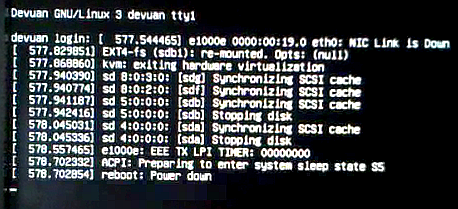
To me, the tell tale sign pointing to the module is that this does not happen when using my shutdown script:
ie: removing it prior to shutdown.
# sync
# disable onboard eth wol
# remove e1000e module
# shutdown system directly
sync && sudo ethtool -s eth0 wol d && sudo rmmod -s -v e1000e && sudo shutdown -h now
It would seem that any doubts about the 82566DM-2 controller supporting EEE have been cleared:
re: /* Currently only supported on 82579 and newer */
But if this controller does not have EEE capabilty, where is this EEE TX LPI TIMER: 00000000 coming from?
And most importantly: why?
Some left over half-cooked code?
Edit 1
EEE support requires auto-negotiation with the device the NIC is connected to.
Could it be that there is some code in there that is attempting to do just that?
Up to now, by removing the module I have not had another bad shutdown (knock wood).
But it is too early to know if it holds it's only been a week.
Edit 2
Looking at the files in /e1000e-3.8.7p/src I came across this in ethtool.c:
groucho@devuan:/usr/src/e1000e-3.8.7p/src$ cat ethtool.c | grep -i "timer"
	mod_timer(&adapter->blink_timer, jiffies + E1000_ID_INTERVAL);
		if (!adapter->blink_timer.function) {
			init_timer(&adapter->blink_timer);
			adapter->blink_timer.function =
			adapter->blink_timer.data = (unsigned long)adapter;
		mod_timer(&adapter->blink_timer, jiffies);
		del_timer_sync(&adapter->blink_timer);
	edata->tx_lpi_timer = er32(LPIC) >> E1000_LPIC_LPIET_SHIFT;   <----- | x |
	if (eee_curr.tx_lpi_timer != edata->tx_lpi_timer) {           <----- | x |
		e_err("Setting EEE Tx LPI timer is not supported\n"); < ---- | x |
groucho@devuan:/usr/src/e1000e-3.8.7p/src$
Thought it may have some relevance.
Thank you very much for your help and patience.
Best,
A.
#1239 Re: Installation » Linux e1000e module removal and e1000e EEE timer - Part II » 2021-04-29 01:52:37
Hello:
What am I missing?
I found something late last night:
<i>"You have to be in the root directory to apply the patch with an absolute path and the -p0 option" </i>
https://www.youtube.com/watch?v=PCsZoVqLv4k see the quoted text at 01:41 - you can skip the strange intro.
There is also a reference to www.unix.stackexchange.com/questions/167216/
So I tried this from the root directory:
groucho@devuan:/$ sudo patch -p0 --dry-run --fuzz 0 -i /usr/src/e1000e-patch/e1000e_387.patch /usr/src/e1000e-3.8.7/src/param.c
checking file /usr/src/e1000e-3.8.7/src/param.c
groucho@devuan:/$
I think(?) it worked.
No complaints.
I'll try the real patching tomorrow morning with a fresh head + a double-espresso latte and report back.
Thanks for your input.
Best
A.
#1240 Re: Installation » Linux e1000e module removal and e1000e EEE timer - Part II » 2021-04-28 22:11:18
Hello:
No need ...
... ask, if something is unclear.
Thanks. 8^)
Hello:
I'll do it right and report back.
Can't seem to get this right.
Code location:
groucho@devuan:~$ ls /usr/src/e1000e-3.8.7/src
80003es2lan.c  82571.o           defines.h     e1000e.o   ich8lan.h  kcompat_ethtool.c   manage.c       netdev.o  param.o  ptp.o
80003es2lan.h  Makefile          e1000.h       ethtool.c  ich8lan.o  kcompat_overflow.h  manage.h       nvm.c     phy.c    regs.h
80003es2lan.o  Module.supported  e1000e.ko     ethtool.o  kcompat.c  mac.c               manage.o       nvm.h     phy.h
82571.c        Module.symvers    e1000e.mod.c  hw.h       kcompat.h  mac.h               modules.order  nvm.o     phy.o
82571.h        common.mk         e1000e.mod.o  ich8lan.c  kcompat.o  mac.o               netdev.c       param.c   ptp.c
groucho@devuan:~$
Patch location:
groucho@devuan:~$ ls /usr/src/e1000e-patch/
e1000e_384_param_eee_be_disabled.patch  patch.txt
groucho@devuan:~$
Having verified the path was correct, I ran the patch:
groucho@devuan:~$ cd /usr/src/e1000e-3.8.7/src && sudo patch -p0 --dry-run --fuzz 0 -i /usr/src/e1000e-patch/e1000e_384_param_eee_be_disabled.patch
can't find file to patch at input line 3
Perhaps you used the wrong -p or --strip option?
The text leading up to this was:
--------------------------
|--- src/param.c	2021-04-27 23:48:45.280682963 +0200
|+++ src/param.c	2021-04-28 00:03:09.596756791 +0200
--------------------------
File to patch: param.c
checking file param.c
groucho@devuan:/usr/src/e1000e-3.8.7/src$
Thinking I had somehow muggled up the path, ran the patch again, but from && onwards:
groucho@devuan:/usr/src/e1000e-3.8.7/src$ sudo patch -p0 --dry-run --fuzz 0 -i /usr/src/e1000e-patch/e1000e_384_param_eee_be_disabled.patch
can't find file to patch at input line 3
Perhaps you used the wrong -p or --strip option?
The text leading up to this was:
--------------------------
|--- src/param.c	2021-04-27 23:48:45.280682963 +0200
|+++ src/param.c	2021-04-28 00:03:09.596756791 +0200
--------------------------
File to patch: param.c
checking file param.c
groucho@devuan:/usr/src/e1000e-3.8.7/src$
But got the same result.
As you suggested it is a dry run so no harm done.
My editor (jed) shows that input line 3 reads @@ -540,17 +540,17 @@ and that line 540 in param.c reads .type = enable_option,.
As I was about to post this, I saw this new post.
... another patch that hopefully compiles and prints the state of EEE Support, enabled or disabled, on module initialization ...
Thanks.
I'll run this one and report back.
Edit
I'm getting the same result with the new patch:
groucho@devuan:/usr/src/e1000e-3.8.7/src$ sudo patch -p0 --dry-run --fuzz 0 -i /usr/src/e1000e-patch/e1000e_387.patch
[sudo] password for groucho:
can't find file to patch at input line 3
Perhaps you used the wrong -p or --strip option?
The text leading up to this was:
--------------------------
|--- src/param.c	2021-04-28 22:38:00.543340862 +0200
|+++ src/param.c	2021-04-28 22:44:42.391432332 +0200
--------------------------
File to patch: param.c
checking file param.c
groucho@devuan:/usr/src/e1000e-3.8.7/src$
groucho@devuan:/usr/src/e1000e-3.8.7/src$
To make it easier to run, I shortened the patch name and ran it from /usr/src/e1000e-3.8.7/src
The dry run asks me for a file name but then does not complain about it.
What am I missing?
Thanks in advance.
Best,
A.
#1241 Re: Installation » Linux e1000e module removal and e1000e EEE timer - Part II » 2021-04-28 20:42:17
Hello:
I'm afraid our posts crossed.
And that I screwed up and did not apply the patch correctly.
I applied the patch to e1000e.ko and not to params.c.
Sorry about that.
... check my example above, no hand editing necessary, no VCS. :-) You just download your driver, patch and compile.
I have a back up for e1000e.ko (3.8.7) so everything is working properly.
I'll do it right and report back.
Thnaks for your input.
Best,
A.
#1242 Re: Installation » Linux e1000e module removal and e1000e EEE timer - Part II » 2021-04-28 18:31:56
Hello:
... bad description.
What would that be?
Bear in mind that this is the first time I've ever run a patch.
Don't have a clue.
... patch the source ;-)
Like you see in the .rej - src/param.c.
Right ...
Take the file /usr/src/e1000e-3.8.7/src/param.c, open to edit and ...
1.
-			.def  = OPTION_ENABLED
+			.def  = OPTION_DISABLED
... remove the line after - and add the line afte +
2.
+		hw->dev_spec.ich8lan.eee_disable = !opt.def;
+
Add the lines after +, one with code and the other one blank
3.
-			} else {
-				hw->dev_spec.ich8lan.eee_disable = !opt.def;
Remove those two lines and save.
4. recompile a new e1000e.ko. Right?
Q:
This would then be a patched e1000e-3.8.7 and I guess we have to have some version control.
Another directory?
eg: /usr/src/e1000e-3.8.7p, exact copy of /3.8.7 save for param.c where the only change has been in those lines.
Thanks in advance.
Best,
A.
#1243 Re: Installation » Linux e1000e module removal and e1000e EEE timer - Part II » 2021-04-28 13:25:57
Hello:
... others with e1000e fun issues.
I'm quite sure there are many who, like me, don't know what is happening with their rigs.
... if they find our posts.
They will if they are still using hardware with the 82566DM-2 controler.
I had some time before having to go out, so I got to it.
But I've had a problem patching e1000e.ko 3.8.7.
I had never applied a patch before and inadvertently left out the file name in the path, but the system is wise enough and asked me which file to patch.
Dumb!
groucho@devuan:/lib/modules/4.19.0-16-amd64/kernel/drivers/net/ethernet/intel/e1000e$
--- snip ---
File to patch: e1000e.ko
patching file e1000e.ko
Hunk #1 FAILED at 540.
1 out of 1 hunk FAILED -- saving rejects to file e1000e.ko.rej
groucho@devuan:/lib/modules/4.19.0-16-amd64/kernel/drivers/net/ethernet/intel/e1000e$
Here's e1000e.ko.rej:
groucho@devuan:/lib/modules/4.19.0-16-amd64/kernel/drivers/net/ethernet/intel/e1000e$ cat e1000e.ko.rej
--- src/param.c	2021-04-27 23:48:45.280682963 +0200
+++ src/param.c	2021-04-28 00:03:09.596756791 +0200
@@ -540,17 +540,17 @@
 			.type = enable_option,
 			.name = "EEE Support",
 			.err  = "defaulting to Enabled (100T/1000T full)",
-			.def  = OPTION_ENABLED
+			.def  = OPTION_DISABLED
 		};

+		hw->dev_spec.ich8lan.eee_disable = !opt.def;
+
 		if (adapter->flags2 & FLAG2_HAS_EEE) {
 			/* Currently only supported on 82579 and newer */
 			if (num_EEE > bd) {
 				unsigned int eee = EEE[bd];
 				e1000_validate_option(&eee, &opt, adapter);
 				hw->dev_spec.ich8lan.eee_disable = !eee;
-			} else {
-				hw->dev_spec.ich8lan.eee_disable = !opt.def;
 			}
 		}
 	}
groucho@devuan:/lib/modules/4.19.0-16-amd64/kernel/drivers/net/ethernet/intel/e1000e$
Hmm ...
/* Currently only supported on 82579 and newer */ -> the 82566DM-2 is an older NIC.
There is a back up but the original e1000e.ko (3.8.7) does not seem to have been patched.
Let me know what I should do.
Thanks in advance,
A.
#1244 Re: Installation » Linux e1000e module removal and e1000e EEE timer - Part II » 2021-04-28 11:26:21
Hello:
... try to apply the patch. If it fails, I check again.
Will do.
... fun to read source looking for such issues.
Thank you very much for checking this out for me.
If this works as intended, maybe you could consider submitting your findings and the patch to https://github.com/torvalds/linux/tree/master/drivers?
... since that eee_disable flag has any value which is in memory at that position, it was true in the old times by sheer luck?
Can't say.
Taking into account what you have discovered, I would not discard some hasty cut-and-paste with respect to the e1000e driver.
I have found no spec sheet/manual for the 82566DM-2 controller clearly stating that it either has or does not have EEE capabilty.
When it comes to EEE, the only thing I have found everywhere is reference to "... parts that support it".
As posted previously, I don't see any need for this EEE feature in a desktop, workstation or server.
To me it is just another layer of complication (painfully obvious here) and should be disabled by default.
In my opinion, this sort of EEE is only useful (and only to a <i>limited</i> extent) in a portable, battery operated device or one in which the network component tends to run hot.
eg: some SoCs.
The same goes for any other energy saving features they come up with.
Actually, this is the first box I have with an on-board NIC as on-board components have never been my cup of tea.
All my other boxes have had 3Com hardware but I cannot say is any better than Intel stuff.
I still remember the eye watering telco bills (ca. 1995) caused by a 3Com/USR Sportster modem that had a severe call-dropping problem.
3Com/USR knew of the problem but the solution (a new chip mailed to customerrs at no cost and under warranty) was buried deep down in their website.
Only found out about that thanks to a PCMag article. 8^/
Any memory value != 0 at that location is true in that case.
And now, with kernel hardening, like default struct values initialization to zero, EEE is on for all e1000e PHY, even if the hardware has no EEE.
So that's the reason for e1000e: EEE TX LPI TIMER: 00000000 in the tty1 output?
I wonder if that output is the only thing happening here or if it has any effect on something else and is causing the bad shutdowns.
... just some wild guess-work.
And a noble effort on your behalf.
Very grateful for that. 8^)
... patch explicitly sets the eee_disable flag to true as default.
Right.
I'll have that done by this afternoon (-03:00 GMT) and report back.
Thanks a lot for your input.
Best,
A.
#1245 Re: Installation » Linux e1000e module removal and e1000e EEE timer - Part II » 2021-04-27 23:07:32
Hello:
... read the source of the intel out-of-tree module.
Thank you for taking the time to do that. 8^D
... a bit more development went into that than in the one in linux source.
I downloaded v.3.8.7-NAPI, compiled and installed it.
It shows the same behaviour as 3.2.4.
... ethtool cannot query because I guess it is incompatible with the out-of-tree module.
Hmm ...
One of the first things I did was to send the maintainer an email asking about the reason/s behind Cannot get EEE settings: Operation not supported.
I asked:
- What does being able to disable the EEE TX LPI timer in my 2566DM-2 Gbe controller actually depend on?
- Is it hardwired?
- If so, could it be solved with a different firmware?
This is his verbatim reply to my questions:
In this case, ethtool is almost certainly only a messenger.
A request like this is passed to kernel and it's the NIC driver to either implement it or report that it is not supported.
And in your case it's querying the current setting that fails so it looks like either the device does not support getting and setting EEE parameters or the support in its driver (e1000e) is missing.
Like I mentioned in another post, the fact that a line in the tty1 output on shutdown reads e1000e: EEE TX LPI TIMER: 00000000 would indicate hardware support.
Unless I have it all wrong (a distinct possibility), it is a question of driver support not being there.
Make sense?
... if you can read the source.
I tried.
Can't make heads or tails of what it is doing.
Another fun fact.
More fun? 8^7
... eee_disable flag seems to be initialized, only if FLAG2_HAS_EEE is set, which is not for your device AFAIS and AFAIUI.
... you setting EEE=0 does nothing at all.
... smart shut down thing is disabled by default AFAIS.
Then WFT dmesg talking about?
I mean, if you cannot believe dmesg, what's left?
... will add a patch soon, so that the eee_disable flag is being initialized, and default be disabled, since most PHY have no FLAG2_HAS_EEE feature, e heh.
Patch: https://geki.selfhost.eu/hacks/e1000e_3 … bled.patch
Apply: cd /path/to/module/ && patch -p0 -i /path/to/e1000e_384_param_eee_be_disabled.patch
I see it is already there.
Can it also be applied to 3.8.7-NAPI?
... wonder if that helps.
My looking into the e1000e driver was based on the tty1 output plus the fact that unloading the module seems to have avoided the bad shutdowns.
But I can't say anyhting much till I've tried it and survived more than a fortnight without a bad shutdown.
I can't but think that all these fun facts you have unearthed within the e1000e code makes for a very sloppy attitude on behalf of whoever was tasked with writing it.
I expected more from Intel.
But then, should I have?
Please let me know if I can use your patch on 3.8.7. https://sourceforge.net/projects/e1000/ … z/download
Thank you very much for taking the time to look into this for me. 8^D
Best,
A.
#1246 Re: Installation » Linux e1000e module removal and e1000e EEE timer » 2021-04-27 12:20:04
Hello:
... same function should be in the driver you compiled yourself and comment that line out there and recompile.
No idea how that works.
Quite happy to actually have been able to compile the driver.
For some reason I expected to see a .config file similar to what I have seen is used to compile a kernel.
So I'd check the boxes of the functions I wanted to compile in the driver.
But none of that came up.
And have no idea where to look or how to do it.
... if that EEE timer has anything to do with the bad shutdown.
Well ...
That is precisely what I am attempting to find out by disabling EEE.
Something that (for unknown reasons) seems to be impossible.
If you had read Part II (post #2) ... 8^D
I ran my rig for more than a week without a bad shutdown using the shutdown script described.
With EEE (supposedly disabled) and a standard shutdown -h now I immediately got a bad shutdown.
Could be a coincidence?
Maybe.
But I also got a line which would seem to be evidence of the EEE TX LPI Timer being active at shutdown, before the system went to S5 and powered down.
This in spite of EEE being disabled albeit with nothing in dmesg indicating that it was or it was not, like with Smart Power Down Disabled.
eg: e1000e: EEE Disabled or e1000e: unknown parameter 'eee' ignored.
... may be wrong.
I may be wrong.
But up to 'now' everything points to the EEE function in the NIC.
Would it be OK if we continue with this in PII?
That's where the driver module compilation (if it comes to that) would be discussed.
Thanks a lot for your input.
Best,
A.
#1247 Re: Installation » Linux e1000e module removal and e1000e EEE timer - Part II » 2021-04-26 23:50:37
Hello:
Question:
... a question of compiling the driver ...
I took the leap and managed to compile the latest available version of the e1000e driver module.
I ended up with an e1000e.ko file which modinfo recognised and correctly identified as being v 3.8.4-NAPI.
I then tested it.
I removed the one in memory and reloaded the one I had just compiled and located at /usr/src/e1000e-3.8.4/src by renaming the original (v. 3.2.6-k) as e1000e.old and putting in its place the new one at /lib/modules/4.19.0-16-amd64/kernel/drivers/net/ethernet/intel/e1000e.
It loaded without any problems, with the relevant lines in dmesg.
groucho@devuan:~$ sudo dmesg
--- snip ---
[     ] e1000e 0000:00:19.0 eth0: NIC Link is Down
[     ] e1000e: Intel(R) PRO/1000 Network Driver - 3.8.4-NAPI
[     ] e1000e: Copyright(c) 1999 - 2020 Intel Corporation.
[     ] e1000e 0000:00:19.0: Interrupt Throttling Rate (ints/sec) set to dynamic conservative mode
[     ] e1000e 0000:00:19.0: PHY Smart Power Down Disabled
[     ] e1000e 0000:00:19.0 eth0: (PCI Express:2.5GT/s:Width x1) 00:14:4f:4a:a2:81
[     ] e1000e 0000:00:19.0 eth0: Intel(R) PRO/1000 Network Connection
[     ] e1000e 0000:00:19.0 eth0: MAC: 7, PHY: 6, PBA No: FFFFFF-0FF
[     ] e1000e 0000:00:19.0 eth0: NIC Link is Up 100 Mbps Full Duplex, Flow Control: None
[     ] e1000e 0000:00:19.0 eth0: 10/100 speed: disabling TSO
groucho@devuan:~$
Hmm ...
No mention of EEE being disabled.
I rebooted with the /etc/modprobe.d/e1000e.conf I was using: options e1000e SmartPowerDownEnable=0 EEE=0.
Everything was coming along fine, did a speedtest and uploaded/downloaded some files: no apparent changes in what I had with the older version of the driver module.
Now came the ethtool test:
groucho@devuan:~$ ethtool --show-eee eth0
Cannot get EEE settings: No such device
groucho@devuan:~$
groucho@devuan:~$ ethtool --set-eee eth0 eee off
bash: ethtool: command not found
groucho@devuan:~$ Things did not look so good now.
Apparently the new driver module does accept the EEE parameter:
groucho@devuan:~$ sudo modinfo e1000e
filename:       /lib/modules/4.19.0-16-amd64/kernel/drivers/net/ethernet/intel/e1000e/e1000e.ko
version:        3.8.4-NAPI
license:        GPL
description:    Intel(R) PRO/1000 Network Driver
author:         Intel Corporation, <linux.nics@intel.com>
srcversion:     559F545E49324123D9302EF
depends:
--- snip ---
retpoline:      Y
name:           e1000e
vermagic:       4.19.0-16-amd64 SMP mod_unload modversions
parm:           copybreak:Maximum size of packet that is copied to a new buffer on receive (uint)
parm:           TxIntDelay:Transmit Interrupt Delay (array of int)
parm:           TxAbsIntDelay:Transmit Absolute Interrupt Delay (array of int)
parm:           RxIntDelay:Receive Interrupt Delay (array of int)
parm:           RxAbsIntDelay:Receive Absolute Interrupt Delay (array of int)
parm:           InterruptThrottleRate:Interrupt Throttling Rate (array of int)
parm:           IntMode:Interrupt Mode (array of int)
parm:           SmartPowerDownEnable:Enable PHY smart power down (array of int)
parm:           KumeranLockLoss:Enable Kumeran lock loss workaround (array of int)
parm:           CrcStripping:Enable CRC Stripping, disable if your BMC needs the CRC (array of int)
parm:           EEE:Enable/disable on parts that support the feature (array of int)         <---- | x |
parm:           Node:[ROUTING] Node to allocate memory on, default -1 (array of int)
parm:           debug:Debug level (0=none,...,16=all) (int)
groucho@devuan:~$
But I have no reliable way of verifying it.
To top it off, dmesg acknowledges Smart Power Down Disabled but not EEE disabled.
The last test was to shutdown the box with a plain shutdown -h now instead of using the script I was using up to now:
groucho@devuan:~$ cat /usr/bin/shutdown.sh
#!/bin/sh
# added to shutdown directly - no shutdown helper
# options added to troubleshoot nic related bad shutdown
PATH=/sbin:/bin:/usr/sbin:/usr/bin:

# sync
# disable onboard eth wol
# remove e1000e module
# shutdown system directly
sync && sudo ethtool -s eth0 wol d && sudo rmmod -s -v e1000e && sudo shutdown -h now
groucho@devuan:~$
I had been running without a bad shudown for over a week.
Not long enough to be able to say anything for certain, but still ...
Result?
Coincidental or not, a bad shutdown.
So I rebooted and shut down again, taking a video grab of the tty1 output to see what was going on when shutting down with the new e1000e module's EEE disabled.
Not good:
The line which tells me that the EEE TX LPI timer was still active was present on shudown ie: without removing the e1000e module prior to shutdown.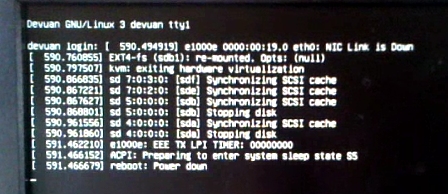
At this stage I don't know what to make of this.
Is EEE disabled or not?
If it is, why is the timer still active?
Most important, why can't the settings be queried?
Any comments would be appreciated.
Thanks in advance,
Best,
A.
#1248 Re: Installation » Linux e1000e module removal and e1000e EEE timer » 2021-04-26 22:52:14
Hello:
... posting my findings here.
No problem ...
But I'll have to continue with the rest on Part II.
You'll see why.
... you need to compile your favorite kernel version ...
Hmm ...
Thanks for the suggestion but I'll pass on that one.
I'm not confortable with having to do all that just to be able to disable this EEE crap. 8^7
Yes, I saw those links but didn't understand what was going on.
I had not done it before so I was rather apprehensive but I managed to follow the instructions and compiled the latest e1000e driver module.
Please bear with me and see the results of my efforts in PII. 8^)
Thanks a lot for your input.
Best,
A.
#1249 Installation » Linux e1000e module removal and e1000e EEE timer - Part II » 2021-04-26 11:43:51
- Altoid
- Replies: 98
Hello:
To keep all this as tidy as possible, I'm posting an update to this other post - https://dev1galaxy.org/viewtopic.php?id=4274 - as a Part II.
In any case, if the admins think it is not proper practise, please advise or edit as needed.
Update
I was not able to find a way to either query or disable any of the e1000e module's EEE settings under Devuan Beowulf.
It occurred to me that it could all be a question of kernel version* or the driver version** or maybe a combination of both.
What I was certain of is that disabling the settings was not an ethtool 4.19 problem.
The maintainer cleared that up: it is up to the e1000e driver module to support access to the settings. ie: query/modify them
I was also certain that the hardware supported EEE, the tty1 output at shutdown was clear enough.
Devuan GNU/Linux 3 devuan tty1
devuan login: [   286.719428] e1000e: eth0 NIC Link is Down
--- snip ---
[287.219230] e1000e: EEE TX LPI TIMER: 00000000              <-------------- | x |
[287.223022] ACPI: Preparing to enter sleep state S5
[287.223551] reboot: Power down
*
groucho@devuan:~$ uname -a
Linux devuan 4.19.0-16-amd64 #1 SMP Debian 4.19.181-1 (2021-03-19) x86_64 GNU/Linux
groucho@devuan:~$
**
groucho@devuan:~$ sudo modinfo e1000e
filename:       /lib/modules/4.19.0-16-amd64/kernel/drivers/net/ethernet/intel/e1000e/e1000e.ko
version:        3.2.6-k
license:        GPL
description:    Intel(R) PRO/1000 Network Driver
author:         Intel Corporation, <linux.nics@intel.com>
srcversion:     20DDE4C4246799DC195007C
--- snip ---
parm:           debug:Debug level (0=none,...,16=all) (int)
parm:           copybreak:Maximum size of packet that is copied to a new buffer on receive (uint)
parm:           TxIntDelay:Transmit Interrupt Delay (array of int)
parm:           TxAbsIntDelay:Transmit Absolute Interrupt Delay (array of int)
parm:           RxIntDelay:Receive Interrupt Delay (array of int)
parm:           RxAbsIntDelay:Receive Absolute Interrupt Delay (array of int)
parm:           InterruptThrottleRate:Interrupt Throttling Rate (array of int)
parm:           IntMode:Interrupt Mode (array of int)
parm:           SmartPowerDownEnable:Enable PHY smart power down (array of int)
parm:           KumeranLockLoss:Enable Kumeran lock loss workaround (array of int)
parm:           WriteProtectNVM:Write-protect NVM [WARNING: disabling this can lead to corrupted NVM] (array of int)
parm:           CrcStripping:Enable CRC Stripping, disable if your BMC needs the CRC (array of int)
groucho@devuan:~$
The parm: lines indicate the parameters that the driver supports.
None of them read "EEE".
I then remembered Knoppix, a live distribution I used while doing MSOSs support and recalled that it was Debian/Ubuntu based and if not rolling, was frequently updated.
I downloaded the last version, burned it to a USB drive and booted my box.
root@Microknoppix:/# uname -a
Linux Microknoppix 5.10.10-64 #3 SMP PREEMPT Sun Feb 7 09:26:54 CET 2021 x86_64 GNU/Linux
root@Microknoppix:/#
The kernel is a recent release.
root@Microknoppix:/# uname -a
Linux Microknoppix 5.10.10-64 #3 SMP PREEMPT Sun Feb 7 09:26:54 CET 2021 x86_64 GNU/Linux
root@Microknoppix:/#
The ethtool application is a newer vesion:
root@Microknoppix:/# ethtool --version
ethtool version 5.9
root@Microknoppix:/#
The driver has the same version as the kernel:
root@Microknoppix:/# ethtool -i eth0
driver: e1000e
version: 5.10.10-64
firmware-version: 1.4-0
expansion-rom-version:
bus-info: 0000:00:19.0
supports-statistics: yes
supports-test: yes
supports-eeprom-access: yes
supports-register-dump: yes
supports-priv-flags: yes
root@Microknoppix:/#
root@Microknoppix:/# modinfo e1000e
filename: /lib/modules/5.10.10-64/kernel/drivers/net/ethernet/intel/e1000e/e1000e.ko
license: GPL v2
description: Intel(R) PRO/1000 Network Driver
author: Intel Corporation, <linux.nics@intel.com>
--- snip ---
name: e1000e
vermagic: 5.10.10-64 SMP preempt mod_unload modversions
parm: debug:Debug level (0=none,...,16=all) (int)
parm: copybreak:Maximum size of packet that is copied to a new buffer on receive (uint)
parm: TxIntDelay:Transmit Interrupt Delay (array of int)
parm: TxAbsIntDelay:Transmit Absolute Interrupt Delay (array of int)
parm: RxIntDelay:Receive Interrupt Delay (array of int)
parm: RxAbsIntDelay:Receive Absolute Interrupt Delay (array of int)
parm: InterruptThrottleRate:Interrupt Throttling Rate (array of int)
parm: IntMode:Interrupt Mode (array of int)
parm: SmartPowerDownEnable:Enable PHY smart power down (array of int)
parm: KumeranLockLoss:Enable Kumeran lock loss workaround (array of int)
parm: WriteProtectNVM:Write-protect NVM [WARNING: disabling this can lead to corrupted NVM] (array of int)
parm: CrcStripping:Enable CRC Stripping, disable if your BMC needs the CRC (array of int)
root@Microknoppix:/#Like before, no parm: line reads "EEE" and as expected the results are the same:
root@Microknoppix:/# ethtool --show-eee eth0
netlink error: Operation not supported
root@Microknoppix:/# ethtool --set-eee eth0 eee off
netlink error: Operation not supported
root@Microknoppix:/#
Removing the e1000e module and reloading it via modprobe -v e1000e EEE=0 shows the same printout in dmesg as in my Devuan installation:
[ 2269.542613] e1000e 0000:00:19.0 eth0: NIC Link is Down
[ 2323.873779] e1000e: unknown parameter 'EEE' ignored     <---------- | x |
[ 2323.873850] e1000e: Intel(R) PRO/1000 Network Driver
[ 2323.873851] e1000e: Copyright(c) 1999 - 2015 Intel Corporation.
[ 2323.874042] e1000e 0000:00:19.0: Interrupt Throttling Rate (ints/sec) set to dynamic conservative mode
[ 2324.145992] e1000e 0000:00:19.0 eth0: (PCI Express:2.5GT/s:Width x1) 00:14:4f:4a:a2:81
[ 2324.146000] e1000e 0000:00:19.0 eth0: Intel(R) PRO/1000 Network Connection
[ 2324.146019] e1000e 0000:00:19.0 eth0: MAC: 7, PHY: 6, PBA No: FFFFFF-0FF
[ 2325.889280] e1000e 0000:00:19.0 eth0: NIC Link is Up 100 Mbps Full Duplex, Flow Control: None
[ 2325.889388] e1000e 0000:00:19.0 eth0: 10/100 speed: disabling TSO
I tried the same thing with an OpenSUSE-Leap-15.2 live *iso and the results were the same.
I then concluded that I could rule out the kernel version as being the problem.
And (at least) in the more up to date versions of the e1000e driver module used by the Knoppix and OpenSUSE distributions.
I thought that there had to be some Linux distribution that used the e1000e module and at the same time had the capacity to disable EEE.
And I found it: a distribution used for bitcoin mining.
Makes sense that it would avoid this EEE crap.
I downloaded the first one I found, HiveOS, burned it to a USB drive, booted and ... 8^D !!!
Test results
Kernel version
root@worker:/home# uname -a
Linux worker 5.4.0-hiveos #108.hiveos.210325 SMP Thu Mar 25 04:39:49 UTC 2021 x86_64 x86_64 x86_64 GNU/Linux
root@worker:/home#
Kernel command line
root@worker:/home# dmesg
[    0.000000] Command line: BOOT_IMAGE=/boot/vmlinuz-5.4.0-hiveos root=UUID=b4b60f60-cd34-49c7-859b-53f802e8659c ro text consoleblank=0 intel_pstate=disable net.ifnames=0 ipv6.disable=1 pci=noaer iommu=soft usbcore.autosuspend=-1 radeon.si_support=0 radeon.cik_support=0 amdgpu.vm_fragment_size=9 amdgpu.si_support=1 amdgpu.cik_support=1 amdgpu.ppfeaturemask=0xffff7fff amdgpu.runpm=0 amdgpu.gpu_recovery=0 noibrs noibpb nopti nospectre_v2 nospectre_v1 l1tf=off nospec_store_bypass_disable no_stf_barrier mds=off mitigations=off e1000e.EEE=0
--- snip ---
root@worker:/home#
As you can see, HiveOS loads the e1000e driver using the EEE=0 stanza in the kernel command line.
With no problem in dmesg save the out-of-tree module line.
root@worker:/home#
--- snip ---
[    1.821812] e1000e: loading out-of-tree module taints kernel.       <------- | x |
[    1.822046] e1000e: module verification failed: signature and/or required key missing - tainting kernel
[    1.823561] e1000e: Intel(R) PRO/1000 Network Driver - 3.8.4-NAPI
[    1.823614] e1000e: Copyright(c) 1999 - 2020 Intel Corporation.
[    1.823867] e1000e 0000:00:19.0: Interrupt Throttling Rate (ints/sec) set to dynamic conservative mode
--- snip ---
[    2.145475] e1000e 0000:00:19.0 eth0: (PCI Express:2.5GT/s:Width x1) 00:14:4f:4a:a2:81
[    2.145540] e1000e 0000:00:19.0 eth0: Intel(R) PRO/1000 Network Connection
[    2.145620] e1000e 0000:00:19.0 eth0: MAC: 7, PHY: 6, PBA No: FFFFFF-0FF
--- snip ---
[   36.150189] e1000e 0000:00:19.0 eth0: NIC Link is Up 100 Mbps Full Duplex, Flow Control: None
[   36.150294] e1000e 0000:00:19.0 eth0: 10/100 speed: disabling TSO
--- snip ---
root@worker:/home#
Removing and reloading the module shows no issues in dmesg:
root@worker:/home# rmmod -v e1000e
root@worker:/home# modprobe -v e1000e
insmod /lib/modules/5.4.0-hiveos/kernel/drivers/net/ethernet/intel/e1000e/e1000e.ko EEE=0
root@worker:/home#
root@worker:/home# dmesg
--- snip ---
[ 663.578746] e1000e 0000:00:19.0 eth0: NIC Link is Down
[ 685.379847] e1000e: Intel(R) PRO/1000 Network Driver - 3.8.4-NAPI
[ 685.379848] e1000e: Copyright(c) 1999 - 2020 Intel Corporation.
[ 685.380029] e1000e 0000:00:19.0: Interrupt Throttling Rate (ints/sec) set to dynamic conservative mode
[ 685.699455] e1000e 0000:00:19.0 eth0: (PCI Express:2.5GT/s:Width x1) 00:14:4f:4a:a2:81
[ 685.699456] e1000e 0000:00:19.0 eth0: Intel(R) PRO/1000 Network Connection
[ 685.699480] e1000e 0000:00:19.0 eth0: MAC: 7, PHY: 6, PBA No: FFFFFF-0FF
[ 699.595711] e1000e 0000:00:19.0 eth0: NIC Link is Up 100 Mbps Full Duplex, Flow Control: None
[ 699.595817] e1000e 0000:00:19.0 eth0: 10/100 speed: disabling TSO
root@worker:/home#Driver module version
root@worker:/home# ethtool -i e1000e
driver: e1000e
version: 3.8.4-NAPI
firmware-version: 1.4-0
expansion-rom-version:
bus-info: 0000:00:19.0
supports-statistics: yes
supports-test: yes
supports-eeprom-access: yes
supports-register-dump: yes
supports-priv-flags: no
root@worker:/home#
Driver module parameters
root@worker:/home# modinfo e1000e
filename:       /lib/modules/5.4.0-hiveos/kernel/drivers/net/ethernet/intel/e1000e/e1000e.ko
version:        3.8.4-NAPI
license:        GPL
description:    Intel(R) PRO/1000 Network Driver
author:         Intel Corporation, <linux.nics@intel.com>
srcversion:     559F545E49324123D9302EF
--- snip ---
depends:        ptp
retpoline:      Y
name:           e1000e
vermagic:       5.4.0-hiveos SMP mod_unload
parm:           copybreak:Maximum size of packet that is copied to a new buffer on receive (uint)
parm:           TxIntDelay:Transmit Interrupt Delay (array of int)
parm:           TxAbsIntDelay:Transmit Absolute Interrupt Delay (array of int)
parm:           RxIntDelay:Receive Interrupt Delay (array of int)
parm:           RxAbsIntDelay:Receive Absolute Interrupt Delay (array of int)
parm:           InterruptThrottleRate:Interrupt Throttling Rate (array of int)
parm:           IntMode:Interrupt Mode (array of int)
parm:           SmartPowerDownEnable:Enable PHY smart power down (array of int)
parm:           KumeranLockLoss:Enable Kumeran lock loss workaround (array of int)
parm:           CrcStripping:Enable CRC Stripping, disable if your BMC needs the CRC (array of int)
parm:           EEE:Enable/disable on parts that support the feature (array of int)         <----- | x |
parm:           Node:[ROUTING] Node to allocate memory on, default -1 (array of int)
parm:           debug:Debug level (0=none,...,16=all) (int)
root@worker:/home#
Note the parm: line for EEE.
But not everything is right, it seems that this driver does not support ethtool querying EEE settings either:
root@worker:/# ethtool --show-eee eth0
Cannot get EEE settings: Operation not supported
root@worker:/#
root@worker:/# ethtool --set-eee eth0 eee off
Cannot get EEE settings: Operation not supported
root@worker:/#
So ...
How do I know that it has really been disabled if I cannot query the module's EEE status?
Conclusion:
It is evident that the e1000e module used in Debian (and consequently in Devuan) is not compiled to support getting and setting EEE parameters via the ethtool application.
I have no idea as to why this is so: it could be an oversight, after all the hardware is probably EOL.
Or it could be another one of those 'systemd' type decisions.
eg: "EEE is very good for both you and the environment. Why would you want to disable it? Tsk, tsk ... Can't let you do that."
Question:
It would seem that it is just a question of compiling the driver with the right flags or configuration options.
But I don't have a clue as to how to go about that and getting it to work in my Beowulf installation.
And not wreak havoc while at it.
I'd appreciate opinions and insight on what to do and how.
Would an email to whoever is in charge of the e1000e module at Debian HQ be of any effect?
Thanks in advance,
A.
#1250 Re: Installation » Modules, modprobe(.d) and kernel command line » 2021-04-23 21:51:49
Hello:
Check
# ethtool --show-eee eth0
Yes, I'm aware than it is not supported in every NIC.
But if in this box I get this ...
groucho@devuan:~$ sudo ethtool --show-eee eth0
[sudo] password for groucho:
Cannot get EEE settings: Operation not supported
groucho@devuan:~$
... while at the same time, at every instance of a bad shutdown I get this:
Devuan GNU/Linux 3 devuan tty1
devuan login: [   286.719428] e1000e: eth0 NIC Link is Down
--- snip ---
[287.219230] e1000e: EEE TX LPI TIMER: 00000000              <-------------- | x |
[287.223022] ACPI: Preparing to enter sleep state S5
[287.223551] reboot: Power down
... it is clear (to me) that this is a NIC that does support EEE.
At the same time, access to both the EEE status and settings via ethtool is disabled in the e1000e driver.
But I think I am (?) getting somewhere:
I now tried this:
[root@devuan groucho]# echo "options e1000e SmartPowerDownEnable=0" | sudo tee /etc/modprobe.d/e1000e.confgroucho@devuan:~$ cat /etc/modprobe.d/e1000e.conf
options e1000e SmartPowerDownEnable=0
groucho@devuan:~$ An update-initramfs -u -k all and a reboot later ...
groucho@devuan:~$ sudo dmesg | grep e1000e
--- snip ---
[    2.147204] e1000e: Intel(R) PRO/1000 Network Driver - 3.2.6-k
[    2.158309] e1000e: Copyright(c) 1999 - 2015 Intel Corporation.
[    2.169606] e1000e 0000:00:19.0: Interrupt Throttling Rate (ints/sec) set to dynamic conservative mode
[    2.180672] e1000e 0000:00:19.0: PHY Smart Power Down Disabled           <-----  | x |
[    2.603166] e1000e 0000:00:19.0 eth0: (PCI Express:2.5GT/s:Width x1) 00:14:4f:4a:a2:81
[    2.616729] e1000e 0000:00:19.0 eth0: Intel(R) PRO/1000 Network Connection
[    2.637607] e1000e 0000:00:19.0 eth0: MAC: 7, PHY: 6, PBA No: FFFFFF-0FF
[   27.495860] e1000e: eth0 NIC Link is Up 100 Mbps Full Duplex, Flow Control: None
[   27.507904] e1000e 0000:00:19.0 eth0: 10/100 speed: disabling TSO
--- snip ---
groucho@devuan:~$
The tty1 on a plain sudo shutdown -h now instead the one I've been using sync && sudo ethtool -s eth0 wol d && sudo rmmod -s -v e1000e && sudo shutdown -h now shows no trace of the EEE TX LPI TIMER: 00000000 (have to check with a video grab)*.
If that is so, I'll start using the plain unedited shutdown script I was using ie: sync && sudo shutdown -h now and wait to see if I get another bad shutdown.
Hopefully, I won't. 8^/
* Unfortunately, I can confirm that disabling SmartPowerDownEnable does not do much with/to EEE.
The tty1 output when shutting down with sync && sudo shutdown -h now shows the line e1000e: EEE TX LPI TIMER: 00000000, which unless I am mistaken, is telling me that EEE is still active.
Which is precisely what I want to avoid. 8^7
Devuan GNU/Linux 3 devuan tty1
devuan login: [        ] e1000e: eth0 NIC Link is Down
[        ] EXT-fs (sdb1): re-mounted. Opts: (null)
[        ] kvm: exiting hardware virtualization
[        ] sd 7:0:3:0: [sdf] Syncronizing SCSI cache
[        ] sd 7:0:2:0: [sde] Syncronizing SCSI cache
[        ] sd 5:0:0:0: [sdb] Syncronizing SCSI cache
[        ] sd 5:0:0:0: [sdb] Stopping disk
[        ] sd 4:0:0:0: [sda] Syncronizing SCSI cache
[        ] sd 4:0:0:0: [sda] Stopping disk
[        ] e1000e: EEE TX LPI TIMER: 00000000    <--------- | x |
[        ] ACPI: Preparing to enter sleep state S5
[        ] reboot: Power down
Thanks for your input.
Best,
A.
Board footer
