
You are not logged in.
- Topics: Active | Unanswered
#1226 Re: Installation » Beowulf installer broken? » 2021-11-18 16:42:23
the question remains, why only the Beowulf would make this error?
The error is almost certainly caused by your motherboard's UEFI firmware. I've seen *many* cases of defective firmware in the various forums I visit, the manufacturers seem to be farming the job out to the lowest bidders with the quality that entails.
#1227 Re: Other Issues » [SOLVED] Problems with a Seagate portable drive » 2021-11-18 16:40:12
I agree with Altoid. I think the drive may be dying.
You can try a SMART test but perhaps ddrescue would be better to just recover any data.
#1228 Re: Installation » Beowulf installer broken? » 2021-11-18 07:19:24
The grub> prompt indicated that either GRUB cannot find the configuration file or that the configuration file does not have any menuentry stanzas.
Use this command from the prompt to find where it is looking for the file:
setYou're looking for the configfile parameter, which will be given relative to the root device (defined elsewhere in the list).
Once you know the location you can check the file.
If this is a UEFI system then use this command from any live ISO image to check the boot entries:
efibootmgr -uvEDIT: that GRUB version is from ASCII (or Debian buster) so you're probably booting from an old boot entry. Change the boot order with efibootmgr's -o option; see the man page for details.
#1229 Re: Other Issues » [SOLVED] Problems with a Seagate portable drive » 2021-11-18 07:14:35
It is already "read and write".
Confirm this for yourself with this sequence of commands:
sudo -i
mount /dev/sdc1 /mnt
touch /mnt/test
ls /mnt
The last command should show the test file created on the device.
Clean up afterwards:
umount /mnt
exit
So presuming that worked (if it didn't please post the full, verbatim error messages here) then the question now is what exactly do you want to do with the drive? What have you tried to do and how did it fail, exactly? Again, please post the full, verbatim command(s) used along with any error messages. Thanks.
#1230 Re: Other Issues » [SOLVED] Problems with a Seagate portable drive » 2021-11-17 16:42:26
KERNEL[1390.625690] add      /devices/pci0000:00/0000:00:14.0/usb2/2-5/2-5:1.0/host6/target6:0:0/6:0:0:0/block/sdc (block)
KERNEL[1390.625768] add      /devices/pci0000:00/0000:00:14.0/usb2/2-5/2-5:1.0/host6/target6:0:0/6:0:0:0/block/sdc/sdc1 (block)
KERNEL[1390.627859] bind     /devices/pci0000:00/0000:00:14.0/usb2/2-5/2-5:1.0/host6/target6:0:0/6:0:0:0 (scsi)
UDEV  [1390.812088] add      /devices/pci0000:00/0000:00:14.0/usb2/2-5/2-5:1.0/host6/target6:0:0/6:0:0:0/block/sdc (block)
UDEV  [1391.023795] add      /devices/pci0000:00/0000:00:14.0/usb2/2-5/2-5:1.0/host6/target6:0:0/6:0:0:0/block/sdc/sdc1 (block)
UDEV  [1391.024599] bind     /devices/pci0000:00/0000:00:14.0/usb2/2-5/2-5:1.0/host6/target6:0:0/6:0:0:0 (scsi)
KERNEL[1391.169704] change   /devices/pci0000:00/0000:00:14.0/usb2/2-5/2-5:1.0/host6/target6:0:0/6:0:0:0/block/sdc/sdc1 (block)
UDEV  [1391.234629] change   /devices/pci0000:00/0000:00:14.0/usb2/2-5/2-5:1.0/host6/target6:0:0/6:0:0:0/block/sdc/sdc1 (block)
So this shows that the drive has been detected as a storage device and assigned to /dev/sdc; it has one partition. Any read errors would show up there so I think it's functional.
nothing happened until I put sudo before the command, then the following came up
Sorry Ron, that's my fault. I put the # symbol in front of the command to indicate it should be run as root (a habit I've picked up from the Arch forums) but you shouldn't enter the # symbol when you type it in because it acts as a comment and stops the shell from reading the rest of the command.
So you should type
sudo hdparm -r /dev/sdcAnd remember: nobody was born knowing this stuff and we're all learning. The only reason I'm comfortable with the command line is because I started out on a Sinclair ZX-81 and that didn't have any GUIs.
#1231 Re: Off-topic » Show your desktop (rebooted) » 2021-11-16 15:45:23
"X" is owned by root
Oh dear, that's unfortunate. What the **** is the point of running "OpenBSD's X" if it's owned by root? Devuan manages to run X under the normal user without systemd thanks to elogind so it's a real shame Hyperbola haven't considered that.
I thought gnome 40-whatever was the love of your life?
I vacillate between sway & GNOME depending on whether I've checked pstree recently or not.
#1232 Re: Other Issues » [SOLVED] Problems with a Seagate portable drive » 2021-11-16 15:10:36
Before you plug the drive open up a terminal and run this command (as root):
udevadm monitorThen plug the drive in and post any new output that appears. Thanks.
Can we also see
# hdparm -r /dev/sdXReplace X with the letter assigned to the drive.
Note that permissions are defined by the mountpoint. There are no permissions until the drive is mounted.
#1233 Re: Off-topic » Show your desktop (rebooted) » 2021-11-16 15:02:09
Your 'ps' command did not produce any output for me, either as root or as normal user.
Oh dear, that's a shame. I did test it in Arch though and it works for me 
How about htop? Which user does that show owns X?
I do not have haveged installed. It's in the repos, but it's also in the Arch and Debian repos, so that doesn't mean much. Are you talking about the live image compression?
Yes, haveged is installed and enabled in the live image but it's a stupid hack. Replacing /dev/random with a symlink to /dev/urandom is the correct solution to entropy "blocking".
# /etc/udev/rules.d/99-urandom.rules
KERNEL=="urandom", PROGRAM+="/bin/rm -f /dev/random", SYMLINK+="random"
Anyway, back on topic with my Debian bullseye sway desktop:

#1234 Re: Off-topic » Show your desktop (rebooted) » 2021-11-15 16:51:04
Uses the openBSD "xenocara" version of xorg
It runs X chrooted under a special _x11 user? Can we see proof of that?
ps -o user= -C XorgTIA
EDIT: trying to answer myself but their live image is console only. And it uses haveged, which is a stupid decision and makes me worry about their competence.
EDIT2: context for my haveged comment: https://www.2uo.de/myths-about-urandom/
#1235 Re: Installation » Problem with updating the repositories » 2021-11-14 11:34:53
http://dev1galaxy.org/viewtopic.php?pid=32737
@OP: please search the boards before posting...
#1236 Re: Off-topic » Anyone know how to compile firefox from source from Devuan? » 2021-11-13 21:28:56
I am familiar with Arch packaging. My instructions in post #9 should work.
See https://wiki.archlinux.org/title/Arch_B … _using_Git for a quick way to checkout the Firefox PKGBUILD from the Arch repositories.
#1237 Re: Off-topic » Anyone know how to compile firefox from source from Devuan? » 2021-11-13 21:17:57
You won't be able to run a Devuan binary in Hyperbola. The ABI will be different and the sonames won't match.
#1238 Re: Hardware & System Configuration » [SOLVED] What is wrong with chimaera and network » 2021-11-13 20:52:26
The machine is a desktop with no wireless hardware or button.
Oops, sorry. I will learn to read one day...
the trouble started after I woke up the machine from hibernation
Is that reproducible? If so what do the logs say?
#1239 Re: Off-topic » Anyone know how to compile firefox from source from Devuan? » 2021-11-13 20:50:26
Is there any chance we could avoid full-quoting unnecessarily? It's making the thread harder to follow (IMO).
which mozconfig, etc.. to modify to add my changes
Look in the debian directory inside the firefox-esr source, the browser.mozconfig.in file is the one you want.
#1240 Re: Off-topic » Anyone know how to compile firefox from source from Devuan? » 2021-11-13 20:40:12
[how the hell do I get the ./mach build to use the mozconfig changes I made?
Follow the instructions on the BLFS page to which I linked.
Or just add a line to the PKGBUILD prepare() function and run makepkg -sri to build and install the custom package if you're doing this from Hyperbola.
#1241 Re: Hardware & System Configuration » [SOLVED] What is wrong with chimaera and network » 2021-11-13 20:18:42
I think Ralph wanted you to check for any other enabled networking services. The easiest way to do this is
# apt install sysv-rc-conf
# sysv-rc-conf
^ The second command will list all services and their state.
I'm pretty sure that NetworkManager, connman & wicd all check /etc/network/interfaces{,.d/*} and will ignore any interfaces listed there but it doesn't hurt to check and disable the services.
Your networking problem could have been caused by rfkill (is there a wireless button on your machine?) or possibly an over-zealous power saving mode for the wireless driver. The logs should show exactly what happened.
#1242 Re: Installation » How to have updated firefox-esr in Chimaera? » 2021-11-13 19:57:57
is this an issue with Chromium as well?
Oh no, the chromium problem is *much* worse because Google don't offer an LTS version and Debian really can't keep up with the steady stream of new vulnerabilities:
https://security-tracker.debian.org/tra … e/chromium
But hey, the big G offers a Chrome .deb that should be compatible with Devuan. The telemetry for that makes FF looks like a paragon of privacy but you know that, right?
EDIT: god I love shitposting. It's so exhilarating 
#1243 Re: Off-topic » Show your desktop (rebooted) » 2021-11-13 14:15:05
^ Thanks Andy, I may just do that...
Back on topic:
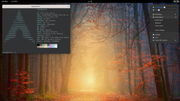
Joining Nili in the GNOME fanboi club. What a desktop. I love it :-)
#1244 Re: Hardware & System Configuration » [SOLVED] What is wrong with chimaera and network » 2021-11-13 13:11:09
If Ralph's suggestion doesn't fix things for you then please post the output of
# ifup --verbose eth0#1245 Re: Off-topic » Anyone know how to compile firefox from source from Devuan? » 2021-11-13 13:08:42
The .js preferences files work with any version of FF. You don't have to compile a custom version to use them.
#1246 Re: Off-topic » Anyone know how to compile firefox from source from Devuan? » 2021-11-13 01:41:30
Add the preferences to a file at /usr/lib/firefox/browser/defaults/user.js
Here's OpenBSD's version for inspiration: https://github.com/openbsd/ports/blob/m … openbsd.js
#1247 Re: Installation » How to have updated firefox-esr in Chimaera? » 2021-11-13 00:58:34
I haven't bothered checking the Debian mailing lists but I suspect they may update both Mesa and rustc to allow FF to be brought up to date. I certainly hope so anyway. Debian update the FF package in violation of the "stable release" principle already because they realise how important it is.
#1248 Re: Off-topic » Anyone know how to compile firefox from source from Devuan? » 2021-11-12 23:50:03
Never tried this myself but Arch PKGBUILDs are good for checking this sort of thing, the prepare() function lists the steps and it looks like the option can be added to mozconfig file like this:
ac_add_options --disable-dbusBut it's probably best to build a modified package from the Debian source:
apt source firefox-esrThen edit debian/browser.mozconfig.in and build the package (debuild -us -uc).
Good luck though. Are you sure you have enough RAM & disk space to build it? If not you could upload the source tarball, debian directory tarball and .dsc file to the openSUSE Build Service and let that build it for you. They only offer Debian repositories but it should be compatible.
EDIT: BLFS says it needs 5.2GiB of disk space and will take 28 SBU (on a four core machine).
#1249 Re: Installation » How to have updated firefox-esr in Chimaera? » 2021-11-12 10:25:50
The ESR version is the repositories is no longer supported by Mozilla and the new version is blocked by Mesa & rust:
https://tracker.debian.org/pkg/firefox-esr
https://bugs.debian.org/cgi-bin/bugrepo … bug=998679
Just download the tarball from Mozilla and live with the added telemetry. It's the only way to be secure online.
#1250 Re: Other Issues » bind mounts show up on MATE desktop » 2021-11-12 10:17:19
Does this help?
Board footer
