
You are not logged in.
- Topics: Active | Unanswered
#851 Re: Desktop and Multimedia » (Partially solved) Lightdm not working right in Excalibur » 2025-03-12 02:58:14
No syslinux dummy package, just syslinux and syslinux-common, no dummy syslinux package listed in the repo. Just have what I had before the upgrade.
To be clear i'm talking about the installed system, not a live-iso, haven't tried to snapshot one yet due to this issue.
Have tried multiple recommended fixes from searches i've done but no luck yet. Hope to get this figured out, it's so far the only real bug in this mini-system, everything else seems to be working really well.
#852 Re: Desktop and Multimedia » (Partially solved) Lightdm not working right in Excalibur » 2025-03-11 18:41:34
Contents of lightdm.log:
[+0.02s] DEBUG: Logging to /var/log/lightdm/lightdm.log
[+0.02s] DEBUG: Starting Light Display Manager 1.32.0, UID=0 PID=1608
[+0.02s] DEBUG: Loading configuration dirs from /usr/share/lightdm/lightdm.conf.d
[+0.02s] DEBUG: Loading configuration from /usr/share/lightdm/lightdm.conf.d/01_debian.conf
[+0.02s] DEBUG: Loading configuration dirs from /usr/local/share/lightdm/lightdm.conf.d
[+0.02s] DEBUG: Loading configuration dirs from /etc/xdg/lightdm/lightdm.conf.d
[+0.02s] DEBUG: Loading configuration from /etc/lightdm/lightdm.conf
[+0.02s] DEBUG: Registered seat module local
[+0.02s] DEBUG: Registered seat module xremote
[+0.02s] DEBUG: Using D-Bus name org.freedesktop.DisplayManager
[+0.55s] DEBUG: _g_io_module_get_default: Found default implementation local (GLocalVfs) for ‘gio-vfs’
[+0.56s] DEBUG: Monitoring logind for seats
[+0.56s] DEBUG: Acquired bus name org.freedesktop.DisplayManager
[+0.56s] DEBUG: Could not run plymouth --ping: Failed to execute child process “plymouth” (No such file or directory)
[+2.12s] DEBUG: Loading users from org.freedesktop.Accounts
[+2.12s] DEBUG: User /org/freedesktop/Accounts/User1000 added
[+146.72s] DEBUG: Seat seat0 changes active session to 1
[+2833.11s] DEBUG: Seat seat0 changes active session to
[+2833.39s] DEBUG: Got signal 15 from process 4930
[+2833.39s] DEBUG: Caught Terminated signal, shutting down
[+2833.39s] DEBUG: Stopping display manager
[+2833.39s] DEBUG: Display manager stopped
[+2833.39s] DEBUG: Stopping daemon
[+2833.40s] DEBUG: Exiting with return value 0#853 Desktop and Multimedia » (Partially solved) Lightdm not working right in Excalibur » 2025-03-11 16:01:42
- greenjeans
- Replies: 10
So yeah, I know the fact that it's still testing is likely to be the issue and may not be quite fixable, but taking a shot here. It's only a few days before the first soft freeze now, so testing season is almost upon us and I wanted to whip up a test iso to get ahead of it.
Procedure for reference:
Clean install of the Devuan-mate-mini I did not long ago, just vanilla Devuan with Mate desktop.
Updates, a dozen or so, new kernel, install, reboot.
Install usrmerge. Reboot.
Change sources.list to Excalibur, open Synaptic and reload, mark all upgrades, apply.
Check lightdm.conf to make sure it's set to autologin user. When done, reboot.
Upon reboot into the new kernel/system, instead of desktop, it throws me into console tty1, username/password and startx gets me into desktop no problem. But rebooting or just trying to logout user, throws me back into console, no lightdm graphical interface at all.
Watching boot sequence, it clearly says "starting lightdm" every time. Once i'm in after using startx, services --status-all shows that lightdm is indeed there and enabled and running.
Any ideas where to start trying to troubleshoot this one?
ETA: Other than that, everything seems to be working fine, even seems a little snappier to me, kinda mind-blowing because it replaced literally every package in the old system.
#854 Re: Hardware & System Configuration » [SOLVED] apt install: So where did it go? » 2025-03-07 23:23:38
I added the heif-gdk-pixbuf and the thumbnailer packages (in Mate) and now Caja shows thumbnails properly, and I can view the image in Gpicview but not in the Eye-of-Mate image viewer.
I take that back, after a reboot the Eye-of-Mate image viewer is now displaying them as well.
No joy though for thumbnails in PCmanFM....got the packages installed and the pixbuf package specifically says in it's description "for programs like gpicview and PcmanFM". Gpicview no problem though, so that's good.
Finding some people online that claim it works for them though, and others like me it doesn't, looks like another puzzle to solve.
#855 Re: Hardware & System Configuration » [SOLVED] apt install: So where did it go? » 2025-03-07 19:18:25
File-managers pretty much all have a way to add custom right-click extensions, usually using a .desktop connected to a command or script.
The below script works to re-size but also to convert to .jpg when you right-click an image. If you just want conversion and no re-sizing, just enter the dimensions of the original in the box. If you'd rather have things converted to .png just alter the script. Just tested this on an .heif file and worked fine.
#!/bin/sh

sizebox=$(yad --fixed --window-icon=image --form --title="Resize Image" --field="Resize to:" --width=400 --text-align=center --text="Enter new size (W x H in pixels, i.e. 800x600, 1024x768 etc.)")

size=$(echo $sizebox | awk 'BEGIN {FS="|" } { print $1 }')

convert "$1" -resize "$size" -set filename:copy '%t-%wx%h' '%[filename:copy].jpg'#856 Re: Hardware & System Configuration » [SOLVED] apt install: So where did it go? » 2025-03-07 18:56:21
Can confirm both methods above work, GIMP export or Imagemagick in terminal.
Imagemagick doesn't list it as a supported file-type, but it works in terminal and file-manager right-click re-sizes that use the imagemagick backend also work perfectly for re-sizing.
I added the heif-gdk-pixbuf and the thumbnailer packages (in Mate) and now Caja shows thumbnails properly, and I can view the image in Gpicview but not in the Eye-of-Mate image viewer.
#857 Re: Devuan Derivatives » Vuu-do Linux! *New Openbox-64 iso's (1.0.7) up 2-02-18*!! » 2025-03-07 05:09:33
Updated Vuu-do mate-mini-z uploaded, been about a month and a number of important updates, plus some
tweaks to the menu and some theme fixes. Also some extensive cosmetic changes to a couple of programs.
#858 Re: Devuan Derivatives » [SOLVED] Announcing Movuan » 2025-03-04 18:42:44
Thanks greenjeans - I think I know how to workaround their challenge (it checks the exact computer time/timezone but if that is set as they expect it, it works further with Firefox). However I need a few days off to muster some new energy before I can actually take a look at other projects.
Oh no, you misunderstand me, I wasn't suggesting a workaround so you could look at my silly stuff, was suggesting a way for you to be able to host your Movuan images on sourceforge, as it's free and you get a large amount of storage.
#859 Re: Off-topic » Show your desktop (rebooted) » 2025-03-04 16:00:48
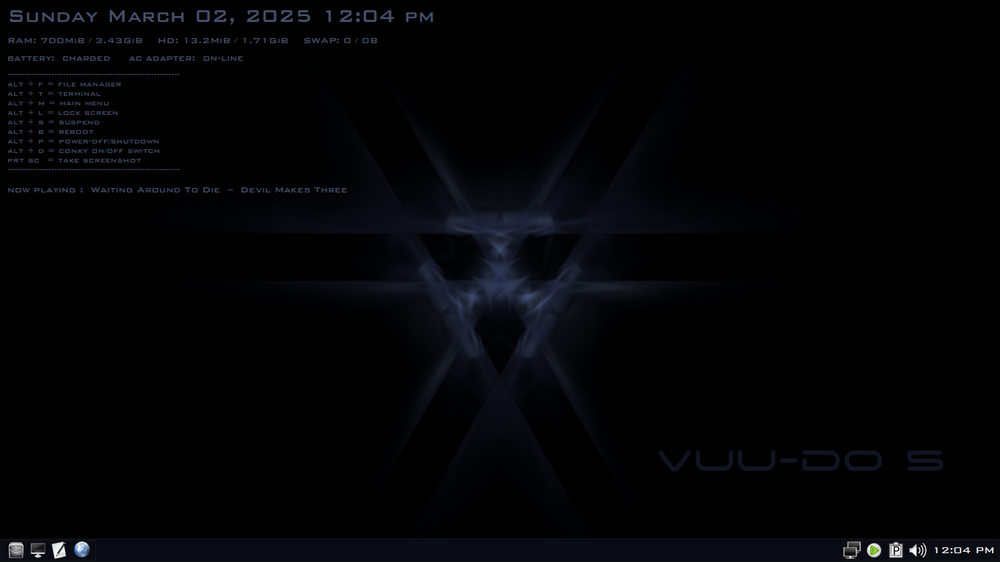
Had the blues the other day....
Image is a thumbnail, click for fullsize.
#860 Re: Installation » [SOLVED] Unable to install Daedalus » 2025-03-03 20:37:40
@rolfie : Refracta2usb is your friend. 
Though I do wish I could find a way to make it use the onboard isolinux in an iso instead of having to add syslinux on top of that.
Mintstick works perfectly with Daedalus too.
#861 Re: Devuan Derivatives » [SOLVED] Announcing Movuan » 2025-03-03 20:27:52
For the moment sourceforge.net through their use of cloudflare.com considers me subhuman.... hmmmmm...
Arrgh...I hate that stupid cloudflare challenge, it's buggy too and can be picky about what browser you're using, have seen multiple instances of it failing repeatedly and tons of complaints from folks. They must be singling out other countries with it right now, as i'm not getting it when I log-in to sourceforge.
If you can't access it but would like some of your images available there, i'd be happy to help in any way I could, can set up another project under my account with your name and content on it if nothing else.
#862 Re: Installation » [SOLVED] Unable to install Daedalus » 2025-03-02 16:42:28
@RedGreen925 They have blanks for sale at most big box stores, I picked up CD's and DVD's recently at walmart. Also found a pack of 10 DVD's at a secondhand store for .99 cents a couple weeks ago.
I have CD's and DVD's I burned going all the way back to 2007 that work fine, just need to store properly and be careful when using. I like having a non-electronic backup for my work and important stuff. Have worked with electronics all my life, and seen too much fail to put all my faith in such.
#863 Re: Devuan Derivatives » Vuu-do Linux! *New Openbox-64 iso's (1.0.7) up 2-02-18*!! » 2025-03-02 04:35:04
Any chance I could get my entry at https://www.devuan.org/os/devuan-distros updated? Have had new versions based on current daedalus stable up for a couple months now. 
Still have the Jessie versions up though, those are classics from the early days, gotta keep those up.
#864 Re: Installation » [SOLVED] Unable to install Daedalus » 2025-03-02 04:27:20
And yet again we see the superiority of the optical disk, as it never fails.
#865 Re: Devuan Derivatives » [SOLVED] Announcing Movuan » 2025-03-01 19:58:41
More choices are always good, welcome to the forum!
#866 Re: Freedom Hacks » ALSA without PulseAudio and PipeWire » 2025-03-01 00:41:44
You won't have sounds on firefox, do you ?
I don't use the OP's method to run pure alsa, but I can attest that FF works for me just fine with nothing but alsa. All the browsers i've tested do.
#867 Re: Devuan Derivatives » Vuu-do Linux! *New Openbox-64 iso's (1.0.7) up 2-02-18*!! » 2025-03-01 00:33:04
Updated iso's of the 5.03 ob-max-z and ob-mini-z uploaded just now. Security updates and I cleaned up some code and did some minor adjusting, nothing major but it's been a few weeks for the mini and the openssh update seemed pretty important for both.
#868 Re: Freedom Hacks » Switching to GTK2 from GTK3 on Post-Beowulf Devuan Releases » 2025-02-28 18:07:12
For me, I still have fully functional ISO's of pure Jessie that are all GTK2, archive repo is still available but I have everything I want already, the only program that needed a modern version to work properly was the browser, so I use an appimage of FF. No frankensteining needed.
#869 Re: Installation » [SOLVED] Unable to install Daedalus » 2025-02-28 17:55:29
There is also Mintstick available in the repo if you'd like a simple GUI method. It's worked well for me over 100 times now and never failed.
Drawback: It will by default use the whole stick, but you can use gnome-disks utility afterwards to create other partitions on the stick.
For multiple ISO's/Live stuff on the same stick and/or adding persistence, refracta2usb is what I use.
For netinstall ISO's I usually burn it to a CD and use that, simple and bulletproof, but newer machines seem to have given up on optical drives.
#870 Re: Off-topic » The Joke Thread » 2025-02-26 23:23:55
Has devuan become a joke?
Microsoft, Apple, and Devuan walk into a bar.
Bartender: "We have a special today on our super secret house specialty drink, like to try it?"
They all agree to try it. Bartender walks up to a huge machine with all kinds of dials and switches, flips a bunch of them, then punches in a code. Then brings them their drinks.
Microsoft: "We would like to buy the recipe for this drink, but you must sign an agreement never to disclose the recipe".
Apple: "We would like to buy the recipe AND the machine but you must sign a binding agreement to never give it to anyone else".
Devuan: "Why are you using a recipe or a machine? It's a friggin' gin & tonic, I can totally make you another one if you want".
#871 Re: Devuan Derivatives » Vuu-do Linux! *New Openbox-64 iso's (1.0.7) up 2-02-18*!! » 2025-02-25 20:31:24
QT update going off my last post, QT6 can now be handled with qt6gtk2 in the exact same fashion as the qt5-gtk2-platformtheme works for QT5, in fact the .xsessionrc export command in the file in user's home doesn't even need to change, they'll work side-by-side for qt5 and qt6 apps.
Only app being stubborn is Calibre, and it has some artifacts and weird behavior, every other qt6 app works fine, and all qt5 apps work great.
qt6gtk2 packages can be found here: https://software.opensuse.org//download … ge=qt6gtk2
.xsessionrc : export QT_QPA_PLATFORMTHEME=gtk2
#872 Re: DIY » Announcement of the OpenMATE desktop environment » 2025-02-21 02:31:53
No offense and the thing to remember is that everyone's tastes are different, but spacefm has been awful in every version i've tried, vanilla PcmanFM is better in every way.
"Power-users" are a very small minority of the computer-users world-wide. And if you are among that minority, then you have the capacity to build yourself whatever works for you. I suggest you do that.
For most folks, the whole "workspaces" thing is completely wasted. As for myself that's the first thing I delete. I don't need 2 panels, much less 4, that's the second thing I delete.
I've converted hundreds of former windoze users to Linux now, and every single one of them preferred a familiar simple interface, one panel at the bottom of the screen, no "workspaces", simple menu, easy and intuitive for people who don't live to code.
Gnome-2 and Mate were that bridge for a lot of people myself included.
#873 Re: DIY » Announcement of the OpenMATE desktop environment » 2025-02-20 19:03:08
Beware of gnome brand trademarks...
This for sure. The goblins devs at gnome are not exactly known for their tolerance of others or sense of humor.
Personally I wouldn't want their name on anything I did.
#874 Re: Devuan Derivatives » Vuu-do Linux! *New Openbox-64 iso's (1.0.7) up 2-02-18*!! » 2025-02-16 23:40:33
New update of the ob-max-z uploaded today, minor security upgrades and Chromium updated.
Added qt5-gtk2-platformtheme package and an .xsessionrc file with an entry that makes
VLC (and any other apps that use QT5) abide by the chosen GTK theme. Working on doing the same
for QT6 apps.
#875 Re: Devuan Derivatives » Vuu-do Linux! *New Openbox-64 iso's (1.0.7) up 2-02-18*!! » 2025-02-13 17:02:22
Thank you so much! It really means a lot, I don't get a lot of feedback from my experiments and am always wondering if it's working out for folks who try it.
It's a lot of work, but very gratifying in the end and a great learning experience. But all credit really goes to the Dev team at Devuan, I have found over time that regardless of any upstream shenanigans, they still somehow manage to keep it sane and stable, so much so that even guys like me with a keyboard and too much time on their hands can't screw it up too badly, lol.
Board footer
