
You are not logged in.
- Topics: Active | Unanswered
#3401 Forum Feedback » Discussion on possible new spam control » 2017-01-25 01:37:52
- golinux
- Replies: 10
UPDATE: The mod requiring answers to questions worked for a while but now the bots are finding us again.  The best solution I can think of to deal with the bots is to require account activation. A new group with no posting privileges would contain all new registrations. An admin could then delete the bot accounts and move 'legitimate' accounts to the members group. This is distasteful because it is a type of censorship. But it's something I can live with and as the primary 'unverified' bot hunter, would be grateful for.
Chanku and I would appreciate feedback from all of you before we consider implementing this change. So please share your thoughts why you think this is or is not a good solution. Perhaps some of you can come up with some better ideas.
golinux
#3402 Re: Documentation » Setting Root Terminal Icon in XFCE4 panel2 and window list » 2017-01-24 15:54:37
I can't remember if the root terminal icons weren't in sync between the menu and the panel when I set up my desktop but they are now. I might have changed it in the panel preferences, certainly never via command in the terminal. I change icons all the time in the panel by clicking on properties > edit > icon (just browse to the one you want to use). Done.
#3403 Re: Hardware & System Configuration » Sleep button doesn't work » 2017-01-18 18:23:14
I just posted a quick how-to on the sleep button fix over in the Documentation section. If you get a chance to look at it, please et me know if you think it needs anything...
Very nice! Thanks for taking the time to write it up.
#3404 Re: Hardware & System Configuration » Sleep button doesn't work » 2017-01-18 17:18:35
I will write it up soon and post in Documentation. If nothing else, you can have endless fun making the 'special buttons' do whatever you want...
Well, I won't be doing that but there are others who might want to. 
Yes, I'd be interested in learning something about all that systemd junk...
Here are the first few nibbles. Probably more to come as I pinged jaromil, nextime and Centurion_Dan . . .
<KatolaZ> golinux: those should be systemd-related scripts installed by other packages
<muep> it is usually harmless for a package to ship a config file for something that is not installed
<golinux> muep: If a package is not installed, why would related config files be sucked in for a non-existent purpose?
<muep> golinux: because packages include those files for the cases where they are installed alongside the thing that does not happen to be present
<muep> and because devuan is using debian packages as-is where they are suitable
<KatolaZ> golinux: and because we should not make the same mistake that all the distros have done
<KatolaZ> i.e., making it impossible to use anything else
<KatolaZ> if a package has scripts for runit or openrc or systemd, why should we remove them?
<KatolaZ> those script will never be executed if runit, openrc, or systemd is not installed
The conversation continues here on botbot.
#3405 Re: Hardware & System Configuration » Sleep button doesn't work » 2017-01-18 16:40:24
I was able to whip up a simple acpi event catcher and script to have the sleep button work.
Perhaps you could share your fix in Documentation?
I did notice, in my poking around, that there is a lot of systemd stuff in /etc/systemd/system, /lib/systemd, and /var/lib/systemd. What's that all about? Or did it get sucked in by something I installed maybe?
I also have these components installed and found it 'disturbing'. That question has been asked before - maybe by me - but I can't remember the answer. LOL! I'll throw it up on #devuan and see who bites . . .
#3406 Re: Hardware & System Configuration » Sleep button doesn't work » 2017-01-18 03:07:13
Do you have upower installed? That used to be the solution but may not be going forward. There is history in the botbot logs.
#3407 Re: Hardware & System Configuration » Sleep button doesn't work » 2017-01-18 02:41:32
Does suspend work from the logout menu?
#3408 Re: Desktop and Multimedia » [solved] XFCE icon labels » 2017-01-18 02:39:53
Is there an easy way for me to have the (beta2) XFCE desktop icon labels text in black?
Just a vanilla installation with everything default.
You'll need to create a .gtkrc-2.0 file in your user directory. Here's an example. Pick and choose the parts you want:
style "xfdesktop-icon-view" {

    XfdesktopIconVIew::cell-spacing = 6
    XfdesktopIconView::cell-padding = 6
    XfdesktopIconView::cell-text-width-proportion = 2.5

    XfdesktopIconView::label-alpha = 0
	XfdesktopIconView::selected-label-alpha = 0

    base[NORMAL] = "#626D31"
    base[SELECTED] = "#A0A985"
    base[ACTIVE] = "#A0A985"

    fg[NORMAL] = "#ffffff"
    fg[SELECTED] = "#DDDFD3"
    fg[ACTIVE] = "#DDDFD3"
}

widget_class "*XfdesktopIconView*" style "xfdesktop-icon-view"
There is some additional Xfce Desktop related info in this post.
(and I think whoever made the "white" kernel colour be gray should have a separate talking-to)
I have no idea what your talking about . . . I didn't know a kernel had a color!! LOL!
#3409 Re: Forum Feedback » Congratulations on a good move! » 2017-01-15 15:37:17
. . . they said there was to be no other init system, but they saw people leaving, & so capitulated, to 'allow' other init systems . . .
I predict that other init systems won't be 'allowed' for much longer . . .
#3410 Re: Forum Feedback » Congratulations on a good move! » 2017-01-14 21:59:27
Thank you fanderal and welcome! It's a little quiet here. Maybe because happy Devuan users ether don't have problems or know how to fix them on their own. Those of us who have gathered here prefer a simple and understandable format. In your words . . . no need to "reinvent the forum wheel". Exactly!!
#3411 Documentation » Taming Xfce 4.10 Desktop tooltips » 2017-01-14 16:45:48
- golinux
- Replies: 0
Here are some tips about how to deal with the humongous tooltips that popup on the xfce 4.10 desktop icons. They are incredibly annoying and distracting. There used to be an option in Settings > Desktop > Icons to toggle "Show icon tooltips" on/off but it has disappeared from xfce 4.10. I was told that option is returning in xfce 4.12.
If you want to disable ALL tooltips add this line to ~/.gtkrc-2.0. Note: Users have noted some problems with this method:
gtk-enable-tooltips = 0If you want to keep tooltips functional, here's how to at least reduce the footprint of the desktop icon tooltips by eliminating the image in the tooltip. This also goes in ~/.gtkrc-2.0. No side effect here but YMMV:
style "xfdesktop-icon-view" {
    XfdesktopIconView::tooltip-size = 0
}
widget_class "*XfdesktopIconView*" style "xfdesktop-icon-view"
Note that if you are using the Clearlooks-Phenix-Purpy theme, this fix to match the purpy wallpaper is already included there:
style "xfdesktop-icon-view" {
XfdesktopIconView::label-alpha = 0
XfdesktopIconView::selected-label-alpha = 0
XfdesktopIconView::tooltip-size = 0
base[NORMAL] = "#000000"
base[SELECTED] = "#94928d"
base[ACTIVE] = "#b5b3ac"
fg[NORMAL] = "#ffffff"
fg[SELECTED] = "#ffffff"
fg[ACTIVE] = "#ffffff" }

# xfce4 stuff
widget_class "*XfdesktopIconView*" style "xfdesktop-icon-view"
This is a revised 'reprint' of this post to the dng list:
https://lists.dyne.org/lurker/message/2 … 84.en.html
#3412 News & Announcements » Signatures have been disabled » 2017-01-12 03:20:09
- golinux
- Replies: 1
Spammers have started to find us again. To make this forum less desirable, signatures have been disabled.
#3413 Re: Other Issues » Missing Virtual Packages » 2017-01-04 02:44:49
If there was a question there, I missed it!
Editing to provide this context from #devuan yesterday:
<Fervi> we need to create virtual package "dbus-session-bus" i think
<Centurion_Dan> Fervi: no we don't. Use dbus-x11
<Fervi> but xfconf require dbus-session-bus, that require dbus-x11. We should add dbus-session-bus or change dependency in xfconf to directly use dbus-x11
<Centurion_Dan> Fervi: ok. I'll fix the dbus package in the next couple of days.
#3414 Re: Forum Feedback » Glad to see this forum. » 2017-01-02 01:22:56
Welcome, norb! And thanks for the report on your successful Devuan upgrade and the kind words. See you 'round!
#3415 Re: Desktop and Multimedia » LXDE user upgrades to Devuan Jessie » 2017-01-01 14:37:54
gksu works just fine. 
#3416 Re: Forum Feedback » SEO / URLs » 2016-12-28 04:07:08
@bobemoe: Well, you're just trying to improve the forum. No apologies needed for that. I'll let Chanku sort it out - backend so isn't my thing . . .
#3417 Re: Forum Feedback » SEO / URLs » 2016-12-27 03:50:18
http://forums.debian.net does not have keywords added to the URLs and it does just fine. In fact, I've never seen that done on a forum. But blogs do often add titles to the URL . . .
#3418 Re: Devuan Derivatives » [MiyoLinux] 64bit only - Update Notifier Icon missing. » 2016-12-26 22:51:09
golinux wrote:Does Clearlooks-Phenix-Purpy play nicely (or at all) with MiyoLinux ?
golinux,
After further consideration, I thought you might appreciate a visual to see your Purpy theme on MiyoLinux.
For the screenshot, I Purpy-ized MiyoLinux to show how it works in widgets, window borders, and the menu; however, instead of using the Mate icons that were included with the update, I used Fabo-Mono...I thought their purple shade might blend in well with your Purpy theme. Just click the image to enlarge it.
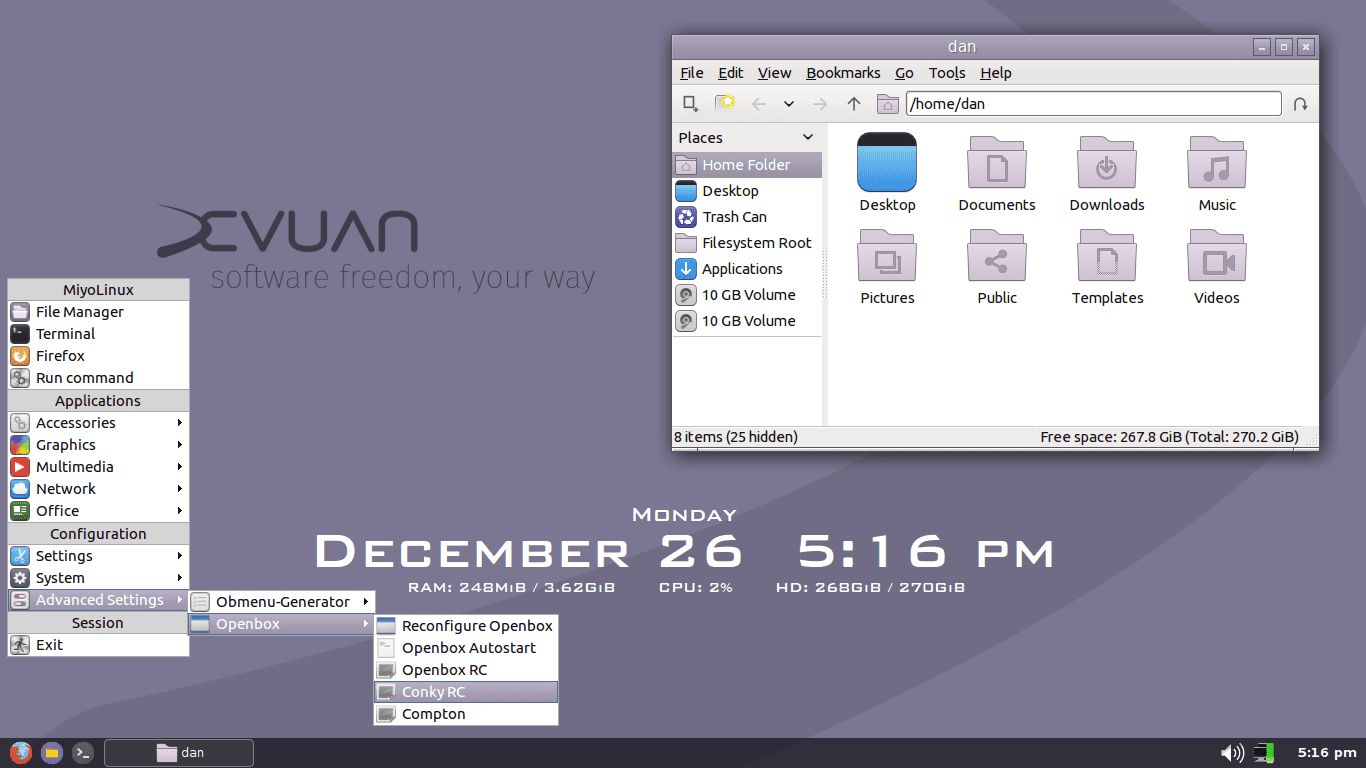
Thank you for this! Yes, it is nice and purpy now. Good to hear that the Mate icons were default. Where can I dl the "Fabo-Mono" icon set? Not one hit on google for it. I would like to recolor them to a more compatible hue (currently too pink and those bright blue ones would have to go). That would give users another option. Was the DMZ (white) mouse icon theme also default? Cheers for all your excellent contributions!
#3419 Re: Installation » How to downgrade from unstable to testing ... » 2016-12-26 17:35:37
It won't be empty once you add the pinning information. Why on earth would you be running ceres when you have to ask basic questions like in this thread? Maybe you should stick to stable . . .
(Note that I have never had to pin a package so can't confirm if the above info is correct.)
#3420 Re: Devuan Derivatives » [MiyoLinux] 64bit only - Update Notifier Icon missing. » 2016-12-24 17:00:18
Just noticed that with the most recent update, the Devuan "Purpy" theme and Mate icons are included.
Oh, thanks for posting that. Centurion_Dan was working on the packaging for desktop-base but I haven't see a default install yet. Does Clearlooks-Phenix-Purpy play nicely (or at all) with MiyoLinux ? And . . . I don't know if MiyoLinux uses slim but if yes, that should now be purpy too.
#3422 DIY » Resource for DIYers » 2016-12-21 16:51:08
- golinux
- Replies: 0
Steve Litt is a tinkerer extraordinaire. His Linux experiments and experiences are collected on the troubleshooters.com website. His init discussions are relevant to Devuan's future. More reading there than I'll ever be able to get around to!!
#3423 Re: Devuan Derivatives » List of Devuan derivatives » 2016-12-21 14:33:15
Here's the link to figos. It hasn't been posted in the list because there is not one mention of Devuan on that page and Puppy/Refracta seems a little too far afield.
#3424 Re: Desktop and Multimedia » LXDE user upgrades to Devuan Jessie » 2016-12-20 17:19:51
OK. I missed that subtlety. FWIW, I have both consolekit and upower installed.
#3425 Re: Forum Feedback » Auto-logout » 2016-12-20 17:13:11
I wonder whether we can use the preview button as a sort of save/keep me logged in facility?
Geoff
Trying right now. Started this 3 hours ago and left it sitting. Preview just refreshed properly. Let's try to post!
Well, it worked here. Don't know whether being an admin had anything to do with it. Anyone else want to give it a try?
Board footer
