
You are not logged in.
- Topics: Active | Unanswered
#476 Re: DIY » Does anyone here use Mintstick for making livUSB's? Need testers. » 2025-07-01 16:59:06
Pulling this off the back-burner as it's bugging me, I use this script all the time and it works great for non-efi iso's, but now want to re-visit it to try and make it work with the extra partition created when using an efi iso. Does anyone know of a small simple hybrid-iso of some thing I can use for testing? No Crunchbang++ please, something really wrong wih those things.
#477 Re: Hardware & System Configuration » Transfering an OS from HD to SSD » 2025-07-01 14:48:38
^^Good advice, I regularly backup my stuff using Refracta Snapshot, that way I have a complete simple turnkey way of re-installing everything.
#478 Re: DIY » Working on a new app, the learning curve continues... » 2025-07-01 14:44:57
^^^I think Barry has done some other stuff previously using Devuan IIRC, but yeah I always figured Devuan would appeal to him and the Puppy folks. I used Puppy a lot back in the day, so I know a lot of the crew.
Back on topic, my wife sat down last night to test the app for me, and despite the fact that she's a very experienced user of some 16 years like me, she still wanted the .deb to install on her own machine, as she found some useful info in there, specifically Calibre, she didn't know that you could use it to download rss feeds and convert them into e-book format.
#479 Re: Off-topic » To shell or not to shell everything ? » 2025-07-01 01:49:33
^^^Great post, you're a pretty erudite dude RRQ.
#480 Re: Desktop and Multimedia » noCSD for GTK4 » 2025-07-01 01:47:14
Unfortunately the result is not what I hoped for, the Ubuntu sourced gtk3-nocsd packages simply remove the CSD (i.e. the program icon on the left and the three windowbar icons on the right) but the SSD doesn't get added, Does anyone know what needs to be done to add the SSD?
It seems like it ought to be simple, I opened the gnome-disk-utility with GTK inspector, and was able to disable the CSD with some CSS, that program is still using gtk3 but is using libhandy to do the CSD I guess, I tried adding the CSS override and running the program normally but no joy. That program at least still has the SSD applied, but of course looks silly with two sets of min/max/close buttons. The GTK4 programs i've tried somehow throw the SSD completely out the window. I'm seriously considering forking some of them if I can, nuke 'em from orbit, it's the only way to be sure.
#481 Re: DIY » Working on a new app, the learning curve continues... » 2025-06-30 23:18:10
Thanks Glenn! The thing is the package managers do have this info, at least in Synaptic, the descriptions in the app are the same ones you'd see if you opened Synaptic and went through your list of installed applications. This is just a quick and easy way to view just the apps that need explaining without having to wade through some 1200-2000 listings of all installed packages in Synaptic.
The idea is, when I convert someone to Linux, I always query them about what kinds of apps they need/want, and I roll them up a custom iso with everything they need already installed, but to a new user all the new names may be confusing, so rather than use Synaptic or open each and every program one by one, they can just click this and get a quick explanation. Obviously after that if folks install new programs from Synaptic they'll read the description there with no need really to re-run the app scraper as they chose those programs and already read the info. So after a time once they get used to using their new apps, this program will be obsoleted, but no biggie, I think it's a handy little reference to help them get up to speed quickly.
#482 Re: DIY » Working on a new app, the learning curve continues... » 2025-06-30 17:52:28
Updated the OP, app done and packaged and uploaded! Would love it if some of you kind folks might test it out!
https://sourceforge.net/projects/vuu-do … -App-Info/
You'll need to have yad installed as well as imagemagick.
#483 Re: Desktop and Multimedia » noCSD for GTK4 » 2025-06-30 17:50:09
(deleted by me, I let myself fall victim to a troll, sorry to the OP and others for posts that have nothing to do with the topic)
#484 Re: Desktop and Multimedia » noCSD for GTK4 » 2025-06-30 16:37:52
(deleted by me)
#485 Re: Desktop and Multimedia » noCSD for GTK4 » 2025-06-30 15:28:53
(deleted by me)
#486 Re: Desktop and Multimedia » noCSD for GTK4 » 2025-06-30 14:32:11
(deleted by me)
#487 Re: DIY » Working on a new app, the learning curve continues... » 2025-06-30 02:06:36
Now working on doing yet another thing I haven't done before, making this into a .deb package...*sigh* looks like another day ahead of trial-and-error. lol.
#488 Re: Desktop and Multimedia » noCSD for GTK4 » 2025-06-30 00:18:56
@tux_99, Dude! That's hot stuff, nice find!! Exactly the kind of thing we need. 
#489 Re: DIY » Working on a new app, the learning curve continues... » 2025-06-30 00:15:06
Right now, I smell like VICTORY! Smell it! Smell my victory!!
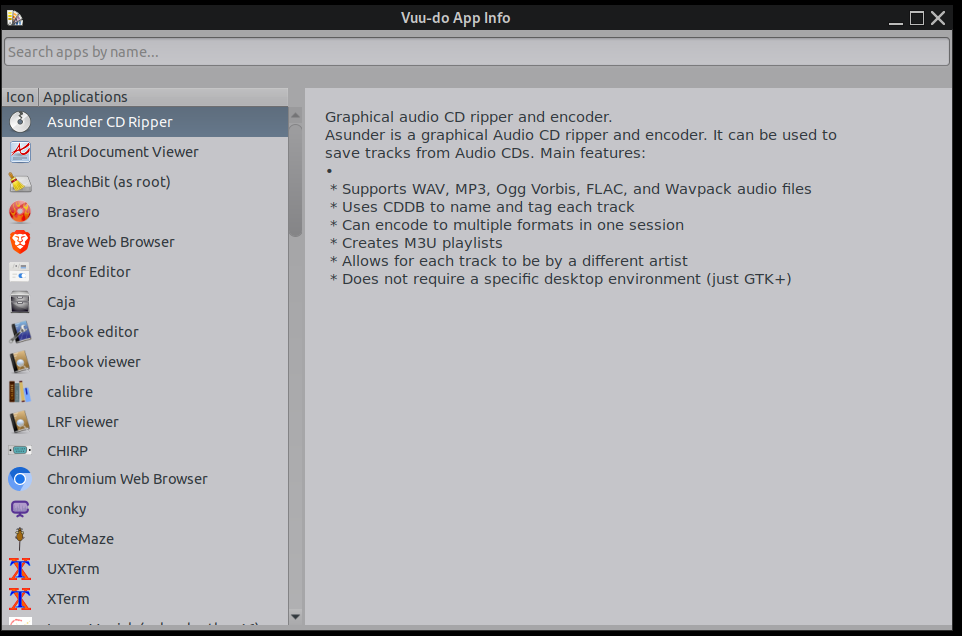
BOOM! *mic drop* This puppy is DONE! My first ever stand-alone application with a real GUI, and man what a learning experience!
Time to go after bigger projects now, I have it in mind to fork the crap out of the gnome-disk-utility, get rid of the bullshit CSD and fix their failure to properly wipe empty space before creating secondary partitions.
I'll post the final scripts here in a bit, kinda wiped out right now and popping the top on a cold one to take a victory lap.
Thank you Devuan and Dev1galaxy and all it's users for making my education possible! Beers for everyone!
#490 Re: Desktop and Multimedia » [SOLVED] HDMI - no sound output; microphone - no sound input » 2025-06-29 17:52:28
^^^For sure, it's been junk since the get-go.
Last time I installed Devuan and chose Mate in the software section, it automatically included pulseaudio. Really IMO no "sound server" should be included on install of any DE, but at the least Devuan ought to de-couple pulseaudio from the Mate metapackage and at least use pipewire instead.
Me I never run anything but pure alsa. Works just fine.
#491 Re: DIY » Working on a new app, the learning curve continues... » 2025-06-29 16:35:48
Thanks so much for testing and posting! Interesting that you tired it on excalibur, the whole thing is built on a daedalus system, have not tested it in my own excalibur setups. Glad you figured out the libgtk3-dev package, I did mention it earlier in the thread but should ave included that as part of the install tutorial. I should have also mentioned that the scraper also creates a debug log which i'm leaving in for now until I get this thing fully tested.
Yeah the calls to dpkg would not have been necessary at all if all applications followed a simple naming convention across the board, i.e same name of the .desktop, the app itself, it's excecutable, and the name of the package itself. As I mentioned before many of these apps have one or more of those factors different than the others, in the case of some apps like the gnome-disk-utility all four were completely different, it took some hella pattern matching to get those to show up and slowed the scraper waaaaaay down.
And packages like Calibre that own multiple .desktops (in calibre's case 4 total), will currently all show the main description of calibre itself.
I tried last night to implement one of the tweaks I want to do, adding a yad progress dialog and an "all done" dialog when it finished, which should have been a piece of cake as I work with yad dialogs in shellscripts all the time, but my first attempt when I ran it caused some kind of looping error that caused the debug log to fill up rapidly way over what it should have been and not stopping! Lol. that's when I decided my brain was too tired and just going to screw up further so I shut it down for the night. But i'll get that worked out hopefully today.
My two other goals are to add icons to the left pane in front of the app names similar to the way it looks in the main menu, pain in the butt to do using the same types of parsing/matching/scraping i'm doing now, but I have an idea about using the cached icons that should already be present in ~/.cache.
Last one is implementing something to speed up the scraper, still pondering how to do that.
All this code is rough as hell, but by golly I got it to a place of good basic functionality, been one heck of a learning experience, which was the primary goal in the first place, so i'm happy. 
ETA: Got the dialogs working now! Simple visual verification that something is happening, and when it's finished.
#492 Re: Installation » How to Install XLibre on Devuan Daedalus (MATE)? » 2025-06-29 04:09:22
^^^FFS just stop, we're all in this together. Lets focus on creating something new and better instead of bitching and arguing.
#493 Re: DIY » Working on a new app, the learning curve continues... » 2025-06-29 03:48:14
It would be great if somebody was willing to test what I have so far. I am posting the latest scripts but first you need to create the folder ~/.local/share/vai and drop all these scripts in there and drop the .desktop file into ~/.local/share/applications, and here is the order i'm posting them:
EDIT: The below scripts have been changed a lot and are now obsolete.
#494 Re: DIY » Working on a new app, the learning curve continues... » 2025-06-29 02:52:03
Winning! Thumbnailing this screenie, I should really have done it for the others:

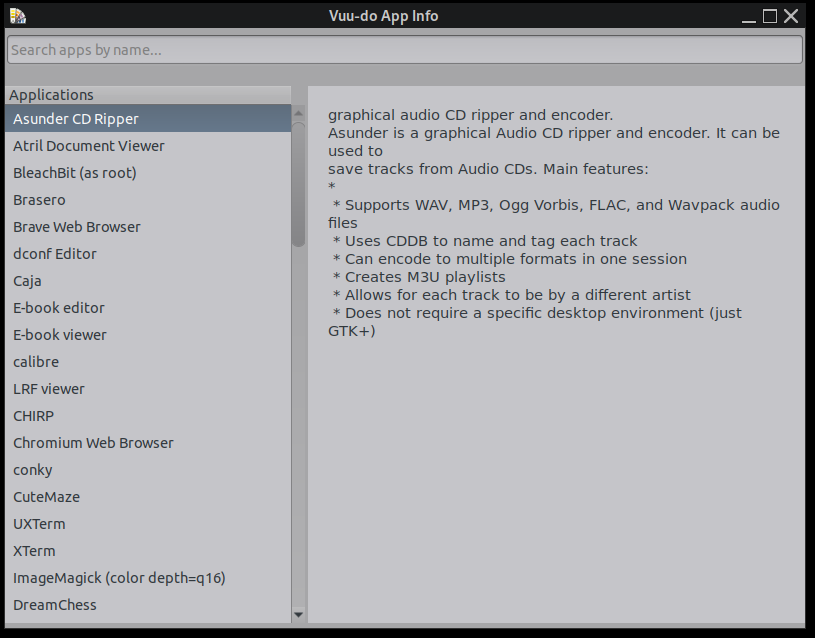
Tons of work but I figured out the word-wrap issue, bullet points etc. Had to also do some functions to fix the first line of the description in /var/lib/dpkg/status, most don't caplitalize the first letter of the first word and none of them add a a period at the end of it. Whole buncha little things like that took a lot of time to sort out, but i'm pretty tickled about where it's at now, got some things to do still though.
Check out that formatting now!
#495 Re: DIY » Working on a new app, the learning curve continues... » 2025-06-28 16:09:31
Dang it's so close now, after messing with it for a long time yesterday I finally got some formatting going on in the description field, some paragraph separation and bullet points properly listed, but it wrecked the word wrap function for some reason I don't know yet. Still it's progress! You can see both the success in formatting and the fail in word wrap here:
#496 Re: Installation » How to Install XLibre on Devuan Daedalus (MATE)? » 2025-06-28 14:06:51
Please keep off-topic stuff down in the off-topic section. Unless of course it's funny as hell like "Xlibre ate my ram".
#497 Re: Off-topic » GNOME is taking the scum bag approach still... » 2025-06-28 14:02:11
Greenjeans <<old school egalitarian, contrarian, wordsmith
"Woke" as a pejorative. In the first place not only do people use this word in a grammatically incorrect way, they have co-opted the very meaning and used it in a slangy, illiterate manner.
So is it any wonder that other people choose to co-opt the meaning themselves and use it in a grammatically incorrect way i.e. as a pejorative?
I encourage folks to get off the internet any time it starts making you angry, and go read a book, maybe watch a nature show on TV, go for a walk in the woods, go fishing, do something that re-connects you to the REAL world.
Politics is out of control, and a whole of lot of evil people have sown deep divisions in this world, the only way we win is not through violence and harsh language, but by refusing to play their games. By being kind and tolerant of each other.
#498 Re: DIY » Thumbnail caching script for PcmanFM » 2025-06-27 21:37:46
Thanks! It should work for anything, I have only tested it with Openbox/PcmanFM and Mate/Caja so far but it's totally agnostic so should work with any file manager/DE.
#499 Re: DIY » Thumbnail caching script for PcmanFM » 2025-06-27 21:23:03
Please note the dependencies, they are all available in the repo except for the libjxl packages which are not in the repo, but are made by the same author and the version 0.11.1 is made specifically for daedalus/bookworm, and can be found here: https://github.com/libjxl/libjxl/releases?page=1
This is the one you're looking for: jxl-debs-amd64-debian-bookworm-v0.11.1.tar.gz
Extract and these are the three you want to install (2 if you don't use GIMP):
libjxl_0.11.1_amd64.deb
libjxl-gdk-pixbuf_0.11.1_amd64.deb
libjxl-gimp-plugin_0.11.1_amd64.deb
#500 DIY » Thumbnail caching script for PcmanFM » 2025-06-27 21:11:38
- greenjeans
- Replies: 3
So I don't think I ever posted the completed script for this, i'm ridiculously proud of this as it's very useful (to me at least) and it's the first complex script that I actually made work in Python. The issue it helps with is defined somewhat in my loooong comments in the script, it's a really strange one and I have it narrowed down pretty much in the source code right where they screwed up, but my bug report has sadly gone unnoticed and I don't quite have the chops to fix it myself, yet. So I made a band-aid.
Issue is the setting in PcmanFM preferences for thumbnailing does NOT do what it says it does, it actually controls caching of thumbnails, and that would be fine but unfortunately it also has a weird effect upon thumbnailing which in turn affects caching too. At any setting below about 4.2 mb it randomly refuses to thumbnail and cache image files of various sizes, it's very arbitrary and occurs quite a bit at the factory setting of 2 mb, lower or raise it just a bit from that, and a whole different batch of files refuses to thumbnail/cache. But up above 4.2 mb and it will properly thumbnail all image and video files and properly cache anything over that 4.2 mb size.
Which is better than refusing completely, but still means as you add images nothing under that level will get cached, and if you have an image-heavy folder with lots of them under that size then every time you return to that folder it has to re-thumbnail all the images which takes a lot of time and is very frustrating to workflow. So I made this script which catches all images/vidoes in your home folder, checks to see if it has a thumbnail cached and if not it creates one for images/videos 100k and up. I have it set to run once at login, but also a menu entry so I can refresh it at any time if I add a lot of images under that 4.2 mb size.
It's fast and works seamlessly, I used parallel-processing too to speed it up quite a bit, default is to use up to 4 processes but if you have a 16 core machine you can adjust that to use more. And adjust lower limit for caching and thumbnail size. Anyhoo, maybe somebody can use it, if you use PcmanFM you should definitely try it.
#!/usr/bin/env python3

# This script creates and caches thumbnails of image/video files.
# It sweeps the user's home folder only (excluding hidden files), checking the
# status of image and video files for cached thumbnails, if needed it creates
# new thumbnails and adds them to the thumbnail cache in ~/.cache.
# Intended use is for PcmanFM, to assist in generating a proper thumbnail cache.
# It can be set to run once at boot/login, and/or used with a menu entry to
# create an updated cache file at any time.

# PcmanFM will continue to generate the cached thumbnails for images larger than
# 4.2 mb on-the-fly per the default setting in Vuu-do, at 4.2 mb or higher the
# thumbnail setting in PcmanFM works (mostly), any lower and you start losing
# thumbnails of arbitrary sizes randomly for some reason, this script catches the
# smaller stuff and anything else, albeit not on-the-fly which would be optimal,
# but even just running this once at boot helps a LOT.

# Copyleft: greenjeans 2025, use as you see fit. https://sourceforge.net/projects/vuu-do/
# Version: 1.02 - adds support for .jxl format.
# This is free software with no warranty, use at your own risk.
# Depends: python3, python3-pil, the gdk-pixbuf, heif, and ffmpeg thumbnailers,
# libjxl and libjxl-gdk-pixbuf version 0.11.1 or higher.

import os
import subprocess
import hashlib
import urllib.parse
import mimetypes
import time
from pathlib import Path
import logging
from PIL import Image
import PIL.PngImagePlugin
from multiprocessing import Pool, cpu_count

# Set up logging. Logs/errors in ~/.xsession-errors.
logging.basicConfig(level=logging.INFO, format='%(asctime)s - %(levelname)s - %(message)s')
logger = logging.getLogger(__name__)

# Configuration. Svg, webp, and jxl files are handled now by gdk-pixbuf-thumbnailer.
# Image/heic must be defined here in addition to image/heif.
HOME = str(Path.home())
CACHE_DIR = os.path.join(HOME, '.cache', 'thumbnails', 'normal')
MIN_FILE_SIZE = 100 * 1024  # 100 KB in bytes, everything above this size gets thumbnailed/cached. (edit to change)
THUMBNAIL_SIZE = 128  # Normal size per XDG spec. (edit to change)
THUMBNAILERS = {
    'image/png': ['gdk-pixbuf-thumbnailer', '-s', str(THUMBNAIL_SIZE), '{input}', '{output}'],
    'image/jpeg': ['gdk-pixbuf-thumbnailer', '-s', str(THUMBNAIL_SIZE), '{input}', '{output}'],
    'image/gif': ['gdk-pixbuf-thumbnailer', '-s', str(THUMBNAIL_SIZE), '{input}', '{output}'],
    'image/jxl': ['gdk-pixbuf-thumbnailer', '-s', str(THUMBNAIL_SIZE), '{input}', '{output}'],
    'image/heif': ['heif-thumbnailer', '{input}', '{output}'],
    'image/heic': ['heif-thumbnailer', '{input}', '{output}'],
    'image/avif': ['heif-thumbnailer', '{input}', '{output}'],
    'image/webp': ['gdk-pixbuf-thumbnailer', '-s', str(THUMBNAIL_SIZE), '{input}', '{output}'],
    'image/svg+xml': ['gdk-pixbuf-thumbnailer', '-s', str(THUMBNAIL_SIZE), '{input}', '{output}'],
    'video/mp4': ['ffmpegthumbnailer', '-i', '{input}', '-o', '{output}', '-s', str(THUMBNAIL_SIZE), '-t', '10'],
    'video/mpeg': ['ffmpegthumbnailer', '-i', '{input}', '-o', '{output}', '-s', str(THUMBNAIL_SIZE), '-t', '10'],
    'video/x-matroska': ['ffmpegthumbnailer', '-i', '{input}', '-o', '{output}', '-s', str(THUMBNAIL_SIZE), '-t', '10'],
}

# EXTENSIONS must be defined below in lowercase for case-insensitive matching.
EXTENSIONS = {'.png', '.jpg', '.jpeg', '.gif', '.heic', '.heif', '.avif', '.webp', '.svg', '.mp4', '.mpeg', '.mpg', '.mkv', '.jxl'}

def ensure_cache_dir():
    """Ensure the thumbnail cache directory exists."""
    os.makedirs(CACHE_DIR, exist_ok=True)
    logger.info(f"Thumbnail cache directory: {CACHE_DIR}")

def get_thumbnail_path(file_path):
    """Generate the thumbnail filename per XDG spec (MD5 of file URI)."""
    file_uri = f"file://{urllib.parse.quote(file_path)}"
    thumb_hash = hashlib.md5(file_uri.encode('utf-8')).hexdigest()
    return os.path.join(CACHE_DIR, f"{thumb_hash}.png")

def add_png_metadata(thumb_path, file_path, mtime):
    """Add XDG-required metadata to the PNG thumbnail."""
    try:
        img = Image.open(thumb_path)
        metadata = PIL.PngImagePlugin.PngInfo()
        file_uri = f"file://{urllib.parse.quote(file_path)}"
        metadata.add_text("Thumb::URI", file_uri)
        metadata.add_text("Thumb::MTime", str(int(mtime)))
        img.save(thumb_path, "PNG", pnginfo=metadata)
        logger.debug(f"Added metadata to {thumb_path}")
    except Exception as e:
        logger.error(f"Failed to add metadata to {thumb_path}: {e}")

def generate_thumbnail(file_path, thumb_path):
    """Generate a thumbnail using the appropriate thumbnailer."""
    mime_type, _ = mimetypes.guess_type(file_path)
    if not mime_type or mime_type not in THUMBNAILERS:
        logger.warning(f"No thumbnailer for MIME type {mime_type or 'unknown'} ({file_path})")
        return False

    cmd = [arg.format(input=file_path, output=thumb_path) for arg in THUMBNAILERS[mime_type]]
    try:
        subprocess.run(cmd, check=True, capture_output=True)
        logger.debug(f"Generated thumbnail for {file_path}")
        return True
    except subprocess.CalledProcessError as e:
        logger.error(f"Thumbnailer failed for {file_path}: {e}")
        return False

def needs_update(file_path, thumb_path):
    """Check if the thumbnail needs to be updated."""
    if not os.path.exists(thumb_path):
        return True
    file_mtime = os.path.getmtime(file_path)
    try:
        img = Image.open(thumb_path)
        metadata_mtime = img.info.get('Thumb::MTime')
        if metadata_mtime and int(metadata_mtime) == int(file_mtime):
            return False
        return True
    except Exception as e:
        logger.warning(f"Invalid thumbnail {thumb_path}: {e}")
        return True

def generate_thumbnail_worker(args):
    """Worker function for multiprocessing to generate a thumbnail for a single file."""
    file_path, thumb_path = args
    try:
        if generate_thumbnail(file_path, thumb_path):
            add_png_metadata(thumb_path, file_path, os.path.getmtime(file_path))
            logger.info(f"Generated thumbnail for {file_path}")
            return True
        else:
            logger.warning(f"Failed to generate thumbnail for {file_path}")
            return False
    except Exception as e:
        logger.error(f"Error processing {file_path}: {e}")
        return False

def scan_and_cache():
    """Scan home directory and generate/update thumbnails using multiprocessing."""
    ensure_cache_dir()
    file_count = 0
    thumb_count = 0
    tasks = []

    # Collect all files that need thumbnailing, excluding hidden files, symlinks, and unreadables.
    for root, dirs, files in os.walk(HOME, topdown=True, followlinks=False):
        dirs[:] = [d for d in dirs if not d.startswith('.')]
        for fname in files:
            if not any(fname.lower().endswith(ext) for ext in EXTENSIONS):
                continue
            file_path = os.path.join(root, fname)
            try:
                if os.path.getsize(file_path) < MIN_FILE_SIZE:
                    logger.debug(f"Skipping {file_path} (size < {MIN_FILE_SIZE} bytes)")
                    continue
                thumb_path = get_thumbnail_path(file_path)
                file_count += 1
                if needs_update(file_path, thumb_path):
                    tasks.append((file_path, thumb_path))
                else:
                    logger.debug(f"Thumbnail up-to-date for {file_path}")
            except OSError as e:
                logger.warning(f"Skipping {file_path}: {e}")
                continue

    # Process tasks in parallel, default setting is to use up to 4 processes, this can be changed if needed.
    if tasks:
        num_processes = min(cpu_count(), 4)
        logger.info(f"Generating {len(tasks)} thumbnails using {num_processes} processes")
        pool = Pool(processes=num_processes)
        try:
             results = pool.map(generate_thumbnail_worker, tasks)
        finally:
             pool.close()
             pool.join()
        thumb_count = sum(1 for result in results if result)

    logger.info(f"Processed {file_count} files, generated/updated {thumb_count} thumbnails")

def main():
    """Main function to run the thumbnail caching process."""
    try:
        scan_and_cache()
    except Exception as e:
        logger.error(f"Script failed: {e}")
        raise

if __name__ == "__main__":
main()Board footer
