
You are not logged in.
- Topics: Active | Unanswered
Pages: 1
#1 2026-03-20 19:20:31
- supusr
- Member

- From: Mountain US
- Registered: 2017-05-14
- Posts: 19
[SOLVED] Brother MFC-L2690DW
I recently became depressed about Debian after reading more about the direction systemd is going with age verification and about the current problems with the leader election, and installed Devuan Xfce. I have used Devuan before and like it fine, except that I was not able to install the above-referenced printer. On Devian Trixie that printer installs automatically with good drivers that allow for all the basic functions, but on Devuan it does not. I am back on Trixie for now due to this issue, but would like to use Devuan if I could get my specific printer going. I've tried the drivers available on the Brother website, but they don't work. There must be a .deb package available since it automatically installs on Debian. If anyone has a solution I would like to come back to Devuan.
Non-technical user, but Linux only since 2012. Retired union business agent. Avid reader. Leftie. English-Spanish.
Offline
#2 2026-03-20 21:27:45
- brocashelm
- Member
- Registered: 2020-06-29
- Posts: 252
- Website
Re: [SOLVED] Brother MFC-L2690DW
I don't think it should be any different installing that printer on Devuan, since the main difference is removing Systemd from their packages. In other words, the DEB file(s) for Brother drivers as provided by Debian should remain the same as in Devuan. I do not have that particular printer, but my HL-L2320D just flew with the printer-driver-brlaser driver package, and using Daedalus (putting off on Excalibur for the foreseeable future, since Debian made it even harder to keep Systemd or Elogind out of installs).
Offline
#3 2026-03-20 21:38:24
- greenjeans
- Member

- Registered: 2017-04-07
- Posts: 1,731
- Website
Re: [SOLVED] Brother MFC-L2690DW
You may have to check in the repo, Devuan doesn't by default install all printer packages. I'm no printer expert as I never use one, so I use the system-config-printer app to help out, it's been very useful.
https://sourceforge.net/projects/vuu-do/ Vuu-do GNU/Linux, Devuan-based Openbox systems.
Devuan 6 mate-mini iso, pure Devuan, 100% no-vuu-do. Now with Xlibre as well.
Please donate to support Devuan and init freedom! https://devuan.org/os/donate
https://devuanusers.com/ Apps source : https://git.devuan.org/greenjeans
Offline
#4 2026-03-21 00:14:46
- Dutch_Master
- Member
- Registered: 2018-05-31
- Posts: 330
Re: [SOLVED] Brother MFC-L2690DW
Brother has an installer for its devices. Just a script, runs on pretty much any Linux version and does the work of installing the correct drivers for you. See the Brother Linux page to find it.
Offline
#5 2026-03-21 03:49:18
- supusr
- Member
- From: Mountain US
- Registered: 2017-05-14
- Posts: 19
Re: [SOLVED] Brother MFC-L2690DW
Thanks to those who replied. As I stated in the initial post, the drivers/installers on the Brother site don't work in my case. I think the system-config-printer route may possibly work -- I've used in on Arch. Since I would have to first reinstall Devuan to try it, it will have to wait until I have the time to do that before finding out if it solves my problems. Maybe next weekend I'll have the time. Thanks again.
Non-technical user, but Linux only since 2012. Retired union business agent. Avid reader. Leftie. English-Spanish.
Offline
#6 2026-03-21 09:11:53
- Andre4freedom
- Member
- Registered: 2017-11-15
- Posts: 265
Re: [SOLVED] Brother MFC-L2690DW
@supusr:
Your printer Brother MFC-L2690DW is in the "driverless printer list" and can print using AirPrint.
When I have such a printer to connect:
- Connect it to your local network
- Make sure CUPS is fully installed
- Start everything
- And at log-in (Cinnamon) "Printer Connected" shows up.
Until now, this has worked with all Brother and most HP, Lexmark and other printer brands.
Maybe this helps: https://dev1galaxy.org/viewtopic.php?pid=60751#p60751
And this: https://dev1galaxy.org/viewtopic.php?pid=58428#p58428
And sure this: https://dev1galaxy.org/viewtopic.php?pid=57101#p57101
That goes for Devuan Daedalus, Excalibur
I use OpenRC or sysvinit and Cinnamon or XFCE
I never have to worry about printers again. Good luck.
Offline
#7 2026-03-21 18:02:34
- slonik
- Member
- Registered: 2026-03-20
- Posts: 13
Re: [SOLVED] Brother MFC-L2690DW
The printer should be connected to the Wi-Fi router - the same one your computer (from which you want to print) is connected to - so that both are on the same Wi-Fi network. The printer's manual should explain how to do this. Another option is to connect the printer directly to the computer using a USB cable.
You need to install CUPS.
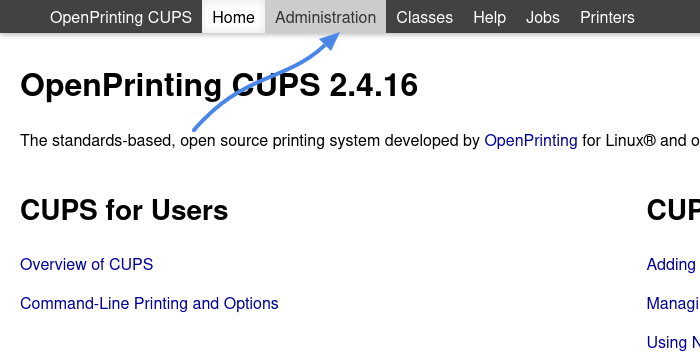
Go to: http://localhost:631
Click: Administration (it will ask for the root password)
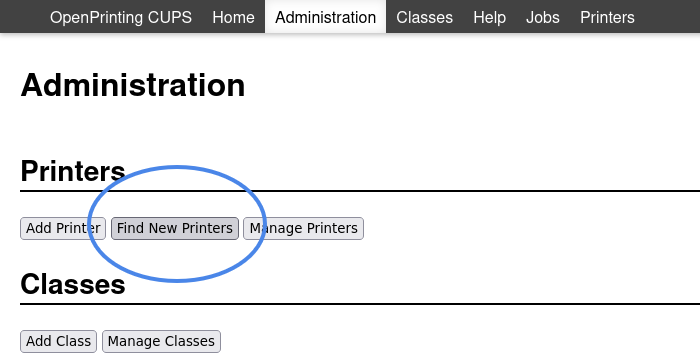
Click: Find New Printers
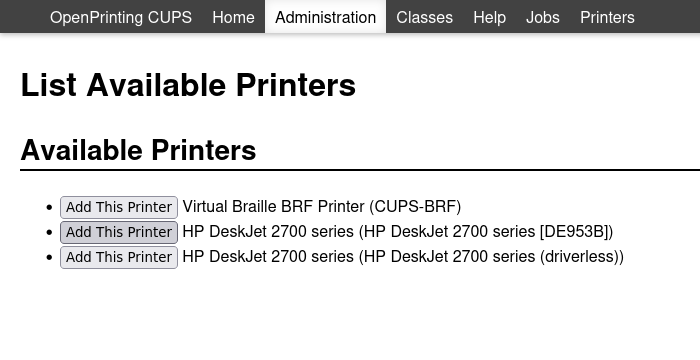
CUPS will start listening for printers that announce themselves on the network and, after a moment, will display them.
Then add the printer and configure it (also within CUPS)
Offline
#8 2026-03-22 03:26:46
- supusr
- Member
- From: Mountain US
- Registered: 2017-05-14
- Posts: 19
Re: [SOLVED] Brother MFC-L2690DW
Slonik: Thanks very much for going to the trouble of laying out the steps like this for me. I will definitely try it when I reinstall, and will let (all of you) know how it goes. Like I said earlier, this will no doubt have to wait for next weekend. -- supusr
Non-technical user, but Linux only since 2012. Retired union business agent. Avid reader. Leftie. English-Spanish.
Offline
#9 2026-03-22 10:23:14
- Duke Nukem
- Member
- Registered: 2018-11-07
- Posts: 83
Re: [SOLVED] Brother MFC-L2690DW
I understand that these new "driverless" printers (but isn't Airprint a driver of sorts, built into CUPS?) have come about thanks to people needing to print from smartphones. Smartphones could have printer drivers of course, but they seem to have provided the impetus for some standardisation. I guess the fancier, proprietary, driver software is now in the printer itself, like Postscript printers were before cheap Win-Printers overtook the market.
Offline
#10 2026-03-22 11:41:43
- kapqa
- Member
- Registered: 2019-01-02
- Posts: 742
Re: [SOLVED] Brother MFC-L2690DW
it seem to me to have a reasonable well aerated room for a laser printer is bigger issue than getting those newer printer to function with computer - laser printers are sure quite a health hazard and would certainly not wanna use one in a room where would work; they need a separate closet, and proper ventilation, and inhaling the fine dusts might cause all sorts of "issues" would contend, "depression" included.
(no health expert, just my opionion)
Offline
#11 2026-03-28 17:32:29
- supusr
- Member
- From: Mountain US
- Registered: 2017-05-14
- Posts: 19
Re: [SOLVED] Brother MFC-L2690DW
I promised I would try to implement some of the suggestions herein offered and report back, so this is it.
1) I am sure that using the Cups interface to find and install my printer might work if I persisted long enough in the attempt, but it did not work for me after an hour or so messing with it.
2) System-config-printer does not work, either.
3) My printer is connected to my computer via a usb cable because my WiFi will not reach it in the location it must occupy in my office, so the WiFi methods suggested will not work.
There must be a way to do install my fairly common printer on Devuan, and I know some very techy and persistent people could probably figure it out, but it is simply too much hassle for me at this time. I reinstalled to try the suggestions offered, but cannot invest more time into it at this point. Back to Debian I go for now. Thanks to all for the input. I will mark as solved to close the thread.
Non-technical user, but Linux only since 2012. Retired union business agent. Avid reader. Leftie. English-Spanish.
Offline
#12 2026-03-29 03:52:48
- dave
- Member
- Registered: 2020-09-28
- Posts: 19
Re: [SOLVED] Brother MFC-L2690DW
And that's the first time you mentioned it's connected via USB... I would suspect that maybe you have a usb connection/configuration problem? And I note that the MFC-L2690DW does *not* have an ethernet connection. Sigh. I've used several Brother models with Ethernet and WiFi capabilities. Never had a problem using the Brother provided installers. Good Luck.
Offline
#13 2026-03-29 08:00:16
- kapqa
- Member
- Registered: 2019-01-02
- Posts: 742
Re: [SOLVED] Brother MFC-L2690DW
if you still have it installed,
it has been mentioned before, you coul stil trai tu uninstal
"ipp-usb"
for a change, but dont be surprised if you still need to configure something , but ithelped me on the usb connection for the epson printer.
cannot guarantee that it will solve ur problem, but it could help with the configuration.
glad you dont use wifi, keeps the air more clean.
Offline
#14 2026-03-30 15:19:05
- Tweedlewise
- Member
- Registered: 2025-01-19
- Posts: 24
Re: [SOLVED] Brother MFC-L2690DW
As a non-sequiturs, my Epson Et-3850 (inkjet tank) wasn't recognized, so I downloaded the Linux driver from the Epson site.
It didn't help. But I did find an Epson driver in Synwhatever Package Manager, and it worked fine!
Tweedlewise
Offline
Pages: 1
