
You are not logged in.
- Topics: Active | Unanswered
#1 Installation » Can not do apt update » 2026-06-09 23:37:30
- deepforest
- Replies: 1
root@devuan:/home/freeartist-devuan# apt update
Hit:1 https://dl.winehq.org/wine-builds/debian trixie InRelease
Hit:2 http://deb.devuan.org/merged excalibur InRelease
Get:3 http://deb.devuan.org/merged excalibur-security InRelease [37.9 kB]
Get:4 http://deb.devuan.org/merged excalibur-updates InRelease [37.6 kB]
Error: Release file for http://deb.devuan.org/merged/dists/excalibur-security/InRelease is not valid yet (invalid for another 1h 10min 51s). Updates for this repository will not be applied.
Error: Release file for http://deb.devuan.org/merged/dists/excalibur-updates/InRelease is not valid yet (invalid for another 14min 53s). Updates for this repository will not be applied.
root@devuan:/home/freeartist-devuan# #2 Re: Desktop and Multimedia » Please, reccommend me a display-manager that isn't garbage » 2026-05-18 19:07:18
"Use Windows, Luke"©
don't suffer with Linux 
#3 Re: Installation » How install hplip-3.25.8? » 2026-05-14 17:55:18
No, I'm afraid you have not understood.
and i am afraid you not undestand my question,
"How install hplip-3.25.8?" or why installation brakes at dependencies stage?
if you cant answer stop offtopic
The package you are attempting to install has not been packaged for Devuan by the Devuan maintainers.
do not be lazy, run hplip script and you see that Debian is present in supported distros
#4 Re: Installation » How install hplip-3.25.8? » 2026-05-13 22:38:06
@steve_v
@Robin
Ok, i am understood, but i am asking not about distro, but why exactly lasted hplip do not want to install at Devuan and breaks at dependencies stage?
#5 Re: Installation » How install hplip-3.25.8? » 2026-05-12 21:14:37
"Why would anyone here know (or care) about some random executable "installer"?"
HP site refers to this, so its not "random"
https://sourceforge.net/projects/hplip/ … ip/3.25.8/
#6 Re: Desktop and Multimedia » GIMP won't start, error message » 2026-05-11 16:50:00
Surprised? Not.
Its linux baby, here nothing works good
Bugs at linux have name - "features"
#7 Re: Installation » No audio in fresh install of Excalibur » 2026-05-11 16:47:03
https://dev1galaxy.org/viewtopic.php?id=7882
"bug on bug ride and the bug rule"©
#8 Re: Desktop and Multimedia » After reboot pavucontrol always sets to Headphones insted Line-out » 2026-05-11 16:45:22
it is old bug?
why it still not fixed?
https://dev1galaxy.org/viewtopic.php?id=4002
#9 Re: Installation » How install hplip-3.25.8? » 2026-05-11 16:40:06
A Debian based system is never going to give you that
My question in first post of this topic - Why lasted hplip installation interrupts at dependencies stage? Devuan here already have most part of needed dependencies but hplip 3.25.8 do not recognize it?
#10 Desktop and Multimedia » After reboot pavucontrol always sets to Headphones insted Line-out » 2026-05-10 22:33:41
- deepforest
- Replies: 1
Devuan Excalibur
pavucontrol not remember my last selection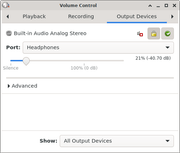
#11 Re: Installation » How install hplip-3.25.8? » 2026-05-10 19:30:02
The highest version available is a .22
i forget to say, i try install new version from here
https://sourceforge.net/projects/hplip/ … ip/3.25.8/
debian repos always have unfresh old software;)
#12 Re: Installation » HP, Inc ScanJet G3010 could not open USB device Access denied » 2026-05-10 02:45:12
"blue tint" issue seem bug of sane
similar issue here
https://gitlab.com/sane-project/backend … _items/203
#13 Re: Installation » HP, Inc ScanJet G3010 could not open USB device Access denied » 2026-05-10 02:23:54
Not sure what driver it uses.
Do you have any ideas where here can be issue with wrong weird blue tint wide stripes?
#14 Installation » How install hplip-3.25.8? » 2026-05-10 02:20:15
- deepforest
- Replies: 19
Installation can resolve this dependencies,
some of them are installed but hplip can't recognize it
MISSING DEPENDENCIES
--------------------
Following dependencies are not installed. HPLIP will not work if all REQUIRED dependencies are not installed and some of the HPLIP features will not work if OPTIONAL dependencies are not installed.
Package-Name         Component            Required/Optional
libtool              base                 REQUIRED
cups-devel           base                 REQUIRED
cups-image           base                 REQUIRED
libusb               base                 REQUIRED
python3-pyqt4-dbus   gui_qt4              OPTIONAL
python3-pyqt4        gui_qt4              REQUIRED
python3-devel        base                 REQUIRED
Do you want to install these missing dependencies (y=yes*, n=no, q=quit) ? y

INSTALL MISSING REQUIRED DEPENDENCIES
-------------------------------------
note: Installation of dependencies requires an active internet connection.
warning: Missing REQUIRED dependency: libtool (libtool - Library building support services)
warning: This installer cannot install 'libtool' for your distro/OS and/or version.
error: Installation cannot continue without this dependency. Please manually install this dependency and re-run this installer.
freeartist-devuan@devuan:~/Downloads$
freeartist-devuan@devuan:~sudo apt install libtool
libtool is already the newest version (2.5.4-4).
The following packages were automatically installed and are no longer required:
libjpeg-turbo-progs libturbojpeg0
Use 'sudo apt autoremove' to remove them.
Summary:
Upgrading: 0, Installing: 0, Removing: 0, Not Upgrading: 0
freeartist-devuan@devuan:~/Downloads$ #15 Re: Installation » HP, Inc ScanJet G3010 could not open USB device Access denied » 2026-05-10 02:13:48
Strange indeed. I have the same scanner. On daedalus, it works fine.
What HPLIP driver are you using?
Under Linux i have stage wide blue tint lines at scanned images but at Windows VueScan all looks good.
#16 Re: Installation » HP, Inc ScanJet G3010 could not open USB device Access denied » 2026-05-10 02:09:59
... until I added the group "root". then it worked.
Thank you man for help, i will try yours solution
but i found yet one fix for that
add this lines
ATTRS{idVendor}=="03f0", ATTRS{idProduct}=="4205", MODE="0666", GROUP="scanner", ENV{libsane_matched}="yes"
SYSFS{idVendor}=="03f0", SYSFS{idProduct}=="4205", MODE="664", GROUP="scanner"
to
/etc/udev/rules.d/40-libsane.rules
and reboot
#17 Installation » HP, Inc ScanJet G3010 could not open USB device Access denied » 2026-05-10 00:55:22
- deepforest
- Replies: 6
Devuan Excalibur... linux mess - sado-mazo again((
Scanner not working
freeartist-devuan@devuan:~$ lsusb
Bus 001 Device 001: ID 1d6b:0002 Linux Foundation 2.0 root hub
Bus 001 Device 002: ID 214b:7000 Huasheng Electronics 4-port hub [Maxxter ACT-HUB2-4P, HS8836, iSoul ultra-slim]
Bus 001 Device 004: ID 03f0:4205 HP, Inc ScanJet G3010
Bus 002 Device 001: ID 1d6b:0001 Linux Foundation 1.1 root hub
Bus 003 Device 001: ID 1d6b:0001 Linux Foundation 1.1 root hub
Bus 004 Device 001: ID 1d6b:0001 Linux Foundation 1.1 root hub
Bus 005 Device 001: ID 1d6b:0001 Linux Foundation 1.1 root hub
Bus 005 Device 002: ID 1038:1706 SteelSeries ApS SteelSeries Rival 95 Gaming Mouse
freeartist-devuan@devuan:~$
freeartist-devuan@devuan:~$ sane-find-scanner -q
could not open USB device 0x03f0/0x4205 at 001:004: Access denied (insufficient permissions)
could not open USB device 0x214b/0x7000 at 001:002: Access denied (insufficient permissions)
could not open USB device 0x1d6b/0x0002 at 001:001: Access denied (insufficient permissions)
could not open USB device 0x1038/0x1706 at 005:002: Access denied (insufficient permissions)
could not open USB device 0x1d6b/0x0001 at 005:001: Access denied (insufficient permissions)
could not open USB device 0x1d6b/0x0001 at 004:001: Access denied (insufficient permissions)
could not open USB device 0x1d6b/0x0001 at 003:001: Access denied (insufficient permissions)
could not open USB device 0x1d6b/0x0001 at 002:001: Access denied (insufficient permissions)
freeartist-devuan@devuan:~$freeartist-devuan@devuan:~$ groups
freeartist-devuan lp cdrom floppy audio dip video plugdev users netdev scanner lpadmin
freeartist-devuan@devuan:~$ #18 Re: Installation » Ceres upgrade to kernel 7.0.3 error NVIDIA driver » 2026-05-06 22:16:17
Then would be a bit better using older kernel versions (I saw changelog and it seems staying on 6.19 works I guess), and I'm also waiting for nvidia to update with backports for their drivers on Debian repos... I hope it's soon... the usual pain with nvidia
Agree!
I will try this trick at Stable Devuan
https://gist.github.com/Anakiev2/8d62e2 … ff855a22a7
#19 Re: Installation » Ceres upgrade to kernel 7.0.3 error NVIDIA driver » 2026-05-06 18:51:03
And? You're running unstable with a bleeding-edge kernel and ancient out-of tree proprietary drivers. Did you expect that not to break?
What, and? Sid still have patches for this legacy drivers, that why i use Sid/Ceres, Debian drop support this drivers over 5 years ago only at stable, but Sid still support it.
#20 Re: Installation » Ceres upgrade to kernel 7.0.3 error NVIDIA driver » 2026-05-05 23:01:50
this command not help
sudo apt reinstall nvidia-legacy-340xx-kernel-dkms
root@devuan:/home/freeartist-devuan# dkms status
nvidia-legacy-340xx/340.108, 6.12.57+deb13-amd64, x86_64: installed
nvidia-legacy-340xx/340.108, 6.19.11+deb14-amd64, x86_64: installed
nvidia-legacy-340xx/340.108, 6.19.14+deb14-amd64, x86_64: installed
root@devuan:/home/freeartist-devuan#
problem with dkms that can`t build nvidia uvm module for kernel 7.0.3
#21 Installation » Ceres upgrade to kernel 7.0.3 error NVIDIA driver » 2026-05-05 20:37:58
- deepforest
- Replies: 5
At end of the upgrading process i have this
Processing triggers for initramfs-tools (0.151)…
update-initramfs: Generating /boot/initrd.img-6.19.14+deb14-amd64
I: The initramfs will attempt to resume from /dev/sdd5
I: (UUID=132b6ad7-4fd2-4211-9072-871347617609)
I: Set the RESUME variable to override this.
Processing triggers for libc-bin (2.42-15)…
Errors were encountered while processing:
 linux-headers-7.0.3+deb14-amd64
 linux-headers-amd64
 linux-image-7.0.3+deb14-amd64
 linux-image-amd64
Error: Sub-process /usr/bin/dpkg returned an error code (1)
root@devuan:/etc/apt/sources.list.d#
sudo apt --fix-broken install
Building module(s).........................(bad exit status: 2)
Failed command:
env NV_VERBOSE=1 make -j4 modules KERNEL_UNAME=7.0.3+deb14-amd64; env NV_VERBOSE=1 make -j4 -C uvm modules KERNEL_UNAME=7.0.3+deb14-amd64 KBUILD_EXTMOD=/var/lib/dkms/nvidia-legacy-340xx/340
.108/build/uvm

Error! Bad return status for module build on kernel: 7.0.3+deb14-amd64 (x86_64)
Consult /var/lib/dkms/nvidia-legacy-340xx/340.108/build/make.log for more information.

Autoinstall on 7.0.3+deb14-amd64 failed for module(s) nvidia-legacy-340xx(10).

Error! One or more modules failed to install during autoinstall.
Refer to previous errors for more information.
run-parts: /etc/kernel/postinst.d/dkms exited with return code 1
dpkg: error processing package linux-image-7.0.3+deb14-amd64 (--configure):
 old linux-image-7.0.3+deb14-amd64 package postinst maintainer script subprocess failed with exit status 1
dpkg: dependency problems prevent configuration of linux-headers-amd64:
 linux-headers-amd64 depends on linux-headers-7.0.3+deb14-amd64 (= 7.0.3-1); however:
  Package linux-headers-7.0.3+deb14-amd64 is not configured yet.

dpkg: error processing package linux-headers-amd64 (--configure):
 dependency problems - leaving unconfigured
dpkg: dependency problems prevent configuration of linux-image-amd64:
 linux-image-amd64 depends on linux-image-7.0.3+deb14-amd64 (= 7.0.3-1); however:
  Package linux-image-7.0.3+deb14-amd64 is not configured yet.

dpkg: error processing package linux-image-amd64 (--configure):
 dependency problems - leaving unconfigured
Errors were encountered while processing:
 linux-headers-7.0.3+deb14-amd64
 linux-image-7.0.3+deb14-amd64
 linux-headers-amd64
 linux-image-amd64
Error: Sub-process /usr/bin/dpkg returned an error code (1)
root@devuan:/etc/apt/sources.list.d#
/var/lib/dkms/nvidia-legacy-340xx/340.108/build/make.log
nv.c: In function ‘nvidia_open’:
nv.c:1468:33: error: ‘screen_info’ undeclared (first use in this function)
 1468 |         if (nv->primary_vga && (screen_info.orig_video_isVGA != 0x01))
      |                                 ^~~~~~~~~~~
nv.c:1468:33: note: each undeclared identifier is reported only once for each function it appears in
make[4]: *** [/usr/src/linux-headers-7.0.3+deb14-common/scripts/Makefile.build:294: nv.o] Error 1
make[4]: *** Waiting for unfinished jobs....
make[3]: *** [/usr/src/linux-headers-7.0.3+deb14-common/Makefile:2129: .] Error 2
make[2]: *** [/usr/src/linux-headers-7.0.3+deb14-common/Makefile:260: __sub-make] Error 2
make[2]: Leaving directory '/var/lib/dkms/nvidia-legacy-340xx/340.108/build'
make[1]: *** [Makefile:260: __sub-make] Error 2
make[1]: Leaving directory '/usr/src/linux-headers-7.0.3+deb14-common'
make: *** [Makefile:219: nvidia.ko] Error 2
make: Entering directory '/var/lib/dkms/nvidia-legacy-340xx/340.108/build/uvm'
cd ./..; make module SYSSRC=/lib/modules/7.0.3+deb14-amd64/source SYSOUT=/lib/modules/7.0.3+deb14-amd64/build KBUILD_EXTMOD=./..
NVIDIA UVM: CC=x86_64-linux-gnu-gcc-15, HOST_CC=x86_64-linux-gnu-gcc-15 NV_TARGET_ARCH=x86_64
NVIDIA UVM: CONFTEST=/bin/sh ./conftest.sh x86_64-linux-gnu-gcc-15 x86_64-linux-gnu-gcc-15 x86_64 /lib/modules/7.0.3+deb14-amd64/source /lib/modules/7.0.3+deb14-amd64/build
make[1]: Entering directory '/var/lib/dkms/nvidia-legacy-340xx/340.108/build'
KERNEL_SOURCES: /lib/modules/7.0.3+deb14-amd64/source
EXTRA_CFLAGS: -O2 -DNVIDIA_UVM_LITE_ENABLED -DLinux -D__linux__ -DNVIDIA_UVM_RM_ENABLED  -I/var/lib/dkms/nvidia-legacy-340xx/340.108/build -I./..
NVIDIA: calling KBUILD...
make NV_MODULE_SUFFIX= KBUILD_OUTPUT=/lib/modules/7.0.3+deb14-amd64/build KERNEL_SOURCES=/lib/modules/7.0.3+deb14-amd64/source KERNEL_OUTPUT=/lib/modules/7.0.3+deb14-amd64/build KBUILD_VERB
OSE=1 -C /lib/modules/7.0.3+deb14-amd64/source M=/var/lib/dkms/nvidia-legacy-340xx/340.108/build ARCH=x86_64 modules
make[2]: Entering directory '/usr/src/linux-headers-7.0.3+deb14-common'
make  -C /usr/src \
-f /usr/src/linux-headers-7.0.3+deb14-common/Makefile modules
make[3]: Entering directory '/usr/src'
make --no-print-directory -C /usr/src \
-f /usr/src/linux-headers-7.0.3+deb14-common/Makefile modules
make -f /usr/src/linux-headers-7.0.3+deb14-common/scripts/Makefile.build obj=. need-builtin=1 need-modorder=1
/usr/src/linux-headers-7.0.3+deb14-common/scripts/Makefile.build:37: Makefile: No such file or directory
make[5]: *** No rule to make target 'Makefile'.  Stop.
make[4]: *** [/usr/src/linux-headers-7.0.3+deb14-common/Makefile:2129: .] Error 2
make[3]: *** [/usr/src/linux-headers-7.0.3+deb14-common/Makefile:260: __sub-make] Error 2
make[3]: Leaving directory '/usr/src'
make[2]: *** [Makefile:260: __sub-make] Error 2
make[2]: Leaving directory '/usr/src/linux-headers-7.0.3+deb14-common'
make[1]: *** [Makefile:219: nvidia.ko] Error 2
make[1]: Leaving directory '/var/lib/dkms/nvidia-legacy-340xx/340.108/build'
make: *** [Makefile:226: ../Module.symvers] Error 2
make: Leaving directory '/var/lib/dkms/nvidia-legacy-340xx/340.108/build/uvm'

# exit code: 2
# elapsed time: 00:01:09#22 Installation » Install Pixel Environment at Devuan » 2026-05-05 20:22:19
- deepforest
- Replies: 0
Is here chance install Pixel Environment without systemd?
I am add sources raspi.sources and key raspberrypi-archive-keyring_2025.1+rpt1_all but...
E: Unable to satisfy dependencies. Reached two conflicting assignments:
   1. raspberrypi-sys-mods:amd64 is selected for install because:
      1. raspberrypi-ui-mods:amd64=1.20250411+b1 is selected for install
      2. raspberrypi-ui-mods:amd64 Depends raspberrypi-sys-mods (>= 20210706)
   2. raspberrypi-sys-mods:amd64 Depends systemd (>= 230)
      but none of the choices are installable:
      [no choices]
root@devuan:/etc/apt/sources.list.d# #23 Re: Installation » LXQt cant install at Ceres » 2026-05-03 23:20:14
@Duke Nukem
Is there a specific reason for you wanting to use Ceres?
1. Ceres\Sid still support nvidia 340 driver but Stable not
2. Ceres feels snappier then Stable at my old PC
#24 Re: Installation » LXQt cant install at Ceres » 2026-04-29 22:04:16
Sorry for reflection.
Where is here was the problem? At lxqt-qtplugin or xkb-data or both?
What is the right way for update Ceres and how to avoid this problems in the future?
#25 Re: Desktop and Multimedia » [SOLVED] Why Devuan have no Lomiri DE in repos? » 2026-04-18 19:10:02
Lomiri packages are banned because they depend on systemd.
Thanks, but as i know, GOME same dependence from systemd but available at Devuan?
I am tied Ubuntu Unity, and can say its works fast at old c2d q6600 + 4gb ram.
Board footer
