
You are not logged in.
- Topics: Active | Unanswered
#576 Re: Hardware & System Configuration » [SOLVED] modprobe: FATAL module not found » 2024-03-25 16:39:30
Hello:
... how to troubleshoot this?
Found the problem.
A mis-read/malinterpreted sensors-detect printout leading to a misconfigured /etc/modules file which would (had it worked) got me a case temperature reading in my conky panel through temperature sensors in each of my two scsi cards. Sensors which did not exist. 8^°
Sorry for the bother ...
Best,
A.
#577 Hardware & System Configuration » [SOLVED] modprobe: FATAL module not found » 2024-03-25 11:46:35
- Altoid
- Replies: 3
Hello:
Like I do every so often, I was having a quick look at my display printout as my box was booting this morning and noticed the dreaded FATAL.
It does not get recorded in dmesg but it does in /var/log/boot:
$ cat boot | grep -i fatal
--- snip ---
Mon Mar 25 07:54:36 2024: modprobe: FATAL: Module scsi not found in directory /lib/modules/5.10.0-0.deb10.16-amd64
$
I had not noticed this before today but then I cannot for the life of me recall when I last had a look at the printout.
Indeed, /lib/modules/5.10.0-0.deb10.16-amd64 has nothing scsi in it:
~$ ls /lib/modules/5.10.0-0.deb10.16-amd64 | grep -i scsi
~$
But a recursive listing gets me a load:
~$ ls -R /lib/modules/5.10.0-0.deb10.16-amd64 | grep -i scsi
scsi
iscsi_ibft.ko
mptscsih.ko

/lib/modules/5.10.0-0.deb10.16-amd64/kernel/drivers/scsi:
be2iscsi
esp_scsi.ko
iscsi_boot_sysfs.ko
iscsi_tcp.ko
libiscsi.ko
libiscsi_tcp.ko
scsi_debug.ko
scsi_mod.ko
scsi_transport_fc.ko
scsi_transport_iscsi.ko
scsi_transport_sas.ko
scsi_transport_spi.ko
scsi_transport_srp.ko
virtio_scsi.ko
vmw_pvscsi.ko
xen-scsifront.ko

/lib/modules/5.10.0-0.deb10.16-amd64/kernel/drivers/scsi/aacraid:
/lib/modules/5.10.0-0.deb10.16-amd64/kernel/drivers/scsi/aic7xxx:
/lib/modules/5.10.0-0.deb10.16-amd64/kernel/drivers/scsi/aic94xx:
/lib/modules/5.10.0-0.deb10.16-amd64/kernel/drivers/scsi/arcmsr:
/lib/modules/5.10.0-0.deb10.16-amd64/kernel/drivers/scsi/be2iscsi:
be2iscsi.ko
/lib/modules/5.10.0-0.deb10.16-amd64/kernel/drivers/scsi/bfa:
/lib/modules/5.10.0-0.deb10.16-amd64/kernel/drivers/scsi/bnx2fc:
/lib/modules/5.10.0-0.deb10.16-amd64/kernel/drivers/scsi/bnx2i:
/lib/modules/5.10.0-0.deb10.16-amd64/kernel/drivers/scsi/csiostor:
/lib/modules/5.10.0-0.deb10.16-amd64/kernel/drivers/scsi/cxgbi:
/lib/modules/5.10.0-0.deb10.16-amd64/kernel/drivers/scsi/cxgbi/cxgb3i:
/lib/modules/5.10.0-0.deb10.16-amd64/kernel/drivers/scsi/cxgbi/cxgb4i:
/lib/modules/5.10.0-0.deb10.16-amd64/kernel/drivers/scsi/device_handler:
scsi_dh_alua.ko
scsi_dh_emc.ko
scsi_dh_hp_sw.ko
scsi_dh_rdac.ko
/lib/modules/5.10.0-0.deb10.16-amd64/kernel/drivers/scsi/esas2r:
/lib/modules/5.10.0-0.deb10.16-amd64/kernel/drivers/scsi/fcoe:
/lib/modules/5.10.0-0.deb10.16-amd64/kernel/drivers/scsi/fnic:
/lib/modules/5.10.0-0.deb10.16-amd64/kernel/drivers/scsi/isci:
/lib/modules/5.10.0-0.deb10.16-amd64/kernel/drivers/scsi/libfc:
/lib/modules/5.10.0-0.deb10.16-amd64/kernel/drivers/scsi/libsas:
/lib/modules/5.10.0-0.deb10.16-amd64/kernel/drivers/scsi/lpfc:
/lib/modules/5.10.0-0.deb10.16-amd64/kernel/drivers/scsi/megaraid:
/lib/modules/5.10.0-0.deb10.16-amd64/kernel/drivers/scsi/mpt3sas:
/lib/modules/5.10.0-0.deb10.16-amd64/kernel/drivers/scsi/mvsas:
/lib/modules/5.10.0-0.deb10.16-amd64/kernel/drivers/scsi/pcmcia:
/lib/modules/5.10.0-0.deb10.16-amd64/kernel/drivers/scsi/pm8001:
/lib/modules/5.10.0-0.deb10.16-amd64/kernel/drivers/scsi/qedf:
/lib/modules/5.10.0-0.deb10.16-amd64/kernel/drivers/scsi/qedi:
/lib/modules/5.10.0-0.deb10.16-amd64/kernel/drivers/scsi/qla2xxx:
/lib/modules/5.10.0-0.deb10.16-amd64/kernel/drivers/scsi/qla4xxx:
/lib/modules/5.10.0-0.deb10.16-amd64/kernel/drivers/scsi/smartpqi:
/lib/modules/5.10.0-0.deb10.16-amd64/kernel/drivers/scsi/snic:
/lib/modules/5.10.0-0.deb10.16-amd64/kernel/drivers/scsi/sym53c8xx_2:
/lib/modules/5.10.0-0.deb10.16-amd64/kernel/drivers/scsi/ufs:
iscsi
target_core_pscsi.ko
/lib/modules/5.10.0-0.deb10.16-amd64/kernel/drivers/target/iscsi:
iscsi_target_mod.ko

/lib/modules/5.10.0-0.deb10.16-amd64/kernel/drivers/target/iscsi/cxgbit:
vhost_scsi.ko
xen-scsiback.ko
~$
The system seems to be running properly and lsmod gets me this:
~$ lsmod | grep -i scsi
mptscsih               32768  1 mptsas
mptbase                77824  2 mptsas,mptscsih
scsi_transport_sas     49152  1 mptsas
scsi_transport_spi     40960  1 aic7xxx
scsi_mod              262144  9 mptsas,scsi_transport_sas,aic7xxx,sd_mod,scsi_transport_spi,drivetemp,mptscsih,libata,sg
~$
Looking for the location of the loaded modules, I find them:
~$ locate mptscsih
/lib/modules/5.10.0-0.deb10.16-amd64/kernel/drivers/message/fusion/mptscsih.ko
~$
~$ locate mptbase
/lib/modules/5.10.0-0.deb10.16-amd64/kernel/drivers/message/fusion/mptbase.ko
~$~$ locate scsi_tr
--- snip ---
/lib/modules/5.10.0-0.deb10.16-amd64/kernel/drivers/scsi/scsi_transport_sas.ko
/lib/modules/5.10.0-0.deb10.16-amd64/kernel/drivers/scsi/scsi_transport_spi.ko
~$
--- snip ---Edit:
Sorry, forgot to add this:
~$ lspci
--- snip ---
03:00.0 SCSI storage controller: LSI Logic / Symbios Logic SAS1068E PCI-Express Fusion-MPT SAS (rev 08)
05:00.0 SCSI storage controller: Adaptec AIC-7870P/7881U [AHA-2940U/UW/D/S76]
--- snip ---
~$
If everything is working properly (seems to be but maybe it is not) the modprobe: FATAL: warning in the log file should not exist so me thinks that something is probably amiss somewhere.
Any ideas as to how to troubleshoot this?
Thanks in advance.
Best,
A.
#578 Re: Hardware & System Configuration » [SOLVED] CLI throughput test for Linux » 2024-03-25 00:54:42
Hello:
... seems to have only replied to 2 of the 61 test packets ...
Yes, that is what it does, always with a 90% to 100% packet loss.
... ping it and see how often it replies.
I tried that but it needs the IP.
host host39.181-89-51.telecom.net.ar should tell you it's IP...
Unfortunately not.
~$ host host39.181-89-51.telecom.net.ar
Host host39.181-89-51.telecom.net.ar not found: 3(NXDOMAIN)
~$
It was just curiosity. 8^°
Thank you very much for your input.
Best,
A.
#579 Re: Hardware & System Configuration » [SOLVED] CLI throughput test for Linux » 2024-03-23 19:39:15
Hello:
... have been configured to not send ICMP responses ...
I just noticed something.
Just out of curiosity ...
What about the node that does not have have ??? for its IP address?
ie:
Hostname                                   Loss
host39.181-89-51.telecom.net.ar            97.6%
Isn't a 97.6% loss rather high?
Is it possible to improve that metric?
I take it that it is between the wireless router and host39.181-89-51.telecom.net.ar, right?
My DIY tin-can waveguide antenna affords me (given the distance/walls to the router) a nice strong ~80% signal most of the time.
Thanks in advance.
Best,
A.
#580 Re: Hardware & System Configuration » [SOLVED] CLI throughput test for Linux » 2024-03-23 17:32:23
Hello:
... have been configured to not send ICMP responses ...
I see.
Thanks for the heads up. 8^)
Much obliged.
Best,
A.
#581 Re: Hardware & System Configuration » [SOLVED] CLI throughput test for Linux » 2024-03-23 14:25:28
Hello:
... top line is the router ...
... next 5 are the provider nodes.
For completeness' sake: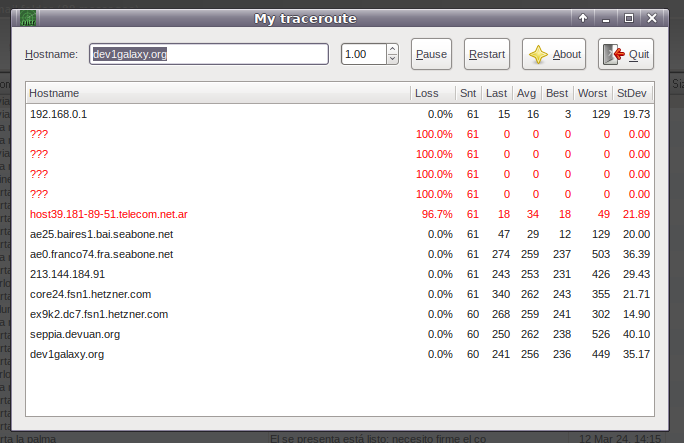
As you can see (for whatever reason) the provider for my loaned wifi link does not list the node IPs.
No matter, it is a broadband CATV to modem + internet service and I do not ever watch television.
Not the one I will be dealing with.
Thanks a lot for your input.
Best,
A.
#582 Re: Hardware & System Configuration » [SOLVED] CLI throughput test for Linux » 2024-03-23 10:48:10
Hello:
... 6.4 $/month
I see ...
Is that € or US$?
If US$, when I get my fibre link installed, I will be paying ~ 1.8x that amount.
Now that's competition. 8^¡
... mtr is simple ...
Thanks for the image.
With my loaned wifi connection, I have these hostnames:.
192.168.0.1 with 0.0% loss (makes sense)
??? with 100% loss
??? with 100% loss
??? with 100% loss
??? with 100% loss
host39.181-89-51.telecom.net.ar with an upwards variating 91.5% loss, probably because it is wifi.
Every other hop (seven in all) has 0% loss, all the way to dev1galaxy.org.
Thanks for your input.
Best,
A.
#583 Re: Hardware & System Configuration » [SOLVED] CLI throughput test for Linux » 2024-03-22 21:07:32
Hello:
... need to check the speed.
Indeed ...
I'll probably get screwed anyway.
That's what an unchecked monopoly/consortium/cartel of 'independent' telcos will get you.
... speed test includes nodes not controlled by the provider.
Yes, I get the gist of it.
... can with great success be presented with an mtr report with the percentage of lost packets in its node.
I already have traceroute installed, I will have to see about installing mtr, learn to use it and write up a script to run in a jiffy if needed.
... provider’s service is at a very high level, partly due to competition.
Competition? 8^D !!!
Sure, it's been heard of by the public and and talked about quite a bit by all the neo-con DHs/AHs that abound around here.
But has anyone actually seen it at work and observed positive results? 8^¡
... speed itself has remained unchanged for more than 10 years, about 100 Mbit/sec.
Interesting, congratulations for that.
Hoping not to be considered indiscrete, a question if I may: how much does that service cost you?
Let's see what the tests say once it has been installed, maybe by mid April.
It is advertised as a 300Mib synchronous all-fibre link direct from whatever is in the area to my apartment, but I have my doubts.
We'll see what happens when it is in place and working.
Thanks for your input.
Best,
A.
#584 Re: Hardware & System Configuration » [SOLVED] CLI throughput test for Linux » 2024-03-22 19:19:54
Hello:
Uncle ...
8^D !!!
... 4-core processor, why do you need a cli?
Because cli is what I should have been proficient at by the time I turned 21, but it was not to be.
Work by day and architecture school by night + lack of funds for anythin IT related did that.
And having a 4-core processor is no excuse for bloated software and who knows what else inside a browser.
... continuously control the speed?
No, not at all.
But I want to know if I am getting what I will be paying (through the nose) for.
And be able to report what is going on.
Multi-national telco corporations are nothing but pirates/thieves.
They will screw you over at every turn/any time they see the posibility of doing so.
... specific speed of working on the Internet with specific sites is more limited by other reasons.
Yes, I am aware of that.
Thanks for your input, nephew. 8̣^)
Best,
A.
#585 Re: Hardware & System Configuration » [SOLVED] CLI throughput test for Linux » 2024-03-22 19:08:05
Hello:
... ssh access to remote servers you can obtain time statistics quite easily.
Thanks for the info.
I'll give it a try when I get the fibre.
Best,
A.
#586 Re: Hardware & System Configuration » [SOLVED] CLI throughput test for Linux » 2024-03-22 12:06:52
Hello:
... used it in the past ...
... quite reliable.
Yes, I many times use the web page version.
Seems to work reliably.
But I would want to avoid using a browser, it would be one thing less to take into account.
To be able to view and save all test results via CSV is a plus. (ie: with date/time/server IPs)
Thanks for your input.
Best,
A.
#587 Hardware & System Configuration » [SOLVED] CLI throughput test for Linux » 2024-03-22 11:24:44
- Altoid
- Replies: 32
Hello:
Seeing how much my (soon to be installed?) fibre connection will eventually cost me, I will be in need to keep tabs on what I will be getting for my retirement moneys.
While I do not expect that complaining to the telco will get me too far, I will need to be able to supply reasonable proof of what is going on should things not go as planned/promised.
To that purpose, I am looking for a way to reliably/consistently measure throughput to compare to what the 'box' says it 'contains'.
While looking around, I have come across this:
https://www.speedtest.net/apps/cli
Anyone used something similar or home brewed?
Thanks in advance.
Best,
A.
#588 Re: Installation » [SOLVED] apt install timeshift error » 2024-03-19 19:28:21
Hello:
I think the clue is in the error printout:
timeshift: Timeshift cant restore RSYNC snapshots if your system installed on BTRFS with wrong subvolumeSee here: https://forum.manjaro.org/t/possible-so … rfs/149901
Best,
A.
#589 Re: Hardware & System Configuration » The importance of Microcode » 2024-03-15 18:39:31
Hello:
... will be utilizing microcode updates to protect myself ...
As far as I know, it is enough to keep your system up to date.
In the last nine years, have seen intel-microcode packages updated once every blue moon, probably because my box runs on a legacy (EOL 03/2013) Intel Yorkfield (Core™2 Quad Q9550) processor.
The intel-microcode package is/has been there as part of the installation/upgrades from the start:
~$ apt list | grep installed | grep -i microcode
--- snip ---
intel-microcode/oldoldstable-security,now 3.20231114.1~deb10u1 amd64 [installed]
~$
And then there is what you can see here.
Microcode for Intel and amd64 CPUs all the way from up Jesse down to Ceres.
So any time a microcode package gets upgraded, it is made available for you in the Devuan repositories.
You would have to take intentional steps to keep your system apt from actually downloading and installing it.
I may be missing something in your particular case, but in my opinion, keeping your system up-to-date is not an option to consider.
It is something you do.
Best,
A.
#590 Re: Installation » [SOLVED] Conky.conf problem » 2024-03-12 10:51:50
senHello:
... set sudo to execute certain commands ...
Indeed.
But I was wanting to avoid adding to my overpopulated sudoers.d directory and thought that maybe there was a way to get that done within conky for cases like this.
Guess that will have to do. 8^)
I'll test it and see how it goes.
Edit: that did it - works as advertised.
Thank you very much for your input.
Best,
A.
#591 Installation » [SOLVED] Conky.conf problem » 2024-03-11 23:52:41
- Altoid
- Replies: 2
Hello:
After much procrastinating, I finally set about cleaning up my conky.conf file.
This year's has been a very hot summer and the fans in the box many times ran at high speeds.
I need to know what is going on inside temperature wise.
The on-board w83627ehf chip is not activated and loading the module gives bogus/unreliable readings.
The only way I can get a reasonably approximate in-box temperature reading are from the pair of SCSI cards I have inside, their readings should be good enough to get an idea of internal temperatures.
So, to that effect, I need to run these lines in conky:
Case 0: +${exec sensors drivetemp-scsi-5-0 | grep 'temp1' | cut -c 30-39} CCase 1: +${exec sensors drivetemp-scsi-3-0 | grep 'temp1' | cut -c 30-39} C}The problem I have is that sensors can only be run as root so it is not working from conky.
~$ sensors drivetemp-scsi-5-0 | grep 'temp1' | cut -c 30-39
Error: File /etc/sensors.d/sun_u24.conf: Permission denied
sensors_init: General parse error
~$
~$ sudo sensors drivetemp-scsi-5-0 | grep 'temp1' | cut -c 30-39
[sudo] password for groucho:
+34.0 C
~$ Everything else works properly.
Any pointers will be appreciated.
Best,
A.
#592 Re: Installation » [SOLVED] Beowulf to Chimaera - precautions II » 2024-03-11 01:11:11
Hello:
@czeekaj
For wireless I'd use this.
Had a look, will put it into the list of possible replacements.
@pcalvert
Did you try connman ...
No, not yet.
The thing is that I am still on the fence as to whether to go through with the Beowulf -> Chimaera, among other things because I am not sure I want to suffer the new version of xfce4, more so with the upgrade itself being rather problematic.
I think I'll wait this transition out for a while longer.
Thank you both for your input, much appreciated. 8^)
Best,
A.
#593 Re: Installation » [SOLVED] Beowulf to Chimaera - precautions » 2024-03-10 11:36:17
Hello:
Disable os-prober before you do any upgrading.
It's been default disabled.
I think grub-customizer probably uses it.
But I have not used that application in more a good long while, when I had another HDD with another version to test.
That said, when/if upgrading, the idea is to clone the system drive, set the box to boot from the clone and only then do any upgrade.
Then, if there are no issues, make an image of that drive to restore back to the system drive.
As this is a BIOS boot (no UEFI stuff) box, any other OS boot issues generated by the OS-prober can be easily fixed there.
... update critical packages first ...
If I decide to continue with attempting this upgrade, the system drive will be fully updated and cleaned of left over cruft/orphans before cloning it.
... make sure you have an up to date keyring ...
Thanks for reminding me.
Seems it was up to date because during the experiment (see part II, link below) there were no warnings in the terminal printout.
And I accepted all the default options when given the choice.
Not sure that was a good thing as I once had a severe problem with the default Devuan MTA, Exim4 by doing just that.
ie: accept default suggestions when updating/upgrading.
TL;DR: I removed/purged it and in its place installed a lightweight and much better maintained one called procmail.
After all, I was only needing a local MTA, nothing too elaborate.
Just works and in three years' use it has never given me any grief, to the extent that I had to actually look up the package name. 8^°
Thanks for your input.
Best,
A.
Note: I will mark this as SOLVED to this thread will continue in part II here.
#594 Re: Installation » [SOLVED] Beowulf to Chimaera - precautions II » 2024-03-09 23:48:01
Hello:
... already demonstrated to you what wicd works in Dedaulus.
Yes, I remember.
Thanks for that. 8^)
But now the problem at hand is first being able to make a painless move from Beowulf to Chimaera.
Incredibly enough, there were no issues with wine, my MS based Pegasus Mail email client or the unsupported legacy Nvidia 340.108 drivers.
Upgrading to Daedalus is not in my sights at this moment.
Whatever for? <- which remains an unanswered question somewhere in my OP.
My WiCD setup/configuration did not survive the upgrade, probably due to (surprise, surprise!) xfce4.
I use WiCD to switch on/off my eth0 connection with just a click as well as being able to get up and running (via my friendly neighbour's WiFi) in under 5' should something happen with my ADSL line, the router or the braindead AHs who run the local telco improvement and modernising departments.
So, at least for me, it is not just for WiFi.
I may have to switch to MATE or directly to Openbox but the lack of an easy to use configuration tool is a bit of an issue for me.
I seem to recall (?) that there was a script (somewhere) which would generate a #! type desktop without much ado.
Can't remember now, maybe it was related to something Hoas wrote up.
Thanks for your input.
Best,
A.
#595 Re: Installation » [SOLVED] Beowulf to Chimaera - precautions II » 2024-03-09 16:10:25
Hello:
... Chimaera has wicd.
Hmm ...
Not really.
Have a look here.
Origin: Devuan
Description: wired and wireless network manager - transitional package
That is a WiCD package only by name.
It is a transitional package that works as a front end to install any one of its listed dependencies:
ie: network-manager-gnome | network-manager | connman-gtk | cmst | connman-ui
From the README.Devuan file:
Wicd was removed from Debian Bullseye as it requires python 2.
This transitional package ensures that users upgrading from Devuan Beowulf get an alternative* network manager installed. It can safely be removed.
* underline is mine.
Thanks for your input.
Best,
A.
#596 Installation » [SOLVED] Beowulf to Chimaera - precautions II » 2024-03-09 12:39:44
- Altoid
- Replies: 9
Hello:
This is a follow up on this post.
More than anything to avoid excessive length and muddling up.
To make a first, quick test run, I booted up my box via a Daedalus 5.0 desktop-live *.iso and and generated an *.img file of my system drive.
That done, I restored that *.img file to an empty, larger drive sitting in one of the cage sleds.
That worked prefectly well, the restored image taking up its space leaving unallocated space untouched.
Being a test, I chanced using gnome disks which surprised me, but then this is a vintage/non-UEFI rig.
I then set up the BIOS to boot from the drive where the newly restored image was residing so that the system would not touch it.
Once I rebooted the box, I checked and found that everything was working as expected and nothing seemed to be amiss.
A bit slower as my system drive is a Samsung 120Gb SSD and this is just an older 300Gb SAS drive.
I then followed the instructions on this page at Dev1.
Clear and straightforward enough, as always/usual.
Being on a WiFi connection, the whole thing took around 45/60 minutes or so, didn't bother to time it.
But after rebooting I found that my xfce desktop settings had all gone south, the panels were empty and I no longer had WiFi access.
ie: I had no way (interface) of making the bloated POS network-manager work.
It seems that the xfce upgrade signifficanly screws up most if not all previous settings.
Why am I not at all surpridsed?
Eventually and after much trial and error, I managed to bring up a WiFi connection via command line to complete something that had not been updated/upgraded correctly.
But after rebooting even nmtui refused to connect to the very same WiFi I could instantly connect to with WiCD/Devuan Beowulf in my Asus 1000HE netbook. Yes, all credentials were correct and I have always been able to connected both machines to the router at the same time.
That said, I think that if I want to ge this right, the first thing I need to do is find a proper replacement for WiCD.
ie: one that works like WiCD, that I can bring up and use to connect to whatever I need/want to use (wired or wlan) without any hassle.
Just like I can do today with WiCD in Devuan Beowulf.
On the bright side of things, SLiM worked as expected, my screen setup worked as usual (nvidia drivers) and even wine brought up my email client (Pegasus Mail) with no issues.
But xfce and network-manager absolutely screwed up, ruining the show.
I am now back to my original system drive thinking about what to do.
Any comments will be welcome.
Thanks in advance,
Best,
A.
BTW: writing up this post took me a while, as a result, the timeout no one else suffers from kicked in. Still don't know why or how this happens.
#597 Re: Installation » [SOLVED] Beowulf to Chimaera - precautions » 2024-03-08 23:32:04
Hello:
... have posted information about some efficient methods here ...
Thank you very much.
I'll have a look at all that.
Best,
A.
#598 Re: Forum Feedback » [SOLVED] Forum timeout while logged in » 2024-03-07 20:27:25
Hello:
... look at my 2 dev1galaxy cookies, no luck.
... tool that allows to read the contents ...
Same here.
... is there a tool within FF that allows to read the contents?
I don't think so, at least I have not found it.
If my memory serves me right (?) a long time ago, opening the settings page in a browser (cannot recall which one) you could see some cookie properties, one of them being their expiration date. I recall having seen cookies with a years' long expiration date. (!)
Have not tried it, but see here.
Bear in mind that it is from 5 years ago so I don't know if it still applies.
Best,
A.
#599 Re: Forum Feedback » [SOLVED] Forum timeout while logged in » 2024-03-07 19:25:06
Hello:
... not aware of any timeout related to the login time ...
... stay logged in as long as I like.
I see.
... FF ESR latest version on Daedalus.
FF 115.8.0esr (64-bit) on Devuan Beowulf here.
... related to a forced IP change of your internet provider?
Don't think so.
My friendly local telco providing me with a landline since 1986 along with a pricey albeit low quality ADSL for the past five years decided manu militari to make good on their advertised improvements and deactivated it. With no previous notice.
I am now a 2.0 USB WiFi dongle, legitimately loaned by a neighbour two doors down the hallway so it is not that, the IP is always 192.168.1.29 and an old tin can antenna makes for a very decent 85/90% signal. A good temporary arrangement till the telco AHS deign themselves to come and see about a installing fibre connection.
But this also happened when my ADSL was working through a Pi-hole/Unbound rig running on a Chimaera VM inside my box, the IP also always 192.168.1.2 and the DNS 192.168.1.5. Worked quite well.
I think that the login credential is on a Dev1 cookie and probably has an expiration date.
eg: at this moment I have two Dev1 cookies in my browser but they show no expiration time/date which I recall could be seen in older browsers (long time ago).
Maybe if I change the setting from Allow for Session to Allow this will stop happening?
I always set any and all browsers I use to clear all history on shutdown.
Thanks for your input.
Best,
A.
#600 Forum Feedback » [SOLVED] Forum timeout while logged in » 2024-03-07 17:06:57
- Altoid
- Replies: 18
Hello:
When answering a post, whether it is long or needs a longish reply (+taking the time to edit/crop/spell appropiately or maybe look up something like the proper spelling of a difficult word) more than once I find that when I hit 'preview' I have been logged out.
ie: some system set timeout has lapsed, no idea how long it is.
In all these years at Dev1 I have 'sort of' become used to it and just log into Dev1 in another tab and go back to the original one.
Hitting 'preview' again in the original tab will make the browser find the Dev1 cookie and I can keep go ahead and edit or post.
But it does not always work as intended and ended up losing finished posts only to have to write them up all over again.
eg: again this morning ... 8^°
Fortunately, my short term memory still functions properly, but still, not all is always remembered. 8^°
I don't know how long that timeout is but for how I post ie: trying to be concise, clear, tidy and on an easy to look at page, it ends up being short.
Others may opine that it is a workflow problem that could be solved using an external editor to write a draft.
But no, it is not a workflow problem: I care about how and what I write and go over my text a few times before I post it.
I consider not posting in haste or 'off the cuff' a matter of respect to my fellow Dev1 members
I also consider that using an external editor would totally defeat the whole idea of using the browser as an editor to post on a site like Dev1.
Some sites automatically save a draft for a few hours/days/permanently when something like this happens.
For whatever motive or if the the poster's system/connection goes down.
So ...
I was wondering if it would it be possible for the Dev1 admins to consider extending that timeout to maybe 50% longer?
Thanks in advance.
Best,
A.
Board footer
