
You are not logged in.
- Topics: Active | Unanswered
Pages: 1
#1 Re: Intergalactic Communities » Spaced Linux » 2026-09-13 14:49:04
@ golinux
What is needed is qualified talent to deal with and repair the chaos being sent to us from Debian.
Besides the labyrinth of dependencies, which further chaos from Debian is causing troubles?
#2 Re: Devuan Derivatives » Test ISO: refracta freia xlibre turnstile pipewire » 2026-09-01 20:29:13
You need to install dbus-x11 instead
For me that is the worst option.
I want as little of dbus on my system as possible.
Why? See here
https://wiki.hyperbola.info/doku.php?id … us_failure
and my post on dbus in the antiX forum
https://www.antixforum.com/forums/topic … ost-118320
#3 Re: Devuan Derivatives » Test ISO: refracta freia xlibre turnstile pipewire » 2026-09-01 18:12:04
Thanks for the hint.
Yes, especially since there are no active dbus daemons on my system, dbus-turnstile-user-session probably is of no effect.
But if I remove it, audacious will go with it, unless I install some dbus dummy.
So I rather keep dbus-turnstile-user-session installed.
#4 Re: Devuan Derivatives » Test ISO: refracta freia xlibre turnstile pipewire » 2026-08-31 15:33:28
It seems that I have discovered the source of the mystery.
My system is based on excalibur and the dbus daemons are excludes by a dbus-bin pin. In excalibur there is no turnstile. So installed it from antiX and the related packages and runit service too. Among these there is the optional package 'dbus-turnstile-user-session'. It contains a script '/etc/user_session.d/01_dbus':
#!/bin/sh
DBUS_SESSION_BUS_ADDRESS="unix:path=$XDG_RUNTIME_DIR/bus"
dbus-daemon --session --nofork --address=$DBUS_SESSION_BUS_ADDRESS &if [ "$XDG_RUNTIME_DIR" = "/run/user/$(id -u)" ]; then
echo export DBUS_SESSION_BUS_ADDRESS="$DBUS_SESSION_BUS_ADDRESS" >> "$XDG_RUNTIME_DIR/profile"
fi
Somehow this script catches the dependencies to dbus-bin.
If I remove 'dbus-turnstile-user-session' (which depends on turnstile), all programs that need dbus-bin will be removed.
So now I understand, why I had got no dependency complains, when I installed audacious.
#5 Re: Devuan Derivatives » Test ISO: refracta freia xlibre turnstile pipewire » 2026-08-30 22:37:27
Yes, it is very weird. Sound works well and is pure alsa, nothing else installed.
Dbus daemons are excluded – only libdbus is installed.
Fortunately I see is no need to remove turnstile.
My guess: The cause is solver 3.
#6 Re: Devuan Derivatives » Test ISO: refracta freia xlibre turnstile pipewire » 2026-08-30 18:50:26
I had not checked sound. Indeed, removing turnstile deactivates sound, even if I set audacious to alsa output.
'refracta_14_test_xlibre_turnstile-20260507_1411.iso' has the same login packages installed as my system.
But I have turnstile as well. If I would purge it, audacious, mousepad, xfburn and gcr would be removed too.
I could not detect why. Reverse depends of turnstile only show turnstile-dbgsym.
#7 Re: Devuan Derivatives » Test ISO: refracta freia xlibre turnstile pipewire » 2026-08-30 13:31:07
To my delight building my system was very uncomplicated. But then I realized, that Refracta 13.3 has libsystemd0 onboard.
I have replaced libsystemd0 by libelogind-compat and libelogind0. Then I tried to remove libelogind0 or replace it by a dummy, but that did brake the system.
This would be possible by using packages from the antiX nosystemd repo. To do so I would have to rise the priority of the antiX nosystemd repo, but then I shall get conflicts with the runit-services package. Maybe it is possible with sysv-init, but not with runit.
This motivated me to check your 'refracta_14_test_xlibre_turnstile-20260507_1411.iso'
Maybe you have found a better solution.
You have installed elogind/libelogind0 installed and seatd, libseat1 and turnstile as well. Both fulfill the same purpose. So which one is active? To figure that out I have run two tests:
(1) # apt purge seatd turnstile
After reboot the system did not show any differences.
seatd and turnstile seem to have no effect.
(2) # apt purge elogind (and keep seatd + turnstile)
This removed lxqt-panel. So Lxqt became unusable, but openbox was still working fine. Then I removed turnstile as well. Again this did not make any difference.
So in both cases turnstile seems to be irrelevant.
#8 Re: Devuan Derivatives » Refractasnapshot – Comparison of different Compression Algorithms » 2026-07-13 15:34:30
Now I have integrated these insights in /etc/refractasnaoshot.conf
The compression sections of my refractasnaoshot.conf now looks like this:
-----------------------------
[...]
# Uncomment one of the lines below to use xz or zstd compression for smaller iso.
# small and slow # relative size of the iso-image
#mksq_opt="-comp xz" # (-4.1% to zstd -19 | -15,4% to zstd -1)
#mksq_opt="-comp xz -b 262144" # (-2.0% to xz)
#mksq_opt="-comp xz -b 524288" # (-3.8% to xz)
#mksq_opt="-comp xz -b 1048576" # (-5.5% to xz)
# smaller and slower:
#mksq_opt="-comp xz -Xbcj x86" # (-1.5% to xz)
#mksq_opt="-comp xz -Xbcj x86 -b 524288" # (-5.4% to xz)
#mksq_opt="-comp xz -Xbcj x86 -b 1048576" # (-6.9% to xz)
# not as small but faster
#mksq_opt="-comp zstd -Xcompression-level 22" # (= zstd -19 | --ultra ?)
#mksq_opt="-comp zstd -Xcompression-level 19" # (-11.8% to zstd -1)
mksq_opt="-comp zstd -Xcompression-level 15" # (-11.1% to zstd -1)
#mksq_opt="-comp zstd -Xcompression-level 8" # (-7.0% to zstd -1)
#mksq_opt="-comp zstd -Xcompression-level 3" # (-3.1% to zstd -1)
#mksq_opt="-comp zstd -Xcompression-level 1" # (-17.2% to lz4)
#mksq_opt="-comp lz4" # (+20,8% to zstd -1)
[...]
#9 Devuan Derivatives » Refractasnapshot – Comparison of different Compression Algorithms » 2026-06-28 17:29:11
- Xaver
- Replies: 2
When I was creating an iso-image of my new Refracta based system, I have noticed, that zstd -22 and zstd -19 deliver the same results. Obviously the zstd ultra mode does not work properly within Refractasnapshot. This inspired me to do some testing of different compression options.
Here are my results:
Total size of the system on qemu hd:
/ 4,09 GB + /home/ 289 MB = 4,37 GB
xz: 1572 MB (-4.1% to zstd -19 | -15,4% to zstd -1)
xz -b 262144: 1540 MB (-2.0% to xz)
xz -b 524288: 1512 MB (-3.8% to xz)
xz -b 1048576: 1486 MB (-5.5% to xz)
xz -Xbcj x86 1548 MB (-1.5% to xz)
zstd -22: 1639 MB ('zstd --ultra -22' does not work)
zstd -19: 1639 MB (-11.8% to zstd -1)
zstd -15: 1652 MB (-11.1% to zstd -1)
zstd -8: 1727 MB (-7.0% to zstd -1)
zstd -3: 1800 MB (-3.1% to zstd -1)
zstd -1: 1858 MB (-17.2% to lz4)
lz4: 2245 MB (+20,8% to zstd -1)
Relative compression speed according to Allan Jude (2017):
[https://openzfs.org/w/images/b/b3/03-Op … in_ZFS.pdf]
zstd -19 = 1x | zstd --ultra -22 = 0.58X
zstd -15 = 2.3x | zstd -8 = 16.1x
zstd -3 = 59.1x | zstd -1 = 101.5x
lz4 = 172.3x
According to Northon Torga (2024) xz and zstd -19 have a similar compression speed:
[https://ntorga.com/gzip-bzip2-xz-zstd-7z-brotli-or-lz4/]
zstd -19 = 1x | xz = 0.96x
Decompression speed of xz is about 5 times slower than zstd:
xz = ~0,18x | zstd = 1x | lz4 = ~ 3.2x
Depending on hardware and kind of files the actual results may differ.
#10 Re: Devuan Derivatives » Test ISO: refracta freia xlibre turnstile pipewire » 2026-06-28 15:36:34
Based on 'refracta_13.3_nox_amd64-20260501_1521.iso' I have created a similar system in qemu.
Already two years ago I had build such a system based on antiX-23 (bookworm). It is running stable on my desktop pc as my work horse.
These have been my steps:
(1) install refracta_13.3_nox with runit and seatd
(2) exclude unwanted packages via pins in /etc/apt/preferences.d:
00dbus-bin 00java-common 00libelogind0 00libsystemd0 00mono-runtime-common 00nodejs 00polkitd
(3) add antiX-26 repos to refracta
Give Devuan a higher priority than antiX in /etc/apt/preferences.d
To stay as close as possible to original Devuan I have turned on the antiX repos only when needed.
(i.e.: Arandr from Devuan cannot be installed – the antiX version is fine. Plank needs gconf-gsettings-backend from antiX to function properly.)
Once the base system has been completed, I shall keep the antiX repos turned on for upgrades.
(4) install from antiX-26:
# apt install turnstile runit-service-turnstiled libturnstile0
# apt install runit-service-seatd
(5) install my proven Openbox desktop
no display manager – just xinitrc | no pipewire – pure alsa
This setup should work with all window managers.
Desktops do not work. They all need active dbus daemons, whereas this setup uses libdbus-1-3 only.
(6) Power Management
For power management I use acpid, xset and the script suspend_if_idle (combined with i3lock and kdocker).
[https://gitlab.com/antiX-Linux/antix-go … type=heads]
(7) use lxterminal as pseudo gui
i.e.; obsession is crippled, lxsession needs polkit
As workaround in the openbox menu I use commands like the following:
<execute>lxterminal --geometry=39x4 --title=PowerOff -e bash -c "echo -- ???_PowerOff_??? __ [ENTER] = yes --; read line; (openbox --exit && sudo poweroff); echo read line"
<execute>lxterminal --geometry=90x32 --title=clamscan_Downloads -e "clamscan -v -r ~/Downloads; echo '<Enter> to Close Terminal'; read line"
So far I have found a solution for all my software needs within this setup.
The system is light, fast and stable and maybe a little more secure than standard.
I had to create one single dummy for pkexec, because gparted as dependency of refractainstaller-gui demands it. Of course pkexec is not really needed. Gparted starts as well with 'lxsu' or 'su-to-root -X -c'.
An extra benefit: The limitations have inspired me to find better alternatives to standard apps.
Example: I use SQLiteStudio instead of the bloated LibreOffice-Base.
Linux-libre works well, but I prefer the Devuan kernel for the option of non-free-firmware.
So far xorg has not caused any problems. Therefore I have not yet tested xlibre. It is in the antiX-26 repo. '#apt install -s xlibre' does not show any problems, but all the xserver-xorg-input-* packages will be removed.
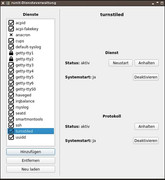
screenshot runit-service-manager https://postimg.cc/RqQnGVvg
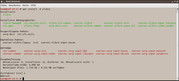
screenshot #apt install xlibre https://postimg.cc/kDFtwX7f
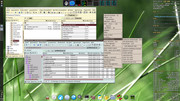
screenshot openbox desktop https://postimg.cc/mhNFV2TS
#11 Re: Devuan Derivatives » Refracta ready for Excalibur? » 2025-12-28 20:59:31
There seem to be two more bugs in refracta_13.2_nox_amd64-20251205_0850
(1) The iso boots well with efi in Qemu. But if installed to a Qemu VM with efi and runit, it does not boot. I could fix it with bootrepair-antix.
(2) The language settings do survive the installation, but not the keyboard setting. This could be fixed by
# dpkg-reconfigure console-setup (all settings were ok - only had to confirm all the settings)
# update-initramfs -u (to make keyboard settings permanent)
Pages: 1
Board footer
