
You are not logged in.
- Topics: Active | Unanswered
#451 Re: Other Issues » [SOLVED] Best practice/procedure question » 2025-07-08 19:54:14
^^^Yep, app-info app. Vuu-do App Info, but I use "vai" as the package name and for the scripts.
The database that's created (simple text file) gets created by the scraper script that's in the /usr/share/vai directory created when you install it, the GUI script is also in that directory. The database once created is stored in ~/.local/share/vai (scraped_apps.txt). I put it there just in case of a multi-user system, so each user could store their own pre-sets.
The app does not automatically update the database file as apps are installed, that would require re-running the scraper, but a user can just re-run it by running the scraper script (scrape12.sh), but in general, philosohy of use is that this is mainly useful to someone new to linux when they start using a system with a lot of new apps/names they haven't used before, after a time they'll get used to it and the app will no longer be necessary, and in the meantime if they install new apps in Synaptic they will have already seen the description.
Mainly my only question is: Is it okay putting those two executable scripts in /usr/share/vai? I know they work fine from there, but is there any general policy that discourages putting executable scripts in /usr/share for some reason?
#452 Other Issues » [SOLVED] Best practice/procedure question » 2025-07-08 17:22:10
- greenjeans
- Replies: 6
Hi folks!
Question: In a recent app I made, it consists of two main scripts, one that creates a database and the other the main GUI, and a wrapper script that activates the app. The wrapper checks to see if the database already exists, and if it does it just runs the GUI, if not it runs the database-creator first then runs the GUI. The wrapper is in my $PATH in /usr/local/bin, the other two scripts are not in the $PATH but instead in the folder for the app that's in /usr/share/name-of-app. It works fine as the wrapper specifically calls the full path to the scripts.
But is this okay, or would it be better to store the two scripts elsewhere? It's a little thing I know, but I do want to try and stick with Devuan protocol as much as possible when making these things.
#453 Re: DIY » drpm - a simple tool to handle deb packages for people used to rpm » 2025-07-08 16:35:36
but rather as an opportunity to learn how to make deb packages
.
Nice, pretty much what i've been doing for the last week or so, been meaning for a long time to learn to package, so i'm easing into it with easy stuff, just building the structure manually and using dpkg-deb --build.
#454 Re: DIY » drpm - a simple tool to handle deb packages for people used to rpm » 2025-07-08 15:19:55
Cool script! I really like little utilities that help folks ease into a new system and get up and running quickly, nice work!
#455 Re: Other Issues » Can I Run Refractasnapshot on Devuan Daedalus with runit? [SOLVED] » 2025-07-08 01:19:39
^^ Can't speak for fsmithred, but in my experience if you install Refracta-Snapshot from the repo, it will also install all needed depends to run it on a sysvinit system.
It's no exaggeration to say i've probably done it 1000 times. Worked perfectly every time. Possibly my favorite linux program EVER.
#456 Re: DIY » Working on a new app, the learning curve continues... » 2025-07-07 19:18:06
Well it seems like a whole lotta work....begets more work, lol!
Version 1.0-3 uploaded, this fixes a bug I found that was throwing some leftover de-bugging content into ~/.xsession-errors, bloating it up with some content
that didn't need to be in there, and also confusing my text-editor (Pluma) into thinking the file was binary due to some special characters that got thrown in there. I also added a window icon to the GUI to match the menu entry and other dialogs, and changed the formatting of the description to make it read and render better. Also removed imagemagick as a dependency as it doesn't need it, was going to use it if the app had a hard time with svg icons, but libsrvg and gdk-pixbuf are handling that just fine. Been testing hard all day and can't find any more bugs, so this may finally be the last version.
Thanks to the folks that downloaded and tried it! If you have it and like it, you should un-install the previous version and you'll also need to manually delete the vai folder in ~/.local/share, then install the new .deb.
#457 Re: Hardware & System Configuration » How are 'live' disks that can boot on many systems created? » 2025-07-06 15:37:45
It's odd how you can ask the same question multiple times and never be understood. Is it so impossible to create an HDD that can boot on multiple systems like a "live" CD, that no one can even comprehend the question? I would think it would be possible to tell your OS to install all available drivers and use a slightly modified boot process similar to what a live CD uses.
That's not really the same question you asked in the original post, you kinda moved the goal-post my friend.
I guess what you're asking might be possible, you should try it.
But I don't see the point when it's easy to make a much more portable USB stick with your system on it that will boot up any machine. Use Refracta2usb and you can get persistence, multi-boot if you want more than one system on the USB, and also additional partitions just for data.
It's also possible to make a USB system that's NOT a live-session, you can do a conventional install on a USB stick too, i've done it with Refracta Installer. Perhaps that would be more suitable to your purpose.
Either way, good luck! 
#458 Re: Hardware & System Configuration » How are 'live' disks that can boot on many systems created? » 2025-07-05 23:57:00
^^^What he said is exactly how I would do it.
I started work on a script a while back that's now on the back-burner, that would query your system to find out what all firmware was actually being used and what was superfluous and could be un-installed and do so. But that kinda stuff is fraught with peril, even if I got it working for me I doubt I would make it public as there's too much that can go wrong.
Seems like I remember PclinuxOS had such a script way back in the day, don't know if they still do.
#459 Re: DIY » ALSA-only purists: Question, new GUI app for the mixer and EQ? » 2025-07-05 23:53:15
Tested earlier in a live session with Vuu-do Mate mini that's also alsa-only, worked great! The mini doesn't have a music app, so I installed Strawberry from the repo for testing (had previously tested with Exaile). Really cool, the pre-set functions are working perfectly. Few more little things to do and it will be ready for packaging.
EDIT: Forgot to mention I also tried it with some different themes in that session, looks fine! Looked really cool in fact in the BlackMate theme.
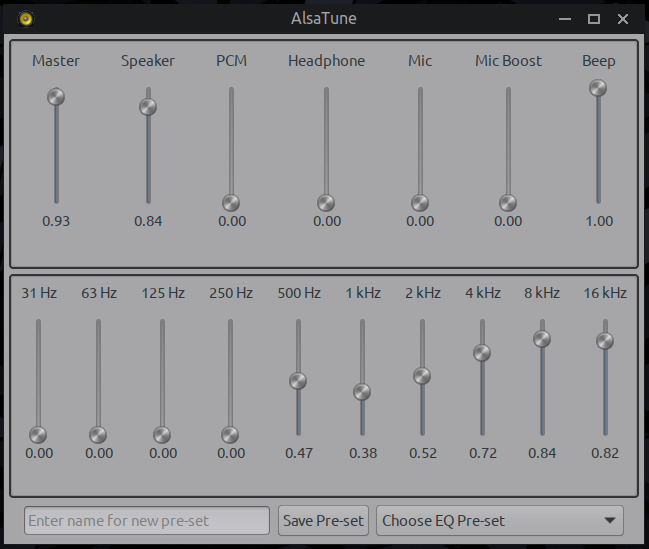
EDIT2: Just added a window icon to the script, looks good and adds a tiny bit of color to it. Decided on a name for the app, going to call it "AlsaTune" which seems good, pretty much describes what the app does in just a few letters! Now just need to do some more testing, and then i'm ready to package which should be a breeze, though I do need to add a fair amount of depends to the control, and also a good size readme.txt with more info and sample .asoundrc and .asound.conf files to help folks with the process. I'm excited going forward, in the end i'd like to help create more add-ons that extend the functionality of alsa, and remove completely the need for things like Pulse and Pipewire, and make configuration a breeze with simple gui apps like this.
#460 Re: DIY » Working on a new app, the learning curve continues... » 2025-07-05 23:29:05
Fixed and uploaded! Also added installed size to the control file so that info will be available now in Synaptic. And changed the whole thing from a per-user app to system-wide for all users.
#461 Re: Forum Feedback » FluxBB » 2025-07-05 19:41:33
^^ And you're a hero for doing it @golinux, love this place, thank you!!!
#462 Re: DIY » Working on a new app, the learning curve continues... » 2025-07-05 19:04:37
Okay. finally found the hidden flaw(s) in this one, a bug that didn't hurt anything or affect function at all, just the postinst script created some superfluous folders/files.
Also the package has the compiled binary for the gui, and that's done in 64-bit, so I need to change the control file and re-name it as it won't run on other architectures.
Other than that it's running great. So with these changes i'm also going to convert it to a more conventional system-wide thing as opposed to a user-specific app, the files generated by the scraper will still go into userspace, but the other scripts other than the wrapper will go into /usr/share/vai and the .desktop into /usr/share/applications.
#463 Re: DIY » ALSA-only purists: Question, new GUI app for the mixer and EQ? » 2025-07-05 14:59:03
^^^ shouldn't be much longer, I have some more testing to do yet, have only tested in Openbox so far, going to fire up a liveUSB today with a Mate version of Vuu-do that's pure alsa-only and test there. I also need to do some testing with other themes, so far the testing (and those screenshots) have only been tried using my own theme I made for Vuu-do (Ice-Breaker), so I don't know how it might look in other themes. Plus I need to attend to some little things, a name for the app, what icon to use etc.
#464 Re: DIY » ALSA-only purists: Question, new GUI app for the mixer and EQ? » 2025-07-05 14:44:21
Hi tux_99, that's basically what i'm doing. In the .deb package for the VAI app I previously did, I included the source code for the one C script in it, the other stuff is all bash/dash scripts so those are already readable in a text editor. In some of my build threads here I actually post the source code in the thread.
The scripts are so tiny and only do some small specific things, not sure any patches are needed. And as with everything I do, it's true open-source code that I claim no ownership over, if you check my scripts they all say "Copyleft greenjeans 2025. Use as you see fit." People are free to take it and make whatever they want with it. I actively encourage them to do so. This is part of the philosophy I adopted from the epic and legendary Miyolinux that Vuu-do is originally based on : MIYO, Make it your own.
Mostly any scripts I write are intended to be used in Vuu-do, it's only lately that i've expanded to trying to make actual apps that can be used in other systems.
As i'm sure you know, you don't have to install a .deb to look at it's contents, I understand that when using compiled binaries that people want to look at the source code, that's why I include the raw C code in the .deb. And we're talking tiny here, the source for this script is only 21 kb or so, the source for the binary in the VAI app is only 13.5 kb, so it's no big deal to include them.
This is just my workflow for now, again i'm just getting started with this stuff, progressing bit by bit to more complex things.
#465 Re: DIY » ALSA-only purists: Question, new GUI app for the mixer and EQ? » 2025-07-05 13:13:32
^^^Hi! I'm sure I haven't been clear enough about functions here even though my posts are usually a bit wordy anyway, let me clarify with use-case examples and such.
1. When you start the GUI it polls the backend for current settings of the EQ, which if you've previously used it to set them, will be exactly as you left it. If you then open the terminal version (regardless if you close the GUI or leave it open), the terminal version will also be at those values.
2. If you open the terminal version of the EQ first and adjust it, it will change sound obviously, then if you open the GUI (regardless if you close the term version or not) the GUI will reflect the changes you just made in the term version.
3. If you have both open at the same time, adjusting either one will change the sound, but they will not update each other while both are open. It seems to me that the logic needed to do that would be difficult, involving some kind of constant polling of each other while in operation, additional code would probably have to be written for both programs. But as always, I could be very wrong about, any enlightenment in that area would be appreciated. But really it's an unlikely edge-case scenario, no reason to have both open at the same time in the first place so I don't see a need to add a bunch of extra code and complexity to this simple app.
As for git, I have no git, "GIT" is what I yell at the cats when I want them to leave me alone, lol!
I guess I should probably have a git account somewhere going forward, maybe. But right now I don't use any of that and don't have all the mega-dev packages that go with it installed, just GCC, lbgtk3-dev and libasound2-dev and the packages that go with them to be able to compile, and dpkg-deb makes the .deb package for me after i've made all the components.
From what I understand github is now owned by microsoft, and gitlab apparently has some kind of stink on it too, leaving gitea which would make sense to use since Devuan uses it I guess, but any links to it hit me with that accursed Anubis crap, which takes a literal 10 minutes to run at least for me, and then when done still doesn't always let me in, so whenever I hit a link and I get Anubis I just close that tab and move on. That and the Clownflare challenge are the bane of my online existence.
Again you have to remember Aitor, I have always made it clear that i'm not a dev by training, schooling, or experience...just a VUU (veteran unix user) trying to get better and contribute something back to the community that's done so much for me. Previous to now, it actually seemed almost a little pretentious for me to set up some kind of git account, still does really. These are just small niche apps i'm working on, no more than a dozen of my last one has been downloaded, probably get a few more with this one. Small potatoes my friend, that's all my stuff is. I just got tired of waiting and hoping other people would make the things I want and decided to learn how to do it myself, same reason I started using Linux 16 years ago.
#466 Re: Desktop and Multimedia » XLibre: The New Xorg Fork » 2025-07-05 01:37:55
^^^ Nice! Devuan leading the push back for 10 years now, and now it seems our list of allies increases!
#467 Re: DIY » ALSA-only purists: Question, new GUI app for the mixer and EQ? » 2025-07-04 20:09:47
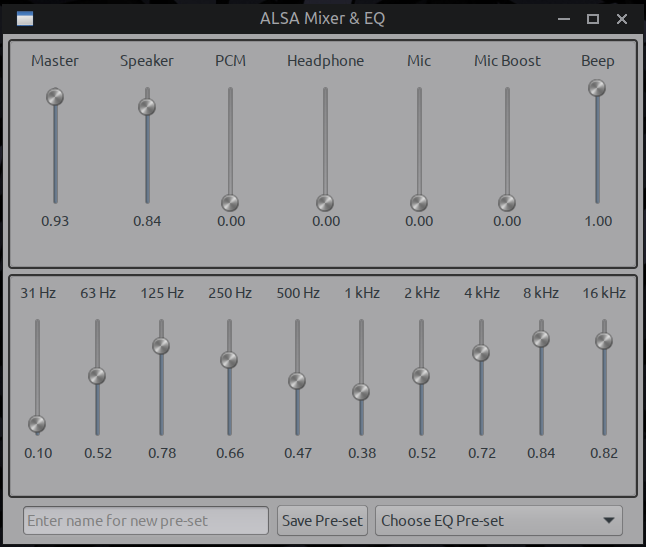
Oh it absolutely saves the settings, it's using the alsa backend to do that as well, the same way running either the mixer or EQ in terminal does, no outboard save files needed for that. But since as per your usual you urged me to do better, lol, here's an updated working draft with user-pre-set functions added, this uses a small outboard text DB file in CSV format for these functions, you set the EQ, type in your new name for the pre-set, hit save pre-set and it saves it to that file, and instantly adds it to the pre-set drop-down list on the right. And you can hit that drop-down and choose a pre-set and it instantly applies it and your sound changes in real-time based on it. 
#468 Re: DIY » ALSA-only purists: Question, new GUI app for the mixer and EQ? » 2025-07-04 14:31:36
Kinda stuck for the moment, having a hard time thinking of a reason not to just leave it like it is, it does everything now that I intended basically and does it well and fast. Needs some cleaning up for margins and such. I don't like feature creep, just doing things because they can be done. I try to think about philosophy of use and just not sure any extra features are needed.
Really could use some input from y'all on proposed additions, the only one i'm seriously considering at the moment, is implementing fsmithred's suggestion. Adding a text-entry field-button to save/name the current EQ setting as a pre-set, then another little field/button that's also a drop-down menu that shows current pre-set applied (if any) and let's you use the drop-down to select one of your other pre-sets.
#469 Re: Installation » How to Install XLibre on Devuan Daedalus (MATE)? » 2025-07-04 12:25:56
Anubis is a pain
That's like the understatement of the year. I just close any link instantly where that pops up.
#470 Re: DIY » ALSA-only purists: Question, new GUI app for the mixer and EQ? » 2025-07-03 22:25:55
Well crap...no...hadn't thought about doing that, was trying to keep it super simple and lean, a set-it-and-forget-it kinda app that's just replicating the same functions you would get running the mixer/eq in terminal, just all in one place and nice and clean and easy to use. Sound doesn't get changed much on my laptop, but I guess on a desktop with good speakers it might be nice to have some user-defined pre-sets... greenjeans gives fsmithred the stinkeye
#471 Re: DIY » ALSA-only purists: Question, new GUI app for the mixer and EQ? » 2025-07-03 21:48:15
Wow, that part was crazy hard, i've been at it for like 7 hours today, just for a tiny bit of stuff it seems like, lol, but part two is done and the whole thing is now 100% functional, sitting here using it right now listening to Boot Liquor playing through Exaile. Last parts should be super easy by comparison. Working draft:

#472 Re: DIY » ALSA-only purists: Question, new GUI app for the mixer and EQ? » 2025-07-03 17:37:02
^^^ Hi aitor! Using GTK and some CSS in a C script. Been working all morning on the EQ section, have probably modded/re-compiled/tested the script about 60-70 times already and no luck yet, it's a lot harder than it was getting the mixer section to work.
#473 Re: DIY » ALSA-only purists: Question, new GUI app for the mixer and EQ? » 2025-07-03 02:03:43
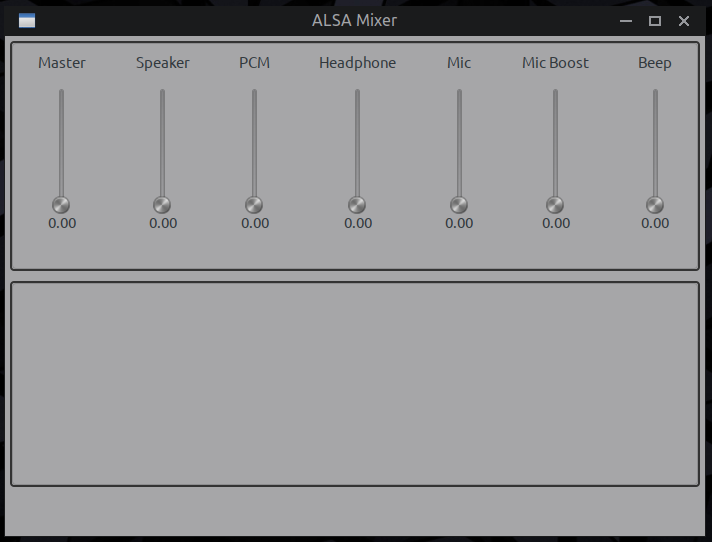
Thanks for the thoughts y'all! So here's a very rough prototype, got the logic worked out for the mixer that's in the top tab and it's working great, and have an empty bottom pane where the EQ will go, but it's gonna take more work on the EQ than it did the mixer. Plus there will be some stuff at the very bottom, info about sound cards and chips and some other things.
Screenie of progress so far:
#474 DIY » ALSA-only purists: Question, new GUI app for the mixer and EQ? » 2025-07-02 15:28:11
- greenjeans
- Replies: 108
So I am one of the alsa-only hard-core holdouts, and I know there's a lot of us out there, so here's what popped into my head last night as I was trying to think about tackling a new project since my app-info project is done. I need something a little more complex to push myself forward in this learning experience and also wanted something even more useful to experienced linux users.
I use pure alsa, and in my systems I add a pair of menu entries, one that opens the alsa mixer in terminal, and another that does the same with the equalizer, looks and works fine but:
1. I'm a GUI guy, can't help it, there's no GUI at all for the EQ, and the mixer is shipped now with a tiny sad gui made with FLTK that just doesn't cut it.
2. It fits the bill for a more complex and potentially useful project.
So i'm thinking a simple gui, with a top pane and a bottom pane, mixer controls on top and EQ in the bottom pane, nice looking sliders, some info about your sound card and such similar to what's in the terminal apps and perhaps some other useful info and things. One simple app to deal with sound, and possibly very helpful to newer folks who might want to go the alsa-only route.
Would love to get folks thoughts on such. This thread will be about the build, I already mocked up a basic working crude protoype last night just for a few controls for the mixer and this seems very do-able and possibly groovy to boot.
EDIT: this thread is NOT about how to get rid of Pulse and Pipe, plenty of other threads cover that, so please no long-winded tutorials and dissertations on how to do so or the merits of doing so. This app will assume you have already converted.
#475 Re: DIY » Does anyone here use Mintstick for making livUSB's? Need testers. » 2025-07-01 19:19:42
Okay, there seems to just be something odd about that crunchbang++ 32-bit iso, because i downloaded a 64 bit version of it and it didn't put up a second partition when i burned it with Mintstick. Ran the Fatstick utility on it and it worked perfectly.
Some thing wonky about that 32-bit iso, likely having to do with trying to use 32-bit with efi. Weird edge case scenario, I don't see a point in messing with the script just for that. I tried an iso of fsmithred's that works for both efi and non-efi systems, and it worked perfectly too.
I'm gonna call the script good, I added a little timeout in both to fix the last tiny sometimes-bug, and have been using it almost daily for a long time now, works great and fast. Here's the final scripts, GUI and cli-only:
#!/bin/bash

# Fatstick: This script is intended for use immediately after using Mintstick to create a
# liveUSB, it creates a 2nd partition for data in FAT32 on the remainder of the
# stick, i.e. if you have a 32 gig stick with a 4 gig iso on it, the script will
# create a 28 gig "DATA" partition in the empty space that follows the iso.

# Copyleft greenjeans 2025, use as you see fit.
# This is free software with NO WARRANTY, use at your own risk!

# Trap to ensure progress dialog is killed on script exit
trap 'kill $PROGRESS_PID 2>/dev/null' EXIT

# Function to display error dialog
error_dialog() {
    local error_message="$1"
    kill $PROGRESS_PID 2>/dev/null
    yad --center --borders=20 --fixed --window-icon=error --title="Error" \
        --height=150 --button="OK:0" \
        --text="$error_message"
    exit 1
}

# Must run with root privileges
if [ "$EUID" -ne 0 ]; then
    error_dialog "This script must be run as root (use sudo or su)."
fi

# Display initial dialog
yad --center --borders=20 --title="Fatstick" --window-icon=drive-removable-media \
    --fixed --height=325 --button="OK:0" --button="Cancel:1" \
    --text="This utility is for use on an existing liveUSB that is using an ISO-9660 filesystem
that takes up the entire stick, i.e. the type made by the Mintstick image writer.

If there is space after the iso, this will create a secondary data partition with
a FAT32 filesystem (for maximum compatibility with all operating systems)
and label it 'DATA'.  WARNING: If the stick has existing secondary partition(s),
the utility will overwrite them and you will lose any data stored on them.

Please ensure there is only one liveUSB with an ISO-9660 filesystem plugged
into your computer before using this utility or it will error out and close.

If you have not already plugged in a liveUSB, do so now before continuing.

Click 'OK' to proceed or 'Cancel' to abort."

if [ $? -ne 0 ]; then
    exit 0
fi

# Start progress dialog in the background
yad --window-icon=drive-removable-media --progress --progress-text="working..." \
    --no-buttons --fixed --borders=20 --center --pulsate --width=400 --auto-close \
    --title="Creating new partition" &
PROGRESS_PID=$!

# Check for multiple USBs with iso9660 filesystems
ISO_COUNT=$(blkid -o device -t TYPE=iso9660 | wc -l)
if [ "$ISO_COUNT" -gt 1 ]; then
    error_dialog "Multiple USB devices with ISO-9660 filesystems detected.\n\nPlease unplug all but one USB device with an ISO-9660 filesystem and try again.\n\nRun 'blkid -o list' to identify connected devices."
elif [ "$ISO_COUNT" -eq 0 ]; then
    error_dialog "No USB with ISO-9660 filesystem found.\n\nRun 'lsblk -o NAME,FSTYPE,LABEL' and 'blkid' to diagnose."
fi

# Find the USB device with an iso9660 filesystem (Mintstick’s LiveUSB)
USB_PART=$(blkid -o device -t TYPE=iso9660 | head -n 1)
if [ -n "$USB_PART" ]; then
    USB_DEV=$(echo "$USB_PART" | sed 's/[0-9]*$//')
fi

# Fallback to lsblk if blkid fails
if [ -z "$USB_DEV" ]; then
    USB_PART=$(lsblk -o NAME,FSTYPE | grep iso9660 | awk '{print $1}' | head -n 1)
    USB_DEV=$(echo "$USB_PART" | sed 's/[0-9]*$//' | head -n 1)
    USB_DEV="/dev/${USB_DEV}"
fi

if [ -z "$USB_DEV" ] || [ ! -b "$USB_DEV" ]; then
    error_dialog "No USB with ISO-9660 filesystem found.\n\nRun 'lsblk -o NAME,FSTYPE,LABEL' and 'blkid' to diagnose."
fi

# Unmount any mounted partitions on the USB
umount "${USB_DEV}"* 2>/dev/null

# Get the partition table and disk info
FDISK_OUT=$(fdisk -l "$USB_DEV" 2>/dev/null)
if [ -z "$FDISK_OUT" ]; then
    error_dialog "Failed to read disk info with fdisk."
fi

# Extract the end sector of the iso9660 partition
ISO_END=$(echo "$FDISK_OUT" | grep "^${USB_PART}" | awk '{print $4}')
if [ -z "$ISO_END" ]; then
    error_dialog "Could not determine end sector of iso9660 partition."
fi

# Extract total sectors
TOTAL_SECTORS=$(echo "$FDISK_OUT" | grep "^Disk $USB_DEV" | grep -o '[0-9]\+ sectors' | awk '{print $1}')
if [ -z "$TOTAL_SECTORS" ]; then
    error_dialog "Could not determine total disk sectors."
fi

# Calculate start and size of the new partition
PART_START=$((ISO_END + 1))
PART_SIZE=$((TOTAL_SECTORS - PART_START))

# Check space (needs at least 1 MB = 2048 sectors)
if [ "$PART_SIZE" -lt 2048 ]; then
    error_dialog "Not enough free space to create a new partition (need at least 1 MB)."
fi

# Proactively wipe ISO-9660 signatures to prevent Gparted detection issues
wipefs -a -t iso9660 "$USB_DEV" 2>/dev/null || {
    error_dialog "Failed to wipe ISO-9660 signatures on $USB_DEV."
}

# Remove any existing secondary partitions
sfdisk --delete "$USB_DEV" 2 2>/dev/null

# Create a new partition using sfdisk
echo "start=$PART_START, size=$PART_SIZE, type=c" | sfdisk --append "$USB_DEV"
if [ $? -ne 0 ]; then
    error_dialog "Failed to create partition on $USB_DEV."
fi

sleep 2

# Check if the new partition was created
NEW_PART="${USB_DEV}2"
if [ ! -b "$NEW_PART" ]; then
    error_dialog "Failed to create partition $NEW_PART."
fi

# Refresh the partition table and wait for kernel to recognize new partition
partprobe "$USB_DEV"
sleep 2  # Give kernel time to update device nodes
for i in {1..3}; do
    if [ -b "$NEW_PART" ]; then
        break
    fi
    sleep 1
done
if [ ! -b "$NEW_PART" ]; then
    error_dialog "New partition $NEW_PART not detected by kernel."
fi

# Format the new partition as FAT32
mkfs.vfat -n "DATA" "$NEW_PART" 2>/dev/null
if [ $? -ne 0 ]; then
    error_dialog "Failed to format $NEW_PART as FAT32."
fi

# Verification of FAT32, 3 tries
for i in {1..3}; do
    if blkid -o device -t TYPE=vfat | grep "$NEW_PART" >/dev/null; then
        break
    fi
    sleep 1
done

if ! blkid -o device -t TYPE=vfat | grep "$NEW_PART" >/dev/null; then
    error_dialog "Could not verify FAT32 filesystem on $NEW_PART, but partition was created.\n\nCheck with 'lsblk -o NAME,FSTYPE,LABEL'."
fi

# Close progress dialog before showing success dialog
kill $PROGRESS_PID 2>/dev/null

# Display success dialog
yad --center --borders=20 --timeout=5 --fixed --height=100 \
    --window-icon=drive-removable-media --no-buttons --title="Fatstick" \
    --text="Success! New partition $NEW_PART created with FAT32 filesystem, labeled 'DATA'."
#!/bin/bash
# Fatstick CLI: Creates a secondary FAT32 data partition on a liveUSB made with Mintstick.
# Copyleft greenjeans 2025, use as you see fit.
# This is free software with NO WARRANTY, use at your own risk!
# Function to display error message and exit
error_exit() {
local error_message="$1"
echo "Error: $error_message" >&2
exit 1
}
# Must run with root privileges
if [ "$EUID" -ne 0 ]; then
error_exit "This script must be run as root (use sudo or su)."
fi
# Display initial prompt
echo "This utility is for use on an existing liveUSB with an ISO-9660 filesystem"
echo "created by Mintstick. It will create a secondary FAT32 data partition labeled"
echo "'DATA' in the remaining space. WARNING: Existing secondary partitions will be"
echo "overwritten, and data on them will be lost."
echo ""
echo "Ensure only one liveUSB with an ISO-9660 filesystem is plugged in."
echo "Run 'lsblk -o NAME,FSTYPE,LABEL' or 'blkid' to check connected devices."
echo ""
echo "Continue? (y/n): "
read -r response
if [ "$response" != "y" ] && [ "$response" != "Y" ]; then
echo "Aborted."
exit 0
fi
# Check for multiple USBs with iso9660 filesystems
ISO_COUNT=$(blkid -o device -t TYPE=iso9660 | wc -l)
if [ "$ISO_COUNT" -gt 1 ]; then
error_exit "Multiple USB devices with ISO-9660 filesystems detected. Unplug all but one and try again. Run 'blkid -o list' to identify devices."
elif [ "$ISO_COUNT" -eq 0 ]; then
error_exit "No USB with ISO-9660 filesystem found. Run 'lsblk -o NAME,FSTYPE,LABEL' and 'blkid' to diagnose."
fi
# Find the USB device with an iso9660 filesystem
USB_PART=$(blkid -o device -t TYPE=iso9660 | head -n 1)
if [ -n "$USB_PART" ]; then
USB_DEV=$(echo "$USB_PART" | sed 's/[0-9]*$//')
fi
# Fallback to lsblk if blkid fails
if [ -z "$USB_DEV" ]; then
USB_PART=$(lsblk -o NAME,FSTYPE | grep iso9660 | awk '{print $1}' | head -n 1)
USB_DEV=$(echo "$USB_PART" | sed 's/[0-9]*$//' | head -n 1)
USB_DEV="/dev/${USB_DEV}"
fi
if [ -z "$USB_DEV" ] || [ ! -b "$USB_DEV" ]; then
error_exit "No USB with ISO-9660 filesystem found. Run 'lsblk -o NAME,FSTYPE,LABEL' and 'blkid' to diagnose."
fi
# Unmount any mounted partitions on the USB
umount "${USB_DEV}"* 2>/dev/null
# Get the partition table and disk info
FDISK_OUT=$(fdisk -l "$USB_DEV" 2>/dev/null)
if [ -z "$FDISK_OUT" ]; then
error_exit "Failed to read disk info with fdisk."
fi
# Extract the end sector of the iso9660 partition
ISO_END=$(echo "$FDISK_OUT" | grep "^${USB_PART}" | awk '{print $4}')
if [ -z "$ISO_END" ]; then
error_exit "Could not determine end sector of iso9660 partition."
fi
# Extract total sectors
TOTAL_SECTORS=$(echo "$FDISK_OUT" | grep "^Disk $USB_DEV" | grep -o '[0-9]\+ sectors' | awk '{print $1}')
if [ -z "$TOTAL_SECTORS" ]; then
error_exit "Could not determine total disk sectors."
fi
# Calculate start and size of the new partition
PART_START=$((ISO_END + 1))
PART_SIZE=$((TOTAL_SECTORS - PART_START))
# Check space (needs at least 1 MB = 2048 sectors)
if [ "$PART_SIZE" -lt 2048 ]; then
error_exit "Not enough free space to create a new partition (need at least 1 MB)."
fi
# Proactively wipe ISO-9660 signatures to prevent Gparted detection issues
echo "Wiping ISO-9660 signatures..."
wipefs -a -t iso9660 "$USB_DEV" 2>/dev/null || {
error_exit "Failed to wipe ISO-9660 signatures on $USB_DEV."
}
# Remove any existing secondary partitions
echo "Removing existing secondary partitions..."
sfdisk --delete "$USB_DEV" 2 2>/dev/null
# Create a new partition using sfdisk
echo "Creating new partition..."
echo "start=$PART_START, size=$PART_SIZE, type=c" | sfdisk --append "$USB_DEV"
if [ $? -ne 0 ]; then
error_exit "Failed to create partition on $USB_DEV."
fi
sleep 1
# Check if the new partition was created
NEW_PART="${USB_DEV}2"
if [ ! -b "$NEW_PART" ]; then
error_exit "Failed to create partition $NEW_PART."
fi
# Refresh the partition table and wait for kernel to recognize new partition
echo "Refreshing partition table..."
partprobe "$USB_DEV"
sleep 2
for i in {1..3}; do
if [ -b "$NEW_PART" ]; then
break
fi
sleep 1
done
if [ ! -b "$NEW_PART" ]; then
error_exit "New partition $NEW_PART not detected by kernel."
fi
# Format the new partition as FAT32
echo "Formatting new partition as FAT32..."
mkfs.vfat -n "DATA" "$NEW_PART" 2>/dev/null
if [ $? -ne 0 ]; then
error_exit "Failed to format $NEW_PART as FAT32."
fi
# Verification of FAT32, 3 tries
for i in {1..3}; do
if blkid -o device -t TYPE=vfat | grep "$NEW_PART" >/dev/null; then
break
fi
sleep 1
done
if ! blkid -o device -t TYPE=vfat | grep "$NEW_PART" >/dev/null; then
error_exit "Could not verify FAT32 filesystem on $NEW_PART, but partition was created. Check with 'lsblk -o NAME,FSTYPE,LABEL'."
fi
# Display success message
echo "Success! New partition $NEW_PART created with FAT32 filesystem, labeled 'DATA'."Board footer
