
You are not logged in.
- Topics: Active | Unanswered
#426 Re: Documentation » Make QT5 and QT6 apps use your GTK theme » 2025-07-18 21:32:09
More success, found a .deb package for qt5gtk2 on the opensuse build service, booted up a live-session of Devuan excalibur and installed, works great! Works with the gt6gtk2 package using the same export command for both which is export QT_QPA_PLATFORMTHEME=qt5gtk2
Package is a bit dated but works fine, the original author has some newer source code, perhaps the package needs to be be updated, but it's working fine in excalibur. All the QT apps look so much nicer with my beautiful GTK theme. 
#427 Re: Packaging for Devuan » Repackaging Debian packages » 2025-07-18 15:24:57
^^ That's an interesting article, but the author said his program is available now using apt, but I don't see it in the repo. I wouldn't mind trying it.
#428 Re: Packaging for Devuan » Repackaging Debian packages » 2025-07-16 20:16:15
Hi SteveM, and welcome! I can't speak for the devs because i'm not one, but in general we are very grateful for anyone who's willing to lend a hand!
You might get a faster reply to your query via IRC, on Libera-chat go to #devuan-dev, that's where all the big cheeses usually hang out
#429 Re: Documentation » Make QT5 and QT6 apps use your GTK theme » 2025-07-14 23:21:13
So for the upcoming excalibur, the qt5-gtk2-platform theme is going bye-bye, The current package might still work, haven't tried it yet.
But going forward I and hopefully some folks smarter than me may have a solution in the works.
The qt6gtk2 package I mentioned above also has a version for trixie, that I have tested on Devuan excalibur and it works fine.
The same author has a qt5 version as well, qt5gtk2, no .deb package yet though, but I did a local make/install from source and it works great in daedalus, just not in excalibur/trixie yet. So hopefully I can get some real ninjas to take a look and maybe fix it. The fellows who packaged the .debs for the qt6gtk2 had to make some changes to get it to work for trixie, i'm hoping they can work that magic for this package as well.
So going forward it's a nice solution as those programs are currently maintained even if they aren't in Debian.
#430 Re: Devuan Derivatives » Devuan 6 (excalibur) mate testing iso uploaded » 2025-07-14 02:30:31
7-13-2025, Updated to today, give it a try!
new version, over 300 updates, ready for testing! Passwords:
User = devuan, password= devuan
Root = root
Happy testing!
#431 Re: Desktop and Multimedia » Daedalus unusable with multiple monitors - Fixed in Excalibur » 2025-07-13 23:11:21
Somebody smarter than me will likely be along directly, but my first thoughts were:
1. xwayland???? Does that even work on 32 bit?
2. KDE on a low spec 32 bit machine? That's like the most complex and resource-intensive DE.
#432 Re: DIY » ALSA-only purists: Question, new GUI app for the mixer and EQ? » 2025-07-13 23:05:50
^^ Thanks my friend!! I posted all this stuff i've been doing up to my sourceforge account, so anybody can test 'em and mess with 'em if they like.
#433 Re: Off-topic » GNOME is taking the scum bag approach still... » 2025-07-13 23:02:35
posted by stargate-sg1-cheyenne-mtn

#434 Re: DIY » ScrotShot, simple GUI frontend for scrot » 2025-07-13 21:05:59
 Thanks guys! A .deb of this and my other projects just uploaded to my sourceforge : https://sourceforge.net/projects/vuu-do … eous/apps/
#435 Re: Devuan Derivatives » Vuu-do Linux! *New Openbox-64 iso's (1.0.7) up 2-02-18*!! » 2025-07-13 21:03:54
Uploaded .debs of the new apps mentioned in the last post (forgot to mention in that post that I included Fatstick on those new iso's too).
Basically all the stuff in my various DIY threads of late.
They can be found here: https://sourceforge.net/projects/vuu-do … eous/apps/
Hope they're useful for folks, it was a lot of long hard work, but man did I ever expand my working knowledge of these kinds of things!
#436 Re: Devuan Derivatives » Vuu-do Linux! *New Openbox-64 iso's (1.0.7) up 2-02-18*!! » 2025-07-13 02:52:34
New versions of the Openbox max and mini Vuu-do iso's uploaded.
Lots of updates in important packages, some 90 or so, new kernel too. Removed some gnome apps, disk-utility, chess, and mahjongg, replaced the disk utility with Fatstick that works hand-in-hand after using Mintstick to create a liveUSB, Fatstick will create a secondary data partition in FAT32 on the stick and label it "DATA". Installed a different mahjongg game and a solitaire game.
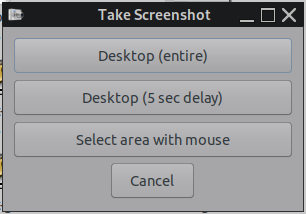
Also included some more new apps i've been working on, Vuu-do App Info which gives simple info about installed applications, Alsatune which is a complete GUI frontend to control the alsa mixer and EQ and also allows for saving EQ pre-sets, and ScrotShot which is a GUI for the scrot screenshot utility and takes the place of the 3 previous menu entries, the 3 choices are;
Desktop (entire)
Desktop (5 second delay)
Select area with the mouse
Note that the last option has two functions, when you select it and your cursor changes to a crosshair, you can left-click and hold to draw a selection, or if you just want to grab a specific window you can just left-click once on the window itself.
Those last two cleaned up the menu quite a bit, from 7 entries to 2.
I added the Vuu-do info app to the mini as well, but haven't done the first run to create the database since it's a mini. Install your favorite programs then run the app and it will create a fresh database for you. It might be superfluous to all but very new users, if so just uninstall it in Synaptic.
#437 Re: DIY » Does anyone here use Mintstick for making livUSB's? Need testers. » 2025-07-12 18:25:42
So for the life of me I cannot find another iso that does that stuff the #!++ 32 bit does. But still, need to deal with it. Pragmatism won out in the end, I just modded the script to check for additional partitions, and if it has one or more extras, it generates an error dialog and exits the script performing no actions on the liveUSB. Done. Going into the new Vuu-do iso's i'm working on today.
#438 Re: Off-topic » GNOME is taking the scum bag approach still... » 2025-07-12 18:22:09
*greenjeans closes eyes*
OMMMMMMMMMM....OMMMMMMMMMM.....
#439 Re: DIY » ALSA-only purists: Question, new GUI app for the mixer and EQ? » 2025-07-12 14:42:15
^^Yeah I got sound in FF just using alsa-only, even in my Mate systems which throw a fit when you first rip out Pulse, lol.
@tux_99 Thanks so much for testing!
#440 Re: DIY » ScrotShot, simple GUI frontend for scrot » 2025-07-12 14:31:54
I would miss a forth option that I use very often (with the default KDE app): 4. Select window using the mouse.
Actually option #3 does that too, for grabbing a window, when the crosshairs comes up, just left-click the window once instead of holding the mouse button and selecting.
#441 Re: Desktop and Multimedia » Good X11 environment for laptops? Plasma 6 is not ideal » 2025-07-11 14:50:13
Surprised nobody mentioned Mate, Devuan's Mate version is very nice. Not sure about the touchpad stuff as I never use it.
#442 DIY » ScrotShot, simple GUI frontend for scrot » 2025-07-11 14:19:52
- greenjeans
- Replies: 10
So I use scrot for screenshotting in Vuu-do, I like how lightweight it is and simple. Up until now i've had to add 3 menu entries under the screenshot category as it's a cli app, so I called the 3 functions I wanted via menu entries since there hasn't been a GUI for it in many years near as I can tell. So I made a GUI yesterday, plain ol' Yad and shellscript. Scrot can do a lot of things but all I ever use are 3 options.
Screenshot of:
1. The entire desktop
2. The entire desktop with a 5 second delay
3. Select area using the mouse
And I like to view the shot right after I take it, so I set it up to open the new shot in a pic viewer after it's taken.
It was harder than it sounds, first of all if you use conky (I do) when you choose select area with mouse, if conky is running it will interfere with the selection process and you'll get some nasty artifacts in the shot, so I had previously written a tiny script that turns off conky when you click the entry, takes the shot, previews it for you, then turns conky back on afterwards. I tried and tried to integrate that with the main script, but it wasn't happening, so I modded it some and left it as an outboard script that gets called from the main script.
Yad's --form window was perfect for the main gui, but it has a quirk in that it doesn't shut down after you click a selection, that took some time and searching to figure out too. And for viewing the the shot after you take it, didn't make sense to try and guess the users pic viewer, so I used Yad for that as well, simple undecorated window with the shot and a close button.
Got just a hair more testing to do today, and then i'll post the scripts if anyone is interested.
#443 Re: Off-topic » GNOME is taking the scum bag approach still... » 2025-07-11 03:13:51
FFS knock it off. Put that energy into creating something. I know Steve does some amazing work, and you've both been with us since the early days, can we just put differences aside and focus on making Devuan the best that it can be?
Lawd knows i'm no paragon of virtue, but i'm trying to be better. Can we not work together to create new and better things?
#444 Re: Devuan » Can't use MAKE command driver for installation » 2025-07-10 14:11:40
@comborico1611
You have used the inline code tag ("c" with square brackets) whereas you should have used the large code block tag ("code" with square brackets) for that lengthy piece of code. It's a simple matter to fix.
#445 Re: DIY » Working on a new app, the learning curve continues... » 2025-07-09 20:31:13
Version 4 uploaded.
No bugs, just moved some files around to comply with Debian's FHS policy, added a readme in /usr/share/vai with some info,
and cleaned up some superfluous code in the postisnt script in the .deb package. Looking great!
#446 Re: Off-topic » The need for cooperation as central motivation in Unix and GNUproject » 2025-07-09 16:35:17
the marketshare loss is mostly due to the continuing increase in smartphone usage which ultimately drives users to the devices default/included browser which is _not_ firefox
I don't believe so, if you look at the chart going back over the years, it shows google Chrome and Safari steadily growing, while FF declines.
#447 Re: Other Issues » [SOLVED] Best practice/procedure question » 2025-07-09 16:31:22
Solved. The $PATH won't expand to sub-directories if I made one in /usr/local/bin. I would have to use full paths. And you probably shouldn't put sub-directories in there anyway.
So likely best practice is I move the wrapper script to /usr/bin, and move the other two scripts to /usr/local/bin. That should satisfy the FHS. I'll still have a folder in usr/share with a copy of the source code, and probably a readme about the app and some compile instructions for anyone who'd like to do any modding.
#448 Re: DIY » ALSA-only purists: Question, new GUI app for the mixer and EQ? » 2025-07-09 16:14:23
Yep, going forward i'll make a git account, just taking baby steps
right now as much as I can, this is a lot of stuff to learn. Here's what's
going on currently for anyone who might like to test:
So this app assumes that users will be alsa-purists who already have a working
alsa-only system with all the goodies including packages alsamixergui, libasound2-plugin-equal,
alsa-utils etc. And already have working terminal versions of the mixer and EQ and a
properly configured ~/.asoundrc and /etc/.asound.conf.
You must not have any sound server daemons or controls active whatsoever, no Pulse
or Pipe etc. Best not to have them installed at all. VLC drags in libpulse0, but that's
just a library and doesn't affect function.
To compile the source, you will need : GCC, libgtk-3-dev, and libasound2-dev and all their
dependencies.
So copy the code here into your text-editor, save it as "mxeq.c" in any folder you
like. The open a terminal in that same folder to compile (you don't need to be root):
gcc -o mxeq mxeq.c $(pkg-config --cflags --libs gtk+-3.0 alsa glib-2.0) -Wall
Then make the resulting binary executable, then run it, if everything is configged
properly it will be there in all it's glory! If you have Pulse running you will
get a gui with no content but a volume slider maybe, won't hurt anything, just won't
work right. Here's the source:
#include <gtk/gtk.h>
#include <alsa/asoundlib.h>
#include <stdio.h>
#include <string.h>
#include <glib/gstdio.h>

typedef struct {
    snd_mixer_t *mixer;
    snd_mixer_elem_t *elem;
    GtkWidget *scale;
    const char *channel_name;
} MixerChannel;

typedef struct {
    snd_mixer_t *mixer;
    MixerChannel *channels;
    int num_channels;
} MixerData;

typedef struct {
    snd_ctl_t *ctl;
    snd_ctl_elem_value_t *val;
    GtkWidget *scale;
    const char *band_name;
} EQBand;

typedef struct {
    snd_ctl_t *ctl;
    EQBand *bands;
    int num_bands;
} EQData;

// Callback to save preset to ~/.local/share/mxeq/presets.csv
static void save_preset(GtkWidget *button, gpointer user_data) {
    EQData *eq_data = (EQData *)user_data;
    GtkWidget *entry = g_object_get_data(G_OBJECT(button), "preset_entry");
    GtkWidget *combo = g_object_get_data(G_OBJECT(button), "preset_combo");
    GtkWidget *window = g_object_get_data(G_OBJECT(button), "window");
    const char *preset_name = gtk_entry_get_text(GTK_ENTRY(entry));

    if (!preset_name || strlen(preset_name) == 0) {
        GtkWidget *dialog = gtk_message_dialog_new(GTK_WINDOW(window), GTK_DIALOG_MODAL,
                                                  GTK_MESSAGE_ERROR, GTK_BUTTONS_OK,
                                                  "Please enter a preset name.");
        gtk_dialog_run(GTK_DIALOG(dialog));
        gtk_widget_destroy(dialog);
        return;
    }

    // Check for duplicate preset name
    const char *home = g_get_home_dir();
    char *preset_path = g_build_filename(home, ".local", "share", "mxeq", "presets.csv", NULL);
    FILE *fp_check = fopen(preset_path, "r");
    if (fp_check) {
        char line[256];
        while (fgets(line, sizeof(line), fp_check)) {
            char *name = strtok(line, ":");
            if (name && strcmp(name, preset_name) == 0) {
                GtkWidget *dialog = gtk_message_dialog_new(GTK_WINDOW(window), GTK_DIALOG_MODAL,
                                                          GTK_MESSAGE_ERROR, GTK_BUTTONS_OK,
                                                          "Preset name already exists. Choose a different name.");
                gtk_dialog_run(GTK_DIALOG(dialog));
                gtk_widget_destroy(dialog);
                fclose(fp_check);
                g_free(preset_path);
                return;
            }
        }
        fclose(fp_check);
    }

    // Create directory if it doesn't exist
    char *dir_path = g_build_filename(home, ".local", "share", "mxeq", NULL);
    g_mkdir_with_parents(dir_path, 0755);
    g_free(dir_path);

    // Open file in append mode
    FILE *fp = fopen(preset_path, "a");
    if (!fp) {
        GtkWidget *dialog = gtk_message_dialog_new(GTK_WINDOW(window), GTK_DIALOG_MODAL,
                                                  GTK_MESSAGE_ERROR, GTK_BUTTONS_OK,
                                                  "Failed to save preset: Could not open file.");
        gtk_dialog_run(GTK_DIALOG(dialog));
        gtk_widget_destroy(dialog);
        g_free(preset_path);
        return;
    }

    // Collect EQ values
    GString *values = g_string_new("");
    for (int i = 0; i < eq_data->num_bands; i++) {
        gdouble value = gtk_range_get_value(GTK_RANGE(eq_data->bands[i].scale));
        g_string_append_printf(values, "%.2f", value);
        if (i < eq_data->num_bands - 1) {
            g_string_append(values, ",");
        }
    }

    // Write preset to file
    fprintf(fp, "%s:%s\n", preset_name, values->str);
    fclose(fp);
    g_string_free(values, TRUE);

    // Add to combo box and set as active
    gtk_combo_box_text_append_text(GTK_COMBO_BOX_TEXT(combo), preset_name);
    gtk_combo_box_set_active_id(GTK_COMBO_BOX(combo), preset_name);

    // Show confirmation dialog
    GtkWidget *dialog = gtk_message_dialog_new(GTK_WINDOW(window), GTK_DIALOG_MODAL,
                                              GTK_MESSAGE_INFO, GTK_BUTTONS_OK,
                                              "Preset Saved!");
    gtk_dialog_run(GTK_DIALOG(dialog));
    gtk_widget_destroy(dialog);

    // Clear entry
    gtk_entry_set_text(GTK_ENTRY(entry), "");
    g_free(preset_path);
}

// Callback to apply selected preset
static void apply_preset(GtkComboBox *combo, gpointer user_data) {
    EQData *eq_data = (EQData *)user_data;
    char *preset_name = gtk_combo_box_text_get_active_text(GTK_COMBO_BOX_TEXT(combo));
    if (!preset_name || g_strcmp0(preset_name, "Choose EQ Pre-set") == 0) {
        g_free(preset_name);
        return;
    }

    // Build preset file path
    const char *home = g_get_home_dir();
    char *preset_path = g_build_filename(home, ".local", "share", "mxeq", "presets.csv", NULL);

    // Open preset file
    FILE *fp = fopen(preset_path, "r");
    if (!fp) {
        fprintf(stderr, "Failed to open presets.csv\n");
        g_free(preset_name);
        g_free(preset_path);
        return;
    }

    // Read file to find matching preset
    char line[256];
    while (fgets(line, sizeof(line), fp)) {
        char *name = strtok(line, ":");
        if (name && strcmp(name, preset_name) == 0) {
            char *values = strtok(NULL, "\n");
            if (values) {
                char *token = strtok(values, ",");
                int i = 0;
                while (token && i < eq_data->num_bands) {
                    gdouble value = g_ascii_strtod(token, NULL);
                    gtk_range_set_value(GTK_RANGE(eq_data->bands[i].scale), value);
                    long alsa_value = (long)(value * 100.0);
                    snd_ctl_elem_value_set_integer(eq_data->bands[i].val, 0, alsa_value);
                    snd_ctl_elem_value_set_integer(eq_data->bands[i].val, 1, alsa_value);
                    snd_ctl_elem_write(eq_data->bands[i].ctl, eq_data->bands[i].val);
                    token = strtok(NULL, ",");
                    i++;
                }
            }
            break;
        }
    }
    fclose(fp);
    g_free(preset_name);
    g_free(preset_path);
}

// Load presets into combo box at startup
static void load_presets(GtkComboBoxText *combo) {
    gtk_combo_box_text_append_text(combo, "Choose EQ Pre-set");
    const char *home = g_get_home_dir();
    char *preset_path = g_build_filename(home, ".local", "share", "mxeq", "presets.csv", NULL);
    FILE *fp = fopen(preset_path, "r");
    if (fp) {
        char line[256];
        while (fgets(line, sizeof(line), fp)) {
            char *name = strtok(line, ":");
            if (name) {
                gtk_combo_box_text_append_text(combo, name);
            }
        }
        fclose(fp);
    }
    gtk_combo_box_set_active(GTK_COMBO_BOX(combo), 0); // Default to "Choose EQ Pre-set"
    g_free(preset_path);
}

static void slider_changed(GtkRange *range, MixerChannel *channel) {
    gdouble value = gtk_range_get_value(range);
    long min, max;
    snd_mixer_selem_get_playback_volume_range(channel->elem, &min, &max);
    long alsa_value = (long)(value * (max - min) + min);
    snd_mixer_selem_set_playback_volume_all(channel->elem, alsa_value);
}

static void eq_slider_changed(GtkRange *range, EQBand *band) {
    gdouble value = gtk_range_get_value(range);
    long alsa_value = (long)(value * 100.0);
    snd_ctl_elem_value_set_integer(band->val, 0, alsa_value); // Left channel
    snd_ctl_elem_value_set_integer(band->val, 1, alsa_value); // Right channel
    snd_ctl_elem_write(band->ctl, band->val);
}

static void init_alsa_mixer(MixerData *data) {
    if (snd_mixer_open(&data->mixer, 0) < 0) {
        fprintf(stderr, "Failed to open ALSA mixer\n");
        return;
    }
    if (snd_mixer_attach(data->mixer, "default") < 0) {
        fprintf(stderr, "Failed to attach mixer to default device\n");
        snd_mixer_close(data->mixer);
        return;
    }
    if (snd_mixer_selem_register(data->mixer, NULL, NULL) < 0) {
        fprintf(stderr, "Failed to register mixer\n");
        snd_mixer_close(data->mixer);
        return;
    }
    if (snd_mixer_load(data->mixer) < 0) {
        fprintf(stderr, "Failed to load mixer\n");
        snd_mixer_close(data->mixer);
        return;
    }

    const char *channel_names[] = {"Master", "Speaker", "PCM", "Headphone", "Mic", "Mic Boost", "Beep"};
    int max_channels = G_N_ELEMENTS(channel_names);
    data->channels = g_new(MixerChannel, max_channels);
    data->num_channels = 0;

    for (int i = 0; i < max_channels; i++) {
        snd_mixer_selem_id_t *sid;
        snd_mixer_selem_id_alloca(&sid);
        snd_mixer_selem_id_set_name(sid, channel_names[i]);
        snd_mixer_elem_t *elem = snd_mixer_find_selem(data->mixer, sid);
        if (elem) {
            data->channels[data->num_channels].elem = elem;
            data->channels[data->num_channels].channel_name = channel_names[i];
            data->num_channels++;
        }
    }
}

static void init_alsa_eq(EQData *data) {
    int err;
    if ((err = snd_ctl_open(&data->ctl, "equal", 0)) < 0) {
        fprintf(stderr, "Failed to open ALSA control 'equal': %s\n", snd_strerror(err));
        return;
    }

    snd_ctl_elem_list_t *list;
    snd_ctl_elem_list_alloca(&list);
    if ((err = snd_ctl_elem_list(data->ctl, list)) < 0) {
        fprintf(stderr, "Failed to get initial control list: %s\n", snd_strerror(err));
        snd_ctl_close(data->ctl);
        return;
    }

    int num_controls = snd_ctl_elem_list_get_count(list);
    if (num_controls <= 0) {
        fprintf(stderr, "No controls found for 'equal' device\n");
        snd_ctl_close(data->ctl);
        return;
    }

    if ((err = snd_ctl_elem_list_alloc_space(list, num_controls)) < 0) {
        fprintf(stderr, "Failed to allocate control list space: %s\n", snd_strerror(err));
        snd_ctl_close(data->ctl);
        return;
    }
    if ((err = snd_ctl_elem_list(data->ctl, list)) < 0) {
        fprintf(stderr, "Failed to list controls: %s\n", snd_strerror(err));
        snd_ctl_close(data->ctl);
        return;
    }

    num_controls = snd_ctl_elem_list_get_used(list);
    data->bands = g_new(EQBand, num_controls);
    data->num_bands = 0;

    for (int i = 0; i < num_controls; i++) {
        snd_ctl_elem_id_t *id;
        snd_ctl_elem_id_alloca(&id);
        snd_ctl_elem_list_get_id(list, i, id);

        const char *name = snd_ctl_elem_id_get_name(id);
        unsigned int numid = snd_ctl_elem_id_get_numid(id);
        snd_ctl_elem_iface_t iface = snd_ctl_elem_id_get_interface(id);

        if (iface != SND_CTL_ELEM_IFACE_MIXER) {
            fprintf(stderr, "Skipping non-mixer control: %s (interface=%d)\n", name, iface);
            continue;
        }

        snd_ctl_elem_value_t *val;
        if ((err = snd_ctl_elem_value_malloc(&val)) < 0) {
            fprintf(stderr, "Failed to allocate value for control '%s': %s\n", name, snd_strerror(err));
            continue;
        }
        snd_ctl_elem_value_set_id(val, id);

        if ((err = snd_ctl_elem_read(data->ctl, val)) < 0) {
            fprintf(stderr, "Failed to read control '%s' (numid %u): %s\n", name, numid, snd_strerror(err));
            snd_ctl_elem_value_free(val);
            continue;
        }

        data->bands[data->num_bands].val = val;
        data->bands[data->num_bands].band_name = g_strdup(name);
        data->bands[data->num_bands].ctl = data->ctl;
        data->num_bands++;
    }

    if (data->num_bands == 0) {
        fprintf(stderr, "No EQ bands found\n");
    }
    snd_ctl_elem_list_free_space(list);
}

static void cleanup_alsa(MixerData *mixer_data, EQData *eq_data) {
    if (mixer_data->mixer) {
        snd_mixer_close(mixer_data->mixer);
        g_free(mixer_data->channels);
    }
    if (eq_data->ctl) {
        for (int i = 0; i < eq_data->num_bands; i++) {
            if (eq_data->bands[i].val) {
                snd_ctl_elem_value_free(eq_data->bands[i].val);
            }
            g_free((char *)eq_data->bands[i].band_name);
        }
        snd_ctl_close(eq_data->ctl);
        g_free(eq_data->bands);
    }
}

int main(int argc, char *argv[]) {
    gtk_init(&argc, &argv);

    // Set the default window icon
    gtk_window_set_default_icon_name("audio-speakers");

    MixerData mixer_data = {0};
    EQData eq_data = {0};
    init_alsa_mixer(&mixer_data);
    init_alsa_eq(&eq_data);

    // Create CSS provider for custom styling
    GtkCssProvider *css_provider = gtk_css_provider_new();
    gtk_css_provider_load_from_data(css_provider,
        "frame {"
        "  border-width: 2px;"
        "  border-style: solid;"
        "  border-color: #333333;"
        "  box-shadow: none;"
        "  border-radius: 4px;"
        "}",
        -1, NULL);
    gtk_style_context_add_provider_for_screen(
        gdk_screen_get_default(),
        GTK_STYLE_PROVIDER(css_provider),
        GTK_STYLE_PROVIDER_PRIORITY_APPLICATION);
    g_object_unref(css_provider);

    // Create window
    GtkWidget *window = gtk_window_new(GTK_WINDOW_TOPLEVEL);
    gtk_window_set_title(GTK_WINDOW(window), "AlsaTune");
    gtk_window_set_default_size(GTK_WINDOW(window), 640, 510);
    gtk_window_set_position(GTK_WINDOW(window), GTK_WIN_POS_CENTER);
    g_signal_connect(window, "destroy", G_CALLBACK(gtk_main_quit), NULL);

    // Main vertical box to hold both mixer and EQ sections
    GtkWidget *main_box = gtk_box_new(GTK_ORIENTATION_VERTICAL, 5);
    gtk_container_set_border_width(GTK_CONTAINER(main_box), 5);
    gtk_container_add(GTK_CONTAINER(window), main_box);

    // Mixer frame with border
    GtkWidget *mixer_frame = gtk_frame_new(NULL);
    gtk_box_pack_start(GTK_BOX(main_box), mixer_frame, FALSE, FALSE, 0);

    // Mixer horizontal box
    GtkWidget *mixer_box = gtk_box_new(GTK_ORIENTATION_HORIZONTAL, 10);
    gtk_container_set_border_width(GTK_CONTAINER(mixer_box), 5);
    gtk_container_add(GTK_CONTAINER(mixer_frame), mixer_box);

    // Add sliders for each mixer channel
    for (int i = 0; i < mixer_data.num_channels; i++) {
        GtkWidget *channel_box = gtk_box_new(GTK_ORIENTATION_VERTICAL, 5);
        gtk_box_pack_start(GTK_BOX(mixer_box), channel_box, TRUE, TRUE, 5);

        GtkWidget *label = gtk_label_new(mixer_data.channels[i].channel_name);
        gtk_widget_set_halign(label, GTK_ALIGN_CENTER);
        gtk_box_pack_start(GTK_BOX(channel_box), label, FALSE, FALSE, 5);

        mixer_data.channels[i].scale = gtk_scale_new_with_range(GTK_ORIENTATION_VERTICAL, 0, 1, 0.01);
        gtk_range_set_inverted(GTK_RANGE(mixer_data.channels[i].scale), TRUE);
        gtk_scale_set_draw_value(GTK_SCALE(mixer_data.channels[i].scale), TRUE);
        gtk_scale_set_value_pos(GTK_SCALE(mixer_data.channels[i].scale), GTK_POS_BOTTOM);
        gtk_widget_set_size_request(mixer_data.channels[i].scale, -1, 150);
        gtk_box_pack_start(GTK_BOX(channel_box), mixer_data.channels[i].scale, TRUE, TRUE, 0);
        g_signal_connect(mixer_data.channels[i].scale, "value-changed", G_CALLBACK(slider_changed), &mixer_data.channels[i]);

        long min, max, value;
        snd_mixer_selem_get_playback_volume_range(mixer_data.channels[i].elem, &min, &max);
        snd_mixer_selem_get_playback_volume(mixer_data.channels[i].elem, 0, &value);
        gtk_range_set_value(GTK_RANGE(mixer_data.channels[i].scale), (double)(value - min) / (max - min));

        GtkWidget *padding = gtk_label_new("");
        gtk_box_pack_start(GTK_BOX(channel_box), padding, FALSE, FALSE, 5);
    }

    // EQ frame with border
    GtkWidget *eq_frame = gtk_frame_new(NULL);
    gtk_box_pack_start(GTK_BOX(main_box), eq_frame, FALSE, FALSE, 0);

    // EQ horizontal box
    GtkWidget *eq_box = gtk_box_new(GTK_ORIENTATION_HORIZONTAL, 10);
    gtk_container_set_border_width(GTK_CONTAINER(eq_box), 2);
    gtk_widget_set_size_request(eq_box, -1, 200);
    gtk_container_add(GTK_CONTAINER(eq_frame), eq_box);

    // Add sliders for each EQ band
    for (int i = 0; i < eq_data.num_bands; i++) {
        if (!eq_data.bands[i].val) {
            fprintf(stderr, "Warning: NULL val for band %d: %s\n", i, eq_data.bands[i].band_name);
            continue;
        }

        GtkWidget *band_box = gtk_box_new(GTK_ORIENTATION_VERTICAL, 5);
        gtk_box_pack_start(GTK_BOX(eq_box), band_box, TRUE, TRUE, 5);

        // Use shorter labels (e.g., "31 Hz" or "1 kHz")
        char short_label[16];
        const char *freq_start = eq_data.bands[i].band_name + 4;
        const char *end = strstr(freq_start, " Playback Volume");
        if (end) {
            strncpy(short_label, freq_start, end - freq_start);
            short_label[end - freq_start] = '\0';
        } else {
            strncpy(short_label, freq_start, sizeof(short_label) - 1);
            short_label[sizeof(short_label) - 1] = '\0';
        }
        // Strip existing Hz or kHz
        char *unit = strstr(short_label, " Hz");
        if (!unit) unit = strstr(short_label, " kHz");
        if (unit) *unit = '\0';
        // Append correct unit based on frequency
        if (strcmp(short_label, "1") == 0 || strcmp(short_label, "2") == 0 || strcmp(short_label, "4") == 0 || strcmp(short_label, "8") == 0 || strcmp(short_label, "16") == 0) {
            strcat(short_label, " kHz");
        } else {
            strcat(short_label, " Hz");
        }
        GtkWidget *label = gtk_label_new(short_label);
        gtk_widget_set_halign(label, GTK_ALIGN_CENTER);
        gtk_box_pack_start(GTK_BOX(band_box), label, FALSE, FALSE, 5);

        eq_data.bands[i].scale = gtk_scale_new_with_range(GTK_ORIENTATION_VERTICAL, 0, 1, 0.01);
        gtk_range_set_inverted(GTK_RANGE(eq_data.bands[i].scale), TRUE);
        gtk_scale_set_draw_value(GTK_SCALE(eq_data.bands[i].scale), TRUE);
        gtk_scale_set_value_pos(GTK_SCALE(eq_data.bands[i].scale), GTK_POS_BOTTOM);
        gtk_widget_set_size_request(eq_data.bands[i].scale, -1, 150);
        gtk_box_pack_start(GTK_BOX(band_box), eq_data.bands[i].scale, TRUE, TRUE, 0);
        g_signal_connect(eq_data.bands[i].scale, "value-changed", G_CALLBACK(eq_slider_changed), &eq_data.bands[i]);

        long value = snd_ctl_elem_value_get_integer(eq_data.bands[i].val, 0);
        gtk_range_set_value(GTK_RANGE(eq_data.bands[i].scale), (double)value / 100.0);

        GtkWidget *padding = gtk_label_new("");
        gtk_box_pack_start(GTK_BOX(band_box), padding, FALSE, FALSE, 5);
    }

    // Preset controls: entry, save button, and combo box
    GtkWidget *preset_box = gtk_grid_new();
    gtk_grid_set_column_spacing(GTK_GRID(preset_box), 5);
    gtk_widget_set_halign(preset_box, GTK_ALIGN_CENTER);
    gtk_box_pack_start(GTK_BOX(main_box), preset_box, FALSE, FALSE, 1);

    GtkWidget *preset_entry = gtk_entry_new();
    gtk_entry_set_placeholder_text(GTK_ENTRY(preset_entry), "Enter name for new pre-set");
    gtk_widget_set_size_request(preset_entry, 250, -1);
    gtk_grid_attach(GTK_GRID(preset_box), preset_entry, 1, 0, 1, 1);

    GtkWidget *save_button = gtk_button_new_with_label("Save Pre-set");
    gtk_grid_attach(GTK_GRID(preset_box), save_button, 2, 0, 1, 1);

    GtkWidget *preset_combo = gtk_combo_box_text_new();
    gtk_widget_set_size_request(preset_combo, 250, -1);
    gtk_grid_attach(GTK_GRID(preset_box), preset_combo, 3, 0, 1, 1);

    // Add spacers for equal left/right margins
    GtkWidget *spacer_left = gtk_label_new("");
    gtk_grid_attach(GTK_GRID(preset_box), spacer_left, 0, 0, 1, 1);
    gtk_widget_set_hexpand(spacer_left, TRUE);
    GtkWidget *spacer_right = gtk_label_new("");
    gtk_grid_attach(GTK_GRID(preset_box), spacer_right, 4, 0, 1, 1);
    gtk_widget_set_hexpand(spacer_right, TRUE);

    // Store references for callbacks
    g_object_set_data(G_OBJECT(save_button), "preset_entry", preset_entry);
    g_object_set_data(G_OBJECT(save_button), "preset_combo", preset_combo);
    g_object_set_data(G_OBJECT(save_button), "window", window);

    // Connect signals
    g_signal_connect(save_button, "clicked", G_CALLBACK(save_preset), &eq_data);
    g_signal_connect(preset_combo, "changed", G_CALLBACK(apply_preset), &eq_data);

    // Load existing presets into combo box
    load_presets(GTK_COMBO_BOX_TEXT(preset_combo));

    gtk_widget_show_all(window);
    gtk_main();

    cleanup_alsa(&mixer_data, &eq_data);
    return 0;
}#449 Re: Other Issues » [SOLVED] Best practice/procedure question » 2025-07-08 23:19:03
Thanks for that @fsmithred.
So in reading both, it would seem a couple of things:
1. It is basically okay now to put architecture-independent stuff in other places other than /usr/share, /usr/lib was specifically mentioned.
2. But as far as the contents of /usr/share are concerned, it is not okay to put architecture-specific files in there, only architecture-independent files.
So based on that it seems putting the compiled binary (vai12) in the /usr/share/vai folder is not okay, as it is compiled for amd64 only.
I guess I could put it in /usr/local/bin with the wrapper script and that would be okay. But given my need to try and organize/group things, now i'm wondering something else:
/usr/local/bin is in the $PATH so in /usr/local/bin , vai12 and the wrapper script (vai.sh) would work in there together. But does the $PATH expand to directories inside /usr/local/bin ? Like say I made a folder in that directory for vai and put the wrapper script and the binary gui script in there, would it still work to call the scripts generically i.e. EXEC=vai.sh, or would I have to use the full path to them i.e. EXEC=/usr/local/bin/vai/vai.sh ? Are sub-directories even allowed in /usr/local/bin ?
Sorry for all the questions, i'm just now learning how to package and I know it needs to be done in a specific manner, so I want to be precise.
#450 Re: Off-topic » The need for cooperation as central motivation in Unix and GNUproject » 2025-07-08 21:30:53
^^^Great example fanderal! And to expand on that:
Global marketshare of Firefox web browser:
January 2014 = 14.88%
ten years later...
February 2024 = 2.82%
Source: https://beautifulchart.com/global-brows … 9-to-2024/
Board footer
