
You are not logged in.
- Topics: Active | Unanswered
#2301 Re: Installation » [Solved] Kernel package held back - why? » 2020-07-04 14:45:56
Use this in /etc/apt/preferences.d/99unstable:
Package: *
Pin: release a=unstable
Pin-Priority: 100
^ That treats unstable just like backports so that packages explicitly installed from there will be kept updated.
#2302 Re: Installation » [solved]Upgrading to Beowulf packages held back » 2020-07-03 17:32:28
I don't know whether my question has anything to do with the problems described above ...
No, it does not. Perhaps use the report button and request that this be split into it's own thread.
I did upgrade from ascii to beowulf.
when I do
apt-get upgradeI get:
Die folgenden Pakete sind zurückgehalten worden:
  elogind libelogind0 libpam-elogind
meaning the following packages have been held back
Use apt full-upgrade to allow those packages to be installed.
I'd like to know if I need to take action?
Yes, elogind should be installed to replace systemd-logind.
your problem roluan17 are a devuan problem.. deprecated packages in repository AGAIN
Nonsense.
#2303 Re: Other Issues » File /etc/protocols not found!!! » 2020-07-03 17:28:10
See our discussion at https://dev1galaxy.org/viewtopic.php?id=2889
Oh yes, I forgot about that 
NB. this doesn't seem to be the only non-Devuanised Debian package I've wanted to use that is not non-systemd ready. Shouldn't it be a requirement?
The lack of support for alternative init systems could theoretically be reported to Debian as a bug but the maintainers are not compelled to fix it thanks to the recent GR.
#2304 Re: Hardware & System Configuration » HPE ProLiant DL560 Gen10 » 2020-07-03 17:23:43
Devuan even has the rpm package, allowing you to use rpm packages on apt systems.
Probably better to use alien to convert the .rpm package to a .deb and install that instead.
And yes, if the hardware supports CentOS then it will almost certainly work under Devuan.
#2305 Re: Other Issues » DeleteService » 2020-07-03 17:20:33
pgrep -a DeleteService?
#2306 Re: Other Issues » File /etc/protocols not found!!! » 2020-07-02 19:37:53
The netbase package supplies /etc/protocols.
ebtables
That's obsolete, use nftables instead.
See also https://www.debian.org/releases/stable/ … l#nftables
#2307 Re: Other Issues » [Solved] Ways Beowulf is worse than ASCII » 2020-07-02 07:30:23
Head_on_a_Stick wrote:Tatwi wrote:I don't know where to look for log/error messages for that
# dmesg | grep firmwareWhen would I be able to use that during the installer? In another TTY?
Yes.
TTY4 contains all of the error messages from the installer, the other TTYs will offer a busybox shell with autologin.
#2308 Re: Other Issues » EFI trouble » 2020-07-02 07:28:54
3. Run BCDEDIT
bcdedit /enum firmwareThis provides a list of entries you see in your bios boot list.
4. Remove the entries you don't want using,
bcdedit delete IDENTIFIER_NAMEwhere IDENTIFIER_NAME is the name of the entry you no longer want.
The efibootmgr(8) command performs the same functions, no need to load up Windows.
#2309 Re: Installation » Unusual locale issue with GUI » 2020-07-01 20:08:06
FThe entire xorg.conf.d directory isn't there. I may try adding it and seeing if it works.
Yeah, you have to create /etc/X11/xorg.conf.d/ yourself.
#2310 Re: Installation » Unusual locale issue with GUI » 2020-07-01 19:38:12
You can set the keyboard layout with an X.Org configuration file: https://wiki.archlinux.org/index.php/Xo … tion_files
EDIT: or add the setxkbmap command to ~/.xsessionrc.
#2311 Re: Installation » Errors encountered processing: libgstreamer-gl1.0-0_1.14.4-2_amd64.deb » 2020-07-01 19:35:44
Have you tried
# apt reinstall locales
# dpkg-reconfigure locales#2312 Re: Other Issues » EFI trouble » 2020-07-01 19:28:23
I would be interested where and how you found the above info
https://wiki.archlinux.org/index.php/Dm … t_loader_3
Is there any safe way to clear the EFI variables?
No, I don't think so.
These rants also talk about that noefi as kernel parameter would stop the kernel to access the EFI variables. But that would mean the computer has to boot in BIOS mode. Am I right?
To stop the machine accessing the EFI variables mount efivarfs read-only:
# /etc/fstab
efivarfs /sys/firmware/efi/efivars efivarfs ro 0 0#2313 Re: Installation » Problems with beowulf » 2020-06-29 19:43:29
Graphics:  Device-1: Intel 4 Series Integrated Graphics vendor: Dell driver: N/A bus ID: 00:02.0
           chip ID: 8086:2e12
           Display: x11 server: X.Org 1.20.4 driver: vesa unloaded: fbdev,modesetting compositor: marco
           v: 1.20.3 resolution: 1600x1200~N/A
           OpenGL: renderer: llvmpipe (LLVM 7.0 128 bits) v: 3.3 Mesa 18.3.6 compat-v: 3.1
           direct render: Yes
You're using the VESA driver and software rendering, which will give awful performance.
Is that output the same if you load up a beowulf live image? Your hardware should be supported.
EDIT: can we see
cat /proc/cmdline
lspci -k | grep -iA3 'vga\|display\|3d'#2314 Re: Installation » upgrading from ascii to beowulf, libpolkit-qt5-1-1 stuck (solved) » 2020-06-29 19:34:45
Did you try aptitude? Synaptic is useless for this sort of thing.
#2315 Re: Installation » Errors encountered processing: libgstreamer-gl1.0-0_1.14.4-2_amd64.deb » 2020-06-29 19:32:43
So, following your instructions, after entering the exit command, I executed umount /dev/sdc4 which reported that the partition was busy but I couldn't find anything open, that I was aware, that could be using a file of the Devuan install. So, after a little research I used the umount -l /dev/sdc4 command which did the trick.
Can you say what would have been holding a file open on the Devuan system even though I had exited the chroot environment?
Not really but you can use lsof /dev/sdc4 to list any open files.
#2316 Re: Hardware & System Configuration » [ SOLVED ] cant run command from commandsline » 2020-06-28 13:55:20
FWIW, /bin/ash can be symlinked to /usr/bin/busybox to use the provided shell for that tool.
Are you sure the posted .bashrc & .profile were from /root/? The alias would suggest that they were from your user's home directory, which would not be read for a root login.
#2317 Re: Off-topic » MX Linux Tools » 2020-06-28 13:50:39
if this would suitable for devuan
MX-19 and Devuan beowulf should be binary-compatible but the Devuan developers do not recommend adding "foreign" sources so if you're going to try it then be sure to make a full system backup beforehand and please report any problems here.
have you tried it with devuan?
No, I have not. MX's "helper" GUIs do not interest me at all and Devuan has refractasnapshot so the MX-snapshot tool is somewhat superfluous.
#2318 Re: Installation » Errors encountered processing: libgstreamer-gl1.0-0_1.14.4-2_amd64.deb » 2020-06-28 09:08:22
If you're chrooting from a beowulf (or Debian buster) system then the easiest method is
# apt install arch-install-scripts
# mount /dev/sdc4 /mnt
# arch-chroot /mnt
[chroot] # mount -a
The arch-chroot command will (bind) mount the API filesystems automatically.
If you're doing this from ASCII then use
# mount /dev/sdc4 /mnt
# for i in proc sys dev{,/pts} ; do mount --bind /$i /mnt/$i ; done
# chroot /mnt
[chroot] # mount -a
No need to bother with /tmp and no need to create any directories under /mnt; the mount and {arch-,}choot commands need root privileges.
EDIT: s/sda/sdc/
#2319 Re: Installation » SOLVED: Beowulf: quite good, but ...... » 2020-06-25 20:26:39
Okay, so as it states in debian packages one could safely disregard xserver-xorg-video-intel if installed?
The Intel DDX driver is reportedly buggy but it does have advantages over the modesetting driver — xbacklight only works with xserver-xorg-video-intel, performance is (slightly) better and it offers a TearFree option to eliminate screen tearing (which can be a problem with Intel video cards), unlike the modesetting driver.
#2320 Re: Desktop and Multimedia » Alternative browser for Devuan/Debian - Brave » 2020-06-24 18:31:20
Do you still want that?
Yes please, just click on the "website" link underneath my avatar to check. Thanks!
#2321 Re: Installation » SOLVED: Beowulf: quite good, but ...... » 2020-06-24 18:26:25
Tseems xserver-xorg-video-intel package provides the free as in freedom i915 driver
No, that package provides the Intel DDX driver. The kernel provides the i915 driver.
you can go further and enable non-free drivers if you like from package firmware-misc-nonfree
There are no non-free Intel drivers. The firmware-misc-nonfree package provides the non-free firmware that is required by all recent Intel cards for full performance.
The parameters you are applying are for framebuffer compression (fbc, to reduce power consumption and memory bandwidth needed for screen refreshes) and to enable GuC/HuC firmware loading. Note that GuC/HuC firmware can cause freezing on some systems, which is why it is disabled by default.
#2322 Re: DIY » [HowTo] runit-init as PID1 » 2020-06-24 18:07:46
To continue type in the phrase 'Yes, do as I say!'
 ?] Yes, do as I say
The trick is to type in the requested phrase — prepending the phrase with a question mark and a square bracket will not work 
EDIT: and you missed the exclamation mark.
#2323 Re: Installation » How can I install 'runit'? » 2020-06-23 18:03:33
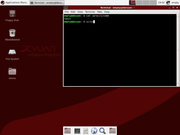
it did not work for me, server error
Really? Can you post the X.Org log file?
I did test my method in a VM and the Xfce desktop seems to work just fine:
#2324 Re: DIY » [HowTo] runit-init as PID1 » 2020-06-22 19:35:29
P.D.: The output of cat /proc/1/comm is runit, not runit-init
Corrected, thanks!
Debian has had very good integration with runit for a long time now but it's much trickier to switch to runit-init because of the systemd-logind entanglement, Devuan solves that problem nicely.
#2325 Re: DIY » [HowTo] runit-init as PID1 » 2020-06-22 19:04:21
Did you send him a link to this post?
I left a comment on the Distrowatch weekly page.
Board footer
