
You are not logged in.
- Topics: Active | Unanswered
#2001 Re: Other Issues » [CLOSED] Logging into Cinnamon DE reports in software render mode! » 2020-10-31 21:04:31
Try installing the firmware-misc-nonfree package, that contains some NVIDIA files which may be needed for nouveau to work properly.
If that doesn't help then please post the output of
glxinfo -B#2002 Re: Installation » kernel requirements and dependencies » 2020-10-31 20:54:06
Is the kernel metapackage installed?
apt policy linux-image-amd64#2003 Re: Hardware & System Configuration » AMD-VI Page Fault device 2 and wifi » 2020-10-30 18:00:25
USB wifi adapter MediaTek 2.4ghz/ 5ghz
Can you be more specific? An exact model designation would be nice. Or you could open a terminal and run dmesg -w then plug the device in and post any new terminal output that appears afterwards.
Under the LM distro's keep getting
AMD-VI Page Fault device 2
I believe this is related to the via technologies USB 3 controller
I think that error message is related to IOMMU rather than your wireless device. Try adding iommu=soft as a kernel command line parameter to remove those errors: https://askubuntu.com/questions/805008/ … page-fault
because when you punch up
lsusbi get returned with
USB 1.1 Linux Foundation
USB 2 Linux Foundation
Please post the full, exact output of lsusb (with the device plugged in). Thanks.
You probably just need firmware for it but we need to know the chip ID first.
#2004 Re: News & Announcements » X.Org ------> ex-org? » 2020-10-30 17:22:16
From the horses mouth: https://ajaxnwnk.blogspot.com/2020/10/o … erver.html
#2005 Re: Desktop and Multimedia » [SOLVED] Beowulf: Xserver native mode in AMD Ryzen 5 Pro 4650G » 2020-10-30 17:21:04
I can't install from backports is the same version as the production one.
The package you need is the firmware-amd-graphics version in the beowulf-backports repository (dated 2020-09-18). You will also need the kernel metapackage from beowulf-backports to keep the newer kernel version updated, there will probably be several fixes for the 4650 soon.
#2006 Re: Devuan » What happened to package search at pkginfo.devuan.org ? » 2020-10-23 19:54:27
Yeah, the message might be because systemd-resolved is useless 
#2007 Re: Devuan » What happened to package search at pkginfo.devuan.org ? » 2020-10-23 19:41:46
Server:		127.0.0.53
Address:	127.0.0.53#53
Isn't that systemd-resolved's stub resolver? I have found that to be somewhat broken but I haven't tried it recently. Are you using Devuan?
#2008 Re: Devuan » What happened to package search at pkginfo.devuan.org ? » 2020-10-23 19:32:14
When I go to https://pkginfo.devuan.org/ using firefox 82.0 I get:
Warning: Potential Security Risk Ahead
I'm using FF v82.0 (Alpine Linux) and I don't see that.
What is your output for the nslookup command I posted above? The dnsutils packages provides the command.
#2009 Re: DIY » Linux ports of OpenBSD's ksh » 2020-10-23 17:29:39
Version 6.8 of loksh is now available:
https://software.opensuse.org//download … kage=loksh
I'm sure Dr. Callahan will have v6.8 of oksh out soon, I'll bump the thread when that happens.
#2010 Re: Devuan » What happened to package search at pkginfo.devuan.org ? » 2020-10-23 15:32:16
The package search page also works for me. Are you using a proxy or something? How are you handling DNS queries in your box?
~$ nslookup pkginfo.devuan.org
Server:         9.9.9.9
Address:        9.9.9.9#53

Non-authoritative answer:
Name:   pkginfo.devuan.org
Address: 54.36.142.179
Name:   pkginfo.devuan.org
Address: 2001:41d0:2:1f68::3624:8eb3

~$#2011 Re: Devuan » Meet Chimaera's deepsea theme » 2020-10-23 15:25:39
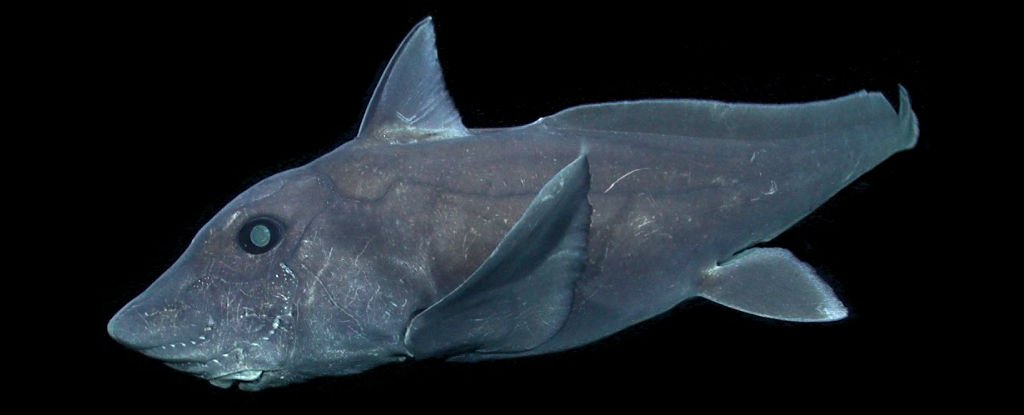
#2012 Re: Desktop and Multimedia » BEOWULF: Xorg crashes sometime » 2020-10-23 15:22:23
What is your video hardware and driver?
lspci -knn | grep -iA3 'vga\|3d\|display'Nothing in Xorg.0.log
Your X.Org log is completely empty? 
If it isn't empty then check it to see if the modesetting DDX driver is being used. Or just post it here (using code tags) so that we can check.
If you have an Intel card the modesetting driver can cause the crashes you describe so I would advise that you try the Intel DDX driver (xserver-xorg-video-intel) instead. The Debian packages page recommends otherwise but it does work better for some systems, at least in my experience.
See the top comment on the Talk section of the kernel mode setting ArchWiki page: https://wiki.archlinux.org/index.php/Ta … de_setting
#2013 Re: Desktop and Multimedia » Cmus not starting on Devuan 3.0.0 Beowulf, Mate[ SOLVED] » 2020-10-20 20:06:40
Hmm, did you try rebooting? You can kill it manually with:
# pkill pulseaudioI don't think it will restart automatically as long as the autospawn line in /etc/pulse/client.conf.d/00-disable-autospawn.conf is commented-out but it might be started by other programs such as Firefox or Chromium.
#2014 Re: Desktop and Multimedia » Cmus not starting on Devuan 3.0.0 Beowulf, Mate[ SOLVED] » 2020-10-20 19:29:14
Okay, thanks for the feedback 
We could now try a diagnostic test: disable PulseAudio to see if that breaks cmus again.
To stop PulseAudio from starting run this command as root:
sed -i '/autospawn/s/#//g' /etc/pulse/client.conf.d/00-disable-autospawn.confThen log out & back in again, check if PulseAudio is disabled (the pgrep command won't produce any output if PA isn't running) and then try to start cmus.
To re-enable PulseAudio again after the test re-apply the comment to the autospawn line by running this command as root:
sed -i '/autospawn/s/^/#/' /etc/pulse/client.conf.d/00-disable-autospawn.conf#2015 Re: Other Issues » Execuable files not running... » 2020-10-20 18:19:45
So did you enable multiarch and install the 32-bit version of the libc-bin package? Those lines won't work if the files it references are not present in your system.
#2016 Re: Desktop and Multimedia » Cmus not starting on Devuan 3.0.0 Beowulf, Mate[ SOLVED] » 2020-10-20 17:57:16
Maybe it was that pulseaudio
So is PulseAudio running now? Use my pgrep command to find out.
#2017 Re: Other Issues » Execuable files not running... » 2020-10-20 17:54:53
Finally! That was like getting blood out of a stone 
Does this say that this is a 32 bit file?
Yes.
how can I run a 32 bit file in a 64 bit machine?
Use a VM or multiarch but for the latter you will need to know which 32-bit libraries are needed to run the executable so see https://superuser.com/questions/908377/ … ont-report for a way to get ldd working so you can find those.
#2018 Re: Desktop and Multimedia » Cmus not starting on Devuan 3.0.0 Beowulf, Mate[ SOLVED] » 2020-10-20 05:43:02
There was none output any of your suggestions.
Of the four code blocks in my last post only the pgrep command was expected to produce any output. If it did not produce any output then that means that PulseAudio is not running in your system, in that case the sed command was intended to ensure that PulseAudio was started on the next login which may have got cmus working. Unfortunately the last command string would then have broken it again if you ran that as well. Sorry but I was expecting you to read and attempt to understand my post rather than just running the commands blindly like a child accepting food from a proffered spoon...
So in summary if the pgrep command now produces some output and you have a file at ~/.cmus/rc that contains the string set output_plugin=alsa then you need to delete ~/.cmus/rc then log out & back in again.
For the record the strace command was expected to create a log file called strace.cmus in whichever directory the command was run from.
#2019 Re: Other Issues » Execuable files not running... » 2020-10-20 05:35:21
It is rather frustrating that we have to ask this three times but can we please see the output of
file linbpqAnd also explain from where you obtained this mysterious binary file.
EDIT: the output of this command would also be useful:
ldd linbpq#2020 Re: Desktop and Multimedia » Cmus not starting on Devuan 3.0.0 Beowulf, Mate[ SOLVED] » 2020-10-19 19:56:21
Please don't full quote unnecessarily, it degrades the readability of the thread.
repo.vivaldi.com That is my Vivaldi-browser.
Well yes but my aptitude command will show if anything else has been dragged in along with it.
Here is full log from xsession-errors
I can't see anything relevant there but just in case I've missed something you can delete the file and then try to start cmus again to see if anything new is added.
You can also try
strace -o strace.cmus cmusThen share the content of strace.cmus but I can't really interpret that in any meaningful way, unfortunately.
Is PulseAudio running?
pgrep -a pulseIf it isn't running then try this command as root:
sed -i '/autospawn/s/^/#/' /etc/pulse/client.conf.d/00-disable-autospawn.conf^ That should get PA running, which may fix things.
Alternatively if you prefer to run without PulseAudio try this command as your normal user:
mkdir ~/.cmus; echo 'set output_plugin=alsa' > ~/.cmus/rcReference: https://bugs.archlinux.org/task/46447
#2021 Re: Other Issues » Execuable files not running... » 2020-10-19 19:31:53
And the file is any file I decide to make up and execute... or boot as I said. No file will run or execute.
^ This is far too vague. Please give us a concrete example and include the entire contents of the file along with the exact method(s) you used to "run or execute" it. Also provide the output of the requested file command when run on your example executable.
#2022 Re: Desktop and Multimedia » Cmus not starting on Devuan 3.0.0 Beowulf, Mate[ SOLVED] » 2020-10-19 19:16:17
I have never seen a sources.list that looked like that.
That's an overview of the sources and pinning that APT sees, it is not the content of /etc/apt/sources.list.
The only suspect entry is repo.vivaldi.com, this should show us what has been installed from there:
aptitude search '?narrow(?installed, ?origin(repo.vivaldi.com))'xsession-errors below
That was the entire content of the file? Nothing relevant to cmus then.
opened another window, but did not open cmus
Well no, I would not expect it to. The point of that suggestion was to see if any error messages from cmus showed up in the original terminal from which the command was run. Did you see anything in the original terminal?
FWIW cmus works just fine in my Debian buster box.
#2023 Re: Desktop and Multimedia » [Ceres] Xfce4: not more xfce4-panel | kernel 5.9 » 2020-10-19 17:43:39
Impossible de redémarrer le tableau de bord.
GDBus.Error:org.freedesktop.DBus.Error.ServiceUnkonwn:
The name org.xfce.Panel was not provided by any .service files
Sounds like it's expecting a systemd unit file to be running. But this could just be a ceres SNAFU, waiting a bit then updating again can fix things sometimes.
#2024 Re: Desktop and Multimedia » Cmus not starting on Devuan 3.0.0 Beowulf, Mate[ SOLVED] » 2020-10-19 17:41:21
Have you checked ~/.xsession-errors?
Perhaps also try running this from a terminal:
x-terminal-emulator -e cmusNot sure if it will return errors from cmus though.
And you should probably share your sources, a FrankenDevuan can result in strange problems:
apt policy#2025 Re: Off-topic » Devuan Install Advanced and Normal » 2020-10-17 09:55:12
What's wrong with https://www.devuan.org/os/documentation … evuan.html?
And off-topic for these boards but your Arch installation "guide" sucks donkey balls, you should replace it with a link to the official guide.
Board footer
