
You are not logged in.
- Topics: Active | Unanswered
#151 Re: Other Issues » Accidentally caught close terminal whilst running gdebi-gtk » 2020-10-29 08:57:43
Run gdebi-gtk again?
#152 Re: Devuan » Archiving Devuan repositories » 2020-10-24 08:27:31
Yes, they are keeping a central quite complete archive.
Thank you. These are very good news. Very long term support can be very useful to people running old systems. Sure they have security concerns, but any sysadmin should know the risks. My point is that beeing able to apt install more packages in an old box is very convinient.
#153 Re: Devuan » Archiving Devuan repositories » 2020-10-23 14:55:59
and will probably be there for a long time to come
I read time ago that removing binaries from archive was planned, but I saw just now binaries even for the very first version. Do you know something about the removing of binaries? Thank you.
#154 Re: Devuan » Meet Chimaera's deepsea theme » 2020-10-23 14:52:37
Screenshot of an early mockup of the Chimaera desktop.
This is a very personal taste and a lot of people here are going to customize their environment. But we need a default. This one proposed pleased me very (VERY!) much.
#155 Re: Desktop and Multimedia » Sony Camera not recognized » 2020-10-22 17:06:00
the camera is recognized and photos come up!
Good! 
it seems however that when installing gphoto2 ... is not enough as it does not install the dependencies.
I need to research a bit about that. I always just install gphoto2 and have no problems so far.
#156 Re: Desktop and Multimedia » Sony Camera not recognized » 2020-10-20 14:35:48
i just checked on my older T60 running debian wheezy, and there the camera is perfectly recognized.
Please note that your Debian Wheezy is using gphoto2 to access to the camera. May be you are missing some package related with gphoto2 in your new box.
#157 Re: Desktop and Multimedia » Cmus not starting on Devuan 3.0.0 Beowulf, Mate[ SOLVED] » 2020-10-20 14:32:06
Everything is all good now.
Good to know. But may be developers should know about this problem: an user run the program but get no messages at all.
#158 Re: Other Issues » Execuable files not running... » 2020-10-19 16:23:46
What a life, eh? Must be a fix out there somewhere.
Quite sure Keep sending us information.
#159 Re: Desktop and Multimedia » Cmus not starting on Devuan 3.0.0 Beowulf, Mate[ SOLVED] » 2020-10-19 16:19:41
I am having issues with cmus player. The basic problem is that it doesn`t start.
What should I do?
May be if you start the program from a terminal you will see some error messages. If so, post that messages.
#160 Re: Desktop and Multimedia » Sony Camera not recognized » 2020-10-16 08:37:43
the camera has a 32gb old sd-card (the bigger ones) and probably no flash memory.
I downloaded the manual from Sony:
https://www.sony.com/electronics/suppor … 14571M.pdf
I can read on page 27 that the camera has around 27 MB of internal memory.
Could work for you just read the files from the sd-card? (As a workaround).
#161 Re: Desktop and Multimedia » Sony Camera not recognized » 2020-10-13 11:45:41
the PTP/MTP is not being recognized
Have you tried gphoto2 -P?
#162 Re: Desktop and Multimedia » Automating post-installation steps » 2020-10-11 10:50:56
I use myself a mix of the two approaches: a lot of secuential scripts for installing and configuring some pieces and unpacking tar files for some other configurations. I use the second tecnique for some graphical environments that I know of fully configure only throughout a GUI (KDE mainly).
I configure the first user of the box and then modify the scripts to add new users using /etc/skel. See man adduser
#163 Re: Desktop and Multimedia » 'Zoom' crawls in beowulf » 2020-10-09 09:22:54
no sound
No PulseAudio daemon running, or not running as session daemon.
Do you have PulseAudio installed?
If not, do you use apulse instead?; if so, you ned to launch your binary with apulse binary
#164 Re: Desktop and Multimedia » Kodi help » 2020-09-28 17:11:30
I'm not sure forcing the install is feasible. The packages are stopping the system until the broken packages are removed.
I don't know if my experience is convenient to do in your case, but I will explain it:
In a few boxes with Devuan Beowulf 64 bits I used a --force-all to install a deb file for an old printer. All the package management programs complained from this point on about not met dependencies. I edited by hand the file /var/lib/dpkg/status and removed the claimed dependencies. So far, so good.
#165 Re: Desktop and Multimedia » File Save: missing options? » 2020-09-27 16:13:34
Searched dconf-editor for "save" and there's no corresponding setting.
May be under org.gtk.Settings.FileChooser
#166 Re: Desktop and Multimedia » Beowolf » 2020-09-25 07:56:16
Some of us like to live on the edge...

In all your systems? Wow
#167 Re: Installation » Refracta2usb not in Beowulf repo? » 2020-09-25 07:54:19
fsmithred wrote:... installer includes Recommends by default.
Not so 'bare-bones' as I expected a net-install to be.
maybe it would be easier to make a list of the Recommends included in the net-install and a script to purge them when the installation is finished
Devuan is absolutely hackable. We all like this. The hack from fsmithred is a good example. Thank you.
I always use Expert install from net-install. My hack is not configure package manager and use my own scripts on first log in the installed system.
Enjoy your own hack
#168 Re: Installation » SOLVED:Beowulf MATE: visudo path, strange logoff, hideous login screen » 2020-09-17 16:03:26
those of us on help-desk...
I've been there, I understand you.
#169 Re: Installation » SOLVED:Beowulf MATE: visudo path, strange logoff, hideous login screen » 2020-09-16 16:57:22
Seems no one reads the Release Notes anymore
Please, don't think so. A lot of people do read this and much more. Keep up!
#170 Re: Hardware & System Configuration » Average Uptime of Your Devuan Systems? » 2020-09-13 09:07:20
The answer is very different if we talk about servers or desktops.
I have no server now with Devuan, but I have been using Debian in servers for years. Uptime is very high (years) if I don't update kernel and high (months) if I do. Main issue is power, I use professional UPS.
For desktops, I usually power them down when I go to sleep.
#171 Re: Freedom Hacks » Do not use pulseaudio » 2020-08-26 11:46:00
You can also use KDE without pulseaudio. Screenshots here was taken on a Beowulf 64 bits box with KDE.
I use KDE with VLC sound engine. By default, KDE try to use pulseaudio, but pure ALSA is also available in GUI configuration.
Go to K, Preferences, System Preferences, Hardware, Audio and Video. You may need to check Show advanced devices: (click to full size):
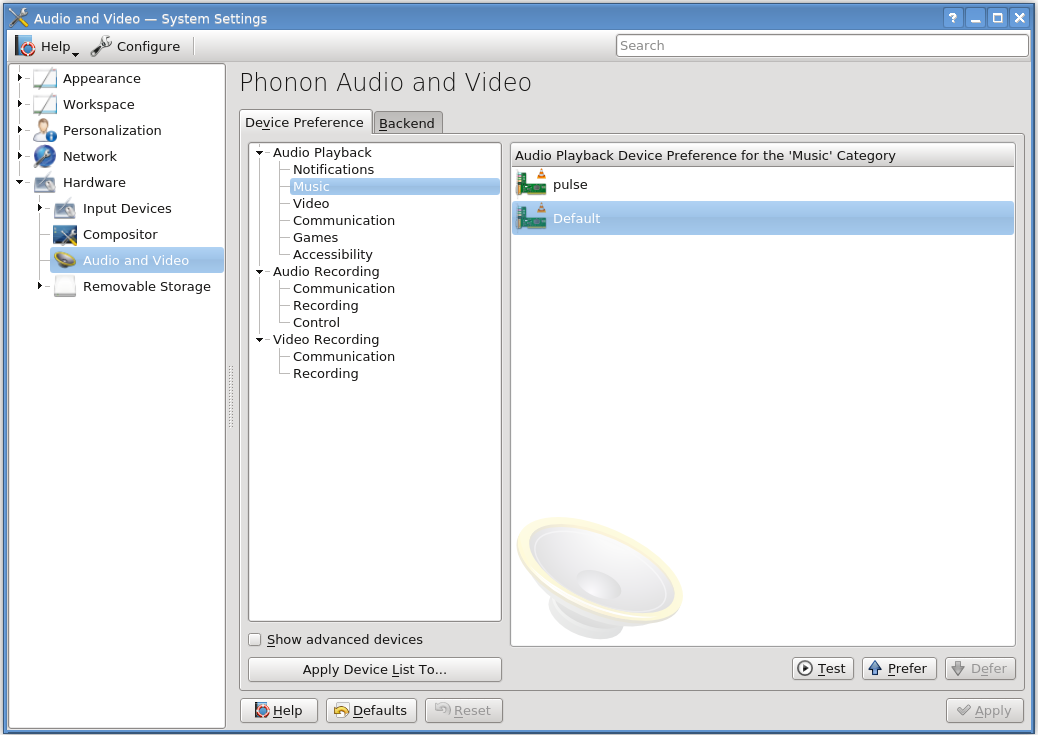
If you (like me) dont have pulseaudio installed, clicking the Test button when pulse is selected will show an error on console:
main audio output error: no suitable audio output module
main decoder error: failed to create audio output
vlcpulse audio output error: PulseAudio server connection failure: Connection refused
Dragging and dropping or with the Prefer button, put the option Default to first position: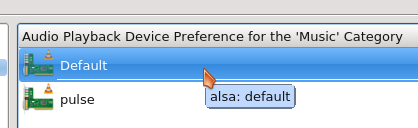
Then, Apply Device List to all the categories (YMMV).
Now, you can listen audio even on Dolphin: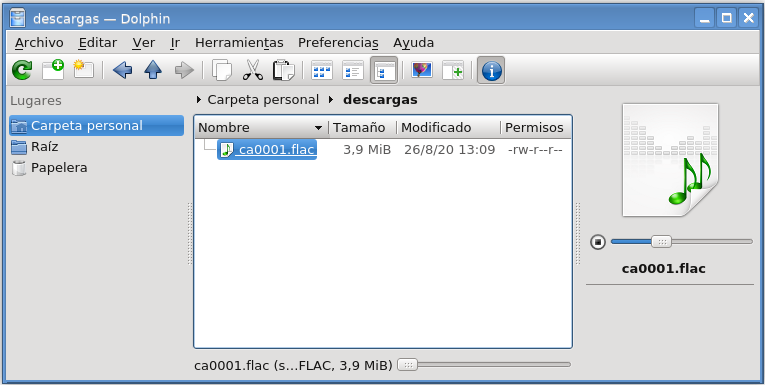
#172 Re: Forum Feedback » New Forum Category Suggestion - Devuan systemd dependency workarounds » 2020-08-03 10:35:03
How about this for the index page??
Freedom Hacks
Explore workarounds to reverse/repair unwanted upstream decisions
I like it.
#173 Re: Forum Feedback » New Forum Category Suggestion - Devuan systemd dependency workarounds » 2020-07-31 08:12:56
Devuan systemd dependency workarounds ... Suggestions welcome.
systemd workarounds
#174 Re: Other Issues » File /etc/protocols not found!!! » 2020-07-19 18:18:16
So... fixed?
Everybody calm
#175 Re: Devuan » The point of Devuan? » 2020-07-17 21:20:18
it is also true that now many Canonical devs are also Debian devs, them were probably recruited from Canonical which is good if that would not harm Debian...
I've hear that years ago, from the very mouth of a few Debian developers I talked with. IMHO is it again the fight between people that look for the good and people that look for the money. In an ideal world, they should be balanced, but in our world they are not.
Board footer
