
You are not logged in.
- Topics: Active | Unanswered
#1326 Re: Installation » Linux e1000e module removal and e1000e EEE timer - Part II » 2021-05-12 21:42:17
Hello:
... here it shuts down properly...
Any idea why it would not shut down properly in my box?
How can I troubleshoot that?
Right.
Thanks. 8^)
... if your system entered sleep and e1000e called the pm_freeze function things could be corrupted, indeed.
Which ones?
... next shutdown and start may go boom?!
Nah ! 8^D
... WoL, too tricky ...
... disable WoL command early in boot process ...
That's what I am already doing, remember?
First at /etc/rc.local ...
groucho@devuan:~$ cat /etc/rc.local
#!/bin/sh -e
#
# rc.local
#
# This script is executed at the end of each multiuser runlevel.
# Make sure that the script will "exit 0" on success or any other
# value on error.
#
# In order to enable or disable this script just change the execution
# bits.
#
# By default this script does nothing.

# to set all /proc/acpi/wakeup entries to 'disabled'
# no wakeup from S4 for anything
# does not survire reboot that's why it is here
# see https://dev1galaxy.org/viewtopic.php?pid=29113#p29113
/usr/local/bin/acpi_wakeups.sh

# to disable wol via ethtool at boot
# does not survire reboot that's why it is here
/sbin/ethtool -s eth0 wol d
groucho@devuan:~$
... and just in case some #%&?¡ whatever decides differently, with my shutdown script:
groucho@devuan:~$ cat /usr/bin/shutdown.sh
#!/bin/sh
# added to shutdown directly - no shutdown helper
# options added to troubleshoot nic related bad shutdown
PATH=/sbin:/bin:/usr/sbin:/usr/bin:

# 2
# sync
# disable onboard eth wol
# shutdown system directly
sync && sudo ethtool -s eth0 wol d && sudo shutdown -h now
I've come across a couple of pages related to PM and /etc/default/acpi-support.
As acpi-support seesm to have been deprecated long ago, I had to look around for oldish pages or get systemd only hits.
I added the links to the file so as to remember where it all came from:
groucho@devuan:~$ cat /etc/default/acpi-support
# comment the next line to disable ACPI suspend to RAM
# ACPI_SLEEP=true
ACPI_SLEEP=false

# comment the next line to disable suspend to disk
# ACPI_HIBERNATE=true
ACPI_HIBERNATE=true

# added 20210511
# see https://forums.linuxmint.com/viewtopic.php?t=43068
# https://askubuntu.com/questions/47311/how-do-i-disable-my-system-from-going-to-sleep
SUSPEND_METHODS="none"
groucho@devuan:~$
With respect to the >5.5 kernel upgrade:
I installed 5.10 but there are no drivers for my Nvidia cards.
It seems that the nvidia-340xx-legacy driver used by my perfectly working Nvidia Quadro FX 580 cards has fallen out of favour with the powers that be.
And from what I have read, caused a lot of noise.
I think Manjaro and Ubuntu have put out patches, I expect Debian/Devuan will follow suit. (?)
So I'll have to wait.
I'm not going to give up my 580's or use nouveau, unless it improves.
They still have a few years left in them.
I'll apply patch 1005 and report back with whatever results I get.
Thank you very much for your help.
Best,
A.
#1327 Re: Installation » Linux e1000e module removal and e1000e EEE timer - Part II » 2021-05-11 11:21:10
Hello:
You got that PCI REMOVE prints once out of dmesg?
Yes.
I posted them at your request.
But I got them only after a rmmod e1000e and modprobe -v e1000e cycle:
groucho@devuan:~$ sudo dmesg
--- snip ---
[    1.805846] e1000e: loading out-of-tree module taints kernel.
[    1.808975] ACPI: Power Button [PWRB]
[    1.851745] e1000e: module verification failed: signature and/or required key missing - tainting kernel
[    1.851839] input: Power Button as /devices/LNXSYSTM:00/LNXPWRBN:00/input/input3
[    1.873915] ACPI: Power Button [PWRF]
[    1.894607] SCSI subsystem initialized
[    1.906926] ACPI: bus type USB registered
[    1.917645] usbcore: registered new interface driver usbfs
[    1.934103] Fusion MPT base driver 3.04.20
[    1.944731] Copyright (c) 1999-2008 LSI Corporation
[    1.945571] usbcore: registered new interface driver hub
[    1.966487] usbcore: registered new device driver usb
[    1.979636] e1000e: Intel(R) PRO/1000 Network Driver - 3.8.7-NAPI
[    1.990206] e1000e: Copyright(c) 1999 - 2020 Intel Corporation.
[    2.002032] e1000e 0000:00:19.0: Interrupt Throttling Rate (ints/sec) set to dynamic conservative mode
[    2.013157] i801_smbus 0000:00:1f.3: SMBus using PCI interrupt
[    2.021243] e1000e 0000:00:19.0: PHY Smart Power Down Disabled
[    2.039474] e1000e 0000:00:19.0: EEE Support was initialized to be enabled
[    2.050107] e1000e 0000:00:19.0: EEE Support has been reset to be disabled
--- snip ----
[  431.874537] e1000e: PCI REMOVE PTP     <-- here is rmmod e1000e
[  431.874542] e1000e: PCI REMOVE TIMER
[  431.874546] e1000e: PCI REMOVE CANCEL WORK SYNC
[  431.874547] e1000e: PCI REMOVE HW TIMESTAMP
[  431.874572] e1000e: NETDEV CLOSE ENTERED
[  431.874573] e1000e: NETDEV CLOSE WAIT DONE
[  431.874575] e1000e: NETDEV CLOSE DEV IS PRESENT
[  432.104194] e1000e: NETDEV CLOSE DEV IS DOWN
[  432.104210] e1000e: NETDEV CLOSE FREE IRQ
[  432.104215] e1000e 0000:00:19.0 eth0: NIC Link is Down
[  432.104217] e1000e: NETDEV CLOSE LINK DOWN MSG
[  432.104218] e1000e: NETDEV CLOSE NAPI DISABLED
[  432.104228] e1000e: NETDEV CLOSE FREE TX RES
[  432.104251] e1000e: NETDEV CLOSE FREE RX RES
[  432.104252] e1000e: NETDEV CLOSE VLAN DONE
[  432.104254] e1000e: NETDEV CLOSE HW CTRL RELEASED
[  432.104257] e1000e: NETDEV CLOSE DONE
[  432.120067] e1000e: PCI REMOVE UNREGISTER NETDEV
[  432.120072] e1000e: PCI REMOVE WAKE NO RESUME
[  432.120075] e1000e: PCI REMOVE RELEASE HW CONTROL
[  432.120110] e1000e: PCI REMOVE INT AND TX RX RING
[  432.120123] e1000e: PCI REMOVE SELECTED REGIONS
[  432.140044] e1000e: PCI REMOVE FREE NETDEV
[  432.140048] e1000e: PCI REMOVE DISABLE ERR REPORTING
[  432.140164] e1000e: PCI REMOVE DISABLE DEVICE
-----------------------------------------------------------------------------------------------------------------------------------
[  443.741628] e1000e: Intel(R) PRO/1000 Network Driver - 3.8.7-NAPI      <--- here is modprobe -v e1000e
[  443.741632] e1000e: Copyright(c) 1999 - 2020 Intel Corporation.
[  443.741822] e1000e 0000:00:19.0: Interrupt Throttling Rate (ints/sec) set to dynamic conservative mode
[  443.741824] e1000e 0000:00:19.0: PHY Smart Power Down Disabled
[  443.741826] e1000e 0000:00:19.0: EEE Support was initialized to be enabled
[  443.741827] e1000e 0000:00:19.0: EEE Support has been reset to be disabled
[  444.060221] e1000e 0000:00:19.0 eth0: (PCI Express:2.5GT/s:Width x1) 00:14:4f:4a:a2:81
[  444.060227] e1000e 0000:00:19.0 eth0: Intel(R) PRO/1000 Network Connection
[  444.060251] e1000e 0000:00:19.0 eth0: MAC: 7, PHY: 6, PBA No: FFFFFF-0FF
[  446.780888] e1000e 0000:00:19.0 eth0: NIC Link is Up 100 Mbps Full Duplex, Flow Control: None
[  446.780997] e1000e 0000:00:19.0 eth0: 10/100 speed: disabling TSO
[  447.562186] e1000e: NETDEV CLOSE ENTERED
[  447.562190] e1000e: NETDEV CLOSE WAIT DONE
[  447.562192] e1000e: NETDEV CLOSE DEV IS PRESENT
[  447.792198] e1000e: NETDEV CLOSE DEV IS DOWN
[  447.792211] e1000e: NETDEV CLOSE FREE IRQ
[  447.792216] e1000e 0000:00:19.0 eth0: NIC Link is Down
[  447.792218] e1000e: NETDEV CLOSE LINK DOWN MSG
[  447.792219] e1000e: NETDEV CLOSE NAPI DISABLED
[  447.792227] e1000e: NETDEV CLOSE FREE TX RES
[  447.792251] e1000e: NETDEV CLOSE FREE RX RES
[  447.792252] e1000e: NETDEV CLOSE VLAN DONE
[  447.792254] e1000e: NETDEV CLOSE HW CTRL RELEASED
[  447.792257] e1000e: NETDEV CLOSE DONE
[  448.311058] e1000e: NETDEV CLOSE ENTERED
[  448.311062] e1000e: NETDEV CLOSE WAIT DONE
[  448.311064] e1000e: NETDEV CLOSE DEV IS PRESENT
[  448.532200] e1000e: NETDEV CLOSE DEV IS DOWN
[  448.532213] e1000e: NETDEV CLOSE FREE IRQ
[  448.532218] e1000e 0000:00:19.0 eth0: NIC Link is Down
[  448.532220] e1000e: NETDEV CLOSE LINK DOWN MSG
[  448.532221] e1000e: NETDEV CLOSE NAPI DISABLED
[  448.532230] e1000e: NETDEV CLOSE FREE TX RES
[  448.532254] e1000e: NETDEV CLOSE FREE RX RES
[  448.532255] e1000e: NETDEV CLOSE VLAN DONE
[  448.532257] e1000e: NETDEV CLOSE HW CTRL RELEASED
[  448.532260] e1000e: NETDEV CLOSE DONE
[  450.408891] e1000e 0000:00:19.0 eth0: NIC Link is Up 100 Mbps Full Duplex, Flow Control: None
[  450.409000] e1000e 0000:00:19.0 eth0: 10/100 speed: disabling TSO
groucho@devuan:~$
I have found no other record of e1000e activity on a bad_sutdown.
A normal shutdown would not enter S3?
Though, I am out with that.
I don't know.
There's the issue of not being able to disable sleep state in the BIOS.
And that being set to S3.
The thing would be to avoid the system from picking it up and overriding what the BIOS says.
ie: the proper way to do things
I patch WOL and PM FREEZE detach thingie and that's it from me.
Sorry to hear that, but I understand.
You've done more than enough already. 8^)
And no one else has made any suggestions.
Maybe not patch WoL as that seems to be taken care of vie ethtool and boot and shutdown.
BTW: you have this in your system?
     # Make it possible to not shut down network interfaces,
        # needed to use wake-on-lan
        netdown="-i"
        if [ "$NETDOWN" = "no" ]; then
                netdown=""
        fi

        log_action_msg "Will now halt"
        read -p "Press enter to halt ($netdown $poweroff $hddown)" reply     <--- this line added
        halt -d -f $netdown $poweroff $hddown
}
Does it shut down properly?
Thanks for your input.
Best,
A.
#1328 Re: Installation » Linux e1000e module removal and e1000e EEE timer - Part II » 2021-05-10 21:54:42
Hello:
... and the dmesg output shows what for the freeze?
Screen was frozen, needed a hard shudown.
dmesg0 does not show anything strange.
I could reproduce the whole thing but how to get what dmesg recorded, if anything at all?
Thanks in advance,
A.
#1329 Re: Installation » Linux e1000e module removal and e1000e EEE timer - Part II » 2021-05-10 21:45:03
Hello:
... you got no pm tooling, I wonder who enters S3.
That's what I think is the question here.
I think the answer is in the U24's BIOS.
Remember that I have not been able to disable ME "Firmware Power Control" and "Host Sleep States" in BIOS.
It is set to S3, I can set it back to S0 but I cannot disable it.
Only one visible for now is /sbin/halt with its unsetted NETDOWN.
If not that, it must be the kernel on its own, then?!
Hmm ...
Why would that be?
Anyone here knows about sleep state handling?
No one else has pitched in ...
But you have gathered quite a following.
Thanks for your input.
A.
#1330 Re: Installation » Linux e1000e module removal and e1000e EEE timer - Part II » 2021-05-10 21:36:05
Hello:
There's some alteration in the posting order ...
... you want to put NETDOWN=no into /etc/default/halt to disable WoL handling of /sbin/halt.
Right.
groucho@devuan:~$ cat /etc/default/halt
# Default behaviour of shutdown -h / halt. Set to "halt" or "poweroff".
HALT=poweroff
NETDOWN=no
groucho@devuan:~$ Quite strange parameter to what it is doing in the end.
I'll take your word for it.
Don't have a clue as to what is strange here ...
Though, you still want to disable WoL via ethtool. The more disabling, the better.
That is supposed to be the tool to use.
When the HW or the driver does not undo it behind your back.
We can get a patch to forcefully disable WoL by module parameter. I already spotted the flag in code, which activates WoL.
We can, hypothetically for now, reset that in src/param.c ...
Thanks for sharing.
But it's you doing the patching. 8^)
... even with that hypothetical patch, We want to disable WoL from /sbin/halt.
Right.
Would be like disabling it in the BIOS, which for whatever reason cannot be done without screwing up everything.
I discovered an old Sun Microsystems thread.
Had to find a catched copy.
Seems that this was a hard cookie from the very start of the Sun Ultra 24's market debut:
https://webcache.googleusercontent.com/ … clnk&gl=us
Best,
A.
#1331 Re: Installation » Linux e1000e module removal and e1000e EEE timer - Part II » 2021-05-10 21:23:33
Hello:
I'll edit that into /etc/init.d/halt and see how it behaves.
If I understand correctly, it will shut down on Enter.
Never got that far ...
Here's the part that I edited:
        # Make it possible to not shut down network interfaces,
        # needed to use wake-on-lan
        netdown="-i"
        if [ "$NETDOWN" = "no" ]; then
                netdown=""
        fi

        log_action_msg "Will now halt"
        read -p "Press enter to halt ($netdown $poweroff $hddown)" reply     <--- just this line
        halt -d -f $netdown $poweroff $hddown
}
On shutdown, the box froze at this point:
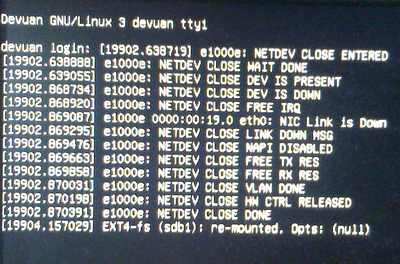
Good sign is that there were no fans blowing.
Only way out was a hard shutdown.
REISUB did not work or maybe it was that I could not type and hold Alt+SysRq at the same time?
This happens whether I shut down with my script or with sudo shutdown -h now from a terminal.
Thanks in advance.
A.
#1332 Re: Installation » Linux e1000e module removal and e1000e EEE timer - Part II » 2021-05-10 20:16:57
Hello:
Note:
Somehow this whole post got lost.
I recovered it but the posting order may have been altered.
Sorry ...
For disabling CONFIG_PM, you have to build your own kernel.
Hmm ...
Not on my list.
... seems to be any pm tooling installed.
How is it that it is done in systemd distributions?
There's no pre-systemd / Linux Devuan equivalent to sudo systemctl mask sleep.target suspend.target hibernate.target hybrid-sleep.target?
I was reading here: https://answers.launchpad.net/acpi-supp … tion/36260
Since my system had no /etc/default/acpi-support file, I added one:
groucho@devuan:~$ cat /etc/default/acpi-support
# Comment the next line to disable ACPI suspend to RAM
ACPI_SLEEP=false

# Comment the next line to disable suspend to disk
ACPI_HIBERNATE=false
groucho@devuan:~$
Don't know if it does anything at all.
... remind you not to use a 4.x kernel and neither kernel version < 5.5.
I do have your suggestion on my desk.
Not forgotten, just postponed. 8^)
Unless we see some NIC hang ...
... mostly out of thoughts.
Well ...
Your efforts did unearth a lot of e1000e fun which could be put to good use by the module's maintainers.
If nothing else, the quality of the code will be been significantly improved by your work.
No one can thumb their nose at that.
Now, what could happen?
1. another bad shutdown.
It's been ~10 days since I started using the last version of the e1000e module ie: three patches + a std. shutdown.
The third patch was then edited further to accomodate various debug scenarios, but I understand that it was basically the same as v2.
Up to that point I had been without a bad_shutdown for at least a week.
I think that the bad_shutdown I had is linked to the bad_boot.
And the bad boot may (?) have been linked to not setting WoL to disabled on shutdown.
Like I mentioned previously, my shutdown script now sets WoL to disabled on shutdown but does not remove the e1000e module.
But there's that S3 that is bothering me and I'd like to know how to get rid of.
2. another bad_boot followed by a bad_shutdown.
My money is on getting rid of S3 to prevent that.
Maybe setting WoL to disabled serves the same purpose?
3. none of the above.
If in 30/45 days' time we are still at 3. then it could mean that something you have edited/changed with your patches to the e1000e module has had effect. 8^D!
But for now, we have to wait and see.
... check /etc/init.d/halt for hddown= and netdown=, which you can disable by respective configuration settings from /etc/default/halt.
Let's see:
groucho@devuan:~$ cat /etc/default/halt
# Default behaviour of shutdown -h / halt. Set to "halt" or "poweroff".
HALT=poweroff
groucho@devuan:~$
groucho@devuan:~$ cat /etc/init.d/halt
#! /bin/sh
### BEGIN INIT INFO
# Provides: halt
# Required-Start:
# Required-Stop:
# Default-Start:
# Default-Stop: 0
# Short-Description: Execute the halt command.
# Description:
### END INIT INFO
NETDOWN=yes
PATH=/sbin:/usr/sbin:/bin:/usr/bin
[ -f /etc/default/halt ] && . /etc/default/halt
. /lib/lsb/init-functions
do_stop () {
if [ "$INIT_HALT" = "" ]
then
case "$HALT" in
[Pp]*)
INIT_HALT=POWEROFF
;;
[Hh]*)
INIT_HALT=HALT
;;
*)
INIT_HALT=POWEROFF
;;
esac
fi
# See if we need to cut the power.
if [ "$INIT_HALT" = "POWEROFF" ] && [ -x /etc/init.d/ups-monitor ]
then
/etc/init.d/ups-monitor poweroff
fi
# Don't shut down drives if we're using RAID.
hddown="-h"
if grep -qs '^md.*active' /proc/mdstat
then
hddown=""
fi
# If INIT_HALT=HALT don't poweroff.
poweroff="-p"
if [ "$INIT_HALT" = "HALT" ]
then
poweroff=""
fi
# Make it possible to not shut down network interfaces, <-------- | x |
# needed to use wake-on-lan <-------- | x |
netdown="-i"
if [ "$NETDOWN" = "no" ]; then
netdown=""
fi
log_action_msg "Will now halt"
halt -d -f $netdown $poweroff $hddown
}
case "$1" in
start|status)
# No-op
;;
restart|reload|force-reload)
echo "Error: argument '$1' not supported" >&2
exit 3
;;
stop)
do_stop
;;
*)
echo "Usage: $0 start|stop" >&2
exit 3
;;
esac
:
groucho@devuan:~$ In my box, netdown and hdown are set.
You may set that configuration parameters, so that they are disabled.
I put
read -p "Press enter to halt ($netdown $poweroff $hddown)" reply
before
halt -d -f $netdown $poweroff $hddown
to see what is set.
Right.
I'll edit that into /etc/init.d/halt and see how it behaves.
If I understand correctly, it will shut down on Enter.
Thanks for your input.
Best,
A.
#1333 Re: Installation » Linux e1000e module removal and e1000e EEE timer - Part II » 2021-05-10 14:39:34
Hello:
... check kernel commandline parameter pcie_port_pm=off.
... disabling sleep states for your pci express slots and NIC.
I think I used something pci=ish without results.
Have to see my notes.
... also the parameter apm ...
... some suspend software installed in /etc/pm, /etc/apm or /etc/acpi and check for such in /etc/default.
I don't have pm-utils installed, removed it some time ago.
groucho@devuan:~$ apt list | grep -i installed | grep -i pm-utils
--- snip ---
groucho@devuan:~$
Notwithstanding, I do have these:
groucho@devuan:~$ ls -R /etc/apm/
/etc/apm/:
event.d

/etc/apm/event.d:
20hdparm
groucho@devuan:~$
This for spinning down HDDs if not on AC.
Always on AC but I presume it works as intended.
groucho@devuan:~$ ls -R /etc/acpi/
/etc/acpi/:
events  powerbtn-acpi-support.sh

/etc/acpi/events:
powerbtn-acpi-support
groucho@devuan:~$
This to initiate shutdown when the power button is pressed.
I disabled this in /etc/default/acpid because I inadvertently touched the recessed power button more than a few times. 8^/
Also because I'd rather shutdown via terminal or script.
groucho@devuan:~$ ls -R /etc/default/
/etc/default/:
acpid         cacerts        dbus    grub.d         hwclock          locale~               ntpdate        rsyslog          su              useradd
anacron       console-setup  devpts  grub.ucf-dist  intel-microcode  networking            rcS            saned            su~             wicd
autofs        cpufrequtils   exim4   halt           keyboard         networking.dpkg-dist  rcS.dpkg-dist  saned.dpkg-dist  sysstat
avahi-daemon  crda           gdomap  haveged        keyboard~        nfs-common            rkhunter       saned~           timeshift.json
bsdmainutils  cron           grub    hddtemp        locale           nss                   rsync          smartmontools    tmpfs

/etc/default/grub.d:
init-select.cfg
groucho@devuan:~$ ls -R /etc/default/
groucho@devuan:~$ cat /etc/default/acpid
# Options to pass to acpid
#
# OPTIONS are appended to the acpid command-line
# enabled 20181108 to log events to syslog
OPTIONS="-l"
# Linux kernel modules to load before starting acpid
#
# MODULES is a space separated list of modules to load, or "all" to load all
# acpi drivers, or commented out to load no module
#MODULES="battery ac processor button fan thermal video"
#MODULES="all"
groucho@devuan:~$ I added OPTIONS="-l" back in 2018 to see if I could get anything written to a(ny) log.
Thanks for your input.
Best,
A.
#1334 Re: Installation » Linux e1000e module removal and e1000e EEE timer - Part II » 2021-05-09 22:21:02
Hello:
... the /sys/power stuff belongs to Kernel CONFIG_PM I guess.
Feel free to disable that.
Hmm ...
Sure.
Q: how do I go about that.
ie: the opposite of # echo mem > /sys/power/state, effectively removing mem?
Cannot find anything specific about that for non-systemd distributions.
My idea is that if I remove anything S3 related from the system, it may (?) keep whatever system state is set in BIOS from activating.
... also try shutdown -h -P to halt and power off.
Just as you point out:
groucho@devuan:~$ cat /etc/default/halt
# Default behaviour of shutdown -h / halt. Set to "halt" or "poweroff".
HALT=poweroff
groucho@devuan:~$ ... if you got to the frozen "reboot: Power down", press Alt + SysRq (Print Screen key) + o for shutdown
Hmm ...
I'm not sure that I did try it but without the expected result.
I'll remember for next time but I think (?) the kb was totally unresponsive.
See: http://blog.kember.net/articles/reisub- … x-restart/
Thanks for the heads up.
Best,
A.
#1335 Re: Installation » Linux e1000e module removal and e1000e EEE timer - Part II » 2021-05-09 16:21:05
Hello:
... does not sound like an NIC (driver) issue.
... if boot already goes noisy.
I agree.
I have always wondered if the bad_boot and the bad_shutdown problems were indpendent of each other or if they shared more than the fans at full blast symptom.
Out of fear of some part of the filesystem getting borked, I had never allowed the boot sequence to go on, aborting it and getting a clean boot afterwards.
It will reboot after a time-out unless you explicitly allow the boot sequence to continue.
This time, not aborting the sequence revealed a bad_shutdown right after a bad_boot.
Then, going back to the Sun Microsystems *.pdf on the matter and seeing the diagnostic put forth (S0, S3, etc.) again made my doubts resurface.
ie:
"If you power on the workstation before the system enters the S3 ... "
Q: why would the system be entering S3 or any other save S5 in the first place?
This probably has to do with my not being able to disable ME "Firmware Power Control" and "Host Sleep States" in BIOS.
It is true that I pressed the power button immediately after power off and blank screen.
But I have not been able to reproduce it.
Like I mentioned, I have edited to shutdown script to set WoL to disabled as before, just not removing the e1000e module.
With respect to system states, dmesg states:
groucho@devuan:~$ sudo dmesg | grep S0
[    0.729378] ACPI: (supports S0 S1 S3 S4 S5)
groucho@devuan:~$
I'm only interested in S0 and S5 but ...
groucho@devuan:/sys/power$ cat /sys/power/state
freeze standby mem disk
groucho@devuan:/sys/power$
I have seen how, if needed, freeze, standby, mem and disk can be added to /sys/power/state to enable power states S0, S1, S3 and S4 respectively.
eg: # echo mem > /sys/power/state
And have found how to disable power states in systemd distributions.
eg: sudo systemctl mask sleep.target suspend.target hibernate.target hybrid-sleep.target
But I have not found out how to do that in Devuan.
I am guessing that not having those values (specifically S3) could help finding out what is going on.
How to do the opposite of # echo mem > /sys/power/state ?
Thanks in advance.
A.
#1336 Re: Installation » Linux e1000e module removal and e1000e EEE timer - Part II » 2021-05-09 01:02:04
Hello:
Update
All shutdowns normal up to now. 050520201@21:03 GMT
That has not changed.
But I did get a bad boot which then resulted in a bad shutdown.
A bad boot is when on starting up the system, both CPU and case fans start to run at 100% and the BIOS stops with a "CPU Fan error" notice.
It asks if you want to continue or press ESC or an Fx to abort, can't recall.
Sorry, no video or grab as I was obviously not ready for it.
This has not happened in a while and although the fans running at 100% is what this bad boot has in common with the bad shutdown, I have always thought they were for different causes.
Sun Microsystems had at one time diagnosed (but evidently not bothered to fix) this problem in a Sun Product Notes *.pdf for this WS (2009) where it says it can happen and why:
CPU Fan Error Might Occur After Power On
If you power on the workstation before the system enters the S3 sleep
state, a CPU fan error might occur.
It also provided a workaround which consists in accessing the Management Engine (ME) BIOS Setup utility to change the power policies.
You have to set ME "Firmware Power Control" to ON and "Host Sleep States" to ON in S0, S3.
I changed "Host Sleep States" from S1, S3 to S0, S3 but every so often the CPU Fan error came around again.
[rant]
But why would I want this?
It is basically allowing Intel ME to start up you workstation remotely.
[/rant]
So I tried to set ME "Firmware Power Control" or "Host Sleep States" to OFF, effectively disabling sleep of any type in my box.
Because ...
WTHF does a server/workstation need a damn S state different than S5 for?
As a result all havok broke loose: on reboot with the box frozen at the start of the BIOS sequence, both CPU and case fans at 100%.
I was scared shitless that my new WS was done for.
Only way out was a hard shutdown, a CMOS clear and a ME BIOS reflash.
I believe that this is closely related to the fact that it is not possible to disable the on-board GbE LAN in the BIOS. (it is greyed out)
That and the Intel e1000 driver is *always* enabling WoL no matter what settings you give it.
Which is why I had WoL set to OFF both at boot and at shutdown via a shutdown script.
In any case, "Host Sleep States" is evidently set to ON and S1, (not S0) and S3.
I insisted with my attempt once again before starting the first part of this thread, with the same results.
Not as scared and more confident around the hardware than the first time I tried it, but in a sweat till I saw a working boot screen come up.
But I digress ...
Instead of aborting the boot sequence I continued to boot into Devuan, which went on without any other problem than the fans blowing continuously at 100%.
I got a copy of dmesg checked that everything was working properly and proceeded to shut down as I am usually doing these days. ie: plain shutdown -h now, no script.
The result was another bad shutdown, like the ones I usually get.
Here's the shutdown screen:
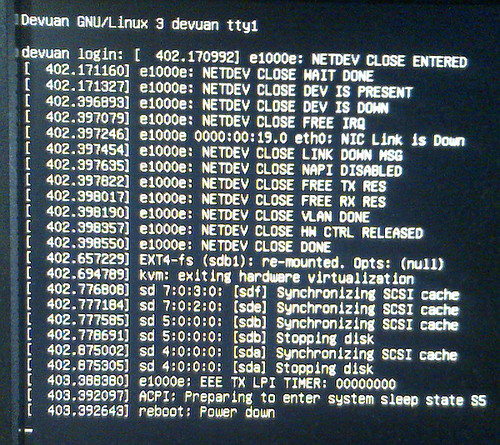
No different than what I am getting these days with a normal shutdown.
ie: contains no debug data.
I will edit the shutdown script to disable WoL as I had been doing to see if there's any change in this behaviour.
Thanks in advance,
A.
#1337 Re: Desktop and Multimedia » Thunar crashes on "Drag and Drop" » 2021-05-07 15:16:17
Hello:
... dependencies are mostly from sid/ceres rather than experimental.
... that .deb cannot be installed in a beowulf system without breaking it.
Enough for me not to consider attempting it.
... could try backporting it ...
... not worth the bother.
I agree.
Thanks for your input.
A.
#1338 Re: Hardware & System Configuration » Conky + sensors temp settings ? » 2021-05-07 15:13:13
Hello:
... individual core temps.
Same here.
Here's the line I'm using, not my work.
I recall getting the format right here at Dev1:
TEMPERATURES
${hr 2}
Core 0: +${hwmon 0 temp 2} C  $alignc Core 1: +${hwmon 0 temp 3} C
Core 2: +${hwmon 0 temp 4} C  $alignc Core 3: +${hwmon 0 temp 5} C
${hr 0.3}
Looks (sort of) like this:
TEMPERATURES
_____________________________
Core 0: +44 C   Core 1: +41 C
Core 2: +40 C   Core 3: +41 C
_____________________________
Best,
A.
#1339 Re: Desktop and Multimedia » Thunar crashes on "Drag and Drop" » 2021-05-07 14:43:40
Hello:
... the way I would try it.
... technically "safe" to add the experimental repositories directly ...
Hmm ...
There must be a solid reason for experimental. 8^D
I remembered looking up this once.
It seems that dpkg -i package_file.deb does not take care of dependencies prooperly or at all.
Which apt install ./package_file.deb does:
groucho@devuan:~/Downloads$ sudo apt install ./libgtk-3-0_3.24.29-1_amd64.deb
Reading package lists... Done
Building dependency tree
Reading state information... Done
Note, selecting 'libgtk-3-0' instead of './libgtk-3-0_3.24.29-1_amd64.deb'
Some packages could not be installed. This may mean that you have
requested an impossible situation or if you are using the unstable
distribution that some required packages have not yet been created
or been moved out of Incoming.
The following information may help to resolve the situation:

The following packages have unmet dependencies:
 libgtk-3-0 : Depends: libatk1.0-0 (>= 2.35.1) but 2.30.0-2 is to be installed
              Depends: libc6 (>= 2.29) but 2.28-10 is to be installed
              Depends: libgdk-pixbuf-2.0-0 (>= 2.40.0) but it is not installable
              Depends: libglib2.0-0 (>= 2.59.0) but 2.58.3-2+deb10u2 is to be installed
              Depends: libjson-glib-1.0-0 (>= 1.5.2) but 1.4.4-2 is to be installed
              Depends: libpango-1.0-0 (>= 1.45.5) but 1.42.4-8~deb10u1 is to be installed
              Depends: libxcomposite1 (>= 1:0.4.5) but 1:0.4.4-2 is to be installed
              Depends: libgtk-3-common (>= 3.24.29-1) but 3.24.5-1 is to be installed
E: Unable to correct problems, you have held broken packages.
groucho@devuan:~/Downloads$ ... if you wanted but be sure to play close attention to the suggested course of action before accepting.
My guess is that I'd have to fetch all these unmet dependencies from experimental also.
But I'd rather not dive into dependency hell and be sure.
I think I'll live with the occasional crash and wait.
In any case I'll eventually be ditching Xfce4.
I don't like where it is going, so I may try LXDE, à la Knoppix Live or a #! solution.
Thanks for your input.
Best,
A.
#1340 Re: Desktop and Multimedia » Thunar crashes on "Drag and Drop" » 2021-05-07 13:55:02
Hello:
v3.24.29 seems to be available in Debian's experimental repositories:
http://deb.debian.org/debian/pool/main/ … _amd64.deb
Thanks for the heads up. 8^)
So ...
Download the .deb and install with dpkg -i libgtk-3-0_3.24.29-1_amd64.deb?
Or is there a better, more fool-proof way?
Thanks in advance,
A.
#1341 Re: Desktop and Multimedia » Thunar crashes on "Drag and Drop" » 2021-05-06 23:42:03
Hello:
The issue is evidently xfce4 inter-component related.
Apparently (?) the problem has been fixed/worked around.
https://gitlab.gnome.org/GNOME/gtk/-/issues/3715
From what I think I understand, a patch has been written up so that the affected applications don't crash.
ie: the root of the problem (in xfce4?) will remain where it is till the next time someone reports something else.
The Devuan Beowulf repository has libgtk-3-0 3.24.5-1 and the Chimaera repository has 3.24.24-3.
The patch is in 3.24.29.
How can I go about checking to see if 3.24.29 fixes the problem?
Thanks in advance,
A.
#1342 Re: Installation » Linux e1000e module removal and e1000e EEE timer - Part II » 2021-05-06 08:23:35
Hello:
Then, we need the dmesg output to have a complete view.
dmesg at boot + rmmod e1000e + modprobe -v e1000e, like this?
groucho@devuan:~$ sudo dmesg | grep "e1000e\|00:19.0"
[    0.744873] pci 0000:00:19.0: [8086:10bd] type 00 class 0x020000
[    0.744888] pci 0000:00:19.0: reg 0x10: [mem 0xf5fc0000-0xf5fdffff]
[    0.744894] pci 0000:00:19.0: reg 0x14: [mem 0xf5ffe000-0xf5ffefff]
[    0.744901] pci 0000:00:19.0: reg 0x18: [io  0xac00-0xac1f]
[    0.744948] pci 0000:00:19.0: PME# supported from D0 D3hot D3cold
[    1.804885] e1000e: loading out-of-tree module taints kernel.
[    1.865505] e1000e: module verification failed: signature and/or required key missing - tainting kernel
[    2.004406] e1000e: Intel(R) PRO/1000 Network Driver - 3.8.7-NAPI
[    2.025277] e1000e: Copyright(c) 1999 - 2020 Intel Corporation.
[    2.042227] e1000e 0000:00:19.0: Interrupt Throttling Rate (ints/sec) set to dynamic conservative mode
[    2.062117] e1000e 0000:00:19.0: PHY Smart Power Down Disabled
[    2.072709] e1000e 0000:00:19.0: EEE Support was initialized to be enabled
[    2.083251] e1000e 0000:00:19.0: EEE Support has been reset to be disabled
[    2.487257] e1000e 0000:00:19.0 eth0: (PCI Express:2.5GT/s:Width x1) 00:14:4f:4a:a2:81
[    2.487259] e1000e 0000:00:19.0 eth0: Intel(R) PRO/1000 Network Connection
[    2.487279] e1000e 0000:00:19.0 eth0: MAC: 7, PHY: 6, PBA No: FFFFFF-0FF
[   26.640872] e1000e 0000:00:19.0 eth0: NIC Link is Up 100 Mbps Full Duplex, Flow Control: None
[   26.653013] e1000e 0000:00:19.0 eth0: 10/100 speed: disabling TSO
[  738.114040] e1000e: PCI REMOVE PTP                            # here starts rmmod e1000e
[  738.114045] e1000e: PCI REMOVE TIMER
[  738.114048] e1000e: PCI REMOVE CANCEL WORK SYNC
[  738.114050] e1000e: PCI REMOVE HW TIMESTAMP
[  738.114074] e1000e: NETDEV CLOSE ENTERED
[  738.114076] e1000e: NETDEV CLOSE WAIT DONE
[  738.114077] e1000e: NETDEV CLOSE DEV IS PRESENT
[  738.344182] e1000e: NETDEV CLOSE DEV IS DOWN
[  738.344196] e1000e: NETDEV CLOSE FREE IRQ
[  738.344201] e1000e 0000:00:19.0 eth0: NIC Link is Down
[  738.344203] e1000e: NETDEV CLOSE LINK DOWN MSG
[  738.344205] e1000e: NETDEV CLOSE NAPI DISABLED
[  738.344213] e1000e: NETDEV CLOSE FREE TX RES
[  738.344236] e1000e: NETDEV CLOSE FREE RX RES
[  738.344238] e1000e: NETDEV CLOSE VLAN DONE
[  738.344240] e1000e: NETDEV CLOSE HW CTRL RELEASED
[  738.344243] e1000e: NETDEV CLOSE DONE
[  738.364058] e1000e: PCI REMOVE UNREGISTER NETDEV
[  738.364062] e1000e: PCI REMOVE WAKE NO RESUME
[  738.364065] e1000e: PCI REMOVE RELEASE HW CONTROL
[  738.364099] e1000e: PCI REMOVE INT AND TX RX RING
[  738.364112] e1000e: PCI REMOVE SELECTED REGIONS
[  738.380049] e1000e: PCI REMOVE FREE NETDEV
[  738.380052] e1000e: PCI REMOVE DISABLE ERR REPORTING
[  738.380172] e1000e: PCI REMOVE DISABLE DEVICE                 # here starts modprobe -v e1000e
[  752.604908] e1000e: Intel(R) PRO/1000 Network Driver - 3.8.7-NAPI
[  752.604913] e1000e: Copyright(c) 1999 - 2020 Intel Corporation.
[  752.605114] e1000e 0000:00:19.0: Interrupt Throttling Rate (ints/sec) set to dynamic conservative mode
[  752.605116] e1000e 0000:00:19.0: PHY Smart Power Down Disabled
[  752.605118] e1000e 0000:00:19.0: EEE Support was initialized to be enabled
[  752.605119] e1000e 0000:00:19.0: EEE Support has been reset to be disabled
[  752.924225] e1000e 0000:00:19.0 eth0: (PCI Express:2.5GT/s:Width x1) 00:14:4f:4a:a2:81
[  752.924230] e1000e 0000:00:19.0 eth0: Intel(R) PRO/1000 Network Connection
[  752.924255] e1000e 0000:00:19.0 eth0: MAC: 7, PHY: 6, PBA No: FFFFFF-0FF
[  755.756888] e1000e 0000:00:19.0 eth0: NIC Link is Up 100 Mbps Full Duplex, Flow Control: None
[  755.756997] e1000e 0000:00:19.0 eth0: 10/100 speed: disabling TSO
[  756.562154] e1000e: NETDEV CLOSE ENTERED
[  756.562159] e1000e: NETDEV CLOSE WAIT DONE
[  756.562161] e1000e: NETDEV CLOSE DEV IS PRESENT
[  756.792199] e1000e: NETDEV CLOSE DEV IS DOWN
[  756.792212] e1000e: NETDEV CLOSE FREE IRQ
[  756.792216] e1000e 0000:00:19.0 eth0: NIC Link is Down
[  756.792218] e1000e: NETDEV CLOSE LINK DOWN MSG
[  756.792219] e1000e: NETDEV CLOSE NAPI DISABLED
[  756.792227] e1000e: NETDEV CLOSE FREE TX RES
[  756.792251] e1000e: NETDEV CLOSE FREE RX RES
[  756.792253] e1000e: NETDEV CLOSE VLAN DONE
[  756.792255] e1000e: NETDEV CLOSE HW CTRL RELEASED
[  756.792258] e1000e: NETDEV CLOSE DONE
[  757.309716] e1000e: NETDEV CLOSE ENTERED
[  757.309721] e1000e: NETDEV CLOSE WAIT DONE
[  757.309722] e1000e: NETDEV CLOSE DEV IS PRESENT
[  757.540196] e1000e: NETDEV CLOSE DEV IS DOWN
[  757.540212] e1000e: NETDEV CLOSE FREE IRQ
[  757.540217] e1000e 0000:00:19.0 eth0: NIC Link is Down
[  757.540218] e1000e: NETDEV CLOSE LINK DOWN MSG
[  757.540220] e1000e: NETDEV CLOSE NAPI DISABLED
[  757.540228] e1000e: NETDEV CLOSE FREE TX RES
[  757.540250] e1000e: NETDEV CLOSE FREE RX RES
[  757.540251] e1000e: NETDEV CLOSE VLAN DONE
[  757.540253] e1000e: NETDEV CLOSE HW CTRL RELEASED
[  757.540256] e1000e: NETDEV CLOSE DONE
[  759.336885] e1000e 0000:00:19.0 eth0: NIC Link is Up 100 Mbps Full Duplex, Flow Control: None
[  759.336993] e1000e 0000:00:19.0 eth0: 10/100 speed: disabling TSO
groucho@devuan:~$
Thanks in advance.
A.
#1343 Re: Installation » Linux e1000e module removal and e1000e EEE timer - Part II » 2021-05-05 22:56:21
Hello:
I'll get to this asap and report back as soon as I get it done.
Right ...
Followed the same procedure as the previous time.
ie: clean unpack
groucho@devuan:/$ pushd /usr/src/e1000e-3.8.7
/usr/src/e1000e-3.8.7 /
groucho@devuan:/usr/src/e1000e-3.8.7$
groucho@devuan:/usr/src/e1000e-3.8.7$ sudo patch --dry-run -p0 -i /usr/src/e1000e-patch/1001-e1000e_387_param_eee_be_disabled.patch
checking file src/param.c
groucho@devuan:/usr/src/e1000e-3.8.7$No complaints.
groucho@devuan:/usr/src/e1000e-3.8.7$ sudo patch -p0 -i /usr/src/e1000e-patch/1001-e1000e_387_param_eee_be_disabled.patch
patching file src/param.c
groucho@devuan:/usr/src/e1000e-3.8.7$ P1001 done.
groucho@devuan:/usr/src/e1000e-3.8.7$ sudo patch --dry-run -p0 -i /usr/src/e1000e-patch/1002-e1000e_387_param_eee_debug_messages.patch
checking file src/param.c
groucho@devuan:/usr/src/e1000e-3.8.7$No complaints.
groucho@devuan:/usr/src/e1000e-3.8.7$ sudo patch -p0 -i /usr/src/e1000e-patch/1002-e1000e_387_param_eee_debug_messages.patch
patching file src/param.c
groucho@devuan:/usr/src/e1000e-3.8.7$ P1002 done.
groucho@devuan:/usr/src/e1000e-3.8.7$ sudo patch --dry-run -p0 -i /usr/src/e1000e-patch/1003-e1000e_387_shutdown_superfluous_pm_freeze.patch
checking file src/netdev.c
groucho@devuan:/usr/src/e1000e-3.8.7$No complaints.
groucho@devuan:/usr/src/e1000e-3.8.7$ sudo patch -p0 -i /usr/src/e1000e-patch/1003-e1000e_387_shutdown_superfluous_pm_freeze.patch
patching file src/netdev.c
groucho@devuan:/usr/src/e1000e-3.8.7$ Patch 1003 done
groucho@devuan:/usr/src/e1000e-3.8.7$ sudo patch --dry-run -p0 -i /usr/src/e1000e-patch/1004-e1000e_387_shutdown_debug_messages_v2.patch
checking file src/netdev.c
groucho@devuan:/usr/src/e1000e-3.8.7$No complaints.
groucho@devuan:/usr/src/e1000e-3.8.7$ sudo patch -p0 -i /usr/src/e1000e-patch/1004-e1000e_387_shutdown_debug_messages_v2.patch
patching file src/netdev.c
groucho@devuan:/usr/src/e1000e-3.8.7$ Patch 1004 done.
Now we make:
groucho@devuan:/usr/src/e1000e-3.8.7$ cd src
groucho@devuan:/usr/src/e1000e-3.8.7/src$ sudo make
make[1]: Entering directory '/usr/src/linux-headers-4.19.0-16-common'
make[2]: Entering directory '/usr/src/linux-headers-4.19.0-16-amd64'
CC [M] /usr/src/e1000e-3.8.7/src/netdev.o
/usr/src/e1000e-3.8.7/src/netdev.c: In function 'e1000e_pm_freeze':
/usr/src/e1000e-3.8.7/src/netdev.c:7398:3: warning: ISO C90 forbids mixed declarations and code [-Wdeclaration-after-statement]
int count = E1000_CHECK_RESET_COUNT;
^~~
CC [M] /usr/src/e1000e-3.8.7/src/ethtool.o
CC [M] /usr/src/e1000e-3.8.7/src/ich8lan.o
CC [M] /usr/src/e1000e-3.8.7/src/mac.o
CC [M] /usr/src/e1000e-3.8.7/src/nvm.o
CC [M] /usr/src/e1000e-3.8.7/src/phy.o
CC [M] /usr/src/e1000e-3.8.7/src/manage.o
CC [M] /usr/src/e1000e-3.8.7/src/80003es2lan.o
CC [M] /usr/src/e1000e-3.8.7/src/82571.o
CC [M] /usr/src/e1000e-3.8.7/src/param.o
CC [M] /usr/src/e1000e-3.8.7/src/ptp.o
CC [M] /usr/src/e1000e-3.8.7/src/kcompat.o
LD [M] /usr/src/e1000e-3.8.7/src/e1000e.o
Building modules, stage 2.
MODPOST 1 modules
CC /usr/src/e1000e-3.8.7/src/e1000e.mod.o
LD [M] /usr/src/e1000e-3.8.7/src/e1000e.ko
make[2]: Leaving directory '/usr/src/linux-headers-4.19.0-16-amd64'
make[1]: Leaving directory '/usr/src/linux-headers-4.19.0-16-common'
groucho@devuan:/usr/src/e1000e-3.8.7/src$ Make done.
groucho@devuan:~$ sudo modinfo e1000e
[sudo] password for groucho:
filename: /lib/modules/4.19.0-16-amd64/kernel/drivers/net/ethernet/intel/e1000e/e1000e.ko
version: 3.8.7-NAPI
license: GPL
description: Intel(R) PRO/1000 Network Driver
author: Intel Corporation, <linux.nics@intel.com>
srcversion: 689D224FDE8A2AB5AF9215A
alias: pci:v00008086d00001A1Dsv*sd*bc*sc*i*
--- snip ---
alias: pci:v00008086d0000105Esv*sd*bc*sc*i*
depends:
retpoline: Y
name: e1000e
vermagic: 4.19.0-16-amd64 SMP mod_unload modversions
parm: copybreak:Maximum size of packet that is copied to a new buffer on receive (uint)
parm: TxIntDelay:Transmit Interrupt Delay (array of int)
parm: TxAbsIntDelay:Transmit Absolute Interrupt Delay (array of int)
parm: RxIntDelay:Receive Interrupt Delay (array of int)
parm: RxAbsIntDelay:Receive Absolute Interrupt Delay (array of int)
parm: InterruptThrottleRate:Interrupt Throttling Rate (array of int)
parm: IntMode:Interrupt Mode (array of int)
parm: SmartPowerDownEnable:Enable PHY smart power down (array of int)
parm: KumeranLockLoss:Enable Kumeran lock loss workaround (array of int)
parm: CrcStripping:Enable CRC Stripping, disable if your BMC needs the CRC (array of int)
parm: EEE:Enable/disable on parts that support the feature (array of int)
parm: Node:[ROUTING] Node to allocate memory on, default -1 (array of int)
parm: debug:Debug level (0=none,...,16=all) (int)
groucho@devuan:~$ groucho@devuan:~$ sudo rmmod e1000e
groucho@devuan:~$ sudo modprobe -v e1000e
insmod /lib/modules/4.19.0-16-amd64/kernel/drivers/net/ethernet/intel/e1000e/e1000e.ko SmartPowerDownEnable=0 EEE=0
groucho@devuan:~$ Gets this in dmesg:
[16365.721275] e1000e: PCI REMOVE PTP
[16365.721279] e1000e: PCI REMOVE TIMER
[16365.721283] e1000e: PCI REMOVE CANCEL WORK SYNC
[16365.721284] e1000e: PCI REMOVE HW TIMESTAMP
[16365.721308] e1000e: NETDEV CLOSE ENTERED
[16365.721310] e1000e: NETDEV CLOSE WAIT DONE
[16365.721311] e1000e: NETDEV CLOSE DEV IS PRESENT
[16365.952439] e1000e: NETDEV CLOSE DEV IS DOWN
[16365.952452] e1000e: NETDEV CLOSE FREE IRQ
[16365.952456] e1000e 0000:00:19.0 eth0: NIC Link is Down
[16365.952458] e1000e: NETDEV CLOSE LINK DOWN MSG
[16365.952460] e1000e: NETDEV CLOSE NAPI DISABLED
[16365.952469] e1000e: NETDEV CLOSE FREE TX RES
[16365.952493] e1000e: NETDEV CLOSE FREE RX RES
[16365.952494] e1000e: NETDEV CLOSE VLAN DONE
[16365.952496] e1000e: NETDEV CLOSE HW CTRL RELEASED
[16365.952499] e1000e: NETDEV CLOSE DONE
[16365.972280] e1000e: PCI REMOVE UNREGISTER NETDEV
[16365.972285] e1000e: PCI REMOVE WAKE NO RESUME
[16365.972288] e1000e: PCI REMOVE RELEASE HW CONTROL
[16365.972322] e1000e: PCI REMOVE INT AND TX RX RING
[16365.972334] e1000e: PCI REMOVE SELECTED REGIONS
[16365.992268] e1000e: PCI REMOVE FREE NETDEV
[16365.992271] e1000e: PCI REMOVE DISABLE ERR REPORTING
[16365.992383] e1000e: PCI REMOVE DISABLE DEVICE
[16367.681610] e1000e: Intel(R) PRO/1000 Network Driver - 3.8.7-NAPI
[16367.681615] e1000e: Copyright(c) 1999 - 2020 Intel Corporation.
[16367.681843] e1000e 0000:00:19.0: Interrupt Throttling Rate (ints/sec) set to dynamic conservative mode
[16367.681845] e1000e 0000:00:19.0: PHY Smart Power Down Disabled
[16367.681848] e1000e 0000:00:19.0: EEE Support was initialized to be enabled
[16367.681850] e1000e 0000:00:19.0: EEE Support has been reset to be disabled
[16367.996454] e1000e 0000:00:19.0 eth0: (PCI Express:2.5GT/s:Width x1) 00:14:4f:4a:a2:81
[16367.996458] e1000e 0000:00:19.0 eth0: Intel(R) PRO/1000 Network Connection
[16367.996485] e1000e 0000:00:19.0 eth0: MAC: 7, PHY: 6, PBA No: FFFFFF-0FF
[16371.829118] e1000e 0000:00:19.0 eth0: NIC Link is Up 100 Mbps Full Duplex, Flow Control: None
[16371.829227] e1000e 0000:00:19.0 eth0: 10/100 speed: disabling TSO
groucho@devuan:~$ And from the video grab on shutdown:
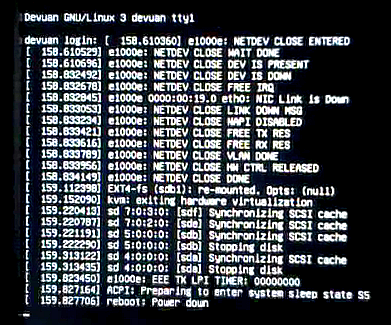
Looks like the PCI REMOVE debug messages only show up in dmesg.
I'll check again -> Confirmed, only in dmesg.
Thanks so much for your help.
A.
#1344 Re: Installation » Linux e1000e module removal and e1000e EEE timer - Part II » 2021-05-05 21:06:45
Hello:
Updated patch 1004.
Right ... 8^)
I hope I did not add a typo.
In that case, it will show up.
Half asleep...
Don't overdo it. 8^D !
Right ...
I'll get to this asap and report back as soon as I get it done.
All shutdowns normal up to now. 050520201@21:03 GMT
Thanks a lot.
Best,
A.
#1345 Re: Other Issues » [SOLVED] Security update delays (again) » 2021-05-05 18:54:15
Hello:
... received this notification more than 24 hours ago ...
... problems have been fixed in version 4.92-8+deb10u6.
See this article from The Register.
https://www.theregister.com/2021/05/05/ … exim_mail/
At the time of writing*, the packages for Debian 9 (Stretch), which is end of life but in long term support, had not yet been updated.
* Wed 5 May 2021 // 17:20 UTC
It may shed some light on the reasons for the apparent delay.
It's probably on its way.
groucho@devuan:~$ apt policy exim4
exim4:
Installed: (none)
Candidate: 4.92-8+deb10u5
Version table:
4.94.2-1~bpo10+1 100
100 http://deb.devuan.org/merged beowulf-backports/main amd64 Packages
100 http://deb.devuan.org/merged beowulf-backports/main i386 Packages
4.92-8+deb10u5 500
500 http://deb.devuan.org/merged beowulf/main amd64 Packages
500 http://deb.devuan.org/merged beowulf/main i386 Packages
4.92-8+deb10u4 500
500 http://deb.devuan.org/merged beowulf-security/main amd64 Packages
500 http://deb.devuan.org/merged beowulf-security/main i386 Packages
groucho@devuan:~$ Best,
A.
#1346 Re: Installation » Linux e1000e module removal and e1000e EEE timer - Part II » 2021-05-05 10:56:45
Hello:
... the other print function.
... hopeefully prints something on pci remove.
Right.
Let me know.
Besides that, no other news here for the time being.
Thanks a lot.
Best,
A.
#1347 Re: Installation » Linux e1000e module removal and e1000e EEE timer - Part II » 2021-05-04 20:25:07
Hello:
... just right, that that message pops up there ...
OK.
... last screenshot of shutdown did not show any of the "PCI REMOVE" debug messages.
I did didn't compare them. (sorry, typo)
... screenshot taken with the very latest patched moule build?
Yes.
Just checked.
The time stamp on the video frame is 20210503 at 19:14 local time.
The only patching that day.
The sequence starts at 291.441602 and ends at 292.649208.
Same as what I uploaded to postimages.org
To keep tabs on myself, I posted the sequence of the patching taken directly from the tty1 output and did not change the *.patch file names.
To make sure everything was truly uncontaminated, I used a freshly unpackaged content of e1000e-3.8.7.tar.gz.
Want me to check something in particular?
Thanks in advance.
A.
#1348 Re: Installation » Linux e1000e module removal and e1000e EEE timer - Part II » 2021-05-04 11:15:43
Hello:
... check where that EEE TX LPI TIMER message comes from....
I looked into all the files in /src, these had references to LPI:
groucho@devuan:/usr/src/e1000e-3.8.7/src$ cat ethtool.c | grep LPI
* on whether Tx or Rx LPI indications have been received.
if (phy_data & (E1000_EEE_TX_LPI_RCVD | E1000_EEE_RX_LPI_RCVD))
edata->tx_lpi_timer = er32(LPIC) >> E1000_LPIC_LPIET_SHIFT;
e_err("Setting EEE Tx LPI timer is not supported\n");
groucho@devuan:/usr/src/e1000e-3.8.7/src$ groucho@devuan:/usr/src/e1000e-3.8.7/src$ cat ich8lan.c | grep LPI
* the link and the EEE capabilities of the link partner. The LPI Control
* EEE LPI must not be asserted earlier than one second after link is up.
* On 82579, EEE LPI should not be enabled until such time otherwise there
* can be link issues with some switches. Other devices can have EEE LPI
* prevents LPI from being asserted too early.
ret_val = e1e_rphy_locked(hw, I82579_LPI_CTRL, &lpi_ctrl);
lpi_ctrl &= ~I82579_LPI_CTRL_ENABLE_MASK;
lpi_ctrl |= I82579_LPI_CTRL_1000_ENABLE;
lpi_ctrl |= I82579_LPI_CTRL_100_ENABLE;
ret_val = e1000_read_emi_reg_locked(hw, I82579_LPI_PLL_SHUT,
data &= ~I82579_LPI_100_PLL_SHUT;
ret_val = e1000_write_emi_reg_locked(hw, I82579_LPI_PLL_SHUT,
/* R/Clr IEEE MMD 3.1 bits 11:10 - Tx/Rx LPI Received */
ret_val = e1e_wphy_locked(hw, I82579_LPI_CTRL, lpi_ctrl);
/* Set EEE LPI Update Timer to 200usec */
I82579_LPI_UPDATE_TIMER,
* link, and enable Auto Enable LPI since there will
* be no driver to enable LPI while in Sx.
/* Set Auto Enable LPI after link up */
I217_LPI_GPIO_CTRL, &phy_reg);
phy_reg |= I217_LPI_GPIO_CTRL_AUTO_EN_LPI;
I217_LPI_GPIO_CTRL, phy_reg);
* power good. LPI (Low Power Idle) state must also reset only
/* Set bit enable LPI (EEE) to reset only on
phy_reg |= I217_SxCTRL_ENABLE_LPI_RESET;
/* Clear Auto Enable LPI after link up */
e1e_rphy_locked(hw, I217_LPI_GPIO_CTRL, &phy_reg);
phy_reg &= ~I217_LPI_GPIO_CTRL_AUTO_EN_LPI;
e1e_wphy_locked(hw, I217_LPI_GPIO_CTRL, phy_reg);
groucho@devuan:/usr/src/e1000e-3.8.7/src$ groucho@devuan:/usr/src/e1000e-3.8.7/src$ cat ich8lan.h | grep LPI
#define I217_LPI_GPIO_CTRL PHY_REG(772, 18)
#define I217_LPI_GPIO_CTRL_AUTO_EN_LPI 0x0800
#define I82579_LPI_CTRL PHY_REG(772, 20)
#define I82579_LPI_CTRL_100_ENABLE 0x2000
#define I82579_LPI_CTRL_1000_ENABLE 0x4000
#define I82579_LPI_CTRL_ENABLE_MASK 0x6000
#define I82579_LPI_UPDATE_TIMER 0x4805 /* in 40ns units + 40 ns base value */
#define I82579_LPI_PLL_SHUT 0x4412 /* LPI PLL Shut Enable */
#define I82579_LPI_100_PLL_SHUT (1 << 2) /* 100M LPI PLL Shut Enabled */
#define E1000_EEE_RX_LPI_RCVD 0x0400 /* Tx LP idle received */
#define E1000_EEE_TX_LPI_RCVD 0x0800 /* Rx LP idle received */
#define I217_SxCTRL_ENABLE_LPI_RESET 0x1000
groucho@devuan:/usr/src/e1000e-3.8.7/src$ But this was the only one I found with the complete string:
ie: EEE TX LPI TIMER:
groucho@devuan:/usr/src/e1000e-3.8.7/src$ cat netdev.c | grep LPI
pr_info("EEE TX LPI TIMER: %08X\n", # <--- | x |
er32(LPIC) >> E1000_LPIC_LPIET_SHIFT);
/* Ensure that the appropriate bits are set in LPI_CTRL
retval = e1e_rphy_locked(hw, I82579_LPI_CTRL,
lpi_ctrl |= I82579_LPI_CTRL_100_ENABLE;
lpi_ctrl |= I82579_LPI_CTRL_1000_ENABLE;
retval = e1e_wphy_locked(hw, I82579_LPI_CTRL,
groucho@devuan:/usr/src/e1000e-3.8.7/src$ Looked at with jed to get the line numbers:
7150 to 7172
7150 }
7151
7152 static void e1000e_flush_lpic(struct pci_dev *pdev)
7153 {
7154 struct net_device *netdev = pci_get_drvdata(pdev);
7155 struct e1000_adapter *adapter = netdev_priv(netdev);
7156 struct e1000_hw *hw = &adapter->hw;
7157 u32 ret_val;
7158
7159 pm_runtime_get_sync((netdev_to_dev(netdev))->parent);
7160
7161 ret_val = hw->phy.ops.acquire(hw);
7162 if (ret_val)
7163 goto fl_out;
7164
7165 pr_info("EEE TX LPI TIMER: %08X\n",
7166 er32(LPIC) >> E1000_LPIC_LPIET_SHIFT);
7167
7168 hw->phy.ops.release(hw);
7169
7170 fl_out:
7171 pm_runtime_put_sync(netdev->dev.parent);
7172 }7526 to 7554:
7526 }
7527
7528 /* Ensure that the appropriate bits are set in LPI_CTRL
7529 * for EEE in Sx
7530 */
7531 if ((hw->phy.type >= e1000_phy_i217) &&
7532 adapter->eee_advert && hw->dev_spec.ich8lan.eee_lp_ability) {
7533 u16 lpi_ctrl = 0;
7534
7535 retval = hw->phy.ops.acquire(hw);
7536 if (!retval) {
7537 retval = e1e_rphy_locked(hw, I82579_LPI_CTRL,
7538 &lpi_ctrl);
7539 if (!retval) {
7540 if (adapter->eee_advert &
7541 hw->dev_spec.ich8lan.eee_lp_ability &
7542 I82579_EEE_100_SUPPORTED)
7543 lpi_ctrl |= I82579_LPI_CTRL_100_ENABLE;
7544 if (adapter->eee_advert &
7545 hw->dev_spec.ich8lan.eee_lp_ability &
7546 I82579_EEE_1000_SUPPORTED)
7547 lpi_ctrl |= I82579_LPI_CTRL_1000_ENABLE;
7548
7549 retval = e1e_wphy_locked(hw, I82579_LPI_CTRL,
7550 lpi_ctrl);
7551 }
7552 }
7553 hw->phy.ops.release(hw);
7554 }Any use?
Thanks in advance,
A.
#1349 Re: Installation » Linux e1000e module removal and e1000e EEE timer - Part II » 2021-05-04 08:00:38
Hello:
... that warning is not mine.
Did not think so.
I expect that it is from Makefile.
Because: ISO C90, mixed declarations, code, syntax?
that EEE TX LPI TIMER message is actually good.
NULL means nothing active.
I thought the value 00000000 meant the timer was active and at that point in the process had reached a value of nought.
Rather misleading.
... just a debug message ...
... they did not remove yet.
I see ...
Left over from the original primary Intel driver e1000e module code?
Seems very sloppy. 8^/
Right.
If all is well up to now (sort of got the hang of it), booting with e1000e_3.8.7+*.patch 1000-4000 and shutting down in a standard manner, then we just have to wait.
I'll post back as soon as I get something.
Thank you so very much for your help.
Best,
A.
#1350 Re: Installation » Linux e1000e module removal and e1000e EEE timer - Part II » 2021-05-03 21:02:17
Hello:
... another oversight.
None of that.
The only way to avoid it is to do nothing.
Not your case. ;^D
Right.
Here we go ...
groucho@devuan:/$ pushd /usr/src/e1000e-3.8.7
/usr/src/e1000e-3.8.7 /
groucho@devuan:/usr/src/e1000e-3.8.7$ sudo patch --dry-run -p0 -i /usr/src/e1000e-patch/1001-e1000e_387_param_eee_be_disabled.patch
checking file src/param.c
groucho@devuan:/usr/src/e1000e-3.8.7$
No complaints.
groucho@devuan:/usr/src/e1000e-3.8.7$ sudo patch -p0 -i /usr/src/e1000e-patch/1001-e1000e_387_param_eee_be_disabled.patch
patching file src/param.c
groucho@devuan:/usr/src/e1000e-3.8.7$
P1001 done.
groucho@devuan:/usr/src/e1000e-3.8.7$ sudo patch --dry-run -p0 -i /usr/src/e1000e-patch/1002-e1000e_387_param_eee_debug_messages.patch
checking file src/param.c
groucho@devuan:/usr/src/e1000e-3.8.7$
No complaints.
groucho@devuan:/usr/src/e1000e-3.8.7$ sudo patch -p0 -i /usr/src/e1000e-patch/1002-e1000e_387_param_eee_debug_messages.patch
patching file src/param.c
groucho@devuan:/usr/src/e1000e-3.8.7$
P1002 done.
groucho@devuan:/usr/src/e1000e-3.8.7$ sudo patch --dry-run -p0 -i /usr/src/e1000e-patch/1003-e1000e_387_shutdown_superfluous_pm_freeze.patch
checking file src/netdev.c
groucho@devuan:/usr/src/e1000e-3.8.7$
No complaints.
groucho@devuan:/usr/src/e1000e-3.8.7$ sudo patch -p0 -i /usr/src/e1000e-patch/1003-e1000e_387_shutdown_superfluous_pm_freeze.patch
patching file src/netdev.c
groucho@devuan:/usr/src/e1000e-3.8.7$ P1003 done.
groucho@devuan:/usr/src/e1000e-3.8.7$ sudo patch --dry-run -p0 -i /usr/src/e1000e-patch/1004-e1000e_387_shutdown_debug_messages.patch
checking file src/netdev.c
groucho@devuan:/usr/src/e1000e-3.8.7$
No complaints.
groucho@devuan:/usr/src/e1000e-3.8.7$ sudo patch -p0 -i /usr/src/e1000e-patch/1004-e1000e_387_shutdown_debug_messages.patch
patching file src/netdev.c
groucho@devuan:/usr/src/e1000e-3.8.7$
P1004 done.
Now we make:
groucho@devuan:/usr/src/e1000e-3.8.7$ cd src
groucho@devuan:/usr/src/e1000e-3.8.7/src$ sudo make
make[1]: Entering directory '/usr/src/linux-headers-4.19.0-16-common'
make[2]: Entering directory '/usr/src/linux-headers-4.19.0-16-amd64'
  CC [M]  /usr/src/e1000e-3.8.7/src/netdev.o
/usr/src/e1000e-3.8.7/src/netdev.c: In function 'e1000e_pm_freeze':
/usr/src/e1000e-3.8.7/src/netdev.c:7413:3: warning: ISO C90 forbids mixed declarations and code [-Wdeclaration-after-statement]
   int count = E1000_CHECK_RESET_COUNT;
   ^~~
  CC [M]  /usr/src/e1000e-3.8.7/src/ethtool.o
  CC [M]  /usr/src/e1000e-3.8.7/src/ich8lan.o
  CC [M]  /usr/src/e1000e-3.8.7/src/mac.o
  CC [M]  /usr/src/e1000e-3.8.7/src/nvm.o
  CC [M]  /usr/src/e1000e-3.8.7/src/phy.o
  CC [M]  /usr/src/e1000e-3.8.7/src/manage.o
  CC [M]  /usr/src/e1000e-3.8.7/src/80003es2lan.o
  CC [M]  /usr/src/e1000e-3.8.7/src/82571.o
  CC [M]  /usr/src/e1000e-3.8.7/src/param.o
  CC [M]  /usr/src/e1000e-3.8.7/src/ptp.o
  CC [M]  /usr/src/e1000e-3.8.7/src/kcompat.o
  LD [M]  /usr/src/e1000e-3.8.7/src/e1000e.o
  Building modules, stage 2.
  MODPOST 1 modules
  CC      /usr/src/e1000e-3.8.7/src/e1000e.mod.o
  LD [M]  /usr/src/e1000e-3.8.7/src/e1000e.ko
make[2]: Leaving directory '/usr/src/linux-headers-4.19.0-16-amd64'
make[1]: Leaving directory '/usr/src/linux-headers-4.19.0-16-common'
groucho@devuan:/usr/src/e1000e-3.8.7/src$
Looks OK:
groucho@devuan:/usr/src/e1000e-3.8.7/src$ sudo modinfo /usr/src/e1000e-3.8.7/src/e1000e.ko
filename:       /usr/src/e1000e-3.8.7/src/e1000e.ko
version:        3.8.7-NAPI
license:        GPL
description:    Intel(R) PRO/1000 Network Driver
author:         Intel Corporation, <linux.nics@intel.com>
srcversion:     E009D1772E8A46CD7637A2F
alias:          pci:v00008086d00001A1Dsv*sd*bc*sc*i*
--- snip ---
alias:          pci:v00008086d0000105Esv*sd*bc*sc*i*
depends:
retpoline:      Y
name:           e1000e
vermagic:       4.19.0-16-amd64 SMP mod_unload modversions
parm:           copybreak:Maximum size of packet that is copied to a new buffer on receive (uint)
parm:           TxIntDelay:Transmit Interrupt Delay (array of int)
parm:           TxAbsIntDelay:Transmit Absolute Interrupt Delay (array of int)
parm:           RxIntDelay:Receive Interrupt Delay (array of int)
parm:           RxAbsIntDelay:Receive Absolute Interrupt Delay (array of int)
parm:           InterruptThrottleRate:Interrupt Throttling Rate (array of int)
parm:           IntMode:Interrupt Mode (array of int)
parm:           SmartPowerDownEnable:Enable PHY smart power down (array of int)
parm:           KumeranLockLoss:Enable Kumeran lock loss workaround (array of int)
parm:           CrcStripping:Enable CRC Stripping, disable if your BMC needs the CRC (array of int)
parm:           EEE:Enable/disable on parts that support the feature (array of int)
parm:           Node:[ROUTING] Node to allocate memory on, default -1 (array of int)
parm:           debug:Debug level (0=none,...,16=all) (int)
groucho@devuan:/usr/src/e1000e-3.8.7/src$
Let me know if all this looks right to you.
Edit:
I realised that I had seen this before.
/usr/src/e1000e-3.8.7/src/netdev.c: In function 'e1000e_pm_freeze':
/usr/src/e1000e-3.8.7/src/netdev.c:7413:3: warning: ISO C90 forbids mixed declarations and code [-Wdeclaration-after-statement]
   int count = E1000_CHECK_RESET_COUNT;
   ^~~
So I installed the patched module.
groucho@devuan:~$ sudo dmesg | grep e1000e
[    2.138286] e1000e: loading out-of-tree module taints kernel.
[    2.138541] e1000e: module verification failed: signature and/or required key missing - tainting kernel
[    2.193603] e1000e: Intel(R) PRO/1000 Network Driver - 3.8.7-NAPI
[    2.215556] e1000e: Copyright(c) 1999 - 2020 Intel Corporation.
[    2.226843] e1000e 0000:00:19.0: Interrupt Throttling Rate (ints/sec) set to dynamic conservative mode
[    2.238204] e1000e 0000:00:19.0: PHY Smart Power Down Disabled
[    2.260496] e1000e 0000:00:19.0: EEE Support was initialized to be enabled
[    2.271540] e1000e 0000:00:19.0: EEE Support has been reset to be disabled
[    2.679491] e1000e 0000:00:19.0 eth0: (PCI Express:2.5GT/s:Width x1) 00:14:4f:4a:a2:81
[    2.679492] e1000e 0000:00:19.0 eth0: Intel(R) PRO/1000 Network Connection
[    2.679510] e1000e 0000:00:19.0 eth0: MAC: 7, PHY: 6, PBA No: FFFFFF-0FF
[   26.936094] e1000e 0000:00:19.0 eth0: NIC Link is Up 100 Mbps Full Duplex, Flow Control: None
[   26.948223] e1000e 0000:00:19.0 eth0: 10/100 speed: disabling TSO
groucho@devuan:~$

groucho@devuan:~$ sudo dmesg | grep 00:19.0
[    1.053337] pci 0000:00:19.0: [8086:10bd] type 00 class 0x020000
[    1.053353] pci 0000:00:19.0: reg 0x10: [mem 0xf5fc0000-0xf5fdffff]
[    1.053359] pci 0000:00:19.0: reg 0x14: [mem 0xf5ffe000-0xf5ffefff]
[    1.053365] pci 0000:00:19.0: reg 0x18: [io  0xac00-0xac1f]
[    1.053413] pci 0000:00:19.0: PME# supported from D0 D3hot D3cold
[    2.226843] e1000e 0000:00:19.0: Interrupt Throttling Rate (ints/sec) set to dynamic conservative mode
[    2.238204] e1000e 0000:00:19.0: PHY Smart Power Down Disabled
[    2.260496] e1000e 0000:00:19.0: EEE Support was initialized to be enabled
[    2.271540] e1000e 0000:00:19.0: EEE Support has been reset to be disabled
[    2.679491] e1000e 0000:00:19.0 eth0: (PCI Express:2.5GT/s:Width x1) 00:14:4f:4a:a2:81
[    2.679492] e1000e 0000:00:19.0 eth0: Intel(R) PRO/1000 Network Connection
[    2.679510] e1000e 0000:00:19.0 eth0: MAC: 7, PHY: 6, PBA No: FFFFFF-0FF
[   26.936094] e1000e 0000:00:19.0 eth0: NIC Link is Up 100 Mbps Full Duplex, Flow Control: None
[   26.948223] e1000e 0000:00:19.0 eth0: 10/100 speed: disabling TSO
groucho@devuan:~$
And from the video grab on shutdown:
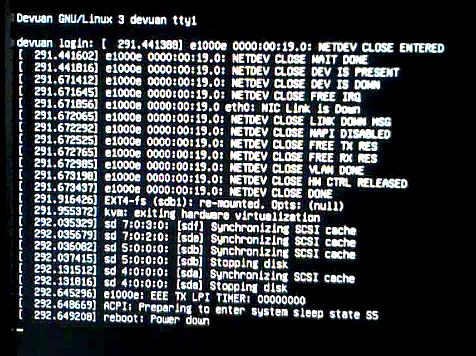
I guess we now wait ....
Thanks in advance,
A.
Board footer
