
You are not logged in.
- Topics: Active | Unanswered
#926 Re: Other Issues » relying on aptitude to keep an OS up to date with security patches » 2021-06-09 13:04:19
i don't know what others do, but 'aptitude update && aptitude full-upgrade' will work properly in debian/devuan. You do need to have a line for the security repo in sources.list, but that's usually there by default.
I'm pretty sure that works in ubuntu, too. I'm not sure about mint. They break up their releases differently from the others.
#927 Re: Installation » runit scripts » 2021-05-25 12:30:39
I don't know the answers to most of your questions, but there's a link to additional runscripts in this post:
https://dev1galaxy.org/viewtopic.php?pid=27300#p27300
I think these are the two main discussions of runit on our forum:
https://dev1galaxy.org/viewtopic.php?id=3716
https://dev1galaxy.org/viewtopic.php?id=3628
#928 Re: Off-topic » freenode irc » 2021-05-21 15:04:11
Yeah, we made it official at yesterday's meeting. Nice to see that you showed up, but you left too soon. IRC is asynchronous. You gotta hang around, even if you don't sit there watching the irc screen.
#929 Re: Other Issues » [SOLVED] Security update delays (again) » 2021-05-16 16:21:51
Thanks for the alert. It's been brought up to date.
#930 Re: Installation » Grub defect » 2021-05-08 17:30:05
sda1 should be the efi partition, which appears to be correctly mounted at /boot/efi. Run blkid to prove to yourself that it holds a fat32 (vfat) filesystem.
I'm having trouble keeping up with the changes in grub's behavior over the last year or so, but I think you probably just need to remove grub-efi-amd64-signed. The unsigned package will remain. Run grub-install and update-grub afterward. This solution assumes you don't use secure boot.
If that doesn't work, ask again or poke around the forum for other solutions. (Hint: search for "set prefix")
#931 Re: Other Issues » [SOLVED] Security update delays (again) » 2021-05-08 14:29:26
Using Refracta won't matter because it only has devuan repos. I was told a full merge is scheduled for Sunday, but I really have no idea what the schedule is or why. It seemed like we had this problem fixed with the last set of patches to amprolla. Guess not.
#932 Re: Installation » networking » 2021-05-04 19:48:58
I'm another one who saw this on the chimaera isos. I don't know if it's in any of the beowulf isos. My solution was to change the wireless password to one that contained only lower-case characters, and it worked. Disabling the password worked, too.
It only seems to be a problem with the installer. The installed system works fine with the original password that contains other characters.
All the installer isos have non-free firmware that gets installed if your hardware needs it unless to choose expert install and tell it you don't want non-free. In the live-isos, most of the wireless firmware packages are already installed.
#933 Re: Devuan Derivatives » SDK or (Debian) Live-build » 2021-05-02 21:46:42
I think Star and Crows are made with live-build. There's no devuanized live-build package right now, so you might want to talk to those devs for hints.
Gnuinos uses a modified live-sdk and includes the debian-installer. Some of the others use refractasnapshot (and refractainstaller) and some I don't know about.
The official devuan-live isos are made with an older version of live-sdk. I need to troubleshoot my builds on the current version when I get some time.
#934 Re: Hardware & System Configuration » Firewall on laptop with Chimaera » 2021-05-02 21:41:40
arno-iptables-firewall is nice and simple. You can configure it with debconf, and it will ask a few questions about which interface(s) to use and which ports to open, etc. There's a way to do fancier stuff by editing configs, but I've never done anything with that.
#935 Re: Installation » [SOLVED] Installing amd64 devuan beowulf 3.1 on an old imac ... » 2021-05-02 21:32:50
You should be able to boot the amd64 desktop-live iso on an old imac. The 32-bit bootloader is included for that specific purpose.
The live isos use refractainstaller. Here's a pictorial guide if you are not familiar with it: https://www.devuan.org/os/documentation … f/live-gui
#936 Re: Desktop and Multimedia » Beowulf is broken » 2021-04-23 12:16:24
Hello:
fsmithred wrote:... there's a way to restore the old behavior.
ALWAYS_SET_PATH yesin /etc/default/su
But you still have to use su -, you just don't get sent to /root.
Right?Best,
A.
After making the edit:
Use su -if you want to cd to /root.
Use su if you want to stay in the current directory or if you want to run a graphical app as root on the user's desktop. (e.g. I frequently start gparted from terminal because I'm already in a terminal and it's easier than going up to the menu.)
@Dutch_Master: check to see if your cpu or motherboard is known to freeze with linux. I have one box that needs an extra boot option to prevent lockups.
#937 Re: Hardware & System Configuration » Multiboot USB and data storage » 2021-04-22 11:05:13
Sorry I didn't see this sooner. Installer isos won't work with refracta2usb. It's mainly for live-isos.
The mini.iso will work. I can't recall if you need to edit the boot menu or if it gets the paths correct automatically.
https://pkgmaster.devuan.org/devuan/dis … s/netboot/
https://pkgmaster.devuan.org/devuan/dis … s/netboot/
Names might be different from what refracta2usb expects. 'vmlinuz' might be 'linux' and 'initrd.img' is probably 'initrd.gz'.
#938 Re: Desktop and Multimedia » Beowulf is broken » 2021-04-20 15:03:02
I hate using 'su -'. Most of the time when I become root, I'm already in the directory where I want to do stuff, and I want to stay there. I don't want to change to /root. And sometimes I want to run a graphical app as root from the user's desktop. That got lost in the change, too. Fortunately, there's a way to restore the old behavior.
ALWAYS_SET_PATH yesin /etc/default/su
#939 Re: Desktop and Multimedia » Chimaera alpha mate desktop audio.. » 2021-04-20 13:07:38
I did a mate install from the chimaera alpha iso. Volume settings persist across reboots. Audio hardware profile setting does not persist. I didn't try editing any files.
#940 Re: Desktop and Multimedia » Beowulf is broken » 2021-04-20 13:05:21
su got moved from shadow to util-linux. I don't know what thought went into the change in root's path when you get there via 'su'. If you use 'su -' it still works the same as it used to. It's in the release notes for beowulf along with some other inherited gems and workarounds. https://files.devuan.org/devuan_beowulf … _notes.txt
#941 Re: Devuan » Devuan 4 Alpha Installer Iso's » 2021-04-17 16:01:19
Edit: files.devuan.org is s - l - o - w . Unless you want to party like it's 1999, choose a faster mirror. They're listed on this page: https://www.devuan.org/get-devuan
#2
Expert install on old (2011) Thinkpad. It asks twice for me to supply the wireless firmware on a usb. I already know that the iso contains the exact firmware I need, so I decline. Twice.
I unplugged the ethernet cable to make sure I could do a wireless install. Installer loads the firmware and detects the nearby wireless signals. I could not authenticate with my router. It turns out that it works fine with no wireless password or if I change the password to one that contains only lower case letters. The original pass had numbers and special characters.
It's not done yet, but it seems to be going along fine.
#1
Full desktop install in qemu yesterday worked. Wicd is gone, and nothing currently replaces it. Wired connection was working with dhcp automatically set up in /etc/network/interfaces.
Xfce did not ask on first login if I wanted default layout or bare layout. Launchers on lower panel exist but are not set to anything. I'll see if I get the same thing on the second install.
#942 Re: Other Issues » How to get rid of Swap file during installation... » 2021-04-16 17:25:57
After you configure the clock/timezone, you get the following screen. Choose "Manual".
https://www.devuan.org/os/documentation … disks1.png
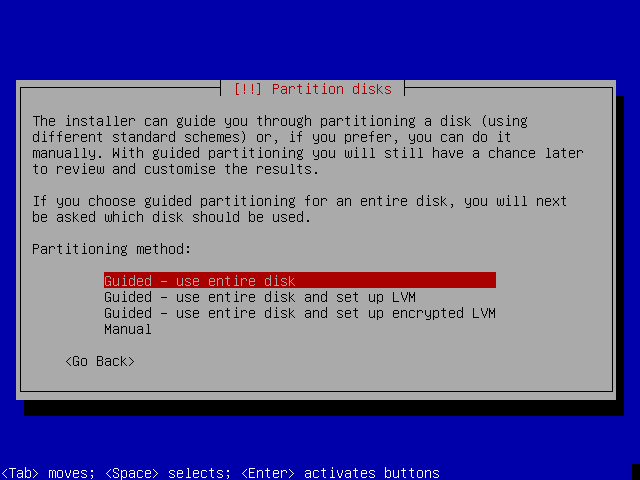
Here's the link for that page: https://www.devuan.org/os/documentation … all-devuan
#943 Re: Installation » I had to use sudo to setup my printer » 2021-04-16 17:12:13
You're running into the changes made to su in buster/beowulf. See the release notes for fixes. https://files.devuan.org/devuan_beowulf … _notes.txt It's in the "What's new" section near the top.
The print server task includes cups. You could set up the printer by going to localhost:631 in a web browser. When you do any admin tasks, it will ask for root login.
#944 Re: Hardware & System Configuration » Multiboot USB and data storage » 2021-04-16 13:34:44
I use refracta2usb for that.
https://refracta.org/docs/readme.refracta2usb.txt
https://sourceforge.net/projects/refrac … b/download
You can create multiple partitions on the usb stick.
First partition must be fat32 and will hold live-isos or unpacked live-isos.
Additional partitions can be used for persistence or to hold loopback files for persistence.
Persistence volumes can be encypted if you want.
If you really want to only have one partition, you can have that with loopback files for persistence on the same volume.
More...
Ask if you have more questions.
#945 Re: Freedom Hacks » runit --> sysvinit » 2021-04-15 15:10:41
I went back and forth between sysvinit and runit a few times before I realized that elogind was not running. I set it to start in runlevels 2-5 with sysv-rc-conf, but it still didn't run. I ended up reinstalling elogind libpam-elogind and libelogind0 and the delays are gone. It seems to be working normally now.
#946 Re: Freedom Hacks » runit --> sysvinit » 2021-04-14 20:40:48
I just tried this in a test system (chimaera in qemu) and had a lot of trouble going back to sysvinit. I'm pretty sure that's because of some changes I made. After I added some runscripts and got them working right, I used update-rc.d to remove the corresponding sysvinit links and I also made the init scripts non-executable. I should have reversed those changes before installing sysvinit-core.
It's working, but it takes a long time for the desktop to come up. Boot time is normal, it pauses at console login, and at first I thought I would get no desktop. So I logged into console, and it took a minute to respond to my password. About that time, the desktop came up. If I don't log into the console, the same thing happens. Takes about a minute from when I log in for the desktop to come up.
#947 Re: Other Issues » [SOLVED] How do I add "Experimental" to my repo for Mesa 21? » 2021-04-13 21:38:56
Aha! I was afraid you might use those lines I posted. You know, the ones that I prefaced with "These lines won't work."
You must add a debian source line. One like this:
deb http://debian.csail.mit.edu/debian experimental main You can pick one closer to home if you're not near Boston. Check a *debian* website for more mirrors. 
Edit: Re-read the part in my first post about "Be careful!"
(No prob, HoaS. We bring different parts of the message.)
#948 Re: Installation » Non Booting GRUB on Beowulf » 2021-04-13 15:35:20
I have no idea about the audio problem. Does aplay -l show anything?
Console font can be changed with dpkg-reconfigure console-setup as root.
#949 Re: Other Issues » [SOLVED] How do I add "Experimental" to my repo for Mesa 21? » 2021-04-13 15:30:32
HoaS beat me to it: How are you looking?
I'm not sure which package you need, but this one has a version 21.
apt policy mesa-common-dev
mesa-common-dev:
  Installed: (none)
  Candidate: 18.3.6-2+deb10u1
  Version table:
     21.0.2-1 1
          1 http://debian.csail.mit.edu/debian experimental/main amd64 Packages
     20.3.5-1 50
         50 http://sledjhamr.org/devuan/merged ceres/main amd64 Packages
         10 http://debian.csail.mit.edu/debian sid/main amd64 Packages
     20.3.4-1 50
50 http://sledjhamr.org/devuan/merged chimaera/main amd64 Packages#950 Re: Installation » Non Booting GRUB on Beowulf » 2021-04-12 15:44:05
Q1: Does minimal-live come with software to drive speaker, for sound?
Q2: 'dhclient eth0' does enable network, but what command disables connection?
englee
A1: alsa is installed, mocp can play audio files, and if you choose one of the access options to boot, the computer will talk to you the entire time it's on. I don't recommend using that unless you have vision problems.
A2: ifconfig eth0 down There's also a way to do it with the 'ip' command, but I haven't gotten around to learning that one yet.
Board footer
