
You are not logged in.
- Topics: Active | Unanswered
#276 Re: Desktop and Multimedia » [SOLVED] Fixing broken Brother DCP-L3510CDW Printer Installation (howto) » 2023-02-04 13:36:04
The OP detailed my problem; in a nutshell:
Having paid out shed-loads of money to Amazon for a LED-powered printer/copier/scanner/wlan CMYK-toner network printer and,
having downloaded an up-to-date Linux driver from the Brother website,
discovered that it completely screwed up the colour balance in both text & photographs and,
Brother just responded with handy-wavy gestures & did nuthin'
To rub salt into the wound, I saved a file that was giving print difficulties as a PDF, took it to a friend with a business, and used his HP DeskJet to print it out (flawless). Bah!
Very recently I discovered that the key to ALL printing (regardless of your OS) is a PPD file. These were originated by Apple (as I understand it), and Adobe is in there somewhere. They are plain-text configuration files for PostScript and, mostly, are to specify ways in which printer-specific services are to be configured, and how things differ from the defaults. Here is the CUPS Help file (link only works if you have CUPS installed):
Printers use a description file with one or more driver ("filter") programs that communicate with the printer through a "backend" program. CUPS currently uses PPD (PostScript Printer Description) files to describe the printer and driver programs needed, some of which come with CUPS while others come with your operating system or Linux distribution.
The Printer Queue shows icons for each installed printer. CUPS uses a PPD file at install-time, in the process creating that icon(s):
Printers
Showing 2 of 2 printers.
Queue Name         | Description   | Make and Model                  | Status
BRPPL3510CDW-CMYK    DCPL3510CDW     Brother DCP-L3510CDW BR-Script3   Idle
DCP3510W-RGB         DCP3510W-RGB    Brother DCP-L3510CDW CUPS         Idle
Here is the head of each file so that you can get a handle on what they are like:
$ sudo head /etc/cups/ppd/BRPPL3510CDW-CMYK.ppd -n 40
*PPD-Adobe: "4.3"
*%================================================
*%	Copyright(C) 2017 Brother Industries, Ltd.
*%	"Brother DCP-L3510CDW BR-Script3"
*%================================================

*%==== General Information Keywords ========================
*FormatVersion: "4.3"
*FileVersion: "1.0"
*LanguageEncoding: ISOLatin1
*LanguageVersion: English
*Manufacturer: "Brother"
*PCFileName: "BRPPL3510CDW.PPD"
*Product: "(Brother DCP-L3510CDW)"
*PSVersion: "(3010.106) 3"
*ShortNickName: "Brother DCP-L3510CDW BR-Script3"
*ModelName: "Brother DCP-L3510CDW BR-Script3"
*NickName: "Brother DCP-L3510CDW BR-Script3"

*%==== Basic Device Capabilities =============
*LanguageLevel: "3"
*TTRasterizer: Type42
*ColorDevice: True
*DefaultColorSpace: CMYK
*FileSystem: True
*?FileSystem:"
save
	/devname (%disk0%) def
	/ret false def
	0 1 7{
		devname exch 48 add 5 exch put
		devname devstatus {
			0 ne {/ret true def}if
			pop pop pop pop pop pop pop
		}if
	}for
	ret {(True)}{(False)} ifelse = flush
restore
"
*End
$ sudo head /etc/cups/ppd/DCP3510W-RGB.ppd -n 40
*PPD-Adobe: "4.3"
*%================================================
*% Copyright(C) 2018 Brother Industries, Ltd.
*% "Brother DCP-L3510CDW for CUPS"
*%================================================
*%==== General Information Keywords ========================
*FormatVersion: "4.3"
*FileVersion: "4.0.9"
*LanguageVersion: English
*LanguageEncoding: ISOLatin1
*PCFileName: "DCP3510W.PPD"
*Manufacturer: "Brother"
*Product: "(DCP-L3510CDW)"
*1284DeviceID: "MFG:Brother;MDL:DCP-L3510CDW"
*cupsVersion: 1.4
*cupsManualCopies: false
*cupsFilter: "application/vnd.cups-postscript 0 brother_lpdwrapper_dcpl3510cdw"
*%cupsFilter: "application/vnd.cups-pdf 0 brother_lpdwrapper_dcpl3510cdw"
*cupsModelNumber: 5
*ModelName: "Brother DCP-L3510CDW"
*ShortNickName: "DCP-L3510CDW"
*NickName: "Brother DCP-L3510CDW CUPS"
*PSVersion: "(3010.106) 3"
*%==== Basic Device Capabilities =============
*LanguageLevel: "3"
*ColorDevice: True
*DefaultColorSpace: RGB
*FileSystem: False
*Throughput: "17"
*VariablePaperSize: False
*TTRasterizer: Type42
*FreeVM: "2700000"
*DefaultResolution: 600dpi
*%DefaultOutputOrder: Reverse
*%=== UI Constraints ==================================
*UIConstraints: "*BRInputSlot AutoSelect *BRMediaType Label"So, first I had to find a PPD file that would actually work. That was simple, if fiddly, once I found it, and is detailed in the OP. I then hoped that simply replacing the file located in /etc/cups/ppd with the new file renamed-to-the-old would be sufficient but, naturally, that was a foolish hope. There is an actual install process to go through, and that will be detailed in the next post.
#277 Desktop and Multimedia » [SOLVED] Fixing broken Brother DCP-L3510CDW Printer Installation (howto) » 2023-02-04 04:46:19
- alexkemp
- Replies: 25
A HP DeskJet printer got replaced with a Brother DCP-L3510CDW led printer.
The HP was used so infrequently that the ink clogged up all the time. That did not happen with the Brother. However, whilst the DeskJet printed fine, the Brother did not:
The Brother was 5 x the cost of the HP
The screen (print preview) + paper results did not correspond
(b/w was OK but colour values were wrong)
A bug report to Brother got nowhere.
After 2 years (still using the same print drums all this time, and never clogs up) I've more-or-less fixed the broken colour values today. Here is how:
Brother provided a code-free CUPS driver from their website that moved in mysterious ways & provided an icon in the XFCE system-config-printer utility accessed from menu:Settings.
I know now that all that is required is a PPD file installed within /etc/cups/ppd/
('PPD' files are Postscript config files, detailing the specific features of the printer)I recently looked at Brother under Open Printing
(CUPs *does* provide a ppd file for my model, but I only found that after fixing it!)My original PPD file was marked as RGB whilst a Brother-DCP-9045CDN-Postscript-Brother.ppd file was marked as CMYK. That gave me hope that changing my driver to CMYK may fix the broken driver (the led printer uses 4 drums to print).
$ la /etc/cups/ppd
total 120
-rw-r----- 1 root  lp    30989 Feb  4 02:33 BRPPL3510CDW-CMYK.ppd
-rw-r----- 2 alexk alexk 30989 Aug 23  2017 BRPPL3510CDW.PPD
-rw-r----- 2 alexk alexk 26326 Jul  3  2019 DCP3510W.PPD
-rw-r----- 1 root  lp    26310 Feb  4 02:39 DCP3510W-RGB.ppd
$ # the original postscript driver:
$ fgrep DefaultColorSpace /etc/cups/ppd/DCP3510W.PPD
*DefaultColorSpace: RGB
$ # now the new one:
$ fgrep DefaultColorSpace /etc/cups/ppd/BRPPL3510CDW.PPD
*DefaultColorSpace: CMYK
The Brother came with a driver CD, but it was only good for Windows or Apple Mac. I found the PPD files within a Windows .msi file (brpsc17a.msi), and 7-Zip is the best way to extract it):
$ 7z x /media/alexk/BROTHER/install/msi/brpsc17a.msiThat creates a mass of (compressed) PPD files that each look something like this:
BRPPL3510CDW.PP__10.8743C30B_11BB_422B_A1A0_160735E2777EOnce again, 7-Zip will expand these files to the (plain-text) PPD files
(a lot of commands moving all relevant files into a sub-dir are missing here):for i in ./*; do 7z x $i; done;All these files are virtually identical. The major difference is a language declaration
(the language within all files was identical; just the declaration was different):fgrep LanguageVersion * $ # example follows $ fgrep LanguageVersion BRPPL3510CDW.PP__03 *LanguageVersion: EnglishI placed the 2-digit ISO 639-1 code into the filename like this:
eg BRPPL3510CDW.en.PP__03 (in the end I had 6 'en' files & used the first one)
(the important feature here is that that PPD file was also CMYK)I now had 2 PPD files:
1) DCP3510W.PPD :: this is the original faulty RGB driver provided via the Brother website
2) BRPPL3510CDW.PPD :: this was sourced via the Brother-supplied driver CDI copied these as hard-links into the CUPs directory (/etc/cups/ppd). It is important to note that they must retain my file owner and group:
$ cp BRPPL3510CDW.en.PP__03 -l /etc/cups/ppd/BRPPL3510CDW.PPD
$ cp DCPL3510CDW.original.ppd -l /etc/cups/ppd/DCP3510W.PPD
That is the first part. Next, we shall use the Xfce-supplied Print Settings utility to add printers for each of these setups. However, that shall be tomorrow after I've had some sleep (almost 5am here in the UK).
#278 Re: Installation » [SOLVED] Debian / non-free-firmware » 2023-02-01 12:10:52
Don't do this with Chimaera:
W: Skipping acquire of configured file 'non-free-firmware/binary-amd64/Packages'
 as repository 'http://deb.devuan.org/merged chimaera InRelease'
 doesn't have the component 'non-free-firmware'
 (component misspelt in sources.list?)
Edit: reset since code is too stupid to wrap lines to the page
#279 Re: Other Issues » [SOLVED] Git hangs on cloning » 2023-01-29 19:22:32
I'm on Chimaera & an upgrade included git just now (minutes earlier). However, no idea if that will have fixed *your* problem.
#280 Re: Hardware & System Configuration » git netfilter compile problem » 2023-01-24 16:42:59
Sounds like port-80 is blocked for external traffic. But of course, that would mean that nf_tables (or something) is running.
Sorry, but cannot help. I was competent with the old firewall, but know nothing about the new one(s).
#281 Re: Desktop and Multimedia » Blu-Ray HOWTO under Devuan (No valid AACS configuration files) » 2023-01-22 15:01:58
Blu-Ray Menus
Mostly, you need to give up on them. They will not run.
Blu-Ray uses JAVA to show a menu on screen. That *used* to work with Linux, but no more. If you have spent any time with Linux you will understand that last sentence completely. However, it also affects a (physical) Samsung Blue-Ray reader that I use to show (upto now, only) DVDs on a large TV-Screen (Samsung Smart TV). It will play the 2001 movie, but no menus. A little better with VLC after the updates: It will play the movie but no menus. VLC will, however show a 'Top Title' via Playback | Title | Top Menu, and that shows me all the titles in the disk, with text to describe them.
#282 Desktop and Multimedia » Blu-Ray HOWTO under Devuan (No valid AACS configuration files) » 2023-01-21 01:56:32
- alexkemp
- Replies: 2
My ancient DVD VHS of "2001 A Space Odyssey" is badly damaged so, since it is one of my favourite movies & I wanted to rip it to disk so that I could watch it in multiple formats, I got a Blu-Ray DVD from Amazon (£6.79).
I was very much hoping that my old, cheap external DVD-reader/burner (~£12) would be able to read a blu-ray. Of course not, so that meant buying a new Blu-Ray reader (£84.98).
The new DVD connects via USB just like the old DVD, and this one revealed files & dirs, but neither VLC nor Handbrake would play. Even after following Interwebs advice I got the following:
$ /usr/bin/vlc bluray:///dev/sr1
VLC media player 3.0.18 Vetinari (revision 3.0.13-8-g41878ff4f2)
[000056024a64f580] main libvlc: Running vlc with the default interface. Use 'cvlc' to use vlc without interface.
keydbcfg.c:680: No valid AACS configuration files found
aacs.c:121: No usable AACS libraries found!
dec.c:197: aacs_open() failed: -2!
[00007f860c001160] libbluray demux: First play: 1, Top menu: 1
HDMV Titles: 19, BD-J Titles: 0, Other: 0
(this was due to my the supplier case-error in naming the cfg file - see 'Fix' below)
Sources:
The Fix:
When DVDs first appeared Linux could not play them. They were encrypted & not (as I understand it) documented. That got fixed & DVDs can now easily be played under Linux. Blu-Ray is more difficult, in that an ID (VUK - part of 'aacs') needs to exist for your specific disk in your specific language.
What follows now are the steps to take (identical to Debian, as it happens):
Install the necessary libraries:
$ sudo apt install vlc libaacs0 libbluray-bdj libbluray2Download & install the latest file of Blu-Ray decryption keys in a specific place with a specific name:
(note that the supplied ZIP contains the correct file with the correct name but in the wrong case)$ la /usr/share/doc/libaacs0/KEYDB.cfg.gz -rw-r--r-- 1 root root 2615 May 4 2017 /usr/share/doc/libaacs0/KEYDB.cfg.gz $ mkdir $HOME/.config/aacs $ cd $HOME/.config/aacs $ wget http://fvonline-db.bplaced.net/fv_download.php?lang=eng $ mv 'fv_download.php?lang=eng' keydb_eng.zip $ unzip keydb_eng.zip Archive: keydb_eng.zip inflating: keydb.cfg(give it the correct name (case-sensitive))
$ mv keydb.cfg KEYDB.cfgAllThe VLC Blu-Ray players will now work, as does Handbrake:$ /usr/bin/vlc bluray:///dev/sr1 VLC media player 3.0.18 Vetinari (revision 3.0.13-8-g41878ff4f2) [000056145484c580] main libvlc: Running vlc with the default interface. Use 'cvlc' to use vlc without interface. aacs.c:170: ignoring empty drl [00007f0578001120] libbluray demux: First play: 1, Top menu: 1 HDMV Titles: 19, BD-J Titles: 0, Other: 0 [00007f0578001120] libbluray demux: Adding ES 4113 select 1 [00007f0578001120] libbluray demux: Adding ES 4352 select 1 … [00007f0558003890] gl gl: Initialized libplacebo v2.72.0 (API v72) libva info: VA-API version 1.10.0 libva info: Trying to open /usr/lib/x86_64-linux-gnu/dri/radeonsi_drv_video.so libva info: Found init function __vaDriverInit_1_10 libva info: va_openDriver() returns 0 [00007f056c006170] avcodec decoder: Using Mesa Gallium driver 20.3.5 for AMD KABINI (DRM 2.50.0, 6.0.0-0.deb11.6-amd64, LLVM 11.0.1) for hardware decoding qt.qpa.xcb: QXcbConnection: XCB error: 3 (BadWindow), sequence: 7365, resource id: 17060910, major code: 40 (TranslateCoords), minor code: 0
A script to use under cron to keep the CFG file updated would be useful.
Updated 2023-01-22:
Corrected small errors. See also my next post for Blu-Ray menu errors (not fixed)
HTH
#283 Re: Installation » [SOLVED] gparted missing » 2023-01-17 20:47:45
FWIW:
I've got Chimaera & gparted is installed:
$ apt policy gparted
gparted:
  Installed: 1.2.0-1
  Candidate: 1.2.0-1
  Version table:
 *** 1.2.0-1 500
        500 http://deb.devuan.org/merged chimaera/main amd64 Packages
100 /var/lib/dpkg/status#284 Re: Installation » pan2, missing 'locale'? » 2022-12-06 16:22:30
Did you copy-paste those errors? There is a syntax error in the 2nd (s/b '<control>O', or perhaps 'Ctrl-O', not '<constrol>O').
#285 Re: ARM Builds » kernel-related question » 2022-11-25 20:33:39
By the sound of it you want backports. Here my setup but remember, YMMV:
$ cat /etc/apt/sources.list | head -8
deb http://deb.devuan.org/merged chimaera main non-free contrib
deb http://deb.devuan.org/merged chimaera-security main non-free contrib
deb http://deb.devuan.org/merged chimaera-updates main non-free contrib
# changed next line following https://dev1galaxy.org/viewtopic.php?pid=38033#p38033
# deb http://deb.devuan.org/devuan chimaera-proposed-updates main non-free contrib
deb http://deb.devuan.org/merged chimaera-proposed-updates main non-free contrib
deb http://deb.devuan.org/merged chimaera-backports main non-free contrib

$ uname -a
Linux ng3 6.0.0-0.deb11.2-amd64 #1 SMP PREEMPT_DYNAMIC Debian 6.0.3-1~bpo11+1 (2022-10-29) x86_64 GNU/Linux#286 Re: Installation » [SOLVED] libc6 bug fix has not reached chimaera-proposed-updates » 2022-10-21 11:19:12
Hi Geoff 42
It must be some other feature of your system that is preventing install of that version. I have the precise same sources.list as you, yet and have the 2.31-13+deb11u4 version for libc6 (note that my system is AMD, not intel):
$ sudo apt-cache policy
(snip)
500 http://deb.devuan.org/devuan chimaera-proposed-updates/main amd64 Packages
     release v=4.0.0,o=Devuan,a=chimaera-proposed-updates,n=chimaera-proposed-updates,l=Devuan,c=main,b=amd64
     origin deb.devuan.org
(snip)
$ apt search libc6 | head -n 3

WARNING: apt does not have a stable CLI interface. Use with caution in scripts.

Sorting...
Full Text Search...
libc6/stable,now 2.31-13+deb11u4 amd64 [installed]
PS
I also wondered why that single line was different to all others in the wiki!
(update)
Realising that I made an error (the update you are talking of is 2.31-13+deb11u5, not u4) I changed the proposed-updates line to match all others, then re-ran the apt update that had already been ran 5 minutes before. The results were startling:
$ ~/.update
Hit:1 http://deb.devuan.org/merged chimaera InRelease
Hit:2 http://deb.devuan.org/merged chimaera-security InRelease
Hit:3 http://deb.devuan.org/merged chimaera-updates InRelease
Hit:4 https://josm.openstreetmap.de/apt alldist InRelease
Get:5 http://deb.devuan.org/merged chimaera-proposed-updates InRelease [26.6 kB]
Hit:6 http://deb.devuan.org/merged chimaera-backports InRelease
Get:7 http://deb.devuan.org/merged chimaera-proposed-updates/main amd64 Packages [70.3 kB]
Get:8 http://deb.devuan.org/merged chimaera-proposed-updates/main Translation-en [38.4 kB]
Get:9 http://deb.devuan.org/merged chimaera-proposed-updates/non-free Translation-en [10.9 kB]
Get:10 http://deb.devuan.org/merged chimaera-proposed-updates/contrib Translation-en [499 B]
Fetched 147 kB in 2s (94.0 kB/s)
Reading package lists... Done
Building dependency tree... Done
Reading state information... Done
10 packages can be upgraded. Run 'apt list --upgradable' to see them.
Reading package lists... Done
Building dependency tree... Done
Reading state information... Done
0 upgraded, 0 newly installed, 0 to remove and 10 not upgraded.
Reading package lists... Done
Building dependency tree... Done
Reading state information... Done
Calculating upgrade... Done
The following packages will be upgraded:
  libbluray2 libc-bin libc-dev-bin libc-l10n libc6 libc6-dev libc6-i386 locales shim-helpers-amd64-signed shim-unsigned
10 upgraded, 0 newly installed, 0 to remove and 0 not upgraded.
(snip)
$ apt search libc6 | head -n 3

WARNING: apt does not have a stable CLI interface. Use with caution in scripts.

Sorting...
Full Text Search...
libc6/stable-proposed-updates,now 2.31-13+deb11u5 amd64 [installed]
Wow! I've been missing out on a lot of updates. Thanks.
#287 Re: Hardware & System Configuration » Realtek USB wifi stick RTL8188FTV » 2022-09-07 17:54:32
Current chimaera-BP kernel is 5.18.0.0
#288 Re: News & Announcements » [SOLVED] invalid: EXPKEYSIG BB23C00C61FC752C Devuan Repository » 2022-09-07 17:48:11
Ogis1975's is a reasonable question to ask.
If you get offended by the question then
That is the response of a child, not of a grown adult
No-one can ever then expect that you will take this matter seriously & responsibly
The future then will be filled with an infinite repetition of these (and other) issues, with zero fix in sight
Now yes, of course, you also get idiotic responses from entitled fools that have zero respect for the continual efforts of unpaid volunteers on their behalf. Those people do not deserve any respect, but that does not mean that Ogis1975's question is not a reasonable one to ask.
Many thanks to Ralph for his continual efforts on Devuan's behalf. It is a new venture & I fully expect bumps along the road. As long as things continually improve I have few complaints & immense gratitude for the simple fact that it is available to the world & to me.
#289 Re: Documentation » [HowTo] Install latest youtube-dl on DEVUAN 4 » 2022-08-29 17:22:58
Did you get your version from elsewhere?
No. The standard youtube-dl is also installed in the standard location. However, I first got it in the days of Debian & updates were few & far in between (today updates are never). So, I installed a second copy in /usr/local/bin and, if you look at the code in my post, that is where the update command is made. I still have youtube-dl installed, but it never updates now:
$ /usr/bin/youtube-dl --version
2021.06.06
$ /usr/local/bin/youtube-dl --version
2021.12.17
$ /usr/bin/yt-dlp --version
2022.08.19
If you only ever want to download old YT videos then you do not need yt-dlp. However, if a recent video then you do, since G changes the algorithm every month or two. Hence the need to make use of backports.
#290 Re: Documentation » [HowTo] Install latest youtube-dl on DEVUAN 4 » 2022-08-29 10:01:28
I advise you most strongly not to bother.
This is the result of a youtube-dl (local) upgrade attempt just now:
sudo /usr/local/bin/youtube-dl -U
youtube-dl is up-to-date (2021.12.17)
It has been abandoned & no longer will download most YT videos. Use yt-dlp instead (available via backports):
man yt-dlp
NAME
       yt-dlp - A youtube-dl fork with additional features and patches
# …
$ yt-dlp --version
2022.08.19#291 Re: Other Issues » [SOLVED] How to Navigate Back to a Previous XFCE Session? » 2022-08-28 12:19:36
Hi HoaS.
^ That output is normal for any graphical terminal emulator regardless of the init system.
This OSTechNix page reports the following for an Ubuntu 18.04 LTS server: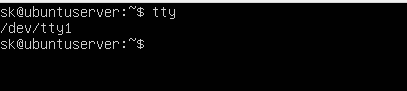 (in text: (user command) tty => /dev/tty1)
When I read that, I saw the words “Ubuntu 18.04 LTS” & overlooked the word server.
Sure ’nuff; in xfce4-terminal:
alexk@ng3:~$ tty
/dev/pts/0
In vt01:
alexk@ng3:~$ tty
/dev/tty1
Thanks for the correction.
Added later:
I now realise that other commands within the OSTechNix page also rely on being within a VT session. As one example, the page reports that:
By default, there are 7 ttys in Linux. … The 1 to 6 ttys are command line only. The 7th tty is GUI (your X desktop session).
…
To view the total number of active virtual consoles, run: fgconsole
You can see the next unallocated virtual terminal using command: fgconsole --next-available
In xfce4-terminal:
$ fgconsole
Couldn't get a file descriptor referring to the console.
In vt01:
$ fgconsole
1
$ fgconsole --next-available
8
That confirms the simple statements within the OSTechNix page quoted at the top of this section. However, also necessary to realise that those simple statements are there to help give simple inroads to begin understanding some of the basics of this topic, whilst the topic itself is way more complex than that (as is indicated by the 64+ VTs created at init startup).
Further, lets offer a silent prayer of thanks up for the fact that Devuan has a simple sanity at it's heart, and that we are not forced to use an OS that has an eternal struggle for domination at it's heart. I spent 12 hours yesterday researching to try to discover which binaries handle the C‑A‑Fn + A‑Fn key combos. I'm a professional researcher with multiple decades experience, but could not find a definitive answer (it should not be a difficult question). What I *did* find was the way that multiple distros are beginning to make simple certainties no longer certain. An example:– The simple route back to a GUI from a VT is Alt‑F7, and that has been true within a default setup for decades. During my research I found many distros that have recently changed the default VT setup, with radical differences in the methods of return. And I'm sorry; I went through scores of websites and, because I was not looking for that precise issue, I did not record which they were.
#292 Re: Other Issues » [SOLVED] How to Navigate Back to a Previous XFCE Session? » 2022-08-28 01:14:25
Like a Bulldog (and also a rat), once I get my teeth into something I cannot stop biting until my teeth meet (ratchet mechanism on their jaws).
(upfront: nothing directly to do with Devuan)
Surprisingly, this topic has *everything* to do with SystemD (if only in reverse), since the virus has taken over from the kernel the process of producing Virtual Terminals (VTs), just like so much else.
In Devuan, the kernel produces a whole bunch of VTs on startup. The precise number will be a kernel setup item. For myself it seems to be 64 (see Ralph's answer), although there are also a few extra:
$ ls /dev/tty[0-9]* | wc -l
64
$ la /dev/tty*
crw-rw-rw- 1 root  tty     5,  0 Aug 25 08:40 /dev/tty
crw--w---- 1 root  tty     4,  0 Aug 25 08:40 /dev/tty0
crw------- 1 alexk tty     4,  1 Aug 26 18:23 /dev/tty1
crw--w---- 1 root  tty     4, 10 Aug 25 08:40 /dev/tty10
…
crw--w---- 1 root  tty     4,  9 Aug 25 08:40 /dev/tty9
crw-rw---- 1 root  dialout 4, 64 Aug 25 08:40 /dev/ttyS0
crw-rw---- 1 root  dialout 4, 65 Aug 25 08:40 /dev/ttyS1
crw-rw---- 1 root  dialout 4, 66 Aug 25 08:40 /dev/ttyS2
crw-rw---- 1 root  dialout 4, 67 Aug 25 08:40 /dev/ttyS3
We now need to consider delgado's answer, and it has taken me quite some time to get the point.
When the computer is first started, the screen that appears is a VT initiated (as best as I can tell) by agetty via init:
DESCRIPTION
agetty opens a tty port, prompts for a login name and invokes the /bin/login command. It is normally invoked by init(8).
My system uses XFCE as a Desktop Manager and SLiM as a Login Manager. Therefore it is startxfce4 for me rather than startx, but the point is that an X-Session is launched which provides the GUI components in both cases, and that is comprehensively different to agetty, which is text-only.
With hindsight it is blooming obvious, but the VT produced by agetty has absolutely nothing to do with the terminal produced by xterm (or in my case, xfce-terminal) which is a GUI emulation of a text-terminal. For those that are interested in historical research, this is what it took to drive a text-terminal (aka typewriter) in the 1960s:
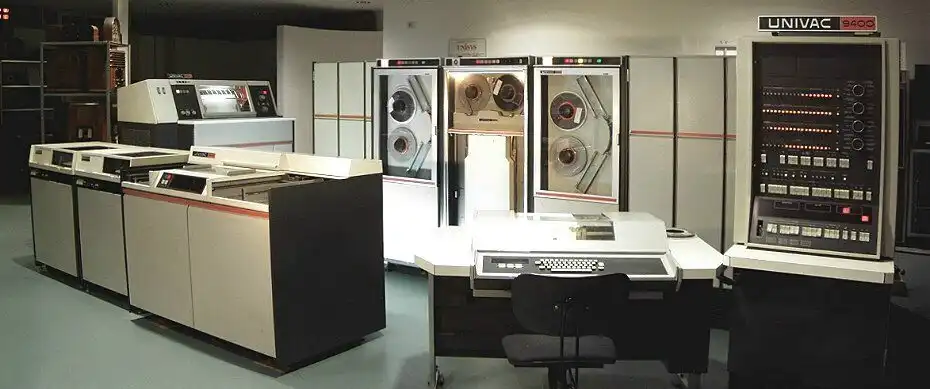
The main difference is that a VT does NOT have a mouse, nor history support. It is possible, though damn difficult, to install them. It is, however, important to know which of the two (VT or GUI-Terminal) you are in, because the commands to switch between VT & GUI are different depending on whether you are based within a GUI or VT screen:
VT → VT : Ctrl + Alt + F7 or, Alt + F7 (switch to VT07, etc) (Ctrl key is optional)
VT → GUI : Ctrl + Alt + F7 or, Alt + F7 (switch to VT07, etc) (Ctrl key is optional)
GUI → VT : Ctrl + Alt + F7 (switch to VT07, etc) (all 3 keys required)
By default, most systems keep 6 text VTs available (at 1-6) and one GUI at '7', so the return in a default system is Ctrl-F7. However, this can be changed (just open another X-Session) and, worse, some distributions change the setup. Yikes! This page has good info on the command to change VTs, etc. (CHVT), and make a note that the TTY command gives a different result in Devuan to SystemD distros:
$ tty
/dev/pts/0
so make a note of the pgrep -a Xorg command that ralph gave.
It seems clear, then, that it is Xorg that handles 3-finger salutes to change from the GUI to a VT, but (perhaps) agetty that handles 2-finger salutes to switch out of the VT to another VT/GUI.
#293 Re: Other Issues » [SOLVED] How to Navigate Back to a Previous XFCE Session? » 2022-08-26 17:51:00
Thank you delgado. That was the kind of info that I was searching for.
Whether Alt-F7 would have got me back *after* login I do not yet know.
I do now, and the answer is "yes".
These are the steps I just took:
Close down all programs.
Open JOSM
Issue (wrong for JOSM) kbd command Ctrl-Alt-F1
(screen switches to text-screen vt01, with a login prompt on screen)Login with my user/password
Issue w & pgrep commands (see below)
Issue Alt-F7 command
(screen instantly switches back to JOSM screen)
For reference, here are the results of w & pgrep from inside TTY1:
$ w
 18:23:03 up 1 day,  9:43,  2 users,  load average: 0.22, 0.70, 0.87
USER     TTY      FROM             LOGIN@   IDLE   JCPU   PCPU WHAT
alexk    tty1     -                18:19    5.00s  0.15s  0.01s w
alexk    :0.0     :0.0             Thu08   ?xdm?   9:43m  1.10s xfce4-session
$ pgrep -a Xorg
1899 /usr/lib/xorg/Xorg -nolisten tcp -auth /var/run/slim.auth vt07
Unless someone knows what supplies Alt-F7 I guess that we are done with this question now. Thank you to everyone that responded - most helpful.
#294 Re: Other Issues » [SOLVED] How to Navigate Back to a Previous XFCE Session? » 2022-08-26 09:41:45
Many thanks, Ralph.
Ctl-Alt-F1 got me to a text-screen under vt07; all that was on the screen was a prompt to login. All it (appeared to) accept as input was a username, then password, although on later testing Alt-F7 did actually return me to the xfce4-session under vt07.
Trying w + pgrep just now from an ordinary terminal:
$ w
 10:14:06 up 1 day,  1:34,  1 user,  load average: 0.63, 0.64, 0.81
USER     TTY      FROM             LOGIN@   IDLE   JCPU   PCPU WHAT
alexk    :0.0     :0.0             Thu08   ?xdm?   7:53m  1.02s xfce4-session
$ pgrep -a Xorg
1899 /usr/lib/xorg/Xorg -nolisten tcp -auth /var/run/slim.auth vt07
That result for w is exactly what I got during my dilemma after the text login for the abandoned session. It neatly explains why I could not understand which TTY the XFCE Session was running under.
Whether Alt-F7 would have got me back *after* login I do not yet know. I also do not understand why exit following login did not shut down vt01 & drop me back into the still-running vt07 session. I see from man Xorg that Xorg supplies the Ctl-Alt-Fn commands, but I also still do not know which program is supplying the Alt-Fn command. So many questions.
Edit: fixed key combos
#295 Re: Other Issues » [SOLVED] How to Navigate Back to a Previous XFCE Session? » 2022-08-25 21:55:33
Try Alt-F7
Reproduced the problem, and Alt-F7 worked to get me back to the logged-in GUI session at the identical place. Thank you Gregors.
The following page documents XFCE4 sessions (the use of alt-f7 is there) (and also, why it may not work):
#296 Re: Other Issues » [SOLVED] How to Navigate Back to a Previous XFCE Session? » 2022-08-25 21:33:25
Try Alt-F7
Why? What does it do? Where is the link to the documentation that it sits within?
Thanks for trying, Gregors, but an unreferenced reply is worthless.
These are two sites I referenced from FF:
#297 Other Issues » [SOLVED] How to Navigate Back to a Previous XFCE Session? » 2022-08-25 18:53:22
- alexkemp
- Replies: 16
(upfront: nothing directly to do with Devuan; everything to do with me being a prat)
Whilst working with JOSM under XFCE to make some small updates to the OSM map I hit a wrong combination of keys & found myself at a fresh text-session. I then could neither shut down that new session nor navigate back to the original xfce-session. My actual actions probably made it impossible to be able to revert to the GUI, but I wanted to know how to do that under Devuan with a XFCE session.
The key-combo needed: Shift-Alt-F1
(switch off auto-download prior to examining a large boundary-area)The key-combo actually used: Ctl-Alt-F1
(start up & switch to TTY1)
(use of w indicated that the new session was under TTY1 & the former xfce-session was on 0:0 (whatever that is))
I cannot now remember the precise order of steps that I took, but I did try exit and startx, plus a text-login, and eventually got to a new XFCE session & used FF to research (it all seemed to be Ubuntu fixes), but nothing worked & I eventually had to shutdown & crash/burn the original GUI. Chromium managed to recover all the tabs in the former session, so that was OK.
If I ever do something as dumb as this again, how do I recover back to the original session?
Edit: fixed key combos
#298 Re: Installation » Avoiding systemd » 2022-08-17 07:31:34
Please see if devuan-baseconf is installed. Let me know if it is.
$ locate avoid-systemd
/etc/apt/preferences.d/avoid-systemd
#
$ apt-cache search devuan-baseconf
devuan-baseconf - Devuan base config files
$ apt-cache showpkg devuan-baseconf
Package: devuan-baseconf
Versions:
0.6.4+devuan3.1 (/var/lib/apt/lists/deb.devuan.org_merged_dists_chimaera_main_binary-amd64_Packages) (/var/lib/dpkg/status)
Already installed. I do full-system updates daily.
#299 Re: Desktop and Multimedia » Alternative browser for Devuan/Debian - Brave » 2022-08-06 17:29:17
In the Git README.md the curl line is secure (https) whereas in your apt command it is not (http); is that the reason for the error?
# curl -s 'https://download.opensuse.org/repositories/home:/ungoogled_chromium/Debian_Bullseye/Release.key' …#300 Re: Off-topic » OT nonsense » 2022-07-26 19:53:26
Oh. I was wondering where all your nonsense was coming from. Then I listened to the latest Rachel Maddow Highlights (Jul 25, 2022) where she was introducing Gerald LK Smith & his Christian Nationalism from the 1950s, and the way that the far right in America are newly re-introducing it, together with it's rampant racism & antisemitism, and I understood. Same old, same old again, and again.
No thanks.
Board footer
