
You are not logged in.
- Topics: Active | Unanswered
#1 Re: Desktop and Multimedia » [SOLVED] Running older games » 2026-07-10 03:41:50
I've had luck with winehq-staging and winetricks from their github repo. This is the nvidia driver version I've got 610.43.02 Instead of making different wine prefixes for a game that does not work. I use steams add a non steam game and try different proton versions.
#2 Re: Desktop and Multimedia » xlibre-deb or xlibre-debian? » 2026-07-09 03:12:34
I've never had a problem with the mixed up suites and components. and updates work on both excalibur and freia. https://github.com/xlibre-debian/devuan
#3 Re: DIY » Gateway Neural Amp Modeler » 2026-06-12 04:12:22
Reached out to the creator Steven, he asked if I don't use the name gateway and focused on NAM. So renamed it to NAMix.
Rebuilt version 0.4.0 is here https://sourceforge.net/projects/namix/ code is here https://github.com/rations/NAMix
#4 Re: DIY » Gateway Neural Amp Modeler » 2026-06-06 13:51:57
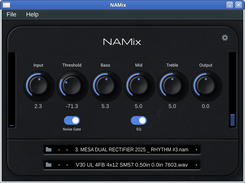
That look is taken from the original. Nam also supports bass not just guitar, it's a great open source project. You can find the nam files and captures here
I built version 0.3.0 on daedalus so it should work on any distro with glibc 2.35 or later
#5 Re: DIY » Gateway Neural Amp Modeler » 2026-06-05 08:33:51
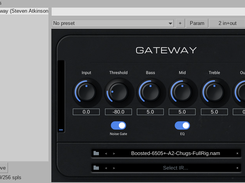
Fixed bugs, improved the look and added standalone version
#6 DIY » Gateway Neural Amp Modeler » 2026-06-04 15:32:05
- rations
- Replies: 7
Testing a linux port of Gateway VST3 by Steven Atkinson. iPlug2, the framework used by the original plugin, does not currently support Linux. Gateway is a Linux port built using JUCE
You can find it here https://sourceforge.net/projects/namix/ and the code here https://github.com/rations/NAMix
@Ralf Did you know that github is a Microsoft site? Yes. And that there are many FOSS alternatives one can use instead? Yes.
Some of my projects are on codeberg and given I use chat bots I don't use devuans git, I put it on github because it's ai slop.
edit updated img
#7 Re: DIY » simple login gui » 2026-06-03 10:59:48
What do you mean by "minimal"? ... 1x1 pixels? Minimal as in it's not very flash, maybe basic would describe it better
#8 DIY » simple login gui » 2026-06-03 04:45:49
- rations
- Replies: 13
A minimal GTK graphical login manager for Devuan Excalibur using sysvinit and seatd. Replaces the text console login on tty1 with a simple username/password screen. On logout from the window manager, the login screen reappears automatically. Supports GTK2 and GTK3.
It works with or without elogind and the installer has an option to use dbus or not.
As usual for me chat bots were used.
It can be found here https://sourceforge.net/projects/simple-login-gui/ and the code is here https://github.com/rations/simple-login-gui
You would have to remove lightdm, slim or whatever you're using for this to work.
#9 Re: Installation » Devuan and vscode » 2026-05-27 20:45:16
the deb package on the github releases page has always worked for me
#10 Re: DIY » testing a yabridge fix » 2026-05-26 00:18:11
Chat bots have done well here. It made a few more changes that seem to work well for vst3 and vst2 on the latest version of wine staging. Also it created an install.sh an GUI for adding and syncing plugins to be a bit more user friendly.
It's now been forked and called vstbridge. It can be found here https://sourceforge.net/projects/vstbridge/
#11 DIY » testing a yabridge fix » 2026-05-22 14:24:44
- rations
- Replies: 1
Any yabridge users?
I've been using chat bots to try a fix for yabridge to work with the latest version of winehq-staging. So far I've only worked on vst3 using reaper. I don't have many windows vsts so was just wondering if anyone is interested and would like to test theirs and provide some feedback on the results. Also if you use ardour see if it works with that.
So far in testing some work as expected, some work with minor bugs like the mouse wheel doesn't change the dials, I have to click and drag and some freeze and I have to close the fx window and reopen it. Different manufactures give different results. If anyone does use yabridge and tries let me know how it went and what plugins you used thanks.
Edit new link https://sourceforge.net/projects/vstbridge/
#12 Re: Desktop and Multimedia » ALSA+Jack system wide audio No pulseaudio or pipewire » 2026-05-04 15:09:22
Chat bots got audio in steam to work. Just need to enable steam gaming in the gui then launch steam normally.

#13 Re: Documentation » HOW TO: Install XLibre on Devuan » 2026-05-04 01:02:43
You asked for recommendations. I'm just sharing what I use with xlibre on excalibur and have not had any issues.
#14 Re: Documentation » HOW TO: Install XLibre on Devuan » 2026-05-03 09:28:28
Does your nvidia card support driver versions above 570.xxx.xxx? If so this is what I do.
sudo apt install linux-headers-amd64
wget https://developer.download.nvidia.com/c … -1_all.deb
sudo dpkg -i cuda-keyring_1.1-1_all.deb
sudo apt-get update
sudo apt-get install cuda-drivers
sudo reboot
#15 Re: Off-topic » Fluxer a Discord clone? » 2026-04-24 00:13:49
The more the merrier
#16 Re: Desktop and Multimedia » KDE Plasma 6.3.6 - Sound and Discover issue. » 2026-04-16 00:45:56
when connecting a 3.5mm jack headphones, devuan don't recognize it and it still plays audio via the laptop speakers.
instead of rebooting check auto-mute in alsamixer. It should be set to enabled. To open alsamixer just type alsamixer in a terminal.
#17 Re: DIY » ALSA-only purists: Question, new GUI app for the mixer and EQ? » 2026-04-15 02:20:16
golinux. I don't think the colours are hard coded, it depends on your desktop environment. For example if you install AlsaTune on xfce it doesn't look like that, it has a light background with blue sliders.
greenjeans. I played around with surround sound but deleted it all. Making it work with jack was not that easy. This is why I think your alsa only setup is great, you could incorporate all of these alsa features. Given you like minimal, keep the simple version and then go all out on a max version. One other suggestion for AlsaTune I think would be handy is a bypass toggle on the eq.
As for an iso for audio production I would just use AlsaTune for sound and use jack only when it's needed for working in the daw. That would keep it minimal. As for which daw? You'll never make everyone happy whatever you pick.
#18 Re: DIY » ALSA-only purists: Question, new GUI app for the mixer and EQ? » 2026-04-15 00:16:32
That's great greenjeans. Isn't it amazing how alsa already has everything yet they spend years and lots of $$$$ on fixing sound in linux. Have you considered adding an option to use surround sound? maybe in the special version?
#19 Re: Devuan Derivatives » Devuan Excalibur mate-mini + Xlibre! » 2026-04-07 11:54:39
@fsmithred Have you tried jgmenu? I use it on jwm and had to add shutdown, logout buttons. In ~/.config/jgmenu had to make append.csv with
Log Out,jwm -exit,system-log-out
Shutdown,sh -c "loginctl poweroff",system-shutdown
Restart JWM,sh -c "jwm -restart",reload
This is using elogind but it might work with a different command.
#20 Re: Devuan Derivatives » Devuan Excalibur mate-mini + Xlibre! » 2026-04-06 05:10:35
Tried this it worked well. Only bug I had was changing the brightness, if that's what the icon next to the speaker is. I tried lowering it and it crashed the panel. Everything else sound, browser etc worked no problems.
#21 Re: Installation » Sound doesn't work out of the box on Devuan Excalibur with Plasma DE » 2026-04-06 03:09:02
@franmm
Do you want pipewire or do you just want sound? You could just install pulseaudio and pavucontrol. No scripts just apt install both from the terminal.
#22 Re: Desktop and Multimedia » ALSA+Jack system wide audio No pulseaudio or pipewire » 2026-04-06 02:00:08
Thanks mate, I tried ya commands SDL_AUDIODRIVER=alsa or STEAM_RUNTIME=0 and still no luck. Everything I've searched and tried so far has failed. It seems that it use to work with only ALSA systems but not anymore.
#23 Re: Devuan Derivatives » Devuan Excalibur mate-mini + Xlibre! » 2026-04-01 03:14:38
maybe check xserver-xlibre-video-amdgpu it didn't install for me when installing xlibre I had to go back and install it. Only issue I've got is the devuan boot splash screen is green. After that everything is fine. This isn't on your mate mini greenjeans, just my setup from base install with jwm. This is using rx9060xt and backports. With my nvidia card no backports and no problems at all.
#24 Re: Desktop and Multimedia » ALSA+Jack system wide audio No pulseaudio or pipewire » 2026-03-26 10:56:24
My setup
@Matlib Did you do any more work on this?
#25 Re: Desktop and Multimedia » Devuan more JWM » 2026-03-25 08:39:02
Doesn't the base system include both by default?
Board footer
