
You are not logged in.
- Topics: Active | Unanswered
#1351 Re: Installation » [SOLVED] Permissions for script in cron » 2021-03-29 20:58:02
Hello:
I'll check with /tmp/WTF tomorrow and get back with the results.
Here's what happened:
As posted previously, I set up WTF.
exec 2>>/tmp/WTF
date -R >&2
I also copied the script that should run in cron.weekly to cron.daily:
groucho@devuan:~$ ls -1 /etc/cron.daily/
--- snip ---
dev-fstrim
--- snip ---
groucho@devuan:~$
I monitored it a couple of times before I shut down the box and all I saw was a set of hourly entries such as this one:
groucho@devuan:~$ cat /tmp/WTF
Mon, 29 Mar 2021 16:57:57 -0300
groucho@devuan:~$
The first one was at boot time.
The following one was at the next HH:30 mark and from then on, once every hour.
No errors logged.
Obviously, /tmp/WTF did not survive a reboot.
This morning I booted the box, did some work and went out to get some stuff.
When I returned, all I saw were a set of hourly entries but with no errors logged.
A look at /var/log/trim.log does not show anyhing new:
groucho@devuan:~$ cat /var/log/trim.log

On Tue, 09 Mar 2021 14:20:41 -0300:
/var/log: 1.4 GiB (1513295872 bytes) trimmed on /dev/sda5
/home: 47.6 GiB (51058135040 bytes) trimmed on /dev/sda6
/: 8.1 GiB (8655081472 bytes) trimmed on /dev/sda1
On Sun, 28 Mar 2021 08:46:19 -0300:
/var/log: 1.4 GiB (1473417216 bytes) trimmed on /dev/sda5
/home: 45.4 GiB (48720437248 bytes) trimmed on /dev/sda6
/: 8.1 GiB (8660197376 bytes) trimmed on /dev/sda1
groucho@devuan:~$
From a previous post we know that the script will run if I do it manually:
Tested it again as USER so it won't really run.
groucho@devuan:~$ /etc/cron.daily/dev-fstrim
/etc/cron.daily/dev-fstrim: 7: /etc/cron.daily/dev-fstrim: cannot create /var/log/trim.log: Permission denied
/etc/cron.daily/dev-fstrim: 8: /etc/cron.daily/dev-fstrim: cannot create /var/log/trim.log: Permission denied
groucho@devuan:~$
groucho@devuan:~$ /etc/cron.weekly/dev-fstrim
/etc/cron.weekly/dev-fstrim: 7: /etc/cron.weekly/dev-fstrim: cannot create /var/log/trim.log: Permission denied
/etc/cron.weekly/dev-fstrim: 8: /etc/cron.weekly/dev-fstrim: cannot create /var/log/trim.log: Permission denied
groucho@devuan:~$ Q: why am I seeing it run twice?
... check if the cron.weekly script is recognised and run:
run-parts --test /etc/cron.weeklyThat will show a list of the scripts to be run.
Here they are:
groucho@devuan:~$ run-parts --test /etc/cron.daily
--- snip ---
/etc/cron.daily/dev-fstrim
--- snip ---
groucho@devuan:~$
groucho@devuan:~$ run-parts --test /etc/cron.weekly
--- snip ---
/etc/cron.weekly/dev-fstrim
--- snip ---
groucho@devuan:~$ It seems that the ownership of the scripts is correct:
groucho@devuan:~$ ls -l /sbin/fstrim
-rwxr-xr-x 1 root root 72808 Nov 27  2019 /sbin/fstrim
groucho@devuan:~$
groucho@devuan:~$ ls -l /etc/cron.daily/dev-fstrim
-rwxr-xr-x 1 root root 236 Mar 29 11:09 /etc/cron.daily/dev-fstrim
groucho@devuan:~$ groucho@devuan:/var/log$ ls -l /etc/cron.weekly/dev-fstrim
-rwxr-xr-x 1 root root 238 Mar 9 14:18 /etc/cron.weekly/dev-fstrim
groucho@devuan:/var/log$ That's all I have.
What else can I do?
Thank you both for your input.
Best,
A.
#1352 Re: Installation » [SOLVED] Permissions for script in cron » 2021-03-29 00:06:21
Hello:
cron.log shows that it finds and loads and processes the /etc/cron.d/anacron scheduling, which would trigger the start/stop script if
there is an executable /etc/init.d/anacron (script) ...
It's there, the one I posted.
... and the pathname /run/systemd/system is not a directory (eg doesn't exist)
It doesn't.
groucho@devuan:~$ ls /run/systemd
cgroups-agent  inaccessible  machines  seats  sessions  users
groucho@devuan:~$ ... add the following two lines into the script /etc/init.d/anacron:
exec 2>>/tmp/WTF
date -R >&2
... just after the PATH=... line.
groucho@devuan:~$ cat /etc/init.d/anacron
#! /bin/sh
--- snip ---
PATH=/bin:/usr/bin:/sbin:/usr/sbin
exec 2>>/tmp/WTF
date -R >&2
--- snip ---
groucho@devuan:~$
Done.
... cause an hourly logging to appear in the file /tmp/WTF, and that file will also contain any other stderr output ...
... the exec 2>>/tmp/WTF line associates standard error (for this script run) in append mode with the file ...
... the date -R >&2 line makes the date program issue a time stamp ...
... error message from the script will be appended ...
Right.
I'll check with /tmp/WTF tomorrow and get back with the results.
Thank you very much for your help.
Best,
A.
#1353 Re: Installation » [SOLVED] Permissions for script in cron » 2021-03-28 22:30:24
Hello:
... anacron is supposed to provide the extended cron function to make sure that the regular scripts are run even if the machine happens to be down at the nominal trigger time.
You give me too much credit, I did not know about that.
Thanks for the heads up. 8^)
... possible that this "chain of control" is broken; that cron fails to run anacron or that anacron fails to run the script(s).
I see ...
Ahh ...
Must be why I got this mail from the system a couple of days ago:
From root@devuan Thu Mar 25 23:30:01 2021
Return-path: <root@devuan>
Envelope-to: root@devuan
Delivery-date: Thu, 25 Mar 2021 23:30:01 -0300
Received: from root by devuan with local (Exim 4.92)
	(envelope-from <root@devuan>)
	id 1lPcEb-0006Cr-Jd
	for root@devuan; Thu, 25 Mar 2021 23:30:01 -0300
From: root@devuan (Cron Daemon)
To: root@devuan
Subject: Cron <root@devuan> [ -x /etc/init.d/anacron ] && if [ ! -d /run/systemd/system ]; then /usr/sbin/invoke-rc.d anacron start >/dev/null; fi
MIME-Version: 1.0
Content-Type: text/plain; charset=US-ASCII
Content-Transfer-Encoding: 8bit
X-Cron-Env: <SHELL=/bin/sh>
X-Cron-Env: <PATH=/usr/local/sbin:/usr/local/bin:/sbin:/bin:/usr/sbin:/usr/bin>
X-Cron-Env: <HOME=/root>
X-Cron-Env: <LOGNAME=root>
Message-Id: <E1lPcEb-0006Cr-Jd@devuan>
Date: Thu, 25 Mar 2021 23:30:01 -0300
Status: RO

invoke-rc.d: -----------------------------------------------------
invoke-rc.d: WARNING: 'invoke-rc.d anacron start' called
invoke-rc.d: during shutdown sequence.
invoke-rc.d: enabling safe mode: initscript policy layer disabled
invoke-rc.d: -----------------------------------------------------
groucho@devuan:~$
Is this what you are referring to?
I get a bad shutdown every so often.
It's the crap BIOS in my Ultra24, maybe it kicked in at the right time.
... anacron is typically set up using the sysvinit start/stop script, once initially at boot up, and then regularly by cron with the schedule contol script /etc/cron.d/anacron.
Yes: " ... this script is to run anacron at boot so that it can catch up with missed jobs."
... includes the particual misfeature of not running anacron imperatively but rather making this dependent on the absence of something.
What would that be?
The part of /etc/init.d/anacron where it checks for on_ac_power returning a value of '0'?
What else would my workstation run on?
... if that something is present then your set up does not run anacron as it should ...
Surgery time?
Which lines should I comment?
groucho@devuan:~$ cat /etc/init.d/anacron
#! /bin/sh
### BEGIN INIT INFO
# Provides:          anacron
# Required-Start:    $remote_fs $syslog $time
# Required-Stop:     $remote_fs $syslog $time
# Default-Start:     2 3 4 5
# Default-Stop:
# Short-Description: Run anacron jobs
# Description: The first purpose of this script is to run anacron at
#              boot so that it can catch up with missed jobs.  Note
#              that anacron is not a daemon.  It is run here just once
#              and is later started by the real cron.  The second
#              purpose of this script is that said cron job invokes
#              this script to start anacron at those subsequent times,
#              to keep the logic in one place.
### END INIT INFO

PATH=/bin:/usr/bin:/sbin:/usr/sbin

test -x /usr/sbin/anacron || exit 0
test -r /etc/default/anacron && . /etc/default/anacron

. /lib/lsb/init-functions

case "$1" in
  start)
    if init_is_upstart 2>/dev/null; then
        exit 1
    fi
    log_daemon_msg "Starting anac(h)ronistic cron" "anacron"
    if test x"$ANACRON_RUN_ON_BATTERY_POWER" != x"yes" && test -x /usr/bin/on_ac_power
    then
        /usr/bin/on_ac_power >/dev/null
        if test $? -eq 1
        then
          log_progress_msg "deferred while on battery power"
	  log_end_msg 0
	  exit 0
        fi
    fi

    # on_ac_power doesn't exist, on_ac_power returns 0 (ac power being used)
    # or on_ac_power returns 255 (undefined, desktop machine without APM)
    start-stop-daemon --start --exec /usr/sbin/anacron -- $ANACRON_ARGS
    log_end_msg 0
    ;;
  restart|force-reload|reload)
	# nothing to do
    :
    ;;
  stop)
    if init_is_upstart 2>/dev/null && status anacron 2>/dev/null | grep -q start
    then
        exit 0
    fi
    log_daemon_msg "Stopping anac(h)ronistic cron" "anacron"
    start-stop-daemon --stop --exec /usr/sbin/anacron --oknodo --quiet --retry=USR1/90/TERM/5/KILL/5
    log_end_msg 0
    ;;
  status)
    exit 4
    ;;
  *)
    echo "Usage: /etc/init.d/anacron {start|stop|restart|force-reload|reload}"
    exit 2
    ;;
esac

exit 0
groucho@devuan:~$ ... consequently your weekly script won't be run "automatically".
Similarly the boot up run of the script only happens at boot up if it's set up so.
This is what I see within the last 50 entries in /var/log/cron.log:
groucho@devuan:/var/log$ tail -50 cron.log | grep -i anacron
Mar 28 16:30:01 devuan CRON[10380]: (root) CMD ([ -x /etc/init.d/anacron ] && if [ ! -d /run/systemd/system ]; then /usr/sbin/invoke-rc.d anacron start >/dev/null; fi)
Mar 28 17:30:01 devuan CRON[20351]: (root) CMD ([ -x /etc/init.d/anacron ] && if [ ! -d /run/systemd/system ]; then /usr/sbin/invoke-rc.d anacron start >/dev/null; fi)
Mar 28 18:30:01 devuan CRON[5177]: (root) CMD ([ -x /etc/init.d/anacron ] && if [ ! -d /run/systemd/system ]; then /usr/sbin/invoke-rc.d anacron start >/dev/null; fi)
groucho@devuan:/var/log$ If the preconditions for the regular run/start of anacron are there ...
If I understood correctly (?), they are not.
Is there something I have to do with /etc/init.d/anacron?
Thanks a lot for your input.
Best,
A.
BTW: would it be possible to increase the logged-on time out?
#1354 Re: Installation » [SOLVED] Permissions for script in cron » 2021-03-28 19:52:45
Hello:
... output of this command (as root):
# crontab -l
Indeed:
[root@devuan ~]# crontab -l
no crontab for root
[root@devuan ~]#
In case you need it, here's my user's crontab -l:
groucho@devuan:~$ crontab -l

# For details see man 4 crontabs
#
# Example of job definition:
# .---------------- minute (0 - 59)
# |  .------------- hour (0 - 23)
# |  |  .---------- day of month (1 - 31)
# |  |  |  .------- month (1 - 12) OR jan,feb,mar,apr ...
# |  |  |  |  .---- day of week (0 - 6) (Sunday=0 or 7) OR
# sun,mon,tue,wed,thu,fri,sat
# |  |  |  |  |
# *  *  *  *  * user-name  command to be executed
#
# --------------------------------------------------------------------------------------------
# Entries added to keep log files from growing too large
# http://www.daniloaz.com/en/how-to-prevent-the-xsession-errors-file-from-growing-to-huge-size
#
# Set logfiles to 10Mb and 200 lines max. checking for size every 23 hours
# see https://crontab.guru/every-12-hours
#
# File size examples:
# 150Mb -> 150000
# 100Mb -> 100000
# 15Mb  ->  15000
# 10Mb  ->  10000
#
# 1. For /home/groucho/.xsession-errors
# ---
0 */23 * * *  [ $(du -k .xsession-errors | awk '{ print $1 }') -gt 10000 ] && tail -200 /home/$(whoami)/.xsession-errors > /home/$(whoami)/.xsession-errors
# ---
#
# 2. For /var/log/boot (bootlogd)
# ---
0 */23 * * *  [ $(du -k /var/log/boot | awk '{ print $1 }') -gt 10000 ] && tail -200 /var/log/boot > /var/log/boot
# ---

# 3. For /var/log/cron.log
# ---
0 */23 * * *  [ $(du -k /var/log/cron.log | awk '{ print $1 }') -gt 15000 ] && tail -500 /var/log/cron.log > /var/log/cron.log
# ---
# --------------------------------------------------------------------------------------------

# Back In Time system entry, DO NOT EDIT -> will be edited by the gui:
0 */15 * * * /usr/bin/nice -n 19 /usr/bin/ionice -c2 -n7 /usr/bin/backintime backup-job >/dev/null
#
groucho@devuan:~$
I add comments to have a reference and keep track of 'how and why'.
Otherwise I forget. 8^/
Before writing this post I came across this:
https://www.cyberciti.biz/cloud-computi … t-working/
--- snip ---
Also add the path at the beginning of your script
PATH=/path/1:/path/2
PATH=/sbin:/usr/sbin/:/usr/local/sbin:/bin:/usr/local/bin
--- snip ---
But the page it is linked to does not say that the path has to be at the beginning of the script.
In any case, the thing is that /var/log/cron.log does not show the script being run:
groucho@devuan:~$ grep -i /sbin/fstrim /var/log/cron.log
groucho@devuan:~$
Thanks for your input.
Best,
A.
#1355 Re: Installation » [SOLVED] Permissions for script in cron » 2021-03-28 14:42:43
Hello:
... is anacron is installed?
Yes.
groucho@devuan:~$ apt list | grep -i anacron

WARNING: apt does not have a stable CLI interface. Use with caution in scripts.

anacron/stable,now 2.3-28 amd64 [installed,automatic]
anacron/stable 2.3-28 i386
groucho@devuan:~$
Thanks for your input.
Bst,
A.
#1356 Re: Installation » [SOLVED] Permissions for script in cron » 2021-03-28 12:31:58
Hello:
... it's a PATH issue.
Either set PATH in the script or call the full path to fstrim in the script.
Right ...
That's what I did.
And that same day (2021-03-09) I ran it manually to check if it worked and it did:
On Tue, 09 Mar 2021 14:20:41 -0300:
/var/log: 1.4 GiB (1513295872 bytes) trimmed on /dev/sda5
/home: 47.6 GiB (51058135040 bytes) trimmed on /dev/sda6
/: 8.1 GiB (8655081472 bytes) trimmed on /dev/sda1
groucho@devuan:/var/log$
But as you can see, nothing has been logged since.
I should have run on the 16th and on the 23rd.
groucho@devuan:~$ cat /etc/cron.weekly/dev-fstrim
#!/bin/sh
# trim all mounted file systems which support it
# PATH=/bin:/sbin:/usr/bin:/usr/sbin:/usr/local/bin:/usr/local/sbin
LOG=/var/log/trim.log
echo "On $(date -R):" >> $LOG
/sbin/fstrim -a -v >> "$LOG" 2>&1
groucho@devuan:~$
I checked again this morning:
[root@devuan ~]# /etc/cron.weekly/dev-fstrim
[root@devuan ~]# cat /var/log/trim.log
On Tue, 09 Mar 2021 14:20:41 -0300:
/var/log: 1.4 GiB (1513295872 bytes) trimmed on /dev/sda5
/home: 47.6 GiB (51058135040 bytes) trimmed on /dev/sda6
/: 8.1 GiB (8655081472 bytes) trimmed on /dev/sda1
On Sun, 28 Mar 2021 08:46:19 -0300:
/var/log: 1.4 GiB (1473417216 bytes) trimmed on /dev/sda5
/home: 45.4 GiB (48720437248 bytes) trimmed on /dev/sda6
/: 8.1 GiB (8660197376 bytes) trimmed on /dev/sda1
[root@devuan ~]#
As you can see, the script runs and logs as intended.
But cron-weekly is not doing it.
What am I missing here?
Thanks in advance,
A.
#1357 Re: Installation » pcc_cpufreq instead of acpi_cpufreq » 2021-03-24 20:20:09
Hello:
I can't load pcc_cpufreq unless acpi_cpufreq is also loaded ...
I see.
How did you determine that Slackware system uses pcc instead of acpi?
No.
I didn't figure that one out.
A chap that posted on bugzilla.kernel.org told me.
He has two identical workstations.
One runs a proprietary OS called Unraid which is based on Slackware, the other plain Linux.
One of the workstations had the shutdown issue while the other (identical) runs Unraid and does not get the bad shutdowns.
The first WS BIOS has since been patched but the second one has not.
See https://bugzilla.kernel.org/show_bug.cgi?id=210689#c4.
... don't think they can be used independently but this is just a guess.
... can't really understand ...
Imagine me trying to get anything out of it. 8^7
And btw ...
Yes, I know.
But I forget, being accustomed to using cat and then grep from ages ago.
Eventually, I guess.
Thanks for your input.
Best,
A.
#1358 Re: Installation » pcc_cpufreq instead of acpi_cpufreq » 2021-03-24 19:16:41
Hello:
... try blocking the acpi_cpufreq module from the GRUB menu ...
This what is going on before blocking it:
groucho@devuan:~$ cpupower frequency-info # supplied by the linux-cpupower package
analyzing CPU 0:
  driver: acpi-cpufreq
  CPUs which run at the same hardware frequency: 0
  CPUs which need to have their frequency coordinated by software: 0
  maximum transition latency: 10.0 us
  hardware limits: 2.00 GHz - 2.83 GHz
  available frequency steps:  2.83 GHz, 2.34 GHz, 2.00 GHz
  available cpufreq governors: ondemand performance schedutil
  current policy: frequency should be within 2.00 GHz and 2.83 GHz.
                  The governor "performance" may decide which speed to use
                  within this range.
  current CPU frequency: Unable to call hardware
  current CPU frequency: 2.03 GHz (asserted by call to kernel)
  boost state support:
    Supported: no
    Active: no
groucho@devuan:~$
This is the result:
groucho@devuan:~$ cpupower frequency-info # supplied by the linux-cpupower package
analyzing CPU 0:
  no or unknown cpufreq driver is active on this CPU
  CPUs which run at the same hardware frequency: Not Available
  CPUs which need to have their frequency coordinated by software: Not Available
  maximum transition latency:  Cannot determine or is not supported.
Not Available
  available cpufreq governors: Not Available
  Unable to determine current policy
  current CPU frequency: Unable to call hardware
  current CPU frequency:  Unable to call to kernel
  boost state support:
    Supported: no
    Active: no
groucho@devuan:~$
But is would seem that if acpi_cpufreq is not loaded, pcc_cpufreq is not loade either:
groucho@devuan:~$ lsmod | grep -i cpu
groucho@devuan:~$ lsmod | grep -i freq
groucho@devuan:~$ lsmod | grep cpu
groucho@devuan:~$ lsmod | grep _cpufreq
groucho@devuan:~$
groucho@devuan:~$ cat /proc/modules | grep _cpufreq
groucho@devuan:~$ Thanks for your input.
Best,
A.
#1359 Installation » pcc_cpufreq instead of acpi_cpufreq » 2021-03-24 14:07:55
- Altoid
- Replies: 5
Hello:
Running up to date Devuan Beowulf 3.1.0:
groucho@devuan:~$ uname -a
Linux devuan 4.19.0-14-amd64 #1 SMP Debian 4.19.171-2 (2021-01-30) x86_64 GNU/Linux
groucho@devuan:~$
My Sun Ultra 24 box has for the longes time had a persistent bad shutdown issue to which I have not been able to find a soluton, even by injecting a modified DSDT file at boot time.
It has been present across many Linux kernels and distributions.
See https://bugzilla.kernel.org/show_bug.cgi?id=201965
I have recently learned that this issue could be related to the cpu scaling driver.
It seems that a proprietary Slackware based OS which uses pcc_cpufreq instead of acpi_cpufreq does not show the problem when run on a workstation which, running another Linux distribution using acpi_cpufreq, does.
Although the WS is not a Sun U24 such as mine, the problem is exactly the same one, presenting the same symptoms.
See:
https://bugzilla.kernel.org/show_bug.cgi?id=199349#c4
https://lkml.org/lkml/2018/11/13/857.
Both modules are present in my installation, the one in use being acpi_cpufreq:
groucho@devuan:~$ lsmod | grep cpu
pcc_cpufreq            16384  0
acpi_cpufreq           24576  1
groucho@devuan:~$
groucho@devuan:~$ cat /proc/modules | grep _cpufreq
pcc_cpufreq 16384 0 - Live 0x0000000000000000
acpi_cpufreq 24576 1 - Live 0x0000000000000000
groucho@devuan:~$ Is it possible to make the system use pcc_cpufreq instead of acpi_cpufreq?
Testing without a module that seems to have issues could get me a solution.
My CPU is a Core2 Q9550 - Yorkfield.
Thanks in advance,
A.
#1360 Re: Hardware & System Configuration » [SOLVED] USB 3.0 card, external drive and unknown algorithms » 2021-03-23 21:19:18
Hello:
... try using the USB "address" ...
Well ...
I'll be quick so my mood does not get worse yet.
---
I really deserve to be mocked to extintion.
I got these USB drives long ago to do some installations that were eventually cancelled.
Got to keep them but have since had very little use.
They are in pristine condition.
Each drive came with it's own OEM cable in the box.
These cables are, as far as I can see, identical and have the same markings: AWM 2725 80°C 30V VM-1
One says "USB 3.0 HighSpeed Cable Broad" and the other says "Universal Serial Bus 3.0", only difference.
But the drives are both USB3.0 ...
Having no reason to think otherwise, I assumed that they were also electrically identical.
More so coming from the same OEM that sells these drives.
So ...
USB cable A bundled with USB3.0 drive A is the same as USB cable B bundled with USB3.0 drive B, in every sense.
Same OEM, same USB standard, same capacity drive, same markings ...
And as such, obviously interchangeable.
Right?
---
BTW: I was asked about the cable at GitHub.
But as they both worked, there wasn't anything wrong with them.
---
Well ...
Tl,dr: I switched the cables and now both drives are recognised.
groucho@devuan:~ $ sudo uhubctl
[sudo] password for groucho:
Current status for hub 5 [1d6b:0003 Linux 4.19.0-14-amd64 xhci-hcd xHCI Host Controller 0000:04:00.0, USB 3.00, 4 ports, ppps]
Port 1: 0203 power 5gbps U0 enable connect [043e:70f5 LG Electronics Inc. LG External HDD A3110300000A]      <--- | x |
Port 2: 0203 power 5gbps U0 enable connect [043e:70f5 LG Electronics Inc. LG External HDD A1204000000004C7]  <--- | x |
Port 3: 02a0 power 5gbps Rx.Detect
Port 4: 02a0 power 5gbps Rx.Detect
Current status for hub 3-3 [0424:2514, USB 2.00, 4 ports, ppps]
Port 1: 0100 power
Port 2: 0100 power
Port 3: 0100 power
Port 4: 0100 power
Current status for hub 3 [1d6b:0002 Linux 4.19.0-14-amd64 xhci-hcd xHCI Host Controller 0000:04:00.0, USB 2.00, 4 ports, ppps]
Port 1: 0100 power
Port 2: 0100 power
Port 3: 0507 power highspeed suspend enable connect [0424:2514, USB 2.00, 4 ports, ppps]
Port 4: 0100 power
groucho@devuan:~ $
For whatever reason, drive A will only work properly with cable A but drive B will work properly with cable A or cable B.
Seems that "USB 3.0 HighSpeed" is not the same as "Universal Serial Bus 3.0"
[rant]
Is it possible that Toshiba skimped $0.05 on a 30cm USB3.0 cable for their #$%& external USB3.0 drives?
Unbelievable ...
[/rant]
So that's it.
Tomorrow I'll feel better.
Thanks for your input.
A.
#1361 Re: Hardware & System Configuration » [SOLVED] USB 3.0 card, external drive and unknown algorithms » 2021-03-23 18:04:54
Hello:
I (think) I have been able to solve the riddle but not the problem.
Of great help was rtreffer @Github.
On a whim, I connected another 500Gb USB3.0 drive I have, unused in a box.
It worked: same cable, same USB3.0 card, same port.
Both USB3.0 drives are Toshiba but they are different models.
The one that works is model HXD7 USB 3.0.
The one that does not work is model HXE4 USB 3.0.
dmesg
[ 2420.760462] usb 2-1: new SuperSpeed Gen 1 USB device number 4 using xhci_hcd
[ 2420.787113] usb 2-1: New USB device found, idVendor=043e, idProduct=70f5, bcdDevice= 1.00
[ 2420.787117] usb 2-1: New USB device strings: Mfr=2, Product=3, SerialNumber=1
[ 2420.787120] usb 2-1: Product: LG External HDD
[ 2420.787123] usb 2-1: Manufacturer: LG Electronics Inc.
[ 2420.787125] usb 2-1: SerialNumber: A3110300000A
[ 2420.791771] usb-storage 2-1:1.0: USB Mass Storage device detected
[ 2420.791953] scsi host9: usb-storage 2-1:1.0
[ 2424.446142] scsi 9:0:0:0: Direct-Access LG External HDD AX00 PQ: 0 ANSI: 5
[ 2424.446523] sd 9:0:0:0: Attached scsi generic sg7 type 0
[ 2424.446645] sd 9:0:0:0: [sdg] 976773168 512-byte logical blocks: (500 GB/466 GiB)
[ 2424.447552] sd 9:0:0:0: [sdg] Write Protect is off
[ 2424.447555] sd 9:0:0:0: [sdg] Mode Sense: 23 00 00 00
So the USB3.0 card and both USB3.0 drives work properly.
It's just that one of them does not do it at USB3.0 speeds.
Since both drives work with the same cable and the same USB3.0 card, I thought the problem had to be with whatever gets done between the card and the SATA/USB bridge.
Nothing else came to mind.
So I opened up the cases (a real PITA) and saw the difference between them:
Model HXD7 has a ASM1053 SATA/USB controller chip.
[http://j5d2v7d7.stackpathcdn.com/wp-con … SM1051.gif] (url) photo from the web

Model HXD7 has a VIA Labs VL 701-04
[https://www.via-labs.com/archive/images … VL701_.jpg] (url) photo from tthe web
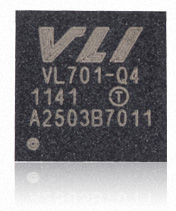
Plugged in the way I knew worked, printout from uhubctl* was clear: both drives are detected
---
*An interesting utility to control USB ports in compatible cards. -> https://github.com/mvp/uhubctl
---
groucho@devuan:~ $ sudo uhubctl
Current status for hub 2 [1d6b:0003 Linux 4.19.0-14-amd64 xhci-hcd xHCI Host Controller 0000:04:00.0, USB 3.00, 4 ports, ppps]
Port 1: 0203 power 5gbps U0 enable connect [043e:70f5 LG Electronics Inc. LG External HDD A3110300000A]      <----- | x |
Port 2: 02a0 power 5gbps Rx.Detect
Port 3: 02a0 power 5gbps Rx.Detect
Port 4: 02a0 power 5gbps Rx.Detect
Current status for hub 1-3 [0424:2514, USB 2.00, 4 ports, ppps]
Port 1: 0503 power highspeed enable connect [043e:70f5 LG Electronics Inc. LG External HDD A1204000000004C7] <----- | x |
Port 2: 0100 power
Port 3: 0100 power
Port 4: 0100 power
Current status for hub 1 [1d6b:0002 Linux 4.19.0-14-amd64 xhci-hcd xHCI Host Controller 0000:04:00.0, USB 2.00, 4 ports, ppps]
Port 1: 0100 power
Port 2: 0100 power
Port 3: 0503 power highspeed enable connect [0424:2514, USB 2.00, 4 ports, ppps]
Port 4: 0100 power
groucho@devuan:~ $
But when I switch them around, the one with the VIA SATA/USB bridge is no longer detected:
groucho@devuan:~ $ sudo uhubctl
Current status for hub 2 [1d6b:0003 Linux 4.19.0-14-amd64 xhci-hcd xHCI Host Controller 0000:04:00.0, USB 3.00, 4 ports, ppps]
Port 1: 02a0 power 5gbps Rx.Detect                                                                        <----- | o |
Port 2: 02a0 power 5gbps Rx.Detect
Port 3: 02a0 power 5gbps Rx.Detect
Port 4: 02a0 power 5gbps Rx.Detect
Current status for hub 1-3 [0424:2514, USB 2.00, 4 ports, ppps]
Port 1: 0503 power highspeed enable connect [043e:70f5 LG Electronics Inc. LG External HDD A3110300000A]  <----- | x |
Port 2: 0100 power
Port 3: 0100 power
Port 4: 0100 power
Current status for hub 1 [1d6b:0002 Linux 4.19.0-14-amd64 xhci-hcd xHCI Host Controller 0000:04:00.0, USB 2.00, 4 ports, ppps]
Port 1: 0100 power
Port 2: 0100 power
Port 3: 0503 power highspeed enable connect [0424:2514, USB 2.00, 4 ports, ppps]
Port 4: 0100 power
groucho@devuan:~ $
That seems to be what it is all about.
lsusb -vv can reveal interesting things:
groucho@devuan:~$ sudo lsusb -vv
--- snip ---
Bus 002 Device 007: ID 043e:70f5 LG Electronics USA, Inc. External HDD
Device Descriptor:
  bLength                18
  bDescriptorType         1
  bcdUSB               3.00
  bDeviceClass            0
  bDeviceSubClass         0
  bDeviceProtocol         0
  bMaxPacketSize0         9
  idVendor           0x043e LG Electronics USA, Inc.
  idProduct          0x70f5 External HDD
  bcdDevice            1.00
  iManufacturer           2 LG Electronics Inc.
  iProduct                3 LG External HDD
  iSerial                 1 A3110300000A
--- snip ---
 wSpeedsSupported   0x000e
      Device can operate at Full Speed (12Mbps)    <---
      Device can operate at High Speed (480Mbps)   <---
      Device can operate at SuperSpeed (5Gbps)     <---
--- snip ---
Bus 001 Device 006: ID 043e:70f5 LG Electronics USA, Inc. External HDD
Device Descriptor:
  bLength                18
  bDescriptorType         1
  bcdUSB               2.10
  bDeviceClass            0
  bDeviceSubClass         0
  bDeviceProtocol         0
  bMaxPacketSize0        64
  idVendor           0x043e LG Electronics USA, Inc.
  idProduct          0x70f5 External HDD
  bcdDevice            6.00
  iManufacturer           1 LG Electronics Inc.
  iProduct                2 LG External HDD
  iSerial                 3 A1204000000004C7
--- snip ---
   wSpeedsSupported   0x000c
      Device can operate at High Speed (480Mbps)    <---
      Device can operate at SuperSpeed (5Gbps)      <---
--- snip ---
lsusb reveals that both external USB3.0 drives support USB3.0 speeds.
I'd think that data that comes from somewhere in the drive's SATA/USB3.0 bridge, not the HDD.
If I had to make an (un)educated guess, I'd say that one SATA/USB bridge has a problem with the USB3.0 ports' Rx.Detect.
And if this were true, could it be a xHCI_PCI module problem/setting causing this?
But it is all over my head.
Any comments of suggestions will be welcome.
Thanks in advance,
Best,
A.
#1362 Re: Hardware & System Configuration » [SOLVED] USB 3.0 card, external drive and unknown algorithms » 2021-03-22 21:08:52
Hello:
Also got a PCIe card with a Renesas 720201 installed. Used the same tools and failed:
05:00.0 USB controller: Renesas Technology Corp. uPD720201 USB 3.0 Host Controller (rev 03)
It seems to be a problematic card, to say the least.
It seems that application has a bug.
See here: https://github.com/markusj/upd72020x-load/issues/16 <- fourth post
So if you compiled the project in the past edit that line to read `is_x1 = true, is_x2 = true;`,
then compile as usual (`make` is enough - the task of make is to figure out what changed an needs to be recompiled)
Then use the new binary to upload.
Now the application apparently works.
But I am doing something wrong.
ie: -w is a no-no and I'm downgrading which apparently won'r work.
See the rest of the thread there, that chap seems to know about it.
Could you send me a link to the firmware you have?
Thanks in advance.
Best,
A.
#1363 Re: Hardware & System Configuration » [SOLVED] USB 3.0 card, external drive and unknown algorithms » 2021-03-22 18:07:43
Hello:
I would place the script under /usr/local/bin/ and place the firmware under /usr/local/lib/firmware/ then change the script like this:
# set paths to loader and firmware, if not provided by environment
readonly UPD72020X_CMD="${UPD72020X_CMD:-/usr/local/bin/upd72020x-load}"
readonly UPD72020X_FW="${UPD72020X_FW:-/usr/local/lib/firmware/K2026.mem}"
^ That replaces lines 7-13 (inclusive) in the original script. It does the same thing without having to run two if...fi loops.
Right, will do.
But it's still not working, some problem with the application and the card's ID and some missing data somewhere.
Hopefully I won't brick the damn thing.
Not as easy as it seemed at first.
But I got to use "make" for the first time.
Altoid wrote:Just who do you take me for?
Sorry, that was a comment about ...
Sorry?
Hmm ...
Have you had your tea yet?
I was just taking the piss ... 8^D!
Can't take me that seriously.
Right.
Once I get this working manually, I'll fix that.
Thanks a lot for your input.
Best,
A.
#1364 Re: Hardware & System Configuration » [SOLVED] USB 3.0 card, external drive and unknown algorithms » 2021-03-22 17:53:03
... so I would guess on
-b 0x04 -d 0x00 -f 0x00
Right ...
But I am getting errors and cannot save the original or upload a new/different firmware.
According to the application, usage is like this:
[root@devuan work]# ./upd72020x-load
upd72020x-load: version 0.1

usage: upd72020 -r -b bus -d dev -f fct -s -o outfile : read eeprom to file (size default is 0x10000 or 64KB)
usage: upd72020 -w -b bus -d dev -f fct -i infile : write file to eeprom
usage: upd72020 -u -b bus -d dev -f fct -i infile : upload file to firmware memory
[root@devuan work]#
Reading:
[root@devuan work]# ./upd72020x-load -r -b 0x04 -d 0x00 -f 0x00 -s -o original.mem
Doing the reading     <---- must be right because it says it is reading.
bus = 4
dev = 0
fct = 0
fname = (null)
ERROR: wrong vendorid/devid. Expected an UPD720201 or UPD720202 chip and this is not one!
       reported vendorid/devid: 1912:0014
 ======> FAILED
Writing:
[root@devuan work]#   ./upd72020x-load -u -b 0x04 -d 0x00 -f 0x00 -i K2013080.mem
Doing the upload      <---- must be right because it says it is uploading.
bus = 4
dev = 0
fct = 0
fname = K2013080.mem
ERROR: wrong vendorid/devid. Expected an UPD720201 or UPD720202 chip and this is not one!
       reported vendorid/devid: 1912:0014
 ======> FAILED
[root@devuan work]#
or
[root@devuan work]# ./upd72020x-load -w -b 0x04 -d 0x00 -f 0x00 -i K2013080.mem
Doing the writing
bus = 4
dev = 0
fct = 0
fname = K2013080.mem
ERROR: wrong vendorid/devid. Expected an UPD720201 or UPD720202 chip and this is not one!
       reported vendorid/devid: 1912:0014
 ======> FAILED
[root@devuan work]#
I've posted at GitHub to see if I can get a solution.
Thanks for your input.
A.
#1365 Re: Hardware & System Configuration » [SOLVED] USB 3.0 card, external drive and unknown algorithms » 2021-03-21 22:41:14
Hello:
... supplies a systemd[0] unit file to load the firmware at boot but that won't work for Devuan.
The readme says:
For using SystemD, please adjust the paths/environment variables in the unit file according to your install locations of script, loader and firmware image.
If no environment variables are set, the script presumes that loader and firmware image are co-located with itself in the same directory.
For testing, I have everything in the same directory:
groucho@devuan:~/Downloads/renesas/work$ ls
K2013080.mem
README.md
upd72020x-check-and-init
upd72020x-load
upd72020x-load.c
Makefile
check-and-init
upd72020x-fwload.service
groucho@devuan:~/Downloads/renesas/work$ Change ...
... and change
Like this?
For the firmware file ---> UPD72020X_FW=[path-to-file] K2026.mem
For the executable ---> UPD72020X_CMD=[path-to-file]./upd72020x-load
Q: where in the system should these two (firmware and executable) files be saved?
You could call the script using /etc/rc.local instead.
Yes.
If it works.
Then I'll have to run it at every boot.
At least until the patch makes it into the kernel but I don't see that happening too soon. 8^/
This issue with Renesas USB .0 cards comes from way back.
I did a dry run to see if everything was in place:
[root@devuan work]#
[root@devuan work]# ./upd72020x-load
upd72020x-load: version 0.1
usage: upd72020 -r -b bus -d dev -f fct -s -o outfile : read eeprom to file (size default is 0x10000 or 64KB)
usage: upd72020 -w -b bus -d dev -f fct -i infile : write file to eeprom
usage: upd72020 -u -b bus -d dev -f fct -i infile : upload file to firmware memory
[root@devuan work]#
Usage is specified at GitHub as being this:
./upd72020x-load -u -b 0x02 -d 0x00 -f 0x0 -i Kxxxxxx.memBut I still need to find the values for -u, -b and -f.
lspci says:
groucho@devuan:~/Downloads/renesas/work$ lspci
04:00.0 USB controller: Renesas Technology Corp. uPD720201 USB 3.0 Host Controller (rev 03)
groucho@devuan:~/Downloads/renesas/work$
So it would be PCI bus 04:00.0
Yes?
lsusb says:
groucho@devuan:~/Downloads/renesas/work$ lsusb
Bus 005 Device 001: ID 1d6b:0003 Linux Foundation 3.0 root hub
groucho@devuan:~/Downloads/renesas/work$
So it would be Device 001
Yes?
Is the function address 1d6b:0003?
I'm at a loss as to how to put together the line.
I'd appreciate some pointers as to how to do it.
---
[0] Not "SystemD"!
Quite obvious ...
Just who do you take me for?
---
Thanks in advance.
Best,
A.
#1366 Re: Hardware & System Configuration » [SOLVED] USB 3.0 card, external drive and unknown algorithms » 2021-03-21 17:26:56
Hello:
I think I found the necessary bits/data for a solution to this but to be honest, have no idea as to how to go about it.
ie: properly and without bricking something.
Here's the link that has what seems to be a solution:
https://github.com/markusj/upd72020x-load
Here's a blog with the hows and whys:
https://mjott.de/blog/881-renesas-usb-3 … -vs-linux/
The uPD720202 chipset requires additional firmware to operate.
It must be either uploaded by the driver during initialization, or can be stored on an external EEPROM.
--- snip ---
For the first case, there exists a patch for the Linux kernel driver for this chipset to support uploading the firmware image at boot time.
But apparently, this patch never made it into the kernel and I have not found the firmware image in the linux-firmware repository.
Here's the link to the firmware file:
https://raw.githubusercontent.com/chunk … 120615.zip
Firmware file Release Note:
****************************************************************************
******* D720201 & D720202 Design Resources Release *******
****************************************************************************
Release Note June 15.2012Renesas Electronics D720201 & uPD720202
USB3.0 Host Controller FirmwareVersion : 2.0.1.3 :June 15th, 2012
Copyright (C) 2011-2012 Renesas Electronics Corporation All Rights Reserved
***************************************************************************************************Note : This firmware is for the following devices.
- uPD720201 ES 2.0 sample whose revision ID (in the PCI Configuration
Register) is 2h.
- uPD720201 ES 2.1 sample & CS sample & Mass product whose revision
ID (in the PCI Configuration Register) is 3h.
- uPD720202 ES 2.0 sample & CS sample & Mass product whose revision
ID (in the PCI Configuration Register) is 2h.
This is all I could find.
Anyone care to have alook/comment?
Thanks in advance,
A.
#1367 Re: Hardware & System Configuration » [SOLVED] USB 3.0 card, external drive and unknown algorithms » 2021-03-20 20:37:04
Hello:
Any ideas?
More additional information.
Kernel configuration has the card ticked:
groucho@devuan:~$ grep -i renesas /boot/config-4.19.0-14-amd64
CONFIG_NET_VENDOR_RENESAS=y
CONFIG_RENESAS_PHY=m
The card is detected as PCI card ...
groucho@devuan:~$ lspci -nn | grep -i usb
--- snip ---
04:00.0 USB controller [0c03]: Renesas Technology Corp. uPD720201 USB 3.0 Host Controller [1912:0014] (rev 03)
groucho@devuan:~$
... and as a USB3.0 hub:
groucho@devuan:~$ lsusb | grep -i hub
Bus 005 Device 001: ID 1d6b:0002 Linux Foundation 2.0 root hub
Bus 010 Device 001: ID 1d6b:0001 Linux Foundation 1.1 root hub
Bus 009 Device 001: ID 1d6b:0001 Linux Foundation 1.1 root hub
Bus 008 Device 001: ID 1d6b:0001 Linux Foundation 1.1 root hub
Bus 002 Device 001: ID 1d6b:0003 Linux Foundation 3.0 root hub <--------- |x|
Bus 001 Device 002: ID 0424:2514 Standard Microsystems Corp. USB 2.0 Hub
Bus 001 Device 001: ID 1d6b:0002 Linux Foundation 2.0 root hub
Bus 003 Device 001: ID 1d6b:0002 Linux Foundation 2.0 root hub
Bus 007 Device 001: ID 1d6b:0001 Linux Foundation 1.1 root hub
Bus 006 Device 001: ID 1d6b:0001 Linux Foundation 1.1 root hub
Bus 004 Device 001: ID 1d6b:0001 Linux Foundation 1.1 root hub
groucho@devuan:~$
Does it matter that it is not referenced in the same way the Dell monitor's hub is?
eg:
Bus 002 Device 001: ID 1d6b:0003 Renesas Technology Corp.USB 3.0 HubEdit:
groucho@devuan:~$ locate renesas
/usr/src/linux-headers-4.19.0-14-amd64/include/config/renesas
/usr/src/linux-headers-4.19.0-14-amd64/include/config/net/vendor/renesas.h
/usr/src/linux-headers-4.19.0-14-amd64/include/config/renesas/phy.h
/usr/src/linux-headers-4.19.0-14-common/arch/arm/include/debug/renesas-scif.S
/usr/src/linux-headers-4.19.0-14-common/include/dt-bindings/clock/renesas-cpg-mssr.h
/usr/src/linux-headers-4.19.0-14-common/include/linux/clk/renesas.h
/usr/src/linux-headers-4.19.0-14-common/include/linux/soc/renesas
/usr/src/linux-headers-4.19.0-14-common/include/linux/soc/renesas/rcar-rst.h
/usr/src/linux-headers-4.19.0-14-common/include/linux/soc/renesas/rcar-sysc.h
/usr/src/linux-headers-4.19.0-14-common/include/linux/usb/renesas_usbhs.h
/usr/src/linux-headers-4.19.0-14-common/include/media/drv-intf/renesas-ceu.h
groucho@devuan:~$
Thanks in advance.
Best,
A.
#1368 Re: Hardware & System Configuration » [SOLVED] USB 3.0 card, external drive and unknown algorithms » 2021-03-20 13:57:28
Hello:
Any ideas?
Some additional information.
I booted the box with an ubuntu fwts-live image which uses the 5.4.0 LTS kernel to see what showed up in dmesg:
[    0.000000] Linux version 5.4.0-66-generic (buildd@lgw01-amd64-039) (gcc version 9.3.0 (Ubuntu 9.3.0-17ubuntu1~20.04)) #74-Ubuntu SMP Wed Jan 27 22:54:38 UTC 2021 (Ubuntu 5.4.0-66.74-generic 5.4.86)
[    0.000000] Command line: BOOT_IMAGE=/boot/vmlinuz root=LABEL=writable ro console=tty1 console=ttyS0 quiet
--- snip ---
[    0.628135] xhci_hcd 0000:04:00.0: xHCI Host Controller
[    0.628138] xhci_hcd 0000:04:00.0: new USB bus registered, assigned bus number 10
[    0.628141] xhci_hcd 0000:04:00.0: Host supports USB 3.0 SuperSpeed
[    0.631214] usb usb10: We don't know the algorithms for LPM for this host, disabling LPM.      <------------ | x |
[    0.631234] usb usb10: New USB device found, idVendor=1d6b, idProduct=0003, bcdDevice= 5.04
[    0.631236] usb usb10: New USB device strings: Mfr=3, Product=2, SerialNumber=1
[    0.631237] usb usb10: Product: xHCI Host Controller
[    0.631238] usb usb10: Manufacturer: Linux 5.4.0-66-generic xhci-hcd
[    0.631239] usb usb10: SerialNumber: 0000:04:00.0
Then in lspci:
04:00.0 USB controller: Renesas Technology Corp. uPD720201 USB 3.0 Host Controller (rev 03)As before, nothing happened when I pugged in the external USB3.0 drive in the USB3.0 card socket.
Thanks in advance,
A.
#1369 Re: Hardware & System Configuration » [SOLVED] USB 3.0 card, external drive and unknown algorithms » 2021-03-20 12:34:00
Hello:
Any ideas?
The plot thickens.
I think there may be more to this USB problem than meets the eye.
This morning, the third or fourth time I rebooted my rig while in the course of running some tests, I was greeted by a non-working Logitech USB Optical mouse.
But not entirely as the mouse's LED was on with the pointer is visible on the desktop, albeit frozen.
I rebooted the box right there and then but nothing changed.
I then dropped into a virtual console with and checked dmesg.
It was not listed in dmsg, a is usual.
Back into X and without rebooting, I unplugged it from a rear socket of the onboard USB2.0 hub and plugged it in again in (same socket), to no avail.
I then plugged it into one of the front panel USB2.0 sockets and it came to life, as you can see here:
groucho@devuan:~$ sudo dmesg | tail -8
[   53.916788] fuse init (API version 7.27)
[  111.196029] usb 10-2: new low-speed USB device number 2 using uhci_hcd
[  111.391046] usb 10-2: New USB device found, idVendor=046d, idProduct=c077, bcdDevice=72.00
[  111.391051] usb 10-2: New USB device strings: Mfr=1, Product=2, SerialNumber=0
[  111.391054] usb 10-2: Product: USB Optical Mouse
[  111.391056] usb 10-2: Manufacturer: Logitech
[  111.406441] input: Logitech USB Optical Mouse as /devices/pci0000:00/0000:00:1d.2/usb10/10-2/10-2:1.0/0003:046D:C077.0002/input/input15
[  111.406624] hid-generic 0003:046D:C077.0002: input,hidraw1: USB HID v1.11 Mouse [Logitech USB Optical Mouse] on usb-0000:00:1d.2-2/input0
groucho@devuan:~$
As you can see here, the mouse was not there when I first booted:
groucho@devuan:~$ sudo dmesg | grep -i "Logitech USB"
[  111.406441] input: Logitech USB Optical Mouse as /devices/pci0000:00/0000:00:1d.2/usb10/10-2/10-2:1.0/0003:046D:C077.0002/input/input15
[  111.406624] hid-generic 0003:046D:C077.0002: input,hidraw1: USB HID v1.11 Mouse [Logitech USB Optical Mouse] on usb-0000:00:1d.2-2/input0
groucho@devuan:~$
A dmesg snip from this morning's first boot (as seen in /var/log/mesages) shows where, early in the boot sequence, it is found and initialised by the system:
Mar 20 06:58:41 [    4.964090] input: Logitech USB Optical Mouse as /devices/pci0000:00/0000:00:1d.1/usb9/9-2/9-2:1.0/0003:046D:C077.0002/input/input5
Mar 20 06:58:41 [    4.985718] hid-generic 0003:046D:C077.0002: input,hidraw1: USB HID v1.11 Mouse [Logitech USB Optical Mouse] on usb-0000:00:1d.1-2/input0
Now this non-working mouse problem had already happened a couple of times before.
I had it plugged into the Dell monitor's hub for less cable clutter at floor level and as I do not use a mouse outside X, it was not a problem if the BIOS did no initilalise it at boot.
I thought that being plugged into the monitor's hub could somehow be causing the problem, so I plugged it back into the rear port and it started working immediately.
Until this morning.
I have now unplugged it from the front panel after and plugged it in the back socket again: it works without issue.
If on reboot it the problem crops up again, I'll edit this post about it.
Edit:
No problem on reboot, was not reproduced.
groucho@devuan:~$ sudo dmesg | grep -i "Logitech USB"
[    4.477408] input: Logitech USB Optical Mouse as /devices/pci0000:00/0000:00:1d.1/usb9/9-1/9-1:1.0/0003:046D:C077.0001/input/input4
[    4.487583] hid-generic 0003:046D:C077.0001: input,hidraw0: USB HID v1.11 Mouse [Logitech USB Optical Mouse] on usb-0000:00:1d.1-1/input0
groucho@devuan:~$
Any ideas?
Thanks in advance,
A.
#1370 Re: Hardware & System Configuration » [SOLVED] USB 3.0 card, external drive and unknown algorithms » 2021-03-20 01:12:21
Hello:
Add amd-iommu=off as well (as per my link).
Sorry ...
Confused it with another link where only iommu=soft was mentioned.
No change.
Also tried booting with the drive attached and also with pci=nomsi in the kernel command but no luck.
See here:
https://github.com/torvalds/linux/commi … 11094b6f09
usb: xhci: Add support for Renesas controller with memory
Some rensas controller like uPD720201 and uPD720202 need firmware to be
loaded. Add these devices in table and invoke renesas firmware loader
functions to check and load the firmware into device memory when
required.
See this post also: https://bbs.archlinux.org/viewtopic.php … 0#p1925250
Thanks for your input.
Cheers,
A.
#1371 Re: Hardware & System Configuration » [SOLVED] USB 3.0 card, external drive and unknown algorithms » 2021-03-19 23:32:06
Hello:
tl;dr: add iommu=soft as a kernel command line parameter.
Read my mind ...
My dmesg does have a reference to IOMMU:
groucho@devuan:~$ sudo dmesg | grep -i iommu
[    1.903203] AMD IOMMUv2 driver by Joerg Roedel <jroedel@suse.de>
[    1.903420] AMD IOMMUv2 functionality not available on this system
groucho@devuan:~$
Tried iommu=soft just now, but made no difference in what happens when I plug in the drive into a USB3.0 port.
Thanks for your input.
Cheers,
A.
#1372 Hardware & System Configuration » [SOLVED] USB 3.0 card, external drive and unknown algorithms » 2021-03-19 22:51:50
- Altoid
- Replies: 19
Hello:
Running up to date Devuan Beowulf 3.1.0:
groucho@devuan:~$ uname -a
Linux devuan 4.19.0-14-amd64 #1 SMP Debian 4.19.171-2 (2021-01-30) x86_64 GNU/Linux
groucho@devuan:~$
My Sun Ultra 24 box has six onboard USB 2.0 ports and I've added a 4 port USB 3.0 card to the empty PCIe 8x slot.
Card shows up in lspci:
groucho@devuan:~$ lspci
--- snip ---
04:00.0 USB controller: Renesas Technology Corp. uPD720201 USB 3.0 Host Controller (rev 03)
--- snip ---
groucho@devuan:~$
dmesg finds it at USB5:
groucho@devuan:~$ sudo dmesg | grep -i "usb usb"
--- snip ---
[    3.187425] usb usb5: We don't know the algorithms for LPM for this host, disabling LPM.        <------------ | ? |
[    3.187444] usb usb5: New USB device found, idVendor=1d6b, idProduct=0003, bcdDevice= 4.19
[    3.187446] usb usb5: New USB device strings: Mfr=3, Product=2, SerialNumber=1
[    3.187447] usb usb5: Product: xHCI Host Controller
[    3.187448] usb usb5: Manufacturer: Linux 4.19.0-14-amd64 xhci-hcd
[    3.187449] usb usb5: SerialNumber: 0000:04:00.0
--- snip ---
groucho@devuan:~$
If I plug in an external USB3.0 HDD in any of the onboard USB2.0 ports , I get this in dmesg:
groucho@devuan:~$ sudo dmesg | tail -20
--- snip ---
[ 2090.462935] usb 6-5: new high-speed USB device number 4 using ehci-pci
[ 2090.624537] usb 6-5: New USB device found, idVendor=043e, idProduct=70f5, bcdDevice= 6.00
[ 2090.624541] usb 6-5: New USB device strings: Mfr=1, Product=2, SerialNumber=3
[ 2090.624544] usb 6-5: Product: LG External HDD
[ 2090.624547] usb 6-5: Manufacturer: LG Electronics Inc.
[ 2090.624549] usb 6-5: SerialNumber: A1204000000004C7
[ 2090.646562] usb-storage 6-5:1.0: USB Mass Storage device detected
[ 2090.646692] scsi host8: usb-storage 6-5:1.0
[ 2090.646818] usbcore: registered new interface driver usb-storage
[ 2095.346949] scsi 8:0:0:0: Direct-Access     Hitachi  HTS545050A7E     GG2O PQ: 0 ANSI: 2
[ 2095.347330] sd 8:0:0:0: Attached scsi generic sg6 type 0
[ 2095.351172] sd 8:0:0:0: [sdf] 976773164 512-byte logical blocks: (500 GB/466 GiB)
[ 2095.351792] sd 8:0:0:0: [sdf] Write Protect is off
[ 2095.351795] sd 8:0:0:0: [sdf] Mode Sense: 00 06 00 00
[ 2095.352416] sd 8:0:0:0: [sdf] No Caching mode page found
[ 2095.352419] sd 8:0:0:0: [sdf] Assuming drive cache: write through
[ 2095.384932]  sdf: sdf1
[ 2096.469187] sd 8:0:0:0: [sdf] Attached SCSI disk
groucho@devuan:~$
lsusb sees it:
groucho@devuan:~$ lsusb
Bus 006 Device 005: ID 043e:70f5 LG Electronics USA, Inc. External HDD
--- snip ---
groucho@devuan:~$
But ...
If I unplug it and plug into one of the USB3.0 card's ports, I don't get anything in dmesg ...
[ 2592.690873]  sdf: sdf1
[ 2593.767241] sd 8:0:0:0: [sdf] Attached SCSI disk
[ 3085.450843] usb 6-5: USB disconnect, device number 5
... or lsusb.
Curiously enough, if I plug it into my Dell monitor's USB2.0 hub (plugged into one of the USB3.0 card's ports), dmesg sees it ...
groucho@devuan:~$ sudo dmesg | tail -20
[ 2592.690873]  sdf: sdf1
[ 2593.767241] sd 8:0:0:0: [sdf] Attached SCSI disk
[ 3085.450843] usb 6-5: USB disconnect, device number 5

[ 3439.586951] usb 4-3.1: new high-speed USB device number 3 using xhci_hcd
[ 3439.694613] usb 4-3.1: New USB device found, idVendor=043e, idProduct=70f5, bcdDevice= 6.00
[ 3439.694617] usb 4-3.1: New USB device strings: Mfr=1, Product=2, SerialNumber=3
[ 3439.694620] usb 4-3.1: Product: LG External HDD
[ 3439.694622] usb 4-3.1: Manufacturer: LG Electronics Inc.
[ 3439.694625] usb 4-3.1: SerialNumber: A1204000000004C7
[ 3439.701034] usb-storage 4-3.1:1.0: USB Mass Storage device detected
[ 3439.701160] scsi host8: usb-storage 4-3.1:1.0
[ 3443.643398] scsi 8:0:0:0: Direct-Access     Hitachi  HTS545050A7E     GG2O PQ: 0 ANSI: 2
[ 3443.643741] sd 8:0:0:0: Attached scsi generic sg6 type 0
[ 3443.647507] sd 8:0:0:0: [sdf] 976773164 512-byte logical blocks: (500 GB/466 GiB)
[ 3443.648127] sd 8:0:0:0: [sdf] Write Protect is off
[ 3443.648132] sd 8:0:0:0: [sdf] Mode Sense: 00 06 00 00
[ 3443.648754] sd 8:0:0:0: [sdf] No Caching mode page found
[ 3443.648757] sd 8:0:0:0: [sdf] Assuming drive cache: write through
[ 3443.681214]  sdf: sdf1
[ 3444.749112] sd 8:0:0:0: [sdf] Attached SCSI disk
groucho@devuan:~$
... so does lsusb:
groucho@devuan:~$ lsusb
--- snip ---
Bus 004 Device 003: ID 043e:70f5 LG Electronics USA, Inc. External HDD
--- snip ---
groucho@devuan:~$
But as USBView says, it is working at USB2.0 speeds:
LG External HDD
Manufacturer: LG Electronics Inc.
Serial Number: A1204000000004C7
Speed: 480Mb/s (high)           <----
Bus:   4
Address:   3
USB Version:  2.10
Device Class: 00(>ifc )
Device Subclass: 00
Device Protocol: 00
Maximum Default Endpoint Size: 64
Number of Configurations: 1
Vendor Id: 043e
Product Id: 70f5
Revision Number:  6.00
The USB3.0 HDD drive works, the on board USB2.0 ports work, the USB3.0 card's ports work albeit through a hub and at USB2.0 speeds.
Thinking that there being a USB2.0 hub plugged into one of the card's ports, I unplugged it to check.
But nothing changed.
It would seem there is some sort of problem with the USB3.0 card working at USB3.0 speeds with USB3.0 devices.
Maybe it has to do with this line in dmsg?
[ 3.187425] usb usb5: We don't know the algorithms for LPM for this host, disabling LPM.Any ideas?
Thanks in advance,
A.
#1373 Re: Desktop and Multimedia » Thunar crashes on "Drag and Drop" » 2021-03-19 13:04:18
Hello:
... using cinnamon desktop ...
I looked at Gnome under Debian just once years ago in my first attempt at Linux.
Not really what I was wanting to see.
A couple of years later I used Cinammon and then Mate in a few other distributions.
I did not like them too much, really didn't see any need for so much bling and flash.
You have MS for that type of thing.
#! Linux with it's customised Openbox WM was great but that distrubution went south in 2015.
Then systemd crept into everything around me but then found Devuan which came with with Xfce.
As time goes by and I use it more (no more office IT work+MS stuff to deal with), I find Xfce more and more annoying.
The fact that at v4.12 Xfce has not been able to get icon behaviour working properly is really annoying and if 4.16 ends up being what it says it will be ...
... dont mind the extra ram usage and a bit of gnome ...
But I do mind.
Both in principle and in practice.
[rant]
Things are what they are in IT because the concept of lean and mean has long been abandoned.
Intelligent/clean coding seems to have become a thing of the past.
If those chaps who write those absolutely incredibly efficient viruses in 8 or 10 lines of code used their skills to write a Linux desktop, Linux would be the king of the desktop PCs today.
Yes, one highly adaptable and configurable desktop, instead of the absurd number of bloated DE we have today.
There's far too much crap (and time/effort spent) in the name of a mis-interpreted freedom within an ecosystem where everyone and his dog wants to be a prima donna.
[/rant]
Right.
I will now quietly step off my box and go have my second morning espresso.
Maybe then I'll feel better. 8^7
Thanks for your input.
Best,
A.
#1374 Re: Desktop and Multimedia » Thunar crashes on "Drag and Drop" » 2021-03-19 01:04:14
Hello:
... if the xfce4 compositor is the issue, maybe see what happens using compton ...
The issue is evidently xfce4 inter-component related.
And from what I have seen with how the 4.16 version is coming along, things won't get better.
It's a pity but that's how it is rolling these days.
So I won't insist with Thunar unless PCManFM ends up not being up to par and have to try something else.
I already have a parallel Beowulf installation that I am attempting to build up as what at one time #! Linux was, I really liked it.
Thanks a lot for your input.
Best,
A.
#1375 Re: Desktop and Multimedia » Thunar crashes on "Drag and Drop" » 2021-03-18 06:55:26
Hello:
... using xfwm4 compositing from the tweaks dialog ...
Yes.
It's all xfwm4: thunar, compositing, etc.
Unfortunately, removing thunar is a messy affaire.
It is so ingrained into Xfce and the desktop that without it, the icons on my desktop would not open and the system complained about org.xfce.filemanager not being found.
The workarounds I found on the web did not work and I had to install it again, bringing along thunar-volman.
It's a real pain in the ass and yet another reason to consider dumping Xfce.
Thanks for your input.
A.
Board footer
