
You are not logged in.
- Topics: Active | Unanswered
Pages: 1
#1 Re: Off-topic » AI and programming. » 2026-08-16 22:37:04
Bro, it's a tool. It's a really useful one too if you control it. I get the fear because for all of human history anything new and good has been used by those in power to control others. Did you say that very thing when the internet came about? Look what they've done to that. We could make amazing things with a computer program as powerful as that and release it to the masses for free for anyone and maybe even better than what exists in the walled gardens. Imagine Linux with a 90% share on the desktop. That's all I'm saying, it's a dead useful tool and if we don't do good with it bad and greedy people will control the world with it. I used it to figure out how to integrate Compton and WPEWebkit into my program and I'm rather pleased with how things worked out. Manually doing that research would have taken me another decade to work out. The code is mine but asking the right questions really steered me to faster results. Am I a bad person for asking for ideas and a little help with the integration path?
#2 Off-topic » AI and programming. » 2026-08-16 20:50:03
- liquibyte
- Replies: 21
What's everyone's thoughts about this post by golinux? Should AI be allowed to help programmers with research or tricky bits of code or should it strictly be verboten? I find that it's a great research tool but apparently some people are dead set against it.
#3 Re: DIY » Gamut is a native X11 color-engineering tool for Linux » 2026-07-22 23:15:40
I also uploaded PixelPrism but haven't packaged it yet. It's a simple color picker that Gamut grew from. The HSL and HSV are degrees and percentages for those outputs like how gcolor2 used to do. Xtk was my response to GTK3 which I despise personally.
#4 Re: DIY » Gamut is a native X11 color-engineering tool for Linux » 2026-07-22 22:55:08
I migrated to Excalibur when it hit stable.
If you open the design window (checkbox), you'll see quite a few more swatches on the right hand side that also drag to the browser to change colors. The gradient swatch at the top is also draggable like that and if you check the reverse checkbox on the gradient page the swatch will also flip direction. The left hand column pulls from the style of the loaded webpage and the right hand column pulls from the program and both have some algorithmic swatches added in below those initial colors.
Also, if you click a label under the swatch on the right hand column, you can edit it. If you click the label under the swatch on the harmony tab, the value copies to the clipboard. The clipboard is also primary and clipboard simultaneously. I tried to address as many use cases as I could think of but I may have missed things.
This isn't too complicated to use is it? I'm open for UI design ideas if it's not a workflow fit for some people. I based this on what I would consider a good workflow for design but it might not be everyone's cup of tea.
#5 Re: Devuan » Do we like green? » 2026-07-22 15:55:17
@liquibyte that #589552 in the main pane is lovely, kind of what I think of when envisioning an olive palette. So, any chance of a .deb package for those of us who are compiling-challenged? big_smile
I think I did this right but let me know if there are any issues.
https://git.devuan.org/liquibyte/Gamut/releases
Direct install .deb file gamut_1.0.0~rc1-1_amd64.deb.
#6 Re: Devuan » Do we like green? » 2026-07-22 13:57:15
I love everything about this, they don't call me "greenjeans" for nothing! Uityyy you rock!
For intense work with color palettes, perhaps liquibytes color picker app could be of use : https://dev1galaxy.org/viewtopic.php?pid=64856#p64856
This is a superb color-picker app for hardcore tuning of color in themes, could be very useful IMO.
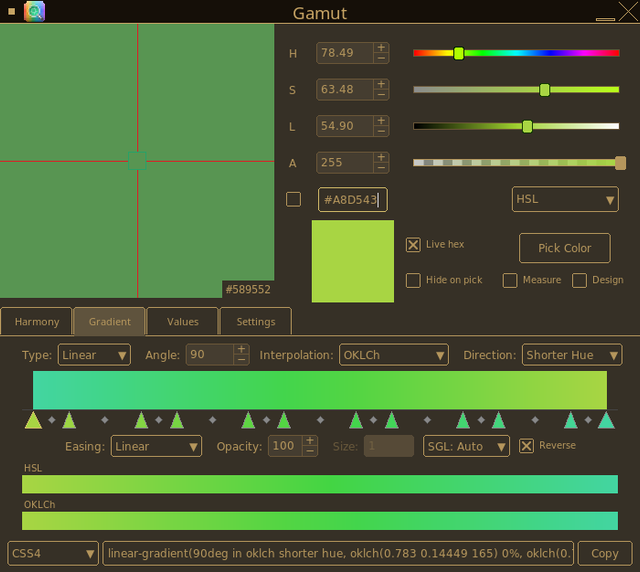
You just made my day. That's exactly the sort of thing I had in mind for Gamut. Behold a gradient with #A8D543 as the primary on the hue wheel 15 degree separation between 6 pairs and an angle of 5 degrees for each pair.
Stops: #43d5a1 0%, #43d595 6.25%, #43d57c 18.75%, #43d570 25%, #43d558 37.5%, #43d54c 43.75%, #53d543 56.25%, #5fd543 62.5%, #77d543 75%, #84d543 81.25%, #9cd543 93.75%, #a8d543 100%

#7 Re: DIY » Gamut is a native X11 color-engineering tool for Linux » 2026-07-20 22:01:38
I just compiled this, and I really like the built-in magnification as I have been previously using color-picker alongside magnus. Is there any option to display hex codes in realtime while picking colors the way color-picker does?
Thanks for the feature request. I added that to xtk_zoom and PixelPrism now has it as well. I have no idea why I didn't think of doing this sooner.
I've updated everything to use git.devuan.org.
#8 Re: DIY » Gamut is a native X11 color-engineering tool for Linux » 2026-07-20 02:44:32
If you toggle the measure dialog checkbox and then run the overlay with the color loupe toggled and the crosshairs toggled it has a smaller zoom window that has a live hex display.
I hadn't thought about adding that to the main zoom window but I've now added the feature as it's a reasonable feature request. I also added a checkbox to toggle it on or off. I also updated the help files and documentation with the complete keyboard shortcuts.
#9 Re: DIY » Gamut is a native X11 color-engineering tool for Linux » 2026-07-19 04:50:44
I've done some looking and organizing and have made commits of both PixelPrism and the Xtk toolkit for the developers that want to play with that.
PixelPrism is just a simple color picker tool that uses Xtk and only outputs HSV, HSL, linear RGB, RGB, and Hex.
Xtk will compile as a library to link against or with minor tweaks can be used statically.
I'm extremely pleased that everyone thinks that these are useful. I use both programs all the time but I'm most proud of Gamut because of the integrated compositor and browser features. They're both extremely useful for design work and I've tried to make both with as many useful features that I could think of.
Would this be more convenient for Devuan devs and users if I migrated to git.devuan.org? I didn't realize we had a public git repository and would probably have used that initially.
#10 Re: DIY » Gamut is a native X11 color-engineering tool for Linux » 2026-07-18 20:10:53
Give me a few weeks and I'll commit the simple version along with the toolkit as separate repositories. I'm glad this is gaining a little traction because it's been a project I've spent years developing.
#11 Re: DIY » Gamut is a native X11 color-engineering tool for Linux » 2026-07-18 16:42:13
There's no sound in the video. I just recorded some of it being used. It's actually an older video but most things still work the same. As long as you have the necessary libraries installed to compile it, it will run from your home directory.
#12 Re: DIY » Gamut is a native X11 color-engineering tool for Linux » 2026-07-18 14:31:36
The readme now has pictures at the bottom. I'll do a more comprehensive set when I have time.
#13 Re: DIY » Gamut is a native X11 color-engineering tool for Linux » 2026-07-16 17:53:38
There's a link at the bottom that takes you to the wiki with 7 screenshots showing the interface. It's using the chocolate theme which is my desktop default but I plan on more screenshots later with the various default themes. This will run from a local folder and all the settings are remembered between program invokations. I built in a theme system since it's a custom toolkit but any theme can be tweaked to match your system from the program itself.
For those that want to see an older video showcasing some of it I have a YouTube video: https://www.youtube.com/watch?v=K9Zrnov … lxdWlieXRl
I started with xzoom and grabc initially and pulled in Compton and WPEWebkit later on for the really cool features. Otherwise it's all original code. I have a stripped down version that's just a color picker using the toolkit called PixelPrism that I'll be doing a release for later. I also intend on releasing the toolkit standalone for developers to use if they want.
#14 Re: DIY » Gamut is a native X11 color-engineering tool for Linux » 2026-07-15 21:01:11
Sorry folks, had it set to private accidentally.
#15 DIY » Gamut is a native X11 color-engineering tool for Linux » 2026-07-15 19:51:04
- liquibyte
- Replies: 21
For those that have been asking.
gamut_1.0.0~rc1-1_amd64.deb
I've also sent an email to the maintainers/devs for inclusion in the repo.
This is a project that started about 10 years ago that morphed from a simple color picker that didn't pull in an entire desktop worth of libraries to just run into a useful color tool for graphics artists, web designers, UI designers, and programmers. I wrote my own toolkit for this purpose and incorporated WPEWebkit for a drag and drop browser and code from compton for a built in compositor to have a measurement overlay that has true transparency and click through behavior to the underlying windows and desktop.
Give it a try and let me know what you think. I'd eventually like to have this in the repos but only if people think it's useful and unique enough to package.
From the README:
Gamut
Gamut is a native X11 color-engineering tool for Linux. It provides a
precision color picker, a multi-model harmony generator, a gradient builder
with perceptual interpolation, a full-screen measurement overlay, and a live
web-design preview — all in a single compact application built without GTK,
Qt, or any large widget toolkit.
Everything is built on Xtk, a self-contained C17 Xlib widget library
written for this project, with LCMS2 for ICC-accurate conversions and
WPEWebKit 2 for the embedded browser.
Version: 1.0.0-rc1 (see CHANGELOG.md)
License: Artistic License 2.0 (see LICENSE)
Install and runtime dependencies:
# Dependencies

Direct dependencies are what Gamut compiles and links against (see
`Makefile`: pkg-config packages plus explicit `-l` libraries). Indirect
dependencies are pulled in through WPE WebKit and are listed for
completeness — they are not referenced by Gamut's own code.

## Core C / POSIX

-   glibc (also provides libm and libdl, both linked explicitly)
-   libpthread (XRecord pointer/key thread, LCMS2 threaded plugin)

## Linux Kernel Interfaces

-   linux-headers (`linux/input-event-codes.h`, `linux/memfd.h` in the
    WPE backend IPC)

## GLib Ecosystem

-   glib-2.0
-   gobject-2.0

## OpenGL

-   libGL / GLX (measurement-overlay compositor)
-   EGL (custom WPE backend)
-   GLESv2 (custom WPE backend)
-   mesa (or another provider of the above)

## X11 Stack

-   libX11 (includes XKB via `X11/XKBlib.h`)
-   libXext (DBE double-buffering, XShm, Shape)
-   libXrender
-   libXrandr (multi-monitor geometry)
-   libXfixes
-   libXdamage
-   libXcomposite (overlay compositor redirection)
-   libXtst (XRecord — overlay pointer/key capture)
-   libXft
-   libXpm

## WPE WebKit (Design Window browser)

-   WPE WebKit (wpe-webkit-2.0)
-   libwpe (wpe-1.0)
-   libsoup-3.0 (build-time: in wpe-webkit-2.0's pkg-config Requires)

Gamut ships its own WPE backend (`wpe-backend/headless.c` →
`libWPEBackend-gamut.so`); wpebackend-fdo is **not** used.

## Color Management

-   lcms2 (with fast_float and threaded plugins)

## Fonts

-   fontconfig
-   freetype

## Indirect (via WPE WebKit, runtime only)

-   gio-2.0
Screenshots are now at the bottom of the README and everything is hosted on git.devuan.org
#16 Re: Hardware & System Configuration » [SOLVED] Daedalus and access to efivars » 2022-12-25 15:01:54
liquibyte wrote:If you are using an rt kernel, none of this works. I've been struggling for 3 days now trying to get the kernel to boot efistub and couldn't figure out how in the world I was booting uefi but efivarfs wasn't mounting. I use the rt kernel due to using my system for playing guitar. Doing a diff on the kernel config files reveals that in the rt kernel, CONFIG_EFI_DISABLE_RUNTIME=y is set. Is there a reason for this in rt vs. default?
Edit: Nevermind
https://www.kernelconfig.io/config_efi_disable_runtime
The EFI runtime services are disabled by default when PREEMPT_RT is
enabled, because measurements have shown that some EFI functions calls
might take too much time to complete, causing large latencies which is
an issue for Real-Time kernels.
I'd hack it! And test it on the machine (same hardware) and see if your system has any lockups.
It looks like a design flaw.
I wanted to run in real time for music (DAW) but could not use the graphics card memory or gpu because of the rt kernel and nVidia conflicts.
Sad really.
You can override the behavior by adding efi=runtime to the kernel options. PREEMPT_RT kernels have this off by default in their config files due to the above mentioned measurements. My concern is that once everything is loaded by EFISTUB exactly how many EFI function calls happen in the course of using the system and how would that affect realtime. I'll report back if I find any negatives.
As for your DAW issue, all I can say is that up until 4 days ago, I was running a 1050ti with the nouveau driver and the rt kernel with no xruns when using guitarix. I don't record so I can't really speak to that as my issue with nvidia cards. I could never get their nonfree driver to load but didn't worry about it too hard TBH. I got a decent bonus this year so I just got a Radeon RX 6650 XT last Thursday because I couldn't do blender without significant frustration and needed it to do CNC with. The blendercam plugin is fairly decent and, once you learn a few vagaries, blender puts freecad to shame. I'd say my advice would be to ditch nvidia as amd seems to give a damn if it's at all possible for you. My new card cost $310 but it was well worth it IMHO. It's a XFX Speedster QICK308 Radeon RX 6650XT if you might be wondering.
#17 Re: Hardware & System Configuration » [SOLVED] Daedalus and access to efivars » 2022-12-25 00:20:43
If you are using an rt kernel, none of this works. I've been struggling for 3 days now trying to get the kernel to boot efistub and couldn't figure out how in the world I was booting uefi but efivarfs wasn't mounting. I use the rt kernel due to using my system for playing guitar. Doing a diff on the kernel config files reveals that in the rt kernel, CONFIG_EFI_DISABLE_RUNTIME=y is set. Is there a reason for this in rt vs. default?
Edit: Nevermind
https://www.kernelconfig.io/config_efi_disable_runtime
The EFI runtime services are disabled by default when PREEMPT_RT is
enabled, because measurements have shown that some EFI functions calls
might take too much time to complete, causing large latencies which is
an issue for Real-Time kernels.Pages: 1
Board footer
