
You are not logged in.
- Topics: Active | Unanswered
#51 Re: Off-topic » Is AI going to become a Frankenstein monster? » 2025-12-31 15:57:55
Sorry to be the voice of moderation here, lol, but pretty much every science fiction story ever written has all kinds of calamity in it by design, people wouldn't read it or go to the movies if it was just mundane everyday life described.
People who design AI say it will be the best thing ever, and then on the other end of the scale there are people who say it will be the worst thing ever.
And here I am in the middle as always, having lived through dozens of these disruptive technology moments and listened to all this before, still saying the same thing which is nearly always correct:
It can be a good thing, or a bad thing, just depends on how people use it. But it won't be the end of the world.
Try optimism people, glass half-full.
Lol I know older folks that have still never used a computer a day in their life because they think it's the devil.
#52 Re: Off-topic » GTK2 Removed from Arch's Repositories » 2025-12-31 15:41:37
I would rather spend the time to take what's useful OFF of gtk2 than to keep gtk2 running at all. That's where I am at this point.
Sadly, that's kind of where i'm at, it's why i've been trying to develop uber-simple apps with GTK3 that are reminiscent of the simplicity of GTK2.
I don't see the harm of leaving gtk2 and gtk2 apps in the repo though, there's lots of them that still work fine. Removing it all together and bullying devs into porting to gtk3 seems a little control-ish to be honest. Alsaplayer-gtk has been removed after debian badgered the dev to port to gtk3, he said screw that I just won't ship the package anymore and it will be CLI-ony now.
#53 Re: Other Issues » [SOLVED] tmp files now stored in a tempfs? Excalibur/Trixie » 2025-12-31 15:25:19
Steve, the milk of human kindness come to warm the place up again, happy New Year buddy! 
which reduces SSD writes
I'll admit, hadn't thought of that angle, as I run spinning rust and not short-life-expectancy ssd's.
improves latency for applications that make frequent use of /tmp.
Horsefeathers. They're both solid-state, there won't be a noticeable difference. There won't even be much of a difference on a machine like mine with an HDD. If I wanted everything in ram i'd load a live-session.
On most systems /tmp is only a few MiB, and has negligible impact on available memory.
It's not the only thing living in ram these days, ram usage overall is more than double what it was a few short years ago, and there's lots of people running old hardware with low ram that need the extra. Not everybody has 32-64 gigs of ram, some folks are on a budget, i'm running 4 gb myself and i'd like to keep it clear.
So it's good to know now that i'll have a choice in the matter, which was the whole point of the post. 
Some days I really wonder if this whole board isn't just a place to bitch about upstreams, other distros, and anyone who ever dared to change anything.
People have a right to do these things, if nobody ever complained every system in the world would suck.
And lastly, for myself, I don't just complain, I do something about it pretty regularly.
Srsly, hope you had a good Christmas and all the best to you and family in the New Year!
#54 Other Issues » [SOLVED] tmp files now stored in a tempfs? Excalibur/Trixie » 2025-12-30 21:53:54
- greenjeans
- Replies: 13
From this link: https://www.debian.org/releases/stable/ … in-a-tmpfs
5.1.6. The temporary-files directory /tmp is now stored in a tmpfs
From trixie, the default is for the /tmp/ directory to be stored in memory using a tmpfs(5) filesystem. This should make applications using temporary files faster, but if you put large files there, you may run out of memory.
So is this in Devuan too? Not running excalibur on anything right now so no way to check.
I 100% do not want that behavior on my machine.
The default is to allocate up to 50% of memory to /tmp (this is a maximum: memory is only used when files are actually created in /tmp).
50% of my ram by default... *edit to remove implied profanity because feels*
I swear the debian devs must have just gotten way too bored in 2024, and decided to do random nonsense to pass the time and create more work for everyone, this is almost as stupid and useless as usrmerge.
#55 Re: DIY » I'm making a note-taking app » 2025-12-30 13:20:19
Hey HardSun, no problem digressing at all, that is exactly the kind of post that is helpful, I know what apps do but I don't always know what people do, if that makes sense.
Your method is very similar to what I wanted, one simple place to go to for my notes. My manual and app info apps are similar to the way you save files, their databases are just carefully formatted long text files.
Yeah this one is more similar to leafpad, very basic, no formatting other than word wrap and a little extra spacing. No opening a file browser to save, everything gets saved in the same folder. Not even a close button, lol.
#56 Re: Off-topic » The future of "synthetic food" » 2025-12-29 23:05:13
Uugh, we need a vomit emoji for that nasty stuff, I am VASTLY expanding our garden space in the spring!
@golinux do you like apple butter? We made a killer batch from our own (organic) apple trees.
#57 Re: Off-topic » Is AI going to become a Frankenstein monster? » 2025-12-29 23:02:22
Ain't skeered.
Fear is the mind-killer, and in the words of a sort of cinematic AI character: "Anger is always more useful than despair".
#58 DIY » I'm making a note-taking app » 2025-12-29 22:47:22
- greenjeans
- Replies: 4
I just can't seem to help myself, this stuff is addicting, I should probably focus most of my time on improving the projects I already have going... but I see things and I think I can do it more to my liking if not in fact, better sometimes.
There's some note apps in the repo, lots more in the wild, and crazy stuff with paid subscriptions mind you, for a note-taking app, lol. Didn't like any of them.
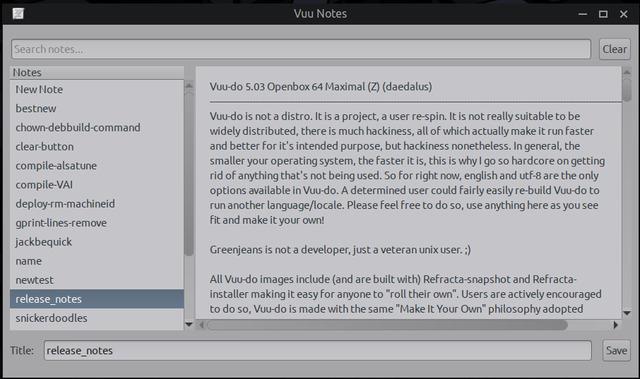
Brute simple is what I like, things that do great work with very little code. So re-using some of my skeleton code that most of my projects start with I have a working prototype called VuuNotes for now (I know, what inspired titles I have, lol). A simple GUI in gtk3 and C, basically a simple text-editor.
On startup it looks for the notes folder and creates one if need be in ~/Documents/VuuNotes, loads all your notes by title into the treeview and will display the contents in the main pane, all fully editable and selectable. It has a search bar at the top to search titles, with a button to clear the searchbar. At the bottom it has a text entry box to enter a name for a new note when you highlight "New Note" which is always at the top of the treeview. This text-entry displays a placeholder text when you first startup, and when you switch to one of your notes to view it the name of that note is displayed in it. You may edit both contents and titles of your notes, or create new ones, and once finished hit the "Save" button to save it. Tiny little utility, binary is about 34 kb.
Like I said, brute simple, no bells or whistles, but it gets the job done fast and is handy and tiny, i'll be using mine mostly for code snippets and such which right now are badly disorganized in test files all over the place. This will improve my workflow quite a bit. I doubt that anybody but me is interested in it but thought i'd
post it up here anyway, i'll throw the code up if someone wants to try it.
Screenie of working prototype, I shrunk the screenshot quite a bit so it would fit here so it looks a little wonky, actual size is about a third larger.
#59 Re: Desktop and Multimedia » [SOLVED] having issues installing vivaldi browser in excalibur » 2025-12-29 16:59:11
This part:(from the directory where you saved Vivaldi)
Unfortunately I'm not sure what they mean by this.
They're just talking about what I mentioned, having your pathways correct in your command, if in doubt always fill in the full path in your command, and that way the terminal can be opened anywhere and the commands issued from there.
sudo apt-get install /home/mamaforestcritter/Downloads/vivaldi-stable_7.7.3851.66-1_amd64.deb
Something like the above, just replace the correct name for your user and whatever directory the .deb is in.
#60 Re: Desktop and Multimedia » [SOLVED] having issues installing vivaldi browser in excalibur » 2025-12-29 16:48:13
Hi, usually when installing a local package I type the full path to the .deb even if i've opened the terminal within the folder the .deb's located at.
sudo apt-get install /path/to/package/vivaldi-stable_7.7.3851.66-1_amd64.deb
For an easy GUI way to install local packages, try the Gdebi package installer, once installed you can just right-click a .deb and it will offer to install it with Gdebi.
Don't know if this helps but thought i'd throw it out there for general purposes.
#61 Re: DIY » ALSA-only purists: Question, new GUI app for the mixer and EQ? » 2025-12-27 21:55:47
(in my opinion the main work should be some kind of alsa-jack-only overlay on devuan, mainly because possibly all the desktop environments and other apps pull either pulseaudio or pipewire and thus cause problems
That in a nutshell, describes @rations' jack-bridge project, a much more complex and encompassing system that I think might do what you are asking. And there's some more nice frontend projects for the alsamixer, saw one that was really nice the other day, it was done in QT which I don't much like, but it was very nice and complete and did split volume controls into right-left channels whereas mine doesn't.
Think of those projects as thoroughbred racehorses that can do it all.
My project, is just a donkey, not too pretty, stubborn at times, but day-in and day-out it just gets the basic jobs done and does them fast as hell for a donkey.
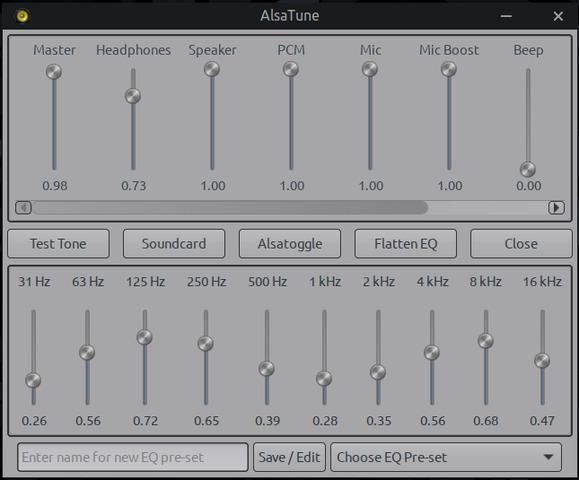
At this point, most anything else I could do would be feature-creep and bloated code. Gonna keep this thing small and simple, there's already other folks working on more sophisticated stuff, i'm going to stick to my little niche and just try to make it the best it can be by little improvements to behavior and some expanded stuff as more testing is done to accommodate more types of soundcards and scenarios.
#62 Re: Devuan Derivatives » Vuu-do Linux! *New Openbox-64 iso's (1.0.7) up 2-02-18*!! » 2025-12-27 17:30:50
So that Vuu-do max I put up a couple days ago has the 3.1-1 version of AlsaTune installed, which I found a bug in and fixed yesterday, if you have downloaded that new Vuu-do max you can just download the new version of AT (3.1-2) which is up on the Sourceforge site, and install it to upgrade. Non-fatal bug, just annoying, check my build thread in the DIY section for details.
Working on rolling up a new max (and a new mini) this weekend, should have them up before Monday.
EDIT: Got the ob-max-z up now, all fixed. Working on the mini soon.
EDIT2: got the mini done too, it's uploaded now.
#63 Re: DIY » ALSA-only purists: Question, new GUI app for the mixer and EQ? » 2025-12-26 20:21:53
^^^Ahh the quirks of alsa and soundcards...it's tough on this end trying to figure them all out, but I feel good progress is being made, and it REALLY helps when folks like you test and give feedback, thanks again!
So I figured out the other bug, wrong command that was a holdover from earlier experiments, so my bad of course. Tickled though that I did figure it out just by looking at the code, didn't have to do any searches or doc-reading and my fix worked the first time with a bonus that I got to eliminate a now un-used function so the script is a little smaller, I think i'm getting better at C.
I'll get it packaged up as 3.1-2 and uploaded here in a bit.
EDIT: All done, it's up now.
#64 Re: DIY » ALSA-only purists: Question, new GUI app for the mixer and EQ? » 2025-12-26 18:30:42
Okay I just tested all the EQ sliders on both machines, and they stay right on the money with the presets.csv and the backend too.
Did find a bug though, the new preset-edit window works fine, until you try to move the window and then it leaves a nice trail for you. *sigh* 
I've had problems from the get-go with that thing, and mostly seems like yad issues, the version in daedalus is ancient, really could use something newer.
Back to the drawing board.
#65 Re: DIY » ALSA-only purists: Question, new GUI app for the mixer and EQ? » 2025-12-26 17:58:43
@ilargi, yes I can think of at least one reason, and it's something I spent a good chunk of yesterday pondering, but I haven't seen it happen with EQ sliders.
Here's what's going on with the backend sliders for the mixer:
1. Some are fully adjustable from 0%-100% in increments of 1, but there are some that seem this way but aren't, more on that in a sec.
2. Some are pure toggle switches without sliders, we got those covered.
3. There's a third kind, one that has a slider on the backend like the other sliders, but is actually a stepped-channel, both mic boosts on my machine are this way, they are actually a sort of 4 position switch, 0% 33% 67% 100%, and the backend slider "snaps" to the nearest value when you are in the alsamixer TUI.
AlsaTune currently just treats those as a regular slider, but if I set it at 40% in AT, it will in reality fall to 33% on the backend. And when you close then re-open AT the value will now be correct at 33%
Thankfully I only have a couple of these, and on controls I don't ordinarily use.
But another fly-in-the-ointment, some sliders for volume can also be incremental with values other than 1, so they are stepped-channels, just a LOT of steps.
Last fun thing I get to deal with in this adventure of sound with ALSA, is that the backend controls (at least on my test machines) aren't linear even if they read 1 through 100 in the alsamixer TUI, so those numbers will always be off from the AT frontend as I tried to normalize the scale some.
I will go and test the EQ more, the whole thing needs a lot more testing really, it's experimental stuff and needs some people smarter than me to take a look.
Thanks ilargi!
#66 Re: Off-topic » Is AI going to become a Frankenstein monster? » 2025-12-25 19:00:05
LLM's are not the frankenstein monster, THIS is the frankenstein monster: https://www.sciencealert.com/computers- … e-prepared
#67 Re: Installation » Brave browser, OnlyOffice and FreeOffice » 2025-12-25 18:38:10
As far a Brave goes - just go to their web site. There are commands there to install Brave on Debian. Just run those commands and it will work for Devuan or Debian. It's just a cut and paste task. Nothing to it.
Nice work, I was coming here to post just that but you covered it perfectly. It wasn't hard at all and browser works pretty good, it's built-in ad-blocking does a nice job.
#68 Re: Devuan Derivatives » Vuu-do Linux! *New Openbox-64 iso's (1.0.7) up 2-02-18*!! » 2025-12-25 18:30:48
12-25-2025
Happy everything my friends, thanks for an awesome year! For my little contribution
to the gift-giving I offer a new version of AlsaTune with the ability to edit saved EQ pre-sets
file directly from the GUI! And also a new Vuu-do ob-max-z with many updates, a couple little
bug fixes and some housecleaning, I packaged the thumbnail-cacher script, and of course
added the new version 3.1-1 of AlsaTune. New versions of Chromium, VLC, and ffmpeg as well.
I'll get a new mini-z up here in a day or so, today it's just the max version.
#69 Re: DIY » ALSA-only purists: Question, new GUI app for the mixer and EQ? » 2025-12-25 18:29:47
New 3.1-1 version is up now and ready for testing!
#70 Re: Devuan » This is the first time i'm trying devuan and i'm using Linux since1999 » 2025-12-24 21:44:07
Hello and welcome to the forum!
#71 Re: Off-topic » A Merry and Happy today » 2025-12-24 21:42:38
Right back atcha good buddy!
Happiest of holidays to all my fellow Devuanites! I hope this season finds you happy and healthy and I hope that continues into a new and prosperous year for all.
#72 Re: DIY » ALSA-only purists: Question, new GUI app for the mixer and EQ? » 2025-12-23 15:10:28
32-bit version is UP! https://sourceforge.net/projects/vuu-do … /AlsaTune/
Thanks @fsmithred!
#73 Re: DIY » ALSA-only purists: Question, new GUI app for the mixer and EQ? » 2025-12-23 00:30:40
Got a new i386 package built for this thanks to fsmithred compiling the binaries for me! Just waiting on a little more testing and then i'll put it up for further testing.
Working on version 3.0-1 now, i've written a little dash/yad script to open an editable text-info window to mod/delete EQ presets in the presets.csv file. Rather than add another button my idea is to take the existing "Save Pre-set" button and change it to "Save/Edit" with a tooltip that explains. So a normal left-click would save a named pre-set as it does now, but a right-click would open the yad window to edit the presets.csv file.
#74 Re: Hardware & System Configuration » [SOLVED] Realtek rtl8852 / MSI AX1800 » 2025-12-22 20:52:48
https://github.com/morrownr/rtw89
https://github.com/morrownr/USB-WiFi/bl … r_Linux.md
Some info there, might help.
#75 Re: Other Issues » [SOLVED] Synaptic problem, or what? » 2025-12-21 21:46:10
Well I checked the "visit homepage" function for the first time in many years, and it seems to be working at least, that seems handier than just fetching a screenshot.
Board footer
